climate HYUNDAI IONIQ 5 2023 Owners Manual
[x] Cancel search | Manufacturer: HYUNDAI, Model Year: 2023, Model line: IONIQ 5, Model: HYUNDAI IONIQ 5 2023Pages: 680, PDF Size: 48.22 MB
Page 6 of 680
1
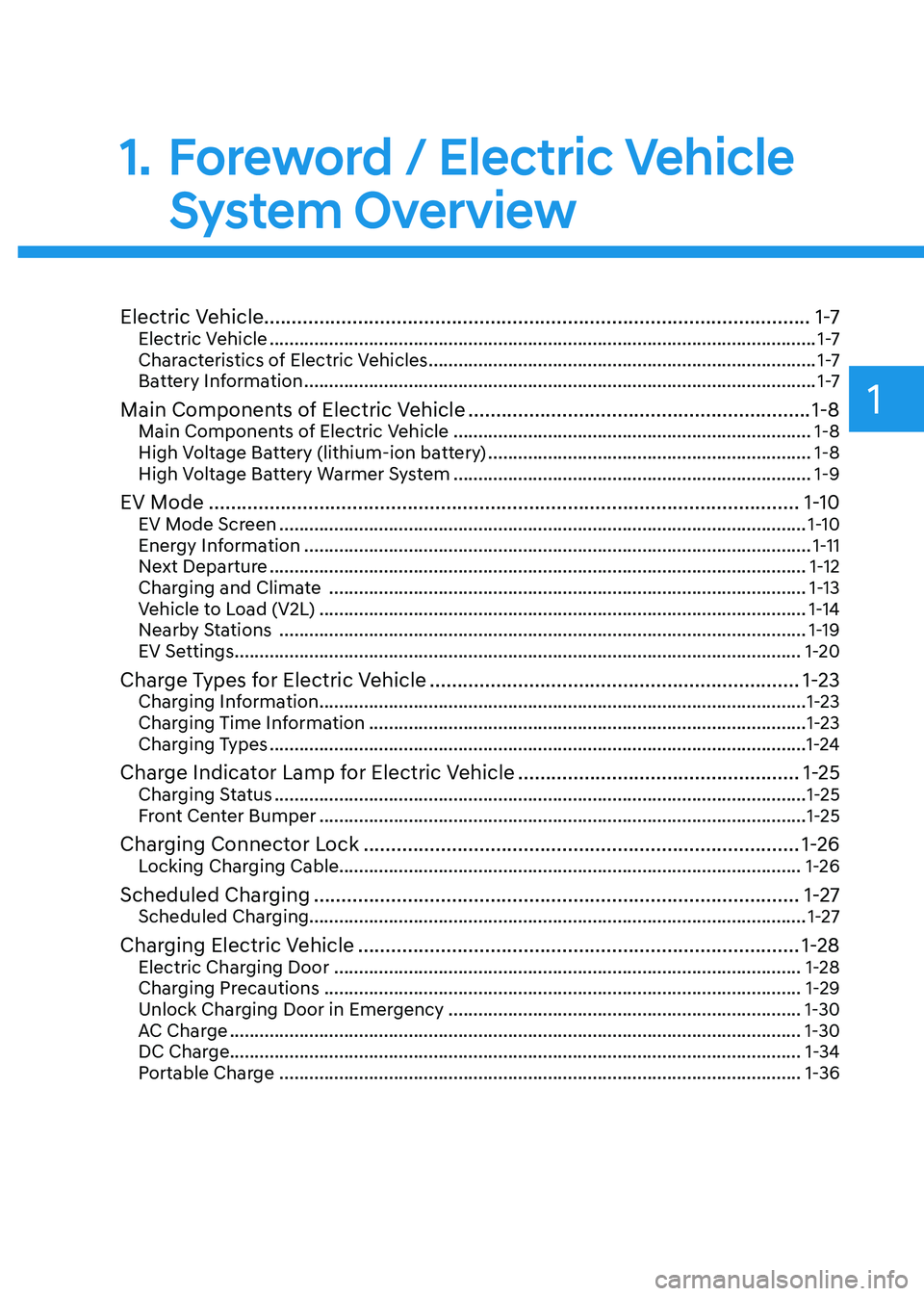
Electric Vehicle...................................................................................................1 -7
Electric Vehicle .............................................................................................................. 1 -7
Characteristics of Electric Vehicles .............................................................................. 1 -7
Battery Information ....................................................................................................... 1 -7
Main Components of Electric Vehicle .............................................................. 1-8
Main Components of Electric Vehicle ........................................................................ 1-8
High Voltage Battery (lithium-ion battery) .................................................................1-8
High Voltage Battery Warmer System ........................................................................ 1-9
EV Mode ........................................................................................................... 1-10
EV Mode Screen .......................................................................................................... 1-10
Energy Information ...................................................................................................... 1-11
Next Departure ............................................................................................................ 1-12
Charging and Climate ................................................................................................ 1-13
Vehicle to Load (V2L) .................................................................................................. 1-14
Nearby Stations .......................................................................................................... 1-19
EV Settings .................................................................................................................. 1-20
Charge Types for Electric Vehicle ................................................................... 1-23
Charging Information .................................................................................................. 1-23
Charging Time Information ........................................................................................ 1-23
Charging Types ............................................................................................................ 1-24
Charge Indicator Lamp for Electric Vehicle ...................................................1-25
Charging Status ........................................................................................................... 1-25
Front Center Bumper .................................................................................................. 1-25
Charging Connector Lock ............................................................................... 1-26
Locking Charging Cable............................................................................................. 1-26
Scheduled Charging ........................................................................................ 1-27
Scheduled Charging.................................................................................................... 1-27
Charging Electric Vehicle ................................................................................ 1-28
Electric Charging Door .............................................................................................. 1-28
Charging Precautions ................................................................................................ 1-29
Unlock Charging Door in Emergency ....................................................................... 1-30
AC Charge ................................................................................................................... 1-30
DC Charge................................................................................................................... 1-34 Portable Charge ......................................................................................................... 1-36
1. Foreword / Electric Vehicle
System Overview
Page 15 of 680
Foreword / Electric Vehicle System Overview
1-10
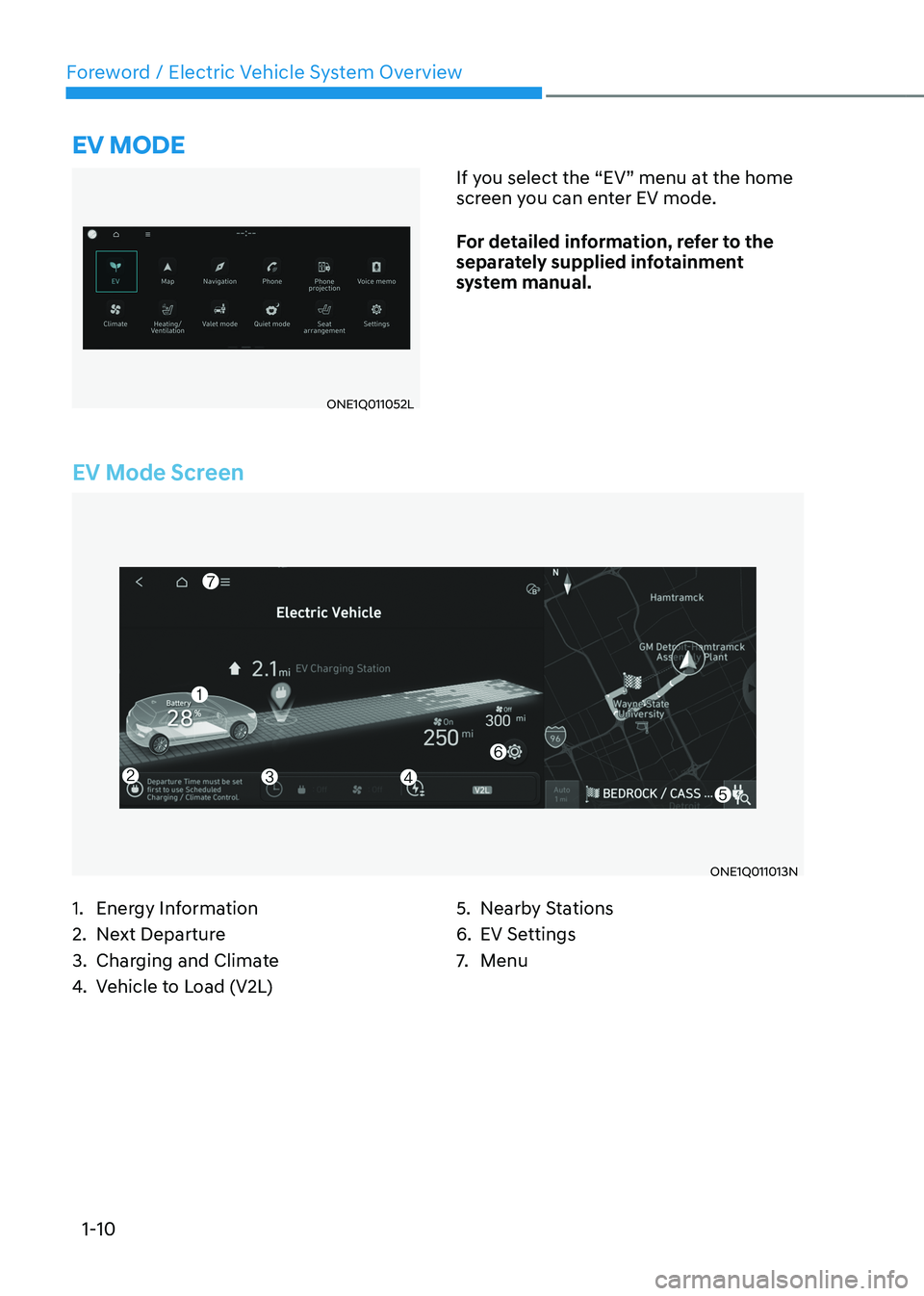
EV Mode Screen
ONE1Q011013N
eV mode
ONE1Q011052LIf you select the “EV” menu at the home
screen you can enter EV mode.
For detailed information, refer to the
separately supplied infotainment
system manual.
1. Energy Information
2. Next Departure
3. Charging and Climate
4. Vehicle to Load (V2L) 5. Nearby Stations
6. EV Settings
7.
Menu
Page 17 of 680
Foreword / Electric Vehicle System Overview
1-12
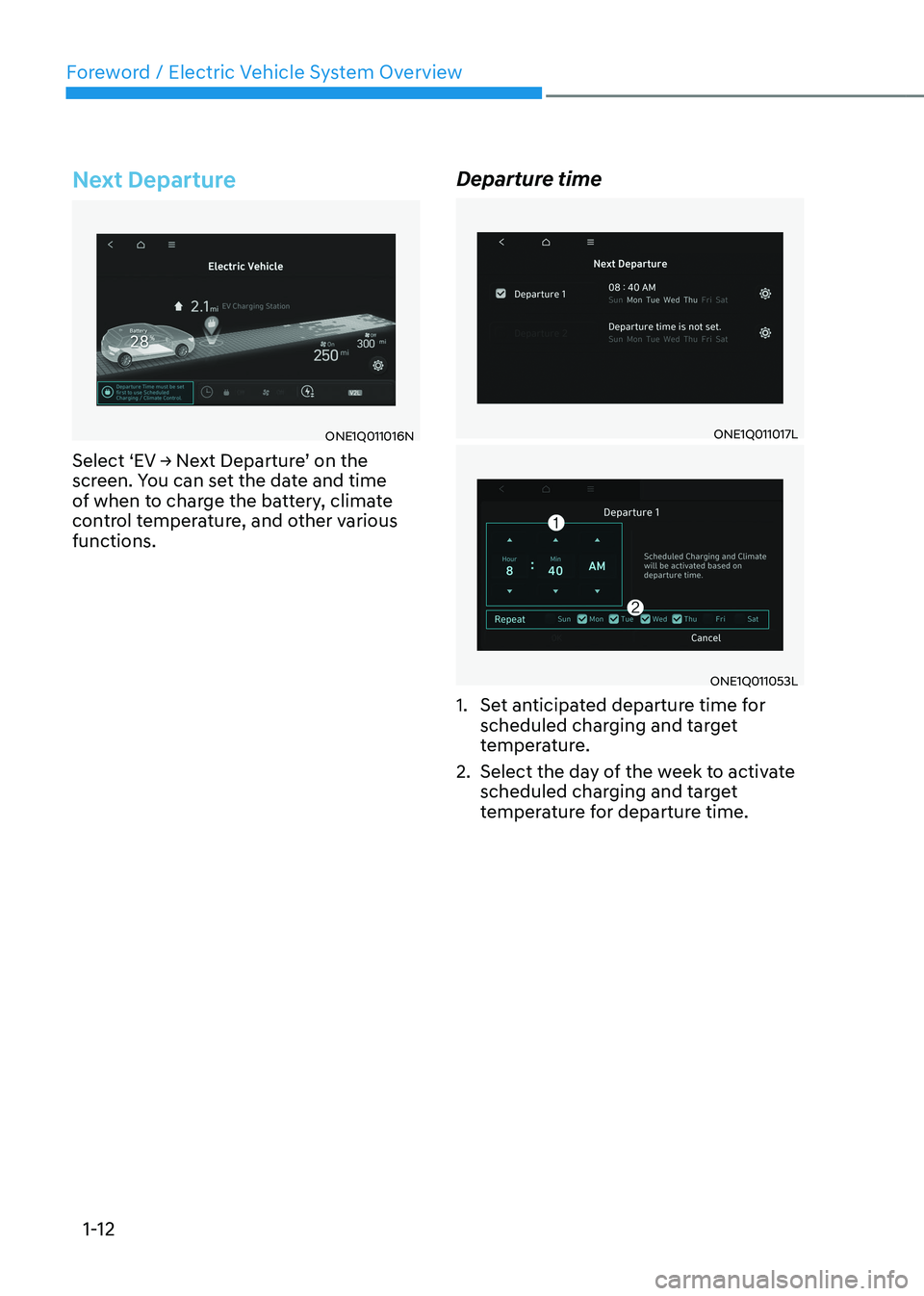
Next Departure
ONE1Q011016N
Select ‘EV → Next Departure’ on the
screen. You can set the date and time
of when to charge the battery, climate
control temperature, and other various functions. Departure timeONE1Q011017L
ONE1Q011053L
1. Set anticipated departure time for scheduled charging and target
temperature.
2. Select the day of the week to activate scheduled charging and target
temperature for departure time.
Page 18 of 680
01
1-13
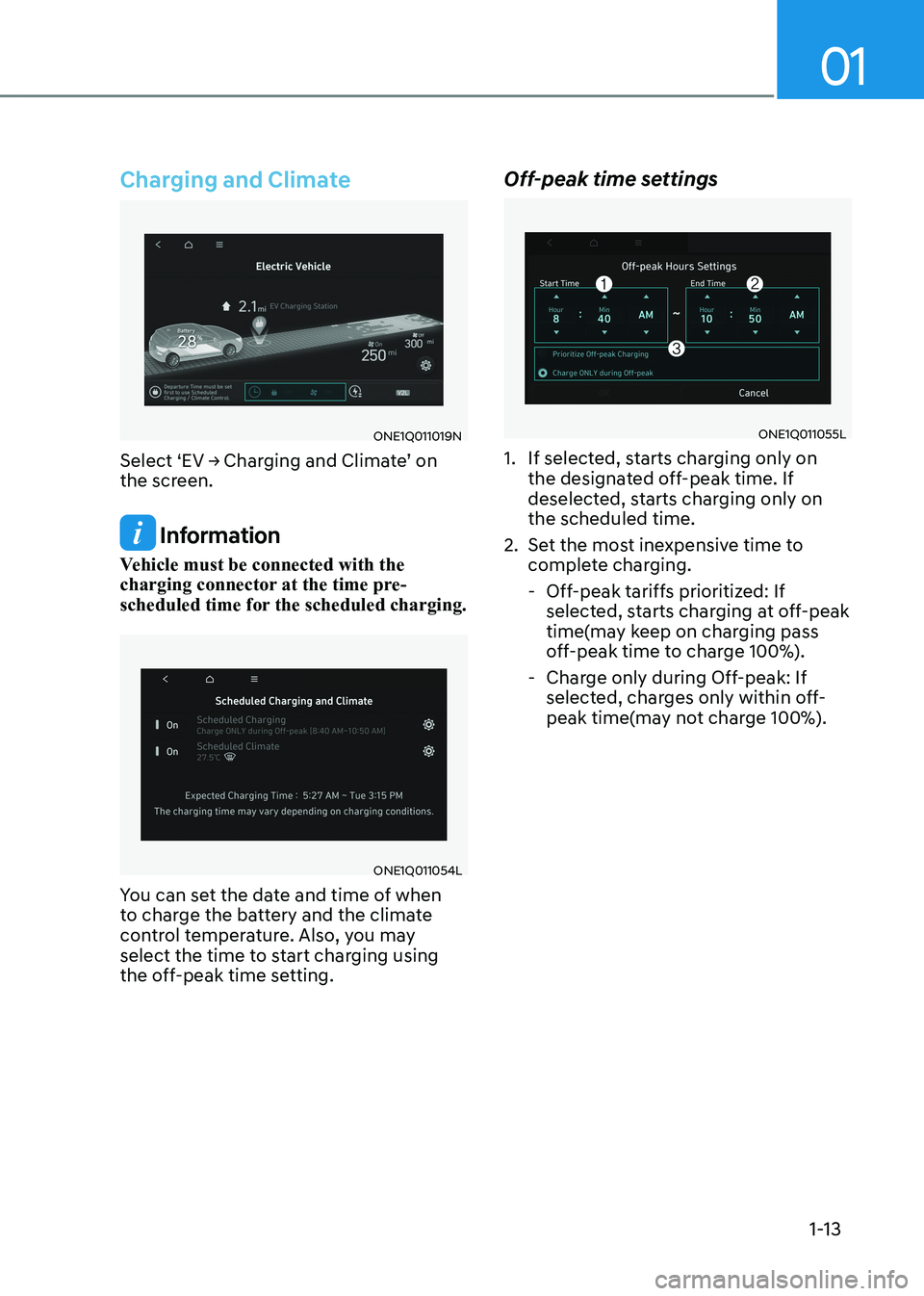
Charging and Climate
ONE1Q011019N
Select ‘EV → Charging and Climate’ on
the screen.
Information
Vehicle must be connected with the
charging connector at the time pre-
scheduled time for the scheduled charging.
ONE1Q011054L
You can set the date and time of when
to charge the battery and the climate
control temperature. Also, you may
select the time to start charging using
the off-peak time setting. Off-peak time settings
ONE1Q011055L
1. If selected, starts charging only on the designated off-peak time. If
deselected, starts charging only on the scheduled time.
2. Set the most inexpensive time to complete charging.
- Off-peak tariffs prioritized: If selected, starts charging at off-peak
time(may keep on charging pass
off-peak time to charge 100%).
- Charge only during Off-peak: If selected, charges only within off-
peak time(may not charge 100%).
Page 58 of 680
01
1-53
ECO Driving
ONE1Q011034E
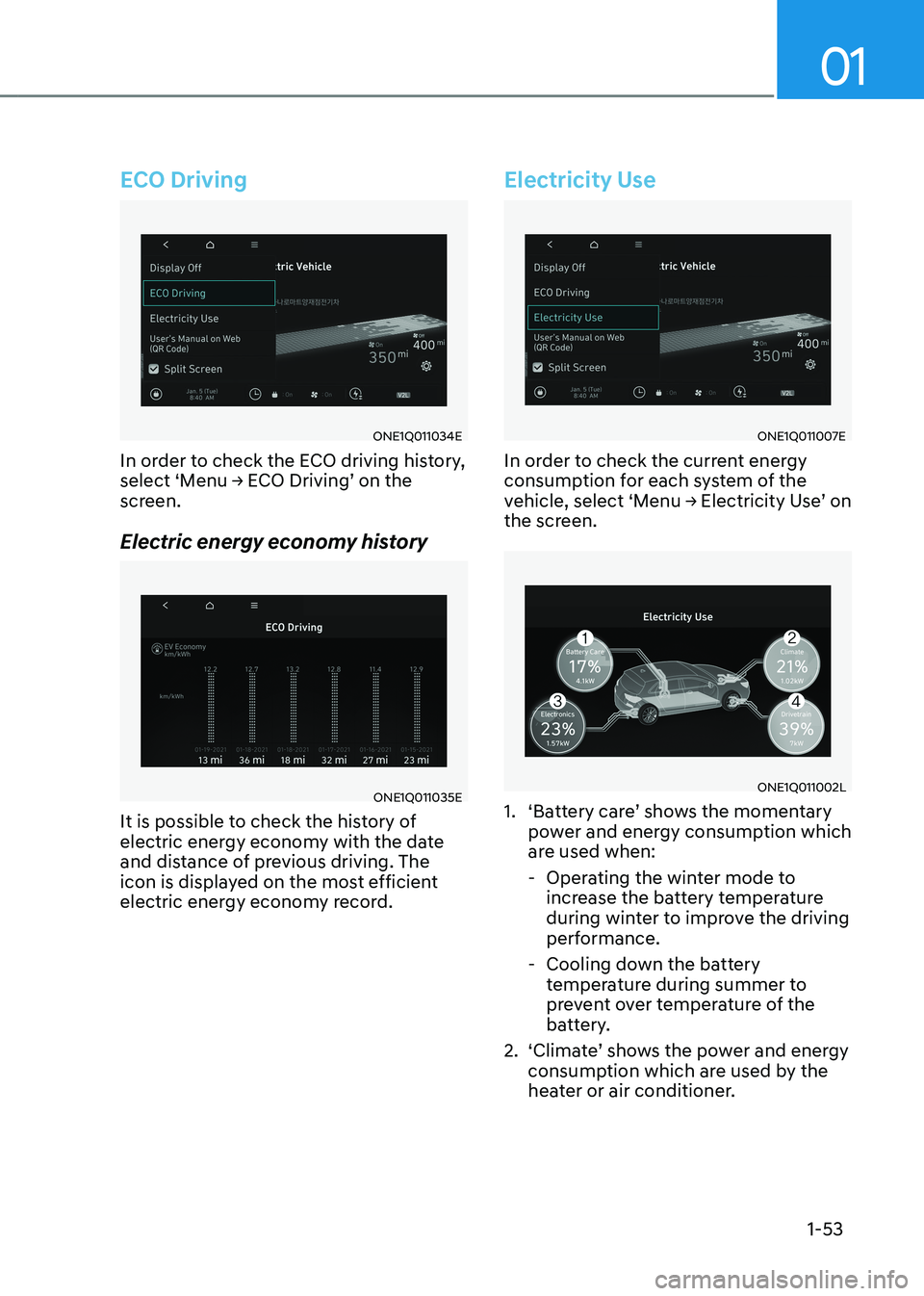
In order to check the ECO driving history,
select ‘Menu → ECO Driving’ on the
screen.
Electric energy economy history
ONE1Q011035E
It is possible to check the history of
electric energy economy with the date
and distance of previous driving. The
icon is displayed on the most efficient
electric energy economy record.
Electricity Use
ONE1Q011007E
In order to check the current energy
consumption for each system of the
vehicle, select ‘Menu → Electricity Use’ on
the screen.
ONE1Q011002L
1. ‘Battery care’ shows the momentary power and energy consumption which
are used when:
- Operating the winter mode to increase the battery temperature
during winter to improve the driving
performance.
- Cooling down the battery temperature during summer to
prevent over temperature of the
battery.
2. ‘Climate’ shows the power and energy consumption which are used by the
heater or air conditioner.
Page 75 of 680
2-5
02
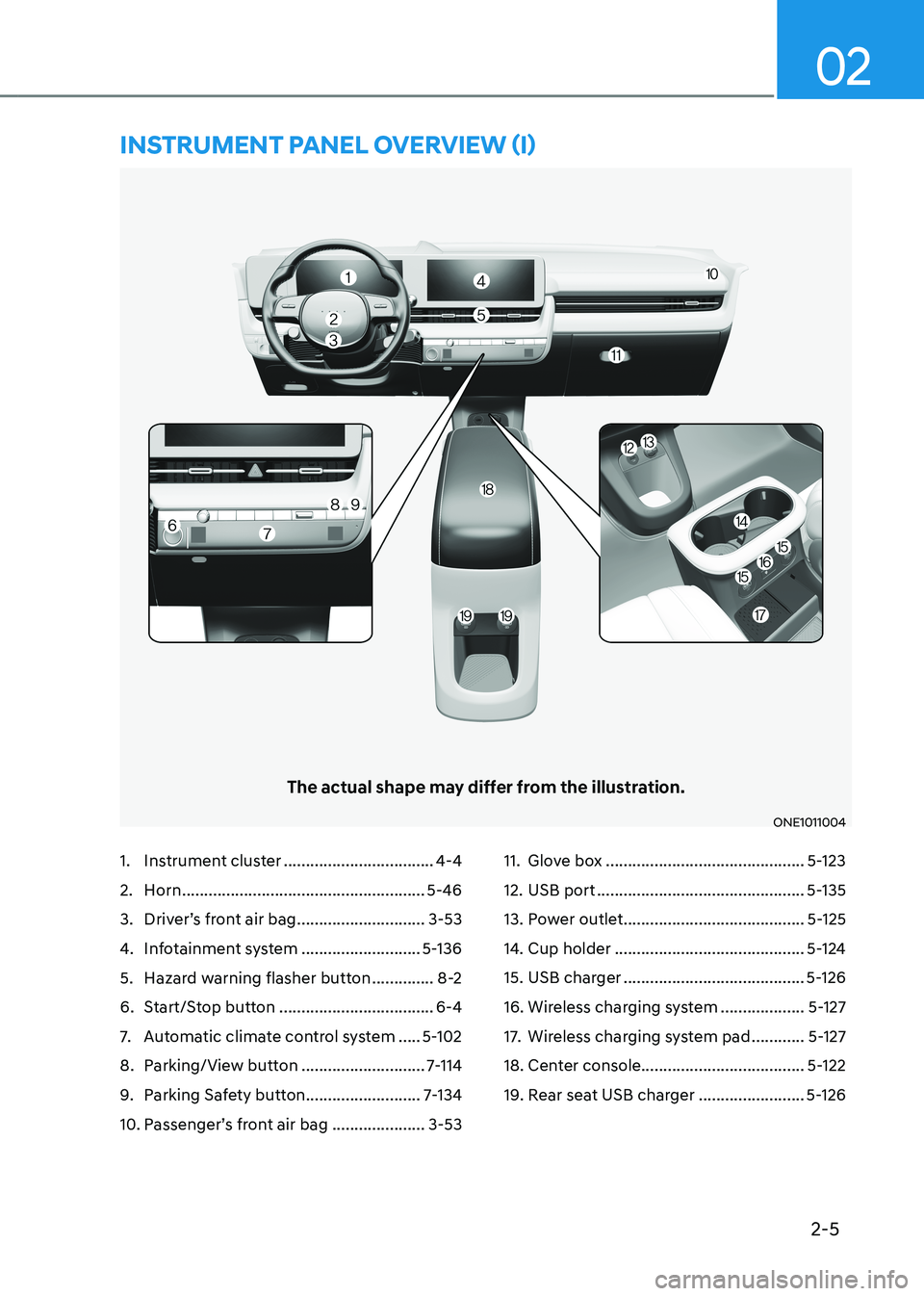
1. Instrument cluster ..................................4-4
2. Horn ....................................................... 5-46
3. Driver’s front air bag .............................3-53
4. Infotainment system ...........................5-136
5. Hazard warning flasher button ..............8-2
6. Start/Stop button ................................... 6-4
7. Automatic climate control system .....5-102
8. Parking/View button ............................7-114
9. Parking Safety button ..........................7-134
10. Passenger’s front air bag ..................... 3-53 11. Glove box
............................................. 5-123
12. USB port ............................................... 5-135
13. Power outlet ......................................... 5-125
14. Cup holder ........................................... 5-124
15. USB charger ......................................... 5-126
16. Wireless charging system ...................5-127
17. Wireless charging system pad ............5-127
18. Center console..................................... 5-122
19. Rear seat USB charger ........................5-126
The actual shape may differ from the illustration.
ONE1011004
instrumEnt panEl ovErviEw (i)
Page 92 of 680
03
3-5
ONE1031077L
Infotainment system
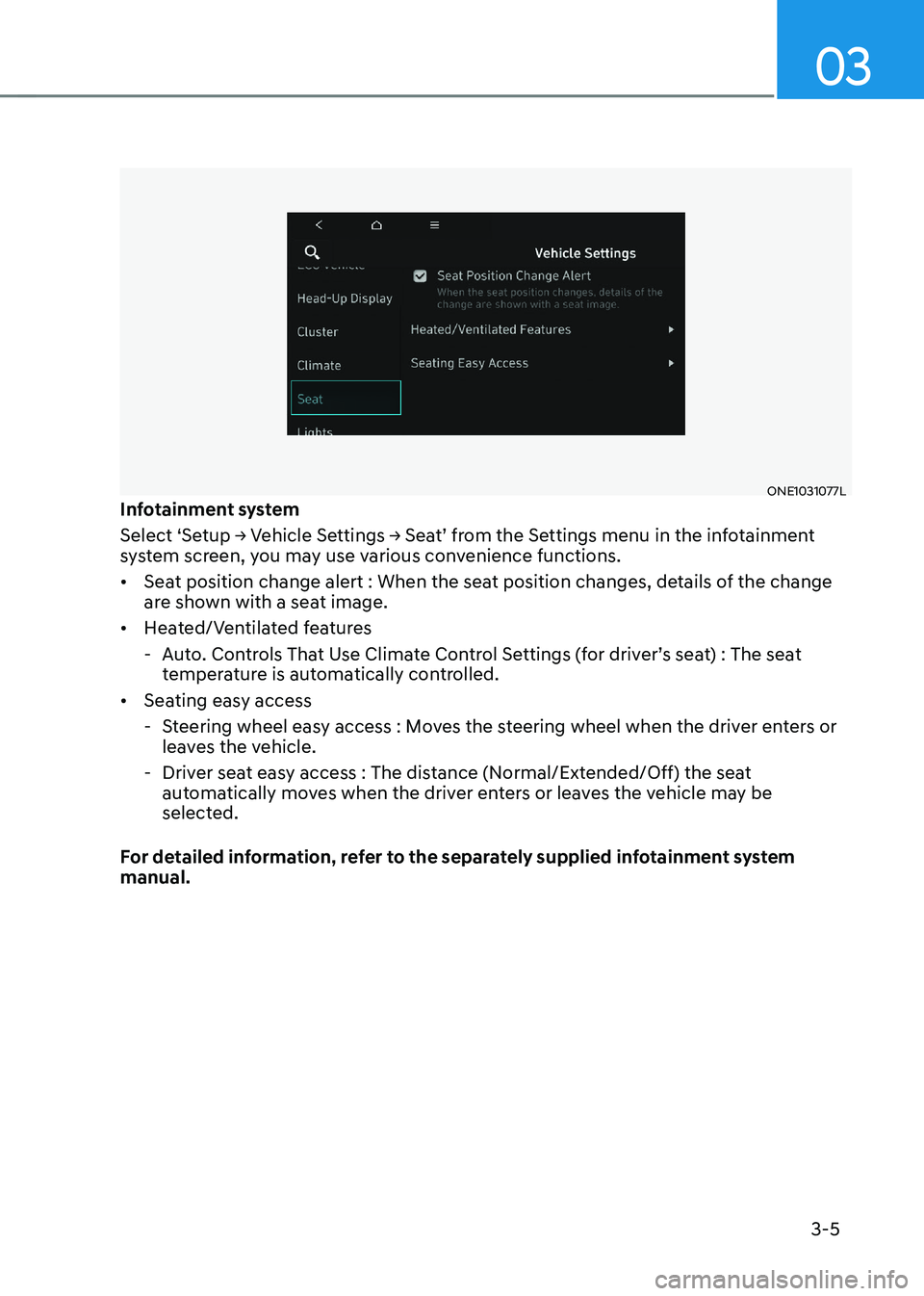
Select ‘Setup � Vehicle Settings � Seat’ from the Settings menu in the infotainment
system screen, you may use various convenience functions. • Seat position change alert : When the seat position changes, details of the change
are shown with a seat image.
• Heated/Ventilated features
- Auto. Controls That Use Climate Control Settings (for driver’s seat) : The seat temperature is automatically controlled.
• Seating easy access
- Steering wheel easy access : Moves the steering wheel when the driver enters or leaves the vehicle.
- Driver seat easy access : The distance (Normal/Extended/Off) the seat automatically moves when the driver enters or leaves the vehicle may be
selected.
For detailed information, refer to the separately supplied infotainment system manual.
Page 112 of 680
03
3-25
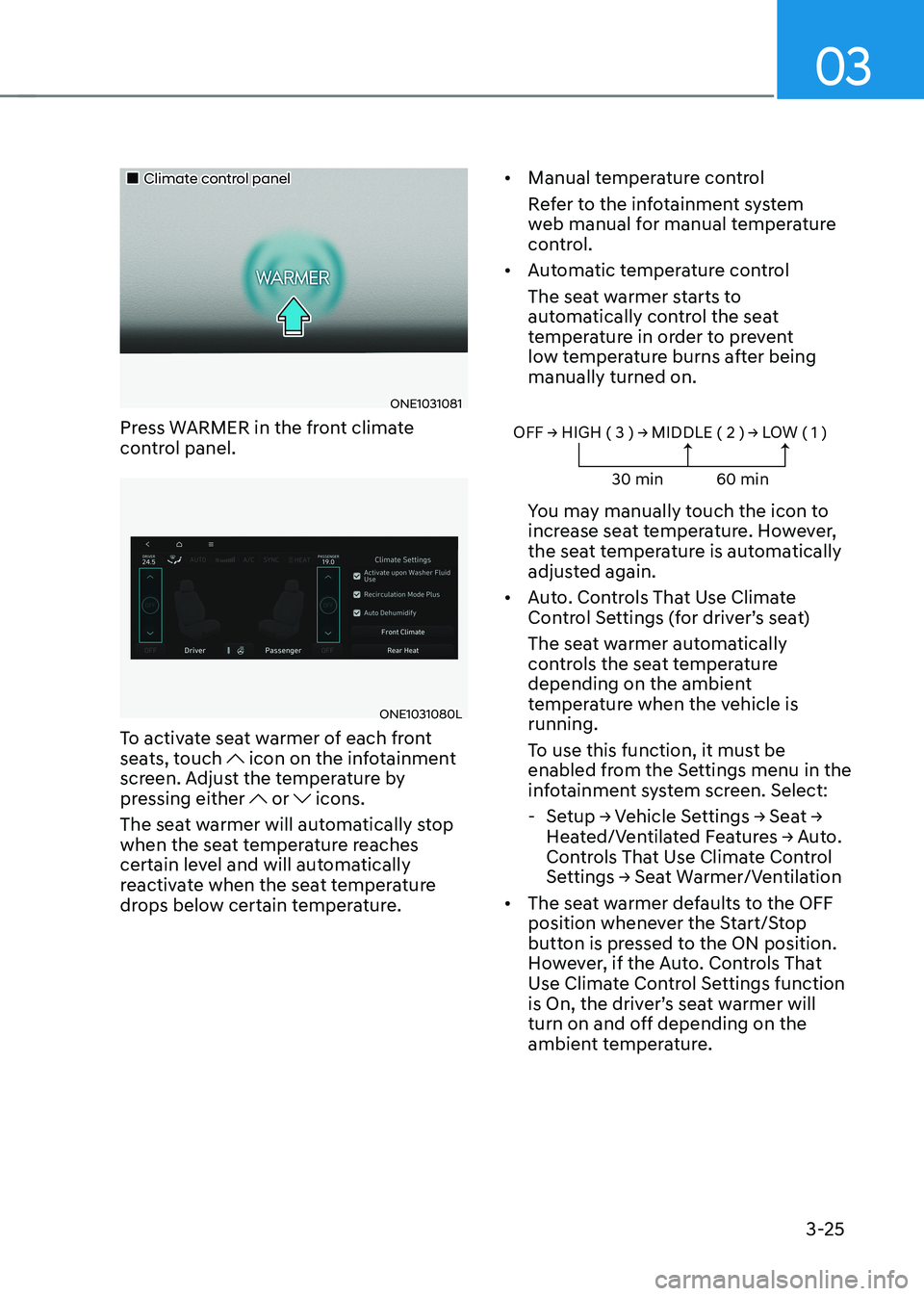
„„Climate control panel
ONE1031081
Press WARMER in the front climate
control panel.
ONE1031080L
To activate seat warmer of each front
seats, touch
icon on the infotainment
screen. Adjust the temperature by
pressing either
or icons.
The seat warmer will automatically stop
when the seat temperature reaches
certain level and will automatically
reactivate when the seat temperature
drops below certain temperature. •
Manual temperature control
Refer to the infotainment system
web manual for manual temperature
control.
• Automatic temperature control
The seat warmer starts to
automatically control the seat
temperature in order to prevent
low temperature burns after being manually turned on.
OFF � HIGH ( 3 ) � MIDDLE ( 2 ) � LOW ( 1 )
30 min 60 min
You may manually touch the icon to
increase seat temperature. However,
the seat temperature is automatically
adjusted again.
• Auto. Controls That Use Climate
Control Settings (for driver’s seat)
The seat warmer automatically
controls the seat temperature
depending on the ambient
temperature when the vehicle is running.
To use this function, it must be
enabled from the Settings menu in the
infotainment system screen. Select:
- Setup � Vehicle Settings � Seat �
Heated/Ventilated Features � Auto.
Controls That Use Climate Control
Settings � Seat Warmer/Ventilation
• The seat warmer defaults to the OFF
position whenever the Start/Stop
button is pressed to the ON position.
However, if the Auto. Controls That
Use Climate Control Settings function
is On, the driver’s seat warmer will
turn on and off depending on the
ambient temperature.
Page 113 of 680
Seats & Safety System
3-26
Air Ventilation Seats
The air ventilation seats are provided
to cool the front seats by blowing air
through small vent holes on the surface
of the seat cushions and seatbacks.
When the operation of the air ventilation
seat is not needed, keep the air
ventilation seats OFF.
NOTICE
To prevent damage to the air ventilation
seats: • Never use a solvent such as paint
thinner, benzene, alcohol or gasoline
to clean the seats.
• Avoid spilling liquids on the surface
of the front seats and seatbacks; this
may cause the air vent holes to block
and not work properly.
• Do not place materials such as plastic
bags or newspapers under the seats.
They may block the air intake causing
malfunction of the air vent.
• Do not change the seat covers. It may
damage the air ventilation seat.
• If the air vents do not operate, restart
the vehicle. If there is no change,
have the vehicle to be inspected by
an authorized HYUNDAI dealer. Front air ventilation seats (if equipped)
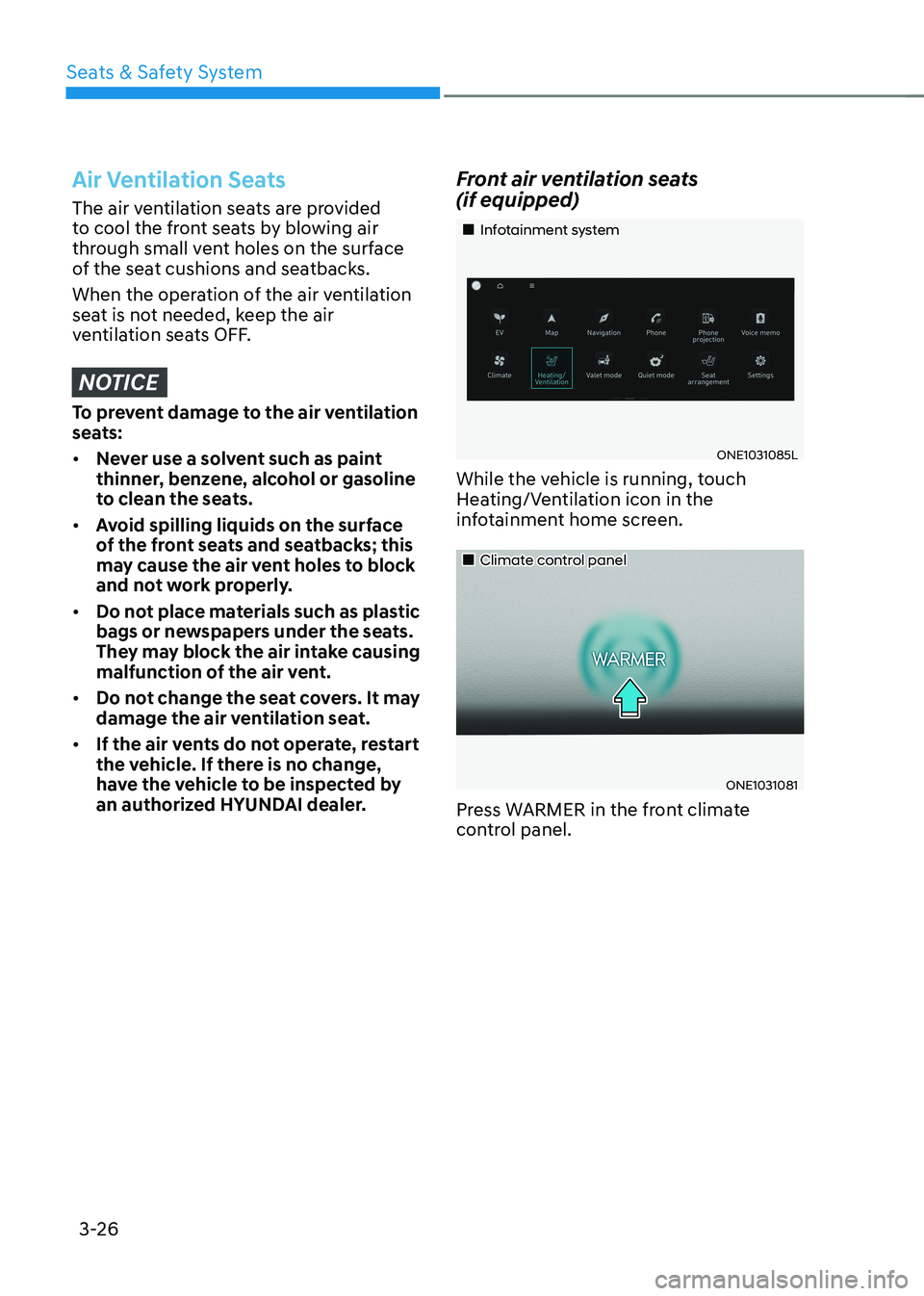
„„Infotainment system
ONE1031085L
While the vehicle is running, touch
Heating/Ventilation icon in the
infotainment home screen.
„„Climate control panel
ONE1031081
Press WARMER in the front climate
control panel.
Page 114 of 680
03
3-27
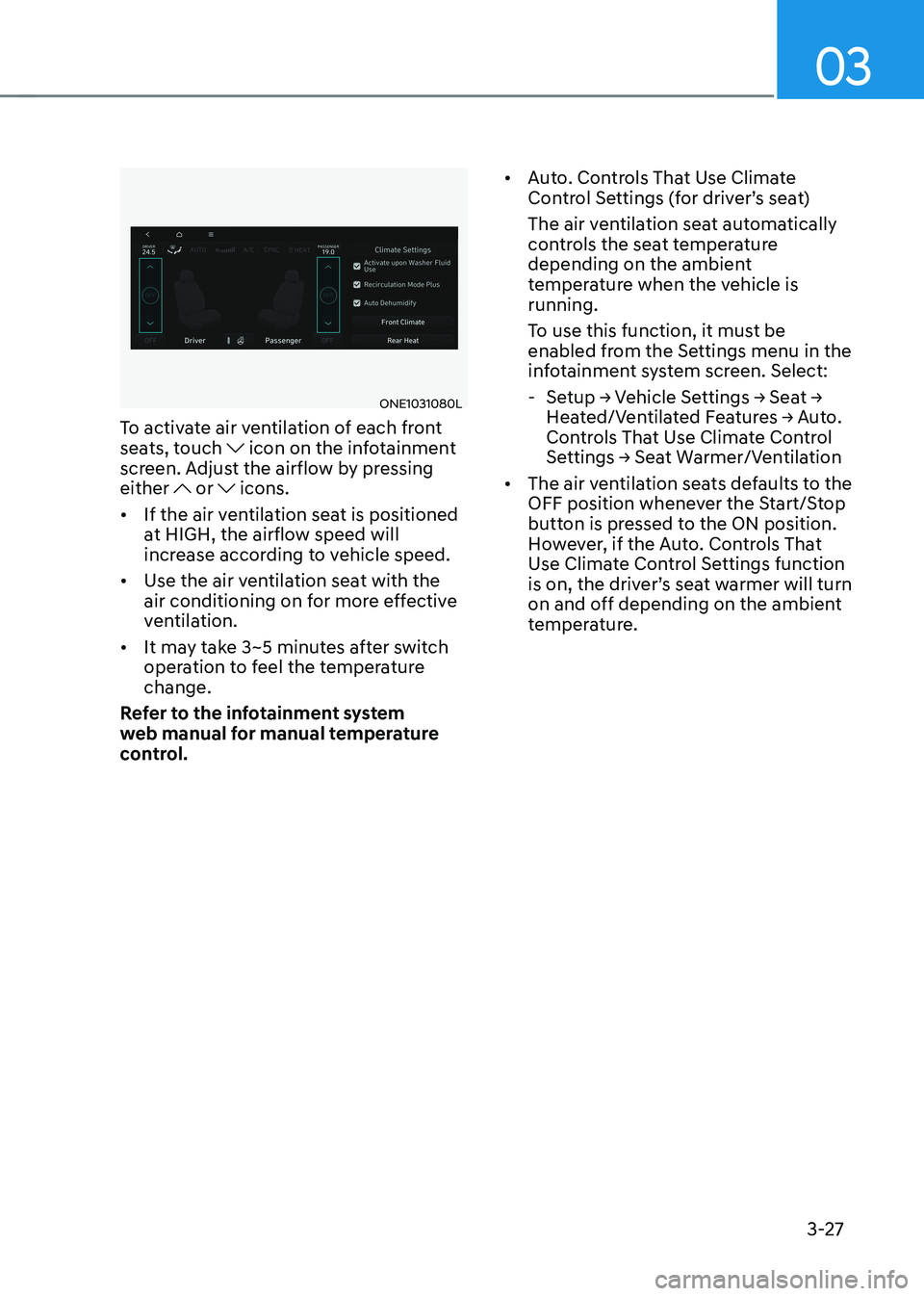
ONE1031080L
To activate air ventilation of each front
seats, touch
icon on the infotainment
screen. Adjust the airflow by pressing either
or icons.
• If the air ventilation seat is positioned
at HIGH, the airflow speed will
increase according to vehicle speed.
• Use the air ventilation seat with the
air conditioning on for more effective
ventilation.
• It may take 3~5 minutes after switch
operation to feel the temperature change.
Refer to the infotainment system
web manual for manual temperature
control. •
Auto. Controls That Use Climate
Control Settings (for driver’s seat)
The air ventilation seat automatically
controls the seat temperature
depending on the ambient
temperature when the vehicle is running.
To use this function, it must be
enabled from the Settings menu in the
infotainment system screen. Select:
- Setup � Vehicle Settings � Seat �
Heated/Ventilated Features � Auto.
Controls That Use Climate Control
Settings � Seat Warmer/Ventilation
• The air ventilation seats defaults to the
OFF position whenever the Start/Stop
button is pressed to the ON position.
However, if the Auto. Controls That
Use Climate Control Settings function
is on, the driver’s seat warmer will turn
on and off depending on the ambient
temperature.