sensor HYUNDAI IONIQ 6 2023 User Guide
[x] Cancel search | Manufacturer: HYUNDAI, Model Year: 2023, Model line: IONIQ 6, Model: HYUNDAI IONIQ 6 2023Pages: 582, PDF Size: 10.77 MB
Page 144 of 582
Seats & Safety System
3-50
Why didn’t My Airbag Go Off in
a Collision?
There are certain types of accidents in
which the airbag would not be expected
to provide additional protection. These
include rear impacts, second or third
collisions in multiple impact accidents, as
well as low speed impacts. Damage to the
vehicle indicates collision energy
absorption, and is not an indicator of
whether or not an airbag should have
inflated.
Airbag collision sensors
WARNING To reduce the risk of an airbag deploying
unexpectedly and causing serious injury
or death:
• Do not hit or allow any objects to impact the locations where airbags or
sensors are installed.
• Do not perform maintenance on or around the airbag sensors. If the
location or angle of the sensors is
altered, the airbags may deploy when
they should not or may not deploy
when they should.
• Installing bumper guards with non-genuine Hyundai parts may
adversely affect the collision and airbag
deployment performance.
To ensure correct function of the airbag
system, have the bumper replaced with
genuine Hyundai part specified for your
vehicle.
• Press the Start/Stop button to the OFF or ACC position and wait for 3 minutes
when the vehicle is being towed to
prevent inadvertent airbag
deployment.
• Have all airbag repairs conducted by an authorized HYUNDAI dealer.
Hyundai_CE_en_US.book Page 50
Page 145 of 582
3
3-51
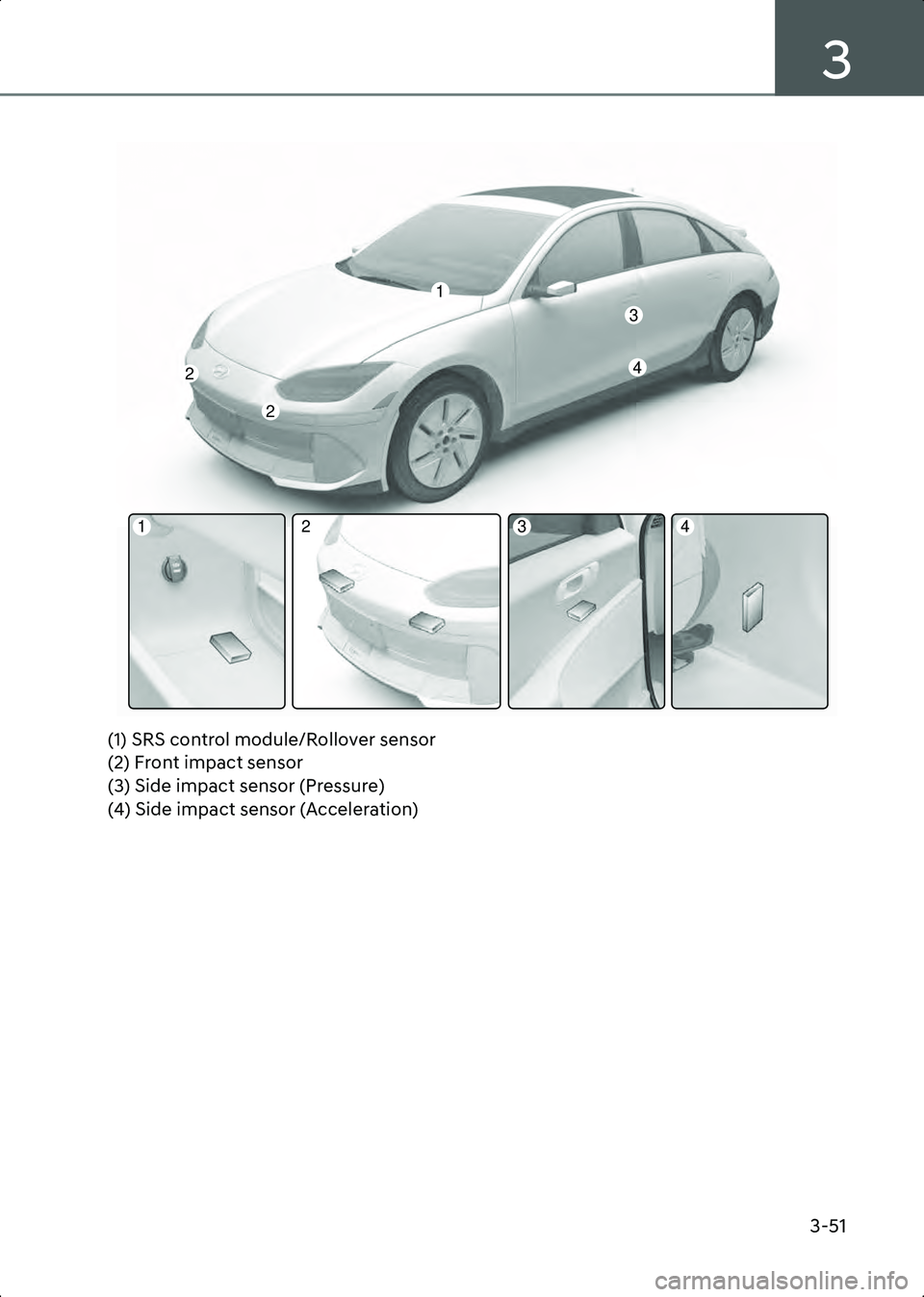
A3003401(1) SRS control module/Rollover sensor
(2) Front impact sensor
(3) Side impact sensor (Pressure)
(4) Side impact sensor (Acceleration)
2
2
3
4
1
2341
Hyundai_CE_en_US.book Page 51
Page 146 of 582
Seats & Safety System
3-52
Airbag inflation conditions
Front airbags
B3003401
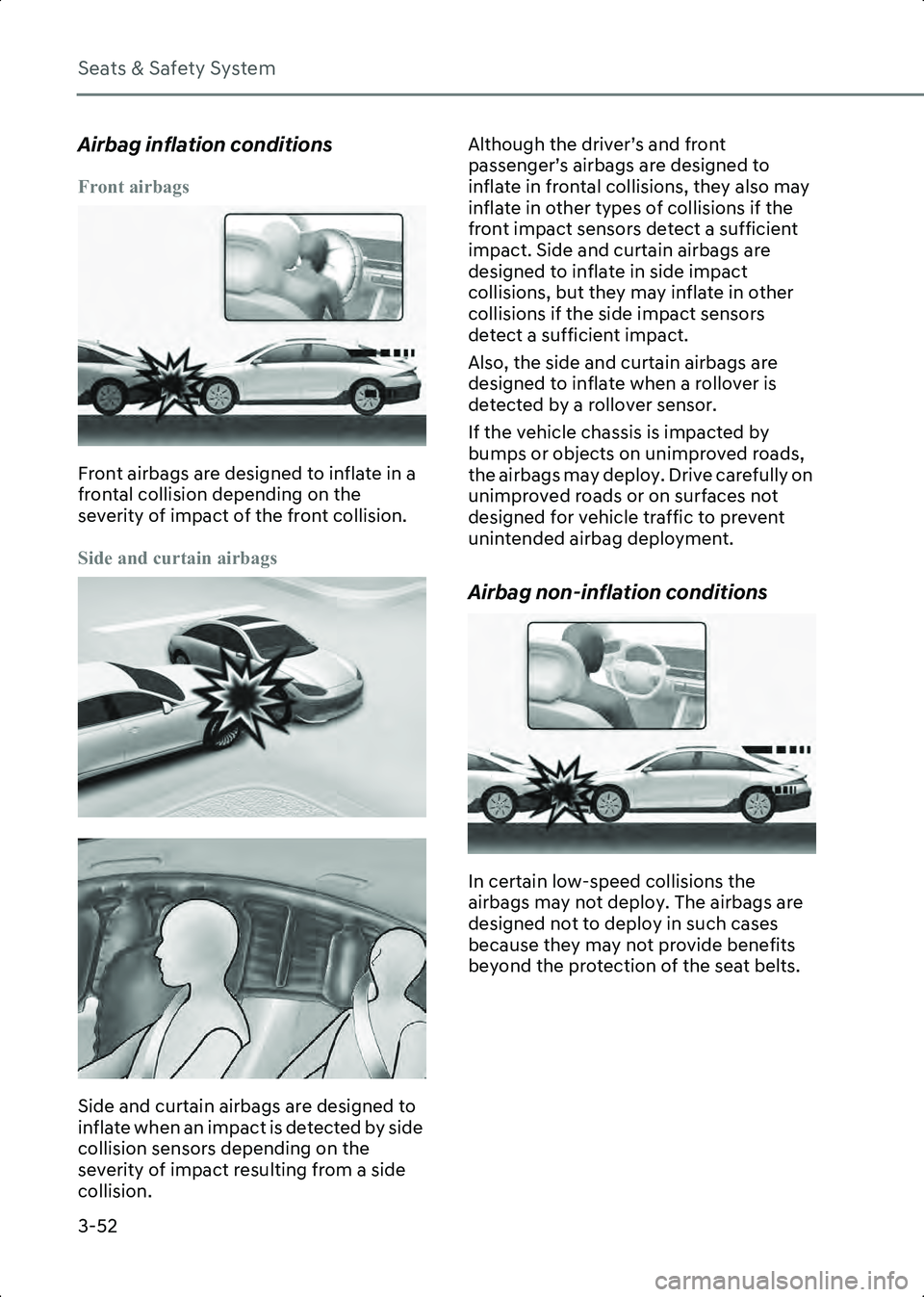
Front airbags are designed to inflate in a
frontal collision depending on the
severity of impact of the front collision.
Side and curtain airbags
B3003402
B3003403
Side and curtain airbags are designed to
inflate when an impact is detected by side
collision sensors depending on the
severity of impact resulting from a side
collision.Although the driver’s and front
passenger’s airbags are designed to
inflate in frontal collisions, they also may
inflate in other types of collisions if the
front impact sensors detect a sufficient
impact. Side and curtain airbags are
designed to inflate in side impact
collisions, but they may inflate in other
collisions if the side impact sensors
detect a sufficient impact.
Also, the side and curtain airbags are
designed to inflate when a rollover is
detected by a rollover sensor.
If the vehicle chassis is impacted by
bumps or objects on unimproved roads,
the airbags may deploy. Drive carefully on
unimproved roads or on surfaces not
designed for vehicle traffic to prevent
unintended airbag deployment.
Airbag non-inflation conditions
B3003404
In certain low-speed collisions the
airbags may not deploy. The airbags are
designed not to deploy in such cases
because they may not provide benefits
beyond the protection of the seat belts.
Hyundai_CE_en_US.book Page 52
Page 147 of 582
3
3-53
B3003405
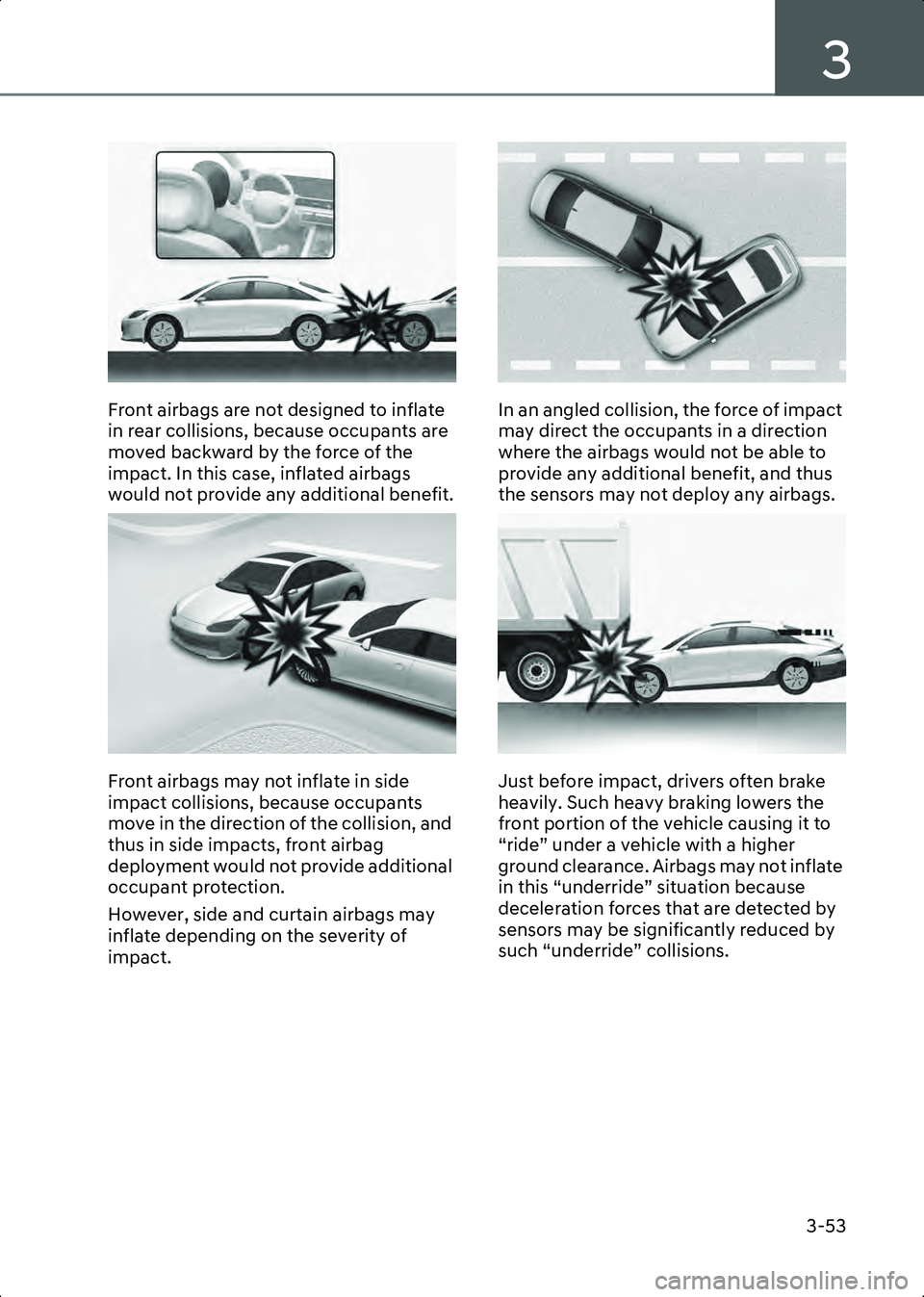
Front airbags are not designed to inflate
in rear collisions, because occupants are
moved backward by the force of the
impact. In this case, inflated airbags
would not provide any additional benefit.
B3003406
Front airbags may not inflate in side
impact collisions, because occupants
move in the direction of the collision, and
thus in side impacts, front airbag
deployment would not provide additional
occupant protection.
However, side and curtain airbags may
inflate depending on the severity of
impact.
B3003407
In an angled collision, the force of impact
may direct the occupants in a direction
where the airbags would not be able to
provide any additional benefit, and thus
the sensors may not deploy any airbags.
B3003408
Just before impact, drivers often brake
heavily. Such heavy braking lowers the
front portion of the vehicle causing it to
“ride” under a vehicle with a higher
ground clearance. Airbags may not inflate
in this “underride” situation because
deceleration forces that are detected by
sensors may be significantly reduced by
such “underride” collisions.
Hyundai_CE_en_US.book Page 53
Page 148 of 582
Seats & Safety System
3-54
B3003409
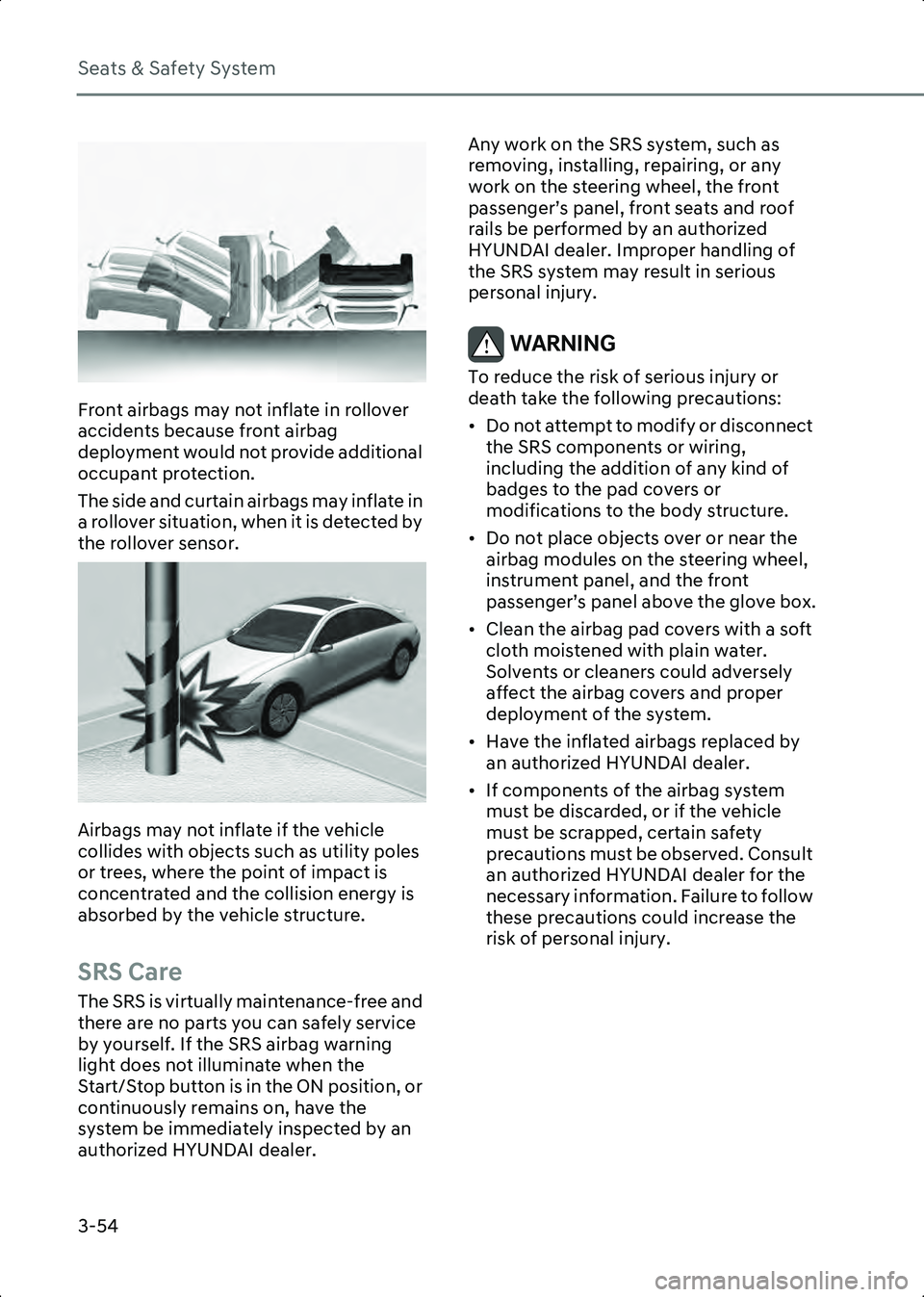
Front airbags may not inflate in rollover
accidents because front airbag
deployment would not provide additional
occupant protection.
The side and curtain airbags may inflate in
a rollover situation, when it is detected by
the rollover sensor.
B3003410
Airbags may not inflate if the vehicle
collides with objects such as utility poles
or trees, where the point of impact is
concentrated and the collision energy is
absorbed by the vehicle structure.
SRS Care
The SRS is virtually maintenance-free and
there are no parts you can safely service
by yourself. If the SRS airbag warning
light does not illuminate when the
Start/Stop button is in the ON position, or
continuously remains on, have the
system be immediately inspected by an
authorized HYUNDAI dealer.Any work on the SRS system, such as
removing, installing, repairing, or any
work on the steering wheel, the front
passenger’s panel, front seats and roof
rails be performed by an authorized
HYUNDAI dealer. Improper handling of
the SRS system may result in serious
personal injury.
WARNING To reduce the risk of serious injury or
death take the following precautions:
• Do not attempt to modify or disconnect
the SRS components or wiring,
including the addition of any kind of
badges to the pad covers or
modifications to the body structure.
• Do not place objects over or near the airbag modules on the steering wheel,
instrument panel, and the front
passenger’s panel above the glove box.
• Clean the airbag pad covers with a soft cloth moistened with plain water.
Solvents or cleaners could adversely
affect the airbag covers and proper
deployment of the system.
• Have the inflated airbags replaced by an authorized HYUNDAI dealer.
• If components of the airbag system must be discarded, or if the vehicle
must be scrapped, certain safety
precautions must be observed. Consult
an authorized HYUNDAI dealer for the
necessary information. Failure to follow
these precautions could increase the
risk of personal injury.
Hyundai_CE_en_US.book Page 54
Page 156 of 582
Instrument Cluster
4-6
the Smart Regenerative System’s
operation status is displayed.
For more information, refer to the
"Regenerative Braking System (Paddle
Shifter)" section in chapter 6.
Warning and Indicator Lights
Information Make sure that all warning lights are OFF
after starting the vehicle. If any light is still
ON, this indicates a situation that needs
attention.
Ready Indicator Light
WL_ReadyLamp
This indicator illuminates:
When the vehicle is ready to be driven.
• ON: Normal driving is possible.
• OFF: Normal driving is not possible, or a problem has occurred.
• Blinking: Emergency driving.
When the indicator goes off or blinks,
there is a problem with the system. In this
case, have your vehicle inspected by an
authorized HYUNDAI dealer.
Service Warning Light
WL_ServiceWarningLamp
This warning light illuminates:
• When the Start/Stop button is in the ON position. The Service warning light
illuminates for 3 seconds and then goes
off.
• When there is a problem with related parts of the electric vehicle control
system, such as sensors, etc.
When the warning light illuminates while
driving, or does not go off after starting
the vehicle, have your vehicle inspected
by an authorized HYUNDAI dealer.
Power Down Indicator Light
WL_PowerDownLamp
This indicator light illuminates:
When the power is limited for the safety
of the high-powered parts of an electric
vehicle. The power is limited for the
following reasons:
• The high voltage battery level is too low or voltage is decreasing
• The temperature of the high voltage battery is too high or too low
• The temperature of the motor is high
Hyundai_CE_en_US.book Page 6
Page 161 of 582
4
4-11
Low Tire Pressure Warning Light
WL_TPMSWarningLamp
This warning light illuminates:
• When the Start/Stop button is in the ON position. The low tire pressure warning
light illuminates for about 3 seconds
and then goes off.
• When one or more tires are significantly underinflated. (The location of the
underinflated tire appears on the
instrument cluster.)
For more information, refer to the “Tire
Pressure Monitoring System (TPMS)”
section in chapter 8.
This warning light remains ON after
blinking for about 60 seconds, or
repeatedly blinks ON and OFF in 3 second
intervals:
When there is a malfunction with the
TPMS.
If this occurs, have the vehicle inspected
by an authorized HYUNDAI dealer as soon
as possible.
For more information, refer to the “Tire
Pressure Monitoring System (TPMS)”
section in chapter 8.
WARNING • The TPMS cannot alert you to severe and sudden tire damage caused by
external factors.
• If you notice any vehicle instability, immediately take your foot off the
accelerator pedal, apply the brakes
gradually with light force, and slowly
move to a safe position off the road.
Driver Attention Warning Light
WL_DriverAttentionWarningLamp
This warning light illuminates:
• When you set the ignition switch to the ON position, the yellow indicator light
illuminates for about 3 seconds and
then goes off
• [Continuously Yellow] When the front view camera is blocked or Driver
Attention Warning is
disable/malfunction
• [Blinking Yellow] When the function suggest that the driver take a break
If the yellow warning light is still on even
after removing foreign material from the
front of the sensor, have the vehicle
inspected by an authorized HYUNDAI
dealer as soon as possible
For more information, refer to the “Driver
Attention Warning (DAW)” section in
chapter 7
Forward Safety Warning Light
WL_FrontSafetyWarningLamp
This warning light illuminates:
• When the Start/Stop button is in the ON position. The Forward Safety warning
light illuminates for about 3 seconds
and then goes off.
• [Yellow] When Forward Safety is deselected or Forward
Hyundai_CE_en_US.book Page 11
Page 162 of 582
![HYUNDAI IONIQ 6 2023 User Guide Instrument Cluster
4-12
Collision-Avoidance Assist
disable/malfunction
• [Blinking Red] When Forward Safety/Forward Cross-Traffic Safety of
Forward Collision-Avoidance Assist is
operating
If the](/img/35/58885/w960_58885-161.png "HYUNDAI IONIQ 6 2023 User Guide Instrument Cluster
4-12
Collision-Avoidance Assist
disable/malfunction
• [Blinking Red] When Forward Safety/Forward Cross-Traffic Safety of
Forward Collision-Avoidance Assist is
operating
If the")
Instrument Cluster
4-12
Collision-Avoidance Assist
disable/malfunction
• [Blinking Red] When Forward Safety/Forward Cross-Traffic Safety of
Forward Collision-Avoidance Assist is
operating
If the yellow warning light is still on even
after removing foreign material from the
front of the sensors after Forward Safety
select in settings, have the vehicle
inspected by an authorized HYUNDAI
dealer as soon as possible.
For more information, refer to the
“Forward Collision-Avoidance Assist
(FCA)” section in chapter 7.
if equipped
Emergency Steering Warning Light
WL_EmergencySteeringWarningLamp
This indicator light illuminates:
• When you set the Start/Stop button to the ON position, the yellow warning
light illuminates for about 3 seconds
and then goes off
• [Continuously Yellow] When Forward/Side Safety is deselected or
Forward Collision-Avoidance Assist
disable/malfunction
• [Blinking Red] When Forward/Side Safety of Forward Collision-Avoidance
Assist is operating
If the yellow warning light is still on even
after removing foreign material from the
front of the sensors after Forward Safety
select in settings, have the vehicle
inspected by an authorized HYUNDAI
dealer as soon as possible. For more information, refer to the
“Forward Collision-Avoidance Assist
(FCA)” section in chapter 7.
Lane Safety Indicator Light
WL_LaneSafetyWarningLamp
This indicator light illuminates:
• When you set the ignition switch to the
ON position, the yellow indicator light
illuminates for about 3 seconds and
then goes off
• [Gray] When Lane Keeping Assist operational conditions are not met
• [Continuously Green] When Lane Keeping Assist operational conditions
are met
• [Blinking Green] When Lane Keeping Assist is operating
• [Yellow] When Lane Safety is deselected or Lane Keeping Assist
disable/malfunction
If the yellow warning light is still on even
after removing foreign material from the
front of the sensor after Lane Safety
select in settings, have the vehicle
inspected by an authorized HYUNDAI
dealer as soon as possible.
For more information, refer to the “Lane
Keeping Assist (LKA)” section in chapter
7.
Hyundai_CE_en_US.book Page 12
Page 183 of 582
5
5-5
Accessing Your Vehicle
Smart Key
Type A
B5000201Type B
B5000202
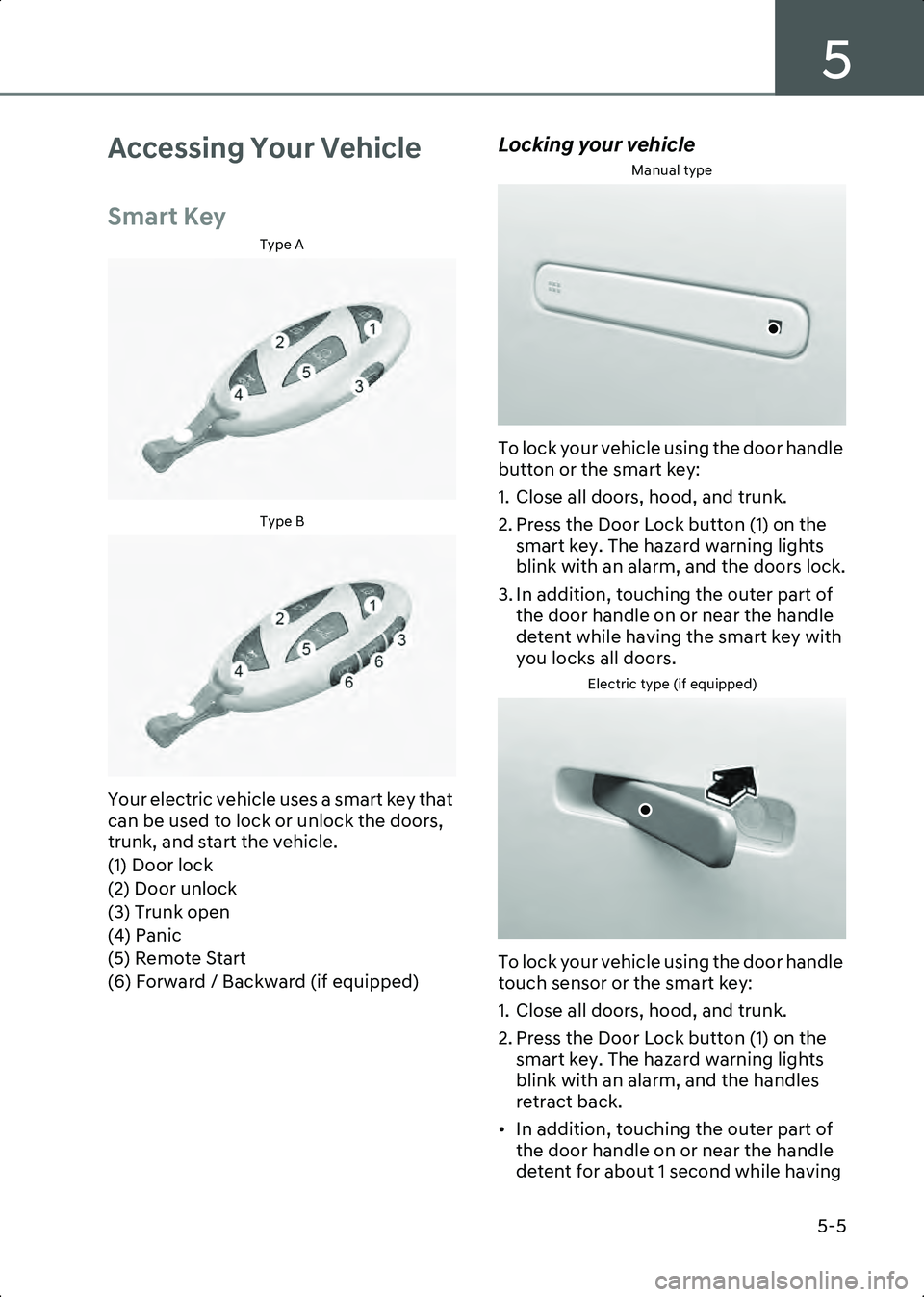
Your electric vehicle uses a smart key that
can be used to lock or unlock the doors,
trunk, and start the vehicle.
(1) Door lock
(2) Door unlock
(3) Trunk open
(4) Panic
(5) Remote Start
(6) Forward / Backward (if equipped)
Locking your vehicle
Manual type
B5000203
To lock your vehicle using the door handle
button or the smart key:
1. Close all doors, hood, and trunk.
2. Press the Door Lock button (1) on the smart key. The hazard warning lights
blink with an alarm, and the doors lock.
3. In addition, touching the outer part of the door handle on or near the handle
detent while having the smart key with
you locks all doors.
Electric type (if equipped)
B5000203_1
To lock your vehicle using the door handle
touch sensor or the smart key:
1. Close all doors, hood, and trunk.
2. Press the Door Lock button (1) on the smart key. The hazard warning lights
blink with an alarm, and the handles
retract back.
• In addition, touching the outer part of the door handle on or near the handle
detent for about 1 second while having
Hyundai_CE_en_US.book Page 5
Page 184 of 582
Convenience Features
5-6
smart key with you locks all doors and
let the door handle to retract back.
Information • The side view mirror will fold if ‘Enable on
Door Unlock’ is selected from the Settings
menu in the infotainment system. Select
Setup > Vehicle > Lights > Welcome
Mirror/Light > Enable on Door Unlock .
• The door handle touch sensor operates when the smart key is within 28-40 in.
(0.7-1 m) from the outside door handle.
• If you lock the doors using the door handle touch sensor, the doors are not locked under
the following circumstances:
- The smart key is in the vehicle.
- The Start/Stop button is from ACC or ON position.
- Any door is open (except for the trunk).
• If this occurs, a chime sounds for about 3 seconds. Check the vehicle before
attempting to lock the vehicle again.
WARNING Do not leave the smart key in your vehicle
with children that are unattended or
unsupervised.
Children could unintentionally press the
Start/Stop button or could operate the
power windows or other vehicle controls
or even cause the vehicle to move. This
may result in serious injury or death.
Information • To fold/unfold the side view mirror simultaneously when the door is
locked/unlocked, select Setup > Vehicle >
Lights > Welcome Mirror/Light >
Enable on Door Unlock in the
infotainment system.
• The door handle button will only operate when the smart key is within 28-40 in. (0.7-1 m) from the outside door handle.
Other people can also open the doors
without the smart key in possession.
• After unlocking the doors, the doors will lock automatically after 30 seconds unless a
door is opened.
The infotainment system may change after
software updates. For more information, refer
to the user’s manual provided in the
infotainment system and the quick reference
guide.
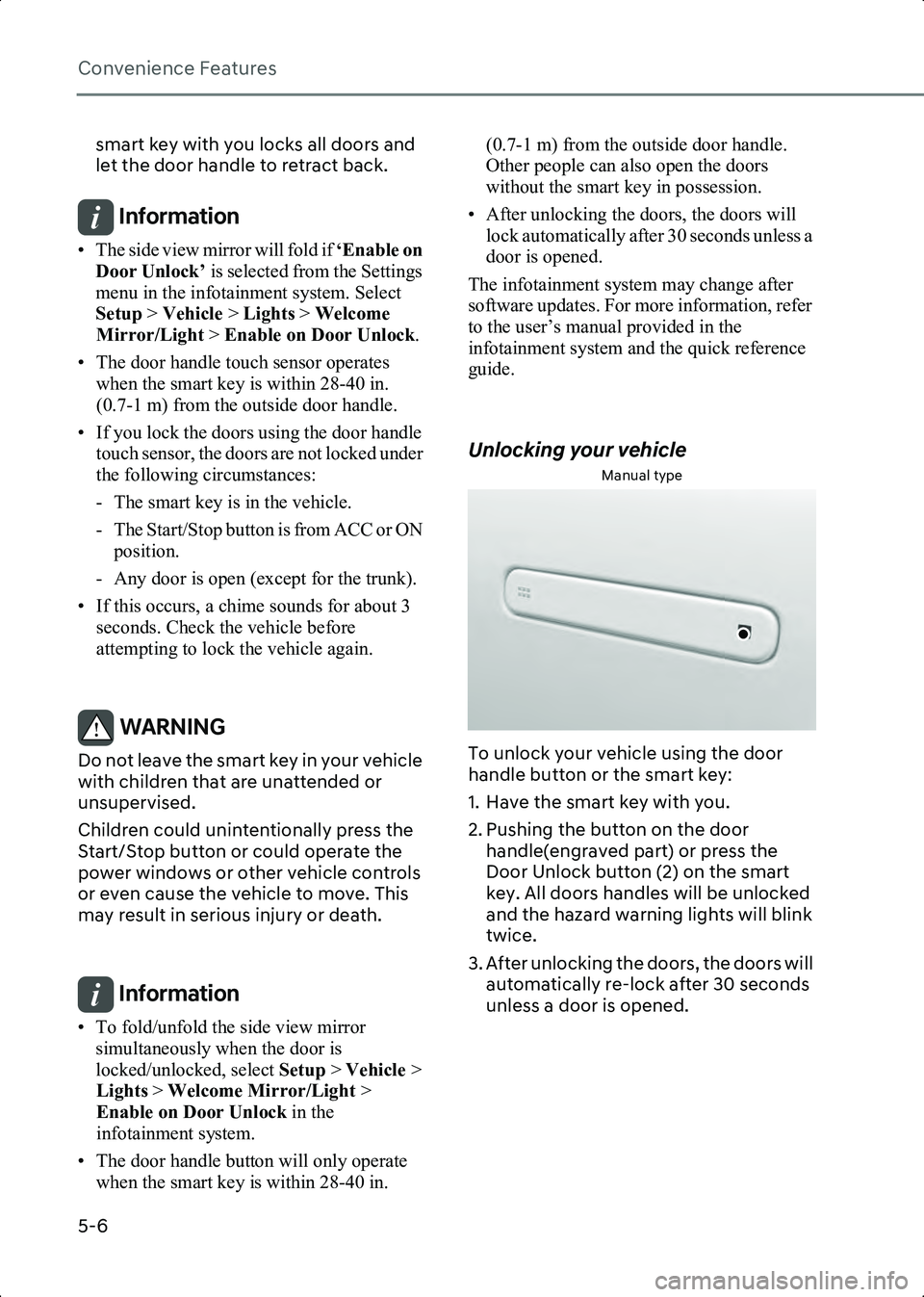
Unlocking your vehicle
Manual type
B5000204
To unlock your vehicle using the door
handle button or the smart key:
1. Have the smart key with you.
2. Pushing the button on the door handle(engraved part) or press the
Door Unlock button (2) on the smart
key. All doors handles will be unlocked
and the hazard warning lights will blink
twice.
3. After unlocking the doors, the doors will automatically re-lock after 30 seconds
unless a door is opened.
Hyundai_CE_en_US.book Page 6