sensor HYUNDAI IONIQ 6 2023 Repair Manual
[x] Cancel search | Manufacturer: HYUNDAI, Model Year: 2023, Model line: IONIQ 6, Model: HYUNDAI IONIQ 6 2023Pages: 582, PDF Size: 10.77 MB
Page 431 of 582
7
7-87
CAUTION For more information on the precautions
of the detecting sensors, refer to the
“Forward Collision-Avoidance Assist
(FCA)” section in this chapter.
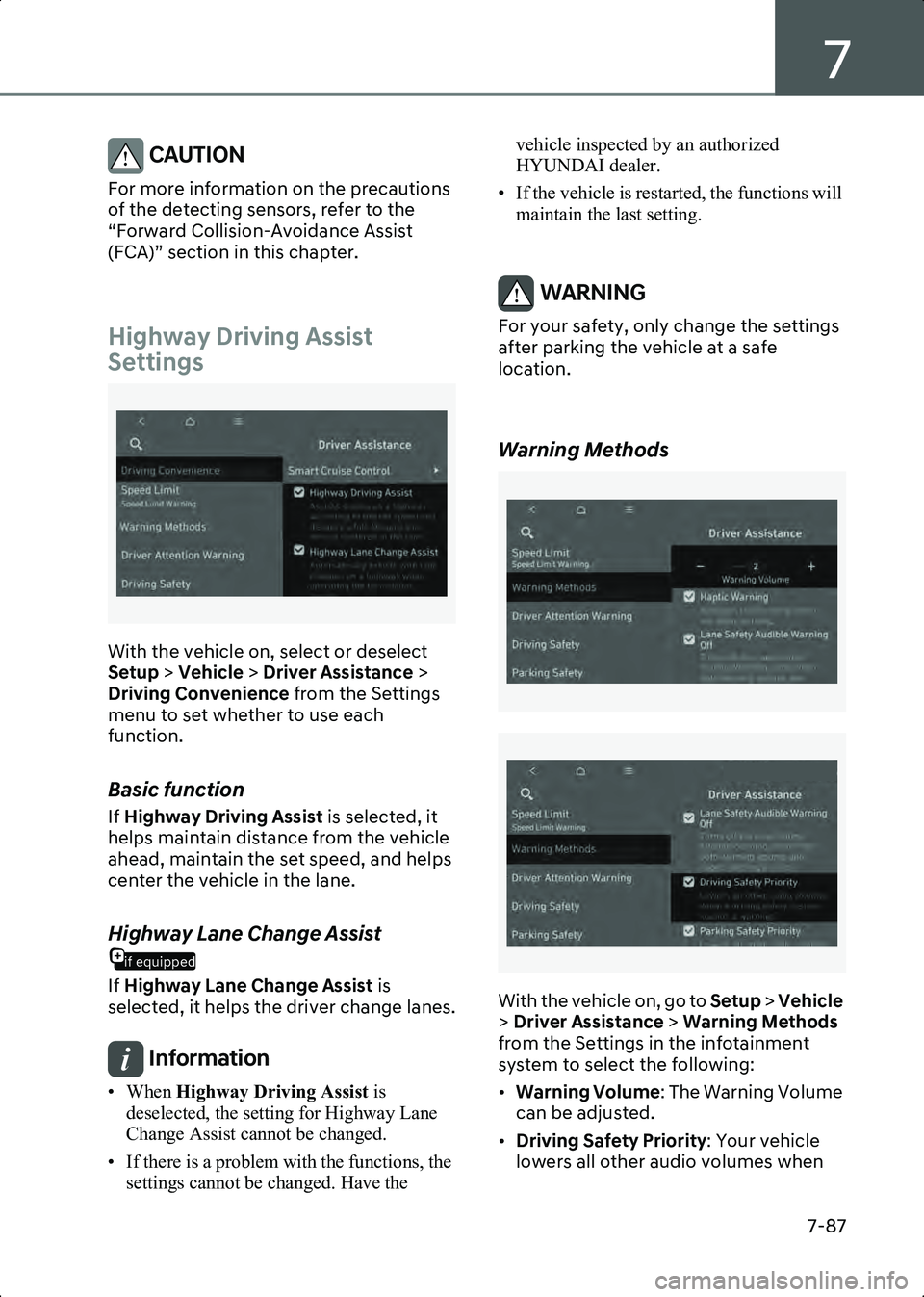
Highway Driving Assist
Settings
B7005401
With the vehicle on, select or deselect
Setup > Vehicle > Driver Assistance >
Driving Convenience from the Settings
menu to set whether to use each
function.
Basic function
If Highway Driving Assist is selected, it
helps maintain distance from the vehicle
ahead, maintain the set speed, and helps
center the vehicle in the lane.
if equipped
Highway Lane Change Assist
If Highway Lane Change Assist is
selected, it helps the driver change lanes.
Information • When Highway Driving Assist is
deselected, the setting for Highway Lane
Change Assist cannot be changed.
• If there is a problem with the functions, the settings cannot be changed. Have the vehicle inspected by an authorized
HYUNDAI dealer.
• If the vehicle is restarted, the functions will maintain the last setting.
WARNING For your safety, only change the settings
after parking the vehicle at a safe
location.
Warning Methods
B7001902
B7001902_1
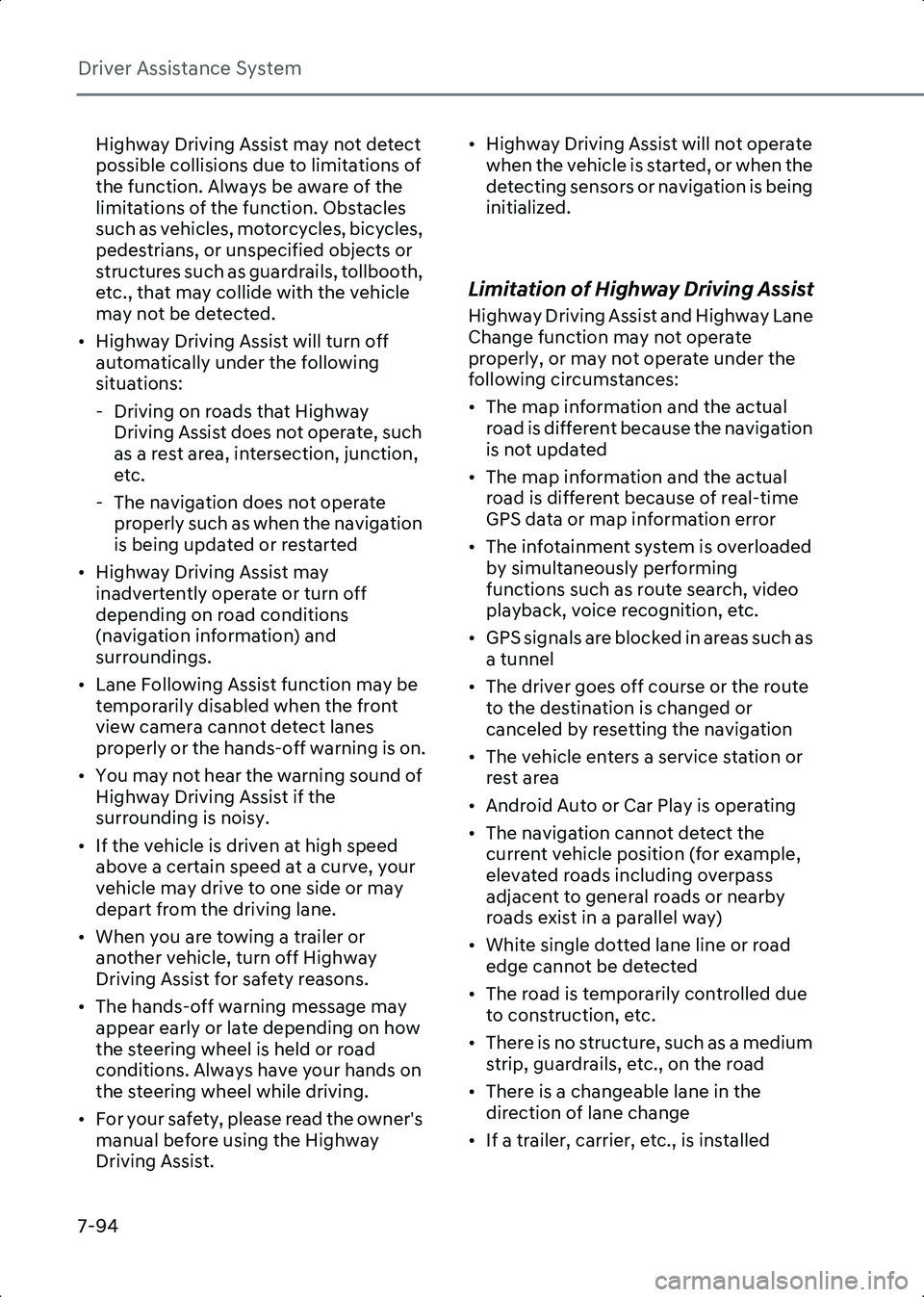
With the vehicle on, go to Setup > Vehicle
> Driver Assistance > Warning Methods
from the Settings in the infotainment
system to select the following:
• Warning Volume : The Warning Volume
can be adjusted.
• Driving Safety Priority : Your vehicle
lowers all other audio volumes when
Hyundai_CE_en_US.book Page 87
Page 438 of 582
Driver Assistance System
7-94
Highway Driving Assist may not detect
possible collisions due to limitations of
the function. Always be aware of the
limitations of the function. Obstacles
such as vehicles, motorcycles, bicycles,
pedestrians, or unspecified objects or
structures such as guardrails, tollbooth,
etc., that may collide with the vehicle
may not be detected.
• Highway Driving Assist will turn off automatically under the following
situations:
- Driving on roads that Highway Driving Assist does not operate, such
as a rest area, intersection, junction,
etc.
- The navigation does not operate properly such as when the navigation
is being updated or restarted
• Highway Driving Assist may inadvertently operate or turn off
depending on road conditions
(navigation information) and
surroundings.
• Lane Following Assist function may be temporarily disabled when the front
view camera cannot detect lanes
properly or the hands-off warning is on.
• You may not hear the warning sound of Highway Driving Assist if the
surrounding is noisy.
• If the vehicle is driven at high speed above a certain speed at a curve, your
vehicle may drive to one side or may
depart from the driving lane.
• When you are towing a trailer or another vehicle, turn off Highway
Driving Assist for safety reasons.
• The hands-off warning message may appear early or late depending on how
the steering wheel is held or road
conditions. Always have your hands on
the steering wheel while driving.
• For your safety, please read the owner's manual before using the Highway
Driving Assist. • Highway Driving Assist will not operate
when the vehicle is started, or when the
detecting sensors or navigation is being
initialized.
Limitation of Highway Driving Assist
Highway Driving Assist and Highway Lane
Change function may not operate
properly, or may not operate under the
following circumstances:
• The map information and the actual road is different because the navigation
is not updated
• The map information and the actual road is different because of real-time
GPS data or map information error
• The infotainment system is overloaded by simultaneously performing
functions such as route search, video
playback, voice recognition, etc.
• GPS signals are blocked in areas such as a tunnel
• The driver goes off course or the route to the destination is changed or
canceled by resetting the navigation
• The vehicle enters a service station or rest area
• Android Auto or Car Play is operating
• The navigation cannot detect the current vehicle position (for example,
elevated roads including overpass
adjacent to general roads or nearby
roads exist in a parallel way)
• White single dotted lane line or road edge cannot be detected
• The road is temporarily controlled due to construction, etc.
• There is no structure, such as a medium strip, guardrails, etc., on the road
• There is a changeable lane in the direction of lane change
• If a trailer, carrier, etc., is installed
Hyundai_CE_en_US.book Page 94
Page 439 of 582
7
7-95
Information For more information on the limitations of the
front view camera, front radar, front corner
radar and rear corner radar, refer to the
“Forward Collision-Avoidance Assist (FCA)”
section in this chapter.
Information This device complies with Part 15 of the FCC
rules.
Operation is subject to the following three
conditions:
1. This device may not cause harmful interference, and
2. This device must accept any interference received, including interference that may
cause undesired operation.
3. Changes or modifications not expressly approved by the party responsible for
compliance could void the user’s authority
to operate the device.
Information Radio frequency radiation exposure
information:
This equipment complies with FCC radiation
exposure limits set forth for an uncontrolled
environment.
This equipment should be installed and
operated with minimum distance of 8 in. (20
cm) between the radiator (antenna) and your
body.
This transmitter must not be co-located or
operating in conjunction with any other
antenna or transmitter.
if equipped
Rear View Monitor (RVM)
Rear View Monitor displays the area
behind your vehicle to help with safe
parking or driving.
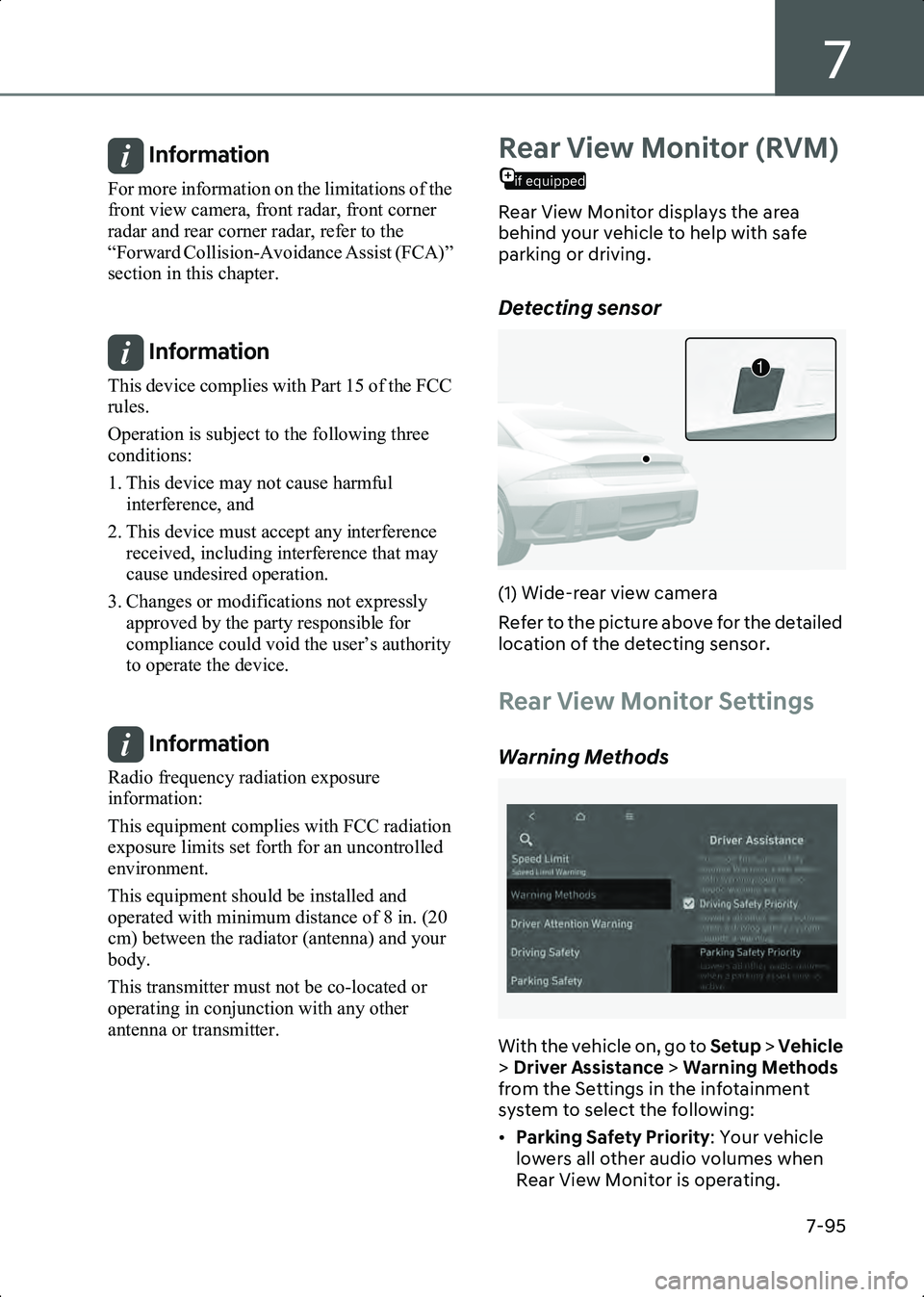
Detecting sensor
B7005801(1) Wide-rear view camera
Refer to the picture above for the detailed
location of the detecting sensor.
Rear View Monitor Settings
Warning Methods
B7005901
With the vehicle on, go to Setup > Vehicle
> Driver Assistance > Warning Methods
from the Settings in the infotainment
system to select the following:
• Parking Safety Priority : Your vehicle
lowers all other audio volumes when
Rear View Monitor is operating.
1
Hyundai_CE_en_US.book Page 95
Page 442 of 582
Driver Assistance System
7-98
Rear View Monitor
Malfunction and Limitations
Rear View Monitor malfunction
When Rear View Monitor is not working
properly, or the screen flickers, or the
camera image does not display properly,
have the vehicle inspected by an
authorized HYUNDAI dealer.
WARNING • The rear view camera does not cover the complete area behind the vehicle.
The driver should always check the rear
area directly through the inside
rearview mirror and outer side view
mirror before parking or backing up.
• The image shown on the screen may differ from the actual distance of the
object. Make sure to directly check the
vehicle's surroundings for safety.
• Always keep the rear view camera lens clean. If the lens is covered with foreign
material, it may adversely affect
camera performance and Rear View
Monitor may not operate properly.
However, do not use chemical solvents
such as strong detergents containing
high alkaline or volatile organic
solvents (gasoline, acetone, etc.). This
may damage the camera lens.
Surround View Monitor
if equipped
(SVM)
Surround View Monitor uses the wide
view cameras and displays images
around your vehicle through the
infotainment system screen to help with
safe parking or driving.
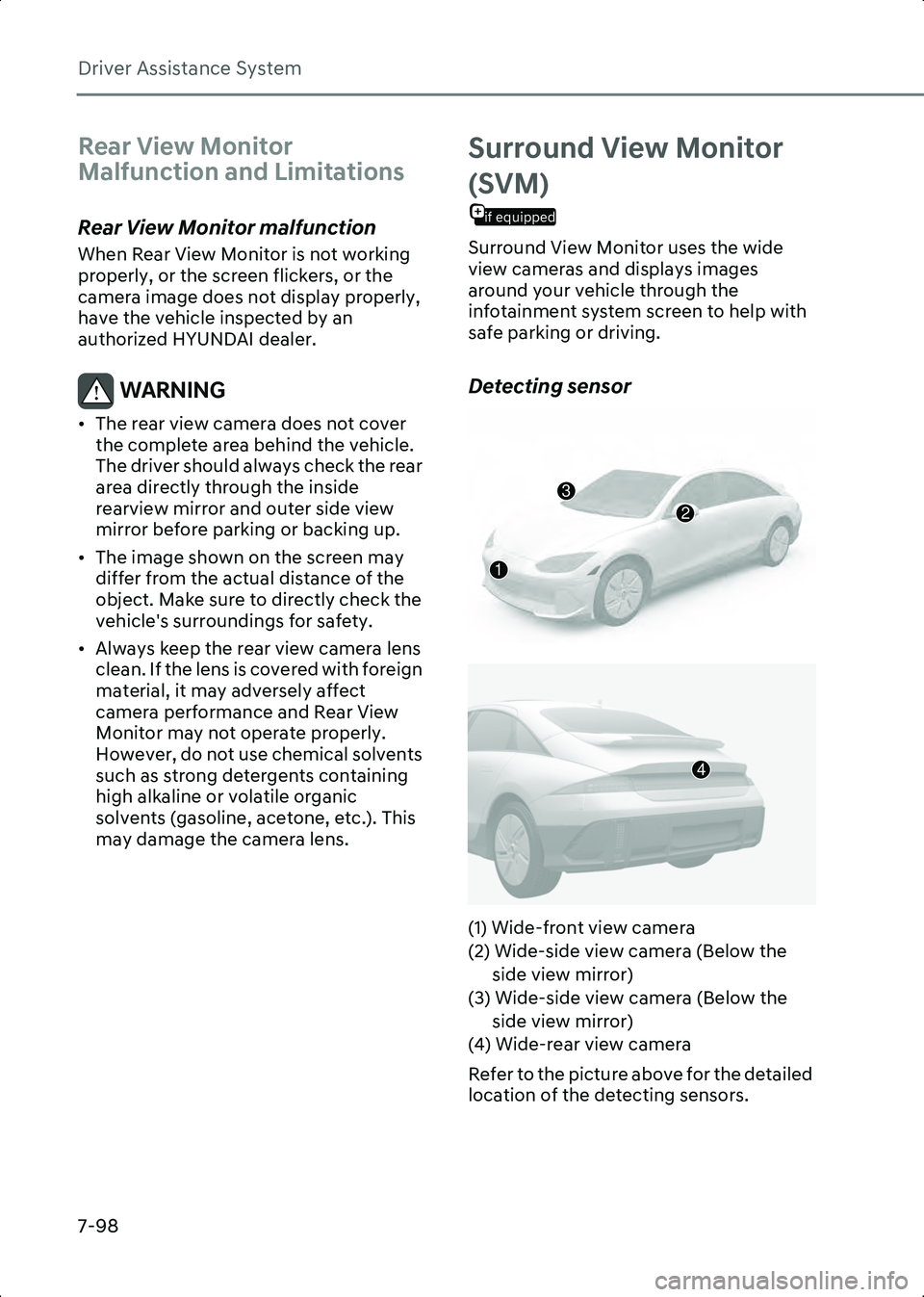
Detecting sensor
B7006201
B7006202
(1) Wide-front view camera
(2) Wide-side view camera (Below the side view mirror)
(3) Wide-side view camera (Below the side view mirror)
(4) Wide-rear view camera
Refer to the picture above for the detailed
location of the detecting sensors.
2
3
1
4
Hyundai_CE_en_US.book Page 98
Page 447 of 582
7
7-103
Rear Cross-Traffic
Collision-Avoidance
Assist (RCCA)
Rear Cross-Traffic Collision-Avoidance
Assist detects vehicles approaching from
the rear left or right while your vehicle is
reversing and warns you of a possible
collision with a warning message and a
warning sound. Also, Rear Cross-Traffic
Collision-Avoidance Assist may assist
with braking your vehicle to help avoid a
collision.
B7006601
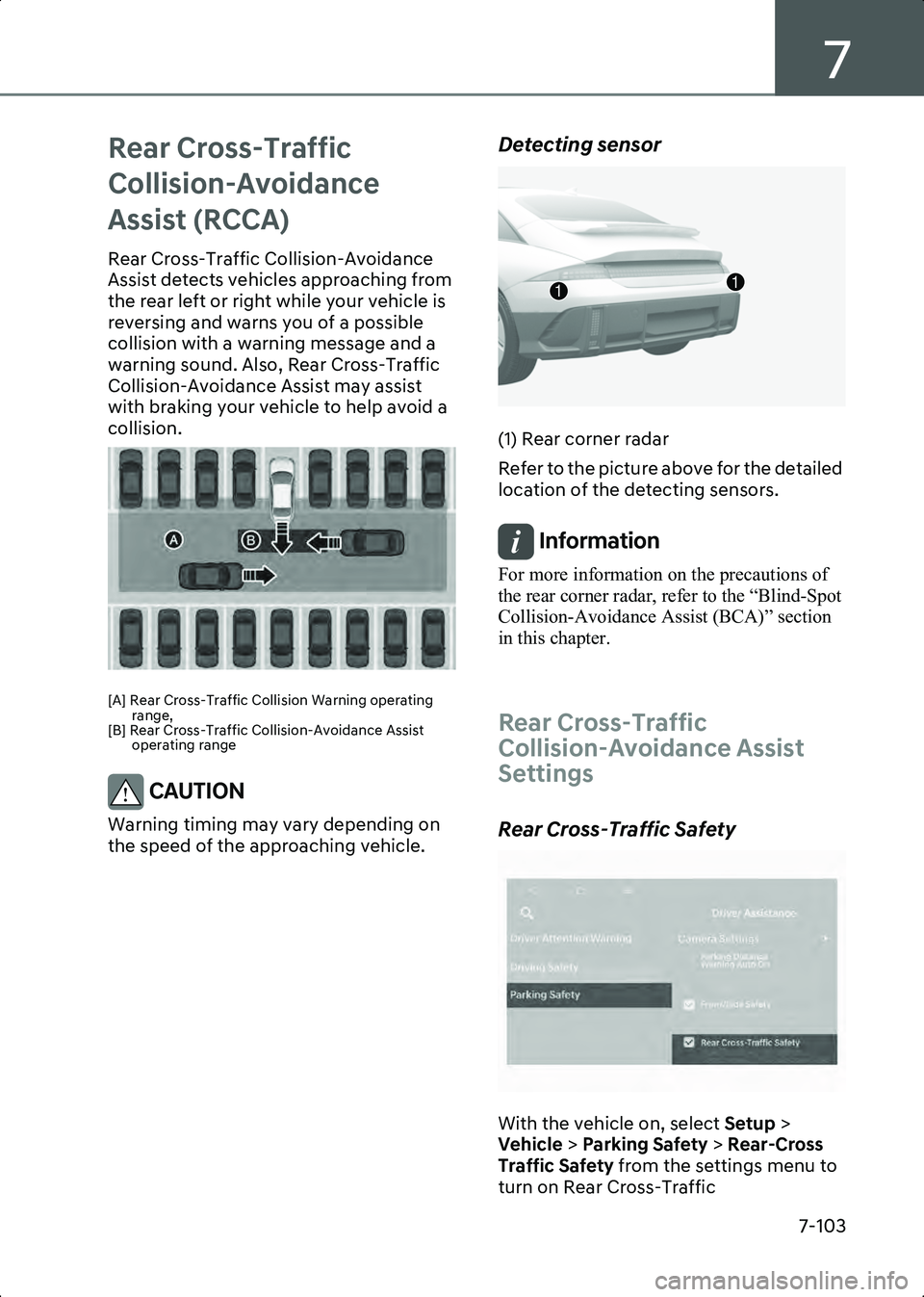
[A] Rear Cross-Traffic Collision Warning operating range,
[B] Rear Cross-Traffic Collision-Avoidance Assist operating range
CAUTION Warning timing may vary depending on
the speed of the approaching vehicle.
Detecting sensor
B7006602
(1) Rear corner radar
Refer to the picture above for the detailed
location of the detecting sensors.
Information For more information on the precautions of
the rear corner radar, refer to the “Blind-Spot
Collision-Avoidance Assist (BCA)” section
in this chapter.
Rear Cross-Traffic
Collision-Avoidance Assist
Settings
Rear Cross-Traffic Safety
B7006701
With the vehicle on, select Setup >
Vehicle > Parking Safety > Rear-Cross
Traffic Safety from the settings menu to
turn on Rear Cross-Traffic
11
Hyundai_CE_en_US.book Page 103
Page 451 of 582
7
7-107
CAUTION The brake control may not operate
properly depending on the status of ESC
(Electronic Stability Control).
There will only be a warning when:
• The ESC (Electronic Stability Control) warning light is on
• ESC (Electronic Stability Control) is engaged in a different function
Information If braking is assisted by Rear Cross-Traffic
Collision-Avoidance Assist, the driver must
immediately depress the brake pedal and
check vehicle surroundings.
• Brake control will end when the driver depresses the brake pedal with sufficient
power.
• After shifting the gear to R (Reverse), braking control will operate once for left
and right vehicle approach.
Rear Cross-Traffic
Collision-Avoidance Assist
Malfunction and Limitations
Rear Cross-Traffic
Collision-Avoidance Assist
malfunction
B7006901
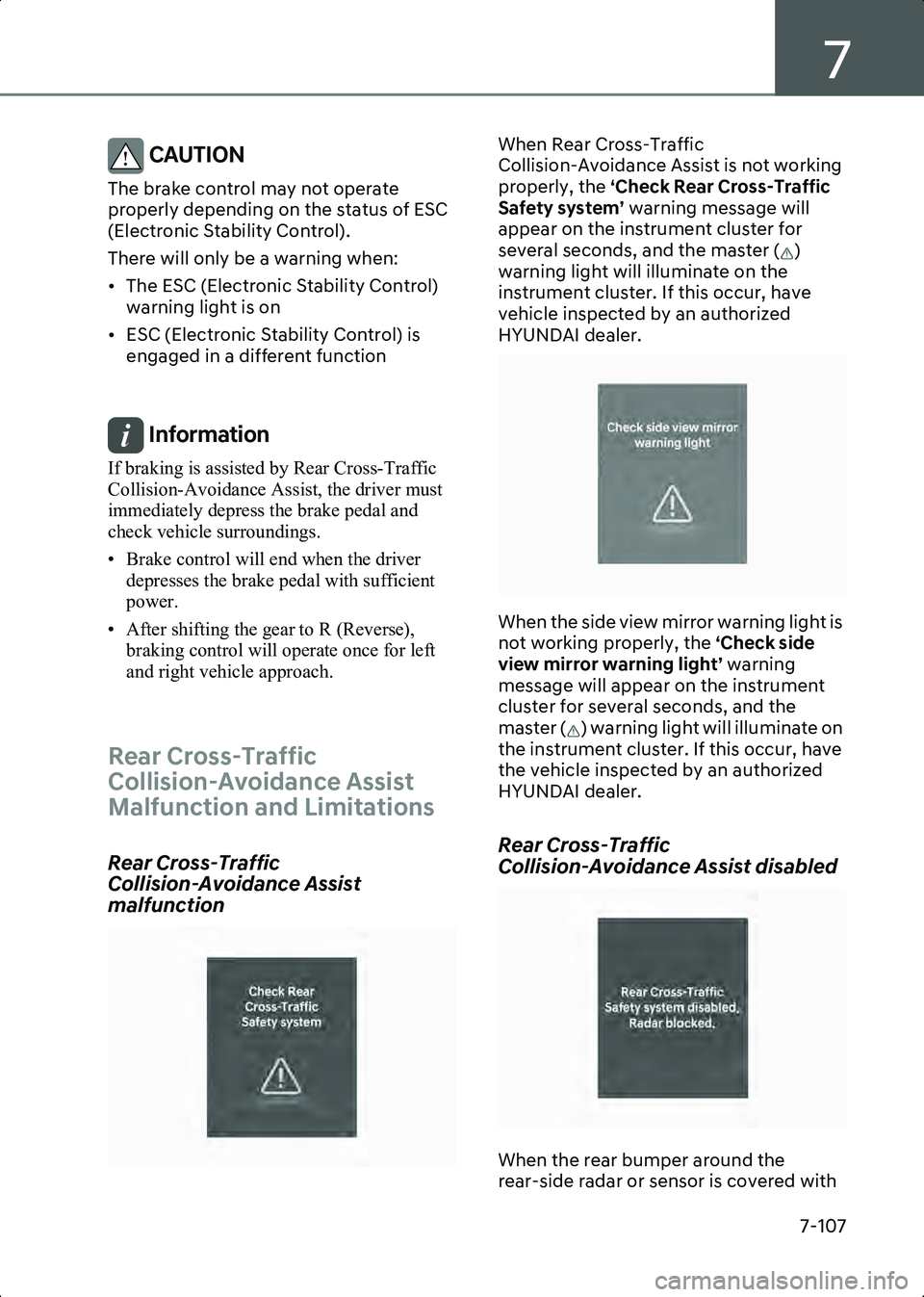
When Rear Cross-Traffic
Collision-Avoidance Assist is not working
properly, the ‘Check Rear Cross-Traffic
Safety system’ warning message will
appear on the instrument cluster for
several seconds, and the master ( )
warning light will illuminate on the
instrument cluster. If this occur, have
vehicle inspected by an authorized
HYUNDAI dealer.
B7001602
When the side view mirror warning light is
not working properly, the ‘Check side
view mirror warning light’ warning
message will appear on the instrument
cluster for several seconds, and the
master ( ) warning light will illuminate on
the instrument cluster. If this occur, have
the vehicle inspected by an authorized
HYUNDAI dealer.
Rear Cross-Traffic
Collision-Avoidance Assist disabled
B7006903
When the rear bumper around the
rear-side radar or sensor is covered with
Hyundai_CE_en_US.book Page 107
Page 454 of 582
Driver Assistance System
7-110
occurs, the function may unnecessarily
warn the driver and control the brake.
Always check your surroundings while
backing up.
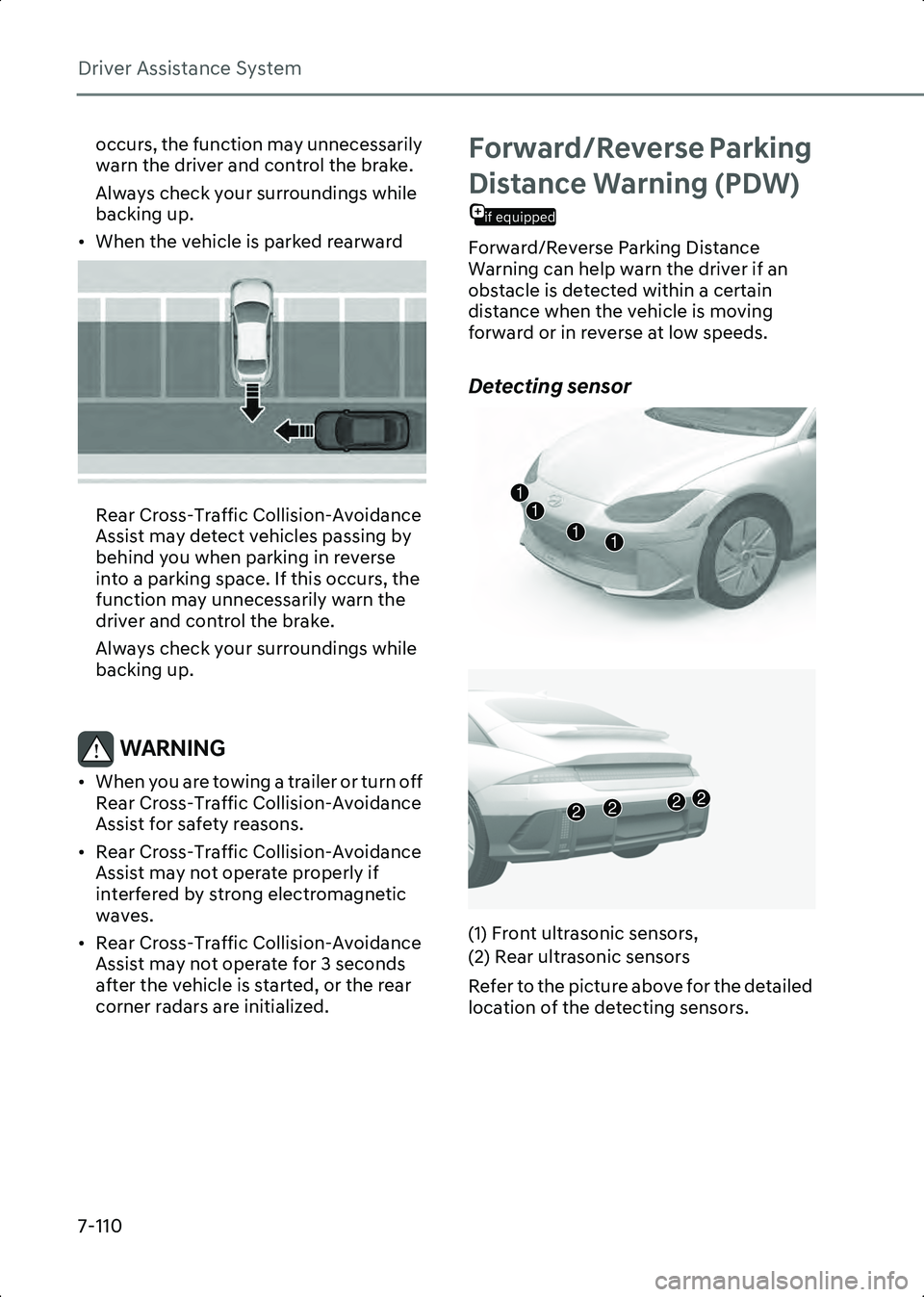
• When the vehicle is parked rearward
B7006909
Rear Cross-Traffic Collision-Avoidance
Assist may detect vehicles passing by
behind you when parking in reverse
into a parking space. If this occurs, the
function may unnecessarily warn the
driver and control the brake.
Always check your surroundings while
backing up.
WARNING • When you are towing a trailer or turn off Rear Cross-Traffic Collision-Avoidance
Assist for safety reasons.
• Rear Cross-Traffic Collision-Avoidance Assist may not operate properly if
interfered by strong electromagnetic
waves.
• Rear Cross-Traffic Collision-Avoidance Assist may not operate for 3 seconds
after the vehicle is started, or the rear
corner radars are initialized.
Forward/Reverse Parking
if equipped
Distance Warning (PDW)
Forward/Reverse Parking Distance
Warning can help warn the driver if an
obstacle is detected within a certain
distance when the vehicle is moving
forward or in reverse at low speeds.
Detecting sensor
B7007001
B7007002
(1) Front ultrasonic sensors,
(2) Rear ultrasonic sensors
Refer to the picture above for the detailed
location of the detecting sensors.
1111
2222
Hyundai_CE_en_US.book Page 110
Page 456 of 582
Driver Assistance System
7-112
from the infotainment system settings
menu.)
• The gear is shifted to R (only front corner warning is on)
Information • Forward Parking Distance Warning will operate only when the vehicle’s forward
speed is below 6 mph (10 km/h).
• Forward Parking Distance Warning is deactivated if the vehicle speed reaches
above 18 mph (30 km/h). It will not
reactivate although the vehicle speed drops
below 6 mph (10 km/h).
(Only when Setup > Vehicle > Driver
Assistance > Parking Safety > Parking
Distance Warning Auto On is not selected
from the infotainment system settings menu.)
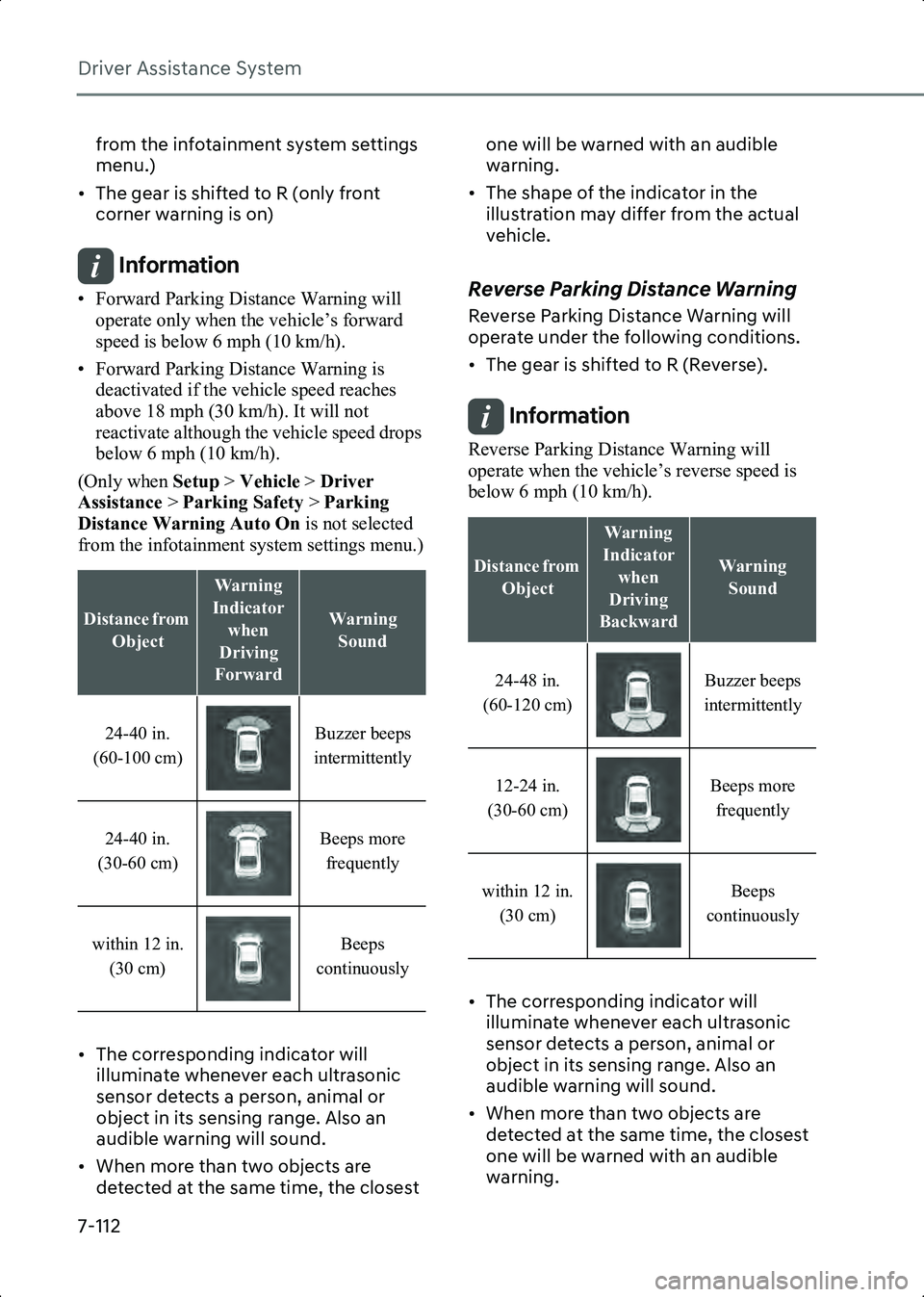
• The corresponding indicator will illuminate whenever each ultrasonic
sensor detects a person, animal or
object in its sensing range. Also an
audible warning will sound.
• When more than two objects are detected at the same time, the closest one will be warned with an audible
warning.
• The shape of the indicator in the illustration may differ from the actual
vehicle.Reverse Parking Distance Warning
Reverse Parking Distance Warning will
operate under the following conditions.
• The gear is shifted to R (Reverse).
Information Reverse Parking Distance Warning will
operate when the vehicle’s reverse speed is
below 6 mph (10 km/h).
• The corresponding indicator will illuminate whenever each ultrasonic
sensor detects a person, animal or
object in its sensing range. Also an
audible warning will sound.
• When more than two objects are detected at the same time, the closest
one will be warned with an audible
warning.
Distance from
Object
Warning
Indicator when
Driving
Forward
Warning Sound
24-40 in.
(60-100 cm) Buzzer beeps
intermittently
24-40 in.
(30-60 cm) Beeps more
frequently
within 12 in. (30 cm) Beeps
continuously
Distance from Object
Warning
Indicator when
Driving
Backward
Warning Sound
24-48 in.
(60-120 cm) Buzzer beeps
intermittently
12-24 in.
(30-60 cm) Beeps more
frequently
within 12 in. (30 cm) Beeps
continuously
Hyundai_CE_en_US.book Page 112
Page 457 of 582
7
7-113
• The shape of the indicator in the illustration may differ from the actual
vehicle.
Forward/Reverse Parking
Distance Warning
Malfunction and Limitations
Parking Distance Warning
malfunction
After starting the vehicle, a beep will
sound when the gear is shifted to R
(Reverse) to indicate Parking Distance
Warning is operating properly.
However, if one or more of the following
occurs, first check whether the ultrasonic
sensor is damaged or blocked with
foreign material. If it still does not work
properly, have the vehicle inspected by
an authorized HYUNDAI dealer.
• The audible warning does not sound.
• The buzzer sounds intermittently.
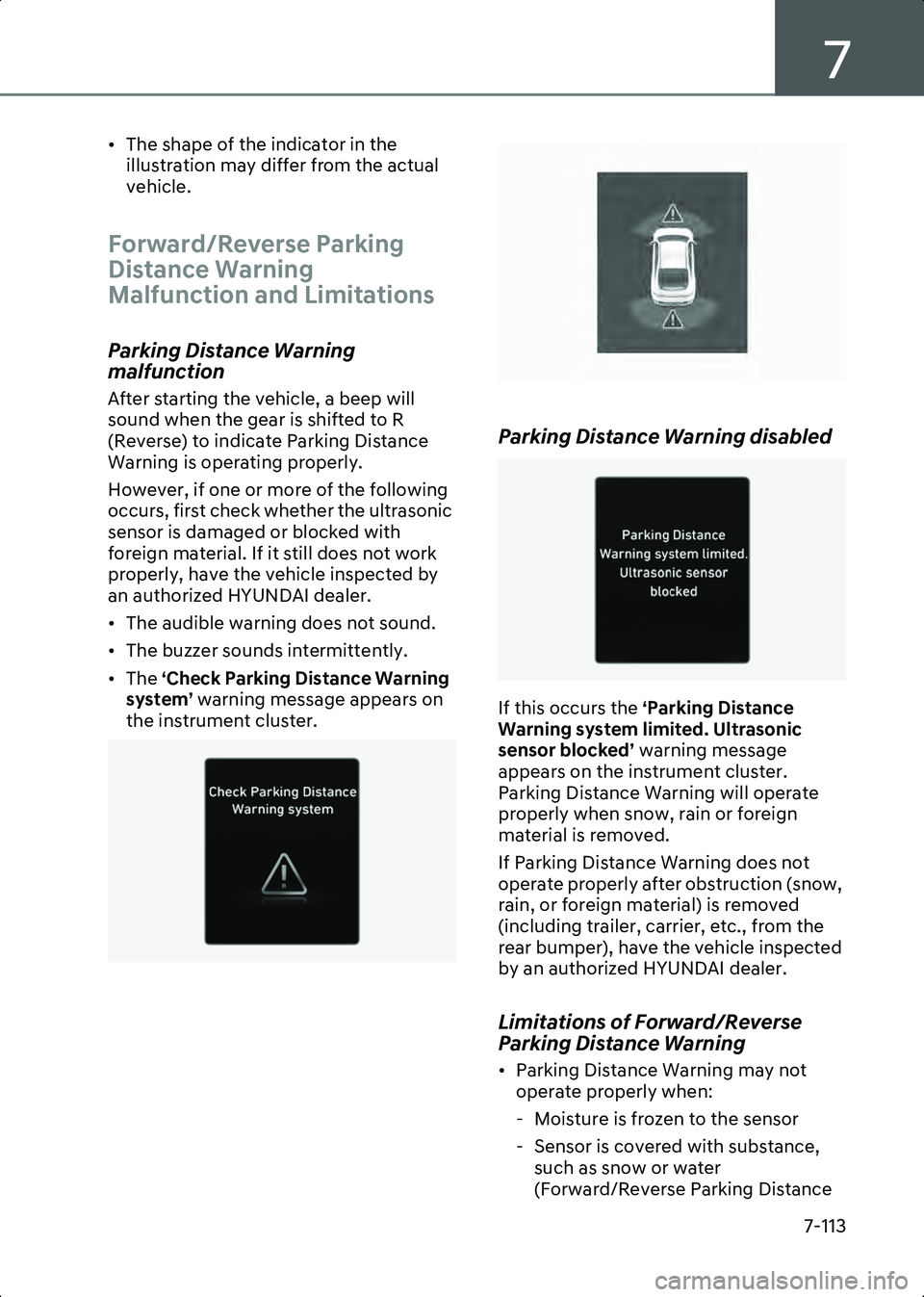
• The ‘Check Parking Distance Warning
system’ warning message appears on
the instrument cluster.
B0377EU01 B7007302
Parking Distance Warning disabled
B0377EU03
If this occurs the
‘Parking Distance
Warning system limited. Ultrasonic
sensor blocked’ warning message
appears on the instrument cluster.
Parking Distance Warning will operate
properly when snow, rain or foreign
material is removed.
If Parking Distance Warning does not
operate properly after obstruction (snow,
rain, or foreign material) is removed
(including trailer, carrier, etc., from the
rear bumper), have the vehicle inspected
by an authorized HYUNDAI dealer.
Limitations of Forward/Reverse
Parking Distance Warning
• Parking Distance Warning may not operate properly when:
- Moisture is frozen to the sensor
- Sensor is covered with substance, such as snow or water
(Forward/Reverse Parking Distance
Hyundai_CE_en_US.book Page 113
Page 458 of 582
Driver Assistance System
7-114
Warning will operate properly when
such substance is removed.)
- The weather is extremely hot or cold
- The sensor or sensor assembly is disassembled
- The surface of the sensor is pressed hard or hit with a hard object
- The surface of the sensor is scratched with a sharp object
- The sensors or its surrounding area is directly sprayed with high pressure
washer
• Parking Distance Warning may malfunction when:
- Heavy rain or water spray is present
- Water flows on the surface of the sensor
- Affected by another vehicle’s sensors
- The sensor is covered with snow or ice
- Driving on uneven road, gravel roads or bushes
- Objects that generate ultrasonic waves are near the sensor
- License plate is installed in a different spot from the original location
- The vehicle bumper height or ultrasonic sensor installation has
been modified
- Attaching equipment or accessories next to the ultrasonic sensors
• The following objects may not be detected:
- Sharp or slim objects, such as ropes, chains or small poles.
- Narrow objects, such as corners of a square column
- Objects, which tend to absorb sensor frequency, such as clothes, spongy
material or snow.
- Objects smaller than 100 cm (40 in.) in length and narrower than 6 in. (14
cm) in diameter. - Pedestrians, animals or objects that
are very close to the ultrasonic
sensors
WARNING • Parking Distance Warning is a supplemental function. The operation
of Parking Distance Warning can be
affected by several factors (including
environmental conditions). It is the
responsibility of the driver to always
check the front and rear views before
and while parking.
• Your new vehicle warranty does not cover any accidents or damage to the
vehicle due to the malfunction of
Parking Distance Warning.
• Pay close attention when driving near objects, pedestrians, and especially
children. Some objects may not be
detected by the ultrasonic sensors, due
to the objects distance, size or material,
all of which can limit the effectiveness
of the sensor.
• Parking Distance Warning does not warn you in the order of detection. It
varies depending on the speed of the
vehicle or the shape of a person,
animal, or object.
• If the Parking Distance Warning does not operate properly, you have the
vehicle inspected by an authorized
HYUNDAI dealer.
Hyundai_CE_en_US.book Page 114