AUX Hyundai Ioniq Hybrid 2017 Owner's Manual
[x] Cancel search | Manufacturer: HYUNDAI, Model Year: 2017, Model line: Ioniq Hybrid, Model: Hyundai Ioniq Hybrid 2017Pages: 553, PDF Size: 59.51 MB
Page 13 of 553
1-6
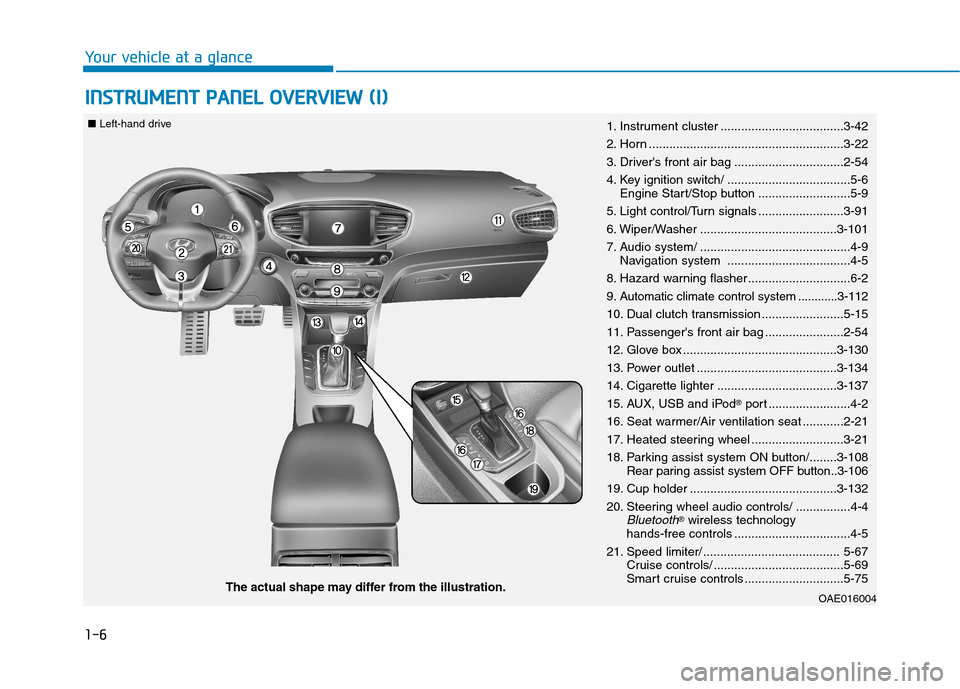
IINN SSTT RR UU MM EENN TT PP AA NN EELL OO VVEERR VV IIEE WW (( II))
Your vehicle at a glance
OAE016004The actual shape may differ from the illustration.
■
Left-hand drive
1. Instrument cluster ....................................3-42
2. Horn .........................................................3-22
3. Driver's front air bag ................................2-54
4. Key ignition switch/ ....................................5-6
Engine Start/Stop button ...........................5-9
5. Light control/Turn signals .........................3-91
6. Wiper/Washer ........................................3-101
7. Audio system/ ............................................4-9 Navigation system ....................................4-5
8. Hazard warning flasher ..............................6-2
9. Automatic climate control system ............3-112
10. Dual clutch transmission ........................5-15
11. Passenger's front air bag .......................2-54
12. Glove box .............................................3-130
13. Power outlet .........................................3-134
14. Cigarette lighter ...................................3-137
15. AUX, USB and iPod ®
port ........................4-2
16. Seat warmer/Air ventilation seat ............2-21
17. Heated steering wheel ...........................3-21
18. Parking assist system ON button/........3-108 Rear paring assist system OFF button..3-106
19. Cup holder ...........................................3-132
20. Steering wheel audio controls/ ................4-4
Bluetooth® wireless technology
hands-free controls ..................................4-5
21. Speed limiter/ ........................................ 5-67 Cruise controls/ ......................................5-69
Smart cruise controls .............................5-75
Page 14 of 553
1-7
Your vehicle at a glance
1
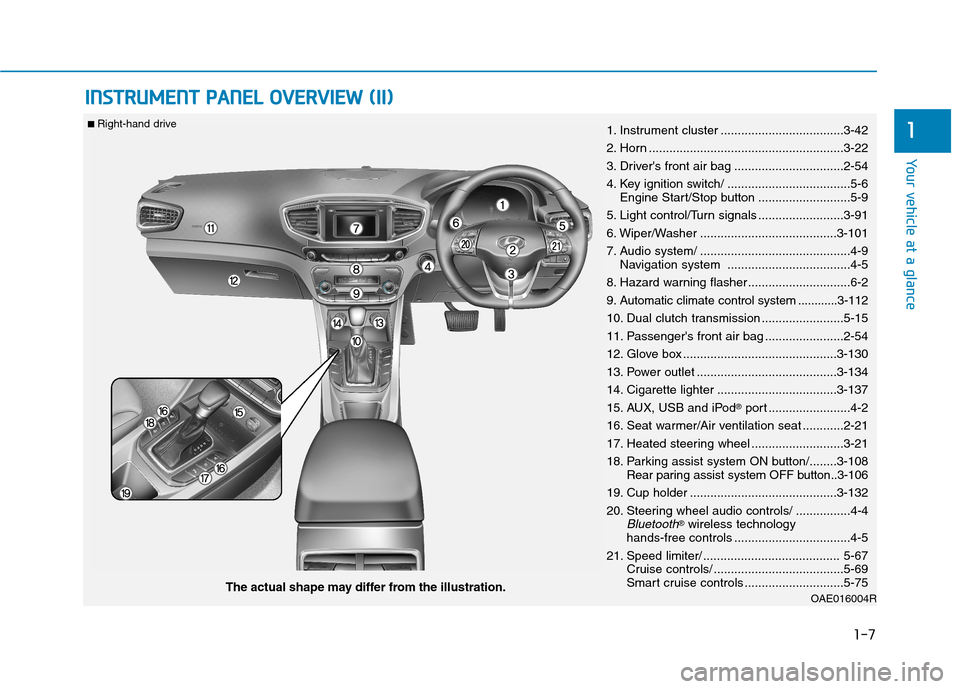
IINN SSTT RR UU MM EENN TT PP AA NN EELL OO VVEERR VV IIEE WW (( IIII))
OAE016004RThe actual shape may differ from the illustration.
■
Right-hand drive
1. Instrument cluster ....................................3-42
2. Horn .........................................................3-22
3. Driver's front air bag ................................2-54
4. Key ignition switch/ ....................................5-6
Engine Start/Stop button ...........................5-9
5. Light control/Turn signals .........................3-91
6. Wiper/Washer ........................................3-101
7. Audio system/ ............................................4-9 Navigation system ....................................4-5
8. Hazard warning flasher ..............................6-2
9. Automatic climate control system ............3-112
10. Dual clutch transmission ........................5-15
11. Passenger's front air bag .......................2-54
12. Glove box .............................................3-130
13. Power outlet .........................................3-134
14. Cigarette lighter ...................................3-137
15. AUX, USB and iPod ®
port ........................4-2
16. Seat warmer/Air ventilation seat ............2-21
17. Heated steering wheel ...........................3-21
18. Parking assist system ON button/........3-108 Rear paring assist system OFF button..3-106
19. Cup holder ...........................................3-132
20. Steering wheel audio controls/ ................4-4
Bluetooth® wireless technology
hands-free controls ..................................4-5
21. Speed limiter/ ........................................ 5-67 Cruise controls/ ......................................5-69
Smart cruise controls .............................5-75
Page 24 of 553
H9
The hybrid system contains many
electronic components. High volt-
age components, such as cables
and other parts, may emit electro-
magnetic waves. Even when the
electromagnetic cover blocks elec-
tromagnetic emissions, electro-
magnetic waves may have an effect
on electronic appliances. When
your vehicle is not for a long period
of time, the hybrid system will dis-
charge. You need to drive the vehi-
cle several times a month. We rec-
ommend driving at least for 1 hour
or 16 km. When the hybrid battery is
discharged, or when it is impossi-
ble to jump start the vehicle, con-
tact your HYUNDAI dealer.
Virtual Engine Sound System(VESS)
The Virtual Engine Sound System
generates engine sound for pedestri-
ans to hear vehicle sound becausethere is limited sound while motor
power is used.
What Does RegenerativeBraking Do?
It uses an electric motor when decel-
erating and braking and transforms
kinetic energy to electrical energy in
order to charge the high voltage bat-
tery.
Battery
The vehicle is composed of a high- voltage battery that drives the
motor and air-conditioner, and an
auxiliary battery (12 V) that drives
the lamps, wipers, and audio sys-tem.
The auxiliary battery is automati- cally charged when the vehicle is in
the ready ( ) mode.
NOTICE
When you start the hybrid
system with the shift lever in
P (Parking), the “ ” indica-tor illuminates on the instru-
ment cluster. The driver can
drive the vehicle, even whenthe engine is stopped.
When you leave the vehicle,
you should turn OFF the
hybrid system or locate the
shift lever in P (Park). When
you depress the accelerator
pedal by mistake, or when the
shift lever is not in P (Park),
the vehicle will abruptly move,
possibly resulting in serious
injury or death.
WARNING
Page 242 of 553
Multimedia System
Multimedia system .................................................4-2Aux, USB and iPod ®®
port ................................................4-2
Antenna ...............................................................................4-2
Steering wheel audio control .........................................4-3
Bluetooth®®Wireless Technology hands-free ..........4-4
Audio / Video / Navigation system (AVN) ..................4-5
How vehicle radio works .................................................4-5
Audio (Without touch screen) .............................4-8 Feature of your audio......................................................4-9Radio .................................................................................4-16
Media..................................................................................4-18
Phone .................................................................................4-32
Setup ..................................................................................4-40
Declaration of conformity ..................................4-42 CE for EU ..........................................................................4-42
NCC for Taiwan ................................................................4-43
4
Page 243 of 553
4-2
Multimedia System
Information
If you install an aftermarket HID headlamp, your vehicle’s audio and
electronic device may malfunction.
Prevent chemicals such as perfume, cosmetic oil, sun cream, hand clean-
er, and air freshener from contacting
the interior parts because they may
cause damage or discoloration.AUX, USB and iPod ®
port
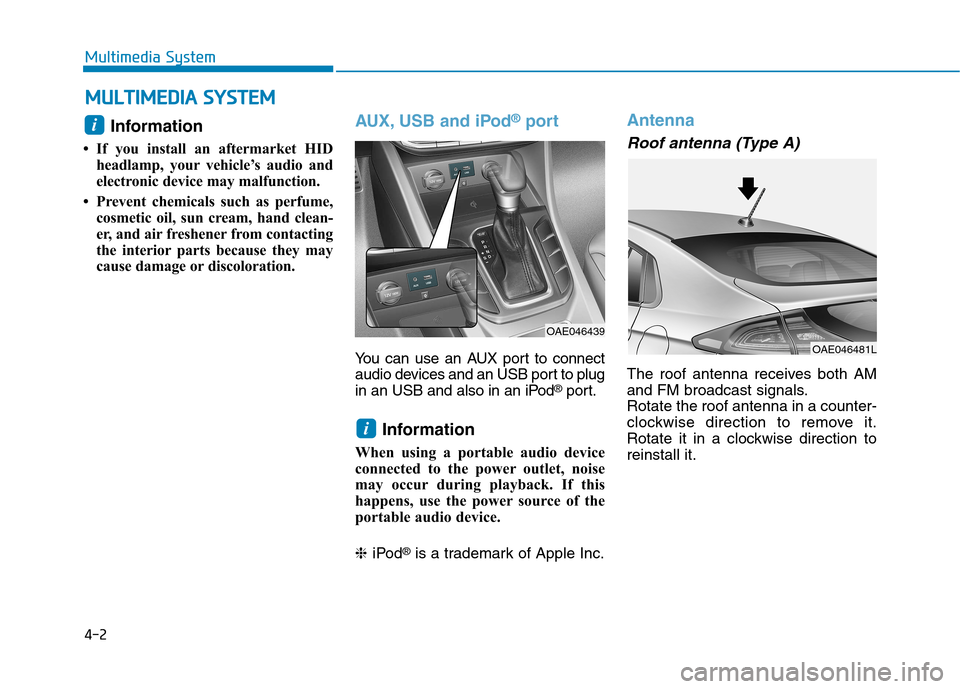
You can use an AUX port to connect
audio devices and an USB port to plug
in an USB and also in an iPod ®
port.
Information
When using a portable audio device
connected to the power outlet, noise
may occur during playback. If this
happens, use the power source of the
portable audio device. ❈ iPod ®
is a trademark of Apple Inc.
Antenna
Roof antenna (Type A)
The roof antenna receives both AM
and FM broadcast signals.Rotate the roof antenna in a counter-
clockwise direction to remove it.
Rotate it in a clockwise direction toreinstall it.
i
OAE046439
i
MM UULLTT IIMM EEDD IIAA SS YY SSTT EEMM
OAE046481L
Page 245 of 553
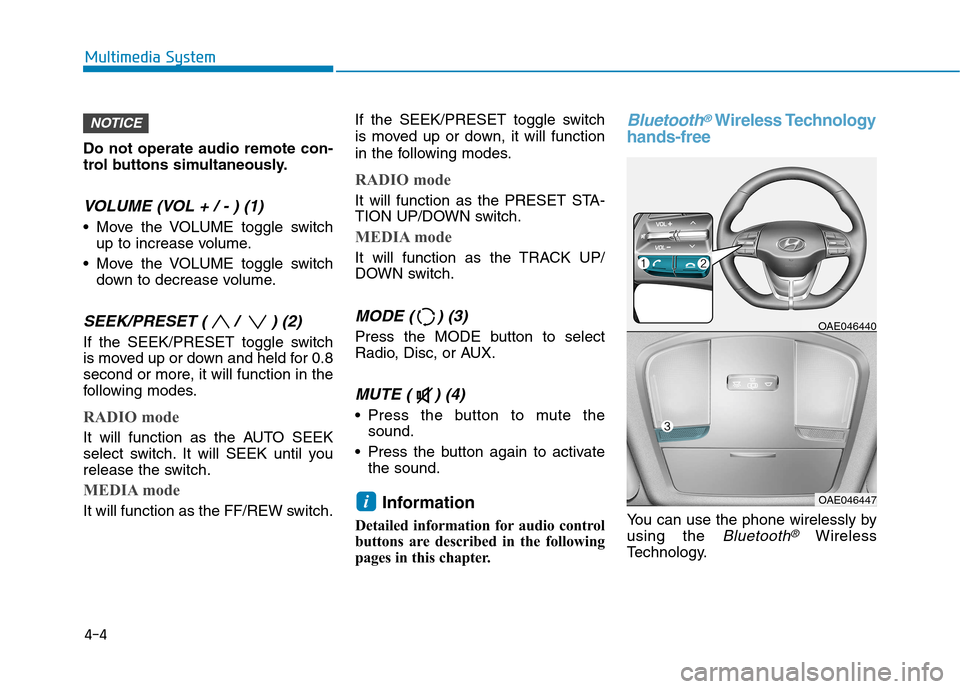
Do not operate audio remote con-
trol buttons simultaneously.
VOLUME (VOL + / - ) (1)
Move the VOLUME toggle switchup to increase volume.
Move the VOLUME toggle switch down to decrease volume.
SEEK/PRESET ( / ) (2)
If the SEEK/PRESET toggle switch
is moved up or down and held for 0.8
second or more, it will function in the
following modes.
RADIO mode
It will function as the AUTO SEEK
select switch. It will SEEK until you
release the switch.
MEDIA mode
It will function as the FF/REW switch. If the SEEK/PRESET toggle switch
is moved up or down, it will function
in the following modes.
RADIO mode
It will function as the PRESET STA-
TION UP/DOWN switch.
MEDIA mode
It will function as the TRACK UP/
DOWN switch.
MODE ( ) (3)
Press the MODE button to select
Radio, Disc, or AUX.
MUTE ( ) (4)
Press the button to mute the
sound.
Press the button again to activate the sound.
Information
Detailed information for audio control
buttons are described in the following
pages in this chapter.
Bluetooth®Wireless Technology
hands-free
You can use the phone wirelessly by using the
Bluetooth®Wireless
Technology.
OAE046440
OAE046447i
NOTICE
4-4
Multimedia System
Page 250 of 553
4-9
Multimedia System
4
Feature of Your Audio
Head unit
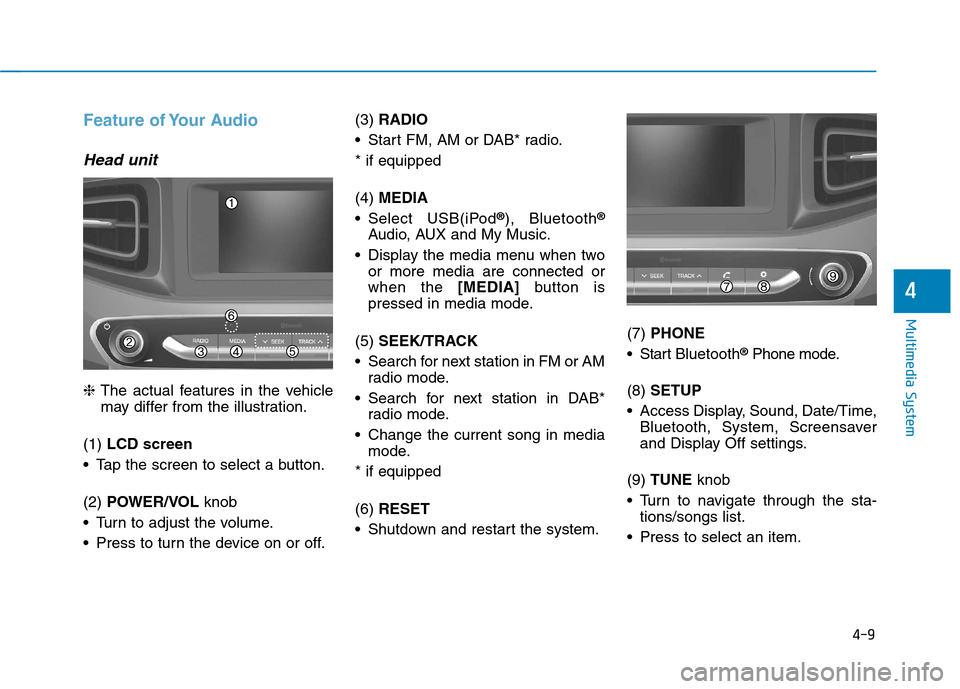
❈The actual features in the vehicle
may differ from the illustration.
(1) LCD screen
Tap the screen to select a button. (2) POWER/VOL knob
Turn to adjust the volume.
Press to turn the device on or off. (3)
RADIO
Start FM, AM or DAB* radio.* if equipped (4) MEDIA
Select USB(iPod ®
), Bluetooth ®
Audio, AUX and My Music.
Display the media menu when two or more media are connected or when the [MEDIA]button is
pressed in media mode.
(5) SEEK/TRACK
Search for next station in FM or AM radio mode.
Search for next station in DAB* radio mode.
Change the current song in media mode.
* if equipped (6) RESET
Shutdown and restart the system. (7)
PHONE
Start Bluetooth ®
Phone mode.
(8) SETUP
Access Display, Sound, Date/Time, Bluetooth, System, Screensaver
and Display Off settings.
(9) TUNE knob
Turn to navigate through the sta- tions/songs list.
Press to select an item.
Page 252 of 553
4-11
Multimedia System
4
Feature of Your Audio
Head unit
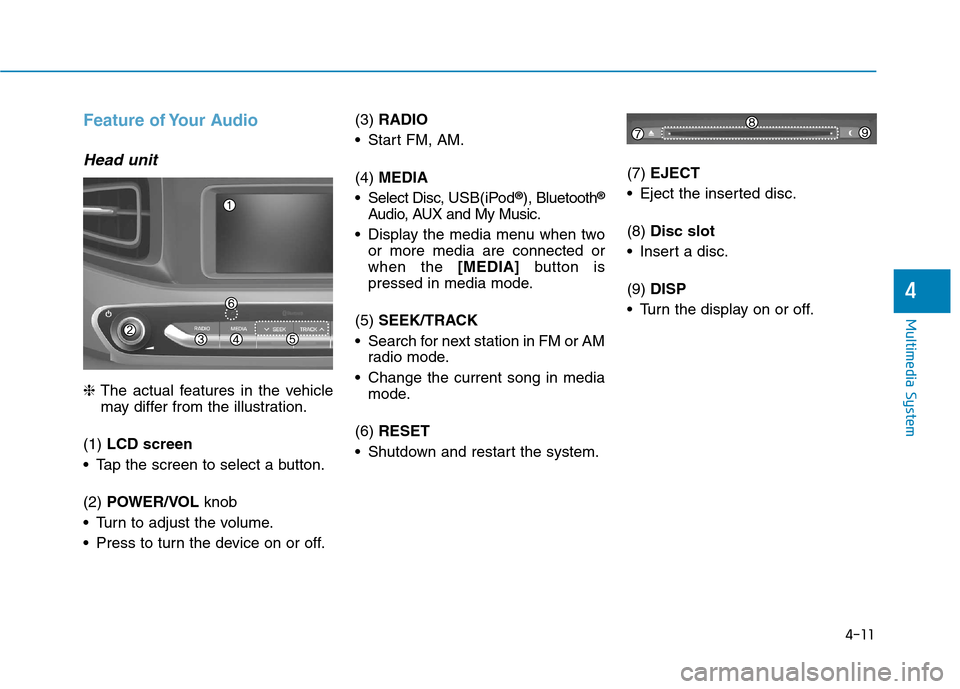
❈The actual features in the vehicle
may differ from the illustration.
(1) LCD screen
Tap the screen to select a button. (2) POWER/VOL knob
Turn to adjust the volume.
Press to turn the device on or off. (3)
RADIO
Start FM, AM. (4) MEDIA
Select Disc, USB(iPod®
), Bluetooth ®
Audio, AUX and My Music.
Display the media menu when two or more media are connected or when the [MEDIA]button is
pressed in media mode.
(5) SEEK/TRACK
Search for next station in FM or AM radio mode.
Change the current song in media mode.
(6) RESET
Shutdown and restart the system. (7)
EJECT
Eject the inserted disc. (8) Disc slot
Insert a disc.(9) DISP
Turn the display on or off.
Page 264 of 553
4-23
Multimedia System
4
(Continued)
Some USB devices are not recog-nized due to compatibility issues.
Do not touch the USB connections.
Connecting and disconnecting USB devices rapidly over a short period
of time can cause equipment failure.
Abnormal sounds may be audible when the USB device is disconnected.
Turn the audio off before connecting or disconnecting external USB
devices.
Recognition may take longer depending on the type, capacity or
file format of the external USB
device. This is not a product mal-
function.
Use of USB devices for purposes other than playing music files is pro-
hibited.
Image display and video playback are not supported.
(Continued)(Continued)
Use of USB accessories, including
charge and heat though the USB I/F,
can lead to reduced product per-
formance or malfunctions. Do not
use USB devices or accessories for
these purposes.
Use of aftermarket USB hubs and extension cables can result in the
vehicle’s audio system failing to rec-
ognize your USB device. Connect
the USB device directly to the multi-
media port of your vehicle.
When using high-capacity USB devices with logical drive divisions,
only files saved on the highest level
logical drive can be played.
If applications are loaded on a USB
drive, file playback may fail.
Some MP3 players, cell phones, dig- ital cameras, etc. (USB devices that
are not recognized as mobile stor-
age) may not operate normally
when connected.
USB charging may not be supported by some mobile devices.
(Continued)(Continued)
Operation is guaranteed only for
standard (Metal Cover Type) USB
Memory drives.
Operation of HDD, CF, SD and memory stick devices is not guaran-
teed.
DRM (Digital Rights Management) files cannot be played.
SD-type USB memory, CF-type USB memory, and other USB mem-
ory devices that require adapters
for connection are not supported.
Proper operation of USB HDDs or USB drives with connectors that
loosen due to vehicle vibrations is
not guaranteed. (iStick, etc.)
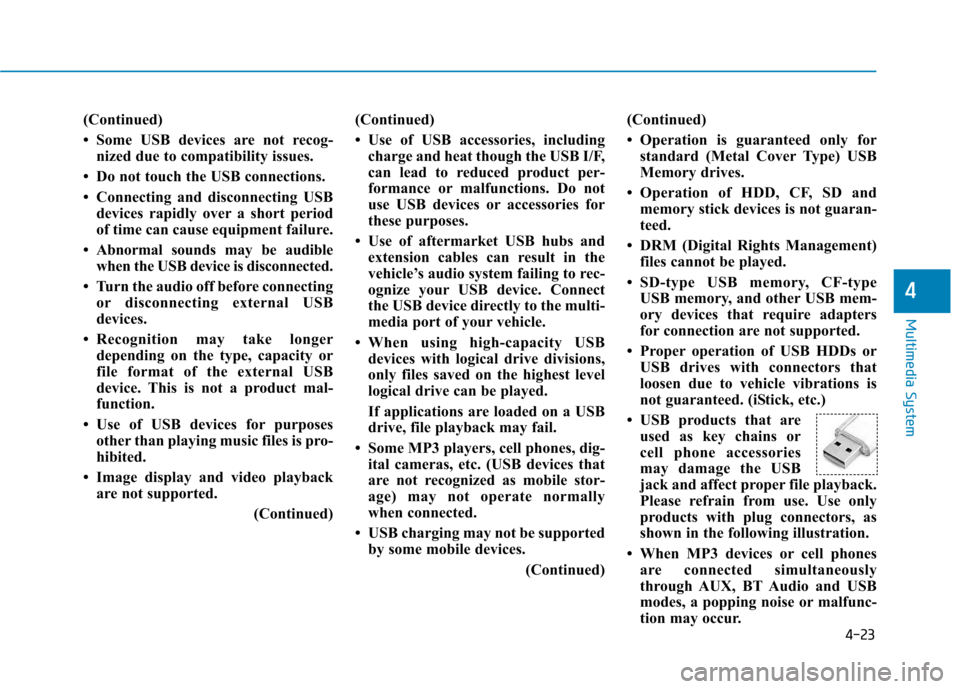
USB products that are used as key chains or
cell phone accessories
may damage the USB
jack and affect proper file playback.
Please refrain from use. Use only
products with plug connectors, as
shown in the following illustration.
When MP3 devices or cell phones are connected simultaneously
through AUX, BT Audio and USB
modes, a popping noise or malfunc-
tion may occur.
Page 267 of 553
4-26
Multimedia System
Information
- Using the iPod®
Devices
To use the audio system’s iPod ®
con-
trol function, use the dedicated
cable provided with your iPod ®
.
Connecting the iPod ®
to the vehicle
during play may result in a loud
noise that lasts about one to two sec-
onds. Connect the iPod ®
to the vehi-
cle after stopping or pausing play.
Connect the iPod ®
with the vehicle in
the ACC ON state to begin charging.
When connecting the iPod ®
cable,
be sure to fully push the cable into
the port.
When EQ effects are enabled simul- taneously on external devices, such
as iPod ®
s and the audio system, the
EQ effects may overlap, causing
sound quality deterioration or dis-
tortion. Deactivate the EQ function
for all external devices, if possible.
Noise may occur when your iPod ®
or the AUX port is connected.
Disconnect and store separately
when not in use.
(Continued)(Continued)
There may be noise if the audio sys-
tem is used with an iPod ®
or AUX
external device connected to the
power jack. In these cases, discon-
nect the iPod ®
or external device
from the power jack.
Play may be interrupted, or device malfunctions may occur depending
on the characteristics of your
iPod ®
/iPhone ®
.
Play may fail if your iPhone ®
is con-
nected through both Bluetooth ®
and
USB. In this case, select Dock con-
nector or Bluetooth ®
on your
iPhone ®
to change the sound output
settings.
If your software version does not support the communication proto-
col or your iPod ®
is not recognized
due to device failure, anomalies or
defects, iPod ®
mode cannot be used.
iPod ®
nano (5th generation) devices
may not be recognized if the battery
is low. Charge sufficiently before use.
(Continued)(Continued)
The search and song play order in
the iPod ®
device may be different
from the search order in the audio
system.
If the iPod ®
has failed due to an
internal defect, please reset the
iPod ®
(consult your iPod ®
manual).
Depending on the software version, the iPod ®
may fail to sync with the
system. If the media is removed or
disconnected before recognition, the
previous mode may not be restored
(iPad ®
cannot be charged).
Cables other than the 1-meter cable provided with iPod ®
/iPhone ®
prod-
ucts may not be recognized.
When other music apps are used on your iPod ®
, the system sync func-
tion may fail due to malfunction of
the iPod ®
application.i