cruise control Hyundai Ioniq Hybrid 2020 Owner's Manual - RHD (UK, Australia)
[x] Cancel search | Manufacturer: HYUNDAI, Model Year: 2020, Model line: Ioniq Hybrid, Model: Hyundai Ioniq Hybrid 2020Pages: 613, PDF Size: 58.64 MB
Page 73 of 613
1-5
Your vehicle at a glance
1
I IN
NS
ST
TR
RU
UM
ME
EN
NT
T
P
PA
AN
NE
EL
L
O
OV
VE
ER
RV
VI
IE
EW
W
-
-
H
HY
YB
BR
RI
ID
D
V
VE
EH
HI
IC
CL
LE
E
The actual shape may differ from the illustration.
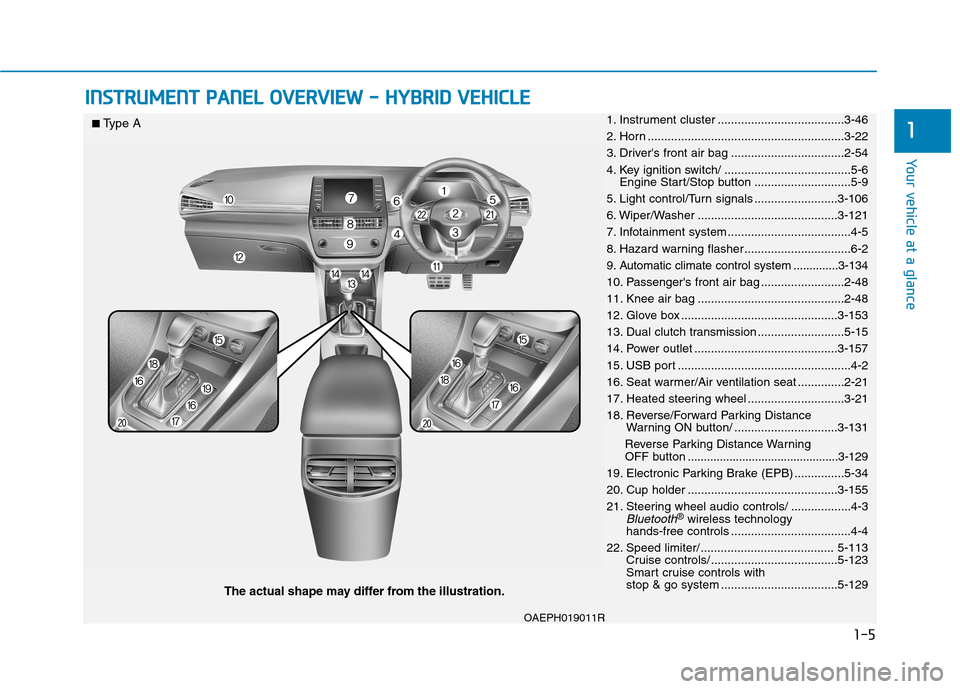
1. Instrument cluster ......................................3-46
2. Horn ...........................................................3-22
3. Driver's front air bag ..................................2-54
4. Key ignition switch/ ......................................5-6
Engine Start/Stop button .............................5-9
5. Light control/Turn signals .........................3-106
6. Wiper/Washer ..........................................3-121
7. Infotainment system .....................................4-5
8. Hazard warning flasher................................6-2
9. Automatic climate control system ..............3-134
10. Passenger's front air bag .........................2-48
11. Knee air bag ............................................2-48
12. Glove box ...............................................3-153
13. Dual clutch transmission ..........................5-15
14. Power outlet ...........................................3-157
15. USB port ....................................................4-2
16. Seat warmer/Air ventilation seat ..............2-21
17. Heated steering wheel .............................3-21
18. Reverse/Forward Parking Distance
Warning ON button/ ...............................3-131
Reverse Parking Distance Warning
OFF button...............................................3-129
19. Electronic Parking Brake (EPB) ...............5-34
20. Cup holder .............................................3-155
21. Steering wheel audio controls/ ..................4-3
Bluetooth®wireless technology
hands-free controls ....................................4-4
22. Speed limiter/ ........................................ 5-113
Cruise controls/ ......................................5-123
Smart cruise controls with
stop & go system ...................................5-129
■Type A
OAEPH019011R
Page 74 of 613
1-6
Your vehicle at a glance
The actual shape may differ from the illustration.
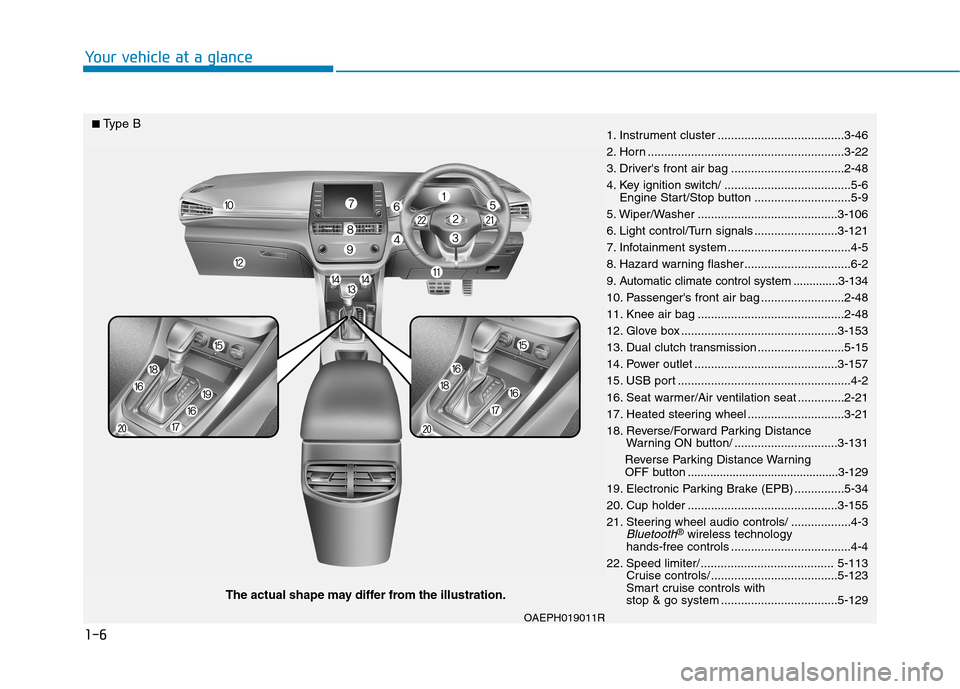
1. Instrument cluster ......................................3-46
2. Horn ...........................................................3-22
3. Driver's front air bag ..................................2-48
4. Key ignition switch/ ......................................5-6
Engine Start/Stop button .............................5-9
5. Wiper/Washer ..........................................3-106
6. Light control/Turn signals .........................3-121
7. Infotainment system .....................................4-5
8. Hazard warning flasher................................6-2
9. Automatic climate control system ..............3-134
10. Passenger's front air bag .........................2-48
11. Knee air bag ............................................2-48
12. Glove box ...............................................3-153
13. Dual clutch transmission ..........................5-15
14. Power outlet ...........................................3-157
15. USB port ....................................................4-2
16. Seat warmer/Air ventilation seat ..............2-21
17. Heated steering wheel .............................3-21
18. Reverse/Forward Parking Distance
Warning ON button/ ...............................3-131
Reverse Parking Distance Warning
OFF button...............................................3-129
19. Electronic Parking Brake (EPB) ...............5-34
20. Cup holder .............................................3-155
21. Steering wheel audio controls/ ..................4-3
Bluetooth®wireless technology
hands-free controls ....................................4-4
22. Speed limiter/ ........................................ 5-113
Cruise controls/ ......................................5-123
Smart cruise controls with
stop & go system ...................................5-129
■Type B
OAEPH019011R
Page 79 of 613
1-11
Your vehicle at a glance
1
I IN
NS
ST
TR
RU
UM
ME
EN
NT
T
P
PA
AN
NE
EL
L
O
OV
VE
ER
RV
VI
IE
EW
W
-
-
P
PL
LU
UG
G-
-I
IN
N
H
HY
YB
BR
RI
ID
D
V
VE
EH
HI
IC
CL
LE
E
OAEPH019004R
The actual shape may differ from the illustration.
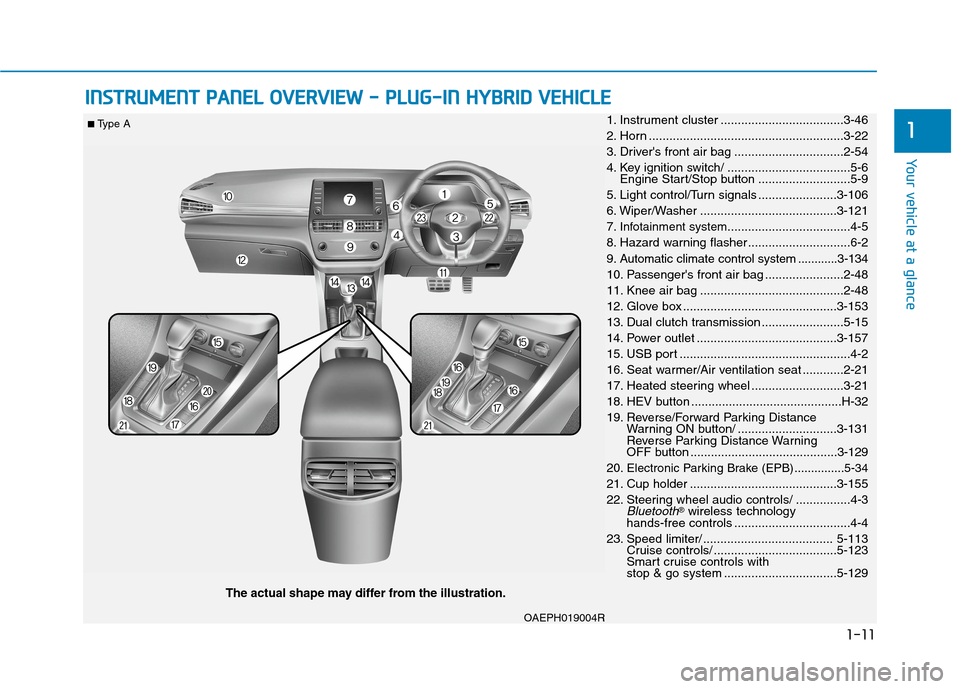
■ Type A1. Instrument cluster ....................................3-46
2. Horn .........................................................3-22
3. Driver's front air bag ................................2-54
4. Key ignition switch/ ....................................5-6
Engine Start/Stop button ...........................5-9
5. Light control/Turn signals .......................3-106
6. Wiper/Washer ........................................3-121
7.
Infotainment system....................................4-5
8. Hazard warning flasher ..............................6-2
9. Automatic climate control system ............3-134
10. Passenger's front air bag .......................2-48
11. Knee air bag ..........................................2-48
12. Glove box .............................................3-153
13. Dual clutch transmission ........................5-15
14. Power outlet .........................................3-157
15. USB port ..................................................4-2
16. Seat warmer/Air ventilation seat ............2-21
17. Heated steering wheel ...........................3-21
18. HEV button ............................................H-32
19. Reverse/Forward Parking Distance
Warning ON button/ .............................3-131
Reverse Parking Distance Warning
OFF button ...........................................3-129
20.
Electronic Parking Brake (EPB)...............5-34
21. Cup holder ...........................................3-155
22. Steering wheel audio controls/ ................4-3
Bluetooth®wireless technology
hands-free controls ..................................4-4
23. Speed limiter/ ...................................... 5-113
Cruise controls/ ....................................5-123
Smart cruise controls with
stop & go system .................................5-129
Page 80 of 613
1-12
Your vehicle at a glance
OAEPH019004R
The actual shape may differ from the illustration.
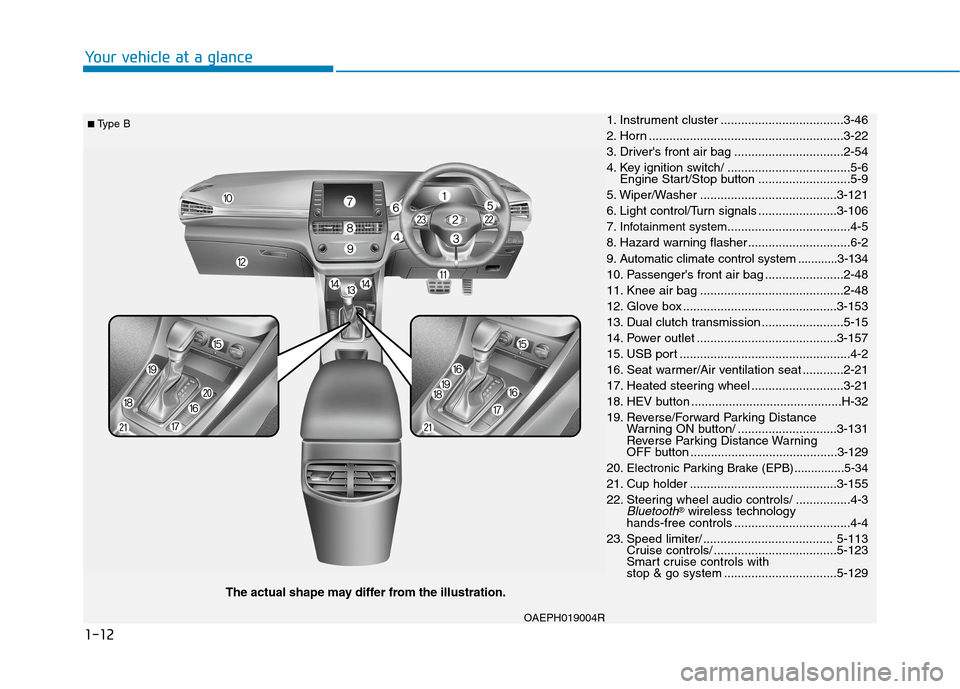
■ Type B1. Instrument cluster ....................................3-46
2. Horn .........................................................3-22
3. Driver's front air bag ................................2-54
4. Key ignition switch/ ....................................5-6
Engine Start/Stop button ...........................5-9
5. Wiper/Washer ........................................3-121
6. Light control/Turn signals .......................3-106
7.
Infotainment system....................................4-5
8. Hazard warning flasher ..............................6-2
9. Automatic climate control system ............3-134
10. Passenger's front air bag .......................2-48
11. Knee air bag ..........................................2-48
12. Glove box .............................................3-153
13. Dual clutch transmission ........................5-15
14. Power outlet .........................................3-157
15. USB port ..................................................4-2
16. Seat warmer/Air ventilation seat ............2-21
17. Heated steering wheel ...........................3-21
18. HEV button ............................................H-32
19. Reverse/Forward Parking Distance
Warning ON button/ .............................3-131
Reverse Parking Distance Warning
OFF button ...........................................3-129
20.
Electronic Parking Brake (EPB)...............5-34
21. Cup holder ...........................................3-155
22. Steering wheel audio controls/ ................4-3
Bluetooth®wireless technology
hands-free controls ..................................4-4
23. Speed limiter/ ...................................... 5-113
Cruise controls/ ....................................5-123
Smart cruise controls with
stop & go system .................................5-129
Page 210 of 613
3-63
Convenient features of your vehicle
3
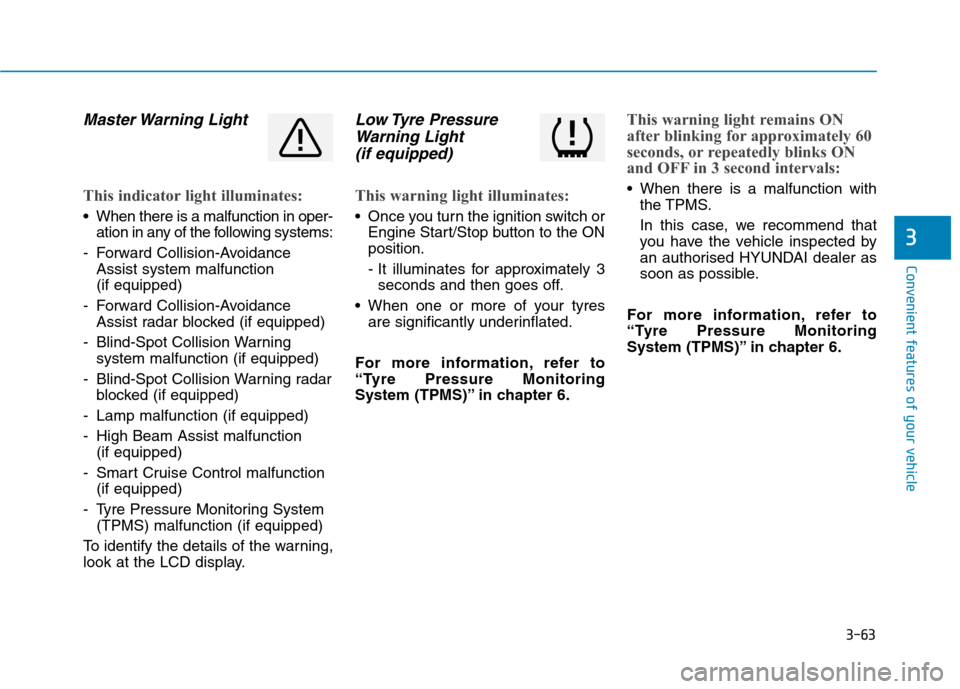
Master Warning Light
This indicator light illuminates:
When there is a malfunction in oper-
ation in any of the following systems:
- Forward Collision-Avoidance
Assist system malfunction
(if equipped)
- Forward Collision-Avoidance
Assist radar blocked (if equipped)
- Blind-Spot Collision Warning
system malfunction (if equipped)
- Blind-Spot Collision Warning radar
blocked (if equipped)
- Lamp malfunction (if equipped)
- High Beam Assist malfunction
(if equipped)
- Smart Cruise Control malfunction
(if equipped)
- Tyre Pressure Monitoring System
(TPMS) malfunction (if equipped)
To identify the details of the warning,
look at the LCD display.
Low Tyre Pressure
Warning Light
(if equipped)
This warning light illuminates:
Once you turn the ignition switch or
Engine Start/Stop button to the ON
position.
- It illuminates for approximately 3
seconds and then goes off.
When one or more of your tyres
are significantly underinflated.
For more information, refer to
“Tyre Pressure Monitoring
System (TPMS)” in chapter 6.
This warning light remains ON
after blinking for approximately 60
seconds, or repeatedly blinks ON
and OFF in 3 second intervals:
When there is a malfunction with
the TPMS.
In this case, we recommend that
you have the vehicle inspected by
an authorised HYUNDAI dealer as
soon as possible.
For more information, refer to
“Tyre Pressure Monitoring
System (TPMS)” in chapter 6.
Page 214 of 613
3-67
Convenient features of your vehicle
3
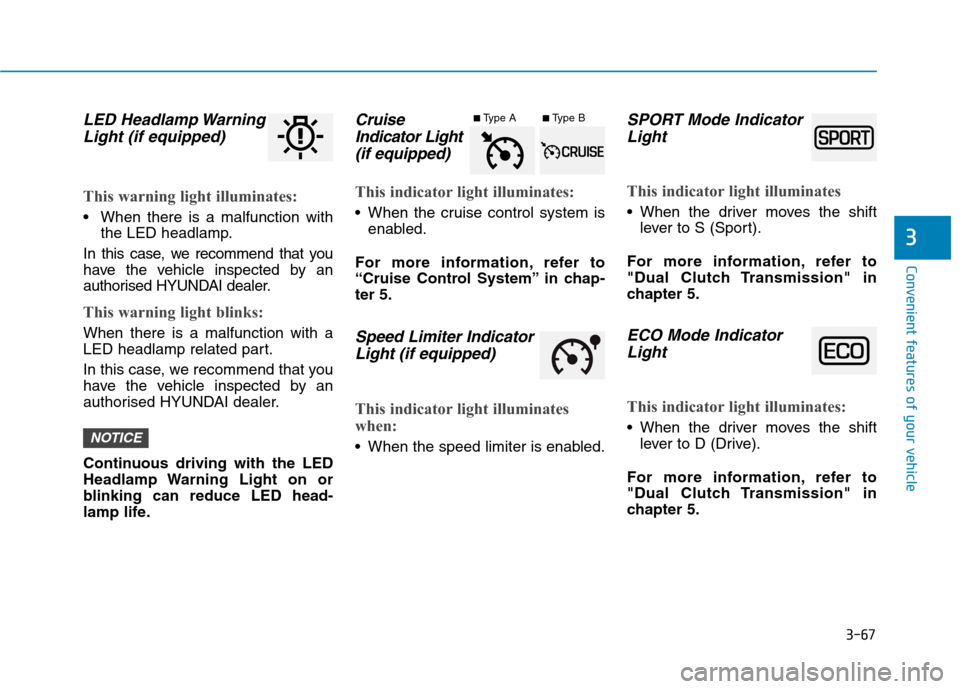
LED Headlamp Warning
Light (if equipped)
This warning light illuminates:
When there is a malfunction with
the LED headlamp.
In this case, we recommend that you
have the vehicle inspected by an
authorised HYUNDAI dealer.
This warning light blinks:
When there is a malfunction with a
LED headlamp related part.
In this case, we recommend that you
have the vehicle inspected by an
authorised HYUNDAI dealer.
Continuous driving with the LED
Headlamp Warning Light on or
blinking can reduce LED head-
lamp life.
Cruise
Indicator Light
(if equipped)
This indicator light illuminates:
When the cruise control system is
enabled.
For more information, refer to
“Cruise Control System” in chap-
ter 5.
Speed Limiter Indicator
Light (if equipped)
This indicator light illuminates
when:
When the speed limiter is enabled.
SPORT Mode Indicator
Light
This indicator light illuminates
When the driver moves the shift
lever to S (Sport).
For more information, refer to
"Dual Clutch Transmission" in
chapter 5.
ECO Mode Indicator
Light
This indicator light illuminates:
When the driver moves the shift
lever to D (Drive).
For more information, refer to
"Dual Clutch Transmission" in
chapter 5.NOTICE
■Type A■Type B
Page 230 of 613
3-83
Convenient features of your vehicle
3
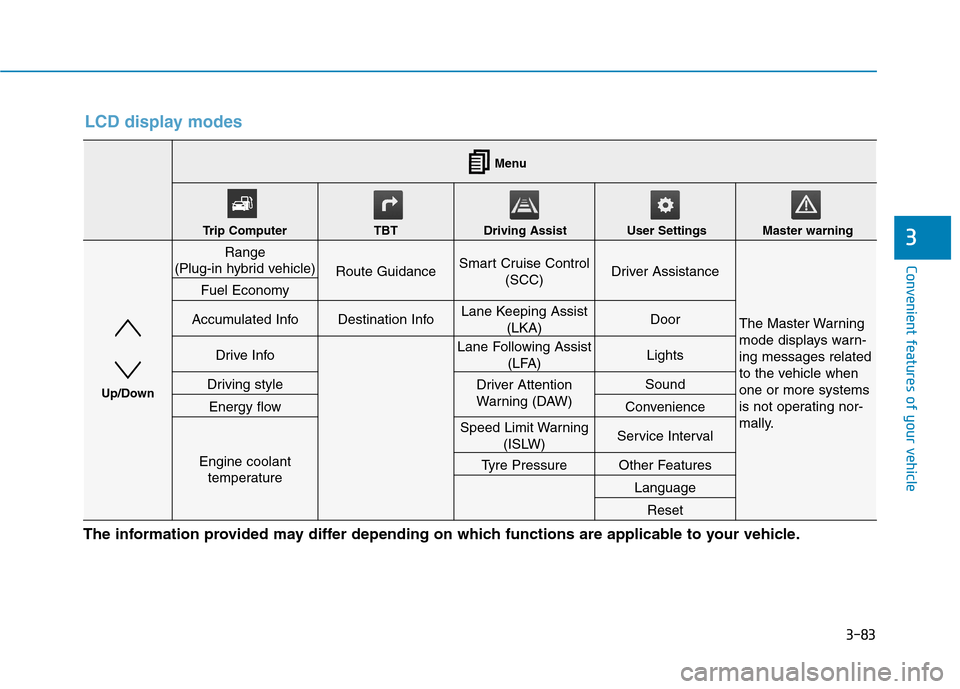
LCD display modes
The information provided may differ depending on which functions are applicable to your vehicle.
Range
(Plug-in hybrid vehicle)
Route GuidanceSmart Cruise Control
(SCC) Driver Assistance
The Master Warning
mode displays warn-
ing messages related
to the vehicle when
one or more systems
is not operating nor-
mally.
Fuel Economy
Accumulated InfoDestination InfoLane Keeping Assist
(LKA)Door
Drive InfoLane Following Assist
(LFA) Lights
Driving styleDriver Attention
Warning (DAW)Sound
Energy flowConvenience
Engine coolant
temperature
Speed Limit Warning
(ISLW)Service Interval
Tyre PressureOther Features
Language
Reset
Menu
Trip Computer TBT Driving Assist User Settings Master warning
Up/Down
Page 231 of 613
3-84
Convenient features of your vehicle
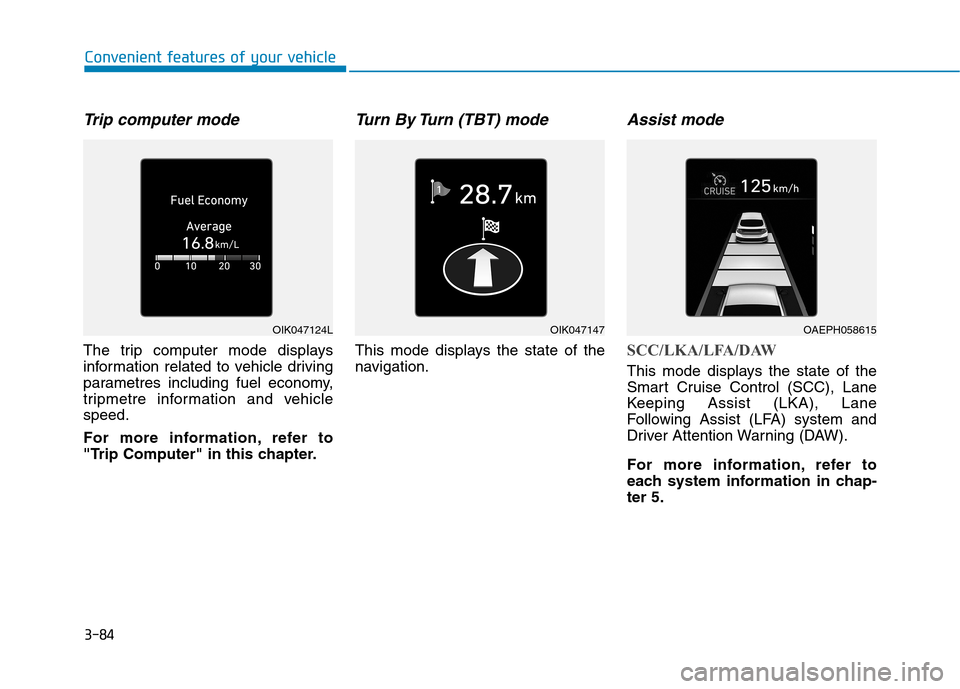
Trip computer mode
The trip computer mode displays
information related to vehicle driving
parametres including fuel economy,
tripmetre information and vehicle
speed.
For more information, refer to
"Trip Computer" in this chapter.
Turn By Turn (TBT) mode
This mode displays the state of the
navigation.
Assist mode
SCC/LKA/LFA/DAW
This mode displays the state of the
Smart Cruise Control (SCC), Lane
Keeping Assist (LKA), Lane
Following Assist (LFA) system and
Driver Attention Warning (DAW).
For more information, refer to
each system information in chap-
ter 5.
OIK047124LOIK047147OAEPH058615
Page 232 of 613
3-85
Convenient features of your vehicle
3
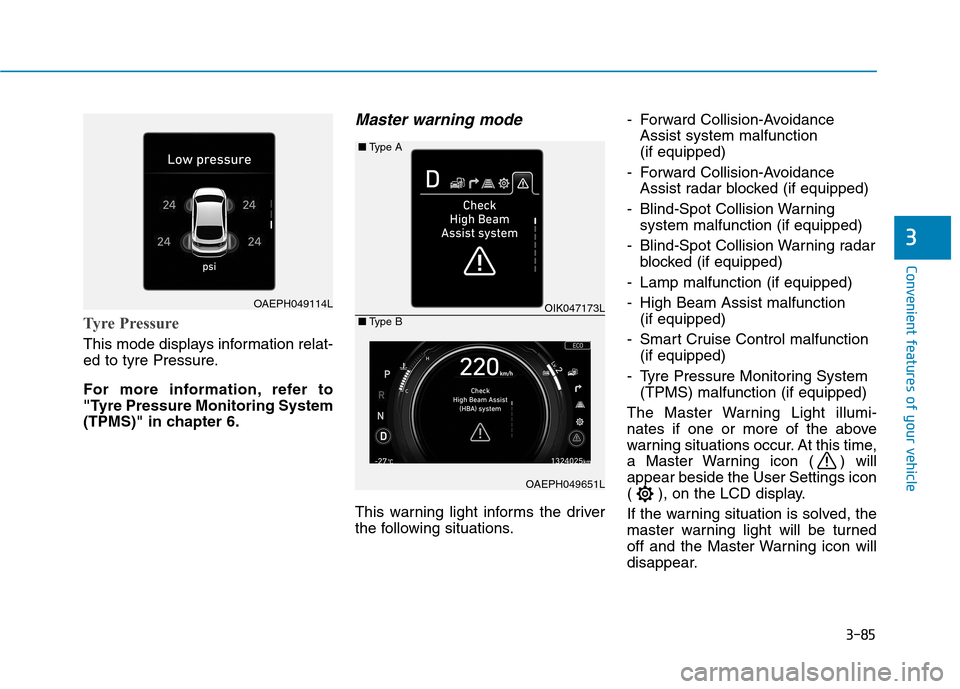
Tyre Pressure
This mode displays information relat-
ed to tyre Pressure.
For more information, refer to
"Tyre Pressure Monitoring System
(TPMS)" in chapter 6.
Master warning mode
This warning light informs the driver
the following situations.- Forward Collision-Avoidance
Assist system malfunction
(if equipped)
- Forward Collision-Avoidance
Assist radar blocked (if equipped)
- Blind-Spot Collision Warning
system malfunction (if equipped)
- Blind-Spot Collision Warning radar
blocked (if equipped)
- Lamp malfunction (if equipped)
- High Beam Assist malfunction
(if equipped)
- Smart Cruise Control malfunction
(if equipped)
- Tyre Pressure Monitoring System
(TPMS) malfunction (if equipped)
The Master Warning Light illumi-
nates if one or more of the above
warning situations occur. At this time,
a Master Warning icon ( ) will
appear beside the User Settings icon
( ), on the LCD display.
If the warning situation is solved, the
master warning light will be turned
off and the Master Warning icon will
disappear.
OAEPH049114LOIK047173L ■Type A
OAEPH049651L ■Type B
Page 234 of 613
3-87
Convenient features of your vehicle
3
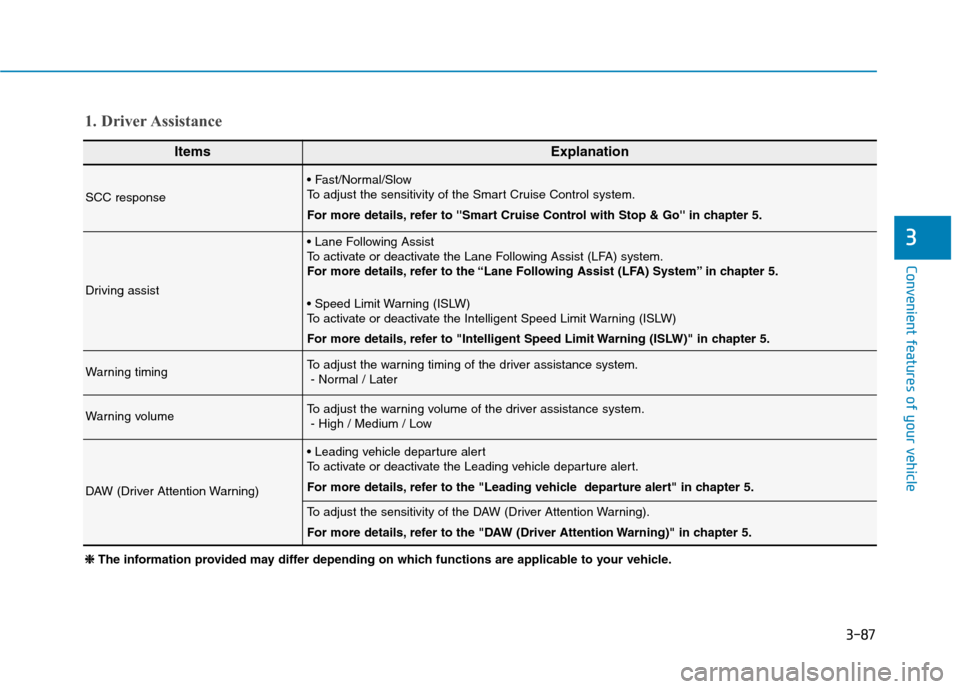
ItemsExplanation
SCC response
To adjust the sensitivity of the Smart Cruise Control system.
For more details, refer to ''Smart Cruise Control with Stop & Go'' in chapter 5.
Driving assist
To activate or deactivate the Lane Following Assist (LFA) system.
For more details, refer to the “Lane Following Assist (LFA) System” in chapter 5.
To activate or deactivate the Intelligent Speed Limit Warning (ISLW)
For more details, refer to "Intelligent Speed Limit Warning (ISLW)" in chapter 5.
Warning timingTo adjust the warning timing of the driver assistance system.
- Normal / Later
Warning volumeTo adjust the warning volume of the driver assistance system.
- High / Medium / Low
DAW (Driver Attention Warning)
To activate or deactivate the Leading vehicle departure alert.
For more details, refer to the "Leading vehicle departure alert" in chapter 5.
To adjust the sensitivity of the DAW (Driver Attention Warning).
For more details, refer to the "DAW (Driver Attention Warning)" in chapter 5.
1. Driver Assistance
❈ ❈
The information provided may differ depending on which functions are applicable to your vehicle.