ECO mode Hyundai Ioniq Plug-in Hybrid 2019 Owner's Manual - RHD (UK, Australia)
[x] Cancel search | Manufacturer: HYUNDAI, Model Year: 2019, Model line: Ioniq Plug-in Hybrid, Model: Hyundai Ioniq Plug-in Hybrid 2019Pages: 599, PDF Size: 17.32 MB
Page 3 of 599
H3
Plug-in Hybrid Vehicle
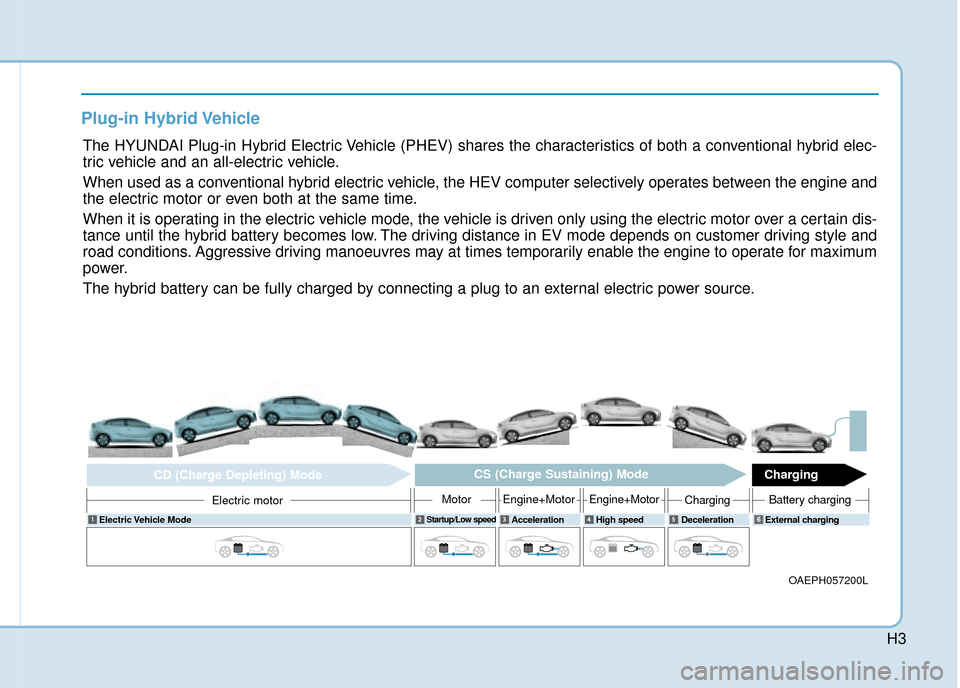
The HYUNDAI Plug-in Hybrid Electric Vehicle (PHEV) shares the characteristics of both a conventional hybrid elec-
tric vehicle and an all-electric vehicle.
When used as a conventional hybrid electric vehicle, the HEV computer selectively operates between the engine and
the electric motor or even both at the same time.
When it is operating in the electric vehicle mode, the vehicle is driven only using the electric motor over a certain dis-
tance until the hybrid battery becomes low. The driving distance in EV mode depends on customer driving style and
road conditions. Aggressive driving manoeuvres may at times temporarily enable the engine to operate for maximum
power.
The hybrid battery can be fully charged by connecting a plug to an external electric power source.
OAEPH057200L
Electric Vehicle ModeStartup/Low speedAcceleration High speed Deceleration External charging
Electric motor
CD (Charge Depleting) ModeCS (Charge Sustaining) Mode
Charging
MotorEngine+MotorEngine+MotorChargingBattery charging
6
Page 25 of 599
H25
How to Disconnect Portable
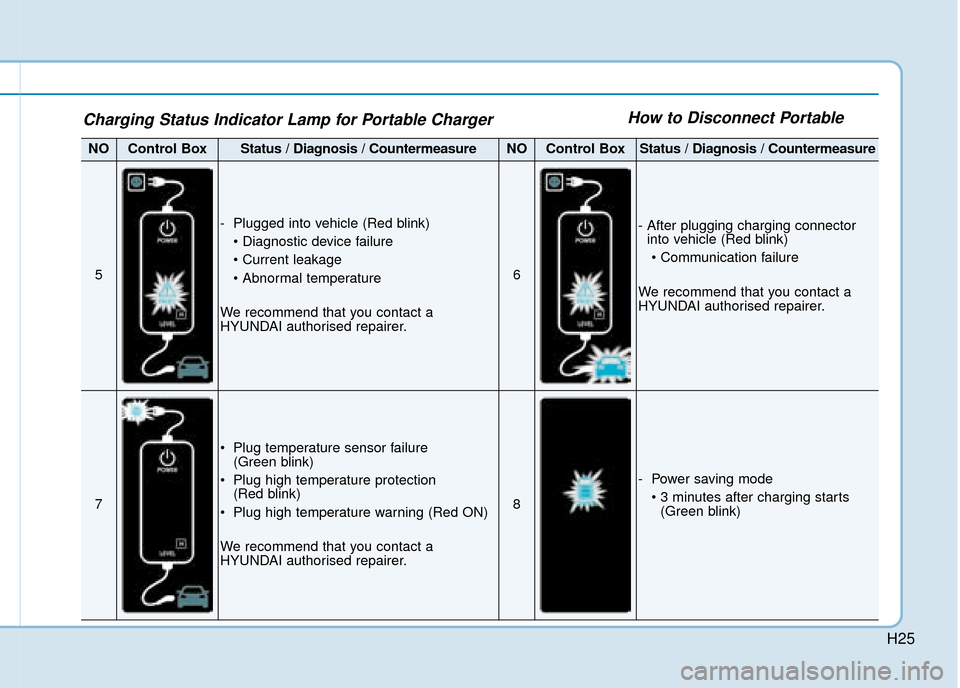
NOControl BoxStatus / Diagnosis / CountermeasureNOControl BoxStatus / Diagnosis / Countermeasure
5
- Plugged into vehicle (Red blink)
We recommend that you contact a
HYUNDAI authorised repairer.
6
- After plugging charging connector into vehicle (Red blink)
We recommend that you contact a
HYUNDAI authorised repairer.
7
Plug temperature sensor failure (Green blink)
Plug high temperature protection (Red blink)
Plug high temperature warning (Red ON)
We recommend that you contact a
HYUNDAI authorised repairer.
8
- Power saving mode (Green blink)
Charging Status Indicator Lamp for Portable Charger
Page 28 of 599
H28
Starting the Vehicle
Vehicles with remote key system
1.Make sure the parking brake isapplied.
2.Make sure the shift lever is in P (Park).
3.Depress the brake pedal.
4.Turn the ignition swich to the START position. Hold the key
(maximum of 10 senconds) until
the " " comes on and release it.
Whether the engine is cold or
warm, it should be started without
depressing the accelerator.
After following the start proce-
dures, “ ” indicator on the
instrument cluster will turn on.
For more information, please check
Chapter 5.
Vehicles with smart key system
1.Carry the smart key or leave it inside the vehicle.
2.Make sure the parking brake is firmly applied.
3.Place the shift lever in P (Park). With the shift lever in N (Neutral),
you cannot start the vehicle.
4.Depress the brake pedal.
5.Press the Engine Start/Stop but- ton. If the hybrid system starts, the
" " indicator will come on.
Whether the engine is cold or
warm, it should be started without
depressing the accelerator.
After following the start proce-
dures, “ ” indicator on the
instrument cluster will turn on.
For more information, please check
Chapter 5. ECONOMICAL and SAFE OPERA-
TION of Hybrid system
Drive smoothly. Accelerate at a
moderate rate and maintain a
steady cruising speed. Do not
make "jack-rabbit" starts. Do not
race between stoplights.
Avoid heavy traffic whenever pos-
sible. Always maintain a safe dis-
tance from other vehicles so you
can avoid unnecessary braking.
This also reduces brake wear out.
The regenerative brake generates energy when the vehicle deceler-
ates.
When the hybrid battery power is low, the hybrid system automatical-
ly recharges the hybrid battery.
When the engine run with the shift lever in N (Neutral), the hybrid sys-
tem cannot generate electricity. The
hybrid battery cannot recharge with
the shift lever in N (Neutral).
D
DR
RI
IV
V I
IN
N G
G
T
T H
H E
E
H
H Y
Y B
BR
RI
ID
D /
/P
P L
LU
U G
G-
-I
IN
N
H
H Y
Y B
BR
RI
ID
D
V
V E
EH
H I
IC
C L
LE
E
Page 32 of 599
H32However, if the Service Indicator
( ) and Malfunction Indicator
Lamp (MIL) ( ) turn on when the
SOC gauge is near the "0" level, we
recommend the vehicle be checked
by a HYUNDAI authorised repairer.
Plug-in Hybrid Mode
(Plug-in hybrid vehicle)
EV/HEV Button
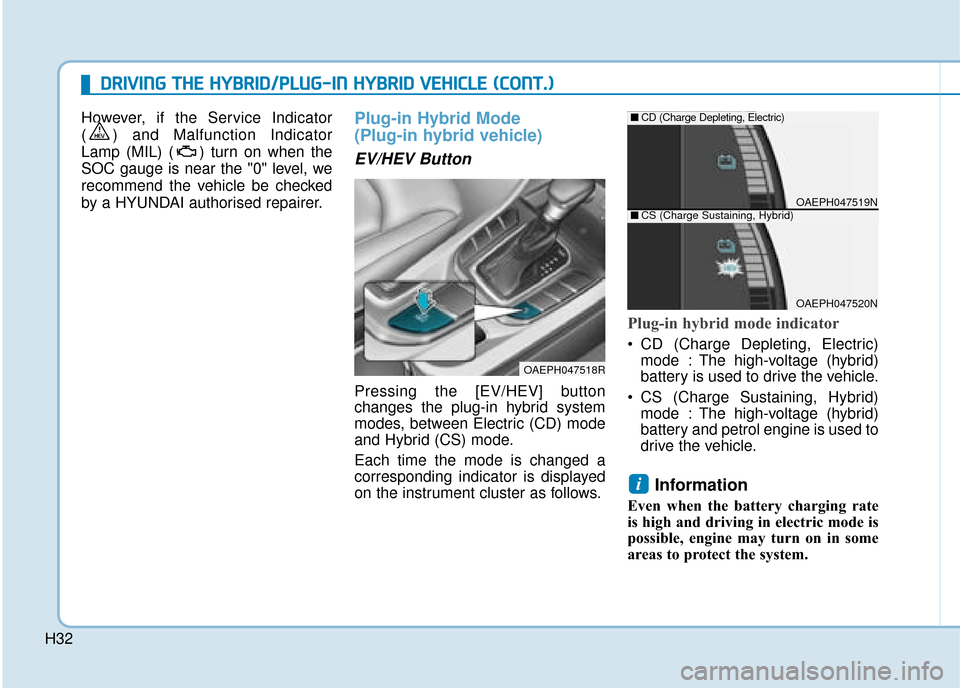
Pressing the [EV/HEV] button
changes the plug-in hybrid system
modes, between Electric (CD) mode
and Hybrid (CS) mode.
Each time the mode is changed a
corresponding indicator is displayed
on the instrument cluster as follows.
Plug-in hybrid mode indicator
CD (Charge Depleting, Electric)
mode : The high-voltage (hybrid)
battery is used to drive the vehicle.
CS (Charge Sustaining, Hybrid) mode : The high-voltage (hybrid)
battery and petrol engine is used to
drive the vehicle.
Information
Even when the battery charging rate
is high and driving in electric mode is
possible, engine may turn on in some
areas to protect the system.
i
D
DR
RI
IV
V I
IN
N G
G
T
T H
H E
E
H
H Y
Y B
BR
RI
ID
D /
/P
P L
LU
U G
G-
-I
IN
N
H
H Y
Y B
BR
RI
ID
D
V
V E
EH
H I
IC
C L
LE
E
(
( C
C O
O N
NT
T.
.)
)
OAEPH047518R
OAEPH047519N
■ CD (Charge Depleting, Electric)
OAEPH047520N
■CS (Charge Sustaining, Hybrid)
Page 33 of 599
![Hyundai Ioniq Plug-in Hybrid 2019 Owners Manual - RHD (UK, Australia) H33
AVN Screen (Plug-in hybrid vehicle) (if equipped)
Press [PHEV] on the [Home] screen
or the [All menus] screen and the
menus related to plug-in hybrid
([ECO driving], [Energy information],
[EV rang](/img/35/16215/w960_16215-32.png "Hyundai Ioniq Plug-in Hybrid 2019 Owners Manual - RHD (UK, Australia) H33
AVN Screen (Plug-in hybrid vehicle) (if equipped)
Press [PHEV] on the [Home] screen
or the [All menus] screen and the
menus related to plug-in hybrid
([ECO driving], [Energy information],
[EV rang")
H33
AVN Screen (Plug-in hybrid vehicle) (if equipped)
Press [PHEV] on the [Home] screen
or the [All menus] screen and the
menus related to plug-in hybrid
([ECO driving], [Energy information],
[EV range], [Set charging times],
[Charging stations], [Petrol stations])
are displayed.
For more information, please refer
to the Multimedia System Manual
that was separately supplied with
your vehicle.
Aux. Battery Saver+
(Plug-in hybrid vehicle)
The Aux. Battery Saver+ is a function
that monitors the charging status of
the 12 V auxiliary battery. If the aux-
iliary battery level is low, the main
high voltage battery charges the aux-
iliary battery.
Information
The Aux. Battery Saver+ function will
be ON when the vehicle is delivered. If
the function is not needed, you may
turn it off in the Users Settings mode
on the cluster. For more information,
refer to the following page.
Mode
Cycle Mode :
When the vehicle is OFF with all
doors, bonnet and tailgate closed,
the Aux. Battery Saver+ periodically
activates according to the auxiliary
battery status.
Automatic Mode :
When the ignition switch is in the ON
position with the charging connector
plugged in, the function activates
according to the auxiliary battery sta-
tus to prevent overdischarge of the
auxiliary battery.
i
OAEPHQ017003L
Page 34 of 599
H34
Information
• The Aux. Battery Saver+ activatesmaximum of 20 minutes. If the Aux.
Battery Saver+ function activates
more than 10 times consecutively, in
the Automatic Mode the function
will stop activating, judging that
there is a problem with the auxiliary
battery. In this case, drive the vehi-
cle for some period of time. The
function will start activating if the
auxiliary battery returns to normal.
• The Aux. Battery Saver+ function cannot prevent battery discharge if
the auxiliary battery is damaged,
worn out, used as a power supply or
unauthorised electronic devises are
used.
• If the Aux. Battery Saver+ function was activated, a message will be dis-
played on the instrument cluster
and the high voltage battery level
may have decreased.
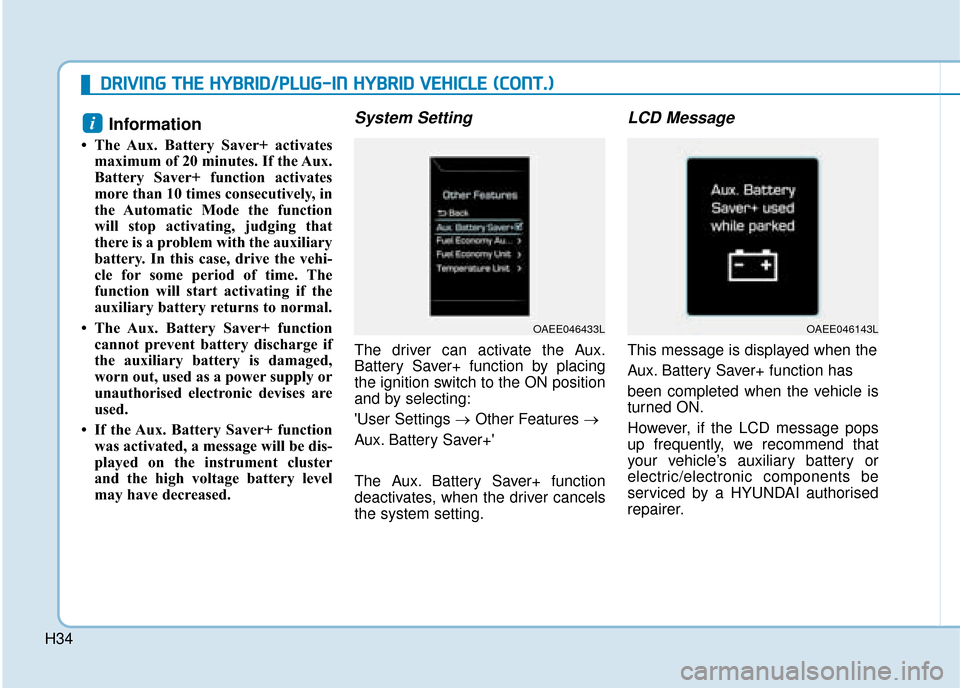
System Setting
The driver can activate the Aux.
Battery Saver+ function by placing
the ignition switch to the ON position
and by selecting:
'User Settings → Other Features →
Aux. Battery Saver+'
The Aux. Battery Saver+ function
deactivates, when the driver cancels
the system setting.
LCD Message
This message is displayed when the
Aux. Battery Saver+ function has
been completed when the vehicle is
turned ON.
However, if the LCD message pops
up frequently, we recommend that
your vehicle’s auxiliary battery or
electric/electronic components be
serviced by a HYUNDAI authorised
repairer.
i
OAEE046143LOAEE046433L
D
D R
RI
IV
V I
IN
N G
G
T
T H
H E
E
H
H Y
Y B
BR
RI
ID
D /
/P
P L
LU
U G
G-
-I
IN
N
H
H Y
Y B
BR
RI
ID
D
V
V E
EH
H I
IC
C L
LE
E
(
( C
C O
O N
NT
T.
.)
)
Page 36 of 599
H36
EV Mode Indicator
This indicator illuminates when the
vehicle is driven by the electric motor.
Charging CableConnection Indicator (Plug-in hybrid vehicle)
This indicator illuminates in red when
the charging cable is connected.
Regenerative BrakeWarning Light
This warning light illuminates :
When the regenerative brake is not
operating. This causes the Brake
Warning light (red) and Regenerative
Brake Warning Light (yellow) to illu-
minate simultaneously as soon as
possible.
In this case, drive safely and have
your vehicle inspected by a
HYUNDAI authorised repairer.
The service brake still function, how-
ever, the operation of the brake pedal
may be more difficult than normal
and the braking distance can
increase.
LCD Display Messages
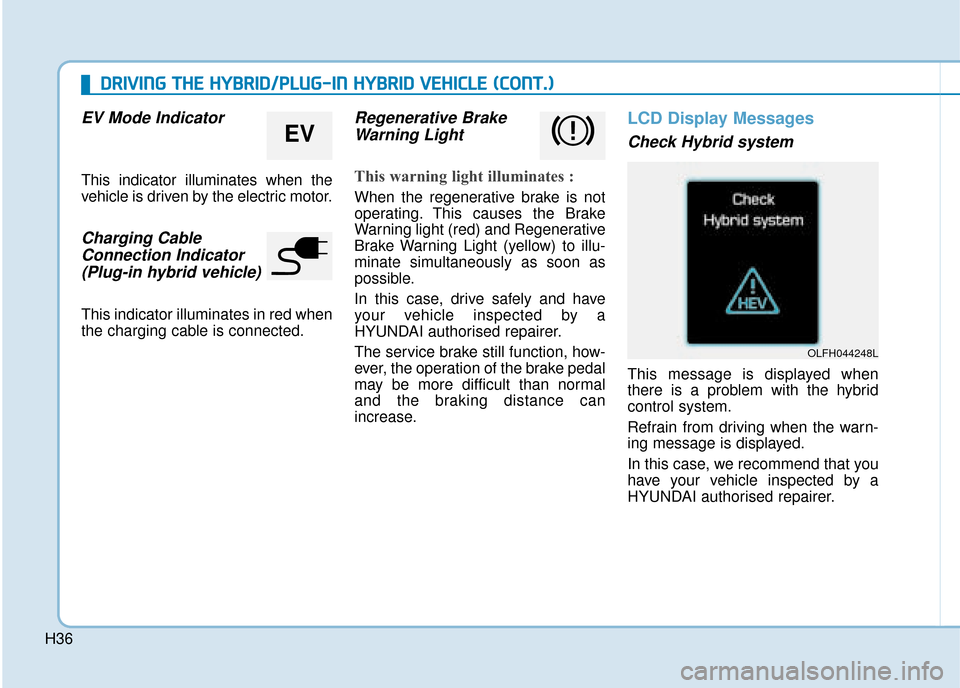
Check Hybrid system
This message is displayed when
there is a problem with the hybrid
control system.
Refrain from driving when the warn-
ing message is displayed.
In this case, we recommend that you
have your vehicle inspected by a
HYUNDAI authorised repairer.
EV
OLFH044248L
D
D R
RI
IV
V I
IN
N G
G
T
T H
H E
E
H
H Y
Y B
BR
RI
ID
D /
/P
P L
LU
U G
G-
-I
IN
N
H
H Y
Y B
BR
RI
ID
D
V
V E
EH
H I
IC
C L
LE
E
(
( C
C O
O N
NT
T.
.)
)
Page 56 of 599
O
OW
W N
NE
ER
R '
'S
S
M
M A
AN
N U
U A
AL
L
O
Op
pe
er
ra
a t
ti
io
o n
n
M
M a
ai
in
n t
te
e n
n a
an
n c
ce
e
S
S p
pe
ec
ci
if
f i
ic
c a
a t
ti
io
o n
ns
s
The information in this Owner's Manual is current at the time of pub-
lication. However, the right to amend specifications without notice or
obligation to incorporate such amendments into vehicles already
produced is reserved.
This manual applies to all models of this vehicle and includes descrip-
tions and explanations of optional as well as standard equipment. As
a result, some of the equipment operating descriptions referred to may
not apply to the particular vehicle with which this manual is supplied.
We recommend that you contact a HYUNDAI authorised repairer for
information regarding current standard and optional equipment levels.
Page 134 of 599
2-57
Safety system of your vehicle
2
SRS warning light
The SRS (Supplement Restraint
System) air bag warning light on the
instrument panel displays the air bag
symbol depicted in the illustration. The
system checks the air bag electrical
system for malfunctions. The light indi-
cates that there is a potential problem
with your air bag system.During a moderate to severe frontal
collision, sensors will detect the vehi-
cle’s rapid deceleration. If the rate of
deceleration is high enough, the con-
trol unit will inflate the front air bags,
at the time and with the force needed.
The front air bags help protect the driv-
er and front passenger by responding
to frontal impacts in which seat belts
alone cannot provide adequate
restraint. When needed, the side air
bags help provide protection in the
event of a side impact or rollover by
supporting the side upper body area.
Air bags are activated (able to
inflate if necessary) only when the
ignition switch is in the ON position.
Air bags inflate in the event of cer-
tain frontal or side collisions to help
protect the occupants from serious
physical injury.
There is no single speed at which the air bags will inflate. Generally,
air bags are designed to inflate
based upon the severity of a colli-
sion and its direction. These two
factors determine whether the sen-
sors produce an electronic deploy-
ment/inflation signal.
If your SRS malfunctions, the
air bag may not inflate properly
during an accident increasing
the risk of serious injury or
death.
If any of the following condi-
tions occur, your SRS is mal-
functioning:
The light does not turn on for
approximately six seconds
when the ignition switch is in
the ON position.
The light stays on after illumi-
nating for approximately six
seconds.
The light comes on whilst the
vehicle is in motion.
The light blinks when the
engine is running.
We recommend that a HYUNDAI
authorised repairer inspect the
SRS as soon as possible if any
of these conditions occur.
WARNING
Page 193 of 599
3-47
Convenient features of your vehicle
3
Gauges and meters
Speedometer
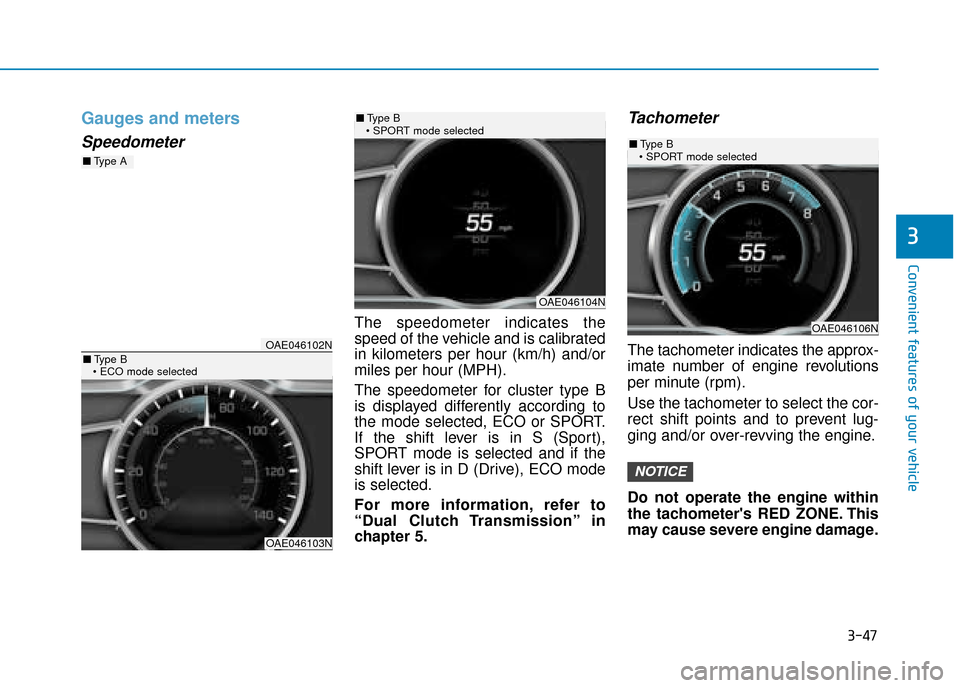
The speedometer indicates the
speed of the vehicle and is calibrated
in kilometers per hour (km/h) and/or
miles per hour (MPH).
The speedometer for cluster type B
is displayed differently according to
the mode selected, ECO or SPORT.
If the shift lever is in S (Sport),
SPORT mode is selected and if the
shift lever is in D (Drive), ECO mode
is selected.
For more information, refer to
“Dual Clutch Transmission” in
chapter 5.
Tachometer
The tachometer indicates the approx-
imate number of engine revolutions
per minute (rpm).
Use the tachometer to select the cor-
rect shift points and to prevent lug-
ging and/or over-revving the engine.
Do not operate the engine within
the tachometer's RED ZONE. This
may cause severe engine damage.
NOTICE
OAE046102N
OAE046103N
■Type A
■Type B
OAE046104N
■ Type B
OAE046106N
■ Type B