display HYUNDAI IX35 2012 Workshop Manual
[x] Cancel search | Manufacturer: HYUNDAI, Model Year: 2012, Model line: IX35, Model: HYUNDAI IX35 2012Pages: 560, PDF Size: 28.31 MB
Page 512 of 560
Features of your vehicle
100
4
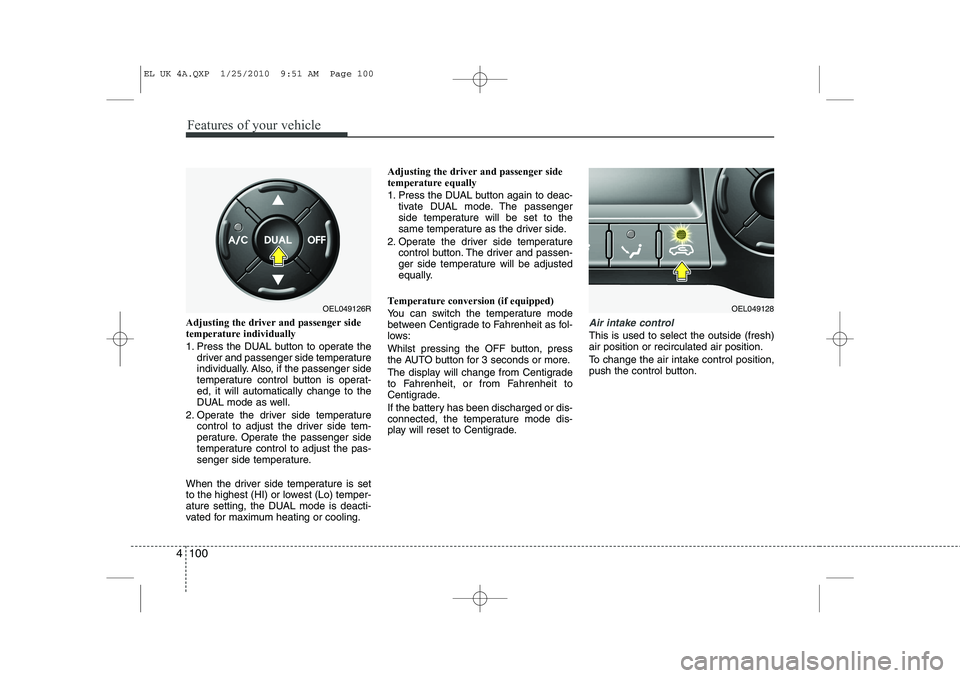
Adjusting the driver and passenger side temperature individually
1. Press the DUAL button to operate the
driver and passenger side temperature
individually. Also, if the passenger side
temperature control button is operat-ed, it will automatically change to the
DUAL mode as well.
2. Operate the driver side temperature control to adjust the driver side tem-
perature. Operate the passenger side
temperature control to adjust the pas-
senger side temperature.
When the driver side temperature is set
to the highest (HI) or lowest (Lo) temper-
ature setting, the DUAL mode is deacti-
vated for maximum heating or cooling. Adjusting the driver and passenger sidetemperature equally
1. Press the DUAL button again to deac-
tivate DUAL mode. The passenger
side temperature will be set to the
same temperature as the driver side.
2. Operate the driver side temperature control button. The driver and passen-
ger side temperature will be adjusted
equally.
Temperature conversion (if equipped)
You can switch the temperature mode
between Centigrade to Fahrenheit as fol-
lows:
Whilst pressing the OFF button, press
the AUTO button for 3 seconds or more.
The display will change from Centigrade
to Fahrenheit, or from Fahrenheit to
Centigrade.
If the battery has been discharged or dis-
connected, the temperature mode dis-
play will reset to Centigrade.Air intake control
This is used to select the outside (fresh) air position or recirculated air position.
To change the air intake control position,
push the control button.
OEL049126ROEL049128
EL UK 4A.QXP 1/25/2010 9:51 AM Page 100
Page 523 of 560
4 111
Features of your vehicle
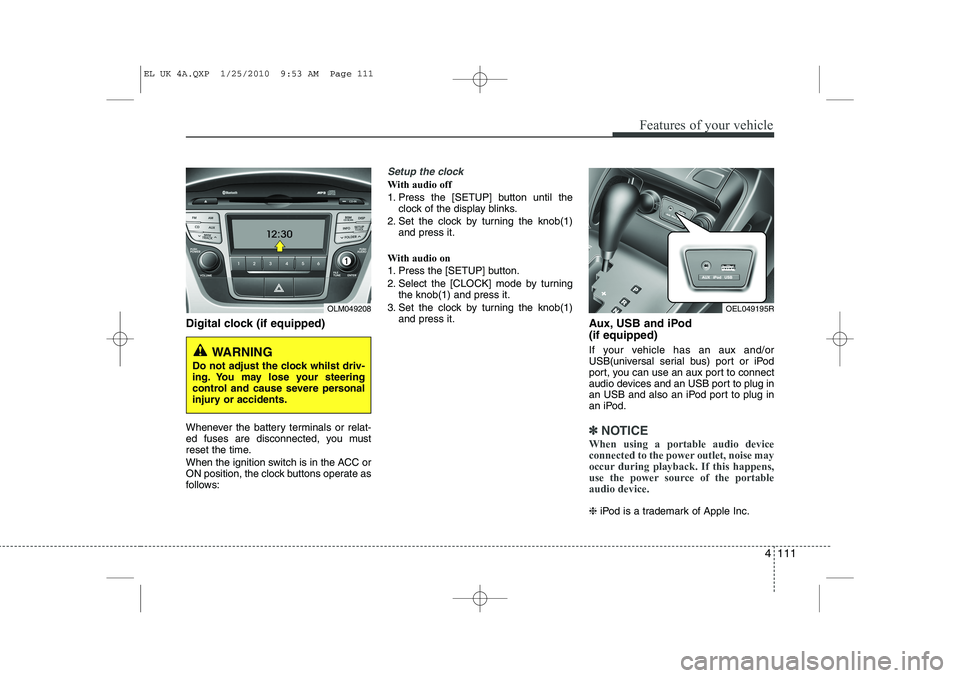
Digital clock (if equipped)
Whenever the battery terminals or relat-
ed fuses are disconnected, you must
reset the time.
When the ignition switch is in the ACC or
ON position, the clock buttons operate as
follows:
Setup the clock
With audio off
1. Press the [SETUP] button until theclock of the display blinks.
2. Set the clock by turning the knob(1) and press it.
With audio on
1. Press the [SETUP] button.
2. Select the [CLOCK] mode by turning the knob(1) and press it.
3. Set the clock by turning the knob(1) and press it. Aux, USB and iPod (if equipped)
If your vehicle has an aux and/or
USB(universal serial bus) port or iPod
port, you can use an aux port to connect
audio devices and an USB port to plug in
an USB and also an iPod port to plug in
an iPod.
✽✽NOTICE
When using a portable audio device
connected to the power outlet, noise may
occur during playback. If this happens,
use the power source of the portableaudio device.
❈ iPod is a trademark of Apple Inc.
OLM049208
WARNING
Do not adjust the clock whilst driv-
ing. You may lose your steering
control and cause severe personal
injury or accidents.
OEL049195R
EL UK 4A.QXP 1/25/2010 9:53 AM Page 111
Page 535 of 560
4 123
Features of your vehicle
1. Power ON/OFF Button &Volume Control Button
Turns on/off the set when the IGNITION
SWITCH is on ACC or ON. If the button
is turned to the right, it increases the vol-
ume and left,decreases the volume.
Press this button to turn the audio sys- tem ON or OFF. (EUROPE MODEL
ONLY)
Depending on the model if the ignition switch is not on ACC or ON position.
the “Battery Discharge” warningappears on LCD after 10 seconds of
power-up, and automatically turns off
after 1 hours of operation.
Adjusts the volume of the car audio system. Rotate clockwise to increase
the volume or counterclockwise to
decrease.
2. FM Selection Button
Turns to FM mode and toggles FM1and
FM2 when the button is pressed each
time. ❈ May change in order of FM1 ➟FM2 ➟
FMA in some models. 3. AM Selection Button
Pressing the [AM] button selects the AM
band. AM Mode is displayed on the LCD. ❈
May change in order of AM ➟AMA in
some models.
4. Automatic Channel Selection Button
When the [SEEK ] button is pressed, it increases the band frequency to auto-
matically select channel. Stops at the
previous frequency if no channel is
found.
5. Preset Button
Push [1]~[6] buttons less than 0.8 sec-
ond to play the channel saved in each
button. Push Preset button for 0.8 sec-
ond or longer to save current channel to
the respective button with a beep. 6. AST(AUTO STORE Button)
When the button is pressed, it automati-
cally selects and saves channels with
high reception rate to PRESET buttons
[1]~[6] and plays the channel saved in
PRESET1. If no channel is saved after
AST, it will play the previous channel.
Saves only to the Preset memory
(1)~(6) of FMA or AMA mode in some
models.
7. SETUP Button
Press this button to turn to the SCROLL
option and the other adjustment mode.
If no action is taken for 5 seconds after
pressing the button, it will return to the
play mode. (After entering SETUP
mode, move between items using the
left, right and PUSH functions of the
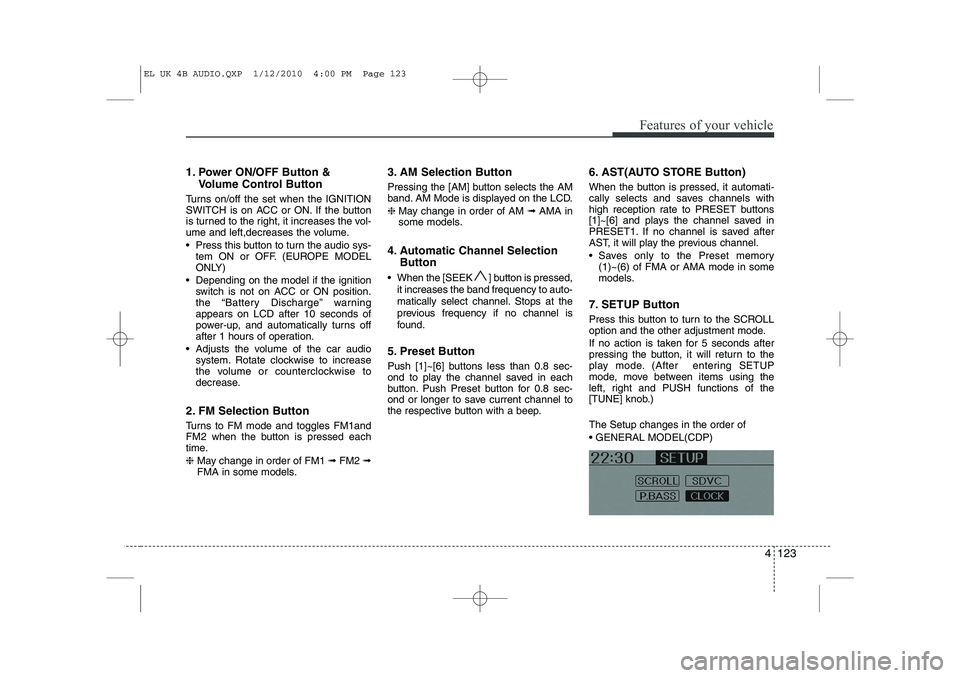
[TUNE] knob.) The Setup changes in the order of GENERAL MODEL(CDP)
EL UK 4B AUDIO.QXP 1/12/2010 4:00 PM Page 123
Page 536 of 560
Features of your vehicle
124
4
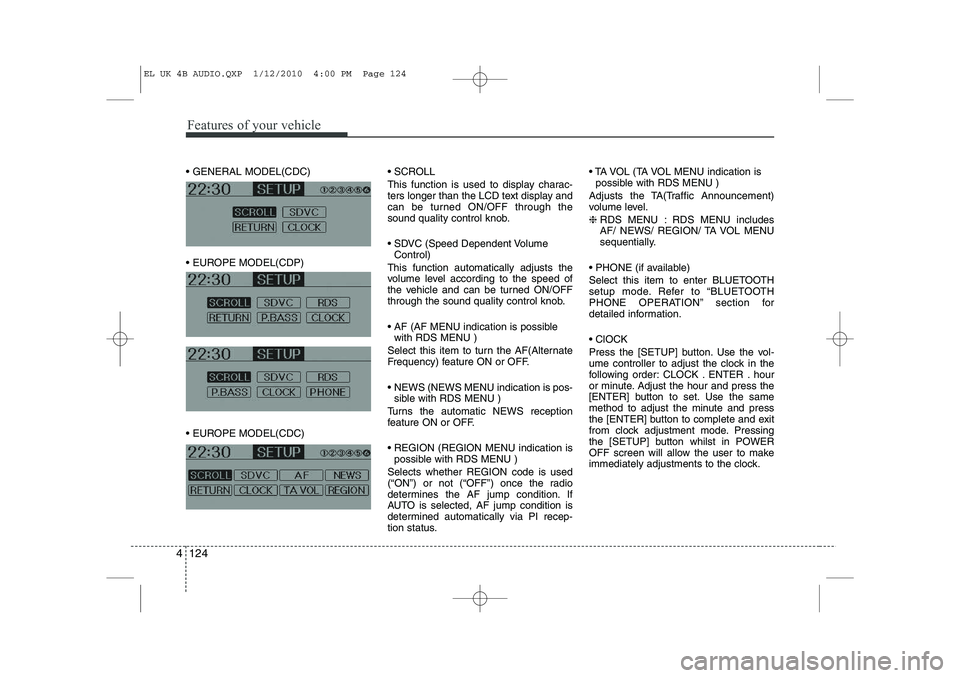
GENERAL MODEL(CDC)
EUROPE MODEL(CDP)
EUROPE MODEL(CDC) SCROLL
This function is used to display charac-
ters longer than the LCD text display and
can be turned ON/OFF through the
sound quality control knob.
SDVC (Speed Dependent Volume
Control)
This function automatically adjusts the
volume level according to the speed of
the vehicle and can be turned ON/OFF
through the sound quality control knob.
AF (AF MENU indication is possible with RDS MENU )
Select this item to turn the AF(Alternate
Frequency) feature ON or OFF.
NEWS (NEWS MENU indication is pos- sible with RDS MENU )
Turns the automatic NEWS reception
feature ON or OFF.
REGION (REGION MENU indication is possible with RDS MENU )
Selects whether REGION code is used
(“ON”) or not (“OFF”) once the radio
determines the AF jump condition. If
AUTO is selected, AF jump condition is
determined automatically via PI recep-
tion status. TA VOL (TA VOL MENU indication is
possible with RDS MENU )
Adjusts the TA(Traffic Announcement)
volume level. ❈ RDS MENU : RDS MENU includes
AF/ NEWS/ REGION/ TA VOL MENU
sequentially.
PHONE (if available)
Select this item to enter BLUETOOTH
setup mode. Refer to “BLUETOOTH
PHONE OPERATION” section for
detailed information. ClOCK
Press the [SETUP] button. Use the vol-
ume controller to adjust the clock in the
following order: CLOCK . ENTER . hour
or minute. Adjust the hour and press the
[ENTER] button to set. Use the same
method to adjust the minute and press
the [ENTER] button to complete and exit
from clock adjustment mode. Pressing
the [SETUP] button whilst in POWER
OFF screen will allow the user to make
immediately adjustments to the clock.
EL UK 4B AUDIO.QXP 1/12/2010 4:00 PM Page 124
Page 537 of 560
4 125
Features of your vehicle
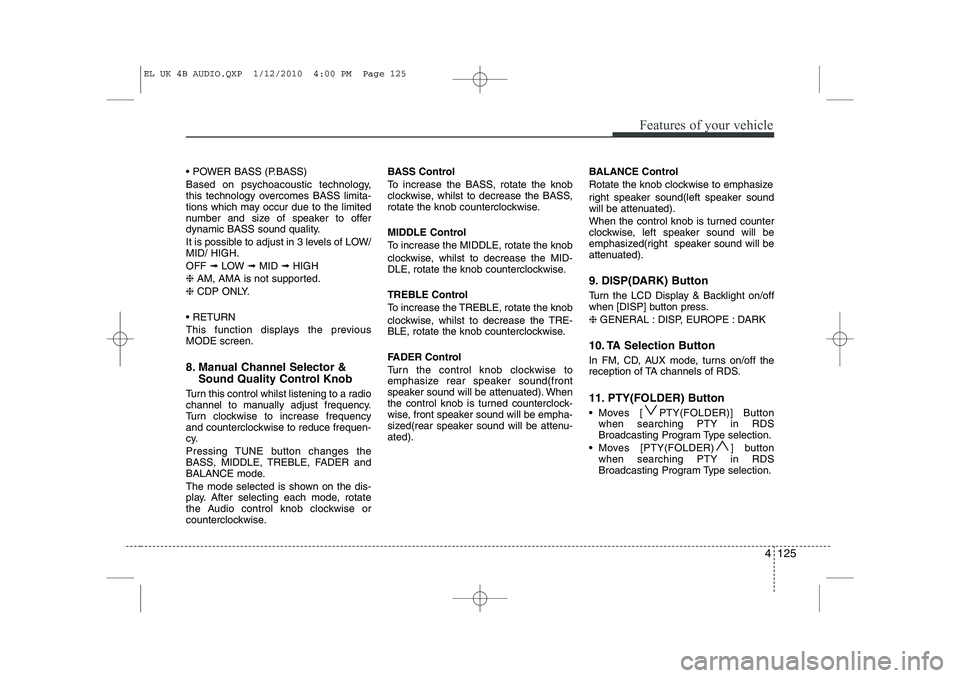
POWER BASS (P.BASS)
Based on psychoacoustic technology,
this technology overcomes BASS limita-
tions which may occur due to the limited
number and size of speaker to offer
dynamic BASS sound quality.
It is possible to adjust in 3 levels of LOW/ MID/ HIGH. OFF ➟LOW ➟MID ➟HIGH
❈ AM, AMA is not supported.
❈ CDP ONLY.
RETURN
This function displays the previous MODE screen.
8. Manual Channel Selector & Sound Quality Control Knob
Turn this control whilst listening to a radio
channel to manually adjust frequency.
Turn clockwise to increase frequency
and counterclockwise to reduce frequen-
cy.
Pressing TUNE button changes the
BASS, MIDDLE, TREBLE, FADER and
BALANCE mode.
The mode selected is shown on the dis-
play. After selecting each mode, rotate
the Audio control knob clockwise or
counterclockwise. BASS Control
To increase the BASS, rotate the knob
clockwise, whilst to decrease the BASS,
rotate the knob counterclockwise.
MIDDLE Control
To increase the MIDDLE, rotate the knob
clockwise, whilst to decrease the MID-
DLE, rotate the knob counterclockwise.
TREBLE Control
To increase the TREBLE, rotate the knob
clockwise, whilst to decrease the TRE-
BLE, rotate the knob counterclockwise.
FADER Control
Turn the control knob clockwise to
emphasize rear speaker sound(front
speaker sound will be attenuated). When
the control knob is turned counterclock-
wise, front speaker sound will be empha-
sized(rear speaker sound will be attenu-ated).
BALANCE Control
Rotate the knob clockwise to emphasize
right speaker sound(left speaker sound
will be attenuated).
When the control knob is turned counter
clockwise, left speaker sound will be
emphasized(right speaker sound will be
attenuated).
9. DISP(DARK) Button
Turn the LCD Display & Backlight on/off
when [DISP] button press. ❈ GENERAL : DISP, EUROPE : DARK
10. TA Selection Button
In FM, CD, AUX mode, turns on/off the
reception of TA channels of RDS.
11. PTY(FOLDER) Button
Moves [ PTY(FOLDER)] Button when searching PTY in RDS
Broadcasting Program Type selection.
Moves [PTY(FOLDER) ] button when searching PTY in RDS
Broadcasting Program Type selection.
EL UK 4B AUDIO.QXP 1/12/2010 4:00 PM Page 125
Page 540 of 560
Features of your vehicle
128
4
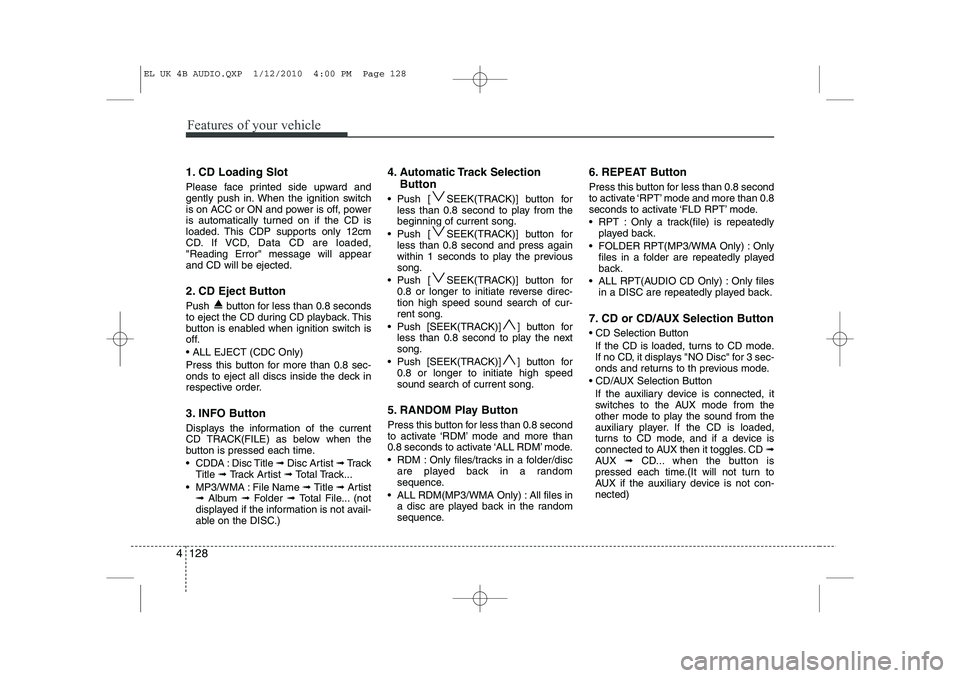
1. CD Loading Slot
Please face printed side upward and
gently push in. When the ignition switch
is on ACC or ON and power is off, power
is automatically turned on if the CD is
loaded. This CDP supports only 12cm
CD. If VCD, Data CD are loaded,"Reading Error" message will appearand CD will be ejected.
2. CD Eject Button
Push button for less than 0.8 seconds
to eject the CD during CD playback. This
button is enabled when ignition switch is
off. ALL EJECT (CDC Only)
Press this button for more than 0.8 sec-
onds to eject all discs inside the deck in
respective order.
3. INFO Button
Displays the information of the current
CD TRACK(FILE) as below when the
button is pressed each time.
CDDA : Disc Title ➟ Disc Artist ➟ Tr a c k
Title ➟ Track Artist ➟ Total Track...
MP3/WMA : File Name ➟ Title ➟ Artist
➟ Album ➟ Folder ➟ Total File... (not
displayed if the information is not avail-
able on the DISC.) 4. Automatic Track Selection
Button
Push [ SEEK(TRACK)] button for less than 0.8 second to play from thebeginning of current song.
Push [ SEEK(TRACK)] button for less than 0.8 second and press again
within 1 seconds to play the previoussong.
Push [ SEEK(TRACK)] button for 0.8 or longer to initiate reverse direc-tion high speed sound search of cur-rent song.
Push [SEEK(TRACK)] ] button for less than 0.8 second to play the nextsong.
Push [SEEK(TRACK)] ] button for 0.8 or longer to initiate high speedsound search of current song.
5. RANDOM Play Button
Press this button for less than 0.8 second
to activate ‘RDM’ mode and more than
0.8 seconds to activate ‘ALL RDM’ mode.
RDM : Only files/tracks in a folder/disc are played back in a random
sequence.
ALL RDM(MP3/WMA Only) : All files in a disc are played back in the random
sequence. 6. REPEAT Button
Press this button for less than 0.8 second
to activate ‘RPT’ mode and more than 0.8
seconds to activate ‘FLD RPT’ mode.
RPT : Only a track(file) is repeatedly
played back.
FOLDER RPT(MP3/WMA Only) : Only files in a folder are repeatedly played
back.
ALL RPT(AUDIO CD Only) : Only files in a DISC are repeatedly played back.
7. CD or CD/AUX Selection Button CD Selection Button If the CD is loaded, turns to CD mode.
If no CD, it displays "NO Disc" for 3 sec-
onds and returns to th previous mode.
CD/AUX Selection Button If the auxiliary device is connected, it
switches to the AUX mode from the
other mode to play the sound from the
auxiliary player. If the CD is loaded,
turns to CD mode, and if a device is
connected to AUX then it toggles. CD ➟
AUX ➟ CD... when the button is
pressed each time.(It will not turn to
AUX if the auxiliary device is not con-nected)
EL UK 4B AUDIO.QXP 1/12/2010 4:00 PM Page 128
Page 541 of 560
4 129
Features of your vehicle
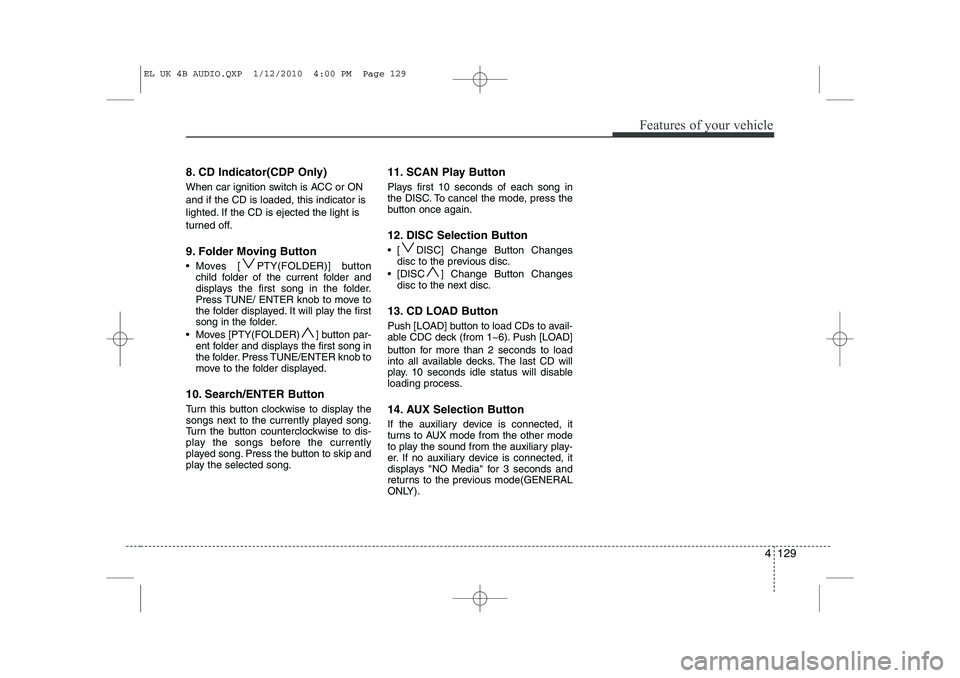
8. CD Indicator(CDP Only)
When car ignition switch is ACC or ON and if the CD is loaded, this indicator is
lighted. If the CD is ejected the light is
turned off.
9. Folder Moving Button
Moves [ PTY(FOLDER)] buttonchild folder of the current folder and
displays the first song in the folder.
Press TUNE/ ENTER knob to move to
the folder displayed. It will play the first
song in the folder.
Moves [PTY(FOLDER) ] button par- ent folder and displays the first song in
the folder. Press TUNE/ENTER knob to
move to the folder displayed.
10. Search/ENTER Button
Turn this button clockwise to display the
songs next to the currently played song.
Turn the button counterclockwise to dis-
play the songs before the currently
played song. Press the button to skip and
play the selected song. 11. SCAN Play Button
Plays first 10 seconds of each song in
the DISC. To cancel the mode, press the
button once again.
12. DISC Selection Button
[ DISC] Change Button Changes
disc to the previous disc.
[DISC ] Change Button Changes disc to the next disc.
13. CD LOAD Button
Push [LOAD] button to load CDs to avail-
able CDC deck (from 1~6). Push [LOAD]
button for more than 2 seconds to load
into all available decks. The last CD will
play. 10 seconds idle status will disable
loading process.
14. AUX Selection Button
If the auxiliary device is connected, it
turns to AUX mode from the other mode
to play the sound from the auxiliary play-
er. If no auxiliary device is connected, it
displays "NO Media" for 3 seconds and
returns to the previous mode(GENERAL
ONLY).
EL UK 4B AUDIO.QXP 1/12/2010 4:00 PM Page 129
Page 546 of 560
Features of your vehicle
134
4
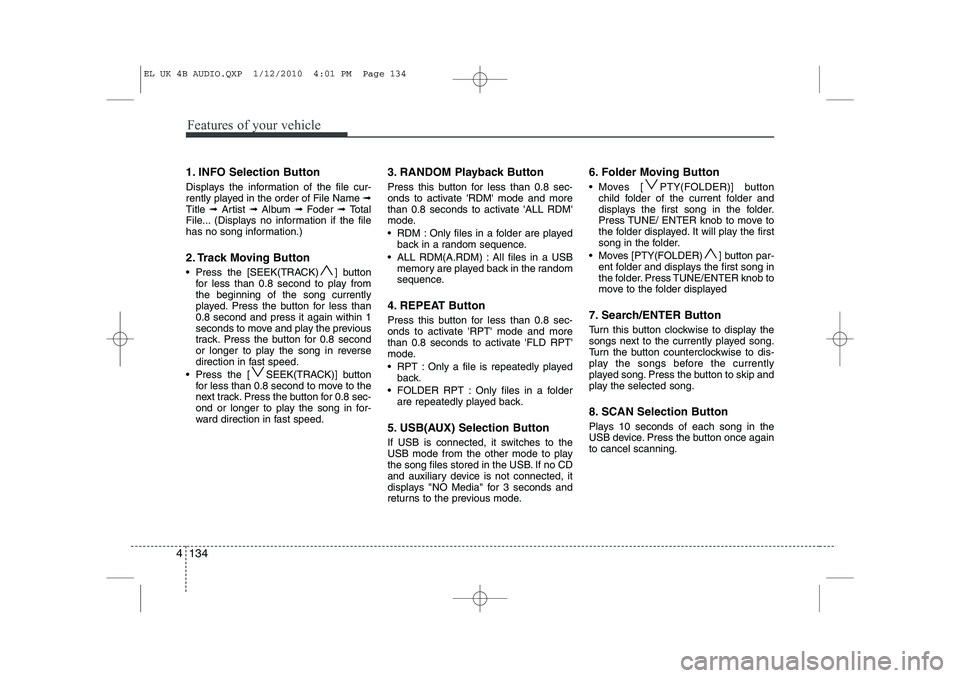
1. INFO Selection Button
Displays the information of the file cur-
rently played in the order of File Name ➟
Title ➟ Artist ➟ Album ➟ Foder ➟ Total
File... (Displays no information if the file
has no song information.)
2. Track Moving Button
Press the [SEEK(TRACK) ] button for less than 0.8 second to play from the beginning of the song currently
played. Press the button for less than0.8 second and press it again within 1
seconds to move and play the previous
track. Press the button for 0.8 second
or longer to play the song in reverse
direction in fast speed.
Press the [ SEEK(TRACK)] button for less than 0.8 second to move to the
next track. Press the button for 0.8 sec-
ond or longer to play the song in for-
ward direction in fast speed. 3. RANDOM Playback Button
Press this button for less than 0.8 sec-
onds to activate 'RDM' mode and more
than 0.8 seconds to activate 'ALL RDM'
mode.
RDM : Only files in a folder are played
back in a random sequence.
ALL RDM(A.RDM) : All files in a USB memory are played back in the random
sequence.
4. REPEAT Button
Press this button for less than 0.8 sec-
onds to activate 'RPT' mode and more
than 0.8 seconds to activate 'FLD RPT'
mode.
RPT : Only a file is repeatedly played back.
FOLDER RPT : Only files in a folder are repeatedly played back.
5. USB(AUX) Selection Button
If USB is connected, it switches to the
USB mode from the other mode to play
the song files stored in the USB. If no CD
and auxiliary device is not connected, it
displays "NO Media" for 3 seconds and
returns to the previous mode. 6. Folder Moving Button
Moves [ PTY(FOLDER)] button
child folder of the current folder and
displays the first song in the folder.
Press TUNE/ ENTER knob to move to
the folder displayed. It will play the first
song in the folder.
Moves [PTY(FOLDER) ] button par- ent folder and displays the first song in
the folder. Press TUNE/ENTER knob to
move to the folder displayed
7. Search/ENTER Button
Turn this button clockwise to display the
songs next to the currently played song.
Turn the button counterclockwise to dis-
play the songs before the currently
played song. Press the button to skip and
play the selected song.
8. SCAN Selection Button
Plays 10 seconds of each song in the
USB device. Press the button once againto cancel scanning.
EL UK 4B AUDIO.QXP 1/12/2010 4:01 PM Page 134
Page 549 of 560
4 137
Features of your vehicle
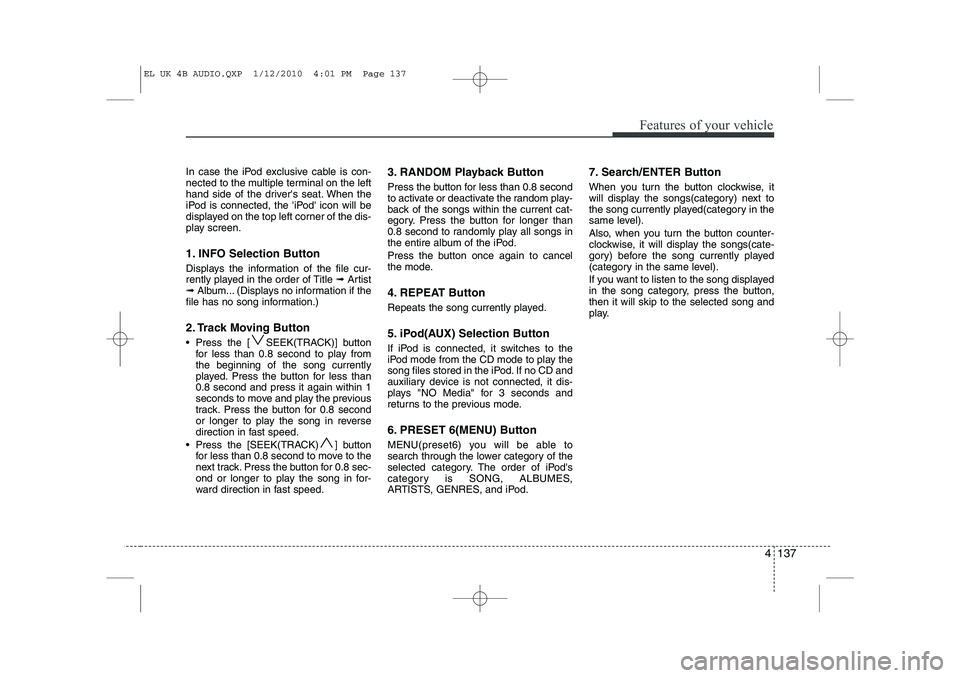
In case the iPod exclusive cable is con-
nected to the multiple terminal on the left
hand side of the driver's seat. When the
iPod is connected, the 'iPod' icon will be
displayed on the top left corner of the dis-
play screen.
1. INFO Selection Button
Displays the information of the file cur-
rently played in the order of Title ➟Artist
➟ Album... (Displays no information if the
file has no song information.)
2. Track Moving Button
Press the [ SEEK(TRACK)] button for less than 0.8 second to play from the beginning of the song currently
played. Press the button for less than0.8 second and press it again within 1
seconds to move and play the previous
track. Press the button for 0.8 second
or longer to play the song in reverse
direction in fast speed.
Press the [SEEK(TRACK) ] button for less than 0.8 second to move to the
next track. Press the button for 0.8 sec-
ond or longer to play the song in for-
ward direction in fast speed. 3. RANDOM Playback Button
Press the button for less than 0.8 second
to activate or deactivate the random play-
back of the songs within the current cat-
egory. Press the button for longer than
0.8 second to randomly play all songs in
the entire album of the iPod.
Press the button once again to cancel
the mode.
4. REPEAT Button
Repeats the song currently played.
5. iPod(AUX) Selection Button
If iPod is connected, it switches to the
iPod mode from the CD mode to play the
song files stored in the iPod. If no CD and
auxiliary device is not connected, it dis-
plays "NO Media" for 3 seconds and
returns to the previous mode.
6. PRESET 6(MENU) Button
MENU(preset6) you will be able to
search through the lower category of the
selected category. The order of iPod's
category is SONG, ALBUMES,
ARTISTS, GENRES, and iPod. 7. Search/ENTER Button
When you turn the button clockwise, it
will display the songs(category) next to
the song currently played(category in the
same level).
Also, when you turn the button counter-
clockwise, it will display the songs(cate-
gory) before the song currently played
(category in the same level).
If you want to listen to the song displayed
in the song category, press the button,then it will skip to the selected song and
play.
EL UK 4B AUDIO.QXP 1/12/2010 4:01 PM Page 137
Page 554 of 560
Features of your vehicle
142
4
■■
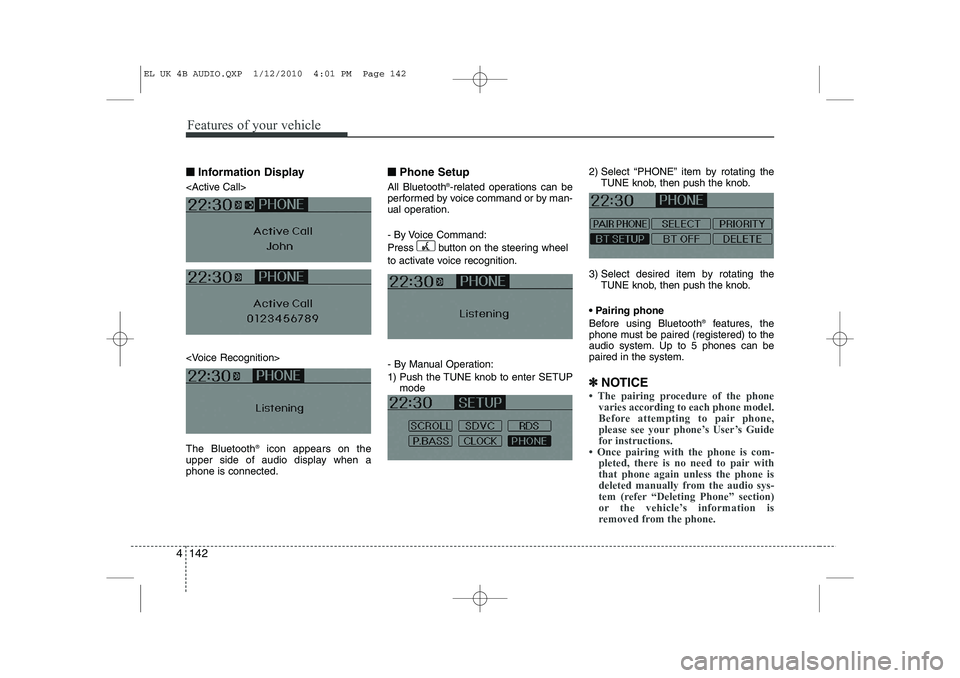
Information Display
icon appears on the
upper side of audio display when a phone is connected. ■■
Phone Setup
All Bluetooth ®
-related operations can be
performed by voice command or by man-
ual operation.
- By Voice Command:
Press button on the steering wheel
to activate voice recognition.
- By Manual Operation:
1) Push the TUNE knob to enter SETUP mode 2) Select “PHONE” item by rotating the
TUNE knob, then push the knob.
3) Select desired item by rotating the TUNE knob, then push the knob.
Pairing phone
Before using Bluetooth ®
features, the
phone must be paired (registered) to the
audio system. Up to 5 phones can bepaired in the system.
✽
✽ NOTICE