Light control HYUNDAI IX35 2012 Owners Manual
[x] Cancel search | Manufacturer: HYUNDAI, Model Year: 2012, Model line: IX35, Model: HYUNDAI IX35 2012Pages: 560, PDF Size: 28.31 MB
Page 2 of 560
Introduction
2
1
This Owners Manual is designed to help
vehicle users derive the greatest possi-
ble amount of enjoyment and satisfaction
from driving the HYUNDAI vehicle. It isstrongly recommended that the entire
manual is read in order that all of the fea-
tures, safety systems and maintenancerequirements are understood.
To minimise the RISK of death or injury,
the "WARNING" and "CAUTION" state-
ments must be read and understood
before operating the vehicle.
Illustrations are used throughout the
manual to complement written descrip-
tions intended to best explain how to
enjoy using the vehicle.
Reading this manual will assist the vehi-
cle user to learn about and understand
the features, important safety informa-
tion, and driving recommendations.
The general layout of the manual is pro-
vided in the Table of Contents. The index
has an alphabetical listing of all the infor-
mation contained in the manual. The
manual has eight sections plus an index.
Each section begins with a brief list ofcontents to easily identify at a glance if
that section contains the informationbeing sought. "WARNING", "CAUTION", and "NOTICE"
information is provided to enhance the
personal safety of the vehicle user. This
information must be carefully read and
followed.
✽✽
NOTICE
A NOTICE indicates interesting or help-
ful information is being provided.
Petrol engine
Unleaded
For the optimal vehicle performance, we
recommend you to use unleaded petrol
with an octane rating of RON (Research
Octane Number) 95 /AKI (Anti Knock
Index) 91 or higher.
You may use unleaded petrol with an
octane rating of RON 91~94/AKI 87~90
but it may result in slight performance
reduction of the vehicle.
HOW TO USE THIS MANUAL FUEL REQUIREMENTS
WARNING
A WARNING indicates a situation in
which harm, serious bodily injury ordeath could result if the warning isignored.
CAUTION
A CAUTION indicates a situation in which damage to your vehicle couldresult if the caution is ignored.
CAUTION
NEVER USE LEADED FUEL. Theuse of leaded fuel is detrimental to the catalytic converter and will
damage the engine control sys- tem’s oxygen sensor and affectemission control.
Never add any fuel system cleaningagents to the fuel tank other than
what has been specified. (Consult a HYUNDAI authorised repairer for details.)
EL UK 1.QXP 1/12/2010 2:51 PM Page 2
Page 10 of 560
23
Your vehicle at a glance
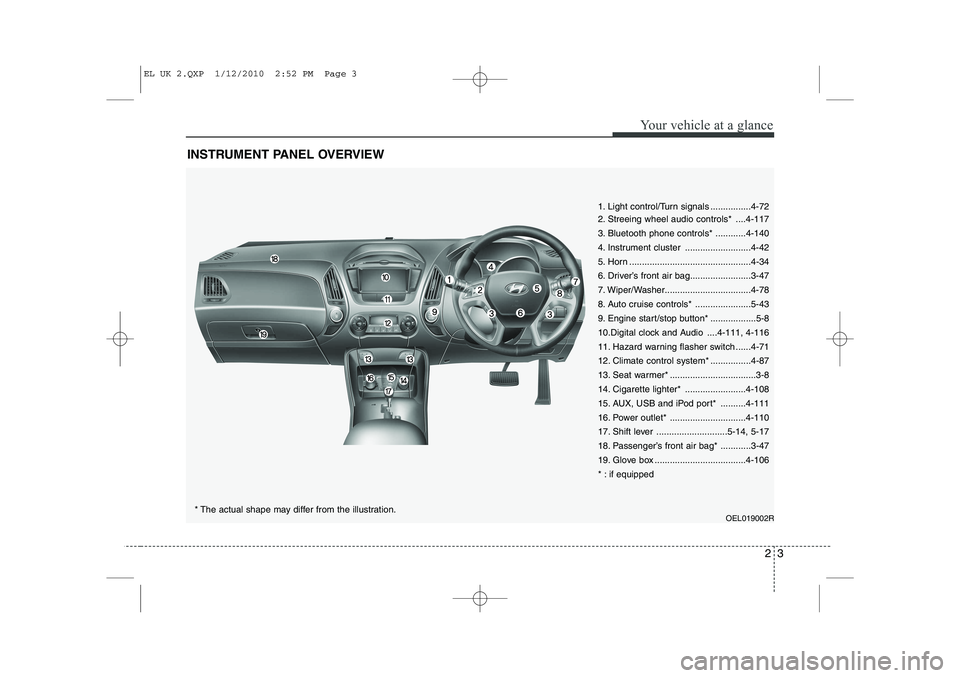
INSTRUMENT PANEL OVERVIEW
1. Light control/Turn signals ................4-72
2. Streeing wheel audio controls* ....4-117
3. Bluetooth phone controls* ............4-140
4. Instrument cluster ..........................4-42
5. Horn ................................................4-34
6. Driver’s front air bag........................3-47
7. Wiper/Washer..................................4-78
8. Auto cruise controls* ......................5-43
9. Engine start/stop button* ..................5-8
10.Digital clock and Audio ....4-111, 4-116
11. Hazard warning flasher switch ......4-71
12. Climate control system* ................4-87
13. Seat warmer* ..................................3-8
14. Cigarette lighter* ........................4-108
15. AUX, USB and iPod port* ..........4-111
16. Power outlet* ..............................4-110
17. Shift lever ............................5-14, 5-17
18. Passenger’s front air bag* ............3-47
19. Glove box ....................................4-106
* : if equippedOEL019002R
* The actual shape may differ from the illustration.
EL UK 2.QXP 1/12/2010 2:52 PM Page 3
Page 35 of 560
323
Safety system of your vehicle
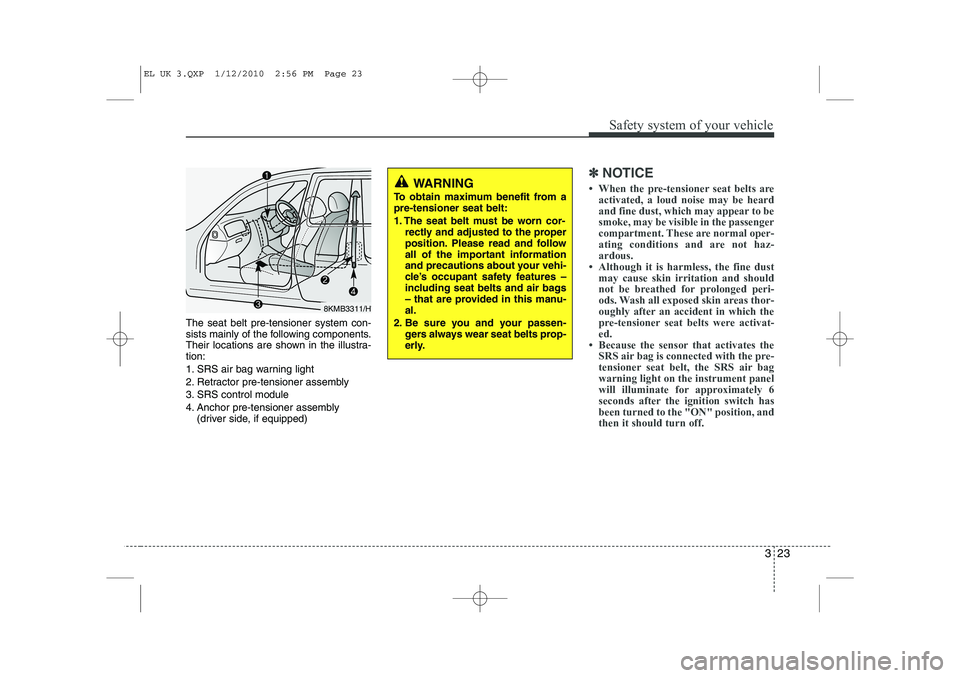
The seat belt pre-tensioner system con-
sists mainly of the following components.
Their locations are shown in the illustra-tion:
1. SRS air bag warning light
2. Retractor pre-tensioner assembly
3. SRS control module
4. Anchor pre-tensioner assembly (driver side, if equipped)
✽✽ NOTICE
Page 57 of 560
345
Safety system of your vehicle
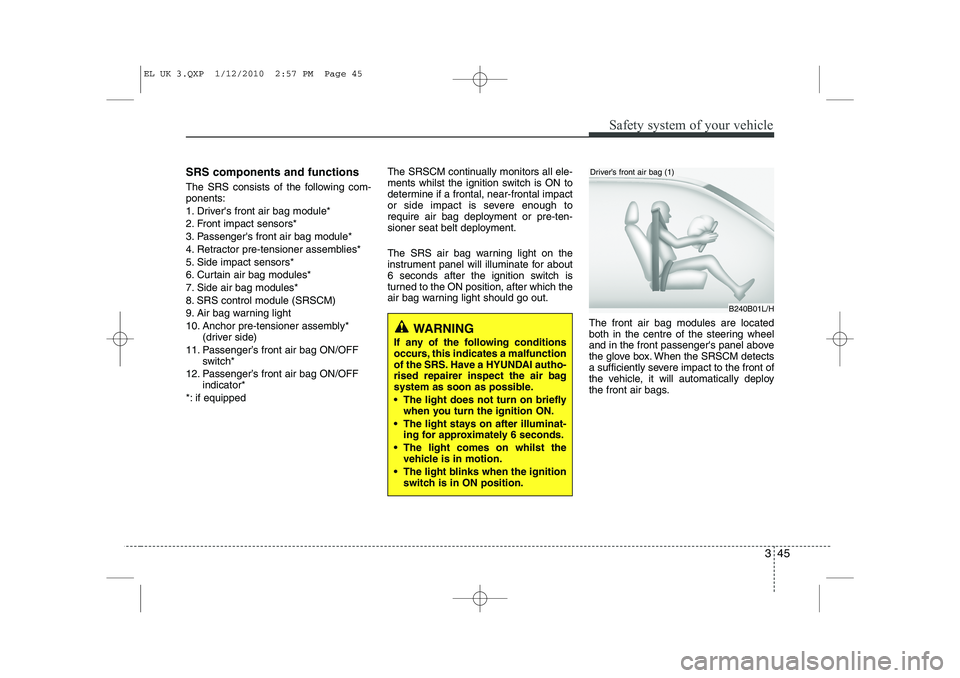
SRS components and functions
The SRS consists of the following com- ponents:
1. Driver's front air bag module*
2. Front impact sensors*
3. Passenger's front air bag module*
4. Retractor pre-tensioner assemblies*
5. Side impact sensors*
6. Curtain air bag modules*
7. Side air bag modules*
8. SRS control module (SRSCM)
9. Air bag warning light
10. Anchor pre-tensioner assembly* (driver side)
11. Passenger’s front air bag ON/OFF switch*
12. Passenger’s front air bag ON/OFF indicator*
*: if equipped The SRSCM continually monitors all ele-
ments whilst the ignition switch is ON to
determine if a frontal, near-frontal impact
or side impact is severe enough to
require air bag deployment or pre-ten-
sioner seat belt deployment.
The SRS air bag warning light on the
instrument panel will illuminate for about
6 seconds after the ignition switch is
turned to the ON position, after which the
air bag warning light should go out.
The front air bag modules are located
both in the centre of the steering wheel
and in the front passenger's panel above
the glove box. When the SRSCM detects
a sufficiently severe impact to the front of
the vehicle, it will automatically deploy
the front air bags.
WARNING
If any of the following conditions
occurs, this indicates a malfunction
of the SRS. Have a HYUNDAI autho-
rised repairer inspect the air bag
system as soon as possible.
The light does not turn on briefly when you turn the ignition ON.
The light stays on after illuminat- ing for approximately 6 seconds.
The light comes on whilst the vehicle is in motion.
The light blinks when the ignition switch is in ON position.
B240B01L/H
Driver’s front air bag (1)
EL UK 3.QXP 1/12/2010 2:57 PM Page 45
Page 76 of 560
4
Keys / 4-2
Remote keyless entry / 4-5
Smart key / 4-8
Theft-alarm system / 4-11
Door locks / 4-13
Tailgate / 4-17
Windows / 4-19
Hood / 4-24
Fuel filler lid / 4-26
Panorama Sunroof / 4-29
Steering wheel / 4-33
Mirrors / 4-35
Instrument cluster / 4-42
Rear parking assist system / 4-67
Rearview camera / 4-71
Hazard warning flasher / 4-71
Lighting / 4-72
Wipers and washers / 4-78
Interior light / 4-82
Defroster / 4-85
Manual climate control system / 4-87
Automatic climate control system / 4-96
Windshield defrosting and defogging / 4-104
Storage compartment / 4-108
Interior features / 4-110
Exterior features / 4-117
Audio system / 4-118
Features of your vehicle
Page 95 of 560
Features of your vehicle
20
4
Power windows
The ignition switch must be in the ON
position for power windows to operate.
Each door has a power window switch
that controls the door’s window. The driv-
er has a power window lock switch which
can block the operation of rear (or front)
passenger windows.
The power windows can be operated for
approximately 30 seconds after the igni-
tion key is removed or turned to the ACC
or LOCK position. However, if the front
doors are opened, the power windows
cannot be operated even within the 30
seconds period. The driver’s door has a
master power window switch that con-
trols all the windows in the vehicle✽✽
NOTICE
While driving with the rear windows
down or with the sunroof (if equipped)
in an open (or partially open position),
your vehicle may demonstrate a wind
buffeting or pulsation noise. This
noise is a normal occurrence and can be
reduced or eliminated by taking the fol-
lowing actions. If the noise occurs with
one or both of the rear windows down,
partially lower both front windows
approximately one inch. If you experi-
ence the noise with the sunroof open,
slightly reduce the size of the sunroof
opening.
Window opening and closing
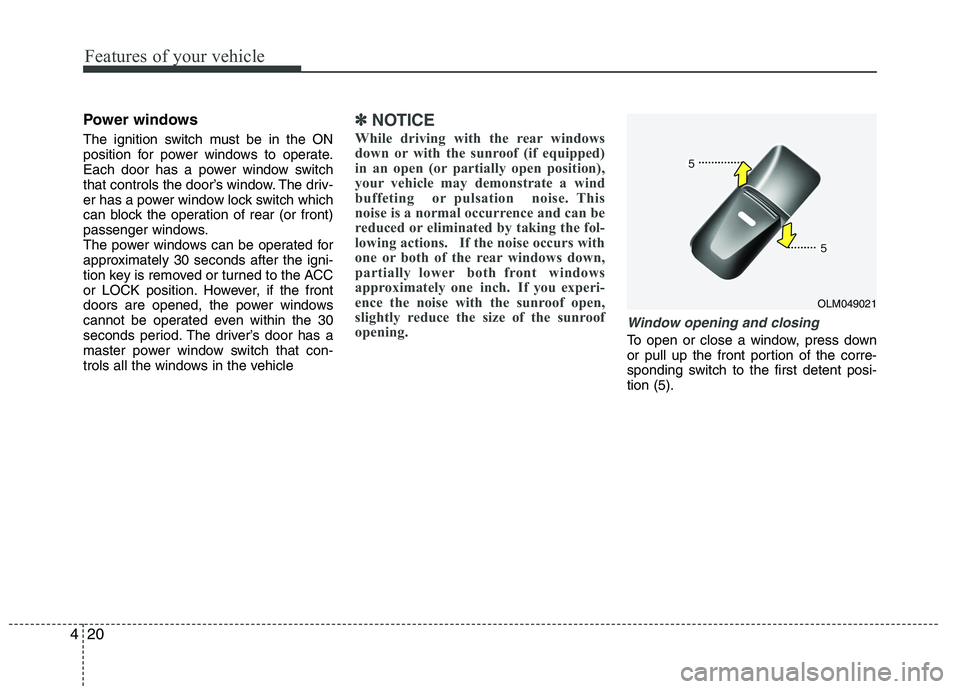
To open or close a window, press down
or pull up the front portion of the corre-
sponding switch to the first detent posi-tion (5).
OLM049021
Page 103 of 560
Features of your vehicle
28
4
(Continued)
Use only portable plastic fuel
containers designed to carry and
store gasoline.
Do not use cellular phones while refueling. Electric current and/or
electronic interference from cel-
lular phones can potentially
ignite fuel vapors causing a fire.
When refueling, always shut the engine off. Sparks produced byelectrical components related to
the engine can ignite fuel vapors
causing a fire. Once refueling is
complete, check to make sure thefiller cap and filler door are
securely closed, before starting
the engine.
DO NOT use matches or a lighter and DO NOT SMOKE or leave a lit
cigarette in your vehicle while at
a gas station especially during
refueling. Automotive fuel is
highly flammable and can, when
ignited, result in fire.
(Continued)(Continued)
If a fire breaks out during refuel-ing, leave the vicinity of the vehi-
cle, and immediately contact the
manager of the gas station and
then contact the local fire depart-
ment. Follow any safety instruc-
tions they provide.CAUTION
Make sure to refuel your vehicle
according to the "Fuel require-
ments" suggested in section 1.
If the fuel filler cap requires replacement, use only a genuineHYUNDAI cap or the equivalent
specified for your vehicle. An incorrect fuel filler cap can resultin a serious malfunction of the fuel system or emission control
system.
Do not spill fuel on the exterior surfaces of the vehicle. Any typeof fuel spilled on painted surfaces may damage the paint.
After refueling, make sure the fuel cap is installed securely to pre-vent fuel spillage in the event of an accident.
Page 108 of 560
433
Features of your vehicle
Electric power steering (if equipped)
Power steering uses the motor to assist
you in steering the vehicle. If the engine
is off or if the power steering system
becomes inoperative, the vehicle may
still be steered, but it will require
increased steering effort.
The motor driven power steering is con-
trolled by the power steering control unit
which senses the steering wheel torque
and vehicle speed to command the
motor.
The steering wheel becomes heavier as
the vehicle’s speed increases and
becomes lighter as the vehicle’s speed
decreases for better control of the steer-ing wheel.
Should you notice any change in the
effort required to steer during normal
vehicle operation, have the power steer-
ing checked by an authorized HYUNDAI
dealer.✽✽NOTICE
The following symptoms may occur dur-
ing normal vehicle operation:
The EPS warning light does not illumi- nate.
The steering effort is high immediately after turning the ignition switch on.
This happens as the system performs
the EPS system diagnostics. When the
diagnostics is completed, the steering
wheel will return to its normal condi-
tion.
A click noise may be heard from the
EPS relay after the ignition switch is
turned to the ON or LOCK position.
Motor noise may be heard when the vehicle is at a stop or at a low driving
speed.
The steering effort can suddenly
increase, if the operation of the EPS
system is stopped to prevent serious
accidents when it detects malfunction
of the EPS system by self-diagnosis.
The steering effort increases if the steering wheel is rotated continuously
when the vehicle is not in motion.
However, after a few minutes, it will
return to its normal conditions.
(Continued)(Continued)
If the Electric Power Steering System
does not operate normally, the warn-
ing light will illuminate on the instru-
ment cluster. The steering wheel may
become difficult to control or operate
abnormally. Take your vehicle to an
authorized HYUNDAI dealer and
have the vehicle checked as soon as
possible.
When you operate the steering wheel
in low temperature, abnormal noise
could occur. If temperature rises, the
noise will disappear. This is a normal
condition.
STEERING WHEEL
Page 110 of 560
435
Features of your vehicle
Inside rearview mirror
Adjust the rearview mirror to center on
the view through the rear window. Make
this adjustment before you start driving.
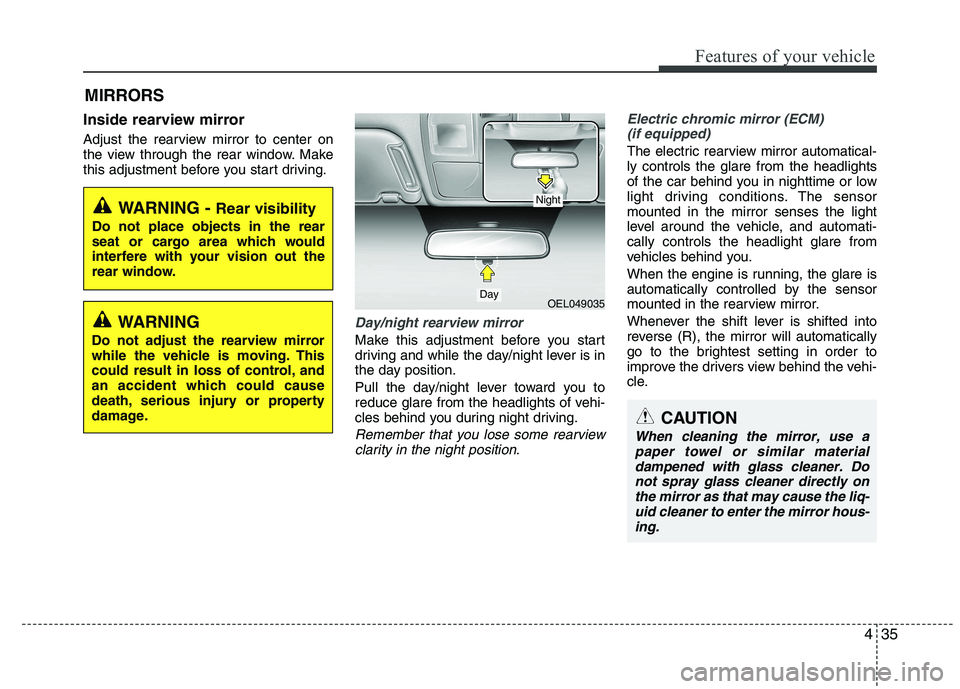
Day/night rearview mirror
Make this adjustment before you start
driving and while the day/night lever is in
the day position.
Pull the day/night lever toward you to
reduce glare from the headlights of vehi-
cles behind you during night driving.
Remember that you lose some rearviewclarity in the night position.
Electric chromic mirror (ECM)(if equipped)
The electric rearview mirror automatical- ly controls the glare from the headlights
of the car behind you in nighttime or low
light driving conditions. The sensormounted in the mirror senses the light
level around the vehicle, and automati-cally controls the headlight glare from
vehicles behind you.
When the engine is running, the glare is
automatically controlled by the sensor
mounted in the rearview mirror.
Whenever the shift lever is shifted into
reverse (R), the mirror will automatically
go to the brightest setting in order to
improve the drivers view behind the vehi-
cle.
MIRRORS
WARNING -
Rear visibility
Do not place objects in the rear
seat or cargo area which would
interfere with your vision out the
rear window.
OEL049035
CAUTION
When cleaning the mirror, use a paper towel or similar materialdampened with glass cleaner. Donot spray glass cleaner directly on
the mirror as that may cause the liq- uid cleaner to enter the mirror hous-ing.
Day
Night
WARNING
Do not adjust the rearview mirror
while the vehicle is moving. This
could result in loss of control, and
an accident which could cause
death, serious injury or property
damage.
Page 111 of 560
Features of your vehicle
36
4
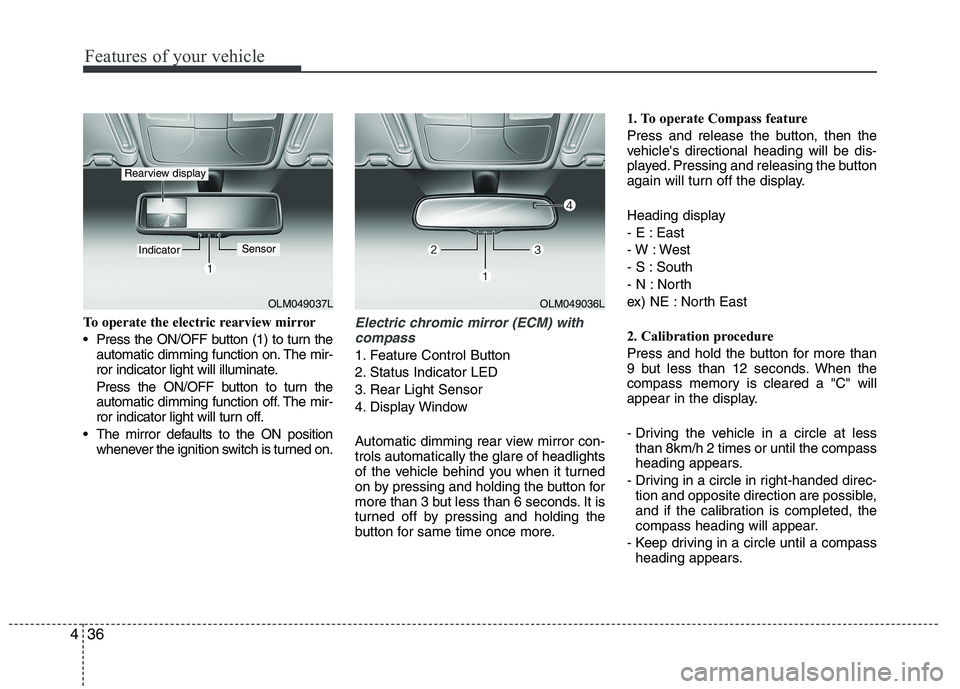
To operate the electric rearview mirror
Press the ON/OFF button (1) to turn the
automatic dimming function on. The mir-
ror indicator light will illuminate.
Press the ON/OFF button to turn the
automatic dimming function off. The mir-
ror indicator light will turn off.
The mirror defaults to the ON position whenever the ignition switch is turned on.Electric chromic mirror (ECM) with
compass
1. Feature Control Button
2. Status Indicator LED
3. Rear Light Sensor
4. Display Window
Automatic dimming rear view mirror con- trols automatically the glare of headlights
of the vehicle behind you when it turned
on by pressing and holding the button for
more than 3 but less than 6 seconds. It is
turned off by pressing and holding the
button for same time once more. 1. To operate Compass feature
Press and release the button, then the
vehicle's directional heading will be dis-
played. Pressing and releasing the button
again will turn off the display.
Heading display
- E : East
- W : West
- S : South
- N : North
ex) NE : North East
2. Calibration procedure
Press and hold the button for more than
9 but less than 12 seconds. When the
compass memory is cleared a "C" will
appear in the display.
- Driving the vehicle in a circle at less
than 8km/h 2 times or until the compass
heading appears.
- Driving in a circle in right-handed direc- tion and opposite direction are possible,
and if the calibration is completed, the
compass heading will appear.
- Keep driving in a circle until a compass heading appears.
OLM049037L
IndicatorSensor
Rearview display
OLM049036L