audio HYUNDAI IX35 2014 Owners Manual
[x] Cancel search | Manufacturer: HYUNDAI, Model Year: 2014, Model line: IX35, Model: HYUNDAI IX35 2014Pages: 1534, PDF Size: 39.76 MB
Page 743 of 1534
![HYUNDAI IX35 2014 Owners Manual 4 253
Features of your vehicle
SETUP
Starting Mode
Press the key to display the Setup screen.
You can select and control options relat-
ed to [Display], [Sound], [Clock/Day],[Phone] and [System].](/img/35/56237/w960_56237-742.png "HYUNDAI IX35 2014 Owners Manual 4 253
Features of your vehicle
SETUP
Starting Mode
Press the key to display the Setup screen.
You can select and control options relat-
ed to [Display], [Sound], [Clock/Day],[Phone] and [System].")
4 253
Features of your vehicle
SETUP
Starting Mode
Press the key to display the Setup screen.
You can select and control options relat-
ed to [Display], [Sound], [Clock/Day],[Phone] and [System].Display Settings
Adjusting the Brightness
Press the key Select
[Display] Select [Brightness]
Use the , buttons to adjust the
screen brightness or set the Brightness
on Automatic, Day, or Night mode.
Press the button to reset.
1) Automatic : Adjusts the brightness
automatically
2) Day : Always maintains the brightness on high
3) Night : Always maintains the bright- ness on low
Pop-up Mode
Press the key Select
[Display] Select [Pop-up Mode]
This feature is used to display the Pop-up
Mode screen when entering radio and
media modes.
When this feature is turned on, pressing
the or key will display
the Pop-up Mode screen.
✽✽ NOTICE
The media Pop-up Mode screen can be
displayed only when two or more mediamodes have been connected.
MEDIA RADIO
SETUP
Default
SETUP SETUP
EL(FL) Eng 4B AUDIO.QXP 7/11/2013 11:21 AM Page 253
Page 744 of 1534
![HYUNDAI IX35 2014 Owners Manual Features of your vehicle
254
4
Scroll Text
Press the key Select
[Display] Select [Scroll text]
This feature is used to scroll text dis-
played on the screen when it is too long
to be displayed at](/img/35/56237/w960_56237-743.png "HYUNDAI IX35 2014 Owners Manual Features of your vehicle
254
4
Scroll Text
Press the key Select
[Display] Select [Scroll text]
This feature is used to scroll text dis-
played on the screen when it is too long
to be displayed at")
Features of your vehicle
254
4
Scroll Text
Press the key Select
[Display] Select [Scroll text]
This feature is used to scroll text dis-
played on the screen when it is too long
to be displayed at once.
When turned on, the text is repeatedly
scrolled. When turned off, the text is
scrolled just once.
MP3 Information Display
Press the key Select
[Display] Select [Song Info]
This feature is used to change the infor-
mation displayed within USB and MP3
CD modes.
1) Folder File : Displays file name and
folder name
2) Album Artist Song : Displays album name/artist name/songSETUP SETUP
EL(FL) Eng 4B AUDIO.QXP 7/11/2013 11:21 AM Page 254
Page 745 of 1534
![HYUNDAI IX35 2014 Owners Manual 4 255
Features of your vehicle
Sound Settings
Sound Settings
Press the key Select
[Sound] Select [Audio Setting]Use the , , , buttons to
adjust the Fader/Balance settings.
Use the , buttons to a](/img/35/56237/w960_56237-744.png "HYUNDAI IX35 2014 Owners Manual 4 255
Features of your vehicle
Sound Settings
Sound Settings
Press the key Select
[Sound] Select [Audio Setting]Use the , , , buttons to
adjust the Fader/Balance settings.
Use the , buttons to a")
4 255
Features of your vehicle
Sound Settings
Sound Settings
Press the key Select
[Sound] Select [Audio Setting]Use the , , , buttons to
adjust the Fader/Balance settings.
Use the , buttons to adjust the
Bass/Middle/Treble settings.
Press the button to reset.
SDVC (Speed Dependent Volume
Control)
Press the key Select
[Sound] Select [Speed Dependent Vol.]
The volume level is controlled automati-
cally according to the vehicle speed.
SDVC can be set by selecting from
Off/Low/Mid/High.SETUP
DefaultSETUP
EL(FL) Eng 4B AUDIO.QXP 7/11/2013 11:21 AM Page 255
Page 746 of 1534
![HYUNDAI IX35 2014 Owners Manual Features of your vehicle
256
4
Voice Recognition Setting
Press the key Select
[Sound] Select [Volume Dialogue]
Use the , buttons to adjust the
Volume Dialog.
Touch Screen Beep
Press the key Sel](/img/35/56237/w960_56237-745.png "HYUNDAI IX35 2014 Owners Manual Features of your vehicle
256
4
Voice Recognition Setting
Press the key Select
[Sound] Select [Volume Dialogue]
Use the , buttons to adjust the
Volume Dialog.
Touch Screen Beep
Press the key Sel")
Features of your vehicle
256
4
Voice Recognition Setting
Press the key Select
[Sound] Select [Volume Dialogue]
Use the , buttons to adjust the
Volume Dialog.
Touch Screen Beep
Press the key Select
[Sound] Select [Touch Screen Beep]
This feature is used to turn the touch
screen beep on/off. Clock/Day Setting
Setting
Press the key Select
[Clock/Day] Select [Clock Settings]
Use the , buttons to set the Hour,
Minutes and AM/PM setting.
✽✽
NOTICE
Press and hold the key (over 0.8 seconds) to display the Clock/ Day
screen.
CLOCK
SETUP
SETUP SETUP
EL(FL) Eng 4B AUDIO.QXP 7/11/2013 11:21 AM Page 256
Page 747 of 1534
![HYUNDAI IX35 2014 Owners Manual 4 257
Features of your vehicle
Day Setting
Press the key Select
[Clock/Day] Select [Day Settings]
Use the , buttons to set the Day,
Month and Year setting.
Time Format
Press the key Select
[Cl](/img/35/56237/w960_56237-746.png "HYUNDAI IX35 2014 Owners Manual 4 257
Features of your vehicle
Day Setting
Press the key Select
[Clock/Day] Select [Day Settings]
Use the , buttons to set the Day,
Month and Year setting.
Time Format
Press the key Select
[Cl")
4 257
Features of your vehicle
Day Setting
Press the key Select
[Clock/Day] Select [Day Settings]
Use the , buttons to set the Day,
Month and Year setting.
Time Format
Press the key Select
[Clock/Day] Select [Time Format]
This feature is used to change the clock
format between 12hr or 24hr.
Clock Display
Press the key Select
[Clock/Day] Select [Clock Display
(Power off)]
This feature is used to display a clock on the screen when the audio system is
turned off.SETUP SETUP SETUP
EL(FL) Eng 4B AUDIO.QXP 7/11/2013 11:21 AM Page 257
Page 748 of 1534
![HYUNDAI IX35 2014 Owners Manual Features of your vehicle
258
4
Automatic RDS Time
Press the key Select
[Clock/Day] Select [Automatic RDSTime]
This feature is used to set time automat-
ically by synchronizing with RDS.SETUP
EL(F](/img/35/56237/w960_56237-747.png "HYUNDAI IX35 2014 Owners Manual Features of your vehicle
258
4
Automatic RDS Time
Press the key Select
[Clock/Day] Select [Automatic RDSTime]
This feature is used to set time automat-
ically by synchronizing with RDS.SETUP
EL(F")
Features of your vehicle
258
4
Automatic RDS Time
Press the key Select
[Clock/Day] Select [Automatic RDSTime]
This feature is used to set time automat-
ically by synchronizing with RDS.SETUP
EL(FL) Eng 4B AUDIO.QXP 7/11/2013 11:21 AM Page 258
Page 749 of 1534
4 259
Features of your vehicle
Bluetooth®Wireless Technology
Setting The
Bluetooth®word mark and logos are
registered trademarks owned by
Bluetooth SIG, Inc. and any use of such
marks is under license. Other trademarks
and trade names are those of their
respective owners. A
Bluetooth®enabled
cell phone is required to use
Bluetooth®
wireless technology
Pairing a New Device
Press the key Select
[Phone] Select [Pair Phone]
Bluetooth®Wireless Technology devices
can be paired with the audio system.
For more information, refer to the “Pairing
through Phone Setup” section within
Bluetooth®Wireless Technology.
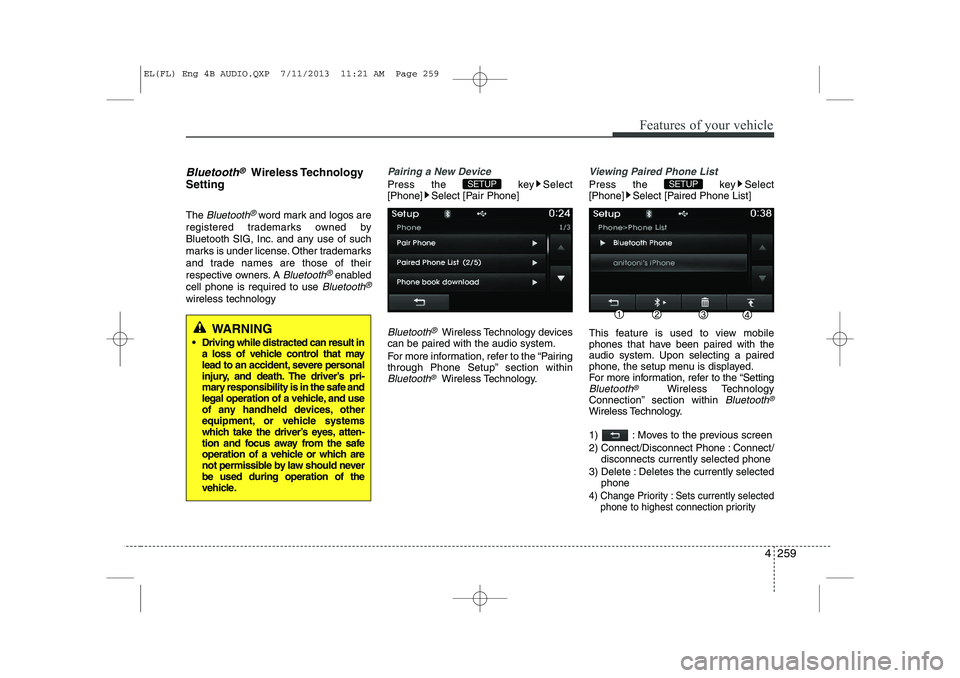
Viewing Paired Phone List
Press the key Select
[Phone] Select [Paired Phone List]
This feature is used to view mobile
phones that have been paired with the
audio system. Upon selecting a paired
phone, the setup menu is displayed.
For more information, refer to the “Setting
Bluetooth®Wireless Technology
Connection” section within Bluetooth®
Wireless Technology.
1) : Moves to the previous screen
2) Connect/Disconnect Phone : Connect/ disconnects currently selected phone
3) Delete : Deletes the currently selected phone
4) Change Priority : Sets currently selected
phone to highest connection priority
SETUP SETUP
WARNING
Driving while distracted can result in a loss of vehicle control that may
lead to an accident, severe personal
injury, and death. The driver’s pri-
mary responsibility is in the safe and
legal operation of a vehicle, and use
of any handheld devices, other
equipment, or vehicle systems
which take the driver’s eyes, atten-
tion and focus away from the safe
operation of a vehicle or which are
not permissible by law should neverbe used during operation of the
vehicle.
EL(FL) Eng 4B AUDIO.QXP 7/11/2013 11:21 AM Page 259
Page 751 of 1534
![HYUNDAI IX35 2014 Owners Manual 4 261
Features of your vehicle
Audio Streaming
Press the key Select
[Phone] Select [Audio Streaming]
When Audio Streaming is turned on, you
can play music files saved in your
Bluetooth®Wireless T](/img/35/56237/w960_56237-750.png "HYUNDAI IX35 2014 Owners Manual 4 261
Features of your vehicle
Audio Streaming
Press the key Select
[Phone] Select [Audio Streaming]
When Audio Streaming is turned on, you
can play music files saved in your
Bluetooth®Wireless T")
4 261
Features of your vehicle
Audio Streaming
Press the key Select
[Phone] Select [Audio Streaming]
When Audio Streaming is turned on, you
can play music files saved in your
Bluetooth®Wireless Technology device
through the audio system.
Outgoing Volume
Press the key Select
[Phone] Select [Outgoing Volume]
Use the , buttons to adjust the
outgoing volume level.
Turning Bluetooth System Off
Press the key Select
[Phone] Select [Bluetooth System Off] Once
Bluetooth®Wireless Technology is
turned off, Bluetooth®Wireless
Technology related features will not be
supported within the audio system.
✽✽ NOTICE
To turn Bluetooth ®
Wireless Technology
back on, go to [Phone] and
press “Yes”.
SETUP
SETUP
SETUP SETUP
CAUTION
Bluetooth ®
Wireless Technology
audio streaming may not be support-
ed in some Bluetooth ®
Wireless
Technology phones.
EL(FL) Eng 4B AUDIO.QXP 7/11/2013 11:21 AM Page 261
Page 752 of 1534
![HYUNDAI IX35 2014 Owners Manual Features of your vehicle
262
4
System Setting
Memory Information
Press the key Select [System]
Select [Memory Information]
This feature displays information related
to system memory.
1) Using : Dis](/img/35/56237/w960_56237-751.png "HYUNDAI IX35 2014 Owners Manual Features of your vehicle
262
4
System Setting
Memory Information
Press the key Select [System]
Select [Memory Information]
This feature displays information related
to system memory.
1) Using : Dis")
Features of your vehicle
262
4
System Setting
Memory Information
Press the key Select [System]
Select [Memory Information]
This feature displays information related
to system memory.
1) Using : Displays capacity currently in
use
2) Capacity : Displays total capacity
Voice Recognition Mode Setting
Press the key Select
[System] Select [Voice RecognitionSystem]
This feature is used to select the desired
prompt feedback option from Normal and
Expert.
1) Normal : When using voice recogni- tion, provides detailed guidance prompts
2) Expert : When using voice recognition, omits some guidance prompts
✽✽NOTICE
Voice Recognition is depend on the Audio System.
Language
Press the key Select
[System] Select [Language]
This feature is used to change the sys-
tem and voice recognition language. If the language is changed, the system
will restart and apply the selected lan-
guage. ❈ Language support by regionSETUP SETUP
SETUP
EL(FL) Eng 4B AUDIO.QXP 7/11/2013 11:21 AM Page 262
Page 753 of 1534
4 263
Features of your vehicle
REAR VIEW CAMERA (if equipped)
The system has been equipped with arear view camera for user safety by
allowing a wider rear range of vision.
The rear view camera will automatical- ly operate when the ignition key is
turned ON and the transmission leveris set to R.
The rear view camera will automatical- ly stop operating when set to a differ-
ent lever.
CAUTION
The rear view camera has been
equipped with an optical lens toprovide a wider range of vision and may appear different from the actu-al distance. For safety, directly
check the rear and left/right sides.
EL(FL) Eng 4B AUDIO.QXP 7/11/2013 11:21 AM Page 263