battery HYUNDAI IX35 2014 Owners Manual
[x] Cancel search | Manufacturer: HYUNDAI, Model Year: 2014, Model line: IX35, Model: HYUNDAI IX35 2014Pages: 1534, PDF Size: 39.76 MB
Page 1135 of 1534
Features of your vehicle
64
4
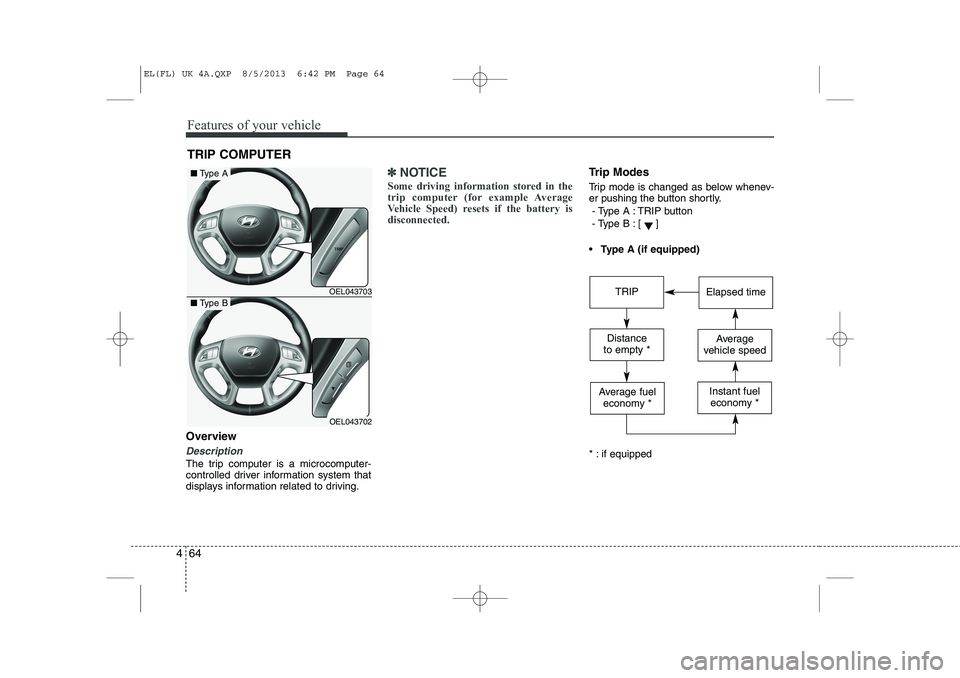
Overview
Description
The trip computer is a microcomputer-
controlled driver information system that
displays information related to driving.
✽✽
NOTICE
Some driving information stored in the
trip computer (for example Average
Vehicle Speed) resets if the battery isdisconnected.Trip Modes
Trip mode is changed as below whenev-
er pushing the button shortly.
- Type A : TRIP button
- Type B :
[]
Type A (if equipped)
* : if equipped
TRIP COMPUTER
OEL043703
OEL043702
■ Type A
■Type BTRIPElapsed time
Distance
to empty *Average
vehicle speed
Average fuel economy *Instant fueleconomy *
EL(FL) UK 4A.QXP 8/5/2013 6:42 PM Page 64
Page 1144 of 1534
473
Features of your vehicle
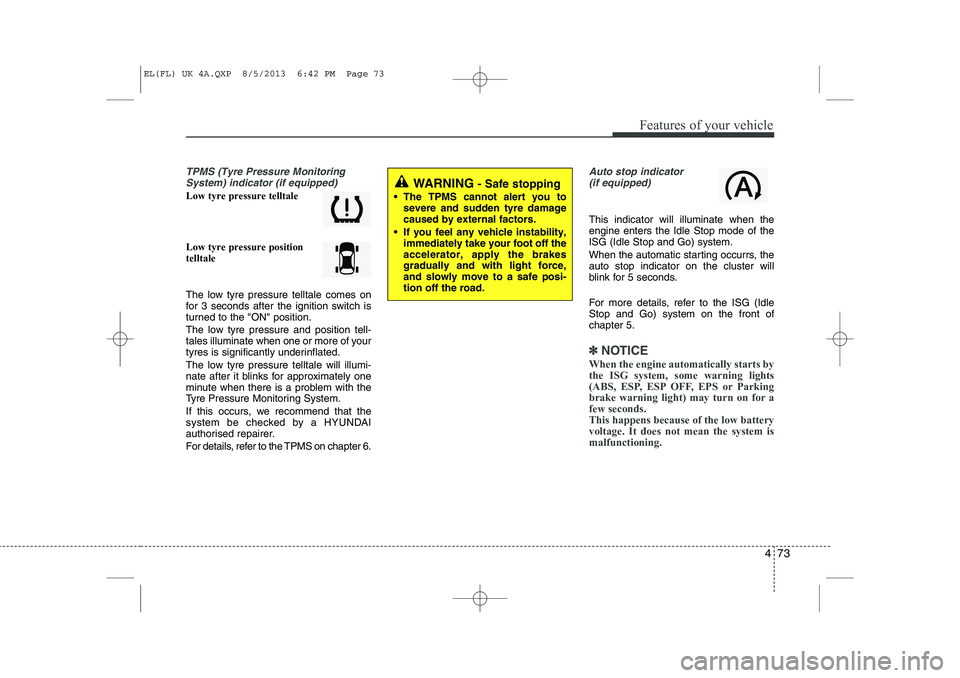
TPMS (Tyre Pressure MonitoringSystem) indicator (if equipped)
Low tyre pressure telltale Low tyre pressure position telltale
The low tyre pressure telltale comes on
for 3 seconds after the ignition switch is
turned to the "ON" position.
The low tyre pressure and position tell-
tales illuminate when one or more of your
tyres is significantly underinflated.
The low tyre pressure telltale will illumi-
nate after it blinks for approximately one
minute when there is a problem with the
Tyre Pressure Monitoring System.
If this occurs, we recommend that the
system be checked by a HYUNDAI
authorised repairer.
For details, refer to the TPMS on chapter 6.
Auto stop indicator(if equipped)
This indicator will illuminate when the engine enters the Idle Stop mode of theISG (Idle Stop and Go) system.
When the automatic starting occurrs, the auto stop indicator on the cluster will
blink for 5 seconds.
For more details, refer to the ISG (Idle Stop and Go) system on the front ofchapter 5.
✽✽ NOTICE
When the engine automatically starts by
the ISG system, some warning lights
(ABS, ESP, ESP OFF, EPS or Parking
brake warning light) may turn on for afew seconds. This happens because of the low batteryvoltage. It does not mean the system ismalfunctioning.
WARNING - Safe stopping
The TPMS cannot alert you to severe and sudden tyre damage caused by external factors.
If you feel any vehicle instability, immediately take your foot off theaccelerator, apply the brakesgradually and with light force,and slowly move to a safe posi-tion off the road.
EL(FL) UK 4A.QXP 8/5/2013 6:42 PM Page 73
Page 1146 of 1534
475
Features of your vehicle
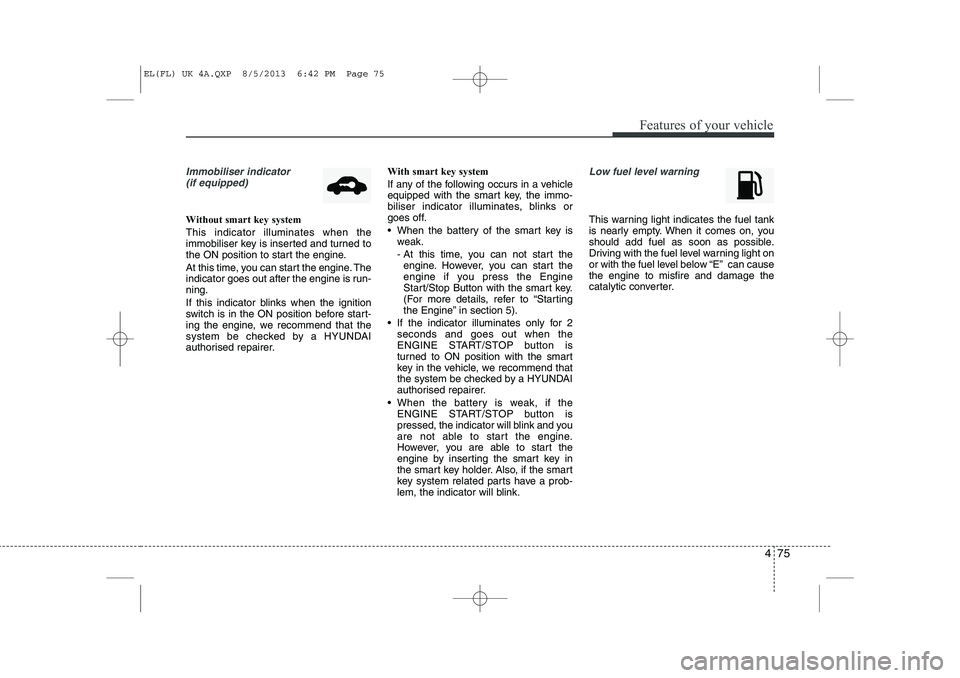
Immobiliser indicator (if equipped)
Without smart key system This indicator illuminates when the
immobiliser key is inserted and turned to
the ON position to start the engine.
At this time, you can start the engine. The
indicator goes out after the engine is run-ning.
If this indicator blinks when the ignition
switch is in the ON position before start-
ing the engine, we recommend that the
system be checked by a HYUNDAI
authorised repairer. With smart key system
If any of the following occurs in a vehicle
equipped with the smart key, the immo-
biliser indicator illuminates, blinks or
goes off.
When the battery of the smart key is
weak.
- At this time, you can not start theengine. However, you can start the
engine if you press the Engine
Start/Stop Button with the smart key.
(For more details, refer to “Starting
the Engine” in section 5).
If the indicator illuminates only for 2 seconds and goes out when the
ENGINE START/STOP button is
turned to ON position with the smart
key in the vehicle, we recommend that
the system be checked by a HYUNDAI
authorised repairer.
When the battery is weak, if the ENGINE START/STOP button is
pressed, the indicator will blink and you
are not able to start the engine.
However, you are able to start the
engine by inserting the smart key in
the smart key holder. Also, if the smart
key system related parts have a prob-
lem, the indicator will blink.
Low fuel level warning
This warning light indicates the fuel tank
is nearly empty. When it comes on, you
should add fuel as soon as possible.
Driving with the fuel level warning light on
or with the fuel level below “E” can causethe engine to misfire and damage the
catalytic converter.
EL(FL) UK 4A.QXP 8/5/2013 6:42 PM Page 75
Page 1150 of 1534
479
Features of your vehicle
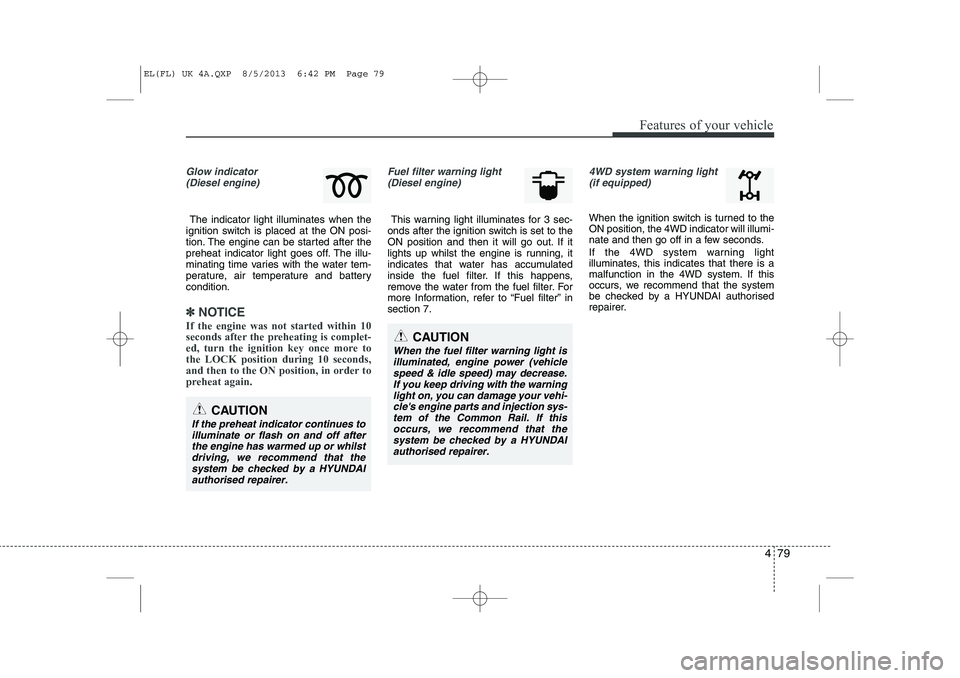
Glow indicator(Diesel engine)
The indicator light illuminates when the
ignition switch is placed at the ON posi-
tion. The engine can be started after the
preheat indicator light goes off. The illu-
minating time varies with the water tem-
perature, air temperature and batterycondition.
✽✽ NOTICE
If the engine was not started within 10
seconds after the preheating is complet-
ed, turn the ignition key once more tothe LOCK position during 10 seconds,
and then to the ON position, in order to
preheat again.
Fuel filter warning light (Diesel engine)
This warning light illuminates for 3 sec-
onds after the ignition switch is set to the
ON position and then it will go out. If it
lights up whilst the engine is running, it
indicates that water has accumulated
inside the fuel filter. If this happens,
remove the water from the fuel filter. For
more Information, refer to “Fuel filter” insection 7.
4WD system warning light
(if equipped)
When the ignition switch is turned to the ON position, the 4WD indicator will illumi-
nate and then go off in a few seconds.
If the 4WD system warning light
illuminates, this indicates that there is a
malfunction in the 4WD system. If this
occurs, we recommend that the system
be checked by a HYUNDAI authorised
repairer.
CAUTION
When the fuel filter warning light is
illuminated, engine power (vehicle speed & idle speed) may decrease.If you keep driving with the warning light on, you can damage your vehi-
cle's engine parts and injection sys- tem of the Common Rail. If thisoccurs, we recommend that the system be checked by a HYUNDAI
authorised repairer.
CAUTION
If the preheat indicator continues toilluminate or flash on and off after
the engine has warmed up or whilstdriving, we recommend that thesystem be checked by a HYUNDAI authorised repairer.
EL(FL) UK 4A.QXP 8/5/2013 6:42 PM Page 79
Page 1170 of 1534
499
Features of your vehicle
Battery saver function
The purpose of this feature is to pre-vent the battery from being dis-
charged. The system automatically
turns off the parking lights when the
driver removes the ignition key and
opens the driver- side door.
With this feature, the parking lights will be turned off automatically if the driver
parks on the side of road at night.
If necessary, to keep the lights on
when the ignition key is removed, per-
form the following :
1) Open the driver-side door.
2) Turn the parking lights OFF and ON again using the light switch on the
steering column. Headlight escort function (if equipped) IThe headlights (and/or taillights) remain
on for approximately 5 minutes after the
ignition key is removed or turned to the
ACC or LOCK position. However, if the
driver’s door is opened and closed, the
headlights are turned off after 15 sec-
onds.
The headlights can be turned off by
pressing the lock button on the transmit-
ter (or smart key) twice or turning off the
light switch from the headlight or Autolight position.
Headlight welcome function (if equipped)
When the headlight switch is in the ON or
AUTO position and all doors (and tail-
gate) are closed and locked, if you press
the door unlock button on the transmitter
(or smart key), the headlights will come
on for about 15 seconds.
If the headlight switch is in the AUTO
position, the function can only operate atnight.
At this time, if you press the door unlock
button again or door lock button on the
transmitter (or smart key), the headlights
will turn off immediately.
LIGHTING
CAUTION
If the driver gets out of the vehicle
through other doors (except dri-ver’s door), the battery saver func- tion does not operate and the head- light escort function does not turn
off automatically. Therefore, it caus- es the battery to be discharged. In this case, make sure to turn off thelamp before getting out of the vehi-
cle.
EL(FL) UK 4A.QXP 8/5/2013 6:44 PM Page 99
Page 1172 of 1534
4 101
Features of your vehicle
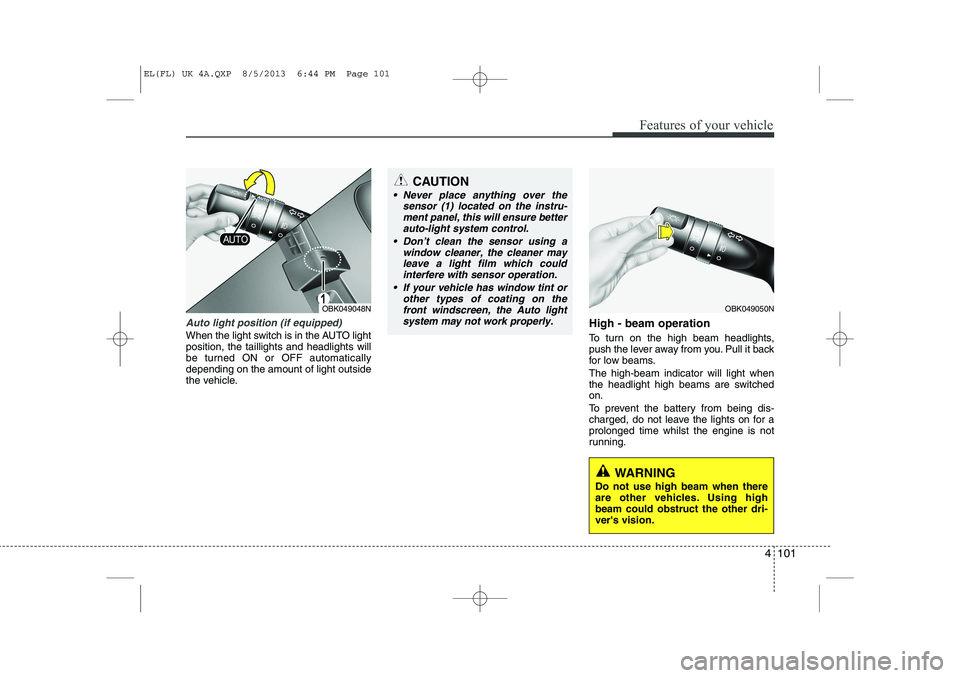
Auto light position (if equipped)
When the light switch is in the AUTO light position, the taillights and headlights will
be turned ON or OFF automaticallydepending on the amount of light outside
the vehicle.High - beam operation
To turn on the high beam headlights,
push the lever away from you. Pull it back
for low beams. The high-beam indicator will light when
the headlight high beams are switchedon.
To prevent the battery from being dis-
charged, do not leave the lights on for aprolonged time whilst the engine is not
running.
OBK049050N
CAUTION
Never place anything over the
sensor (1) located on the instru-
ment panel, this will ensure better auto-light system control.
Don’t clean the sensor using a window cleaner, the cleaner may
leave a light film which could interfere with sensor operation.
If your vehicle has window tint or other types of coating on thefront windscreen, the Auto light
system may not work properly.
OBK049048N
WARNING
Do not use high beam when there
are other vehicles. Using highbeam could obstruct the other dri-ver's vision.
EL(FL) UK 4A.QXP 8/5/2013 6:44 PM Page 101
Page 1181 of 1534
Features of your vehicle
110
4
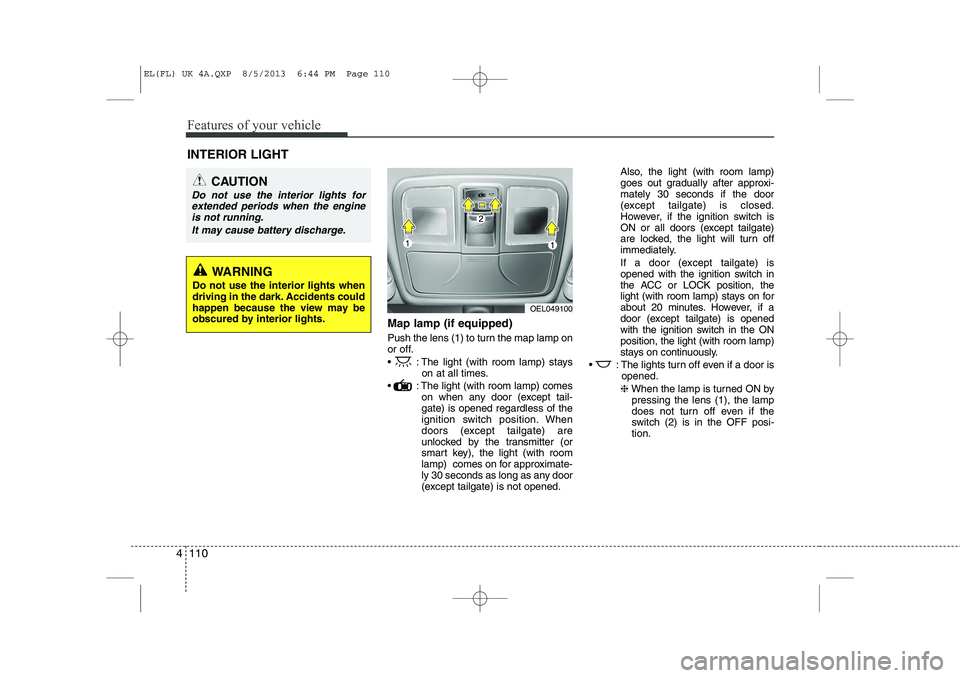
Map lamp (if equipped)
Push the lens (1) to turn the map lamp on
or off.
: The light (with room lamp) stays
on at all times.
: The light (with room lamp) comes on when any door (except tail- gate) is opened regardless of the
ignition switch position. When
doors (except tailgate) are
unlocked by the transmitter (or
smart key), the light (with room
lamp) comes on for approximate-
ly 30 seconds as long as any door
(except tailgate) is not opened. Also, the light (with room lamp)
goes out gradually after approxi-mately 30 seconds if the door
(except tailgate) is closed.
However, if the ignition switch is
ON or all doors (except tailgate)
are locked, the light will turn off
immediately.
If a door (except tailgate) is
opened with the ignition switch in
the ACC or LOCK position, the
light (with room lamp) stays on for
about 20 minutes. However, if a
door (except tailgate) is opened
with the ignition switch in the ONposition, the light (with room lamp)
stays on continuously.
: The lights turn off even if a door is opened.
❈ When the lamp is turned ON by
pressing the lens (1), the lamp
does not turn off even if the
switch (2) is in the OFF posi-tion.
INTERIOR LIGHT
CAUTION
Do not use the interior lights for
extended periods when the engine
is not running.
It may cause battery discharge.
OEL049100
WARNING
Do not use the interior lights when
driving in the dark. Accidents could
happen because the view may be
obscured by interior lights.
EL(FL) UK 4A.QXP 8/5/2013 6:44 PM Page 110
Page 1182 of 1534
4 111
Features of your vehicle
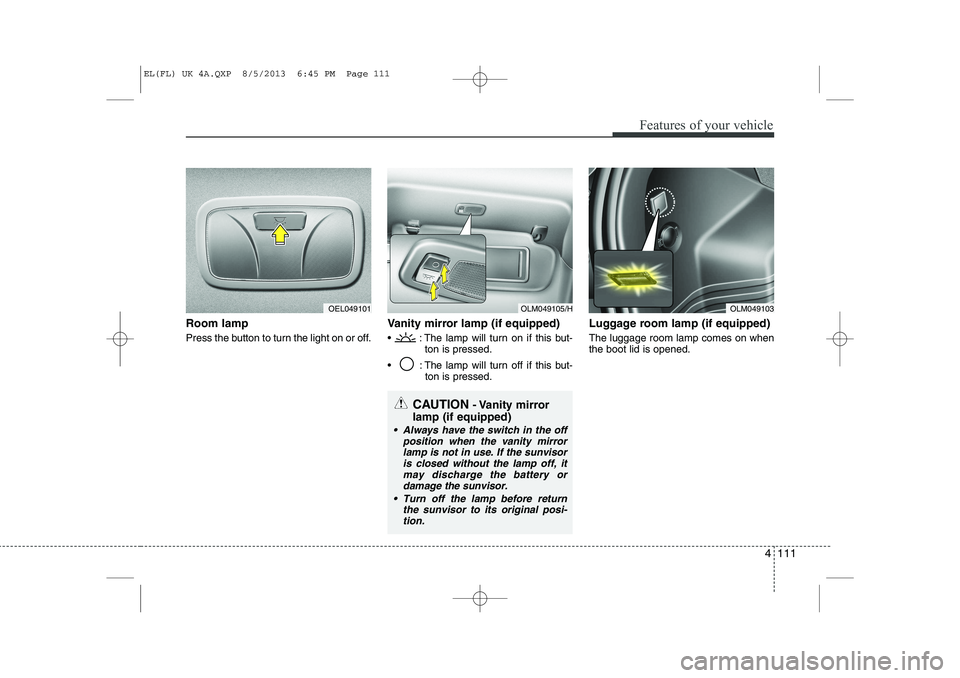
Room lamp
Press the button to turn the light on or off.Vanity mirror lamp (if equipped)
: The lamp will turn on if this but-
ton is pressed.
: The lamp will turn off if this but- ton is pressed. Luggage room lamp (if equipped)The luggage room lamp comes on when the boot lid is opened.
OLM049105/HOLM049103OEL049101
CAUTION
- Vanity mirror
lamp (if equipped)
Always have the switch in the off position when the vanity mirrorlamp is not in use. If the sunvisoris closed without the lamp off, it
may discharge the battery ordamage the sunvisor.
Turn off the lamp before return the sunvisor to its original posi-tion.
EL(FL) UK 4A.QXP 8/5/2013 6:45 PM Page 111
Page 1199 of 1534
Features of your vehicle
128
4
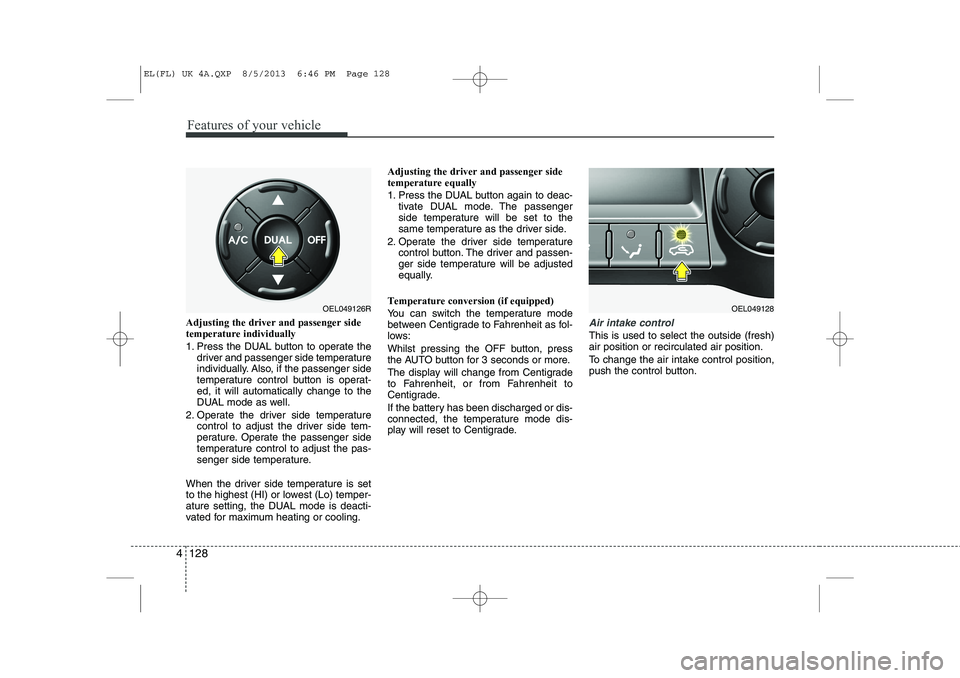
Adjusting the driver and passenger side temperature individually
1. Press the DUAL button to operate the
driver and passenger side temperature
individually. Also, if the passenger side
temperature control button is operat-ed, it will automatically change to the
DUAL mode as well.
2. Operate the driver side temperature control to adjust the driver side tem-
perature. Operate the passenger side
temperature control to adjust the pas-
senger side temperature.
When the driver side temperature is set
to the highest (HI) or lowest (Lo) temper-
ature setting, the DUAL mode is deacti-
vated for maximum heating or cooling. Adjusting the driver and passenger sidetemperature equally
1. Press the DUAL button again to deac-
tivate DUAL mode. The passenger
side temperature will be set to the
same temperature as the driver side.
2. Operate the driver side temperature control button. The driver and passen-
ger side temperature will be adjusted
equally.
Temperature conversion (if equipped)
You can switch the temperature mode
between Centigrade to Fahrenheit as fol-
lows:
Whilst pressing the OFF button, press
the AUTO button for 3 seconds or more.
The display will change from Centigrade
to Fahrenheit, or from Fahrenheit to
Centigrade.
If the battery has been discharged or dis-
connected, the temperature mode dis-
play will reset to Centigrade.Air intake control
This is used to select the outside (fresh) air position or recirculated air position.
To change the air intake control position,
push the control button.
OEL049126ROEL049128
EL(FL) UK 4A.QXP 8/5/2013 6:46 PM Page 128
Page 1210 of 1534
4 139
Features of your vehicle
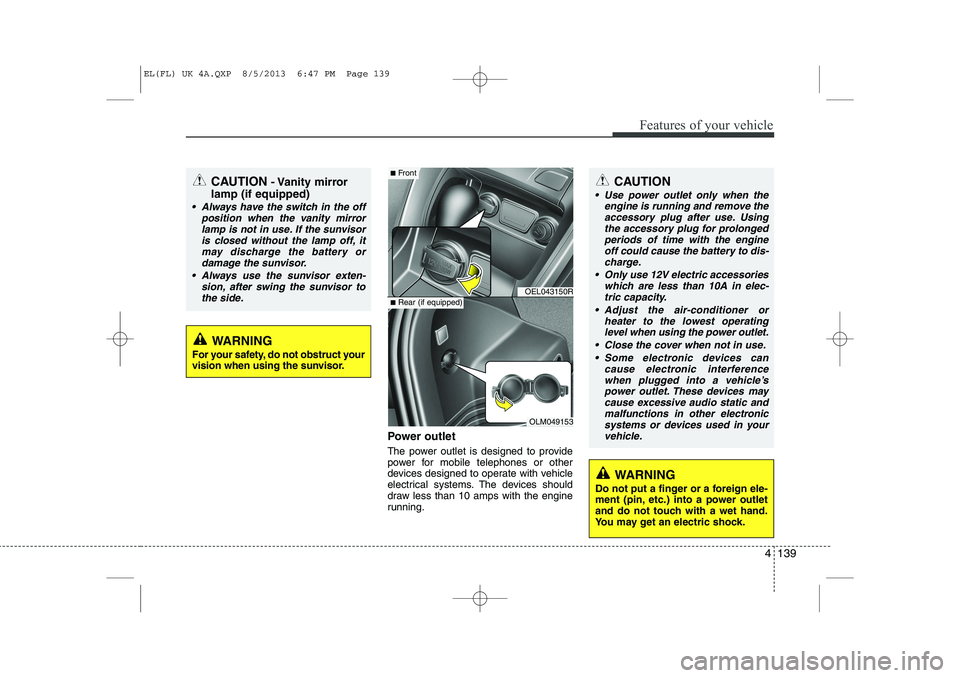
Power outlet
The power outlet is designed to provide
power for mobile telephones or other
devices designed to operate with vehicle
electrical systems. The devices should
draw less than 10 amps with the engine
running.
CAUTION- Vanity mirror
lamp (if equipped)
Always have the switch in the off position when the vanity mirror
lamp is not in use. If the sunvisoris closed without the lamp off, itmay discharge the battery or damage the sunvisor.
Always use the sunvisor exten- sion, after swing the sunvisor tothe side.
CAUTION
Use power outlet only when the engine is running and remove the
accessory plug after use. Using the accessory plug for prolongedperiods of time with the engineoff could cause the battery to dis-
charge.
Only use 12V electric accessories which are less than 10A in elec-tric capacity.
Adjust the air-conditioner or heater to the lowest operatinglevel when using the power outlet.
Close the cover when not in use. Some electronic devices can cause electronic interference
when plugged into a vehicle’s power outlet. These devices maycause excessive audio static and malfunctions in other electronic
systems or devices used in yourvehicle.
WARNING
Do not put a finger or a foreign ele-
ment (pin, etc.) into a power outlet
and do not touch with a wet hand.
You may get an electric shock.
WARNING
For your safety, do not obstruct your
vision when using the sunvisor.
OEL043150R
OLM049153
■ Front
■Rear (if equipped)
EL(FL) UK 4A.QXP 8/5/2013 6:47 PM Page 139