key HYUNDAI IX35 2014 Owners Manual
[x] Cancel search | Manufacturer: HYUNDAI, Model Year: 2014, Model line: IX35, Model: HYUNDAI IX35 2014Pages: 1534, PDF Size: 39.76 MB
Page 732 of 1534
Features of your vehicle
242
4
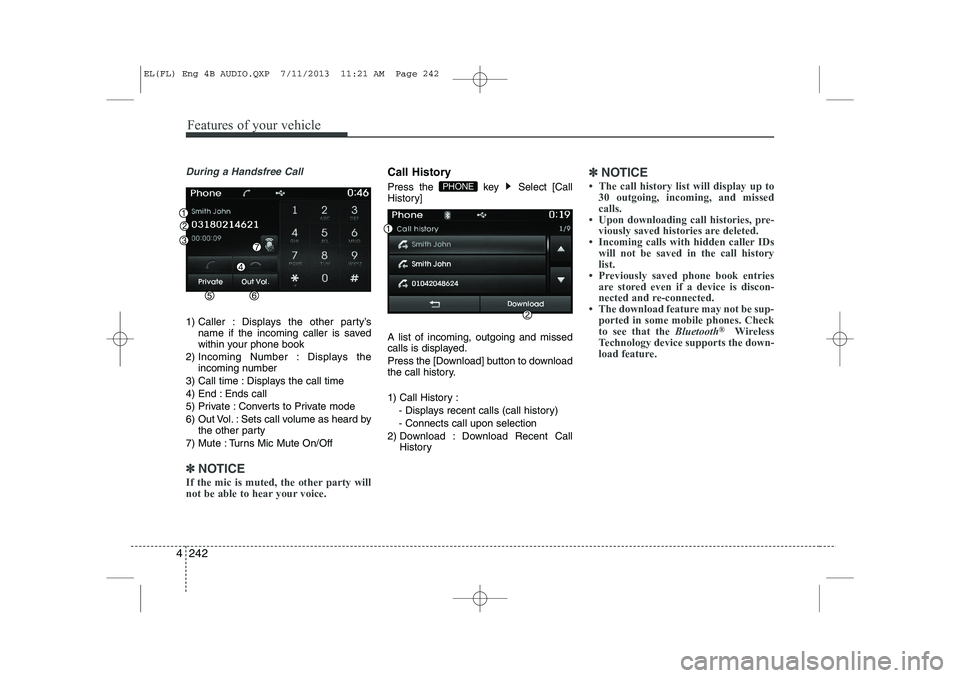
During a Handsfree Call
1) Caller : Displays the other party’s
name if the incoming caller is saved
within your phone book
2) Incoming Number : Displays the incoming number
3) Call time : Displays the call time
4) End : Ends call
5) Private : Converts to Private mode
6) Out Vol. : Sets call volume as heard by the other party
7) Mute : Turns Mic Mute On/Off
✽✽ NOTICE
If the mic is muted, the other party will
not be able to hear your voice.
Call History
Press the key Select [Call
History] A list of incoming, outgoing and missed
calls is displayed.
Press the [Download] button to download
the call history.
1) Call History :
- Displays recent calls (call history) - Connects call upon selection
2) Download : Download Recent Call History✽✽NOTICE
Page 733 of 1534
![HYUNDAI IX35 2014 Owners Manual 4 243
Features of your vehicle
Phone Book
Press the key Select [Phone book]
The list of saved phone book entries is
displayed. Press the [Download] button
to download the call history.
1) Contact](/img/35/56237/w960_56237-732.png "HYUNDAI IX35 2014 Owners Manual 4 243
Features of your vehicle
Phone Book
Press the key Select [Phone book]
The list of saved phone book entries is
displayed. Press the [Download] button
to download the call history.
1) Contact")
4 243
Features of your vehicle
Phone Book
Press the key Select [Phone book]
The list of saved phone book entries is
displayed. Press the [Download] button
to download the call history.
1) Contact List :- Displays downloaded phone bookentries
- Connects call upon selection
2) Download : Download phone book entries✽✽NOTICE
Page 735 of 1534
4 245
Features of your vehicle
VOICE RECOGNITION
Using Voice Recognition
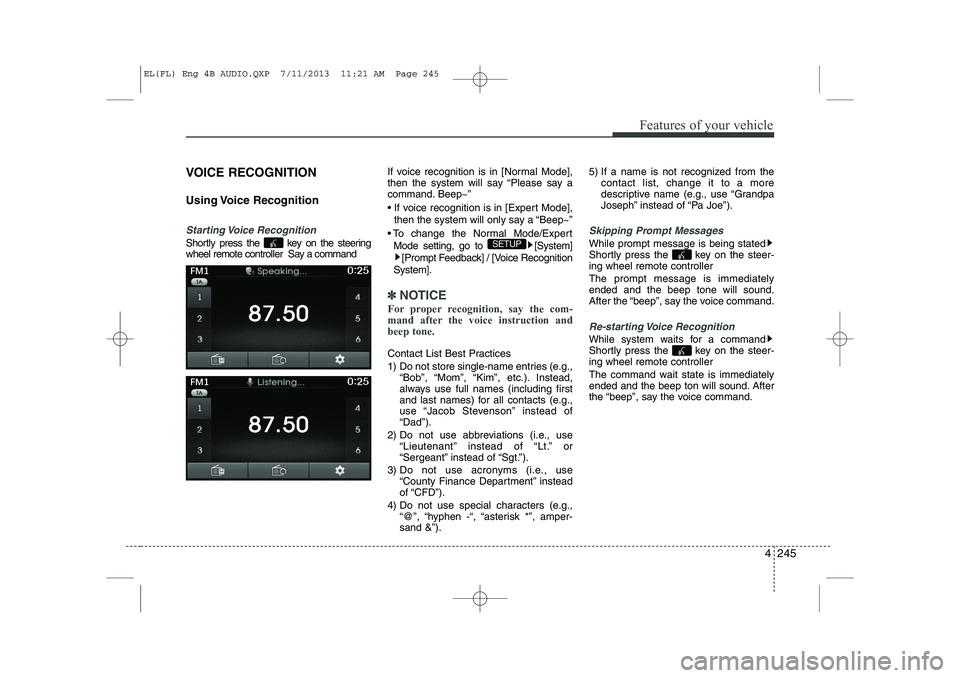
Starting Voice Recognition
Shortly press the key on the steering
wheel remote controller Say a commandIf voice recognition is in [Normal Mode],
then the system will say “Please say a
command. Beep~”
If voice recognition is in [Expert Mode],
then the system will only say a “Beep~”
To change the Normal Mode/Expert Mode setting, go to [System] [Prompt Feedback] / [Voice Recognition
System].
✽✽ NOTICE
For proper recognition, say the com-
mand after the voice instruction andbeep tone.
Contact List Best Practices
1) Do not store single-name entries (e.g., “Bob”, “Mom”, “Kim”, etc.). Instead,
always use full names (including first
and last names) for all contacts (e.g.,
use “Jacob Stevenson” instead of“Dad”).
2) Do not use abbreviations (i.e., use “Lieutenant” instead of “Lt.” or
“Sergeant” instead of “Sgt.”).
3) Do not use acronyms (i.e., use “County Finance Department” insteadof “CFD”).
4) Do not use special characters (e.g., “@”, “hyphen -“, “asterisk *”, amper-sand &”). 5) If a name is not recognized from the
contact list, change it to a more
descriptive name (e.g., use “Grandpa
Joseph” instead of “Pa Joe”).
Skipping Prompt Messages
While prompt message is being stated
Shortly press the key on the steer-
ing wheel remote controller The prompt message is immediately ended and the beep tone will sound.
After the “beep”, say the voice command.
Re-starting Voice Recognition
While system waits for a command
Shortly press the key on the steer-
ing wheel remote controller
The command wait state is immediately
ended and the beep ton will sound. After
the “beep”, say the voice command.
SETUP
EL(FL) Eng 4B AUDIO.QXP 7/11/2013 11:21 AM Page 245
Page 736 of 1534
Features of your vehicle
246
4
ENDING VOICE RECOGNITION
While Voice Recognition is operating
Press and hold the key on the steer-
ing wheel remote controller
✽✽
NOTICE
Page 737 of 1534
4 247
Features of your vehicle
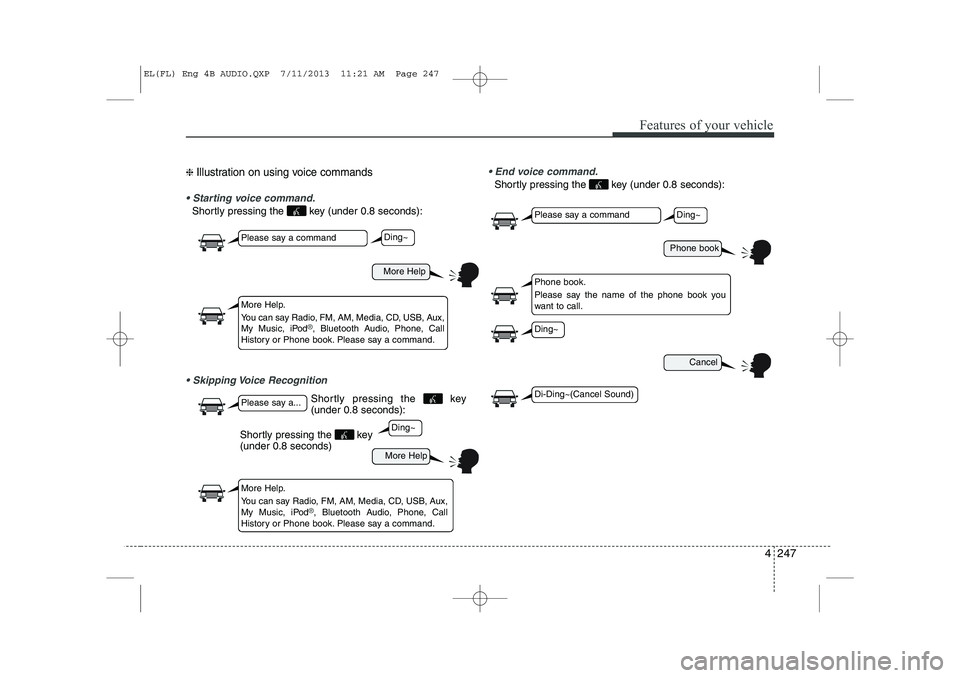
❈ Illustration on using voice commands
Starting voice command.
Shortly pressing the key (under 0.8 seconds):
Skipping Voice Recognition End voice command.
Shortly pressing the key (under 0.8 seconds):
More Help
More Help
Please say a command
Please say a...
More Help.
You can say Radio, FM, AM, Media, CD, USB, Aux,
My Music, iPod
®, Bluetooth Audio, Phone, Call
History or Phone book. Please say a command.
More Help.
You can say Radio, FM, AM, Media, CD, USB, Aux,
My Music, iPod
®, Bluetooth Audio, Phone, Call
History or Phone book. Please say a command.
Ding~
Ding~
Shortly pressing the key (under 0.8 seconds)
Phone book
Cancel
Please say a command
Phone book.
Please say the name of the phone book you
want to call.
Ding~
Di-Ding~(Cancel Sound)
Ding~
Shortly pressing the key (under 0.8 seconds):
EL(FL) Eng 4B AUDIO.QXP 7/11/2013 11:21 AM Page 247
Page 743 of 1534
![HYUNDAI IX35 2014 Owners Manual 4 253
Features of your vehicle
SETUP
Starting Mode
Press the key to display the Setup screen.
You can select and control options relat-
ed to [Display], [Sound], [Clock/Day],[Phone] and [System].](/img/35/56237/w960_56237-742.png "HYUNDAI IX35 2014 Owners Manual 4 253
Features of your vehicle
SETUP
Starting Mode
Press the key to display the Setup screen.
You can select and control options relat-
ed to [Display], [Sound], [Clock/Day],[Phone] and [System].")
4 253
Features of your vehicle
SETUP
Starting Mode
Press the key to display the Setup screen.
You can select and control options relat-
ed to [Display], [Sound], [Clock/Day],[Phone] and [System].Display Settings
Adjusting the Brightness
Press the key Select
[Display] Select [Brightness]
Use the , buttons to adjust the
screen brightness or set the Brightness
on Automatic, Day, or Night mode.
Press the button to reset.
1) Automatic : Adjusts the brightness
automatically
2) Day : Always maintains the brightness on high
3) Night : Always maintains the bright- ness on low
Pop-up Mode
Press the key Select
[Display] Select [Pop-up Mode]
This feature is used to display the Pop-up
Mode screen when entering radio and
media modes.
When this feature is turned on, pressing
the or key will display
the Pop-up Mode screen.
✽✽ NOTICE
The media Pop-up Mode screen can be
displayed only when two or more mediamodes have been connected.
MEDIA RADIO
SETUP
Default
SETUP SETUP
EL(FL) Eng 4B AUDIO.QXP 7/11/2013 11:21 AM Page 253
Page 744 of 1534
![HYUNDAI IX35 2014 Owners Manual Features of your vehicle
254
4
Scroll Text
Press the key Select
[Display] Select [Scroll text]
This feature is used to scroll text dis-
played on the screen when it is too long
to be displayed at](/img/35/56237/w960_56237-743.png "HYUNDAI IX35 2014 Owners Manual Features of your vehicle
254
4
Scroll Text
Press the key Select
[Display] Select [Scroll text]
This feature is used to scroll text dis-
played on the screen when it is too long
to be displayed at")
Features of your vehicle
254
4
Scroll Text
Press the key Select
[Display] Select [Scroll text]
This feature is used to scroll text dis-
played on the screen when it is too long
to be displayed at once.
When turned on, the text is repeatedly
scrolled. When turned off, the text is
scrolled just once.
MP3 Information Display
Press the key Select
[Display] Select [Song Info]
This feature is used to change the infor-
mation displayed within USB and MP3
CD modes.
1) Folder File : Displays file name and
folder name
2) Album Artist Song : Displays album name/artist name/songSETUP SETUP
EL(FL) Eng 4B AUDIO.QXP 7/11/2013 11:21 AM Page 254
Page 745 of 1534
![HYUNDAI IX35 2014 Owners Manual 4 255
Features of your vehicle
Sound Settings
Sound Settings
Press the key Select
[Sound] Select [Audio Setting]Use the , , , buttons to
adjust the Fader/Balance settings.
Use the , buttons to a](/img/35/56237/w960_56237-744.png "HYUNDAI IX35 2014 Owners Manual 4 255
Features of your vehicle
Sound Settings
Sound Settings
Press the key Select
[Sound] Select [Audio Setting]Use the , , , buttons to
adjust the Fader/Balance settings.
Use the , buttons to a")
4 255
Features of your vehicle
Sound Settings
Sound Settings
Press the key Select
[Sound] Select [Audio Setting]Use the , , , buttons to
adjust the Fader/Balance settings.
Use the , buttons to adjust the
Bass/Middle/Treble settings.
Press the button to reset.
SDVC (Speed Dependent Volume
Control)
Press the key Select
[Sound] Select [Speed Dependent Vol.]
The volume level is controlled automati-
cally according to the vehicle speed.
SDVC can be set by selecting from
Off/Low/Mid/High.SETUP
DefaultSETUP
EL(FL) Eng 4B AUDIO.QXP 7/11/2013 11:21 AM Page 255
Page 746 of 1534
![HYUNDAI IX35 2014 Owners Manual Features of your vehicle
256
4
Voice Recognition Setting
Press the key Select
[Sound] Select [Volume Dialogue]
Use the , buttons to adjust the
Volume Dialog.
Touch Screen Beep
Press the key Sel](/img/35/56237/w960_56237-745.png "HYUNDAI IX35 2014 Owners Manual Features of your vehicle
256
4
Voice Recognition Setting
Press the key Select
[Sound] Select [Volume Dialogue]
Use the , buttons to adjust the
Volume Dialog.
Touch Screen Beep
Press the key Sel")
Features of your vehicle
256
4
Voice Recognition Setting
Press the key Select
[Sound] Select [Volume Dialogue]
Use the , buttons to adjust the
Volume Dialog.
Touch Screen Beep
Press the key Select
[Sound] Select [Touch Screen Beep]
This feature is used to turn the touch
screen beep on/off. Clock/Day Setting
Setting
Press the key Select
[Clock/Day] Select [Clock Settings]
Use the , buttons to set the Hour,
Minutes and AM/PM setting.
✽✽
NOTICE
Press and hold the key (over 0.8 seconds) to display the Clock/ Day
screen.
CLOCK
SETUP
SETUP SETUP
EL(FL) Eng 4B AUDIO.QXP 7/11/2013 11:21 AM Page 256
Page 747 of 1534
![HYUNDAI IX35 2014 Owners Manual 4 257
Features of your vehicle
Day Setting
Press the key Select
[Clock/Day] Select [Day Settings]
Use the , buttons to set the Day,
Month and Year setting.
Time Format
Press the key Select
[Cl](/img/35/56237/w960_56237-746.png "HYUNDAI IX35 2014 Owners Manual 4 257
Features of your vehicle
Day Setting
Press the key Select
[Clock/Day] Select [Day Settings]
Use the , buttons to set the Day,
Month and Year setting.
Time Format
Press the key Select
[Cl")
4 257
Features of your vehicle
Day Setting
Press the key Select
[Clock/Day] Select [Day Settings]
Use the , buttons to set the Day,
Month and Year setting.
Time Format
Press the key Select
[Clock/Day] Select [Time Format]
This feature is used to change the clock
format between 12hr or 24hr.
Clock Display
Press the key Select
[Clock/Day] Select [Clock Display
(Power off)]
This feature is used to display a clock on the screen when the audio system is
turned off.SETUP SETUP SETUP
EL(FL) Eng 4B AUDIO.QXP 7/11/2013 11:21 AM Page 257