Features of your vehicle
246
4
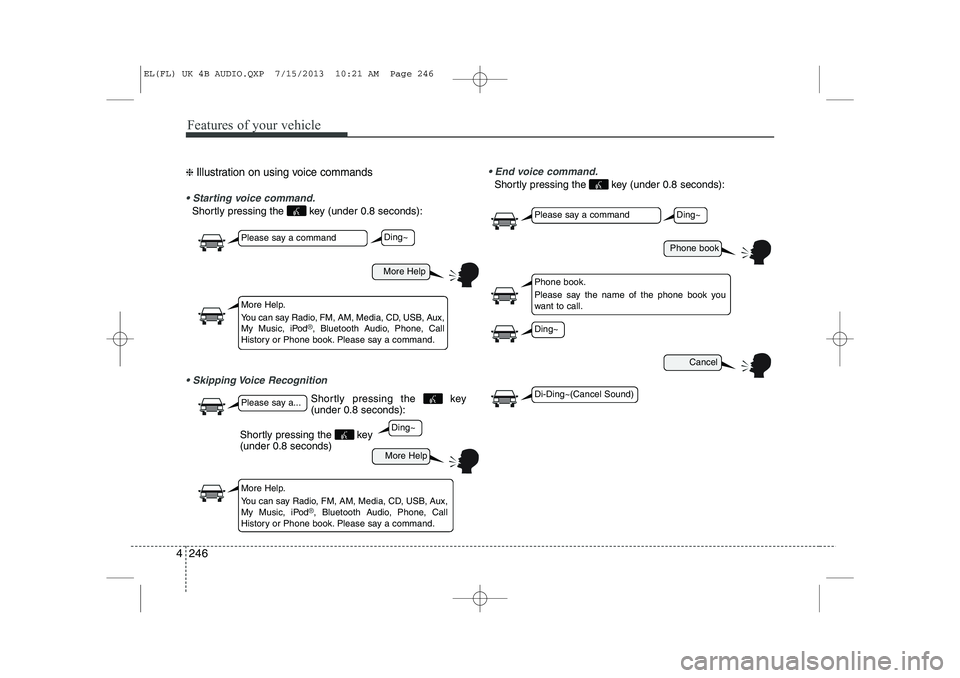
❈ Illustration on using voice commands
Starting voice command.
Shortly pressing the key (under 0.8 seconds):
Skipping Voice Recognition End voice command.
Shortly pressing the key (under 0.8 seconds):
More Help
More Help
Please say a command
Please say a...
More Help.
You can say Radio, FM, AM, Media, CD, USB, Aux,
My Music, iPod
®, Bluetooth Audio, Phone, Call
History or Phone book. Please say a command.
More Help.
You can say Radio, FM, AM, Media, CD, USB, Aux,
My Music, iPod
®, Bluetooth Audio, Phone, Call
History or Phone book. Please say a command.
Ding~
Ding~
Shortly pressing the key (under 0.8 seconds)
Phone book
Cancel
Please say a command
Phone book.
Please say the name of the phone book you
want to call.
Ding~
Di-Ding~(Cancel Sound)
Ding~
Shortly pressing the key (under 0.8 seconds):
EL(FL) UK 4B AUDIO.QXP 7/15/2013 10:21 AM Page 246
Features of your vehicle
248
4
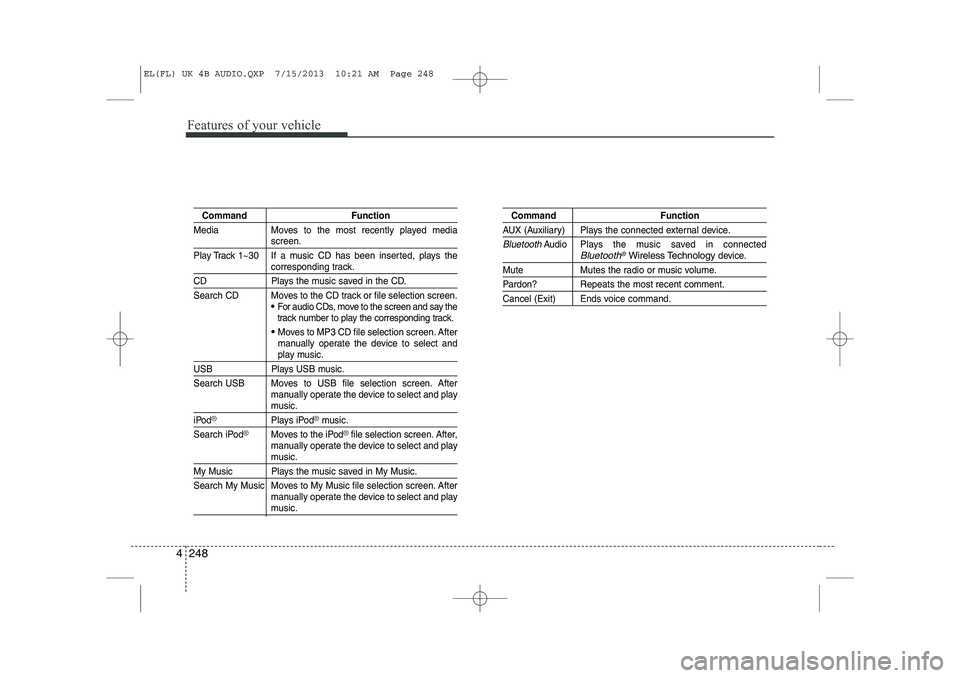
Command Function
Media Moves to the most recently played media
screen.
Play Track 1~30 If a music CD has been inserted, plays the
corresponding track.
CD Plays the music saved in the CD.
Search CD Moves to the CD track or file selection screen.
For audio CDs, move to the screen and say the
track number to play the corresponding track.
Moves to MP3 CD file selection screen. After
manually operate the device to select and
play music.
USB Plays USB music.
Search USB Moves to USB file selection screen. After manually operate the device to select and play
music.
iPod®Plays iPod®music.
Search iPod
®Moves to the iPod®file selection screen. After,
manually operate the device to select and play
music.
My Music Plays the music saved in My Music.
Search My Music Moves to My Music file selection screen. After manually operate the device to select and play
music.
Command Function
AUX (Auxiliary) Plays the connected external device.
BluetoothAudio Plays the music saved in connectedBluetooth®Wireless Technologydevice.
Mute Mutes the radio or music volume.
Pardon? Repeats the most recent comment.
Cancel (Exit) Ends voice command.
EL(FL) UK 4B AUDIO.QXP 7/15/2013 10:21 AM Page 248
4 263
Features of your vehicle
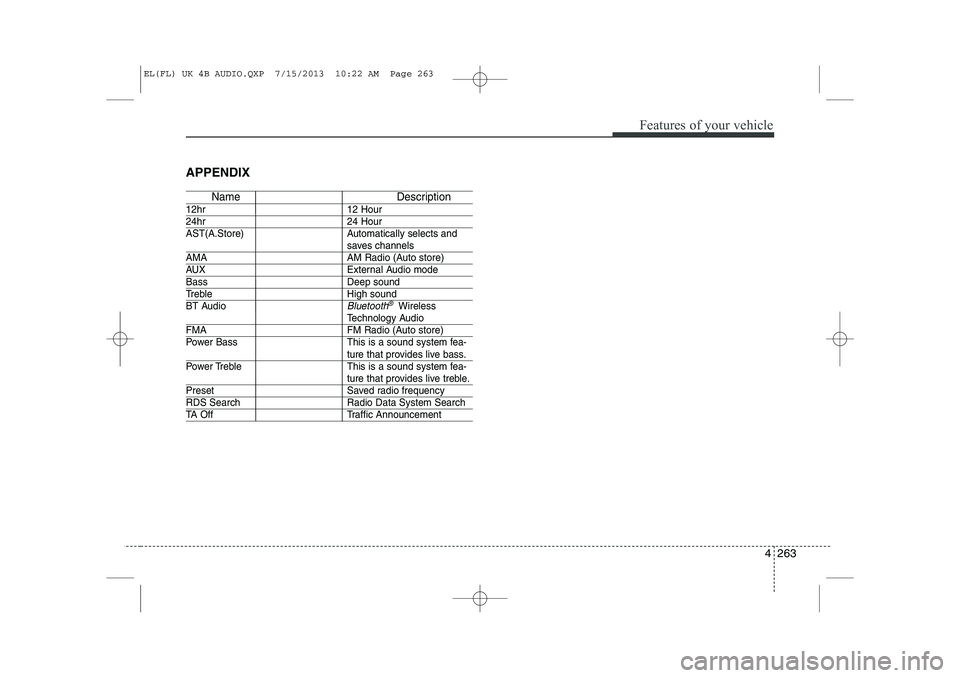
APPENDIX
Name Description
12hr 12 Hour
24hr 24 Hour
AST(A.Store) Automatically selects and
saves channels
AMA AM Radio (Auto store)
AUX External Audio mode
Bass Deep sound
Treble High sound
BT Audio
Bluetooth®Wireless
Technology Audio
FMA FM Radio (Auto store)
Power Bass This is a sound system fea-
ture that provides live bass.
Power Treble This is a sound system fea-
ture that provides live treble.
Preset Saved radio frequency
RDS Search Radio Data System Search
TA Off Traffic Announcement
EL(FL) UK 4B AUDIO.QXP 7/15/2013 10:22 AM Page 263