light Hyundai Kona 2018 Owner's Manual
[x] Cancel search | Manufacturer: HYUNDAI, Model Year: 2018, Model line: Kona, Model: Hyundai Kona 2018Pages: 523, PDF Size: 33.6 MB
Page 337 of 523
5-83
Driving your vehicle
5
Driving on a steep grade, over ahill, or when driving on a curved road.
The adverse road conditions cause excessive vehicle vibrations while
driving.
The surrounding of the inside rear view mirror temperature is highdue to direct sunlight, etc.
When front visibility is poor
The windshield or the LKAS cam- era lens is blocked with dirt or
debris.
The windshield glass is fogged up; a clear view of the road is obstruct-ed.
Placing objects on the dashboard, etc.
The sensor cannot detect the lane because of fog, heavy rain or snow.LKA system function change
The driver can change LKA to Lane
Departure Warning (LDW) system orchange the LKA system mode
between Standard LKA and Active
LKA from the LCD display. Go to the"User Settings Driver Assistance
Lane Keeping Assist Lane
Departure Warning/Standard
LKA/Active LKA". The system is automatically set to Standard LKA if a function is notselected.
Lane Departure Warning
LDW system alerts the driver with a
visual warning and a warning alarm
when the system detects the vehicle
departing the lane. The steeringwheel will not be controlled.
Standard LKA
The Standard LKA mode guides the
driver to help keep the vehicle within
the lanes. It rarely controls the steer-
ing wheel, when the vehicle drives
well inside the lanes. However, it
starts to control the steering wheel,
when the vehicle is about to deviate
out of the lanes.
Active LKA
The Active LKA mode provides more
frequent steering wheel control in
comparison with the Standard LKA
mode. Active LKA can reduce the dri-
ver’s fatigue to assist the steering for
maintaining the vehicle in the middle
of the lane.
Page 341 of 523
5-87
Driving your vehicle
5
The Driver Attention Warning
(DAW) system utilizes the camera
sensor on the front windshield for
its operation. To keep the camera
sensor in the best condition, you
should observe the followings:
NEVER install any accessoriesor stickers on the front wind-
shield, nor tint the front wind-shield.
NEVER locate any reflective objects (i.e. white paper, mirror)
over the dashboard. Any light
reflection may cause a malfunc-tion of the Driver Attention
Warning (DAW) system.
Pay extreme caution to keep the camera sensor out of water.
NEVER arbitrarily disassemble the camera assembly, nor apply
any impact on the camera
assembly. Do not disassemble camera
temporarily for tinted window or
attaching any types of coatings
and accessories. If you disas-
semble a camera and assemble
it again, we recommend that you
take your vehicle to an author-
ized HYUNDAI dealer and have
the system checked for calibra-tion.
NOTICE
The Driver Attention Warning
(DAW) system may not properly
operate with limited alerting in
the following situations:
The lane detection perform-
ance is limited. (For more
details, refer to "Lane KeepingAssist (LKA) system" in this
chapter.)
The vehicle is violently driven
or is abruptly turned for
obstacle avoidance (e.g. con-
struction area, other vehicles,
fallen objects, bumpy road).
CAUTION
Forward drivability of the
vehicle is severely under-
mined (possibly due to wide
variation in tire pressures,
uneven tire wear-out, toe-in/toe-out alignment).
The vehicle drives on a curvy
road.
The vehicle drives through a
windy area.
The vehicle drives on a
bumpy road.
The vehicle is controlled by
the following driving assistsystems:
- Lane Keeping Assist (LKA)system
- Forward Collision-avoidance Assist (FCA) system
Playing the vehicle audio sys-
tem at high volume may offset
the Driver Attention Warning
(DAW) system warning sounds.
CAUTION
Page 344 of 523
5-90
Driving your vehicle
Cruise Control operation
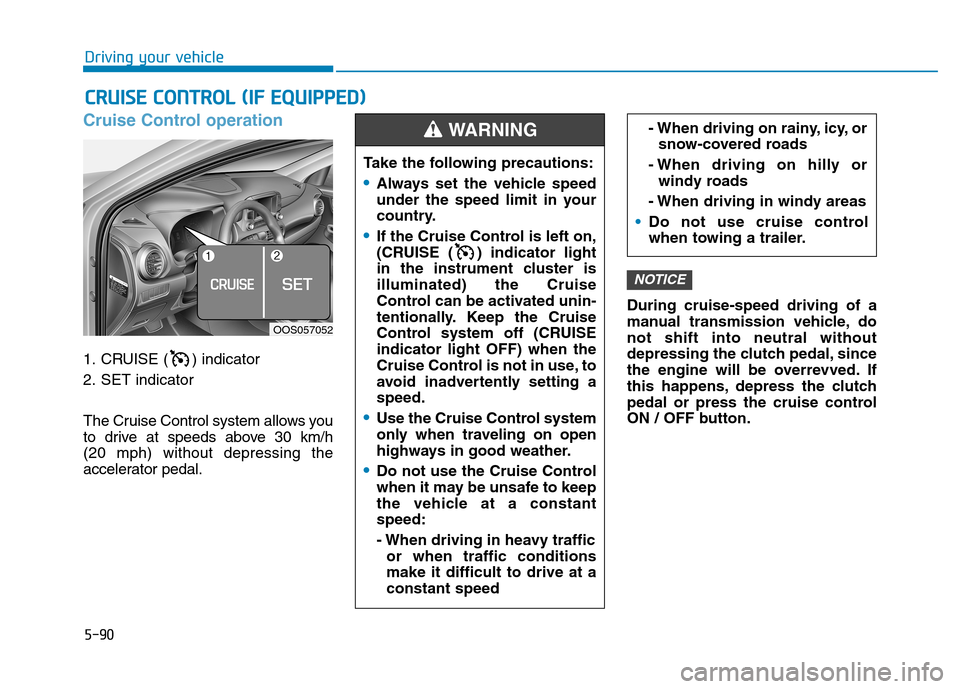
1. CRUISE ( ) indicator
2. SET indicator
The Cruise Control system allows you
to drive at speeds above 30 km/h (20 mph) without depressing the
accelerator pedal.During cruise-speed driving of a
manual transmission vehicle, donot shift into neutral without
depressing the clutch pedal, since
the engine will be overrevved. If
this happens, depress the clutch
pedal or press the cruise control
ON / OFF button.
NOTICE
CC
RR UU IISS EE CC OO NNTTRR OO LL (( IIFF EE QQ UUIIPP PP EEDD ))
Take the following precautions:
Always set the vehicle speed
under the speed limit in your
country.
If the Cruise Control is left on,
(CRUISE ( ) indicator light
in the instrument cluster isilluminated) the Cruise
Control can be activated unin-
tentionally. Keep the Cruise
Control system off (CRUISEindicator light OFF) when the
Cruise Control is not in use, to
avoid inadvertently setting aspeed.
Use the Cruise Control system
only when traveling on open
highways in good weather.
Do not use the Cruise Control
when it may be unsafe to keep
the vehicle at a constantspeed:
- When driving in heavy traffic
or when traffic conditions make it difficult to drive at aconstant speed
- When driving on rainy, icy, orsnow-covered roads
- When driving on hilly or windy roads
- When driving in windy areas
Do not use cruise control
when towing a trailer.
WARNING
OOS057052
Page 346 of 523
5-92
Driving your vehicle
To set Cruise Control speed
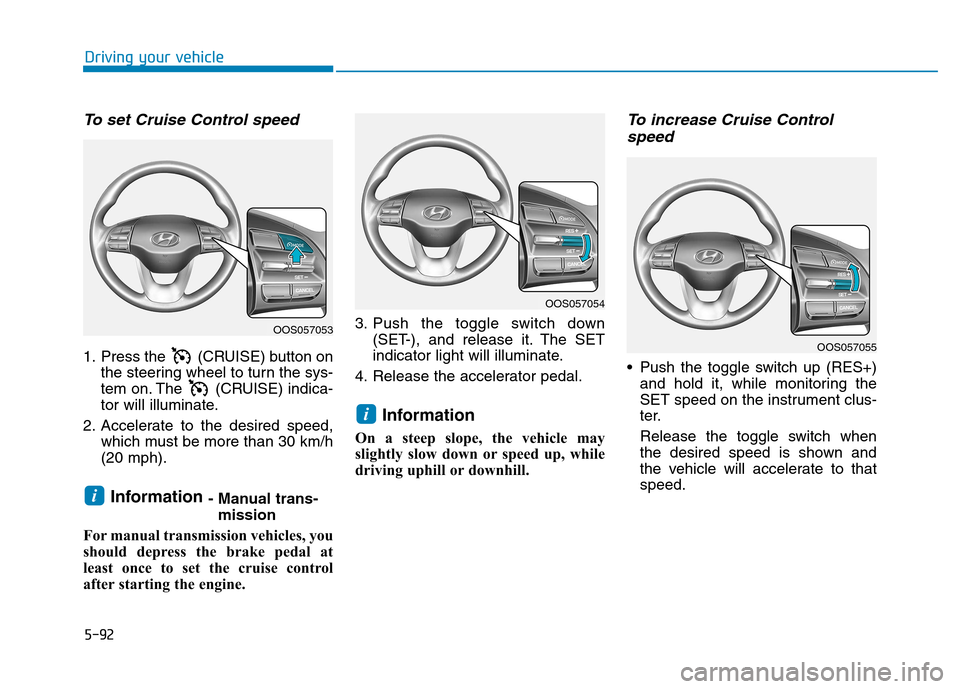
1. Press the (CRUISE) button onthe steering wheel to turn the sys-
tem on. The (CRUISE) indica-
tor will illuminate.
2. Accelerate to the desired speed, which must be more than 30 km/h(20 mph).
Information - Manual trans-
mission
For manual transmission vehicles, you
should depress the brake pedal at
least once to set the cruise control
after starting the engine. 3. Push the toggle switch down
(SET-), and release it. The SET
indicator light will illuminate.
4. Release the accelerator pedal.
Information
On a steep slope, the vehicle may
slightly slow down or speed up, while
driving uphill or downhill.
To increase Cruise Control speed
Push the toggle switch up (RES+) and hold it, while monitoring the
SET speed on the instrument clus-
ter.
Release the toggle switch when
the desired speed is shown and
the vehicle will accelerate to thatspeed.
i
i
OOS057053
OOS057054
OOS057055
Page 347 of 523
5-93
Driving your vehicle
5
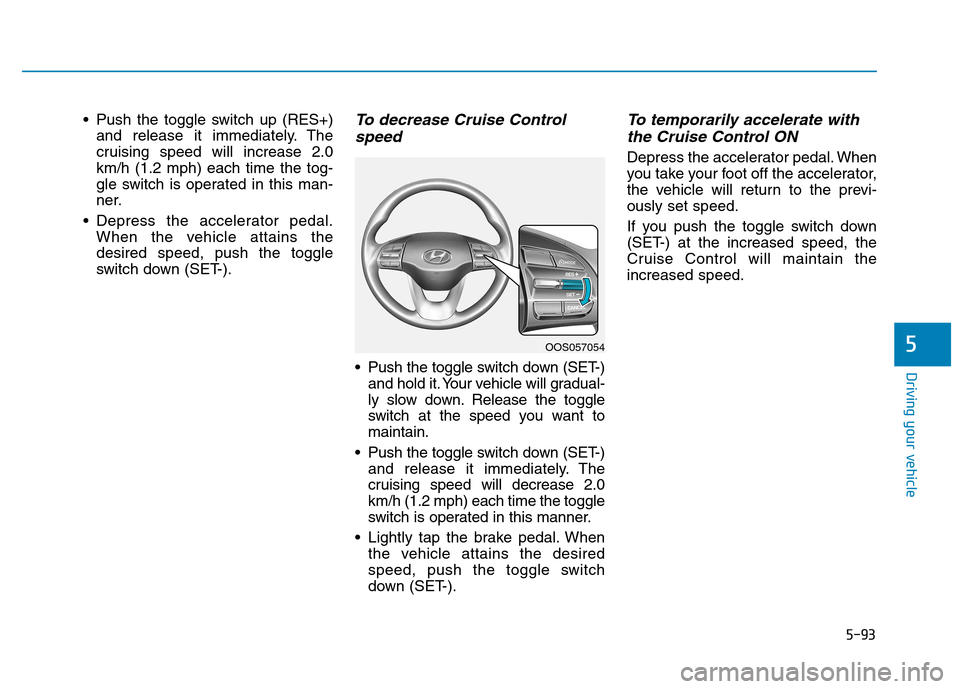
Push the toggle switch up (RES+)and release it immediately. The
cruising speed will increase 2.0km/h (1.2 mph) each time the tog-
gle switch is operated in this man-
ner.
Depress the accelerator pedal. When the vehicle attains thedesired speed, push the toggle
switch down (SET-).To decrease Cruise Control
speed
Push the toggle switch down (SET-) and hold it. Your vehicle will gradual-
ly slow down. Release the toggle
switch at the speed you want tomaintain.
Push the toggle switch down (SET-) and release it immediately. The
cruising speed will decrease 2.0km/h (1.2 mph) each time the toggle
switch is operated in this manner.
Lightly tap the brake pedal. When the vehicle attains the desired
speed, push the toggle switch
down (SET-).
To temporarily accelerate with
the Cruise Control ON
Depress the accelerator pedal. When
you take your foot off the accelerator,
the vehicle will return to the previ-ously set speed.
If you push the toggle switch down
(SET-) at the increased speed, the
Cruise Control will maintain theincreased speed.
OOS057054
Page 348 of 523
5-94
Driving your vehicle
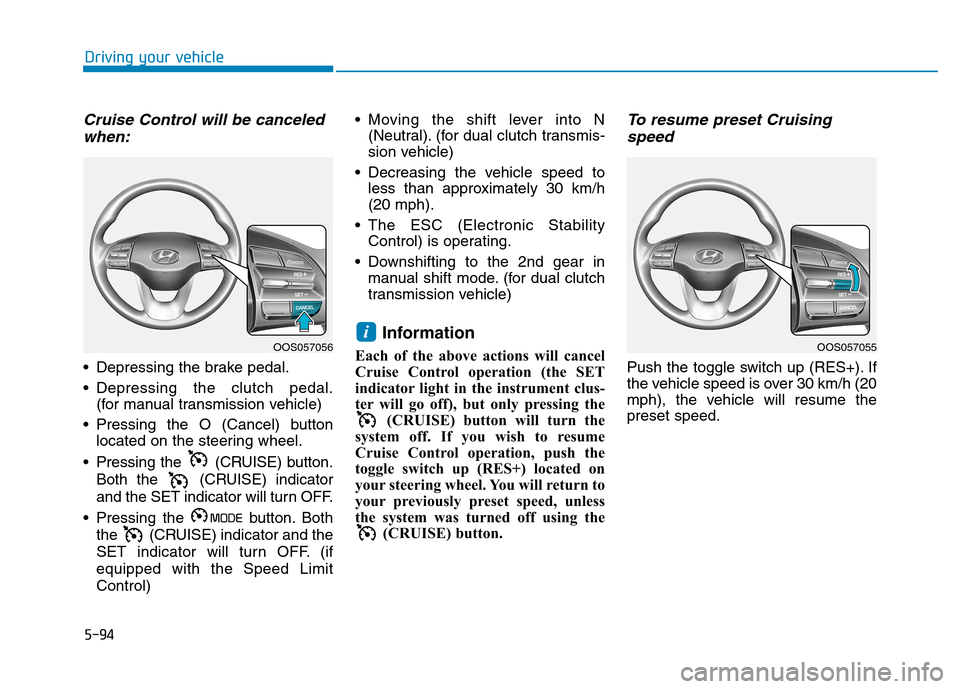
Cruise Control will be canceledwhen:
Depressing the brake pedal.
Depressing the clutch pedal. (for manual transmission vehicle)
Pressing the O (Cancel) button located on the steering wheel.
Pressing the (CRUISE) button. Both the (CRUISE) indicator
and the SET indicator will turn OFF.
Pressing the button. Both the (CRUISE) indicator and the
SET indicator will turn OFF. (ifequipped with the Speed LimitControl) Moving the shift lever into N
(Neutral). (for dual clutch transmis-
sion vehicle)
Decreasing the vehicle speed to less than approximately 30 km/h(20 mph).
The ESC (Electronic Stability Control) is operating.
Downshifting to the 2nd gear in manual shift mode. (for dual clutch
transmission vehicle)
Information
Each of the above actions will cancel
Cruise Control operation (the SET
indicator light in the instrument clus-
ter will go off), but only pressing the (CRUISE) button will turn the
system off. If you wish to resume
Cruise Control operation, push the
toggle switch up (RES+) located on
your steering wheel. You will return to
your previously preset speed, unless
the system was turned off using the (CRUISE) button.
To resume preset Cruising
speed
Push the toggle switch up (RES+). If
the vehicle speed is over 30 km/h (20
mph), the vehicle will resume thepreset speed.
iOOS057055OOS057056
Page 349 of 523
5-95
Driving your vehicle
5
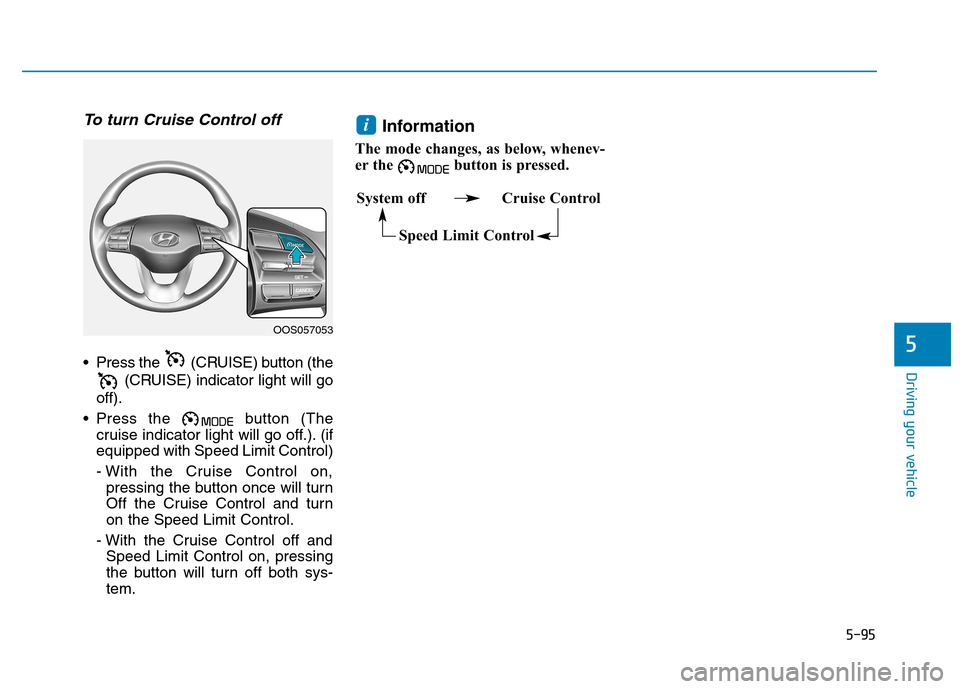
To turn Cruise Control off
Press the (CRUISE) button (the(CRUISE) indicator light will go
off).
Press the button (The cruise indicator light will go off.). (if equipped with Speed Limit Control)
- With the Cruise Control on,pressing the button once will turn
Off the Cruise Control and turnon the Speed Limit Control.
- With the Cruise Control off and Speed Limit Control on, pressing
the button will turn off both sys-tem. Information
The mode changes, as below, whenev-
er the button is pressed.
i
System off Cruise Control
Speed Limit Control
OOS057053
Page 350 of 523
5-96
Driving your vehicle
Hazardous driving conditions
When hazardous driving elements
are encountered such as water,
snow, ice, mud and sand, take the
following precautions:
Drive cautiously and maintain alonger braking distance.
Avoid abrupt braking or steering.
When your vehicle is stuck in snow, mud, or sand, use the second
gear. Accelerate slowly to avoid
unnecessary wheel spinning.
Put sand, rock salt, tire chains or other non-slip materials under the
wheels to provide additional trac-
tion while being stuck in ice, snow,
or mud.
Rocking the vehicle
If it is necessary to rock the vehicle
to free it from snow, sand, or mud,
first turn the steering wheel right and
left to clear the area around your
front wheels. Then, shift back and
forth between R (Reverse) and a for-
ward gear.
Try to avoid spinning the wheels, and
do not race the engine.
To prevent transmission wear, wait
until the wheels stop spinning before
shifting gears. Release the accelera-tor pedal while shifting, and press
lightly on the accelerator pedal while
the transmission is in gear. Slowly
spinning the wheels in forward and
reverse directions causes a rocking
motion that may free the vehicle.
SSPP EECCIIAA LL DD RRIIVV IINN GG CC OO NNDDIITT IIOO NNSS
Downshifting with an a dual
clutch transmission while driv-
ing on slippery surfaces can
cause an accident. The sudden
change in tire speed could
cause the tires to skid. Be care-
ful when downshifting on slip-
pery surfaces.
WARNING
If the vehicle is stuck and
excessive wheel spin occurs,the temperature in the tires can
increase very quickly. If the tires
become damaged, a tire blow
out or tire explosion can occur.
This condition is dangerous -
you and others may be injured.
Do not attempt this procedure if
people or objects are anywhere
near the vehicle.
If you attempt to free the vehi-
cle, the vehicle can overheat
quickly, possibly causing an
engine compartment fire or
other damage. Try to avoid spin-
ning the wheels as much as
possible to prevent overheating
of either the tires or the engine.
DO NOT allow the vehicle to
spin the wheels above 56 km/h(35 mph).
WARNING
Page 351 of 523
5-97
Driving your vehicle
5
Information
The ESC system (if equipped) must be
turned OFF before rocking the vehi-
cle.
If you are still stuck after rocking
the vehicle a few times, have the
vehicle pulled out by a tow vehicle
to avoid engine overheating, pos-
sible damage to the transmission,
and tire damage. See "Towing" in
chapter 6.Smooth cornering
Avoid braking or gear changing in
corners, especially when roads are
wet. Ideally, corners should always
be taken under gentle acceleration.
Driving at night
Night driving presents more hazards
than driving in the daylight. Here are
some important tips to remember:
Slow down and keep more dis- tance between you and other vehi-
cles, as it may be more difficult tosee at night, especially in areas
where there may not be any street
lights.
Adjust your mirrors to reduce the glare from other drivers' head-
lamps.
Keep your headlamps clean and properly aimed. Dirty or improperly
aimed headlamps will make it
much more difficult to see at night.
Avoid staring directly at the head- lamps of oncoming vehicles. You
could be temporarily blinded, and it
will take several seconds for your
eyes to readjust to the darkness.
Driving in the rain
Rain and wet roads can make driving
dangerous. Here are a few things to
consider when driving in the rain or
on slick pavement:
Slow down and allow extra follow-ing distance. A heavy rainfall
makes it harder to see and increas-es the distance needed to stop
your vehicle.
Turn OFF your Cruise Control. (if equipped)
Replace your windshield wiper blades when they show signs ofstreaking or missing areas on thewindshield.
Be sure your tires have enough tread. If your tires do not have
enough tread, making a quick stop
on wet pavement can cause a skid
and possibly lead to an accident.
See "Tire Tread" in chapter 7 .
Turn on your headlamps to make it easier for others to see you.
Driving too fast through large pud- dles can affect your brakes. If you
must go through puddles, try to
drive through them slowly.
NOTICE
i
Page 352 of 523
5-98
Driving your vehicle
If you believe your brakes may bewet, apply them lightly while driv-
ing until normal braking operation
returns.
Hydroplaning
If the road is wet enough and you are
going fast enough, your vehicle may
have little or no contact with the road
surface and actually ride on the
water. The best advice is SLOW
DOWN when the road is wet.
The risk of hydroplaning increas- es as the depth of tire tread
decreases, refer to "Tire Tread" in
chapter 7.
Driving in flooded areas
Avoid driving through flooded areas
unless you are sure the water is nohigher than the bottom of the wheel
hub. Drive through any water slowly.
Allow adequate stopping distance
because brake performance may bereduced.
After driving through water, dry the
brakes by gently applying them sev-
eral times while the vehicle is moving
slowly.
Highway driving
Tires
Adjust the tire inflation, as specified.
Under-inflation may overheat or
damage the tires.
Do not install worn-out or damaged
tires, which may reduce traction or
fail the braking operation.
Information
Never over-inflate your tires above the
maximum inflation pressure, as speci-
fied on your tires.
Fuel, engine coolant and engine oil
Driving at higher speeds on the high-
way consumes more fuel and is less
efficient than driving at a slower,
more moderate speed. Maintain a
moderate speed in order to conserve
fuel when driving on the highway.
Be sure to check both the engine
coolant level and the engine oil
before driving.
Drive belt
A loose or damaged drive belt may
overheat the engine.
i