display Hyundai Kona 2018 User Guide
[x] Cancel search | Manufacturer: HYUNDAI, Model Year: 2018, Model line: Kona, Model: Hyundai Kona 2018Pages: 523, PDF Size: 33.6 MB
Page 126 of 523
3-43
Convenient features of your vehicle
3
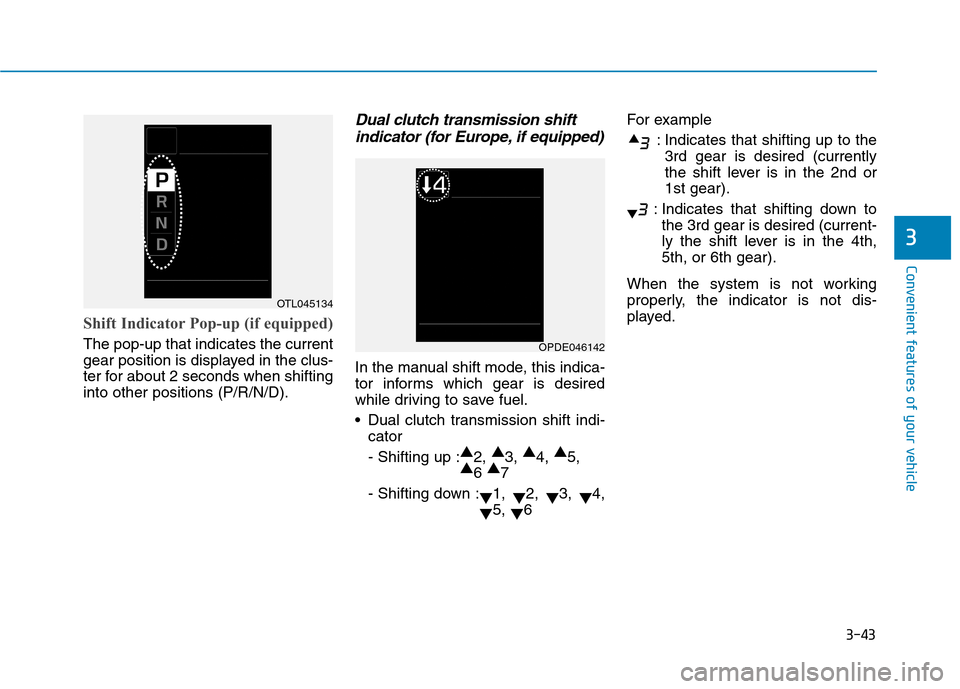
Shift Indicator Pop-up (if equipped)
The pop-up that indicates the current
gear position is displayed in the clus-
ter for about 2 seconds when shiftinginto other positions (P/R/N/D).
Dual clutch transmission shiftindicator (for Europe, if equipped)
In the manual shift mode, this indica-
tor informs which gear is desired
while driving to save fuel.
Dual clutch transmission shift indi- cator- Shifting up : ▲
2, ▲
3, ▲
4, ▲
5,
▲ 6 ▲
7
- Shifting down : ▼1,
▼2,
▼3,
▼4,
▼ 5,
▼6 For example
: Indicates that shifting up to the3rd gear is desired (currently
the shift lever is in the 2nd or1st gear).
: Indicates that shifting down to the 3rd gear is desired (current-
ly the shift lever is in the 4th,5th, or 6th gear).
When the system is not working
properly, the indicator is not dis-
played.
OTL045134
OPDE046142
Page 133 of 523
3-50
Convenient features of your vehicle
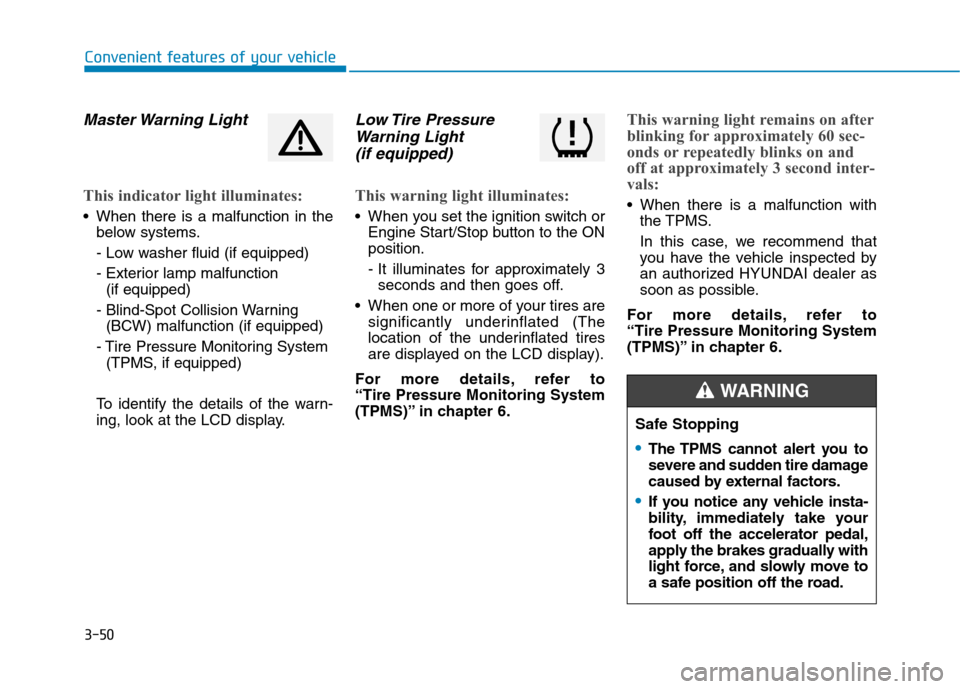
Master Warning Light
This indicator light illuminates:
When there is a malfunction in thebelow systems.
- Low washer fluid (if equipped)
- Exterior lamp malfunction(if equipped)
- Blind-Spot Collision Warning (BCW) malfunction (if equipped)
- Tire Pressure Monitoring System (TPMS, if equipped)
To identify the details of the warn-
ing, look at the LCD display.
Low Tire Pressure Warning Light
(if equipped)
This warning light illuminates:
When you set the ignition switch or Engine Start/Stop button to the ON position.
- It illuminates for approximately 3seconds and then goes off.
When one or more of your tires are significantly underinflated (The
location of the underinflated tires
are displayed on the LCD display).
For more details, refer to “Tire Pressure Monitoring System
(TPMS)” in chapter 6.
This warning light remains on after
blinking for approximately 60 sec-
onds or repeatedly blinks on and
off at approximately 3 second inter-
vals:
When there is a malfunction with the TPMS.
In this case, we recommend that
you have the vehicle inspected by
an authorized HYUNDAI dealer as
soon as possible.
For more details, refer to “Tire Pressure Monitoring System
(TPMS)” in chapter 6.
Safe Stopping
The TPMS cannot alert you to
severe and sudden tire damage
caused by external factors.
If you notice any vehicle insta-
bility, immediately take your
foot off the accelerator pedal,
apply the brakes gradually with
light force, and slowly move to
a safe position off the road.
WARNING
Page 140 of 523
![Hyundai Kona 2018 User Guide 3-57
Convenient features of your vehicle
3
Lane Keeping Assist(LKA) system indica-
tor light (if equipped)
This indicator light illuminates:
[Green] When the system operat- ing conditions are satisfi](/img/35/16231/w960_16231-139.png "Hyundai Kona 2018 User Guide 3-57
Convenient features of your vehicle
3
Lane Keeping Assist(LKA) system indica-
tor light (if equipped)
This indicator light illuminates:
[Green] When the system operat- ing conditions are satisfi")
3-57
Convenient features of your vehicle
3
Lane Keeping Assist(LKA) system indica-
tor light (if equipped)
This indicator light illuminates:
[Green] When the system operat- ing conditions are satisfied.
[White] The system operating con- ditions are not satisfied.
[Yellow] When there is a malfunc- tion with the lane keeping assist system.
In this case, we recommend you to
have your vehicle inspected by an
authorized HYUNDAI dealer.
For more details, refer to "Lane
Keeping Assist (LKA) system" in
chapter 5.
Icy Road Warning Light (if equipped)
This warning light is to warn the driver
the road may be icy.
When the temperature on the out-
side temperature gauge is approxi-
mately below 4°C (40°F), the Icy
Road Warning Light and Outside
Temperature Gauge blinks and then
illuminates. Also, the warning chime
sounds 1 time.
Information
If the icy road warning light appears
while driving, you should drive more
attentively and safely refraining from
over-speeding, rapid acceleration, sud-
den braking or sharp turning, etc.
LCD display messages
Shift to P (for smart key system and dual clutch transmission)
This warning message is displayed if
you try to turn off the engine without
the shift lever in P (Park) position.
At this time, the Engine Start/Stop
button turns to the ACC position (If
you press the Engine Start/Stop but-
ton once more, it will turn to the ONposition).
Low Key Battery
(for smart key system)
This warning message is displayed if
the battery of the smart key is dis-charged while changing the Engine
Start/Stop button to the OFF position.i
Page 141 of 523
3-58
Convenient features of your vehicle
Press START button while turn-ing wheel (for smart key sys-
tem)
This warning message is displayed if
the steering wheel does not unlock
normally when the Engine Start/Stop
button is pressed.
You should press the Engine Start/Stop
button while turning the steering wheel
right and left.
Steering wheel not locked (for smart key system)
This warning message is displayed if
the steering wheel is not locked while
the Engine Start/Stop button changesto the OFF position.
Check Steering Wheel LockSystem (for smart key system)
This warning message is displayed if
the steering wheel does not lock nor-
mally while the Engine Start/Stop but-ton changes to the OFF position.
Press brake pedal to start engine(for smart key system and dual
clutch transmission)
This warning message is displayed if
the Engine Start/Stop button changes
to the ACC position twice by pressing
the button repeatedly without depress-
ing the brake pedal.
You can start the vehicle by depressing
the brake pedal.
Press clutch pedal to start engine (for smart key system
and manual transmission)
This warning message is displayed if
the Engine Start/Stop button is in the
ACC position twice by pressing the
button repeatedly without depressingthe clutch pedal.
Depress the clutch pedal to start the
engine.
Key not in vehicle(for smart key system)
This warning message is displayed if
the smart key is not in the vehicle
when you open or close door in the
ACC position or ON position. The
warning sound is heard when you
close door without a smart key in
vehicle.
When attempting to start the vehicle
always have the smart key with you.
Key not detected (for smart key system)
This warning message is displayed if
the smart key is not detected when you
press the Engine Start/Stop button.
Page 142 of 523
3-59
Convenient features of your vehicle
3
Press START button with key(for smart key system)
This warning message is displayed if
you press the Engine Start/Stop but-
ton while the warning message “Key
not detected” is displayed.
At this time, the immobilizer indicator
light blinks.
Press START button again (for smart key system)
This message is displayed if you
were unable to start the vehicle when
the Engine Start/Stop button waspressed.
If this occurs, attempt to start the
engine by pressing the Engine
Start/Stop button again.
If the warning message appears
each time you press the Engine
Start/Stop button, we recommend
that you have your vehicle inspected
by an authorized HYUNDAI dealer.
Check BRAKE SWITCH fuse (for smart key system and dual
clutch transmission)
This warning message is displayed if
the brake switch fuse is disconnected.
You need to replace the fuse with a
new one. If that is not possible, you
can start the engine by pressing the
Engine Start/Stop button for 10 sec-
onds in the ACC position.
Shift to P or N to start engine (for smart key system and dual
clutch transmission)
This warning message is displayed if
you try to start the engine with the
shift lever not in the P (Park) or N
(Neutral) position.
Information
You can start the engine with the shift
lever in the N (Neutral) position. But,
for your safety, we recommend that
you start the engine with the shift
lever in the P (Park) position.
i
Page 143 of 523
3-60
Convenient features of your vehicle
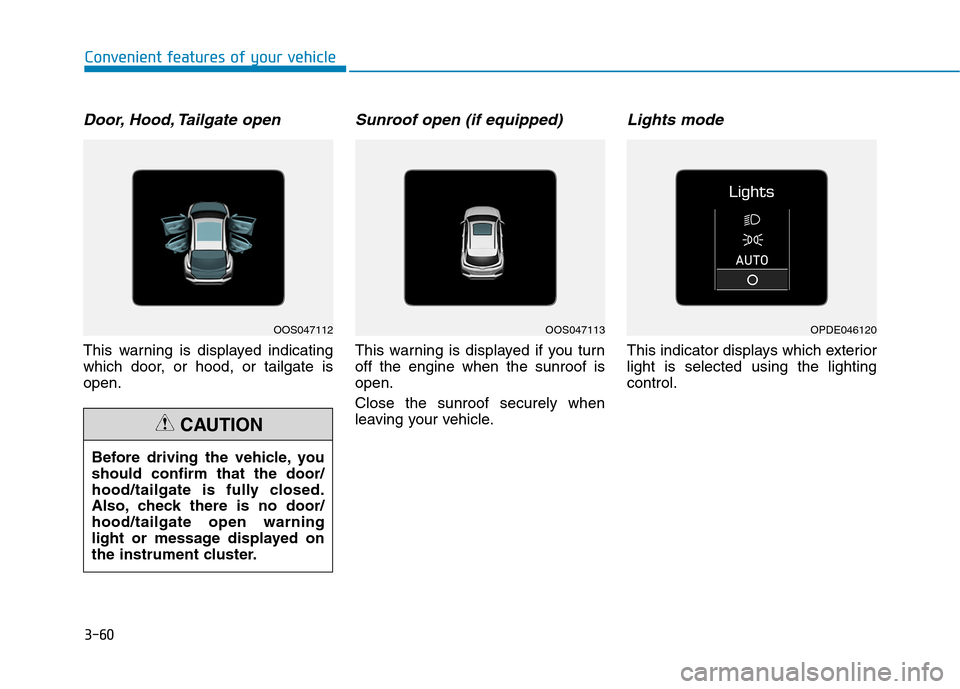
Door, Hood, Tailgate open
This warning is displayed indicating
which door, or hood, or tailgate isopen.
Sunroof open (if equipped)
This warning is displayed if you turnoff the engine when the sunroof isopen. Close the sunroof securely when
leaving your vehicle.
Lights mode
This indicator displays which exteriorlight is selected using the lightingcontrol.
Before driving the vehicle, youshould confirm that the door/
hood/tailgate is fully closed.
Also, check there is no door/hood/tailgate open warning
light or message displayed on
the instrument cluster.
CAUTION
OOS047112OOS047113OPDE046120
Page 144 of 523
3-61
Convenient features of your vehicle
3
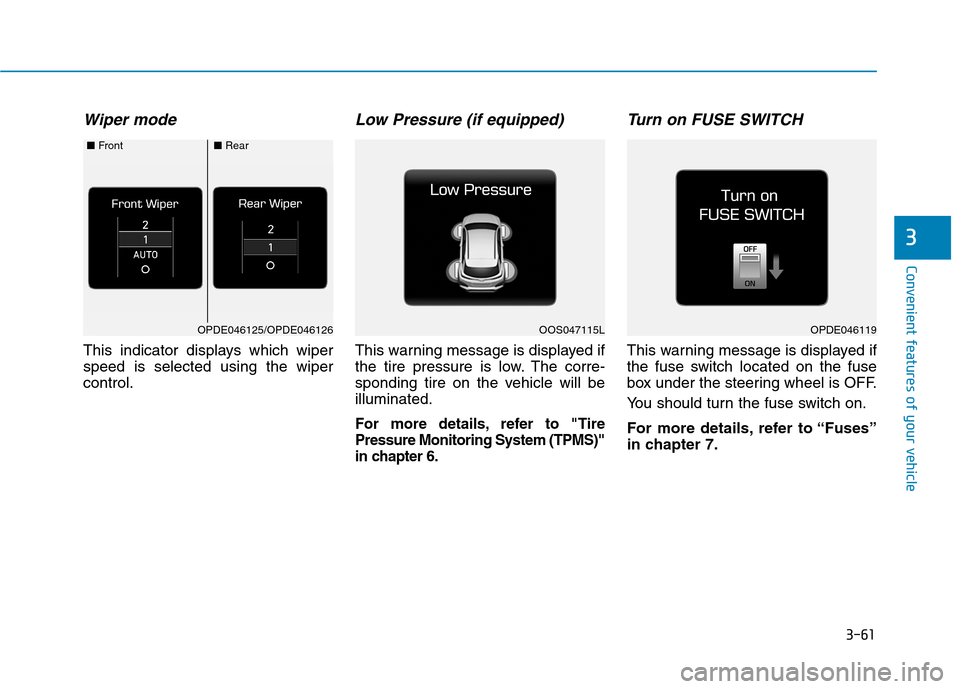
Wiper mode
This indicator displays which wiper speed is selected using the wipercontrol.
Low Pressure (if equipped)
This warning message is displayed if
the tire pressure is low. The corre-
sponding tire on the vehicle will beilluminated.
For more details, refer to "TirePressure Monitoring System (TPMS)"
in chapter 6.
Turn on FUSE SWITCH
This warning message is displayed if
the fuse switch located on the fuse
box under the steering wheel is OFF.
You should turn the fuse switch on.
For more details, refer to “Fuses”
in chapter 7.
OPDE046119OOS047115LOPDE046125/OPDE046126
■Front■Rear
Page 145 of 523
3-62
Convenient features of your vehicle
Heated Steering Wheel turnedoff (if equipped)
This message is displayed if you turn
off the heated steering wheel.
For more details, refer to “Heated
Steering Wheel” in this chapter.
Low washer fluid (if equipped)
This warning message is displayed
if the washer fluid level in the reser-
voir is nearly empty.
Have the washer fluid reservoir refilled.
Low fuel
This warning message is displayed ifthe fuel tank is almost out of fuel.
When this message is displayed, the
low fuel level warning light in thecluster will come on.
It is recommended to look for the nearest fueling station and refuel as
soon as possible.
Add fuel as soon as possible.
Engine has overheated (if equipped)
This warning message is displayed
when the engine coolant tempera-
ture is above 120°C (248°F). This
means that the engine is overheated
and may be damaged.
If your vehicle is overheated, refer
to “Overheating” in chapter 6.
Check headlight (if equipped)
This warning message is displayed if
the headlamps are not operating
properly. A headlamp bulb may needto be replaced.
Information
Make sure to replace the burned out
bulb with a new one of the same wattage
rating.
Check High Beam Assist (HBA) system (if equipped)
This warning message is displayed if
there is a problem with the High
Beam Assist (HBA) System. We rec-
ommend that you have the vehicle
inspected by an authorized
HYUNDAI dealer.
For more information, refer to
“High Beam Assist (HBA) System”
in chapter 3.
i
Page 146 of 523
3-63
Convenient features of your vehicle
3
Check FCA system (if equipped)
This warning message is displayed if there is a malfunction with the
Forward Collision-Avoidance Assist
(FCA) system. We recommend that
you have the vehicle inspected by an
authorized HYUNDAI dealer.
For more details, refer to "Forward
Collision-Avoidance Assist (FCA)
system" in chapter 5.
Check Driver Attention Warning(DAW) system (if equipped)
This warning message is displayed if
there is a problem with the Driver
Attention Warning (DAW) system. We
recommend that you have the vehicle
inspected by an authorized HYUNDAI
dealer.
For more information, refer to
“Driver Attention Warning (DAW)
system” in chapter 5.
Check Forward Collision
Warning system (if equipped)
This warning message is displayed if
there is a problem with the Forward
Collision Warning (FCW) system. We
recommend that you have the vehicle
inspected by an authorized HYUNDAI
dealer.
For more information, refer to
"Forward Collision Warning (FCW)
System" in chapter 5.
Check Lane Keeping Assist
(LKA) system (if equipped)
This warning message is displayed if
there is a problem with the Lane
Keeping Assist (LKA) system. We
recommend that you have the vehicle
inspected by an authorized HYUNDAI
dealer.
For more information, refer to
“Lane Keeping Assist (LKA) sys-
tem” in chapter 5.
Page 147 of 523
3-64
Convenient features of your vehicle
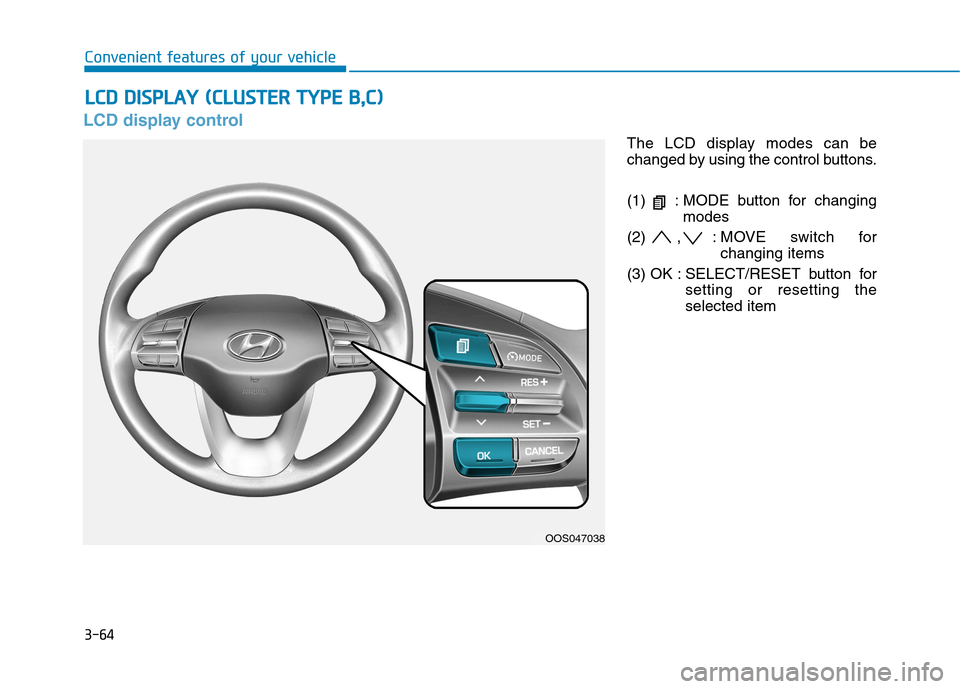
LCD display control
The LCD display modes can be
changed by using the control buttons.
(1) : MODE button for changingmodes
(2) , : MOVE switch for changing items
(3) OK : SELECT/RESET button for setting or resetting the selected item
LLCC DD DD IISS PP LLAA YY (( CC LLUU SSTT EERR TT YY PPEE BB ,,CC ))
OOS047038