sensor Hyundai Kona 2018 User Guide
[x] Cancel search | Manufacturer: HYUNDAI, Model Year: 2018, Model line: Kona, Model: Hyundai Kona 2018Pages: 523, PDF Size: 33.6 MB
Page 81 of 523
2-62
Safety system of your vehicle
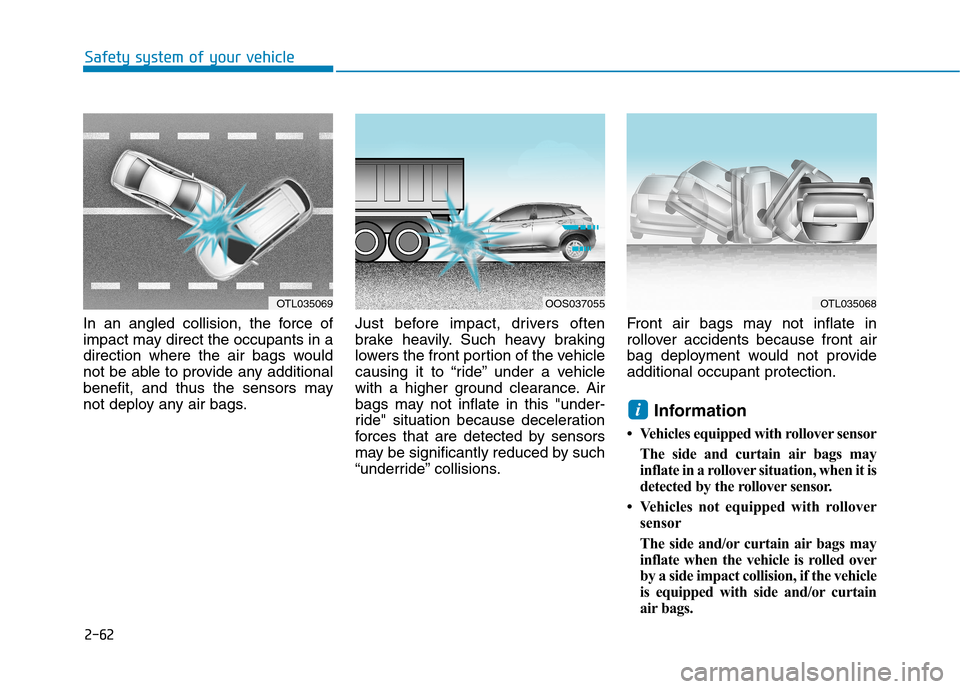
In an angled collision, the force of
impact may direct the occupants in a
direction where the air bags would
not be able to provide any additional
benefit, and thus the sensors may
not deploy any air bags.Just before impact, drivers often
brake heavily. Such heavy braking
lowers the front portion of the vehicle
causing it to “ride” under a vehicle
with a higher ground clearance. Air
bags may not inflate in this "under-
ride" situation because deceleration
forces that are detected by sensors
may be significantly reduced by such
“underride” collisions.Front air bags may not inflate in
rollover accidents because front air
bag deployment would not provideadditional occupant protection.
Information
Vehicles equipped with rollover sensor The side and curtain air bags may
inflate in a rollover situation, when it is
detected by the rollover sensor.
Vehicles not equipped with rollover sensor
The side and/or curtain air bags may
inflate when the vehicle is rolled over
by a side impact collision, if the vehicle
is equipped with side and/or curtain
air bags.
i
OTL035069OOS037055OTL035068
Page 103 of 523
3-20
Convenient features of your vehicle
Pull the day/night lever towards you to reduce glare from the headlamps
of the vehicles behind you during
night driving.
Remember that you lose somerearview clarity in the night position.
Electric Chromic Mirror (ECM)
(if equipped)
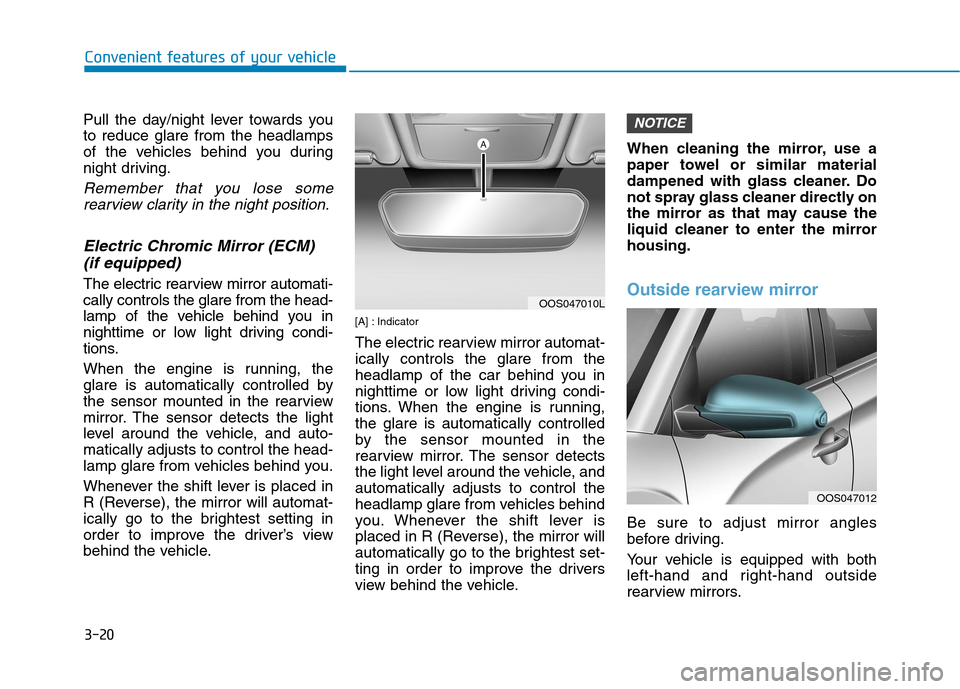
The electric rearview mirror automati-cally controls the glare from the head-
lamp of the vehicle behind you in
nighttime or low light driving condi-
tions.
When the engine is running, the
glare is automatically controlled by
the sensor mounted in the rearview
mirror. The sensor detects the light
level around the vehicle, and auto-matically adjusts to control the head-
lamp glare from vehicles behind you.
Whenever the shift lever is placed in
R (Reverse), the mirror will automat-
ically go to the brightest setting in
order to improve the driver’s view
behind the vehicle. [A] : Indicator
The electric rearview mirror automat- ically controls the glare from the
headlamp of the car behind you in
nighttime or low light driving condi-
tions. When the engine is running,the glare is automatically controlled
by the sensor mounted in the
rearview mirror. The sensor detects
the light level around the vehicle, andautomatically adjusts to control the
headlamp glare from vehicles behind
you. Whenever the shift lever is
placed in R (Reverse), the mirror will
automatically go to the brightest set-
ting in order to improve the drivers
view behind the vehicle.When cleaning the mirror, use a
paper towel or similar material
dampened with glass cleaner. Do
not spray glass cleaner directly on
the mirror as that may cause the
liquid cleaner to enter the mirrorhousing.Outside rearview mirror
Be sure to adjust mirror angles
before driving.
Your vehicle is equipped with both
left-hand and right-hand outside
rearview mirrors.
NOTICE
OOS047010L
OOS047012
Page 166 of 523
3-83
Convenient features of your vehicle
3
Exterior lights
Lighting control
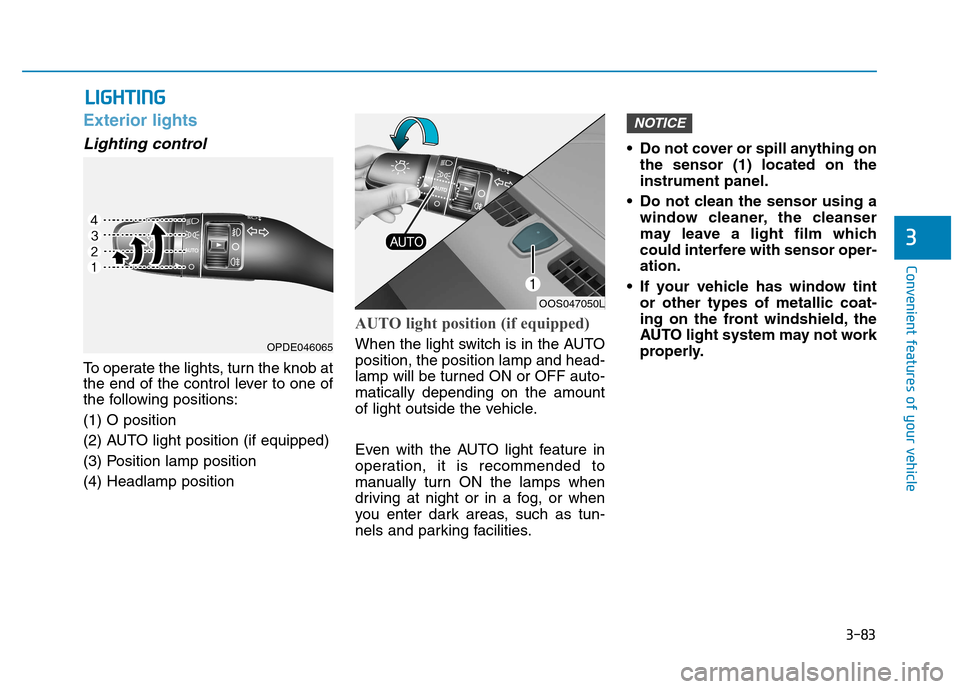
To operate the lights, turn the knob at
the end of the control lever to one of
the following positions: (1) O position
(2) AUTO light position (if equipped)
(3) Position lamp position(4) Headlamp position
AUTO light position (if equipped)
When the light switch is in the AUTO position, the position lamp and head-
lamp will be turned ON or OFF auto-matically depending on the amount
of light outside the vehicle.
Even with the AUTO light feature in
operation, it is recommended to
manually turn ON the lamps when
driving at night or in a fog, or when
you enter dark areas, such as tun-
nels and parking facilities.• Do not cover or spill anything on
the sensor (1) located on theinstrument panel.
Do not clean the sensor using a window cleaner, the cleanser
may leave a light film which
could interfere with sensor oper-ation.
If your vehicle has window tint or other types of metallic coat-
ing on the front windshield, the
AUTO light system may not work
properly.
NOTICE
LLIIGG HH TTIINN GG
OOS047050L
OPDE046065
Page 179 of 523
3-96
Convenient features of your vehicle
Windshield wipers
Operates as follows when the igni-
tion switch is turned ON./MIST : For a single wiping cycle,
move the lever down ( ) or up (MIST) and release
it. The wipers will operate
continuously if the lever isheld in this position.
O/OFF : Wiper is not in operation
---/INT : Wiper operates intermittently
at the same wiping intervals.
Use this mode in light rain or
mist. To vary the speed set-
ting, turn the speed control
knob.
1/LO : Normal wiper speed
2/HI : Fast wiper speed
Information
If there is heavy accumulation of snow
or ice on the windshield, defrost the
windshield for about 10 minutes, or until
the snow and/or ice is removed before
using the windshield wipers to ensure
proper operation.
If you do not remove the snow and/or ice
before using the wiper and washer, it may
damage the wiper and washer system.
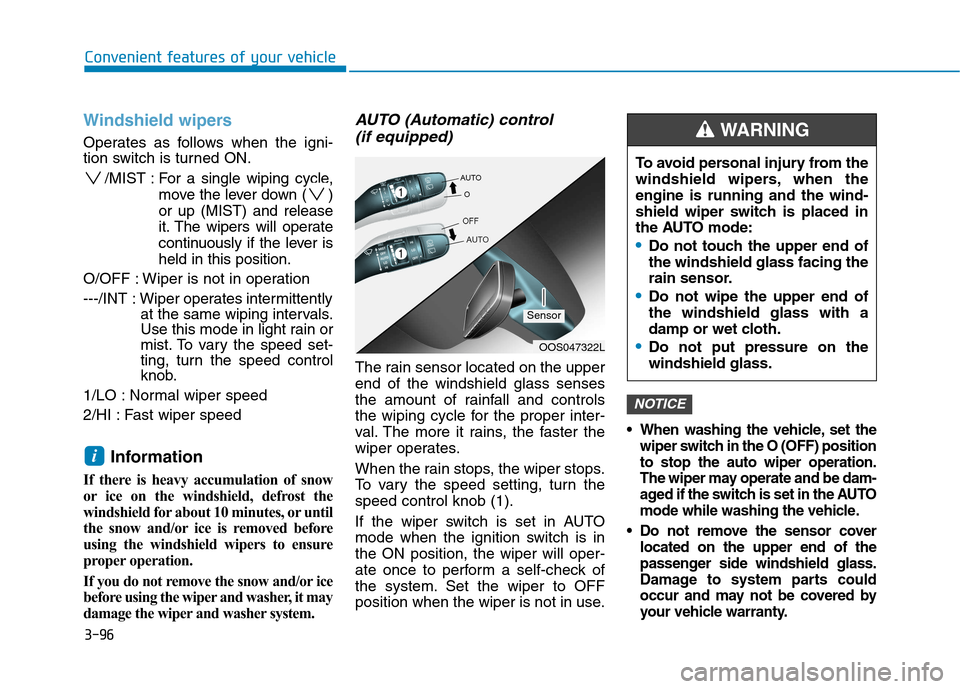
AUTO (Automatic) control (if equipped)
The rain sensor located on the upperend of the windshield glass senses
the amount of rainfall and controls
the wiping cycle for the proper inter-
val. The more it rains, the faster the
wiper operates.
When the rain stops, the wiper stops.
To vary the speed setting, turn thespeed control knob (1).
If the wiper switch is set in AUTO
mode when the ignition switch is inthe ON position, the wiper will oper-
ate once to perform a self-check of
the system. Set the wiper to OFF
position when the wiper is not in use.
When washing the vehicle, set the wiper switch in the O (OFF) positionto stop the auto wiper operation.
The wiper may operate and be dam-
aged if the switch is set in the AUTO
mode while washing the vehicle.
Do not remove the sensor cover located on the upper end of the
passenger side windshield glass.
Damage to system parts could
occur and may not be covered by
your vehicle warranty.
NOTICE
i
OOS047322L
Sensor To avoid personal injury from the
windshield wipers, when theengine is running and the wind-
shield wiper switch is placed in
the AUTO mode:
Do not touch the upper end of the windshield glass facing the
rain sensor.
Do not wipe the upper end of the windshield glass with a
damp or wet cloth.
Do not put pressure on the windshield glass.
WARNING
Page 183 of 523
![Hyundai Kona 2018 User Guide 3-100
Convenient features of your vehicle
Parking Distance Warning
(Reverse) system (if equipped)
[A] : Sensor
The Parking Distance Warning
(Reverse) system assists the driver
during reverse moveme](/img/35/16231/w960_16231-182.png "Hyundai Kona 2018 User Guide 3-100
Convenient features of your vehicle
Parking Distance Warning
(Reverse) system (if equipped)
[A] : Sensor
The Parking Distance Warning
(Reverse) system assists the driver
during reverse moveme")
3-100
Convenient features of your vehicle
Parking Distance Warning
(Reverse) system (if equipped)
[A] : Sensor
The Parking Distance Warning
(Reverse) system assists the driver
during reverse movement of the vehi-
cle by chiming if any object is sensedwithin the distance of 120 cm (50
inches) behind the vehicle. This system is a supplemental sys- tem that senses objects within the
range and location of the sensors, itcannot detect objects in other areaswhere sensors are not installed.
Operation of the ParkingDistance Warning (Reverse)
system
Operating condition
This system will activate when backing up with the ignition switch
in the ON position. However, if vehi-
cle speed exceeds 5 km/h (3 mph),
the system may not detect objects.
If vehicle speed exceeds 10 km/h (6 mph), the system will not warn you
even though objects are detected.
When more than two objects are sensed at the same time, the clos-
est one will be recognized first.
ALWAYS look around your vehi-
cle to make sure there are not
any objects or obstacles before
moving the vehicle in any direc-
tion to prevent a collision.
Always pay close attention
when the vehicle is driven close
to objects, particularly pedestri-
ans, and especially children.
Be aware that some objects
may not be visible on the
screen or be detected by the
sensors, due to the objects
distance, size or material, all of
which can limit the effective-
ness of the sensor.
WARNING
OOS047042
Page 184 of 523
3-101
Convenient features of your vehicle
3
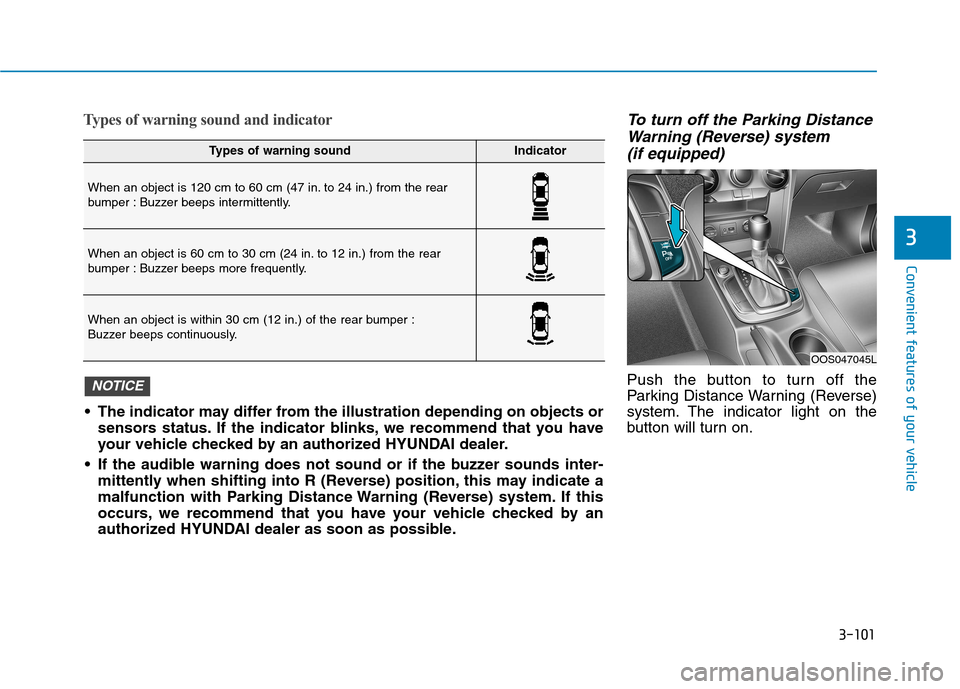
Types of warning sound and indicatorTo turn off the Parking DistanceWarning (Reverse) system
(if equipped)
Push the button to turn off the
Parking Distance Warning (Reverse)
system. The indicator light on the
button will turn on.
Types of warning soundIndicator
When an object is 120 cm to 60 cm (47 in. to 24 in.) from the rear
bumper : Buzzer beeps intermittently.
When an object is 60 cm to 30 cm (24 in. to 12 in.) from the rear
bumper : Buzzer beeps more frequently.
When an object is within 30 cm (12 in.) of the rear bumper :
Buzzer beeps continuously.
The indicator may differ from the illustration depending on objects or sensors status. If the indicator blinks, we recommend that you have
your vehicle checked by an authorized HYUNDAI dealer.
If the audible warning does not sound or if the buzzer sounds inter- mittently when shifting into R (Reverse) position, this may indicate a
malfunction with Parking Distance Warning (Reverse) system. If this
occurs, we recommend that you have your vehicle checked by an
authorized HYUNDAI dealer as soon as possible.
NOTICE
OOS047045L
Page 185 of 523

3-102
Convenient features of your vehicle
Non-operational conditions ofParking Distance Warning
(Reverse) system
The Parking Distance Warning
(Reverse) system may not operate
normally when:
Moisture is frozen to the sensor.
Sensor is covered with foreign mat- ter, such as snow or water, or the
sensor cover is blocked.
There is a possibility of the Parking
Distance Warning (Reverse) system
malfunction when:
Driving on uneven road surfacessuch as unpaved roads, gravel,
bumps, or gradient.
Objects generating excessive noise such as vehicle horns, loud motor-
cycle engines, or truck air brakes
can interfere with the sensor.
Heavy rain or water spray is present.
Wireless transmitters or mobile phones are present near the sensor.
The sensor is covered with snow.
Any non-factory equipment or acces- sories have been installed, or if the
vehicle bumper height or sensorinstallation has been modified.
Detecting range may decrease when:
Outside air temperature is extreme-ly hot or cold.
Undetectable objects smaller than 1 m (40 inches) and narrower than
14 cm (6 inches) in diameter.
Page 186 of 523
3-103
Convenient features of your vehicle
3
The following objects may not be
recognized by the sensor:
Sharp or slim objects such asropes, chains or small poles.
Objects, which tend to absorb sen- sor frequency such as clothes,
spongy material or snow.
Parking Distance Warning
(Reverse) system precautions
The Parking Distance Warning (Reverse) system may not soundconsistently depending on the speedand shapes of the objects detected.
The Parking Distance Warning (Reverse) system may malfunction if
the vehicle bumper height or sensorinstallation has been modified or
damaged. Any non-factory installed
equipment or accessories may also
interfere with the sensor perform-
ance.
The sensor may not recognize objects less than 30 cm (11 in.) from
the sensor, or it may sense an incor-
rect distance. Use caution.
When the sensor is frozen or stained with snow, dirt, or water, the sensor
may be inoperative until the stains
are removed using a soft cloth.
Do not push, scratch or strike the sensor with any hard objects that
could damage the surface of the
sensor. Sensor damage could occur. Do not spray the sensors or its sur-
rounding area directly with a high
pressure washer. Shock applied
from high pressure water may cause
the device to not operate normally.
Your new vehicle warranty does
not cover any accidents or dam-
age to the vehicle or injuries toits occupants related to a
Parking Distance Warning
(Reverse) system. Always drive
safely and cautiously.
WARNING
Page 187 of 523
![Hyundai Kona 2018 User Guide 3-104
Convenient features of your vehicle
Parking Distance Warning
(Reverse/Forward) system (if equipped)
[A] : Rear Sensor, [B] : Front SensorThe Parking Distance Warning
(Reverse/Forward) system a](/img/35/16231/w960_16231-186.png "Hyundai Kona 2018 User Guide 3-104
Convenient features of your vehicle
Parking Distance Warning
(Reverse/Forward) system (if equipped)
[A] : Rear Sensor, [B] : Front SensorThe Parking Distance Warning
(Reverse/Forward) system a")
3-104
Convenient features of your vehicle
Parking Distance Warning
(Reverse/Forward) system (if equipped)
[A] : Rear Sensor, [B] : Front SensorThe Parking Distance Warning
(Reverse/Forward) system assists
the driver during movement of the
vehicle by chiming if any object issensed within the distance of 100 cm(39 inches) in front and 120 cm (47
inches) behind the vehicle. This system is a supplemental sys- tem that senses objects within the
range and location of the sensors, itcannot detect objects in other areaswhere sensors are not installed.
Operation of the Parking
Distance Warning
(Reverse/Forward) system
Operating condition
This system will activate when the Parking Distance Warning (Reverse/
Forward) system button is pressed
with the engine r unning.
ALWAYS look around your vehi-
cle to make sure there are no
objects or obstacles before
moving the vehicle in any direc-
tion to prevent a collision.
Always pay close attention
when the vehicle is driven close
to objects, particularly pedestri-
ans, and especially children.
Be aware that some objects
may not be visible on the
screen or be detected by the
sensors, due to the objects
distance, size or material, all of
which can limit the effective-
ness of the sensor.
WARNING
OOS047045OOS047043
OOS047042
■Front sensor
■Rear sensor
Page 188 of 523
3-105
Convenient features of your vehicle
3
The Parking Distance Warning(Reverse/Forward) system button
turns on automatically and activates
the Parking Distance Warning
(Reverse/Forward) system when
you move the shift lever to the R
(Reverse) position. However, if vehi-
cle speed exceeds 10 km/h (6
mph), the system will not warn you
even though objects are detected,
and if vehicle speed exceeds 20
km/h (12 mph), the system will turn
off automatically. To turn on the sys-
tem, press the Parking Distance
Warning (Reverse/Forward) system
button.
When more than two objects are sensed at the same time, the clos-
est one will be recognized first.
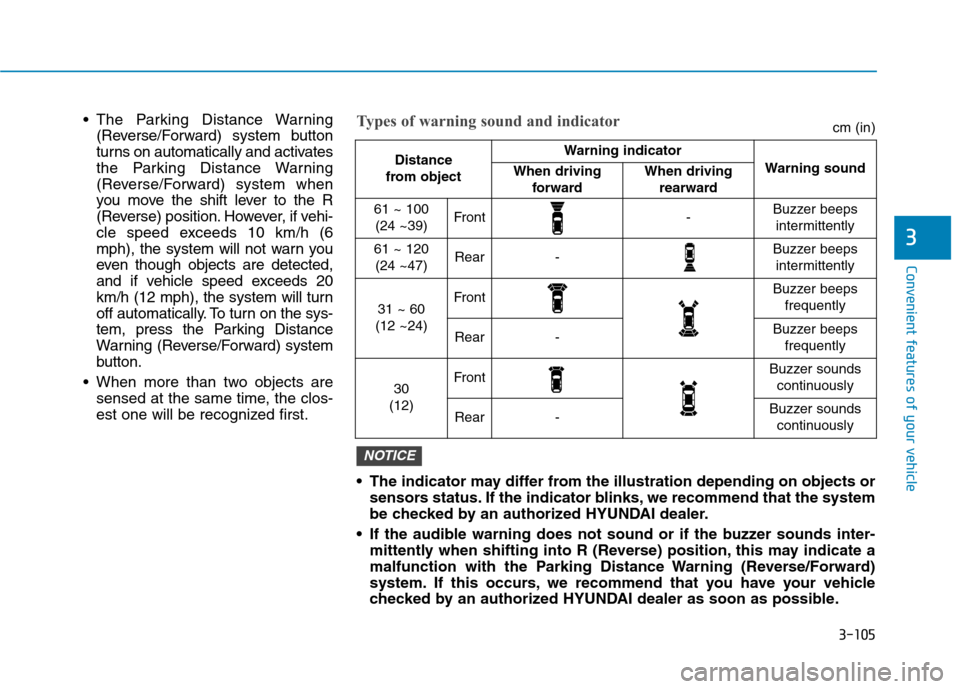
The indicator may differ from the illustration depending on objects orsensors status. If the indicator blinks, we recommend that the system
be checked by an authorized HYUNDAI dealer.
If the audible warning does not sound or if the buzzer sounds inter- mittently when shifting into R (Reverse) position, this may indicate a
malfunction with the Parking Distance Warning (Reverse/Forward)
system. If this occurs, we recommend that you have your vehicle
checked by an authorized HYUNDAI dealer as soon as possible.
NOTICE
Distance
from object Warning indicator
Warning soundWhen driving forwardWhen driving rearward
61 ~ 100(24 ~39)Front-Buzzer beeps intermittently
61 ~ 120(24 ~47)Rear-Buzzer beeps intermittently
31 ~ 60
(12 ~24)FrontBuzzer beeps frequently
Rear-Buzzer beeps frequently
30
(12)FrontBuzzer sounds continuously
Rear-Buzzer sounds continuously
Types of warning sound and indicatorcm (in)