Drive mode Hyundai Kona 2018 Owner's Guide
[x] Cancel search | Manufacturer: HYUNDAI, Model Year: 2018, Model line: Kona, Model: Hyundai Kona 2018Pages: 523, PDF Size: 33.6 MB
Page 242 of 523
![Hyundai Kona 2018 Owners Guide 4-21
Multimedia System
4
Playing iPod files
Select [iPod files] to play songs
saved on your iPod®
.
If there are no songs saved on your
iPod ®
, the [iPod files] is disabled.
Information
Operation](/img/35/16231/w960_16231-241.png "Hyundai Kona 2018 Owners Guide 4-21
Multimedia System
4
Playing iPod files
Select [iPod files] to play songs
saved on your iPod®
.
If there are no songs saved on your
iPod ®
, the [iPod files] is disabled.
Information
Operation")
4-21
Multimedia System
4
Playing iPod files
Select [iPod files] to play songs
saved on your iPod®
.
If there are no songs saved on your
iPod ®
, the [iPod files] is disabled.
Information
Operation cannot be carried out cor-
rectly due to iPod ®
application mal-
function. Information
- Using Bluetooth
®
(BT) Audio
Bluetooth ®
Audio mode can only be
used if a Bluetooth ®
-enabled phone
is connected. Only devices that sup-
port Bluetooth ®
audio can be used.
If the Bluetooth ®
-enabled phone is
disconnected during play, the music
stops.
When the TRACK UP/DOWN but- tons are used during Bluetooth ®
audio streaming, a popping noise or
sound interruptions may occur,
depending on the cell phone device.
Depending on the cell phone model, the audio streaming function may
not be supported.
If a phone call is made or received when music is playing in Bluetooth ®
Audio mode, the call may mix with
the music.
When returning to Bluetooth ®
Audio mode after ending a call, play
might not resume automatically for
some cell phone models. Bluetooth
®
Handsfree is a fea-
ture that enables drivers to prac-
tice safe driving. Connecting thecar audio system with aBluetooth ®
phone allows the
user to conveniently make calls,
receive calls, and manage the
phone book. Before using the
Bluetooth®Wireless Technology,
carefully read the contents of
this user’s manual.
Excessive use or operations while driving may lead to negli-
gent driving practices and bethe cause of accidents.
Do not operate the device exces- sively while driving.
Viewing the screen for pro- longed periods of time is dan-
gerous and may lead to acci-dents.
When driving, view the screen only for short periods of time.
NOTICEi
i
Page 255 of 523
Driving your vehicle
Before driving.........................................................5-4Before entering the vehicle ...........................................5-4
Before starting...................................................................5-4
Ignition switch ........................................................5-6 Key ignition switch ............................................................5-6
Engine Start/Stop button ................................................5-9
Manual transmission............................................5-16 Manual transmission operation ...................................5-16
Good driving practices ...................................................5-18
Dual clutch transmission .....................................5-19 Dual clutch transmission operation ............................5-19
Parking ...............................................................................5-26
Good driving practices ...................................................5-26
Braking system.....................................................5-28 Power brakes ...................................................................5-28
Disc brakes wear indicator ...........................................5-29
Parking brake ...................................................................5-29
Anti-lock Brake System (ABS) ....................................5-31
Electronic Stability Control (ESC)................................5-33
Vehicle Stability Management......................................5-36
Hill-Start Assist Control (HAC) ....................................5-37
Emergency Stop Signal (ESS) ......................................5-37
Downhill Brake Control (DBC) ......................................5-38
Good braking practices..................................................5-40 Four wheel drive (4WD) ......................................5-41
4WD operation .................................................................5-42
Emergency precautions .................................................5-45
ISG (Idle Stop and Go) system ...........................5-47 To activate the ISG system ...........................................5-47
To deactivate the ISG system ......................................5-51
ISG system malfunction .................................................5-51
The battery sensor deactivation .................................5-52
Drive mode integrated control system .............5-53
Blind-spot collision warning (BCW) system ....5-55 BCW ....................................................................................5-56
RCCW (Rear Cross-Traffic Collision Warning) .........5-58
Detecting sensor .............................................................5-60
Limitations of the system .............................................5-61
Forward Collision-avoidance Assist (FCA)system-sensor fusion type
(Front radar + Front camera) ............................5-63 System setting and activation......................................5-63
FCA warning message and system control ..............5-65
FCA sensor........................................................................5-67
System malfunction ........................................................5-69
Limitations of the system .............................................5-70
5
Page 273 of 523
5-19
Driving your vehicle
5
The dual clutch transmission canbe thought of as an automatically
shifting manual transmission. It
gives the driving feel of a manual
transmission, yet provides the
ease of a fully automatic transmis-sion.
When D (Drive) is selected, the transmission will automatically shiftthrough the gears similar to a con-
ventional automatic transmission.
Unlike a traditional automatic
transmission, the gear shifting can
sometimes be felt and heard as theactuators engage the clutches andthe gears are selected.
The dual clutch transmission incor- porates a dry-type dual clutch
mechanism, which allows for better
acceleration performance and
increased fuel efficiency while driv-
ing. But it differs from a conven-
tional automatic transmission
because it does not incorporate a
torque converter. Instead, the tran-
sition from one gear to the next is
managed by clutch slip, especially
at lower speeds.
DDUU AALL CC LLUU TTCCHH TT RR AA NN SSMM IISS SSIIOO NN (( IIFF EE QQ UUIIPP PP EEDD ))
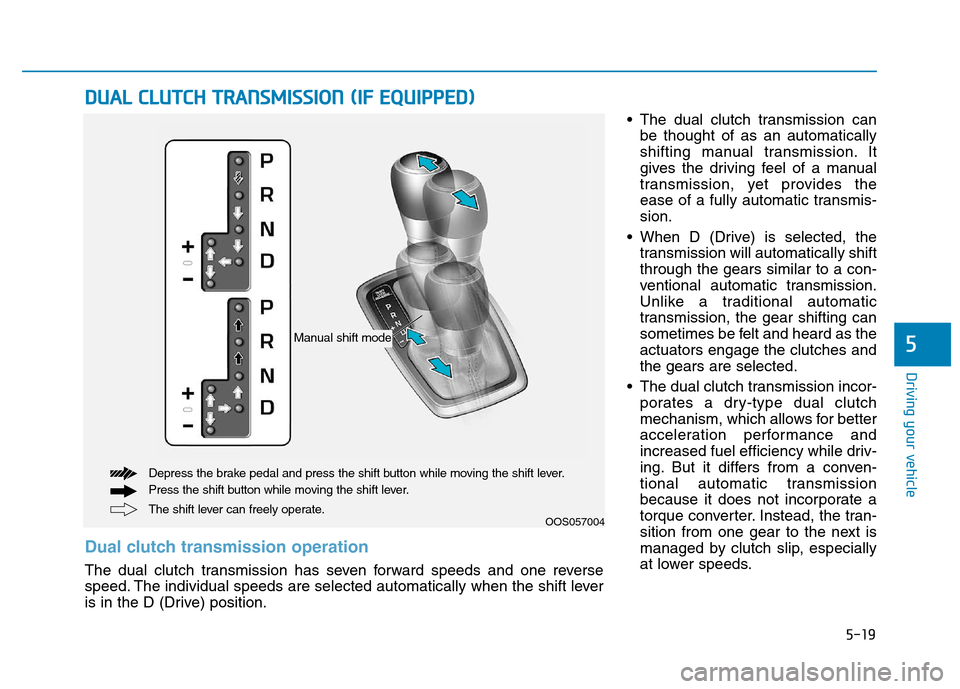
OOS057004
The shift lever can freely operate.
Depress the brake pedal and press the shift button while moving the shift lever.
Press the shift button while moving the shift lever.
Manual shift mode
Dual clutch transmission operation
The dual clutch transmission has seven forward speeds and one reverse
speed. The individual speeds are selected automatically when the shift lever
is in the D (Drive) position.
Page 274 of 523
5-20
Driving your vehicle
As a result, shifts are sometimes
more noticeable, and a light vibra-
tion can be felt as the transmissionshaft speed is matched with the
engine shaft speed. This is a nor-mal condition of the dual clutch
transmission.
The dry-type clutch transfers torque more directly and provides
a direct-drive feeling which may
feel different from a conventional
automatic transmission. This may
be more noticeable when launch-
ing the vehicle from a stop or when
traveling at low, stop-and-go vehi-
cle speeds.
When rapidly accelerating from a lower vehicle speed, the engine
rpm may increase dramatically asa result of clutch slip as the dual
clutch transmission selects the cor-
rect gear. This is a normal condi-tion.
When accelerating from a stop on an incline, press the accelerator
smoothly and gradually to avoid
any shudder feeling or jerkiness. When traveling at a lower vehicle
speed, if you release the accelera-
tor pedal quickly, you may feel
engine braking before the trans-
mission changes gears. This
engine braking feeling is similar to
operating a manual transmission at
low speed.
When driving downhill, you may wish to move the gear shift lever to
Manual Shift mode and downshift
to a lower gear in order to control
your speed without using the brake
pedal excessively.
When you turn the engine on and off, you may hear clicking soundsas the system goes through a self-
test. This is a normal sound for the
dual clutch transmission.
During the first 1,500 km (1000 miles), you may feel that the vehi-
cle may not be smooth when accel-
erating at low speed. During this
break-in period, the shift quality
and performance of your new vehi-
cle is continuously optimized. To reduce the risk of serious
injury or death:
ALWAYS check the surround-
ing areas near your vehicle for
people, especially children,
before shifting a vehicle into
D (Drive) or R (Reverse).
Before leaving the driver's
seat, always make sure the
shift lever is in the P (Park)
position, then set the parking
brake, and place the ignition
switch in the LOCK/OFF posi-
tion. Unexpected and sudden
vehicle movement can occurif these precautions are not
followed.
Do not use aggressive engine
braking (shifting from a high-
er gear to a lower gear) on
slippery roads. This could
cause the tires to slip and mayresult in an accident.
WARNING
Page 278 of 523
5-24
Driving your vehicle
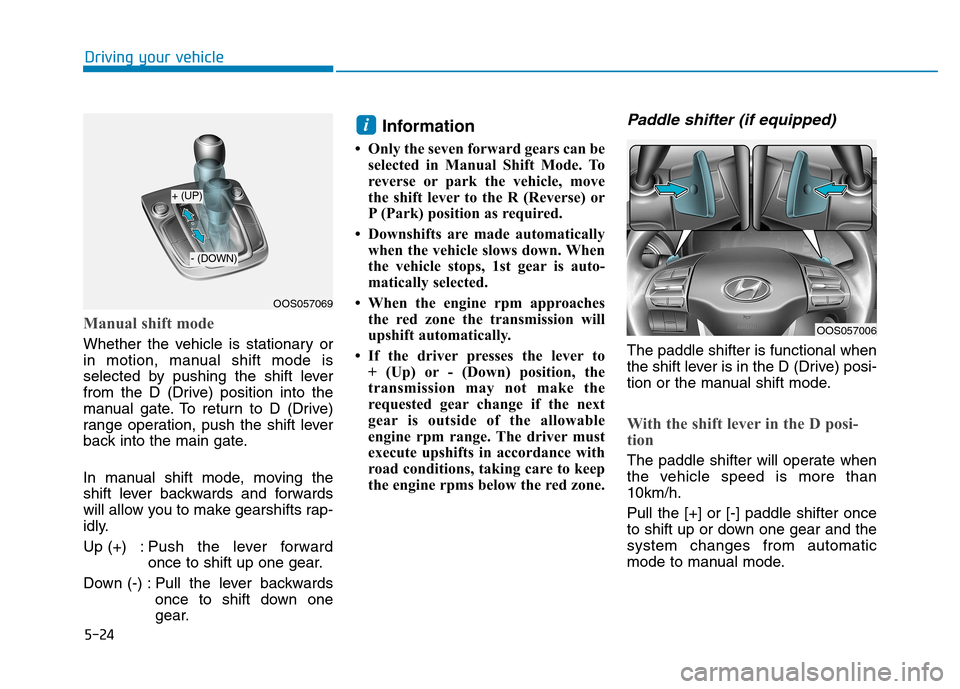
Manual shift mode
Whether the vehicle is stationary or
in motion, manual shift mode is
selected by pushing the shift lever
from the D (Drive) position into the
manual gate. To return to D (Drive)
range operation, push the shift lever
back into the main gate.
In manual shift mode, moving the
shift lever backwards and forwards
will allow you to make gearshifts rap-
idly.
Up (+) : Push the lever forwardonce to shift up one gear.
Down (-) : Pull the lever backwards once to shift down one
gear. Information
Only the seven forward gears can be selected in Manual Shift Mode. To
reverse or park the vehicle, move
the shift lever to the R (Reverse) or
P (Park) position as required.
Downshifts are made automatically when the vehicle slows down. When
the vehicle stops, 1st gear is auto-
matically selected.
When the engine rpm approaches the red zone the transmission will
upshift automatically.
If the driver presses the lever to + (Up) or - (Down) position, the
transmission may not make the
requested gear change if the next
gear is outside of the allowable
engine rpm range. The driver must
execute upshifts in accordance with
road conditions, taking care to keep
the engine rpms below the red zone.
Paddle shifter (if equipped)
The paddle shifter is functional when
the shift lever is in the D (Drive) posi-
tion or the manual shift mode.
With the shift lever in the D posi-
tion
The paddle shifter will operate when
the vehicle speed is more than10km/h. Pull the [+] or [-] paddle shifter once
to shift up or down one gear and thesystem changes from automatic
mode to manual mode.
i
OOS057069
+ (UP)
- (DOWN)
OOS057006
Page 279 of 523
5-25
Driving your vehicle
5
When the vehicle speed is lower
than 10 km/h, if you depress the
accelerator pedal for more than 5
seconds or if you move the shift lever
from D (Drive) to manual shift mode
and move it from manual shift mode
to D (Drive) again, the system
changes from manual mode to auto-
matic mode.
With the shift lever in the manual
shift mode
Pull the [+] or [-] paddle shifter once
to shift up or down one gear.Information
If the [+] and [-] paddle shifters are
pulled at the same time, gear shift may
not occur.
Shift-lock system
For your safety, the dual clutch trans-
mission has a shift-lock system
which prevents shifting the transmis-
sion from P (Park) into R (Reverse)
unless the brake pedal is depressed.
To shift the transmission from P
(Park) into R (Reverse):
1. Depress and hold the brake pedal.
2. Start the engine or place the igni- tion switch in the ON position.
3. Move the shift lever.
Shift-lock release
If the shift lever cannot be moved
from the P (Park) position into R
(Reverse) position with the brake
pedal depressed, continue depress-
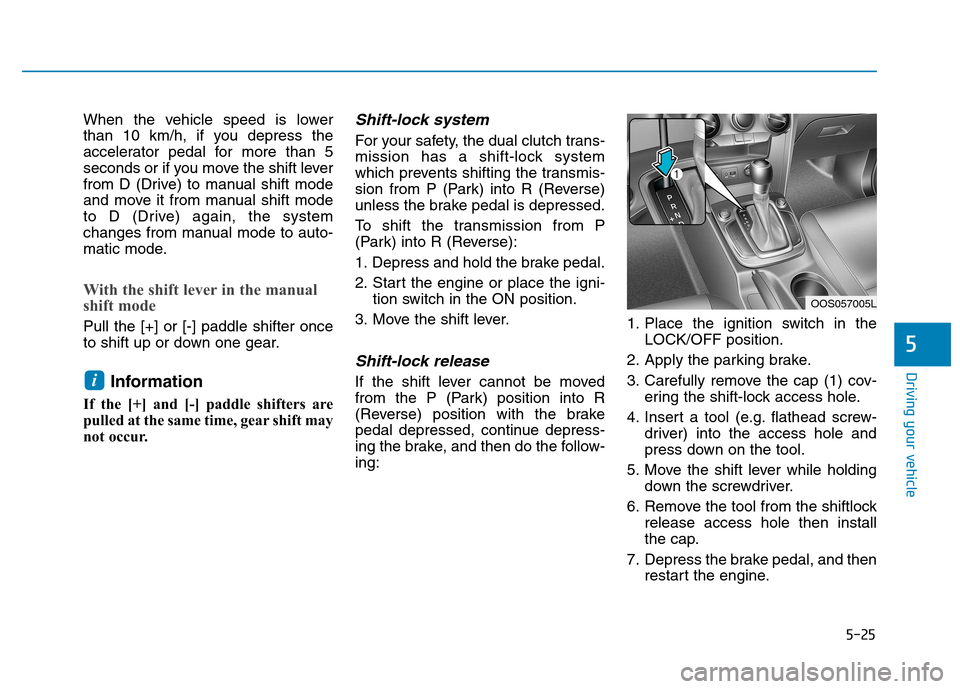
ing the brake, and then do the follow-ing: 1. Place the ignition switch in the
LOCK/OFF position.
2. Apply the parking brake.
3. Carefully remove the cap (1) cov- ering the shift-lock access hole.
4. Insert a tool (e.g. flathead screw- driver) into the access hole and
press down on the tool.
5. Move the shift lever while holding down the screwdriver.
6. Remove the tool from the shiftlock release access hole then install
the cap.
7. Depress the brake pedal, and then restart the engine.i
OOS057005L
Page 280 of 523
5-26
Driving your vehicle
If you need to use the shift-lock
release, we recommend that the sys-
tem be inspected by an authorized
HYUNDAI dealer immediately.
Ignition key interlock system (if equipped)
The ignition key cannot be removed
unless the shift lever is in the P
(Park) position.
Parking
Always come to a complete stop and
continue to depress the brake pedal.
Move the shift lever into the P (Park)
position, apply the parking brake,
and place the ignition switch in the
LOCK/OFF position. Take the Key
with you when exiting the vehicle.
Good driving practices
Never move the shift lever from P (Park) or N (Neutral) to any other
position with the accelerator pedaldepressed.
Never move the shift lever into P (Park) when the vehicle is inmotion.
Be sure the vehicle is completely
stopped before you attempt to shift
into R (Reverse) or D (Drive).
Do not move the shift lever to N (Neutral) when driving. Doing so
may result in an accident because
of a loss of engine braking and the
transmission could be damaged.
Do not drive with your foot resting on the brake pedal. Even light, butconsistent pedal pressure can
result in the brakes overheating,
brake wear and possibly even
brake failure.
When driving in manual shift mode, slow down before shifting to a
lower gear. Otherwise, the lower
gear may not be engaged if the
engine rpms are outside of the
allowable range.
When you stay in the vehicle
with the engine running, becareful not to depress the accel-
erator pedal for a long period of
time. The engine or exhaust
system may overheat and start
a fire.
The exhaust gas and the
exhaust system are very hot.
Keep away from the exhaustsystem components.
Do not stop or park over flam-
mable materials, such as dry
grass, paper or leaves. They
may ignite and cause a fire.
WARNING
Page 286 of 523
5-32
Driving your vehicle
ABS cannot prevent a loss of stabili-
ty. Always steer moderately when
braking hard. Severe or sharp steer-
ing wheel movement can still cause
your vehicle to veer into oncoming
traffic or off the road.
On loose or uneven road surfaces,
operation of the anti-lock brake sys-
tem may result in a longer stopping
distance than for vehicles equipped
with a conventional brake system.
The ABS warning light ( ) will stay
on for several seconds after the
Ignition switch is placed in the ON
position. During that time, the ABSwill go through self-diagnosis and the
light will go off if everything is nor-
mal. If the light stays on, you may
have a problem with your ABS. We
recommend that you contact an
authorized HYUNDAI dealer as soon
as possible.When you drive on a road having
poor traction, such as an icy road,
and apply your brakes continu-
ously, the ABS will be active con-
tinuously and the ABS warning
light ( ) may illuminate. Pull
your vehicle over to a safe place
and turn the engine off.
Restart the engine. If the ABS
warning light is off, then your ABSsystem is normal.
Otherwise, you may have a prob-
lem with your ABS system. We
recommend that you contact an
authorized HYUNDAI dealer as
soon as possible. Information
When you jump start your vehicle
because of a drained battery, the ABS
warning light ( ) may turn on at the
same time. This happens because of
the low battery voltage. It does not
mean your ABS is malfunctioning.
Have the battery recharged before
driving the vehicle.i
NOTICE
If the ABS warning light ( ) is
on and stays on, you may have
a problem with the ABS. Your
power brakes will work normal-
ly. To reduce the risk of serious
injury or death, we recommend
that you contact your HYUNDAI
dealer as soon as possible.
WARNING
Page 289 of 523
5-35
Driving your vehicle
5
The ESC OFF indicator light comes
on when the ESC is turned off with
the button. Driving with wheels and tires with
different sizes may cause the ESC
system to malfunction. Before
replacing tires, make sure all fourtires and wheels are the same
size. Never drive the vehicle with
different sized wheels and tiresinstalled.ESC OFF usage
When Driving
The ESC OFF mode should only be
used briefly to help free the vehicle if
stuck in snow or mud, by temporarily
stopping operation of the ESC, to
maintain wheel torque.
To turn ESC off while driving, press
the ESC OFF button while driving on
a flat road surface.To prevent damage to the trans-mission:
Do not allow wheel(s) of one
axle to spin excessively while
the ESC, ABS, and parking brake
warning lights are displayed.
The repairs would not be cov-
ered by the vehicle warranty.
Reduce engine power and do
not spin the wheel(s) excessive-
ly while these lights are dis-
played.
When operating the vehicle on a dynamometer, make sure theESC is turned off (ESC OFF lightilluminated).
Information
Turning the ESC off does not affect
ABS or standard brake system opera-
tion.
i
NOTICE
NOTICE
When the ESC is blinking, this indicates the ESC is active:
Drive slowly and NEVER attempt
to accelerate. NEVER turn theESC off while the ESC indicator
light is blinking or you may lose
control of the vehicle resulting inan accident.
WARNING
Page 292 of 523
5-38
Driving your vehicle
The hazard warning flasher turns OFF:
When the vehicle drives at a lowspeed for a certain period of time.
The driver can manually turn OFF the
hazard warning flasher by pressing
the button.
Information
The Emergency Stop Signal (ESS) sys-
tem will not activate, when the hazard
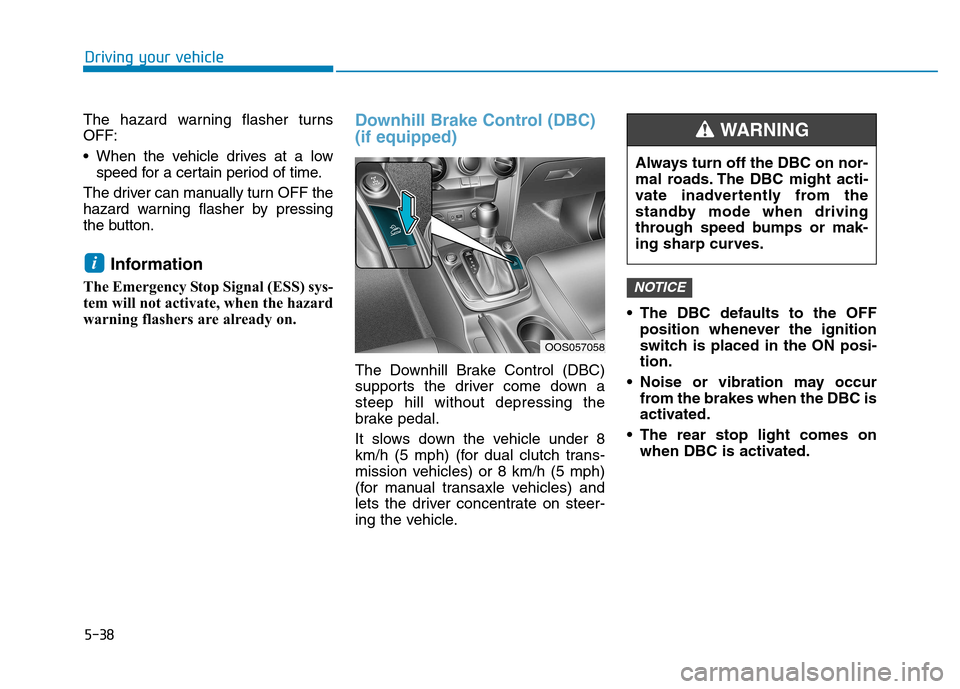
warning flashers are already on.Downhill Brake Control (DBC) (if equipped)
The Downhill Brake Control (DBC)
supports the driver come down asteep hill without depressing the
brake pedal.
It slows down the vehicle under 8
km/h (5 mph) (for dual clutch trans-
mission vehicles) or 8 km/h (5 mph)
(for manual transaxle vehicles) and
lets the driver concentrate on steer-
ing the vehicle. The DBC defaults to the OFF
position whenever the ignition
switch is placed in the ON posi-tion.
Noise or vibration may occur from the brakes when the DBC is
activated.
The rear stop light comes on when DBC is activated.
NOTICE
i
OOS057058 Always turn off the DBC on nor-
mal roads. The DBC might acti-
vate inadvertently from the
standby mode when driving
through speed bumps or mak-
ing sharp curves.
WARNING