reset Hyundai Kona 2018 Owner's Guide
[x] Cancel search | Manufacturer: HYUNDAI, Model Year: 2018, Model line: Kona, Model: Hyundai Kona 2018Pages: 523, PDF Size: 33.6 MB
Page 234 of 523
![Hyundai Kona 2018 Owners Guide 4-13
Multimedia System
4
Radio
FM/AM (with RDS (if equipped))
Switching between FM and AM
Press the [RADIO]button on the
audio system to switch between FM and AM.
Searching stations
Press the [SEEK/](/img/35/16231/w960_16231-233.png "Hyundai Kona 2018 Owners Guide 4-13
Multimedia System
4
Radio
FM/AM (with RDS (if equipped))
Switching between FM and AM
Press the [RADIO]button on the
audio system to switch between FM and AM.
Searching stations
Press the [SEEK/")
4-13
Multimedia System
4
Radio
FM/AM (with RDS (if equipped))
Switching between FM and AM
Press the [RADIO]button on the
audio system to switch between FM and AM.
Searching stations
Press the [SEEK/TRACK] button to
search stations.
Presets
Save up to 36 frequently used sta-
tions.
1. Press and hold the desired slot from 1 through 36. This saves the current station in the selected slot.
If the slot is empty, simply press-
ing saves the station to the slot.
2. To save in slots numbered 7 or higher, press the [PRESET]but-
ton to move to the previous/next
page and save.
To listen to a preset station, pressthe desired station in the list.
Menu
Press the [MENU]button, and select
the desired function.
List: A list of all available stations in the current location of the vehicle is
displayed. Press the desired sta-tion.
Traffic Announcement (TA): Enable or disable Traffic Announcements.
Scan: All available stations are played for five seconds each.
Sound Settings: Audio sound set- tings can be changed.
DAB/FM (with DAB)
Switching between DAB/FM and AM
Press the [RADIO]button on the
audio system to switch between
DAB/FM and AM.
Searching stations
Press the [SEEK/TRACK] button to
search stations.
Page 235 of 523
4-14
Multimedia System
Presets
Save up to 36 frequently used sta-
tions.
1. Press and hold the desired slotfrom 1 through 36. This saves the current station in the selected slot.
If the slot is empty, simply press-
ing saves the station to the slot.
2. To save in slots numbered 7 or higher, press the [PRESET]but-
ton to move to the previous/next
page and save.
To listen to a preset station, pressthe desired station in the list.
Menu
Press the [MENU]button, and select
the desired function.
List: A list of all available stations in the current location of the vehicle is
displayed. Press the desired sta-tion.
Traffic Announcement (TA): Enable or disable Traffic Announcements.
Region : Enable or disable auto- matic switching between regional
stations.
Sound Settings: Audio sound set- tings can be changed.
Scan: All available stations are played for five seconds each.
Manual tune FM : Search for fre- quencies manually.
Media
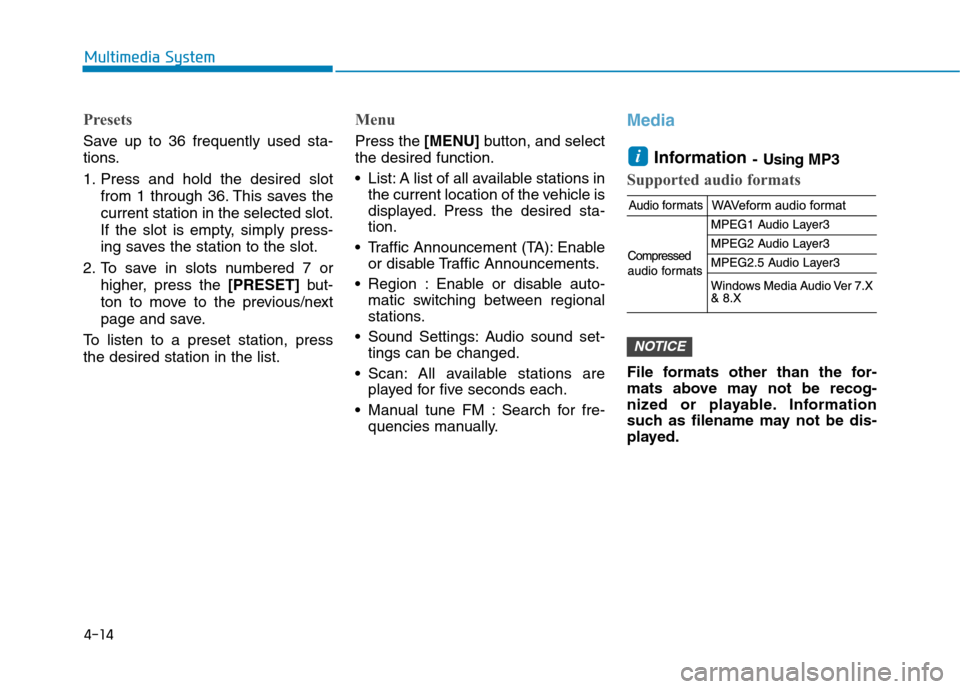
Information - Using MP3
Supported audio formats
File formats other than the for-
mats above may not be recog-
nized or playable. Information
such as filename may not be dis-
played.
NOTICE
i
Page 240 of 523
4-19
Multimedia System
4
There may be noise if the audio sys-tem is used with an iPod ®
or AUX
external device connected to the
power jack. In these cases, discon-
nect the iPod ®
or external device
from the power jack.
Play may be interrupted, or device malfunctions may occur depending
on the characteristics of your
iPod ®
/iPhone ®
.
Play may fail if your iPhone ®
is con-
nected through both Bluetooth ®
and
USB. In this case, select Dock con-
nector or Bluetooth ®
on your
iPhone ®
to change the sound output
settings.
If your software version does not support the communication proto-
col or your iPod ®
is not recognized
due to device failure, anomalies or
defects, iPod ®
mode cannot be used.
iPod ®
nano (5th generation) devices
may not be recognized if the battery
is low. Charge sufficiently before
use.
The search and song play order in the iPod ®
device may be different
from the search order in the audio
system. If the iPod
®
has failed due to an
internal defect, please reset the
iPod ®
(consult your iPod ®
manual).
Depending on the software version, the iPod ®
may fail to sync with the
system. If the media is removed or
disconnected before recognition, the
previous mode may not be restored
(iPad ®
cannot be charged).
Cables other than the 1-meter cable provided with iPod ®
/iPhone ®
prod-
ucts may not be recognized.
When other music apps are used on your iPod ®
, the system sync func-
tion may fail due to malfunction of
the iPod ®
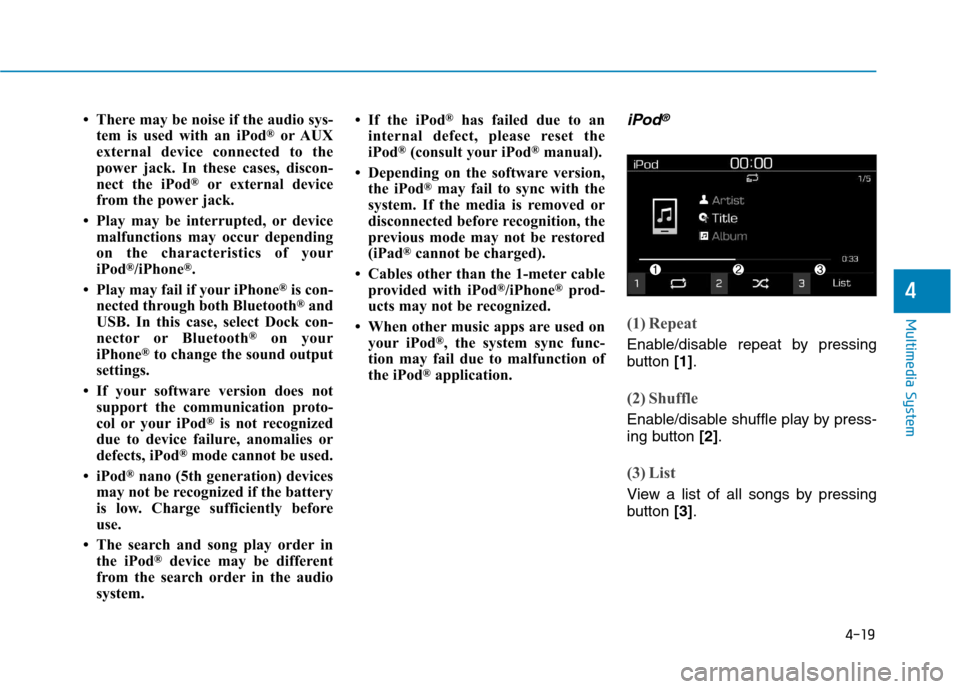
application.iPod®
(1) Repeat
Enable/disable repeat by pressing
button [1].
(2) Shuffle
Enable/disable shuffle play by press-
ing button [2].
(3) List
View a list of all songs by pressing
button [3].
Page 253 of 523
![Hyundai Kona 2018 Owners Guide 4-32
Multimedia System
Bluetooth
Press the [SETUP/CLOCK] button
➟ Select [Bluetooth].
Connections: Control pairing, dele- tion, connection and disconnection of Bluetooth ®
devices.
Auto connectio](/img/35/16231/w960_16231-252.png "Hyundai Kona 2018 Owners Guide 4-32
Multimedia System
Bluetooth
Press the [SETUP/CLOCK] button
➟ Select [Bluetooth].
Connections: Control pairing, dele- tion, connection and disconnection of Bluetooth ®
devices.
Auto connectio")
4-32
Multimedia System
Bluetooth
Press the [SETUP/CLOCK] button
➟ Select [Bluetooth].
Connections: Control pairing, dele- tion, connection and disconnection of Bluetooth ®
devices.
Auto connection priority: Set the connection priority of Bluetooth ®
devices when the vehicle is started.
Update contacts: Contacts can be
downloaded from connectedBluetooth ®
devices.
Bluetooth voice guidance: Play or mute voice prompts for Bluetooth ®
device pairing, connection and
errors. Information
When paired devices are deleted, the call history and contacts of the
device saved to the audio system are
deleted.
For Bluetooth ®
connections with
low connection priority, some time
may be required for the connection
to be established.
Contacts can be downloaded only from the currently connected
Bluetooth ®
device.
If no Bluetooth ®
device is connected,
the Download Contacts button is
disabled.
If the language setting is Slovakian or Hungarian, Bluetooth voice guid-
ance is not supported.
System
Press the [SETUP/CLOCK] button
on the audio system ➟Select
[System].
Language: Change the user lan- guage.
Default: Reset the audio system.
Information
The system resets to the default val-
ues, and all saved data and settings
are lost.
Display Off
To prevent glare, the screen can be
turned off with the audio system in
operation. Press the [SETUP/CLOCK] button
on the audio system ➟Select
[Display Off].
Information
Use ‘Screensaver’ to set the informa-
tion to be displayed when the screen is
turned off.
i
i
i
Page 256 of 523
5
Lane Keeping Assist (LKA) system ...................5-76LKA operation ..................................................................5-77
Warning light and message ..........................................5-81
Limitations of the System .............................................5-82
LKA system function change .......................................5-83
Driver attention warning (DAW) system ..........5-84 System setting and activation......................................5-84
Resetting the system .....................................................5-85
System standby ...............................................................5-86
System malfunction ........................................................5-86
Speed limit control system .................................5-88 Speed Limit Control operation .....................................5-88
Cruise control .......................................................5-90 Cruise Control operation ...............................................5-90
Special driving conditions ...................................5-96 Hazardous driving conditions.......................................5-96
Rocking the vehicle ........................................................5-96
Smooth cornering ...........................................................5-97
Driving at night ................................................................5-97
Driving in the rain ...........................................................5-97
Driving in flooded areas ................................................5-98
Highway driving ...............................................................5-98
Reducing the risk of a rollover ...................................5-99 Winter driving .....................................................5-100
Snow or icy conditions ................................................5-100
Winter Precautions .......................................................5-102
Trailer towing (for europe) ..............................5-104 If you decide to pull a trailer?...................................5-105
Trailer towing equipment ............................................5-108
Driving with a trailer ....................................................5-109
Maintenance when towing a trailer .........................5-112
Vehicle weight ....................................................5-113 Overloading ....................................................................5-113
Page 307 of 523
5-53
Driving your vehicle
5
DDRRIIVV EE MM OODDEE IINN TTEEGG RRAA TTEEDD CC OO NNTTRR OO LL SS YY SSTT EEMM (( IIFF EE QQ UUIIPP PPEEDD ))
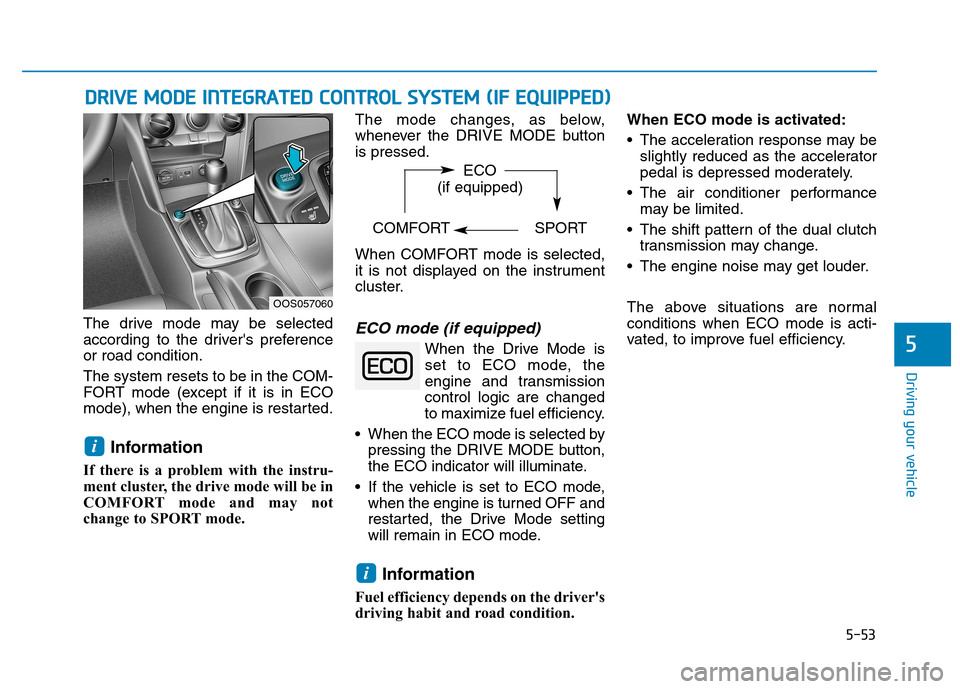
The drive mode may be selected
according to the driver's preferenceor road condition. The system resets to be in the COM-
FORT mode (except if it is in ECO
mode), when the engine is restarted.
Information
If there is a problem with the instru-
ment cluster, the drive mode will be in
COMFORT mode and may not
change to SPORT mode. The mode changes, as below,
whenever the DRIVE MODE buttonis pressed.
When COMFORT mode is selected,
it is not displayed on the instrument
cluster.ECO mode (if equipped)
When the Drive Mode is
set to ECO mode, the
engine and transmission
control logic are changed
to maximize fuel efficiency.
When the ECO mode is selected by pressing the DRIVE MODE button,
the ECO indicator will illuminate.
If the vehicle is set to ECO mode, when the engine is turned OFF and
restarted, the Drive Mode setting
will remain in ECO mode.
Information
Fuel efficiency depends on the driver's
driving habit and road condition. When ECO mode is activated:
The acceleration response may be
slightly reduced as the accelerator
pedal is depressed moderately.
The air conditioner performance may be limited.
The shift pattern of the dual clutch transmission may change.
The engine noise may get louder.
The above situations are normal conditions when ECO mode is acti-
vated, to improve fuel efficiency.
i
i
OOS057060 ECO
(if equipped)
COMFORT SPORT
Page 339 of 523
5-85
Driving your vehicle
5
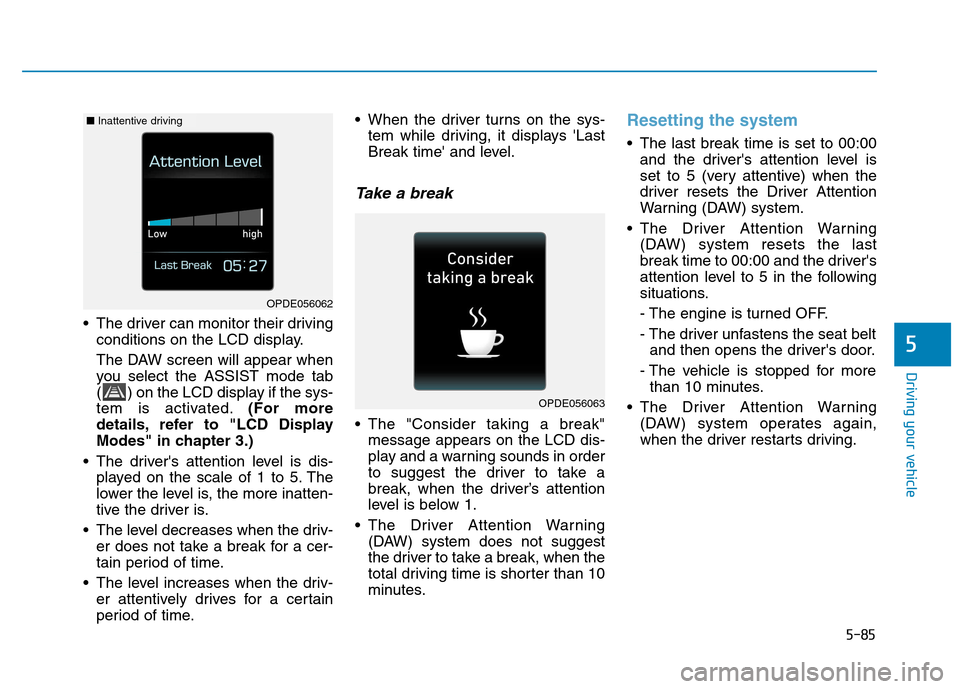
The driver can monitor their drivingconditions on the LCD display.
The DAW screen will appear when
you select the ASSIST mode tab
( ) on the LCD display if the sys-
tem is activated. (For more
details, refer to "LCD Display
Modes" in chapter 3.)
The driver's attention level is dis- played on the scale of 1 to 5. The
lower the level is, the more inatten-
tive the driver is.
The level decreases when the driv- er does not take a break for a cer-
tain period of time.
The level increases when the driv- er attentively drives for a certain
period of time. When the driver turns on the sys-
tem while driving, it displays 'Last
Break time' and level.
Take a break
The "Consider taking a break"message appears on the LCD dis-
play and a warning sounds in order
to suggest the driver to take a
break, when the driver’s attention
level is below 1.
The Driver Attention Warning (DAW) system does not suggest
the driver to take a break, when the
total driving time is shorter than 10
minutes.
Resetting the system
The last break time is set to 00:00and the driver's attention level is
set to 5 (very attentive) when the
driver resets the Driver Attention
Warning (DAW) system.
The Driver Attention Warning (DAW) system resets the last
break time to 00:00 and the driver's
attention level to 5 in the following
situations.
- The engine is turned OFF.
- The driver unfastens the seat beltand then opens the driver's door.
- The vehicle is stopped for more than 10 minutes.
The Driver Attention Warning (DAW) system operates again,
when the driver restarts driving.
OPDE056063
OPDE056062
■Inattentive driving
Page 342 of 523
5-88
Driving your vehicle
Speed Limit Control operation
You can set the speed limit when you
do not want to drive over a specificspeed.
If you drive over the preset speed
limit, the warning system operates
(set speed limit will blink and chime
will sound) until the vehicle speed
returns within the speed limit.Information
While speed limit control is in opera-
tion, the cruise control system cannot
be activated.
Speed limit control switch
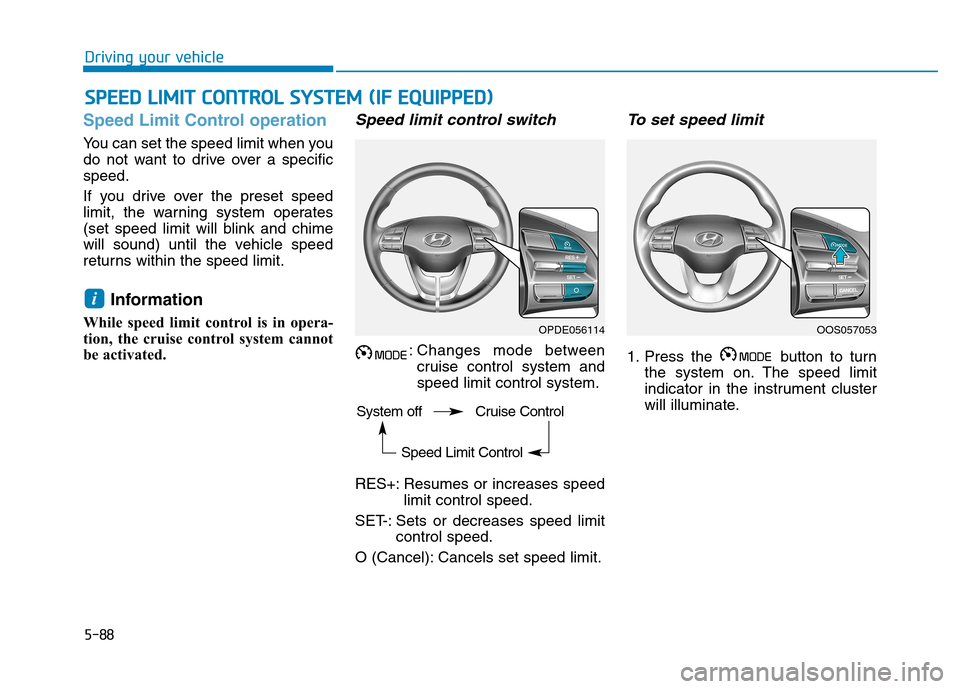
: Changes mode between cruise control system andspeed limit control system.
RES+: Resumes or increases speed limit control speed.
SET-: Sets or decreases speed limit control speed.
O (Cancel): Cancels set speed limit.
To set speed limit
1. Press the button to turn the system on. The speed limit
indicator in the instrument cluster
will illuminate.
i
SSPP EEEEDD LL IIMM IITT CC OO NNTTRR OO LL SS YY SSTT EEMM (( IIFF EE QQ UUIIPP PPEEDD ))
OPDE056114OOS057053
System off Cruise Control Speed Limit Control
Page 348 of 523
5-94
Driving your vehicle
Cruise Control will be canceledwhen:
Depressing the brake pedal.
Depressing the clutch pedal. (for manual transmission vehicle)
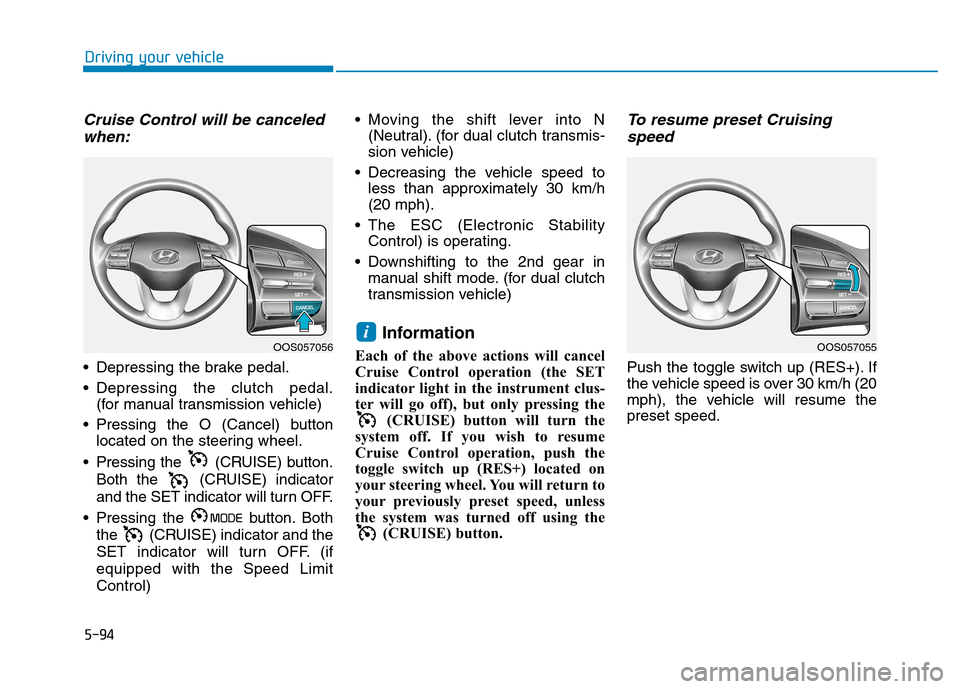
Pressing the O (Cancel) button located on the steering wheel.
Pressing the (CRUISE) button. Both the (CRUISE) indicator
and the SET indicator will turn OFF.
Pressing the button. Both the (CRUISE) indicator and the
SET indicator will turn OFF. (ifequipped with the Speed LimitControl) Moving the shift lever into N
(Neutral). (for dual clutch transmis-
sion vehicle)
Decreasing the vehicle speed to less than approximately 30 km/h(20 mph).
The ESC (Electronic Stability Control) is operating.
Downshifting to the 2nd gear in manual shift mode. (for dual clutch
transmission vehicle)
Information
Each of the above actions will cancel
Cruise Control operation (the SET
indicator light in the instrument clus-
ter will go off), but only pressing the (CRUISE) button will turn the
system off. If you wish to resume
Cruise Control operation, push the
toggle switch up (RES+) located on
your steering wheel. You will return to
your previously preset speed, unless
the system was turned off using the (CRUISE) button.
To resume preset Cruising
speed
Push the toggle switch up (RES+). If
the vehicle speed is over 30 km/h (20
mph), the vehicle will resume thepreset speed.
iOOS057055OOS057056
Page 413 of 523
7
Maintenance
7
Maintenance
Engine compartment .............................................7-3
Maintenance services ...........................................7-4Owner's responsibility ......................................................7-4
Owner maintenance precautions ..................................7-4
Owner maintenance ...............................................7-5 Owner maintenance schedule ........................................7-5
Scheduled maintenance services.........................7-7 Normal Maintenance Schedule
(Gasoline Engine, for Europe) ........................................7-8
Maintenance Under Severe Usage
and Low Mileage Conditions
(Gasoline Engine, for Europe)......................................7-11Normal Maintenance Schedule
(Gasoline Engine, except Europe) ...............................7-13
Maintenance Under Severe Usage
and Low Mileage Conditions
(Gasoline Engine, except Europe) ...............................7-17
Explanation of scheduled maintenance items .7-19
Engine oil ..............................................................7-21 Checking the engine oil level (Gasoline engine) .....7-21
Checking the engine oil and filter ..............................7-23 Engine coolant......................................................7-23
Checking the engine coolant level..............................7-23
Changing the engine coolant .......................................7-25
Brake/clutch fluid ................................................7-26 Checking the brake/clutch fluid level ........................7-26
Washer fluid .........................................................7-27 Checking the washer fluid level ..................................7-27
Parking brake .......................................................7-27 Checking the parking brake .........................................7-27
Air cleaner ............................................................7-28 Filter replacement ...........................................................7-28
Climate control air filter .....................................7-29 Filter inspection ...............................................................7-29
Filter replacement ...........................................................7-29
Wiper blades .........................................................7-30 Blade inspection ..............................................................7-30
Blade replacement ..........................................................7-30
Battery...................................................................7-32 For best battery service................................................7-33
Battery capacity label ....................................................7-34
Battery recharging .........................................................7-34
Reset items .......................................................................7-35
7