ignition Hyundai Kona 2018 Workshop Manual
[x] Cancel search | Manufacturer: HYUNDAI, Model Year: 2018, Model line: Kona, Model: Hyundai Kona 2018Pages: 523, PDF Size: 33.6 MB
Page 190 of 523
3-107
Convenient features of your vehicle
3
DDEEFFRR OO SSTT EERR
To prevent damage to the conduc-
tors bonded to the inside surface
of the rear window, never use
sharp instruments or window
cleaners containing abrasives to
clean the window.
Information
If you want to defrost and defog the
front windshield, refer to “Windshield
Defrosting and Defogging” in this
chapter.
Rear window defroster
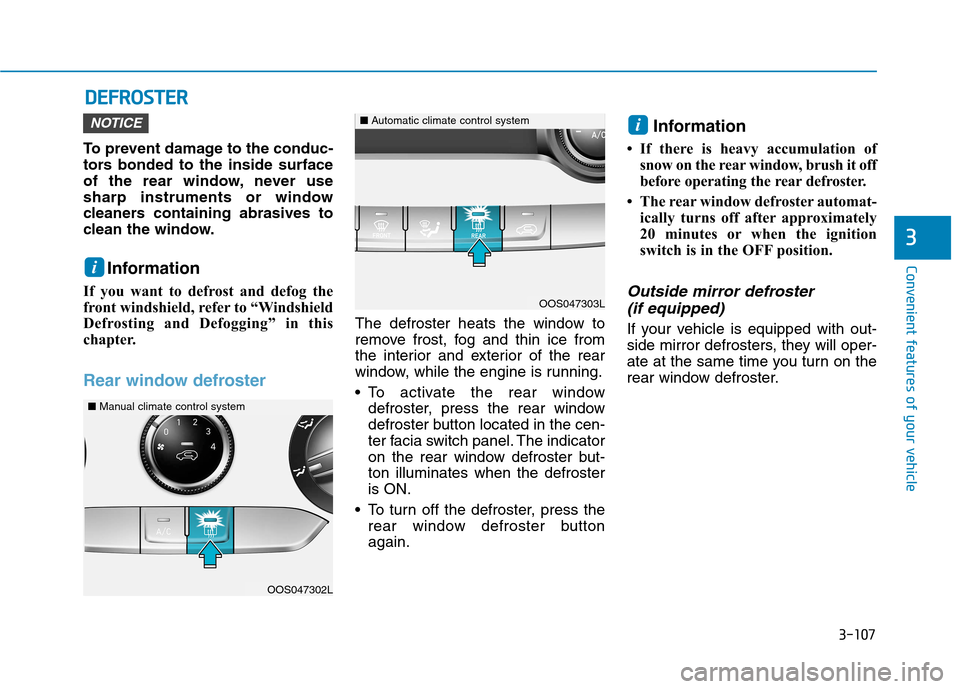
The defroster heats the window to
remove frost, fog and thin ice from
the interior and exterior of the rear
window, while the engine is running.
To activate the rear window defroster, press the rear window
defroster button located in the cen-
ter facia switch panel. The indicator
on the rear window defroster but-ton illuminates when the defrosteris ON.
To turn off the defroster, press the rear window defroster buttonagain. Information
If there is heavy accumulation of snow on the rear window, brush it off
before operating the rear defroster.
The rear window defroster automat- ically turns off after approximately
20 minutes or when the ignition
switch is in the OFF position.
Outside mirror defroster
(if equipped)
If your vehicle is equipped with out-
side mirror defrosters, they will oper-
ate at the same time you turn on the
rear window defroster.
iNOTICE
i
OOS047302L
OOS047303L
■ Manual climate control system
■Automatic climate control system
Page 194 of 523
3-111
Convenient features of your vehicle
3
Temperature control (2)
The temperature will increase by turn-
ing the knob to the right. The tempera-
ture will decrease by turning the knobto the left.
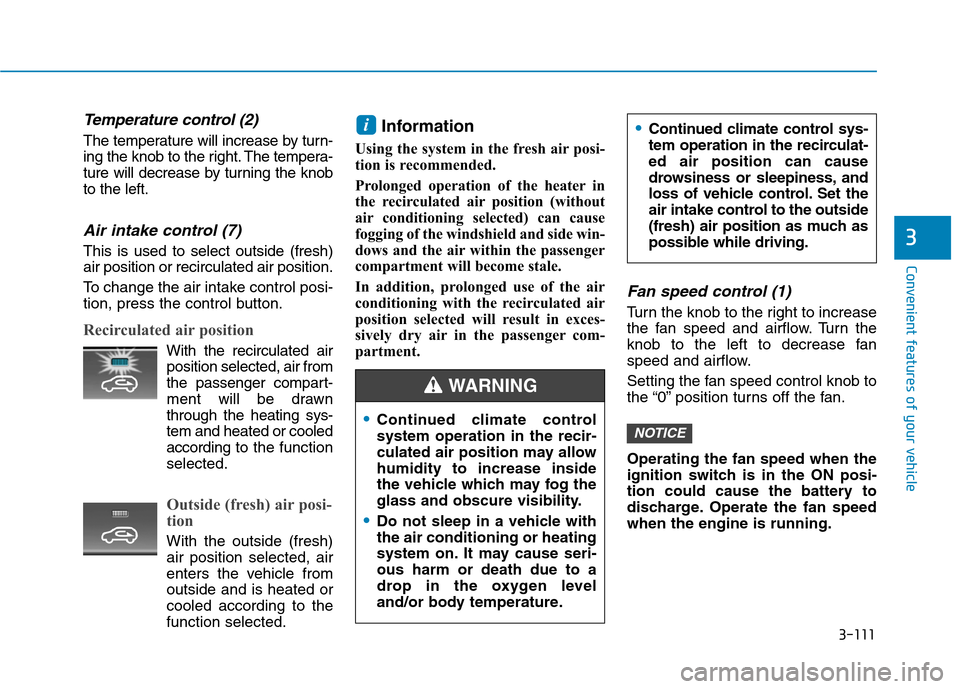
Air intake control (7)
This is used to select outside (fresh) air position or recirculated air position.
To change the air intake control posi-
tion, press the control button.
Recirculated air position
With the recirculated airposition selected, air from
the passenger compart-
ment will be drawnthrough the heating sys-tem and heated or cooled
according to the function
selected.
Outside (fresh) air posi-
tion
With the outside (fresh) air position selected, air
enters the vehicle from outside and is heated orcooled according to thefunction selected. Information
Using the system in the fresh air posi-
tion is recommended.
Prolonged operation of the heater in
the recirculated air position (without
air conditioning selected) can cause
fogging of the windshield and side win-
dows and the air within the passenger
compartment will become stale.
In addition, prolonged use of the air
conditioning with the recirculated air
position selected will result in exces-
sively dry air in the passenger com-
partment.
Fan speed control (1)
Turn the knob to the right to increase
the fan speed and airflow. Turn the
knob to the left to decrease fan
speed and airflow.
Setting the fan speed control knob to
the “0” position turns off the fan. Operating the fan speed when the
ignition switch is in the ON posi-
tion could cause the battery to
discharge. Operate the fan speedwhen the engine is running.
NOTICE
i
Continued climate control system operation in the recir-
culated air position may allowhumidity to increase inside
the vehicle which may fog the
glass and obscure visibility.
Do not sleep in a vehicle with the air conditioning or heating
system on. It may cause seri-ous harm or death due to a
drop in the oxygen level
and/or body temperature.
Continued climate control sys-
tem operation in the recirculat-ed air position can cause
drowsiness or sleepiness, and
loss of vehicle control. Set the
air intake control to the outside
(fresh) air position as much as
possible while driving.
WARNING
Page 203 of 523
3-120
Convenient features of your vehicle
Fan speed control (2)
The fan speed can be set as desired
by pushing the fan speed control but-ton.
More air is delivered with higher fan
speeds.
Pressing the OFF button turns off the
fan. Operating the fan when the ignition
switch is in the ON position could
cause the battery to discharge.Operate the fan when the engine isrunning.
Air conditioning (4)
Push the A/C button to turn the airconditioning system on (indicatorlight will illuminate).
Push the button again to turn the air
conditioning system off.
OFF mode (5)
Push the OFF button to turn the cli-
mate control system off. However,
you can still operate the mode and air
intake buttons as long as the ignition
switch is in the ON position.
System operation
Ventilation
1. Set the mode to the position.
2. Set the air intake control to theoutside (fresh) air position.
3. Set the temperature control to the desired position.
4. Set the fan speed control to the desired speed.
Heating
1. Set the mode to the position.
2. Set the air intake control to theoutside (fresh) air position.
3. Set the temperature control to the desired position.
4. Set the fan speed control to the desired speed.
5. If dehumidified heating is desired, turn the air conditioning system on.
If the windshield fogs up, set the mode to the or position.
NOTICE
Continued climate control system operation in the recir-
culated air position may allowhumidity to increase inside
the vehicle which may fog the
glass and obscure visibility.
Do not sleep in a vehicle with the air conditioning or heating
system on. It may cause seri-ous harm or death due to a
drop in the oxygen level
and/or body temperature.
Continued climate control sys-
tem operation in the recirculat-ed air position can cause
drowsiness or sleepiness, and
loss of vehicle control. Set the
air intake control to the outside
(fresh) air position as much as
possible while driving.
WARNING
Page 210 of 523
3-127
Convenient features of your vehicle
Cluster ionizer (if equipped)
When the ignition switch is in the ON
position, the clean air function turns
on automatically.
Also, the clean air function turns off
automatically, when the ignition
switch is in the OFF position.
Automatic ventilation (if equipped)
To increase cabin air quality and reduce windscreen misting, air recir-
culation mode switches off automati-
cally after about 5 to 30 minutes,
depending on outside temperature,
and the air intake will change to out-
side (fresh) mode.
To cancel or set the automatic venti-
lation feature, select Face level modeand press the air recirculation
mode button for 3 seconds.
When the automatic ventilation is set, the air recirculation indicator will
blink 6 times. When canceled, the
indicator will blink 3 times.
Sunroof inside air recirculation (if equipped)
When the heater or air conditioning system is on with the sunroof opened,the outside (fresh) air position will be
automatically selected. At this time, if
you press the recirculated air position
button, the recirculated air position
will be selected but will change backto the outside (fresh) air position after
3 minutes. When the sunroof is closed, the air
intake position will return to the orig-
inal position that was selected.
CC LLIIMM AATTEE CC OO NNTTRR OO LL AA DDDDIITT IIOO NNAALL FF EE AA TTUU RREESS
3
Page 233 of 523
4-12
Multimedia System
Operating the device while driv-ing could lead to accidents due
to a lack of attention to external
surroundings. First park the
vehicle before operating the
device.
Adjust the volume to levels that allow the driver to hear sounds
from outside of the vehicle.
Driving in a state where external
sounds cannot be heard maylead to accidents.
Pay attention to the volume set- ting when turning the device on.
A sudden output of extreme vol-
ume upon turning the device oncould lead to hearing impair-
ment. (Adjust the volume to a
suitable levels before turning off
the device.)
Turn on the car engine before using this device. Do not oper-
ate the audio system for long
periods of time only with the
ignition turned on as such oper-
ations may lead to battery dis-
charge. Do not subject the device to
severe shock or impact. Direct
pressure onto the front side of
the monitor may cause damage
to the LCD.
When cleaning the device, make sure to turn off the device and
use a dry and smooth cloth.
Never use tough materials, chem-
ical cloths, or solvents (alcohol,
benzene, thinners, etc.). As such
materials may damage the devicepanel or cause color/quality dete-rioration.
Do not place beverages close to the audio system. Spilling bever-
ages may lead to system mal-function.
In case of product malfunction, please contact your place of pur-
chase or After Service center.
Placing the audio system within an electromagnetic environment
may result in noise interference.
Prevent caustic solutions such as perfume and cosmetic oil
from contacting the dashboard
because they may cause dam-
age or discoloration.
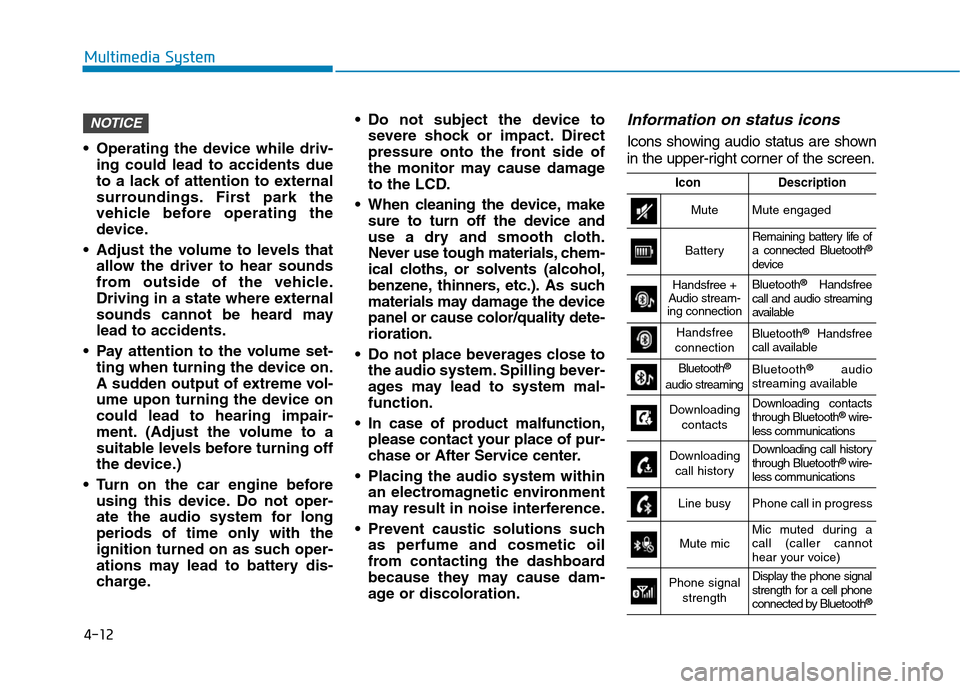
Information on status icons
Icons showing audio status are shown
in the upper-right corner of the screen.
NOTICE
IconDescription
MuteMute engaged
BatteryRemaining battery life of a connected Bluetooth ®
device
Handsfree +
Audio stream-
ing connectionBluetooth ®
Handsfree
call and audio streaming
available
Handsfree
connectionBluetooth ®
Handsfree
call available
Bluetooth ®
audio streamingBluetooth ®
audio
streaming available
Downloading
contactsDownloading contacts through Bluetooth ®
wire-
less communications
Downloading
call historyDownloading call history through Bluetooth ®
wire-
less communications
Line busyPhone call in progress
Mute micMic muted during a call (caller cannot
hear your voice)
Phone signal
strengthDisplay the phone signal
strength for a cell phone
connected by Bluetooth ®
Page 255 of 523
Driving your vehicle
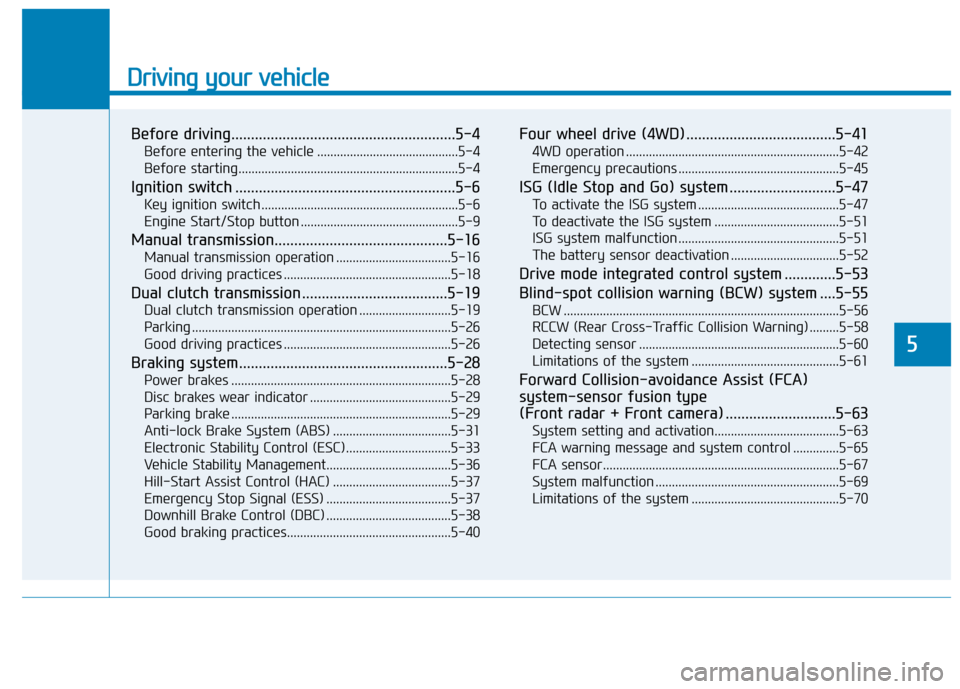
Before driving.........................................................5-4Before entering the vehicle ...........................................5-4
Before starting...................................................................5-4
Ignition switch ........................................................5-6 Key ignition switch ............................................................5-6
Engine Start/Stop button ................................................5-9
Manual transmission............................................5-16 Manual transmission operation ...................................5-16
Good driving practices ...................................................5-18
Dual clutch transmission .....................................5-19 Dual clutch transmission operation ............................5-19
Parking ...............................................................................5-26
Good driving practices ...................................................5-26
Braking system.....................................................5-28 Power brakes ...................................................................5-28
Disc brakes wear indicator ...........................................5-29
Parking brake ...................................................................5-29
Anti-lock Brake System (ABS) ....................................5-31
Electronic Stability Control (ESC)................................5-33
Vehicle Stability Management......................................5-36
Hill-Start Assist Control (HAC) ....................................5-37
Emergency Stop Signal (ESS) ......................................5-37
Downhill Brake Control (DBC) ......................................5-38
Good braking practices..................................................5-40 Four wheel drive (4WD) ......................................5-41
4WD operation .................................................................5-42
Emergency precautions .................................................5-45
ISG (Idle Stop and Go) system ...........................5-47 To activate the ISG system ...........................................5-47
To deactivate the ISG system ......................................5-51
ISG system malfunction .................................................5-51
The battery sensor deactivation .................................5-52
Drive mode integrated control system .............5-53
Blind-spot collision warning (BCW) system ....5-55 BCW ....................................................................................5-56
RCCW (Rear Cross-Traffic Collision Warning) .........5-58
Detecting sensor .............................................................5-60
Limitations of the system .............................................5-61
Forward Collision-avoidance Assist (FCA)system-sensor fusion type
(Front radar + Front camera) ............................5-63 System setting and activation......................................5-63
FCA warning message and system control ..............5-65
FCA sensor........................................................................5-67
System malfunction ........................................................5-69
Limitations of the system .............................................5-70
5
Page 258 of 523
5-4
Driving your vehicle
Before entering the vehicle
• Be sure all windows, outside mir-ror(s), and outside lights are clean
and unobstructed.
Remove frost, snow, or ice.
Visually check the tires for uneven wear and damage.
Check under the vehicle for any sign of leaks.
Be sure there are no obstacles behind you if you intend to back up.
Before starting
Make sure the hood, the tailgate,and the doors are securely closed
and locked.
Adjust the position of the seat and steering wheel.
Adjust the inside and outside rearview mirrors.
Verify all the lights work.
Fasten your seat belt. Check that all passengers have fastened their seat belt.
Check the gauges and indicators in the instrument panel and the mes-
sages on the instrument display
when the ignition switch is in theON position.
Check that any items you are car- rying are stored properly or fas-
tened down securely.
BBEEFFOO RREE DD RRIIVV IINN GG
To reduce the risk of SERIOUS
INJURY or DEATH, take the fol-
lowing precautions:
•ALWAYS wear your seat belt.
All passengers must be prop-
erly belted whenever the vehi-
cle is moving. For more infor-
mation, refer to "Seat Belts" in
chapter 2.
Always drive defensively.
Assume other drivers or pedes-
trians may be careless andmake mistakes.
Stay focused on the task of
driving. Driver distraction cancause accidents.
Leave plenty of space between
you and the vehicle in front of
you.
WARNING
Page 260 of 523
5-6
Driving your vehicleI
I GG NN IITT IIOO NN SS WW IITT CCHH
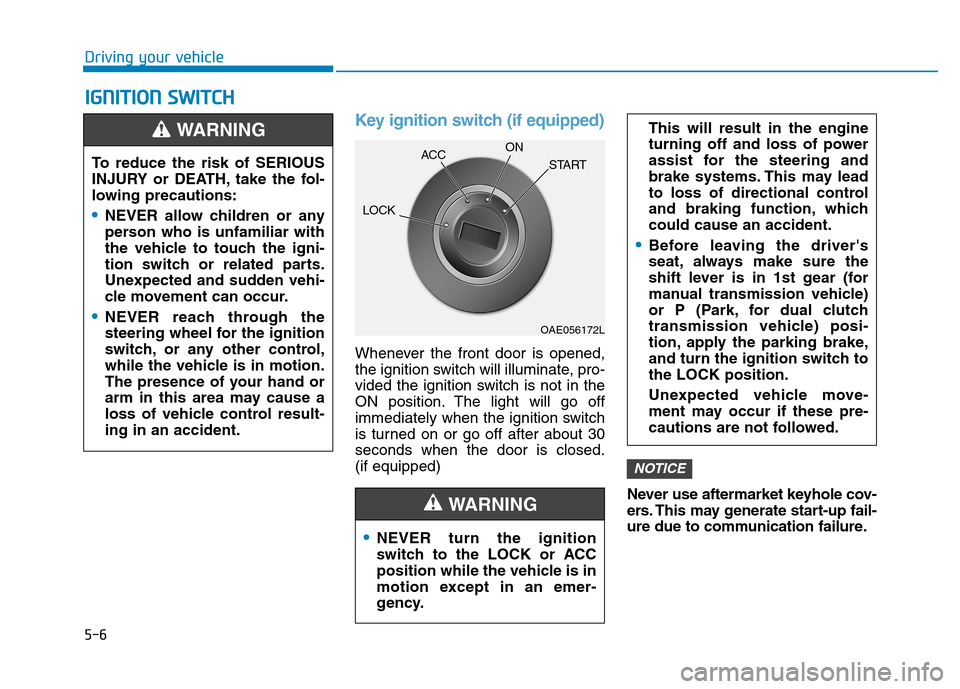
Key ignition switch (if equipped)
Whenever the front door is opened,
the ignition switch will illuminate, pro-
vided the ignition switch is not in the
ON position. The light will go off
immediately when the ignition switch
is turned on or go off after about 30seconds when the door is closed.(if equipped)
Never use aftermarket keyhole cov-
ers. This may generate start-up fail-
ure due to communication failure.
NOTICE
NEVER turn the ignition
switch to the LOCK or ACC
position while the vehicle is in
motion except in an emer-
gency.
This will result in the engine
turning off and loss of power
assist for the steering and
brake systems. This may lead
to loss of directional control
and braking function, whichcould cause an accident.
Before leaving the driver's
seat, always make sure the
shift lever is in 1st gear (for
manual transmission vehicle)
or P (Park, for dual clutch
transmission vehicle) posi-
tion, apply the parking brake,
and turn the ignition switch tothe LOCK position.
Unexpected vehicle move-
ment may occur if these pre-
cautions are not followed.
WARNING
To reduce the risk of SERIOUS
INJURY or DEATH, take the fol-
lowing precautions:
NEVER allow children or any
person who is unfamiliar with
the vehicle to touch the igni-
tion switch or related parts.
Unexpected and sudden vehi-
cle movement can occur.
NEVER reach through the
steering wheel for the ignition
switch, or any other control,
while the vehicle is in motion.
The presence of your hand or
arm in this area may cause a
loss of vehicle control result-ing in an accident.
WARNING
OAE056172L
LOCK
ACC
ON
START
Page 261 of 523
5-7
Driving your vehicle
5
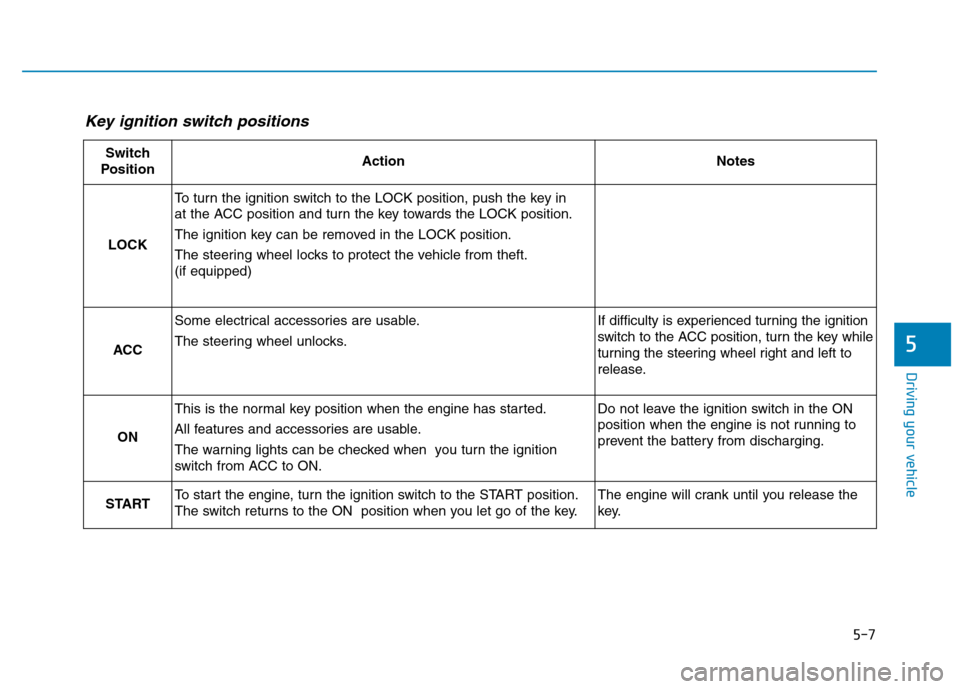
Key ignition switch positions
Switch
PositionActionNotes
LOCK
To turn the ignition switch to the LOCK position, push the key in
at the ACC position and turn the key towards the LOCK position.
The ignition key can be removed in the LOCK position.
The steering wheel locks to protect the vehicle from theft. (if equipped)
ACC
Some electrical accessories are usable.
The steering wheel unlocks.If difficulty is experienced turning the ignition
switch to the ACC position, turn the key while
turning the steering wheel right and left to
release.
ON
This is the normal key position when the engine has started.
All features and accessories are usable.
The warning lights can be checked when you turn the ignition
switch from ACC to ON.Do not leave the ignition switch in the ON
position when the engine is not running to
prevent the battery from discharging.
STARTTo start the engine, turn the ignition switch to the START position.
The switch returns to the ON position when you let go of the key.The engine will crank until you release the
key.
Page 262 of 523
5-8
Driving your vehicle
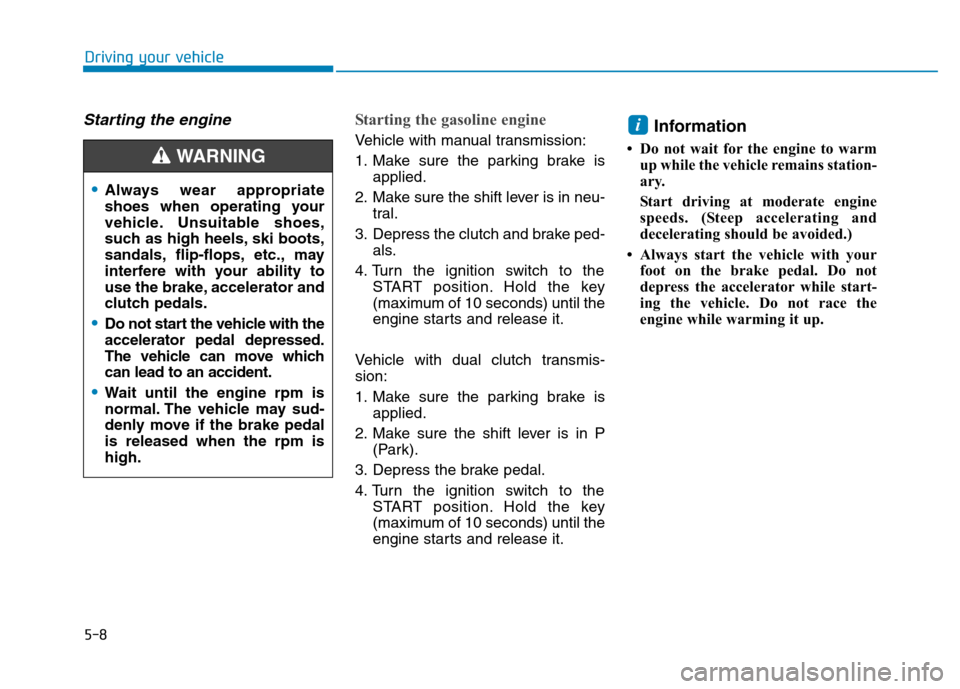
Starting the engine Starting the gasoline engine
Vehicle with manual transmission:
1. Make sure the parking brake isapplied.
2. Make sure the shift lever is in neu- tral.
3. Depress the clutch and brake ped- als.
4. Turn the ignition switch to the START position. Hold the key
(maximum of 10 seconds) until the
engine starts and release it.
Vehicle with dual clutch transmis-sion:
1. Make sure the parking brake is applied.
2. Make sure the shift lever is in P (Park).
3. Depress the brake pedal.
4. Turn the ignition switch to the START position. Hold the key
(maximum of 10 seconds) until the
engine starts and release it. Information
Do not wait for the engine to warm up while the vehicle remains station-
ary.
Start driving at moderate engine
speeds. (Steep accelerating and
decelerating should be avoided.)
Always start the vehicle with your foot on the brake pedal. Do not
depress the accelerator while start-
ing the vehicle. Do not race the
engine while warming it up.i
Always wear appropriate
shoes when operating your
vehicle. Unsuitable shoes,
such as high heels, ski boots,
sandals, flip-flops, etc., may
interfere with your ability to
use the brake, accelerator and
clutch pedals.
Do not start the vehicle with the accelerator pedal depressed.
The vehicle can move whichcan lead to an accident.
Wait until the engine rpm is
normal. The vehicle may sud-
denly move if the brake pedalis released when the rpm ishigh.
WARNING