lock Hyundai Kona 2018 Workshop Manual
[x] Cancel search | Manufacturer: HYUNDAI, Model Year: 2018, Model line: Kona, Model: Hyundai Kona 2018Pages: 523, PDF Size: 33.6 MB
Page 164 of 523
3-81
Convenient features of your vehicle
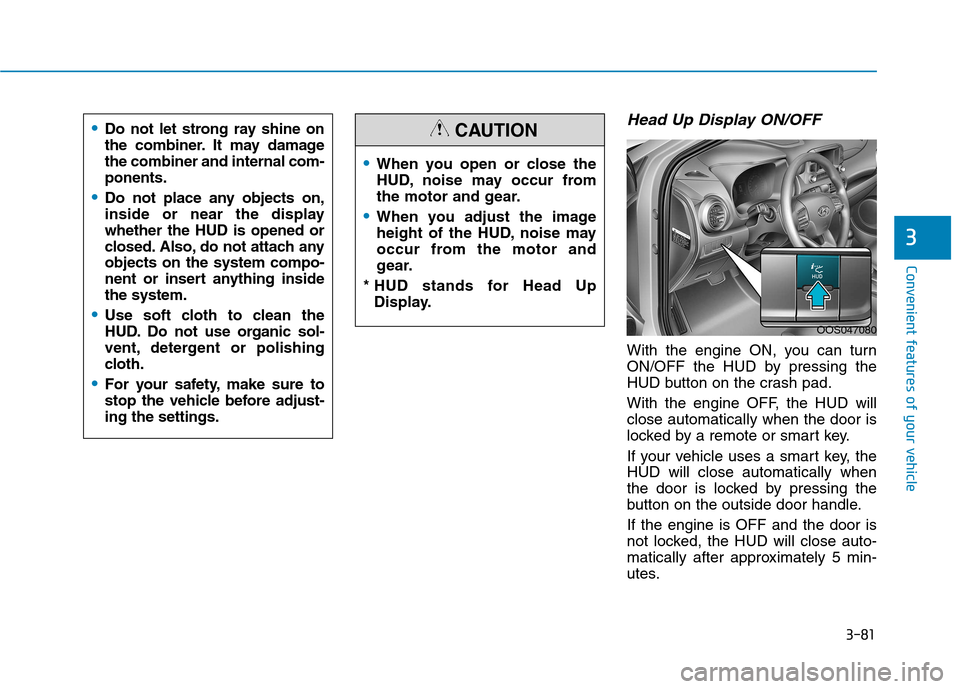
Head Up Display ON/OFF
With the engine ON, you can turn
ON/OFF the HUD by pressing the
HUD button on the crash pad.
With the engine OFF, the HUD will close automatically when the door is
locked by a remote or smart key.
If your vehicle uses a smart key, the HUD will close automatically when
the door is locked by pressing the
button on the outside door handle. If the engine is OFF and the door is
not locked, the HUD will close auto-
matically after approximately 5 min-
utes.
3
When you open or close the
HUD, noise may occur from
the motor and gear.
When you adjust the image
height of the HUD, noise may
occur from the motor and
gear.
* HUD stands for Head Up Display.
CAUTION
OOS047080
Do not let strong ray shine on
the combiner. It may damagethe combiner and internal com-ponents.
Do not place any objects on,
inside or near the displaywhether the HUD is opened or
closed. Also, do not attach anyobjects on the system compo-
nent or insert anything insidethe system.
Use soft cloth to clean the
HUD. Do not use organic sol-
vent, detergent or polishing
cloth.
For your safety, make sure to
stop the vehicle before adjust-ing the settings.
Page 173 of 523
3-90
Convenient features of your vehicle
Battery saver function
The purpose of this feature is to pre-
vent the battery from being dis-
charged. The system automatically
turns off the position lamp when the
driver turns the engine off and opens
the driver-side door.
With this feature, the position lamps
will turn off automatically if the driver
parks on the side of road at night.
If necessary, to keep the lamps on
when the engine is turned off, perform
the following:
1) Open the driver-side door.
2) Turn the position lamps OFF andON again using the light switch on
the steering column.
Headlamp delay function
(if equipped)
If you place the ignition switch to the
ACC or OFF position with the head-lamps ON, the headlamps (and/or
position lamps) remain on for about 5
minutes. However, with the engine off if
the driver’s door is opened and closed,the headlamps (and/or position lamps)
are turned off after 15 seconds. The headlamps (and/or position
lamps) can be turned off by pressing
the lock button on the remote key or
smart key twice or turning the light
switch to the OFF or AUTO position.
However, if you turn the light switch
to the AUTO position when it is dark
outside, the headlamps will not be
turned off.
You can activate or deactivate the
Headlamp Delay function from theUser Settings mode on the LCD dis-
play. For more details, refer to
"LCD Display" in this chapter. If the driver gets out of the vehicle
through other doors (except dri-
ver's door), the battery saver func-tion does not operate and the
headlamp delay function does not
turn off automatically. Therefore, It
causes the battery to be dis-
charged. In this case, make sure to
turn off the lamp before getting out
of the vehicle.
NOTICE
Page 175 of 523
3-92
Automatic type
It automatically adjusts the head-
lamp beam level according to the
number of passengers and loading
weight in the luggage area.
It also adjusts to the appropriate head-
lamp beam level for various situations.
Low Beam Assist-Static light (if equipped)
While driving a corner, for greater
visibility and safety, either the left or
right side Low Beam Assist-Static
light will turn on automatically. The
Low Beam Assist-Static light will turn
on when one of the following condi-
tions occur.
Vehicle speed is less than 10 km/h(6 mph) and steering wheel angle
is turned approximately 80 degrees
with the low beam on.
Vehicle speed is between 10 km/h (6 mph) to 90 km/h (56 mph) and
steering wheel angle is turned
approximately 35 degrees with the
low beam on.
When the vehicle is in reverse with one of the conditions above satis-fied, the light opposite to the direc-
tion the steering wheel is steered
will turn on.
Welcome system (if equipped)
Interior lamp
When the interior lamp switch is in the DOOR position and all doors (and
tailgate) are closed and locked, the
room lamp will come on for 30 sec-
onds if any of the below is performed.
When the door unlock button ispressed on the remote key or
smart key.
When the button of the outside door handle is pressed with the
smart key in possession.
At this time, if you press the door lock
or unlock button, the room lamp will
turn off immediately.
Convenient features of your vehicle
If the function does not work
properly, we recommend that
the system be inspected by an
authorized HYUNDAI dealer. Donot attempt to inspect or
replace the wiring yourself.
WARNING
Page 176 of 523
3-93
Convenient features of your vehicle
Interior lights
Do not use the interior lights for
extended periods when the engine
is turned off otherwise the battery
will discharge.
Interior lamp AUTO cut
The interior lamps will automatically
go off approximately 20 minutes after
the engine is turned off and the
doors are closed. If a door is opened,
the lamp will go off 40 minutes after
the engine is turned off. If the doors
are locked and the vehicle enters the
armed stage of the theft alarm sys-
tem, the lamps will go off five sec-
onds later.
Front lamps
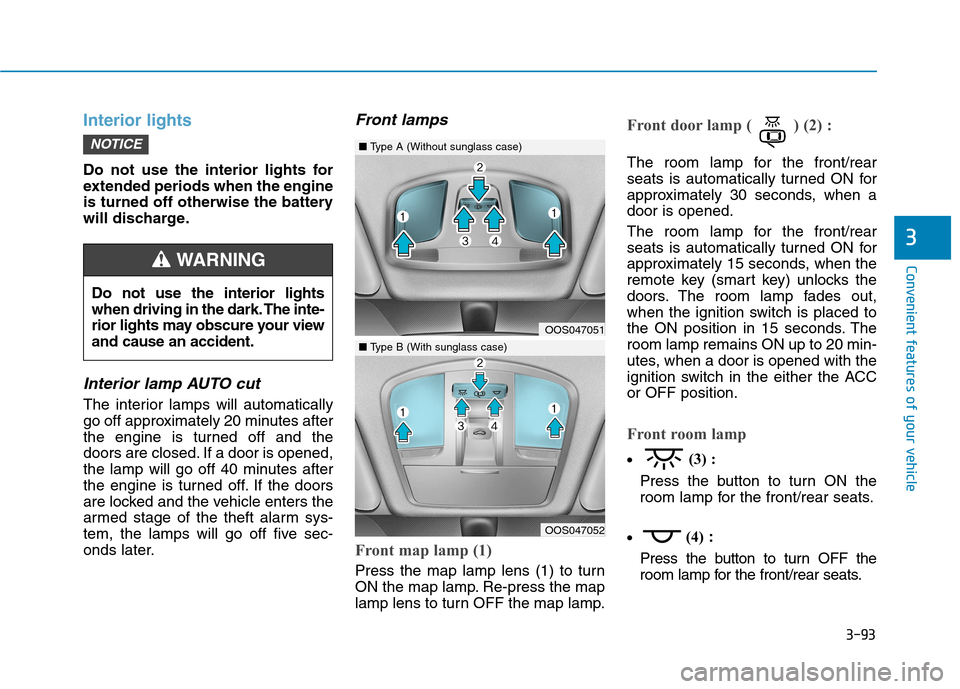
Front map lamp (1)
Press the map lamp lens (1) to turn
ON the map lamp. Re-press the map
lamp lens to turn OFF the map lamp.
Front door lamp ( ) (2) :
The room lamp for the front/rear
seats is automatically turned ON for
approximately 30 seconds, when adoor is opened.
The room lamp for the front/rear
seats is automatically turned ON for
approximately 15 seconds, when the
remote key (smart key) unlocks the
doors. The room lamp fades out,
when the ignition switch is placed to
the ON position in 15 seconds. Theroom lamp remains ON up to 20 min-
utes, when a door is opened with the
ignition switch in the either the ACCor OFF position.
Front room lamp
(3) :
Press the button to turn ON the
room lamp for the front/rear seats.
(4)
:
Press the button to turn OFF the
room lamp for the front/rear seats.
NOTICE
3
Do not use the interior lights
when driving in the dark. The inte-
rior lights may obscure your viewand cause an accident.
WARNING
OOS047051
OOS047052
■ Type A (Without sunglass case)
■Type B (With sunglass case)
Page 185 of 523

3-102
Convenient features of your vehicle
Non-operational conditions ofParking Distance Warning
(Reverse) system
The Parking Distance Warning
(Reverse) system may not operate
normally when:
Moisture is frozen to the sensor.
Sensor is covered with foreign mat- ter, such as snow or water, or the
sensor cover is blocked.
There is a possibility of the Parking
Distance Warning (Reverse) system
malfunction when:
Driving on uneven road surfacessuch as unpaved roads, gravel,
bumps, or gradient.
Objects generating excessive noise such as vehicle horns, loud motor-
cycle engines, or truck air brakes
can interfere with the sensor.
Heavy rain or water spray is present.
Wireless transmitters or mobile phones are present near the sensor.
The sensor is covered with snow.
Any non-factory equipment or acces- sories have been installed, or if the
vehicle bumper height or sensorinstallation has been modified.
Detecting range may decrease when:
Outside air temperature is extreme-ly hot or cold.
Undetectable objects smaller than 1 m (40 inches) and narrower than
14 cm (6 inches) in diameter.
Page 189 of 523
3-106
Convenient features of your vehicle
Non-operational conditions ofParking Distance Warning
(Reverse/Forward) system
Parking Distance Warning
(Reverse/Forward) system may not
operate normally when:
Moisture is frozen to the sensor.
Sensor is covered with foreign mat- ter, such as snow or water, or the
sensor cover is blocked.
There is a possibility of Parking
Distance Warning (Reverse/Forward)
system malfunction when:
Driving on uneven road surfacessuch as unpaved roads, gravel,
bumps, or gradient.
Objects generating excessive noise such as vehicle horns, loud motor-
cycle engines, or truck air brakes
can interfere with the sensor.
Heavy rain or water spray is present.
Wireless transmitters or mobile phones are present near the sensor.
The sensor is covered with snow.
Any non-factory equipment or accessories have been installed, or
if the vehicle bumper height or sen-sor installation has been modified.
Detecting range may decrease when:
Outside air temperature isextremely hot or cold.
Undetectable objects smaller than 1 m and narrower than 14 cm in
diameter.
The following objects may not be
recognized by the sensor:
Sharp or slim objects such asropes, chains or small poles.
Objects, which tend to absorb sen- sor frequency such as clothes,
spongy material or snow.
Parking Distance Warning
(Reverse/Forward) system
precautions
The Parking Distance Warning (Reverse/Forward) system may notsound consistently depending on thespeed and shapes of the objectsdetected.
The Parking Distance Warning (Reverse/Forward) system may mal-
function if the vehicle bumper heightor sensor installation has been mod-
ified or damaged. Any non-factory
installed equipment or accessories
may also interfere with the sensor
performance.
The sensor may not recognize objects less than 30 cm (11 in.) from
the sensor, or it may sense an incor-
rect distance. Use caution.
When the sensor is frozen or stained with snow, dirt, or water, the sensor
may be inoperative until the stains
are removed using a soft cloth.
Do not push, scratch or strike the sensor. Sensor damage could occur.
Do not spray the sensors or its sur- rounding area directly with a high
pressure washer. Shock applied
from high pressure water may cause
the device to not operate normally.
Your new vehicle warranty does
not cover any accidents or dam-
age to the vehicle or injuries toits occupants related to a
Parking Distance Warning
(Reverse/Forward) system.
Always drive safely and cau-
tiously.
WARNING
Page 212 of 523
3-129
Convenient features of your vehicle
3
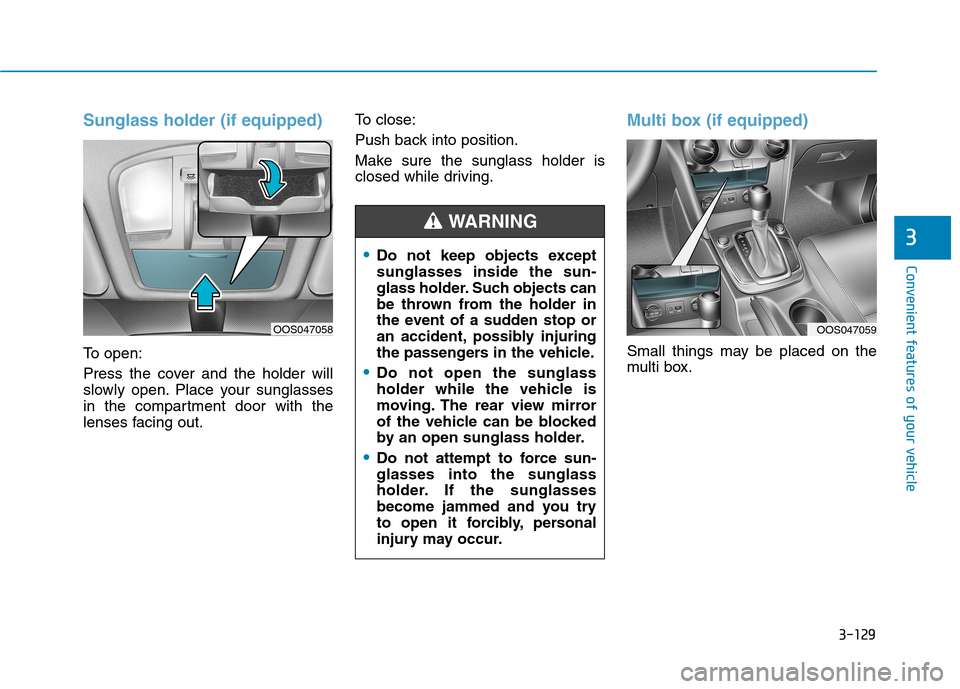
Sunglass holder (if equipped)
To open:
Press the cover and the holder will
slowly open. Place your sunglasses
in the compartment door with the
lenses facing out.To close:
Push back into position.
Make sure the sunglass holder is
closed while driving.
Multi box (if equipped)
Small things may be placed on the
multi box.
Do not keep objects except sunglasses inside the sun-
glass holder. Such objects can
be thrown from the holder in
the event of a sudden stop or
an accident, possibly injuring
the passengers in the vehicle.
Do not open the sunglass
holder while the vehicle is
moving. The rear view mirror
of the vehicle can be blocked
by an open sunglass holder.
Do not attempt to force sun- glasses into the sunglass
holder. If the sunglasses
become jammed and you try
to open it forcibly, personal
injury may occur.
WARNING
OOS047059OOS047058
Page 215 of 523
3-132
Convenient features of your vehicle
Sunvisor
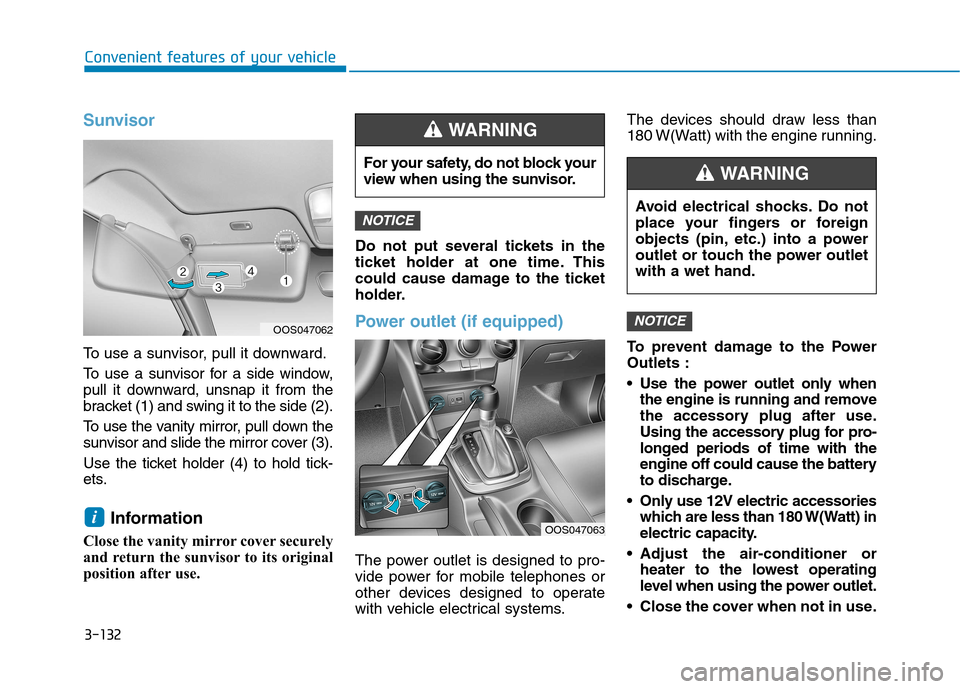
To use a sunvisor, pull it downward.
To use a sunvisor for a side window,
pull it downward, unsnap it from the
bracket (1) and swing it to the side (2).
To use the vanity mirror, pull down the
sunvisor and slide the mirror cover (3).
Use the ticket holder (4) to hold tick-
ets.Information
Close the vanity mirror cover securely
and return the sunvisor to its original
position after use. Do not put several tickets in the
ticket holder at one time. This
could cause damage to the ticket
holder.
Power outlet (if equipped)
The power outlet is designed to pro-
vide power for mobile telephones or
other devices designed to operate
with vehicle electrical systems.The devices should draw less than
180 W(Watt) with the engine running.
To prevent damage to the Power Outlets :
Use the power outlet only when
the engine is running and remove
the accessory plug after use.
Using the accessory plug for pro-
longed periods of time with the
engine off could cause the battery
to discharge.
Only use 12V electric accessories which are less than 180 W(Watt) in
electric capacity.
Adjust the air-conditioner or heater to the lowest operating
level when using the power outlet.
Close the cover when not in use.
NOTICE
NOTICE
i
For your safety, do not block your
view when using the sunvisor.
WARNING
OOS047062
OOS047063 Avoid electrical shocks. Do not
place your fingers or foreign
objects (pin, etc.) into a power
outlet or touch the power outletwith a wet hand.
WARNING
Page 218 of 523
![Hyundai Kona 2018 Workshop Manual 3-135
Convenient features of your vehicle
3
Clock
Vehicles with Audio system
Select the [SETUP/CLOCK ] button on
the audio system ➟Select [Date/Time].
Set time: Set the time displayed on
the audio](/img/35/16231/w960_16231-217.png "Hyundai Kona 2018 Workshop Manual 3-135
Convenient features of your vehicle
3
Clock
Vehicles with Audio system
Select the [SETUP/CLOCK ] button on
the audio system ➟Select [Date/Time].
Set time: Set the time displayed on
the audio")
3-135
Convenient features of your vehicle
3
Clock
Vehicles with Audio system
Select the [SETUP/CLOCK ] button on
the audio system ➟Select [Date/Time].
Set time: Set the time displayed on
the audio screen.
Time format: Choose between 12- hour and 24-hour time formats.
Vehicles with Navigation system
Select the Settings menu on the
Navigation system ➟Select
[Date/Time].
GPS time: Displays time according to the received GNSS time.
24-hour: Switches to 12 hour or 24 hour.
For more details, please refer to
the separate manual that was sup-
plied with your vehicle.
Clothes hanger (if equipped)
These hangers are not designed to
hold large or heavy items. Do not hang other objects such
as hangers or hard objects
except clothes. Also, do not put
heavy, sharp or breakable
objects in the clothes pockets. In an accident or when the cur-
tain air bag is inflated, it may
cause vehicle damage or per-
sonal injury.
WARNING
OOS047066
Do not adjust the clock while
driving. You may lose your steer-
ing control and cause severe
personal injury or accidents.
WARNING
OOS047065
Page 223 of 523
4-2
Multimedia System
Information
If you install an aftermarket HID headlamp, your vehicle’s audio and
electronic devices may malfunction.
Prevent chemicals such as perfume, cosmetic oil, sun cream, hand clean-
er, and air freshener from contacting
the interior parts because they may
cause damage or discoloration.
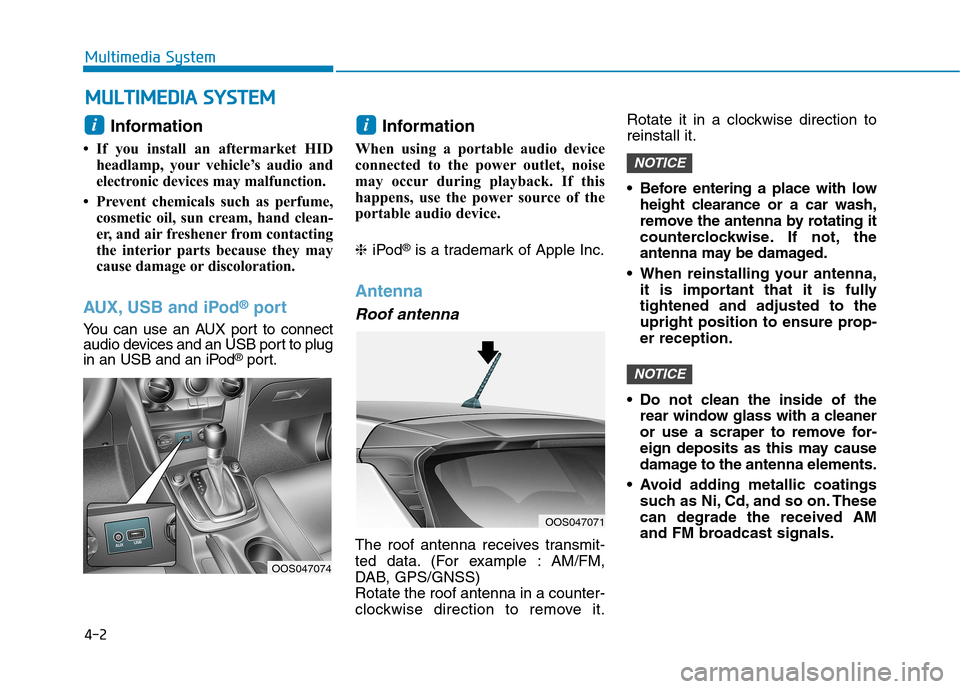
AUX, USB and iPod ®
port
You can use an AUX port to connect
audio devices and an USB port to plug
in an USB and an iPod ®
port. Information
When using a portable audio device
connected to the power outlet, noise
may occur during playback. If this
happens, use the power source of the
portable audio device. ❈ iPod ®
is a trademark of Apple Inc.
Antenna
Roof antenna
The roof antenna receives transmit-
ted data. (For example : AM/FM,
DAB, GPS/GNSS)Rotate the roof antenna in a counter-
clockwise direction to remove it. Rotate it in a clockwise direction toreinstall it.
Before entering a place with low
height clearance or a car wash,
remove the antenna by rotating it
counterclockwise. If not, the
antenna may be damaged.
When reinstalling your antenna, it is important that it is fullytightened and adjusted to the
upright position to ensure prop-er reception.
Do not clean the inside of the rear window glass with a cleaner
or use a scraper to remove for-
eign deposits as this may cause
damage to the antenna elements.
Avoid adding metallic coatings such as Ni, Cd, and so on. Thesecan degrade the received AM
and FM broadcast signals.
NOTICE
NOTICE
ii
MM UULLTT IIMM EEDD IIAA SS YY SSTT EEMM
OOS047071
OOS047074