lock Hyundai Kona 2018 Repair Manual
[x] Cancel search | Manufacturer: HYUNDAI, Model Year: 2018, Model line: Kona, Model: Hyundai Kona 2018Pages: 523, PDF Size: 33.6 MB
Page 227 of 523
4-6
Multimedia System
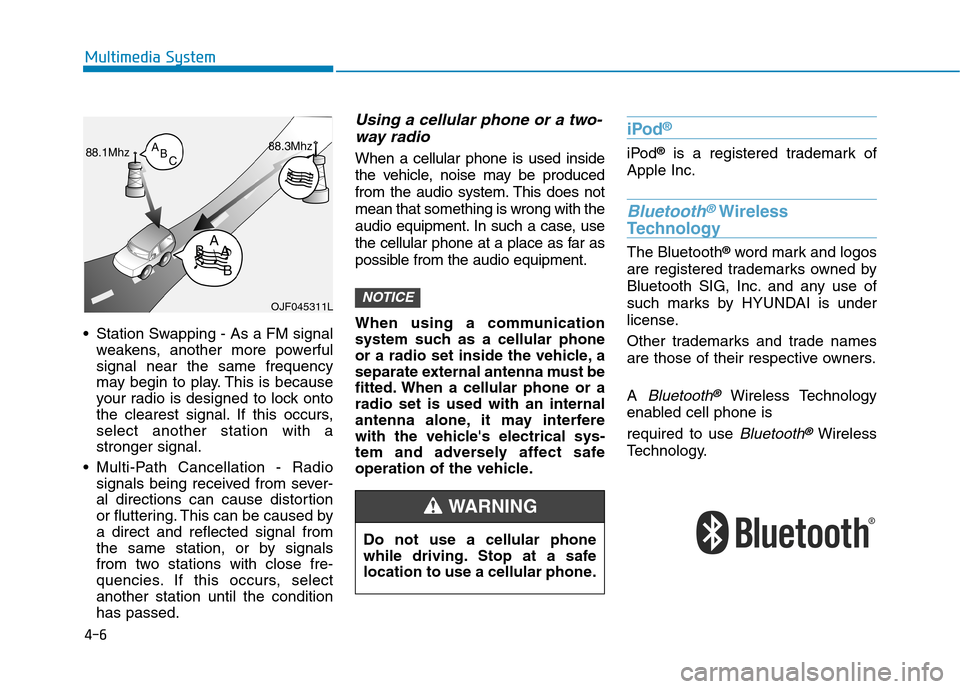
Station Swapping - As a FM signalweakens, another more powerful signal near the same frequency
may begin to play. This is because
your radio is designed to lock onto
the clearest signal. If this occurs,select another station with astronger signal.
Multi-Path Cancellation - Radio signals being received from sever-
al directions can cause distortion
or fluttering. This can be caused bya direct and reflected signal from
the same station, or by signals
from two stations with close fre-
quencies. If this occurs, selectanother station until the conditionhas passed.
Using a cellular phone or a two-
way radio
When a cellular phone is used inside
the vehicle, noise may be produced
from the audio system. This does notmean that something is wrong with the
audio equipment. In such a case, use
the cellular phone at a place as far as
possible from the audio equipment.
When using a communication
system such as a cellular phone
or a radio set inside the vehicle, a
separate external antenna must be
fitted. When a cellular phone or aradio set is used with an internal
antenna alone, it may interfere
with the vehicle's electrical sys-
tem and adversely affect safe
operation of the vehicle.
iPod ®
iPod
®
is a registered trademark of
Apple Inc.
Bluetooth®Wireless
Technology
The Bluetooth ®
word mark and logos
are registered trademarks owned by
Bluetooth SIG, Inc. and any use of
such marks by HYUNDAI is under
license.
Other trademarks and trade names
are those of their respective owners. A
Bluetooth®Wireless Technology
enabled cell phone is required to use
Bluetooth®Wireless
Technology.
NOTICEOJF045311L
Do not use a cellular phone
while driving. Stop at a safe
location to use a cellular phone.
WARNING
Page 230 of 523
4-9
Multimedia System
4
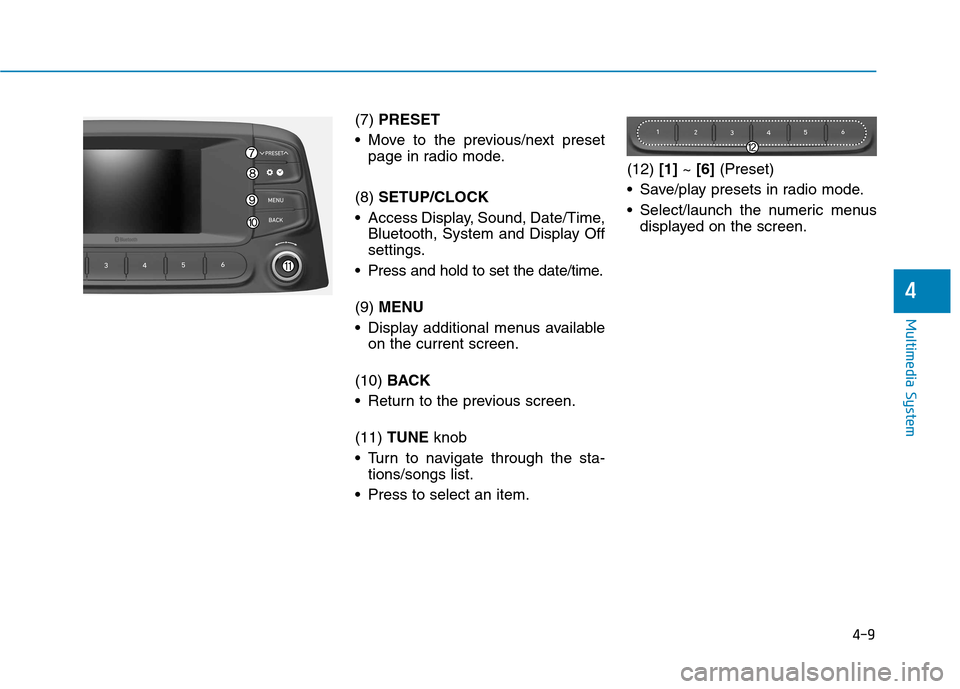
(7) PRESET
Move to the previous/next preset page in radio mode.
(8) SETUP/CLOCK
Access Display, Sound, Date/Time, Bluetooth, System and Display Off
settings.
Press and hold to set the date/time. (9) MENU
Display additional menus available on the current screen.
(10) BACK
Return to the previous screen.(11) TUNE knob
Turn to navigate through the sta- tions/songs list.
Press to select an item. (12)
[1]~ [6] (Preset)
Save/play presets in radio mode.
Select/launch the numeric menus displayed on the screen.
Page 247 of 523
![Hyundai Kona 2018 Repair Manual 4-26
Multimedia System
Information
The 6-digit passkey in the image
above is an example. Refer to your
vehicle for the actual passkey.
Pairing a second Bluetooth ®
device
Press the [SETUP/CLOCK] bu](/img/35/16231/w960_16231-246.png "Hyundai Kona 2018 Repair Manual 4-26
Multimedia System
Information
The 6-digit passkey in the image
above is an example. Refer to your
vehicle for the actual passkey.
Pairing a second Bluetooth ®
device
Press the [SETUP/CLOCK] bu")
4-26
Multimedia System
Information
The 6-digit passkey in the image
above is an example. Refer to your
vehicle for the actual passkey.
Pairing a second Bluetooth ®
device
Press the [SETUP/CLOCK] button
on the audio system ➟Select
[Bluetooth] ➟Select [Connections]
➟ Select [Add new device].
- The pairing procedure from this point is identical to [Pairing the first
Bluetooth device]. Information
Bluetooth ®
standby mode lasts for
three minutes. If a device is not
paired within three minutes, pairing
is canceled. Start over from the
beginning.
For most Bluetooth ®
devices, a con-
nection is established automatically
after pairing. Some devices, howev-
er, require separate confirmation
when connecting after pairing. Be
sure to check your Bluetooth ®
device after pairing to confirm that
it has connected.
Connecting Bluetooth®devices
If there are no connected devices
Press the [PHONE]button on the
audio system or the [CALL]button in
the steering wheel remote control ➟
List of paired Bluetooth ®
devices ➟
Select the desired Bluetooth ®
device
from the list ➟Connect Bluetooth ®
.
ii
Page 249 of 523
![Hyundai Kona 2018 Repair Manual 4-28
Multimedia System
Operation during calls
Incoming call with Bluetooth®
con-
nected ➟Select [Accept].
(1) Call duration: Call duration display.
(2) Caller name: If the caller number is in yo](/img/35/16231/w960_16231-248.png "Hyundai Kona 2018 Repair Manual 4-28
Multimedia System
Operation during calls
Incoming call with Bluetooth®
con-
nected ➟Select [Accept].
(1) Call duration: Call duration display.
(2) Caller name: If the caller number is in yo")
4-28
Multimedia System
Operation during calls
Incoming call with Bluetooth®
con-
nected ➟Select [Accept].
(1) Call duration: Call duration display.
(2) Caller name: If the caller number is in your contacts, the corresponding
name is displayed.
(3) Incoming phone number: Incoming phone number is displayed.
(4) Private: Call is transferred to a cell phone.
(5) End: End call.
(6) Mute: Block outgoing voice.
Menu
Press the [MENU]button and select
the desired function.
Switch: Switch between calls if connected to two or more calls.
Microphone Volume: Adjust outgo- ing voice volume.
Information
Some Bluetooth ®
devices may not
support the Private function.
The outgoing voice volume may vary depending on the type of
Bluetooth ®
device. If the outgoing
voice volume is too high or low,
adjust the Microphone Volume.
The Switch menu will only be dis- played if connected to two or more
calls.
Favourites
Press the [PHONE]button on the
audio system ➟Select [Favourites] ➟
Favourites list displayed.
(1) Add to favourites: Add a down- loaded phone number to
favourites.
(2) Favourites list: A list of paired favourite is displayed Connect a call when selected.
Menu
Press the [MENU]button, and select
the desired function.
Delete: Delete a saved favourites.
i
Page 252 of 523
![Hyundai Kona 2018 Repair Manual 4-31
Multimedia System
4
Setup
Access Display, Sound, Date/Time,
Bluetooth, System and Display Off
settings. Press the [SETUP/CLOCK] button
on the audio system.
Display
Press the [SETUP/CLOCK] butt](/img/35/16231/w960_16231-251.png "Hyundai Kona 2018 Repair Manual 4-31
Multimedia System
4
Setup
Access Display, Sound, Date/Time,
Bluetooth, System and Display Off
settings. Press the [SETUP/CLOCK] button
on the audio system.
Display
Press the [SETUP/CLOCK] butt")
4-31
Multimedia System
4
Setup
Access Display, Sound, Date/Time,
Bluetooth, System and Display Off
settings. Press the [SETUP/CLOCK] button
on the audio system.
Display
Press the [SETUP/CLOCK] button
on the audio system ➟Select
[Display].
Dimming mode: Brightness is auto- matically adjusted according to the
headlight use.
Brightness: The brightness of the audio screen can be changed.
Screensaver: Set the information displayed when the audio system
is switched off or the screen is
turned off.
Sound
Press the [SETUP/CLOCK] button
on the audio system ➟Select
[Sound].
Position: Sound balance and fader can be adjusted.
Equaliser: Sound tone color can be adjusted.
Speed dependent volume control: Automatically adjust volume based
on vehicle speed.
Rear parking sensors prioritised: Automatically lower audio volume
while reversing.
Date/Time
Press the [SETUP/CLOCK] button
on the audio system ➟Select
[Date/Time].
Set time: Set the time displayed on the audio screen.
Time format: Choose betw een 12-
hour and 24-hour time formats.
Set date: Set the date displayed on the audio screen.
Page 253 of 523
![Hyundai Kona 2018 Repair Manual 4-32
Multimedia System
Bluetooth
Press the [SETUP/CLOCK] button
➟ Select [Bluetooth].
Connections: Control pairing, dele- tion, connection and disconnection of Bluetooth ®
devices.
Auto connectio](/img/35/16231/w960_16231-252.png "Hyundai Kona 2018 Repair Manual 4-32
Multimedia System
Bluetooth
Press the [SETUP/CLOCK] button
➟ Select [Bluetooth].
Connections: Control pairing, dele- tion, connection and disconnection of Bluetooth ®
devices.
Auto connectio")
4-32
Multimedia System
Bluetooth
Press the [SETUP/CLOCK] button
➟ Select [Bluetooth].
Connections: Control pairing, dele- tion, connection and disconnection of Bluetooth ®
devices.
Auto connection priority: Set the connection priority of Bluetooth ®
devices when the vehicle is started.
Update contacts: Contacts can be
downloaded from connectedBluetooth ®
devices.
Bluetooth voice guidance: Play or mute voice prompts for Bluetooth ®
device pairing, connection and
errors. Information
When paired devices are deleted, the call history and contacts of the
device saved to the audio system are
deleted.
For Bluetooth ®
connections with
low connection priority, some time
may be required for the connection
to be established.
Contacts can be downloaded only from the currently connected
Bluetooth ®
device.
If no Bluetooth ®
device is connected,
the Download Contacts button is
disabled.
If the language setting is Slovakian or Hungarian, Bluetooth voice guid-
ance is not supported.
System
Press the [SETUP/CLOCK] button
on the audio system ➟Select
[System].
Language: Change the user lan- guage.
Default: Reset the audio system.
Information
The system resets to the default val-
ues, and all saved data and settings
are lost.
Display Off
To prevent glare, the screen can be
turned off with the audio system in
operation. Press the [SETUP/CLOCK] button
on the audio system ➟Select
[Display Off].
Information
Use ‘Screensaver’ to set the informa-
tion to be displayed when the screen is
turned off.
i
i
i
Page 255 of 523
Driving your vehicle
Before driving.........................................................5-4Before entering the vehicle ...........................................5-4
Before starting...................................................................5-4
Ignition switch ........................................................5-6 Key ignition switch ............................................................5-6
Engine Start/Stop button ................................................5-9
Manual transmission............................................5-16 Manual transmission operation ...................................5-16
Good driving practices ...................................................5-18
Dual clutch transmission .....................................5-19 Dual clutch transmission operation ............................5-19
Parking ...............................................................................5-26
Good driving practices ...................................................5-26
Braking system.....................................................5-28 Power brakes ...................................................................5-28
Disc brakes wear indicator ...........................................5-29
Parking brake ...................................................................5-29
Anti-lock Brake System (ABS) ....................................5-31
Electronic Stability Control (ESC)................................5-33
Vehicle Stability Management......................................5-36
Hill-Start Assist Control (HAC) ....................................5-37
Emergency Stop Signal (ESS) ......................................5-37
Downhill Brake Control (DBC) ......................................5-38
Good braking practices..................................................5-40 Four wheel drive (4WD) ......................................5-41
4WD operation .................................................................5-42
Emergency precautions .................................................5-45
ISG (Idle Stop and Go) system ...........................5-47 To activate the ISG system ...........................................5-47
To deactivate the ISG system ......................................5-51
ISG system malfunction .................................................5-51
The battery sensor deactivation .................................5-52
Drive mode integrated control system .............5-53
Blind-spot collision warning (BCW) system ....5-55 BCW ....................................................................................5-56
RCCW (Rear Cross-Traffic Collision Warning) .........5-58
Detecting sensor .............................................................5-60
Limitations of the system .............................................5-61
Forward Collision-avoidance Assist (FCA)system-sensor fusion type
(Front radar + Front camera) ............................5-63 System setting and activation......................................5-63
FCA warning message and system control ..............5-65
FCA sensor........................................................................5-67
System malfunction ........................................................5-69
Limitations of the system .............................................5-70
5
Page 258 of 523
5-4
Driving your vehicle
Before entering the vehicle
• Be sure all windows, outside mir-ror(s), and outside lights are clean
and unobstructed.
Remove frost, snow, or ice.
Visually check the tires for uneven wear and damage.
Check under the vehicle for any sign of leaks.
Be sure there are no obstacles behind you if you intend to back up.
Before starting
Make sure the hood, the tailgate,and the doors are securely closed
and locked.
Adjust the position of the seat and steering wheel.
Adjust the inside and outside rearview mirrors.
Verify all the lights work.
Fasten your seat belt. Check that all passengers have fastened their seat belt.
Check the gauges and indicators in the instrument panel and the mes-
sages on the instrument display
when the ignition switch is in theON position.
Check that any items you are car- rying are stored properly or fas-
tened down securely.
BBEEFFOO RREE DD RRIIVV IINN GG
To reduce the risk of SERIOUS
INJURY or DEATH, take the fol-
lowing precautions:
•ALWAYS wear your seat belt.
All passengers must be prop-
erly belted whenever the vehi-
cle is moving. For more infor-
mation, refer to "Seat Belts" in
chapter 2.
Always drive defensively.
Assume other drivers or pedes-
trians may be careless andmake mistakes.
Stay focused on the task of
driving. Driver distraction cancause accidents.
Leave plenty of space between
you and the vehicle in front of
you.
WARNING
Page 260 of 523
5-6
Driving your vehicleI
I GG NN IITT IIOO NN SS WW IITT CCHH
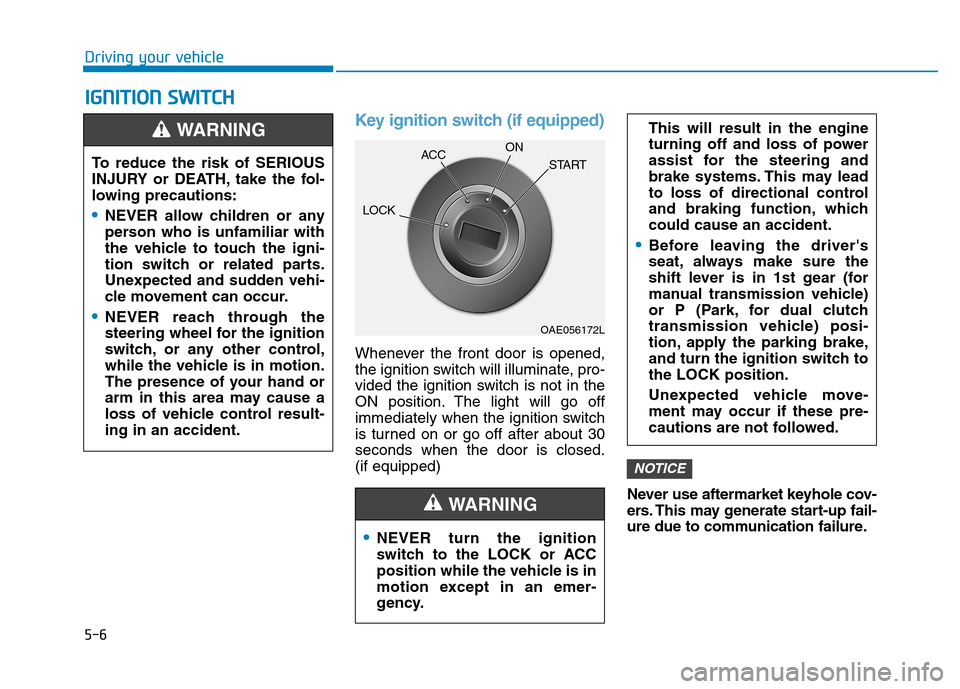
Key ignition switch (if equipped)
Whenever the front door is opened,
the ignition switch will illuminate, pro-
vided the ignition switch is not in the
ON position. The light will go off
immediately when the ignition switch
is turned on or go off after about 30seconds when the door is closed.(if equipped)
Never use aftermarket keyhole cov-
ers. This may generate start-up fail-
ure due to communication failure.
NOTICE
NEVER turn the ignition
switch to the LOCK or ACC
position while the vehicle is in
motion except in an emer-
gency.
This will result in the engine
turning off and loss of power
assist for the steering and
brake systems. This may lead
to loss of directional control
and braking function, whichcould cause an accident.
Before leaving the driver's
seat, always make sure the
shift lever is in 1st gear (for
manual transmission vehicle)
or P (Park, for dual clutch
transmission vehicle) posi-
tion, apply the parking brake,
and turn the ignition switch tothe LOCK position.
Unexpected vehicle move-
ment may occur if these pre-
cautions are not followed.
WARNING
To reduce the risk of SERIOUS
INJURY or DEATH, take the fol-
lowing precautions:
NEVER allow children or any
person who is unfamiliar with
the vehicle to touch the igni-
tion switch or related parts.
Unexpected and sudden vehi-
cle movement can occur.
NEVER reach through the
steering wheel for the ignition
switch, or any other control,
while the vehicle is in motion.
The presence of your hand or
arm in this area may cause a
loss of vehicle control result-ing in an accident.
WARNING
OAE056172L
LOCK
ACC
ON
START
Page 261 of 523
5-7
Driving your vehicle
5
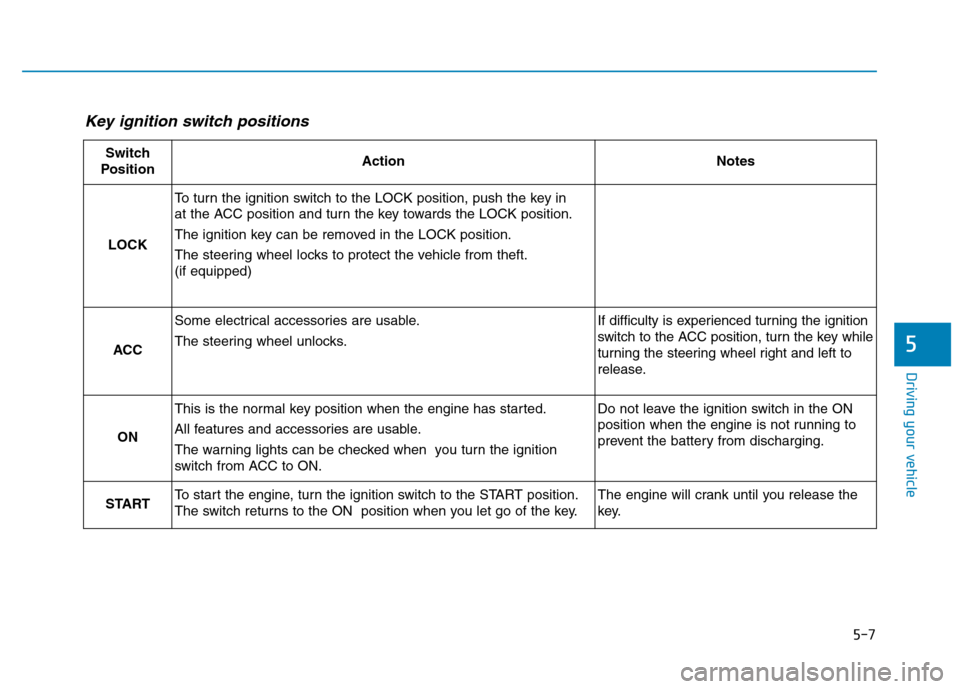
Key ignition switch positions
Switch
PositionActionNotes
LOCK
To turn the ignition switch to the LOCK position, push the key in
at the ACC position and turn the key towards the LOCK position.
The ignition key can be removed in the LOCK position.
The steering wheel locks to protect the vehicle from theft. (if equipped)
ACC
Some electrical accessories are usable.
The steering wheel unlocks.If difficulty is experienced turning the ignition
switch to the ACC position, turn the key while
turning the steering wheel right and left to
release.
ON
This is the normal key position when the engine has started.
All features and accessories are usable.
The warning lights can be checked when you turn the ignition
switch from ACC to ON.Do not leave the ignition switch in the ON
position when the engine is not running to
prevent the battery from discharging.
STARTTo start the engine, turn the ignition switch to the START position.
The switch returns to the ON position when you let go of the key.The engine will crank until you release the
key.