clutch Hyundai Kona 2018 Owner's Manual
[x] Cancel search | Manufacturer: HYUNDAI, Model Year: 2018, Model line: Kona, Model: Hyundai Kona 2018Pages: 523, PDF Size: 33.6 MB
Page 17 of 523
1-6
Your vehicle at a glanceI
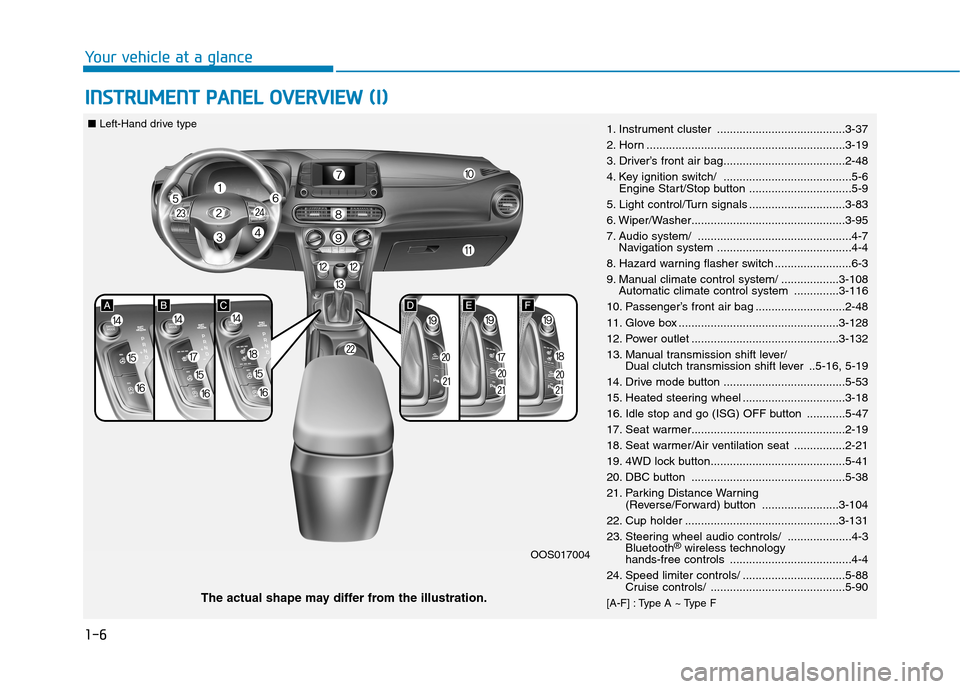
I NN SSTT RR UU MM EENN TT PP AA NN EELL OO VVEERR VV IIEE WW (( II))
1. Instrument cluster ........................................3-37
2. Horn ..............................................................3-19
3. Driver’s front air bag......................................2-48
4. Key ignition switch/ ........................................5-6
Engine Start/Stop button ................................5-9
5. Light control/Turn signals ..............................3-83
6. Wiper/Washer................................................3-95
7. Audio system/ ................................................4-7 Navigation system ..........................................4-4
8. Hazard warning flasher switch ........................6-3
9. Manual climate control system/ ..................3-108 Automatic climate control system ..............3-116
10. Passenger’s front air bag ............................2-48
11. Glove box ..................................................3-128
12. Power outlet ..............................................3-132
13. Manual transmission shift lever/ Dual clutch transmission shift lever ..5-16, 5-19
14. Drive mode button ......................................5-53
15. Heated steering wheel ................................3-18
16. Idle stop and go (ISG) OFF button ............5-47
17. Seat warmer................................................2-19
18. Seat warmer/Air ventilation seat ................2-21
19. 4WD lock button..........................................5-41
20. DBC button ................................................5-38
21. Parking Distance Warning (Reverse/Forward) button ........................3-104
22. Cup holder ................................................3-131
23. Steering wheel audio controls/ ....................4-3 Bluetooth ®
wireless technology
hands-free controls ......................................4-4
24. Speed limiter controls/ ................................5-88 Cruise controls/ ..........................................5-90
[A-F] : Type A ~ Type F
The actual shape may differ from the illustration. OOS017004
■
Left-Hand drive type
Page 18 of 523
1-7
Your vehicle at a glance
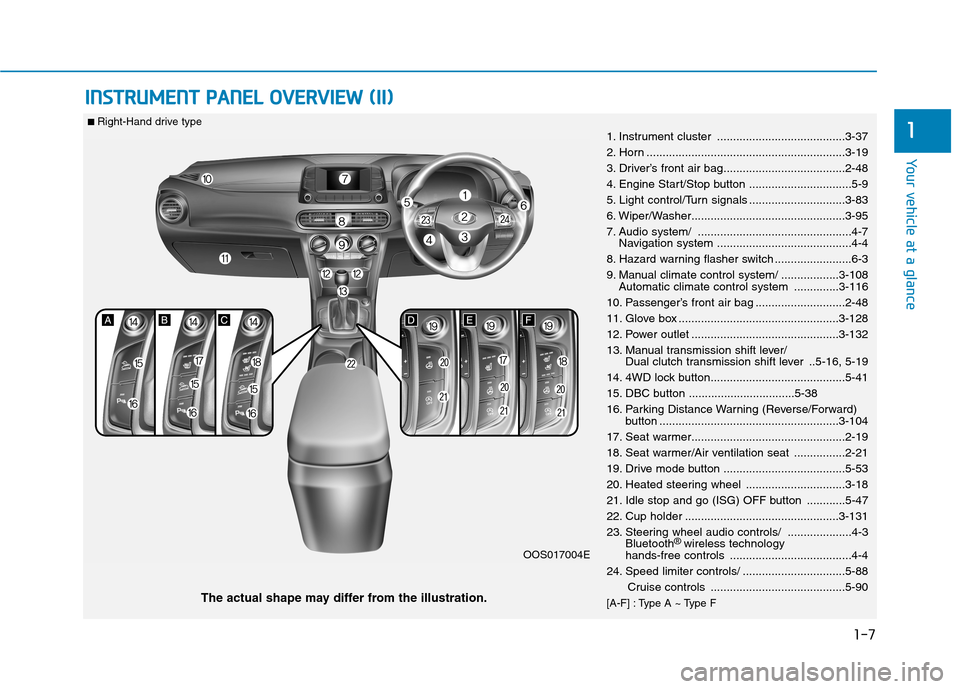
IINN SSTT RR UU MM EENN TT PP AA NN EELL OO VVEERR VV IIEE WW (( IIII))
11. Instrument cluster ........................................3-37
2. Horn ..............................................................3-19
3. Driver’s front air bag......................................2-48
4. Engine Start/Stop button ................................5-9
5. Light control/Turn signals ..............................3-83
6. Wiper/Washer................................................3-95
7. Audio system/ ................................................4-7
Navigation system ..........................................4-4
8. Hazard warning flasher switch ........................6-3
9. Manual climate control system/ ..................3-108 Automatic climate control system ..............3-116
10. Passenger’s front air bag ............................2-48
11. Glove box ..................................................3-128
12. Power outlet ..............................................3-132
13. Manual transmission shift lever/ Dual clutch transmission shift lever ..5-16, 5-19
14. 4WD lock button..........................................5-41
15. DBC button .................................5-38
16. Parking Distance Warning (Reverse/Forward) button ........................................................3-104
17. Seat warmer................................................2-19
18. Seat warmer/Air ventilation seat ................2-21
19. Drive mode button ......................................5-53
20. Heated steering wheel ...............................3-18
21. Idle stop and go (ISG) OFF button ............5-47
22. Cup holder ................................................3-131
23. Steering wheel audio controls/ ....................4-3 Bluetooth ®
wireless technology
hands-free controls ......................................4-4
24. Speed limiter controls/ ................................5-88
Cruise controls ..........................................5-90
[A-F] : Type A ~ Type F
The actual shape may differ from the illustration. OOS017004E
■
Right-Hand drive type
Page 19 of 523
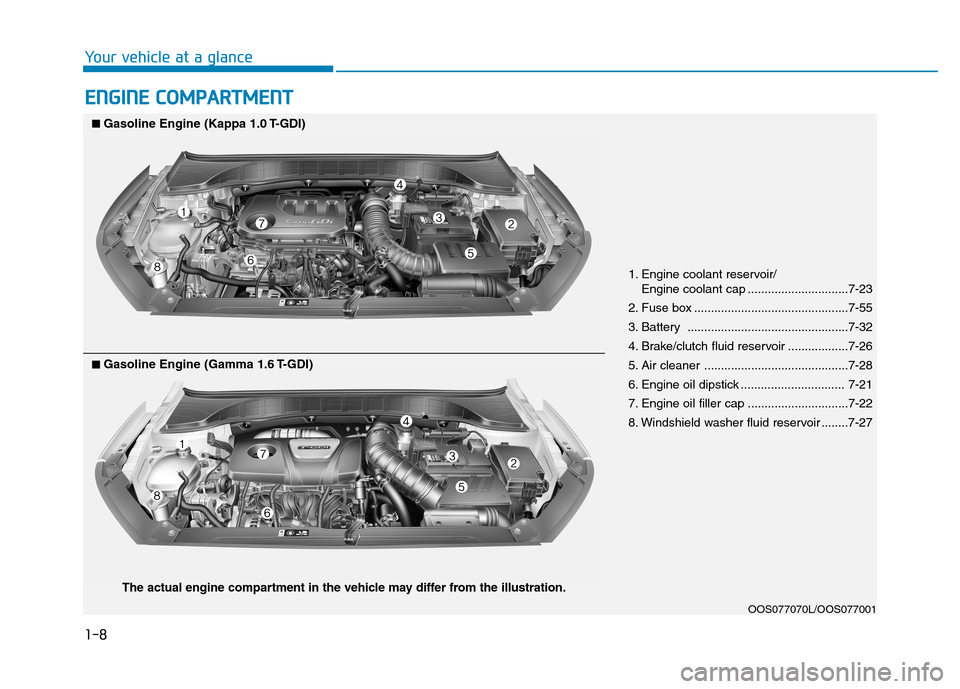
EENN GGIINN EE CC OO MM PPAA RRTTMM EENN TT
1. Engine coolant reservoir/
Engine coolant cap ..............................7-23
2. Fuse box ..............................................7-55
3. Battery ................................................7-32
4. Brake/clutch fluid reservoir ..................7-26
5. Air cleaner ...........................................7-28
6. Engine oil dipstick ............................... 7-21
7. Engine oil filler cap ..............................7-22
8. Windshield washer fluid reservoir ........7-27
OOS077070L/OOS077001
■■Gasoline Engine (Kappa 1.0 T-GDI)
■■
Gasoline Engine (Gamma 1.6 T-GDI)
The actual engine compartment in the vehicle may differ from the illustration.
Your vehicle at a glance
1-8
Page 97 of 523
3-14
Convenient features of your vehicle
Deadlocks (if equipped)
Some vehicles are equipped with a
deadlock system. Deadlocks preventopening of a door from either inside
or outside the vehicle once the dead-
locks have been activated providing
an additional measure of vehicle
security.
To lock the vehicle using the dead-
lock function, the doors must be
locked by using the remote key or
smart key. To unlock the vehicle, the
transmitter or smart key must beused again.
Leaving your vehicle unlockedincreases the potential risk to
you or others from someone
hiding in your vehicle.
To secure your vehicle, while
depressing the brake, move the
shift lever to the P (Park) posi-
tion (for
dual clutch transmis-
sion) or first g ear or R (Reverse,
for manual transaxle), engage
the parking brake, and place the
ignition switch in the LOCK/OFF
position, close all windows,
lock all doors, and always take
the key with you.WARNING
Do not lock the doors with the
remote key or the smart key with
anybody left in the vehicle. The
passenger in the vehicle cannot
unlock the doors with the door
lock button. For example, if the
door is locked with the remote
key, the passenger in the vehicle
cannot unlock the door without
the transmitter.
WARNING
Opening a door when something
is approaching may cause dam-
age or injury. Be careful when
opening doors and watch for
vehicles, motorcycles, bicycles
or pedestrians approaching the
vehicle in the path of the door.
WARNING
If you stay in the vehicle for a long time while the weather is
very hot or cold, there are risks
of injuries or danger to life. Do
not lock the vehicle from the out-side when someone is in the
vehicle.
WARNING
Page 119 of 523
3-36
Convenient features of your vehicle
Information
Make sure to refuel your vehicle
according to the "Fuel Requirements"
suggested in the Introduction chapter.
Do not spill fuel on the exterior surfaces of the vehicle. Any type of fuel spilled on painted sur-
faces may damage the paint.
If the fuel filler cap requires replacement, use only a genuine
HYUNDAI cap or the equivalent
specified for your vehicle. Anincorrect fuel filler cap canresult in a serious malfunctionof the fuel system or emission
control system.
NOTICE
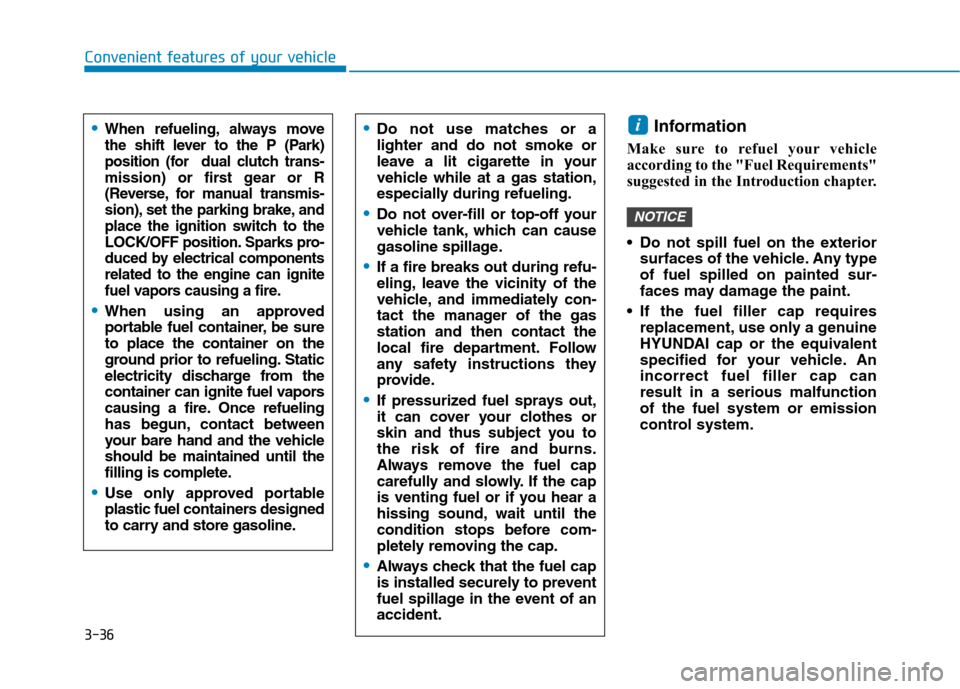
iDo not use matches or a lighter and do not smoke or
leave a lit cigarette in your
vehicle while at a gas station,
especially during refueling.
Do not over-fill or top-off your
vehicle tank, which can cause
gasoline spillage.
If a fire breaks out during refu-
eling, leave the vicinity of the
vehicle, and immediately con-
tact the manager of the gasstation and then contact the
local fire department. Follow
any safety instructions they
provide.
If pressurized fuel sprays out,
it can cover your clothes or
skin and thus subject you to
the risk of fire and burns.
Always remove the fuel cap
carefully and slowly. If the cap
is venting fuel or if you hear a
hissing sound, wait until the
condition stops before com-
pletely removing the cap.
Always check that the fuel cap
is installed securely to prevent
fuel spillage in the event of anaccident.
When refueling, always move
the shift lever to the P (Park)
position (for dual clutch trans-
mission) or first gear or R
(Reverse, for manual transmis-
sion), set the parking brake, and
place the ignition switch to the
LOCK/OFF position. Sparks pro-
duced by electrical componentsrelated to the engine can ignite
fuel vapors causing a fire.
When using an approved
portable fuel container, be sureto place the container on the
ground prior to refueling. Static
electricity discharge from the
container can ignite fuel vapors
causing a fire. Once refueling
has begun, contact between
your bare hand and the vehicleshould be maintained until the
filling is complete.
Use only approved portable
plastic fuel containers designed
to carry and store gasoline.
Page 125 of 523
3-42
Convenient features of your vehicle
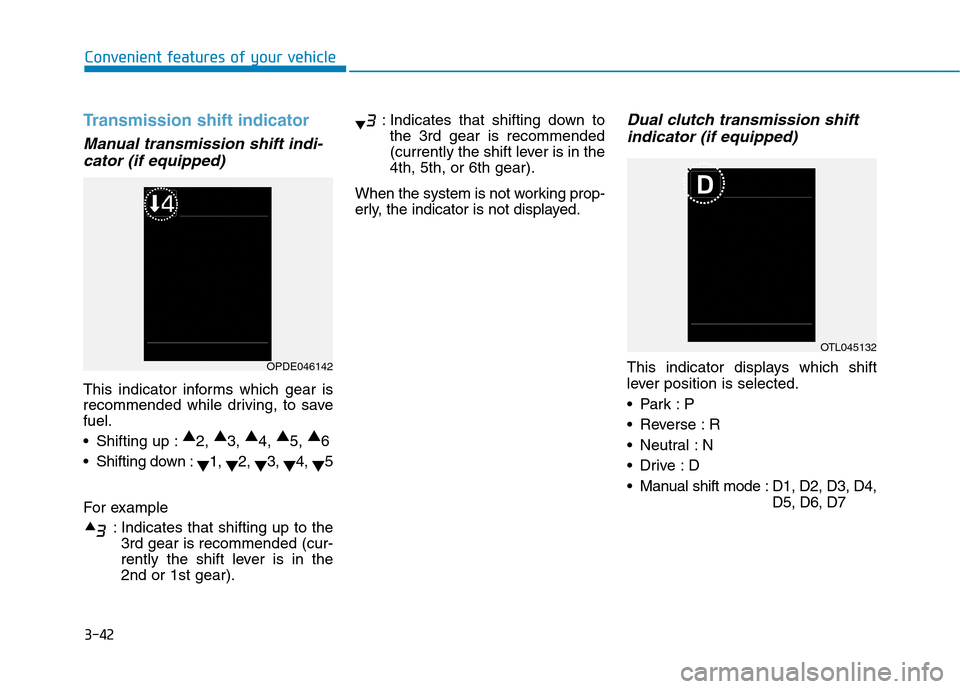
Transmission shift indicator
Manual transmission shift indi-cator (if equipped)
This indicator informs which gear is
recommended while driving, to savefuel.
Shifting up : ▲
2, ▲
3, ▲
4, ▲
5, ▲
6
Shifting down : ▼1,
▼2,
▼3,
▼4,
▼5
For example : Indicates that shifting up to the3rd gear is recommended (cur-
rently the shift lever is in the2nd or 1st gear). : Indicates that shifting down to
the 3rd gear is recommended
(currently the shift lever is in the4th, 5th, or 6th gear).
When the system is not working prop-
erly, the indicator is not displayed.
Dual clutch transmission shift indicator (if equipped)
This indicator displays which shift
lever position is selected.
Reverse : R
Neutral : N
Manual shift mode : D1, D2, D3, D4, D5, D6, D7OPDE046142
OTL045132
Page 126 of 523
3-43
Convenient features of your vehicle
3
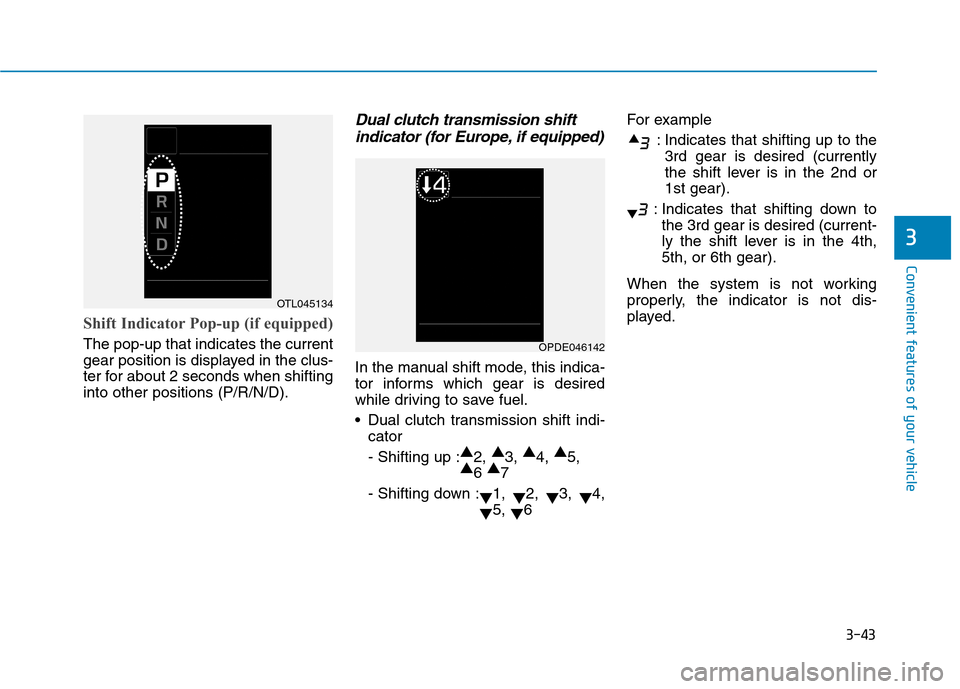
Shift Indicator Pop-up (if equipped)
The pop-up that indicates the current
gear position is displayed in the clus-
ter for about 2 seconds when shiftinginto other positions (P/R/N/D).
Dual clutch transmission shiftindicator (for Europe, if equipped)
In the manual shift mode, this indica-
tor informs which gear is desired
while driving to save fuel.
Dual clutch transmission shift indi- cator- Shifting up : ▲
2, ▲
3, ▲
4, ▲
5,
▲ 6 ▲
7
- Shifting down : ▼1,
▼2,
▼3,
▼4,
▼ 5,
▼6 For example
: Indicates that shifting up to the3rd gear is desired (currently
the shift lever is in the 2nd or1st gear).
: Indicates that shifting down to the 3rd gear is desired (current-
ly the shift lever is in the 4th,5th, or 6th gear).
When the system is not working
properly, the indicator is not dis-
played.
OTL045134
OPDE046142
Page 140 of 523
![Hyundai Kona 2018 Owners Manual 3-57
Convenient features of your vehicle
3
Lane Keeping Assist(LKA) system indica-
tor light (if equipped)
This indicator light illuminates:
[Green] When the system operat- ing conditions are satisfi](/img/35/16231/w960_16231-139.png "Hyundai Kona 2018 Owners Manual 3-57
Convenient features of your vehicle
3
Lane Keeping Assist(LKA) system indica-
tor light (if equipped)
This indicator light illuminates:
[Green] When the system operat- ing conditions are satisfi")
3-57
Convenient features of your vehicle
3
Lane Keeping Assist(LKA) system indica-
tor light (if equipped)
This indicator light illuminates:
[Green] When the system operat- ing conditions are satisfied.
[White] The system operating con- ditions are not satisfied.
[Yellow] When there is a malfunc- tion with the lane keeping assist system.
In this case, we recommend you to
have your vehicle inspected by an
authorized HYUNDAI dealer.
For more details, refer to "Lane
Keeping Assist (LKA) system" in
chapter 5.
Icy Road Warning Light (if equipped)
This warning light is to warn the driver
the road may be icy.
When the temperature on the out-
side temperature gauge is approxi-
mately below 4°C (40°F), the Icy
Road Warning Light and Outside
Temperature Gauge blinks and then
illuminates. Also, the warning chime
sounds 1 time.
Information
If the icy road warning light appears
while driving, you should drive more
attentively and safely refraining from
over-speeding, rapid acceleration, sud-
den braking or sharp turning, etc.
LCD display messages
Shift to P (for smart key system and dual clutch transmission)
This warning message is displayed if
you try to turn off the engine without
the shift lever in P (Park) position.
At this time, the Engine Start/Stop
button turns to the ACC position (If
you press the Engine Start/Stop but-
ton once more, it will turn to the ONposition).
Low Key Battery
(for smart key system)
This warning message is displayed if
the battery of the smart key is dis-charged while changing the Engine
Start/Stop button to the OFF position.i
Page 141 of 523
3-58
Convenient features of your vehicle
Press START button while turn-ing wheel (for smart key sys-
tem)
This warning message is displayed if
the steering wheel does not unlock
normally when the Engine Start/Stop
button is pressed.
You should press the Engine Start/Stop
button while turning the steering wheel
right and left.
Steering wheel not locked (for smart key system)
This warning message is displayed if
the steering wheel is not locked while
the Engine Start/Stop button changesto the OFF position.
Check Steering Wheel LockSystem (for smart key system)
This warning message is displayed if
the steering wheel does not lock nor-
mally while the Engine Start/Stop but-ton changes to the OFF position.
Press brake pedal to start engine(for smart key system and dual
clutch transmission)
This warning message is displayed if
the Engine Start/Stop button changes
to the ACC position twice by pressing
the button repeatedly without depress-
ing the brake pedal.
You can start the vehicle by depressing
the brake pedal.
Press clutch pedal to start engine (for smart key system
and manual transmission)
This warning message is displayed if
the Engine Start/Stop button is in the
ACC position twice by pressing the
button repeatedly without depressingthe clutch pedal.
Depress the clutch pedal to start the
engine.
Key not in vehicle(for smart key system)
This warning message is displayed if
the smart key is not in the vehicle
when you open or close door in the
ACC position or ON position. The
warning sound is heard when you
close door without a smart key in
vehicle.
When attempting to start the vehicle
always have the smart key with you.
Key not detected (for smart key system)
This warning message is displayed if
the smart key is not detected when you
press the Engine Start/Stop button.
Page 142 of 523
3-59
Convenient features of your vehicle
3
Press START button with key(for smart key system)
This warning message is displayed if
you press the Engine Start/Stop but-
ton while the warning message “Key
not detected” is displayed.
At this time, the immobilizer indicator
light blinks.
Press START button again (for smart key system)
This message is displayed if you
were unable to start the vehicle when
the Engine Start/Stop button waspressed.
If this occurs, attempt to start the
engine by pressing the Engine
Start/Stop button again.
If the warning message appears
each time you press the Engine
Start/Stop button, we recommend
that you have your vehicle inspected
by an authorized HYUNDAI dealer.
Check BRAKE SWITCH fuse (for smart key system and dual
clutch transmission)
This warning message is displayed if
the brake switch fuse is disconnected.
You need to replace the fuse with a
new one. If that is not possible, you
can start the engine by pressing the
Engine Start/Stop button for 10 sec-
onds in the ACC position.
Shift to P or N to start engine (for smart key system and dual
clutch transmission)
This warning message is displayed if
you try to start the engine with the
shift lever not in the P (Park) or N
(Neutral) position.
Information
You can start the engine with the shift
lever in the N (Neutral) position. But,
for your safety, we recommend that
you start the engine with the shift
lever in the P (Park) position.
i