display Hyundai Kona 2020 Manual Online
[x] Cancel search | Manufacturer: HYUNDAI, Model Year: 2020, Model line: Kona, Model: Hyundai Kona 2020Pages: 505, PDF Size: 13.47 MB
Page 362 of 505
What to do in an emergency
6
Hazard warning flasher ........................................6-2
In case of an emergency while driving ..............6-2
If the Engine Stalls While Driving .................................6-2
If the Engine Stalls at a Crossroad or Crossing ........6-2
If you Have a Flat Tire While Driving ..........................6-3
If the engine will not start ...................................6-3
If the Engine Doesn't Turn Over or
Turns Over Slowly .............................................................6-3
If the Engine Turns Over Normally but
Doesn't Start ......................................................................6-\
3
Jump starting ..........................................................6-4
If the engine overheats ........................................6-6
Tire Pressure Monitoring System (TPMS).........6-8
Check Tire Pressure .........................................................6-8
Tire Pressure Monitoring System .................................6-9
Low Tire Pressure Telltale ............................................6-10
Low Tire Pressure LCD Display with
Position Indicator ............................................................6-10
TPMS Malfunction Indicator ........................................6-11
Changing a Tire with TPMS..........................................6-12
If you have a flat tire (With spare tire) ...........6-14
Jack and Tools .................................................................6-14
Changing Tires .................................................................6-15
If you have a flat tire (with tire mobility kit)..6-20
Introduction ......................................................................6-\
20
Notes on the safe use of the Tire Mobility Kit.......6-21
Components of the Tire Mobility Kit .........................6-22
Using the Tire Mobility Kit............................................6-23
Distributing the sealant .................................................6-24
Checking the tire inflation pressure ..........................6-25
Towing ...................................................................6-27
Towing Service .................................................................6-27
Removable Towing Hook ...............................................6-28
Emergency Towing..........................................................6-29
Tie-down Hook ................................................................6-30
Page 369 of 505
6-8
What to do in an emergency
T
TI
IR
R E
E
P
P R
R E
ES
SS
SU
U R
RE
E
M
M O
ON
NI
IT
T O
O R
RI
IN
N G
G
S
S Y
Y S
ST
T E
EM
M
(
( T
T P
P M
M S
S)
)
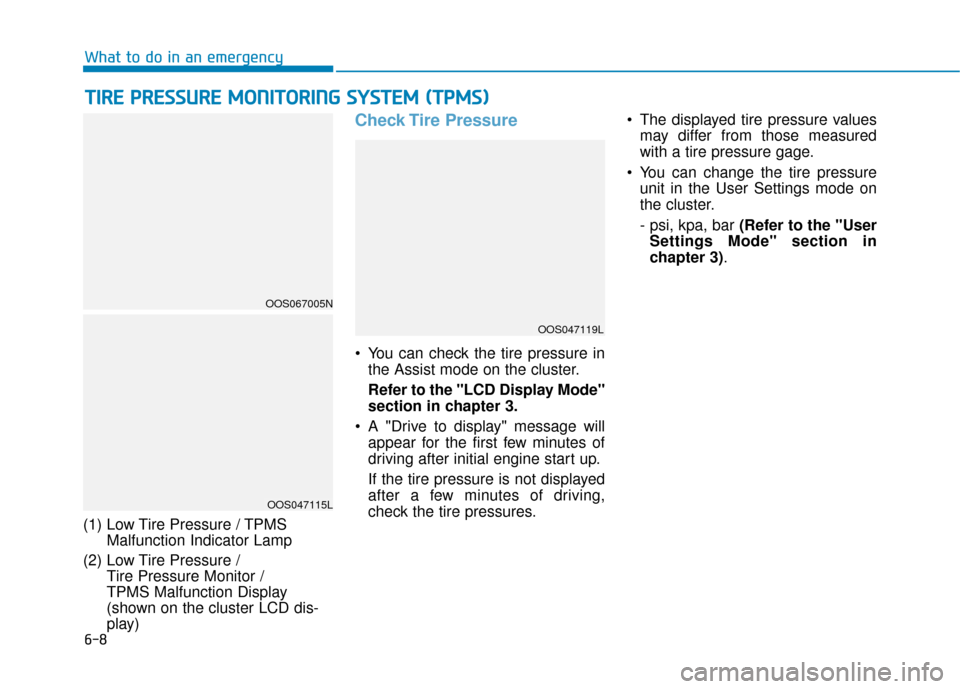
(1) Low Tire Pressure / TPMS
Malfunction Indicator Lamp
(2) Low Tire Pressure / Tire Pressure Monitor /
TPMS Malfunction Display
(shown on the cluster LCD dis-
play)
Check Tire Pressure
• You can check the tire pressure in
the Assist mode on the cluster.
Refer to the "LCD Display Mode"
section in chapter 3.
A "Drive to display" message will appear for the first few minutes of
driving after initial engine start up.
If the tire pressure is not displayed
after a few minutes of driving,
check the tire pressures. The displayed tire pressure values
may differ from those measured
with a tire pressure gage.
You can change the tire pressure unit in the User Settings mode on
the cluster.
- psi, kpa, bar (Refer to the "User
Settings Mode" section in
chapter 3).
OOS047115L
OOS067005N
OOS047119L
Page 371 of 505
6-10
What to do in an emergency
If any of the below happens, have
the system checked by an author-
ized HYUNDAI dealer.
1. The Low Tire Pressure TPMS Malfunction Indicator does not
illuminate for 3 seconds when
the ignition switch is placed to
the ON position or engine is
running.
2. The TPMS Malfunction Indicator remains illuminated after blink-
ing for approximately 1 minute.
3. The Low Tire Pressure LCD dis- play remains illuminated
Low Tire Pressure
Telltale
Low Tire Pressure
LCD Display with
Position Indicator
When the tire pressure monitoring
system warning indicators are illumi-
nated and the warning message is
displayed on the cluster LCD display,
one or more of your tires is signifi-
cantly under-inflated. The LCD posi-
tion indicator will indicate which tire
is significantly under-inflated by illu-
minating the corresponding position
light. If any of your tire pressures are indi-
cated as being low, immediately
reduce your speed, avoid hard cor-
nering, and anticipate increased
stopping distances. You should stop
and check your tires as soon as pos-
sible. Inflate the tires to the proper
pressure as indicated on the vehi-
cle’s placard or tire inflation pressure
label located on the driver's side cen-
ter pillar outer panel.
If you cannot reach a service station
or if the tire cannot hold the newly
added air, replace the low pressure
tire with the spare tire.
The Low Tire Pressure LCD position
indicator will remain on and the
TPMS Malfunction Indicator may
blink for one minute and then remain
illuminated until you have the low
pressure tire repaired and replaced
on the vehicle.
The spare tire is not equipped with
a tire pressure sensor.
NOTICE
NOTICE
OOS047115L
Page 372 of 505
6-11
What to do in an emergency
6
TPMS Malfunction
Indicator
The TPMS Malfunction Indicator will
illuminate after it blinks for approxi-
mately one minute when there is a
problem with the Tire Pressure
Monitoring System.
Have the system checked by an
authorized HYUNDAI dealer as soon
as possible.
If there is a malfunction with the
TPMS, the individual tire pres-
sures in the cluster LCD display
will not be available. Have the sys-
tem checked by an authorized
HYUNDAI dealer as soon as possi-
ble.
NOTICE
In winter or cold weather, the
Low Tire Pressure Telltale may
be illuminated if the tire pres-
sure was adjusted to the recom-
mended tire inflation pressure
in warm weather. It does not
mean your TPMS is malfunc-
tioning because the decreased
temperature leads to a propor-
tional lowering of tire pressure.
When you drive your vehicle
from a warm area to a cold area
or from a cold area to a warm
area, or the outside temperature
is greatly higher or lower, you
should check the tire inflation
pressure and adjust the tires to
the recommended tire inflation
pressure.
CAUTION
Low pressure damage
Significantly low tire pressure
makes the vehicle unstable and
can contribute to loss of vehicle
control and increased braking
distances.
Continued driving on low pres-
sure tires can cause the tires to
overheat and fail.
WARNING
Page 383 of 505
6-22
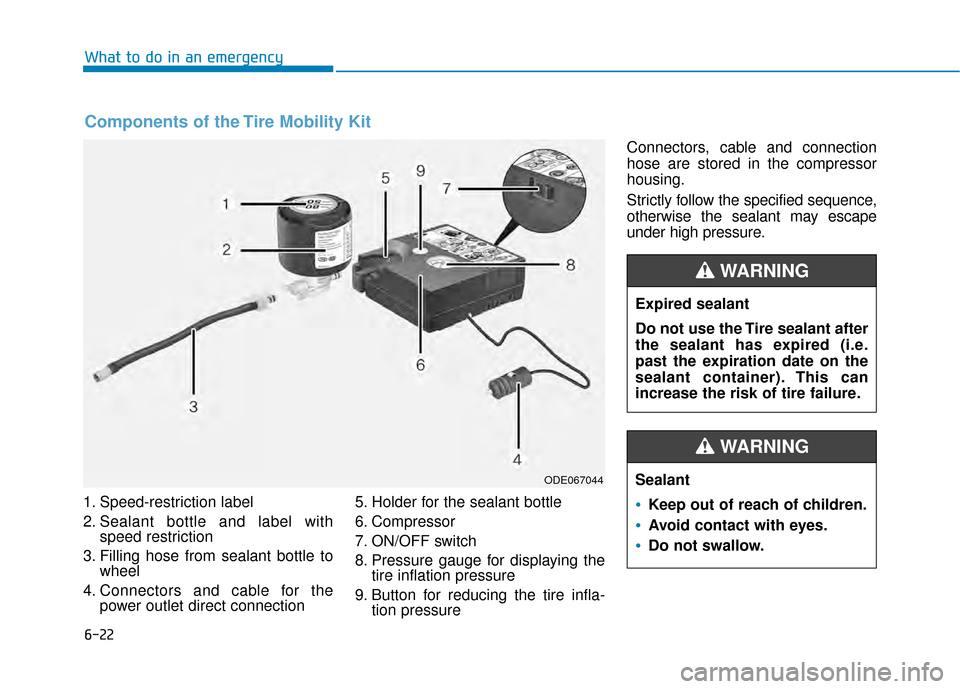
1. Speed-restriction label
2. Sealant bottle and label withspeed restriction
3. Filling hose from sealant bottle to wheel
4. Connectors and cable for the power outlet direct connection 5. Holder for the sealant bottle
6. Compressor
7. ON/OFF switch
8. Pressure gauge for displaying the
tire inflation pressure
9. Button for reducing the tire infla- tion pressure Connectors, cable and connection
hose are stored in the compressor
housing.
Strictly follow the specified sequence,
otherwise the sealant may escape
under high pressure.
What to do in an emergency
Components of the Tire Mobility Kit
ODE067044
Expired sealant
Do not use the Tire sealant after
the sealant has expired (i.e.
past the expiration date on the
sealant container). This can
increase the risk of tire failure.
WARNING
Sealant
•Keep out of reach of children.
Avoid contact with eyes.
Do not swallow.
WARNING
Page 436 of 505
7-45
7
Maintenance
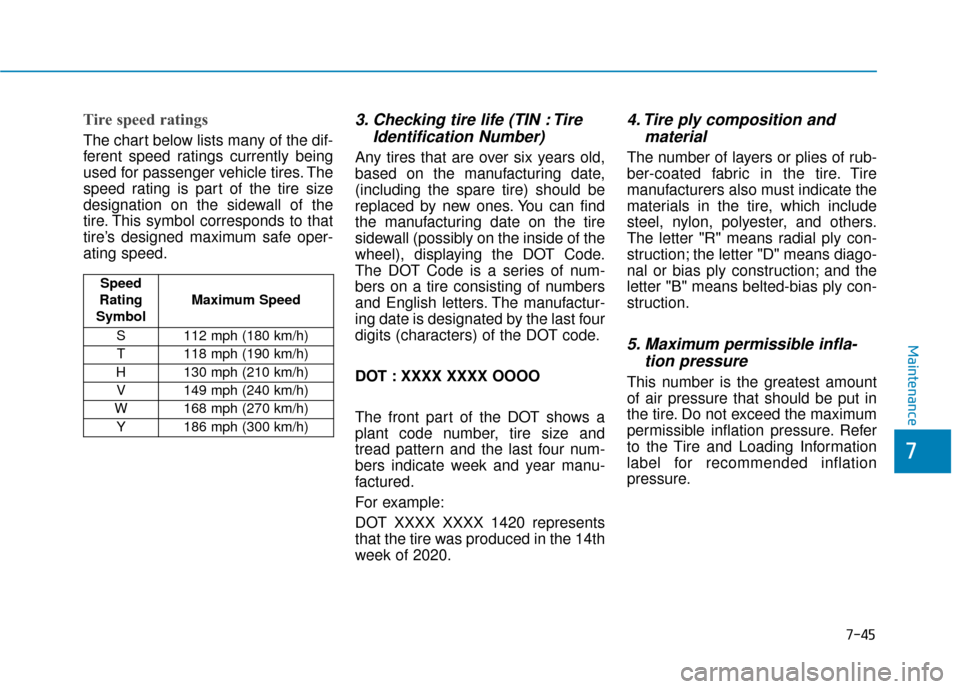
Tire speed ratings
The chart below lists many of the dif-
ferent speed ratings currently being
used for passenger vehicle tires. The
speed rating is part of the tire size
designation on the sidewall of the
tire. This symbol corresponds to that
tire’s designed maximum safe oper-
ating speed.
3. Checking tire life (TIN : TireIdentification Number)
Any tires that are over six years old,
based on the manufacturing date,
(including the spare tire) should be
replaced by new ones. You can find
the manufacturing date on the tire
sidewall (possibly on the inside of the
wheel), displaying the DOT Code.
The DOT Code is a series of num-
bers on a tire consisting of numbers
and English letters. The manufactur-
ing date is designated by the last four
digits (characters) of the DOT code.
DOT : XXXX XXXX OOOO
The front part of the DOT shows a
plant code number, tire size and
tread pattern and the last four num-
bers indicate week and year manu-
factured.
For example:
DOT XXXX XXXX 1420 represents
that the tire was produced in the 14th
week of 2020.
4. Tire ply composition andmaterial
The number of layers or plies of rub-
ber-coated fabric in the tire. Tire
manufacturers also must indicate the
materials in the tire, which include
steel, nylon, polyester, and others.
The letter "R" means radial ply con-
struction; the letter "D" means diago-
nal or bias ply construction; and the
letter "B" means belted-bias ply con-
struction.
5. Maximum permissible infla-tion pressure
This number is the greatest amount
of air pressure that should be put in
the tire. Do not exceed the maximum
permissible inflation pressure. Refer
to the Tire and Loading Information
label for recommended inflation
pressure.
Speed
Rating
Symbol Maximum Speed
S 112 mph (180 km/h) T 118 mph (190 km/h)
H 130 mph (210 km/h) V 149 mph (240 km/h)
W 168 mph (270 km/h)
Y186 mph (300 km/h)
Page 450 of 505
7-59
7
Maintenance
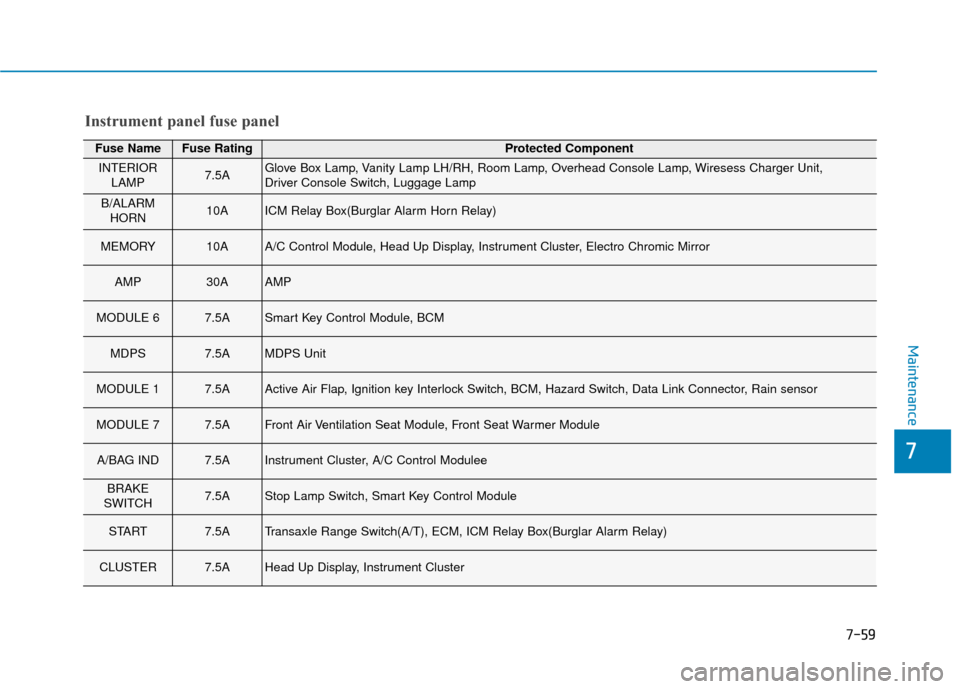
Fuse NameFuse RatingProtected Component
INTERIORLAMP7.5AGlove Box Lamp, Vanity Lamp LH/RH, Room Lamp, Overhead Console Lamp, Wiresess Charger Unit,
Driver Console Switch, Luggage Lamp
B/ALARMHORN10AICM Relay Box(Burglar Alarm Horn Relay)
MEMORY10AA/C Control Module, Head Up Display, Instrument Cluster, Electro Chromic Mirror
AMP30AAMP
MODULE 67.5ASmart Key Control Module, BCM
MDPS7.5AMDPS Unit
MODULE 17.5AActive Air Flap, Ignition key Interlock Switch, BCM, Hazard Switch, Data Link Connector, Rain sensor
MODULE 77.5AFront Air Ventilation Seat Module, Front Seat Warmer Module
A/BAG IND7.5AInstrument Cluster, A/C Control Modulee
BRAKE
SWITCH7.5AStop Lamp Switch, Smart Key Control Module
START7.5ATransaxle Range Switch(A/T), ECM, ICM Relay Box(Burglar Alarm Relay)
CLUSTER7.5AHead Up Display, Instrument Cluster
Instrument panel fuse panel
Page 500 of 505
I-4
Emission control system .................................................7-88Crankcase Emission Control System .........................7-88
Evaporative Emission Control System Including Onboard Refueling Vapor Recovery (ORVR) ........7-88
Exhaust Emission Control System .............................7-89
Engine ........................................................................\
.......8-2
Engine Compartment.................................................1-6, 7-3
Engine coolant ................................................................7-23 Changing Engine Coolant ..........................................7-26
Checking the Engine Coolant Level ..........................7-23
Engine Number ...............................................................8-11
Engine oil ........................................................................\
7-21 Checking the Engine Oil and Filter ...........................7-22
Checking the Engine Oil Level ..................................7-21
Explanation of scheduled maintenance items.................7-18
Exterior Features .................................................3-43, 3-144 Fuel Filler Door ..........................................................3-46
Hood ........................................................................\
...3-43
Liftgate .......................................................................3\
-44
Roof Side Rails ........................................................3-144
Exterior Overview.............................................................1-2 Forward Collision-avoidance Assist (FCA) system
- Camera type ..............................................................5-55
FCA Sensor ................................................................5-59
FCA Warning Message and System Control..............5-57
Limitations of the System ..........................................5-63
System Malfunction ...................................................5-61
System Setting and Activation ...................................5-55
Forward collision-avoidance assist (FCA) system - sensor fusion type (Front radar + Front camera) ......5-68
System Setting and Activation ...................................5-68
FCA Sensor ................................................................5-72
FCA Warning Message and System Control..............5-70
Limitations of the System ..........................................5-75
System Malfunction ...................................................5-73
Fuses ........................................................................\
.......7-53 Engine Compartment Panel Fuse Replacement .........7-55
Fuse/Relay Panel Description ....................................7-57
Instrument Panel Fuse Replacement ..........................7-54
Hazard warning flasher .....................................................6-2
Head Up Display (HUD) ................................................3-87
Index
EF
H
Page 501 of 505
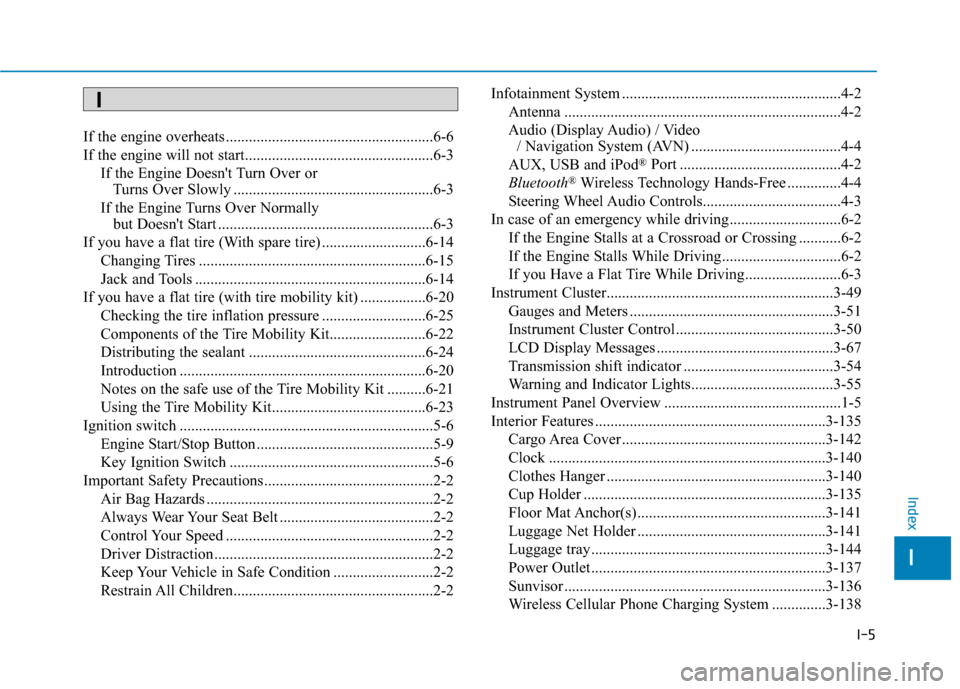
I-5
If the engine overheats ......................................................6-6
If the engine will not start.................................................6-3If the Engine Doesn't Turn Over or Turns Over Slowly ....................................................6-3
If the Engine Turns Over Normally but Doesn't Start ........................................................6-3
If you have a flat tire (With spare tire) ...........................6-14 Changing Tires ...........................................................6-15
Jack and Tools ............................................................6-14
If you have a flat tire (with tire mobility kit) .................6-20 Checking the tire inflation pressure ...........................6-25
Components of the Tire Mobility Kit.........................6-22
Distributing the sealant ..............................................6-24
Introduction ................................................................6-20
Notes on the safe use of the Tire Mobility Kit ..........6-21
Using the Tire Mobility Kit........................................6-23
Ignition switch ..................................................................5-6 Engine Start/Stop Button ..............................................5-9
Key Ignition Switch .....................................................5-6
Important Safety Precautions............................................2-2 Air Bag Hazards ...........................................................2-2
Always Wear Your Seat Belt ........................................2-2
Control Your Speed ......................................................2-2
Driver Distraction.........................................................2-2
Keep Your Vehicle in Safe Condition ..........................2-2
Restrain All Children....................................................2-2 Infotainment System .........................................................4-2
Antenna ........................................................................\
4-2
Audio (Display Audio) / Video / Navigation System (AVN) .......................................4-4
AUX, USB and iPod
®Port ..........................................4-2
Bluetooth®Wireless Technology Hands-Free ..............4-4
Steering Wheel Audio Controls....................................4-3
In case of an emergency while driving .............................6-2 If the Engine Stalls at a Crossroad or Crossing ...........6-2
If the Engine Stalls While Driving...............................6-2
If you Have a Flat Tire While Driving.........................6-3
Instrument Cluster...........................................................3-49 Gauges and Meters .....................................................3-51
Instrument Cluster Control .........................................3-50
LCD Display Messages ..............................................3-67
Transmission shift indicator .......................................3-54
Warning and Indicator Lights.....................................3-55
Instrument Panel Overview ..............................................1-5
Interior Features ............................................................3-135 Cargo Area Cover .....................................................3-142
Clock ........................................................................\
3-140
Clothes Hanger .........................................................3-140
Cup Holder ...............................................................3-135
Floor Mat Anchor(s) .................................................3-141
Luggage Net Holder .................................................3-141
Luggage tray.............................................................3-144
Power Outlet.............................................................3-137
Sunvisor ....................................................................3-13\
6
Wireless Cellular Phone Charging System ..............3-138
I
Index
I
Page 502 of 505

I-6
Interior Overview..............................................................1-4
Jump starting .....................................................................6-4\
Lane Keeping Assist (LKA) system ...............................5-80Limitations of the System ..........................................5-86
LKA system Function Change ...................................5-87
LKA system Operation ...............................................5-81
Warning Light and Message.......................................5-85
LCD Display ...................................................................3-72 LCD Display Control .................................................3-72
LCD Display Modes ..................................................3-73
Light bulbs ......................................................................7-\
69 Front fog lamp ............................................................7-74
Headlamp, Parking Lamp, Daytime Running Light, Turn Signal Lamp and Side Marker, Cornering lamp .......................................................7-69
High Mounted Stop Lamp Replacement....................7-77
Interior Light Bulb Replacement ...............................7-78
License Plate Light Bulb Replacement ......................7-78
Rear Combination Light Bulb Replacement ..............7-75
Side Repeater Lamp Replacement .............................7-74 Lighting ........................................................................\
...3-90
Exterior Lights............................................................3-90
Interior Lights.............................................................3-98
Smart cornering lamp .................................................3-97
Welcome System ......................................................3-100
Maintenance services ........................................................7-4 Owner Maintenance Precautions..................................7-4
Owner's Responsibility.................................................7-4
Manual Climate Control System...................................3-110 Heating and Air Conditioning ..................................3-111
System Maintenance.................................................3-116
System Operation .....................................................3-114
Mirrors ........................................................................\
....3-21 Inside Rearview Mirror ..............................................3-21
Side View Mirrors ......................................................3-31
Owner maintenance ..........................................................7-5 Owner Maintenance Schedule......................................7-6
Parking brake ..................................................................7-28 Checking the Parking Brake ......................................7-28
Index
M
O
P
L
J