start HYUNDAI KONA 2022 Owners Manual
[x] Cancel search | Manufacturer: HYUNDAI, Model Year: 2022, Model line: KONA, Model: HYUNDAI KONA 2022Pages: 579, PDF Size: 35.31 MB
Page 429 of 579

07
7-97
Highway Driving Assist may
inadvertently operate or turn off
depending on road conditions
(navigation information) and
surroundings.
Lane Following Assist function may
be temporarily disabled when the
front view camera cannot detect
lanes properly or the hands-off
warning is on.
You may not hear the warning sound
of Highway Driving Assist if the
surrounding is noisy.
If the vehicle is driven at high speed
above a certain speed at a curve,
your vehicle may drive to one side or
may depart from the driving lane.
When you are towing a trailer or
another vehicle, we recommend that
Highway Driving Assist is turned off
due to safety reasons.
The hands–off warning message
may appear early or late depending
on how the steering wheel is held or
road conditions. Always have your
hands on the steering wheel while
driving.
For your safety, please read the
owner's manual before using the
Highway Driving Assist.
Highway Driving Assist will not
operate when the engine is started,
or when the detecting sensors or
navigation is being initialized.
Limitations of Highway Driving
Assist
Highway Driving Assist may not operate
normally, or may not operate under the
following circumstances:
The map information and the
actual road is different because the
navigation is not updated
The map information and the actual
road is different because of real-time
GPS data or map information error
The infotainment system is overloaded
by simultaneously performing
functions such as route search, video
playback, voice recognition, etc.
GPS signals are blocked in areas such
as a tunnel
The driver goes off course or the
route to the destination is changed or
canceled by resetting the navigation
The vehicle enters a service station or
rest area
Android Auto or Car Play is operating
The navigation cannot detect the
current vehicle position (ex: elevated
roads including overpass adjacent to
general roads or nearby roads exist in
a parallel way)
Information
Page 435 of 579
07
7-103
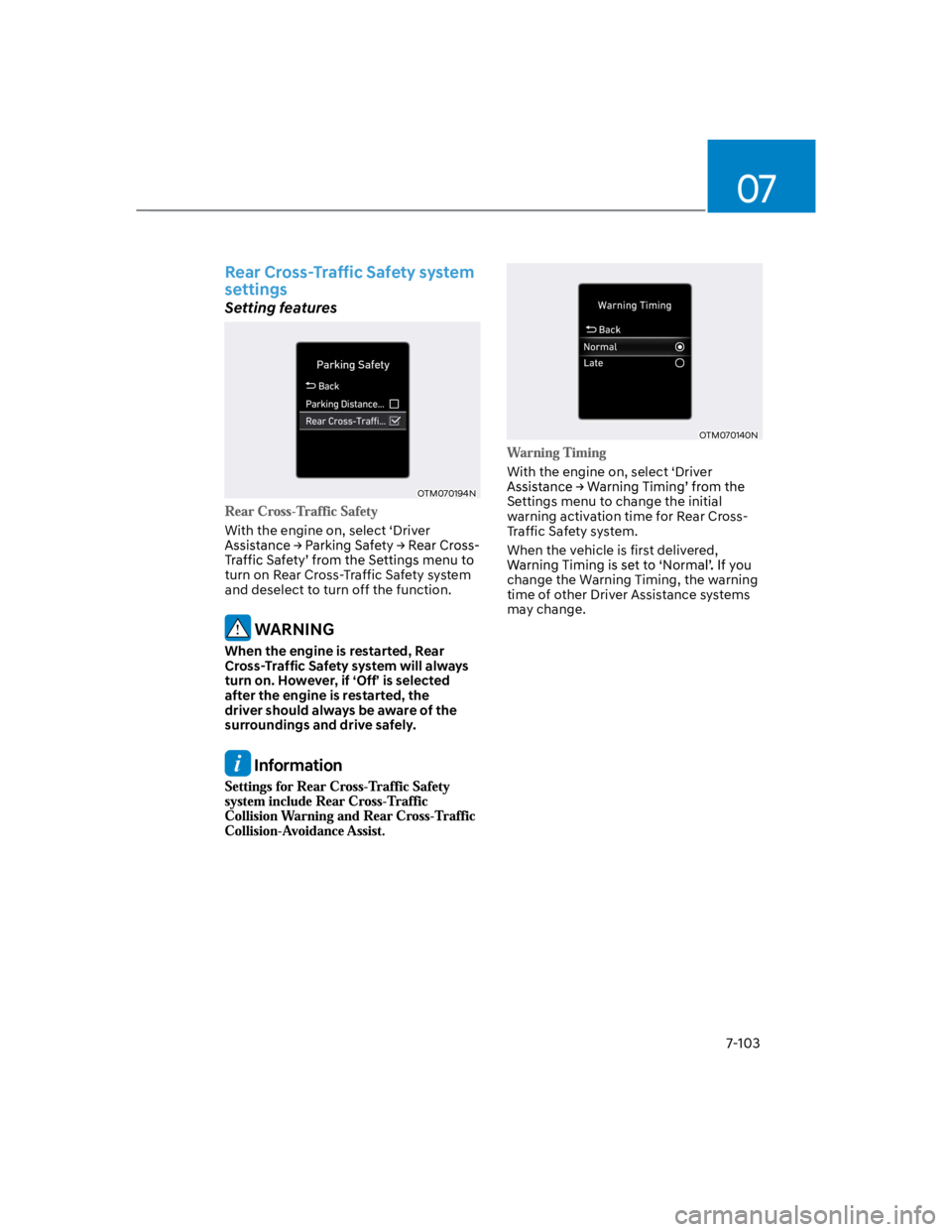
Rear Cross-Traffic Safety system
settings
Setting features
OTM070194N
With the engine on, select ‘Driver
turn on Rear Cross-Traffic Safety system
and deselect to turn off the function.
WARNING
When the engine is restarted, Rear
Cross-Traffic Safety system will always
turn on. However, if ‘Off’ is selected
after the engine is restarted, the
driver should always be aware of the
surroundings and drive safely.
Information
OTM070140N
With the engine on, select ‘Driver
Settings menu to change the initial
warning activation time for Rear Cross-
Traffic Safety system.
When the vehicle is first delivered,
change the Warning Timing, the warning
time of other Driver Assistance systems
may change.
Page 444 of 579
Driver assistance system
7-112
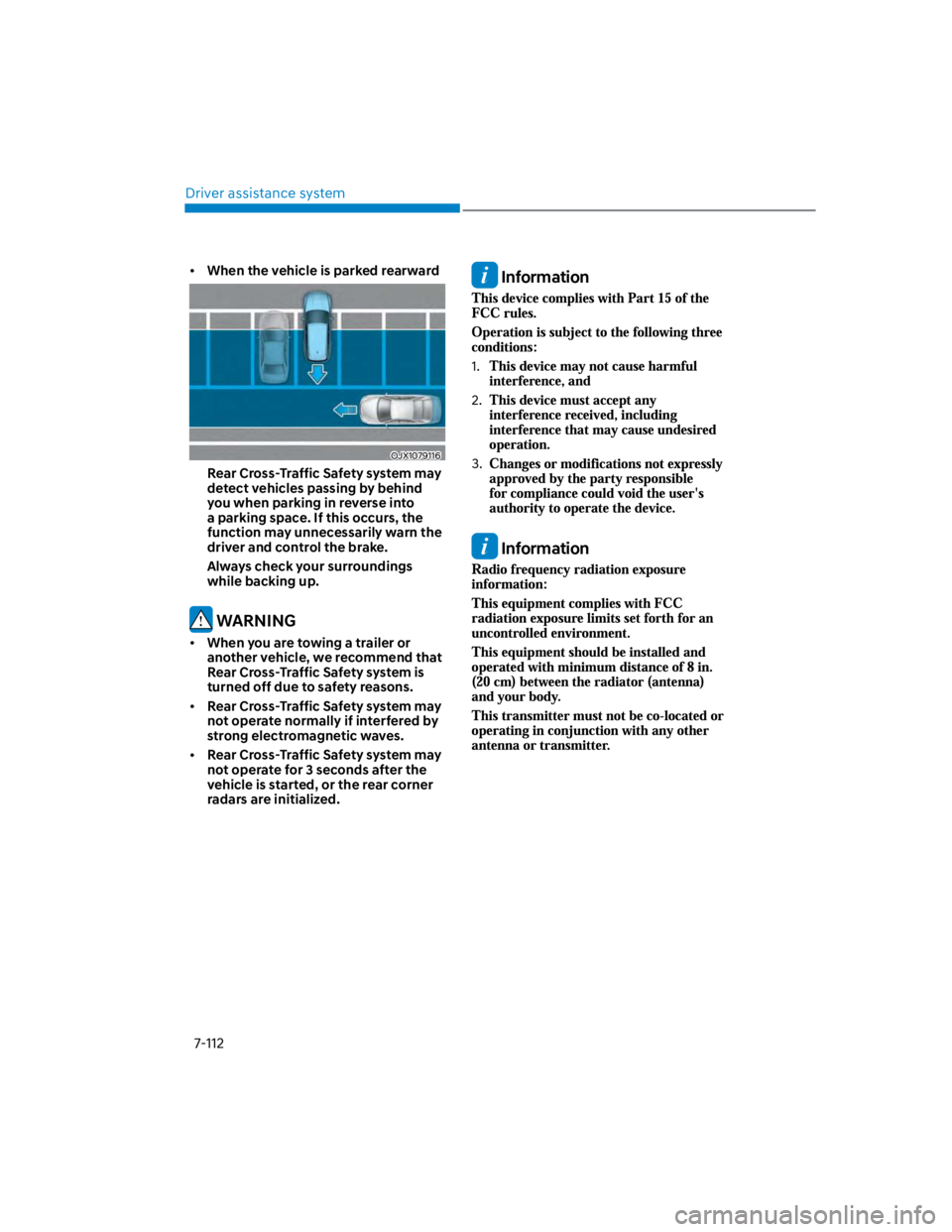
When the vehicle is parked rearward
OJX1079116
Rear Cross-Traffic Safety system may
detect vehicles passing by behind
you when parking in reverse into
a parking space. If this occurs, the
function may unnecessarily warn the
driver and control the brake.
Always check your surroundings
while backing up.
WARNING
When you are towing a trailer or
another vehicle, we recommend that
Rear Cross-Traffic Safety system is
turned off due to safety reasons.
Rear Cross-Traffic Safety system may
not operate normally if interfered by
strong electromagnetic waves.
Rear Cross-Traffic Safety system may
not operate for 3 seconds after the
vehicle is started, or the rear corner
radars are initialized.
Information
1.
2.
3.
Information
Page 446 of 579
Driver assistance system
7-114
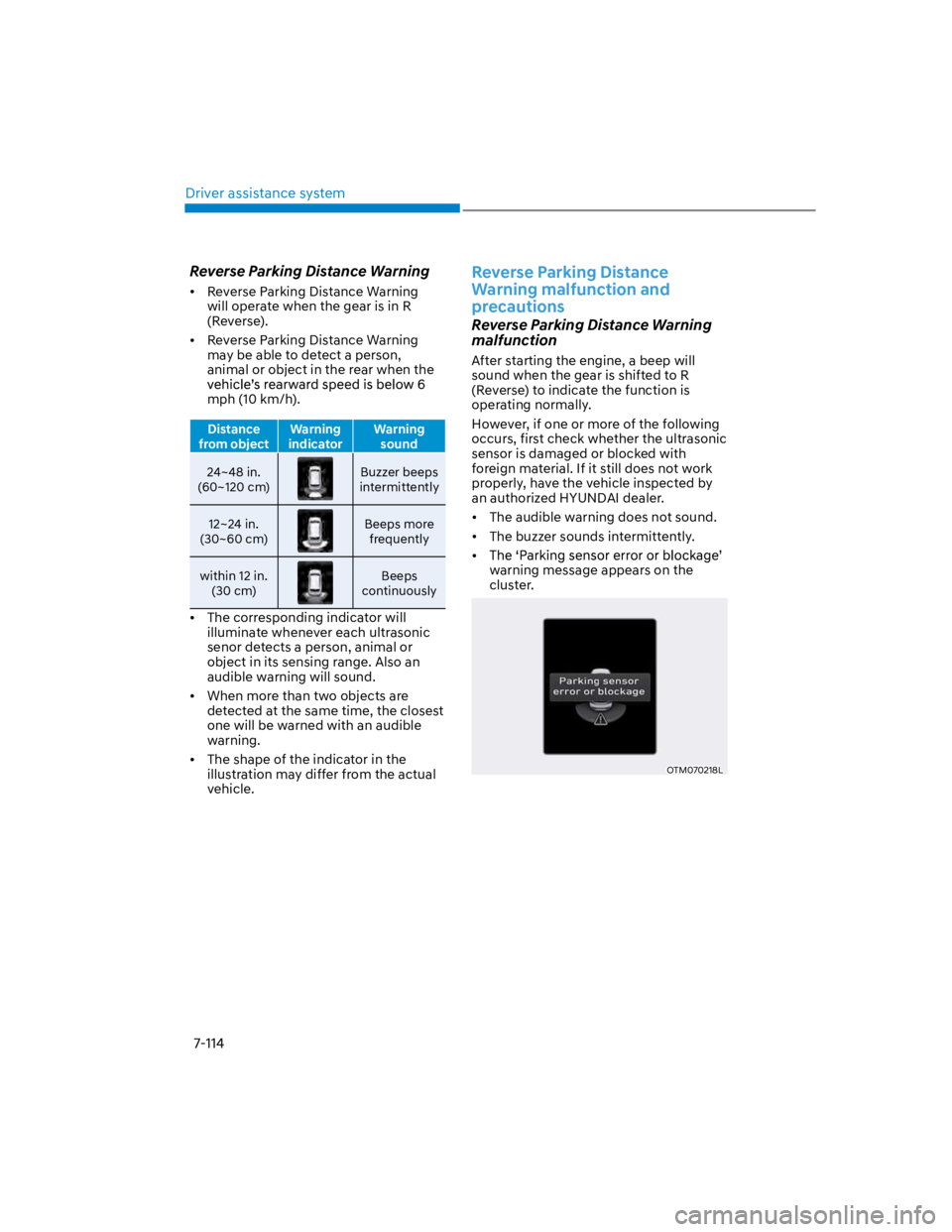
Reverse Parking Distance Warning
Reverse Parking Distance Warning
will operate when the gear is in R
(Reverse).
Reverse Parking Distance Warning
may be able to detect a person,
animal or object in the rear when the
mph (10 km/h).
Distance
from object
Warning
indicator
Warning
sound
24~48 in.
(60~120 cm)
Buzzer beeps
intermittently
12~24 in.
(30~60 cm)
Beeps more
frequently
within 12 in.
(30 cm)
Beeps
continuously
The corresponding indicator will
illuminate whenever each ultrasonic
senor detects a person, animal or
object in its sensing range. Also an
audible warning will sound.
When more than two objects are
detected at the same time, the closest
one will be warned with an audible
warning.
The shape of the indicator in the
illustration may differ from the actual
vehicle.
Reverse Parking Distance
Warning malfunction and
precautions
Reverse Parking Distance Warning
malfunction
After starting the engine, a beep will
sound when the gear is shifted to R
(Reverse) to indicate the function is
operating normally.
However, if one or more of the following
occurs, first check whether the ultrasonic
sensor is damaged or blocked with
foreign material. If it still does not work
properly, have the vehicle inspected by
an authorized HYUNDAI dealer.
The audible warning does not sound.
The buzzer sounds intermittently.
warning message appears on the
cluster.
OTM070218L
Page 451 of 579
8
Hazard warning flasher..................................................................................... 8-2
In case of an emergency while driving ............................................................ 8-2
If the engine stalls while driving ................................................................................. 8-2
If the engine stalls at a crossroad or crossing ............................................................ 8-2
If you have a flat tire while driving ..............................................................................8-3
If the engine will not start ................................................................................ 8-3
If the Engine Doesn't Turn Over or Turns Over Slowly ..............................................8-3
If the Engine Turns Over Normally but Doesn't Start ................................................8-3
Jump starting .................................................................................................... 8-4
If the engine overheats ......................................................................................8-7
Tire Pressure Monitoring System (TPMS) (Type A) ......................................... 8-9
Low tire pressure telltale ........................................................................................... 8-10
TPMS (Tire Pressure Monitoring System) malfunction indicator ............................ 8-10
Tire Pressure Monitoring System (TPMS) (Type B) ........................................ 8-13
Check tire pressure .................................................................................................... 8-13
Tire pressure monitoring system ............................................................................... 8-14
Low tire pressure warning light ................................................................................. 8-15
Low tire pressure position and tire pressure telltale ................................................ 8-15
TPMS malfunction indicator ...................................................................................... 8-16
Changing a tire with TPMS ........................................................................................ 8-16
If you have a flat tire (with spare tire) .............................................................8-18
Jack and tools............................................................................................................. 8-18
Changing tires ............................................................................................................ 8-19
Jack label ....................................................................................................................8-24
If you have a flat tire (with Tire Mobility Kit) ................................................. 8-25
Introduction ................................................................................................................ 8-25
Components of the Tire Mobility Kit .........................................................................8-26
Using the Tire Mobility Kit ......................................................................................... 8-27
How to adjust tire pressure ...................................................................................... 8-30
Notes on the safe use of the Tire Mobility Kit ..........................................................8-32
Towing ............................................................................................................. 8-33
Towing service ............................................................................................................8-33
Removable Towing Hook ..........................................................................................8-34
Emergency Towing ....................................................................................................8-35
Tie-down Hook .......................................................................................................... 8-36
8. Emergency situations
Page 452 of 579
Emergency situations
8-2
HAZARD WARNING
FLASHER
OOS080006L
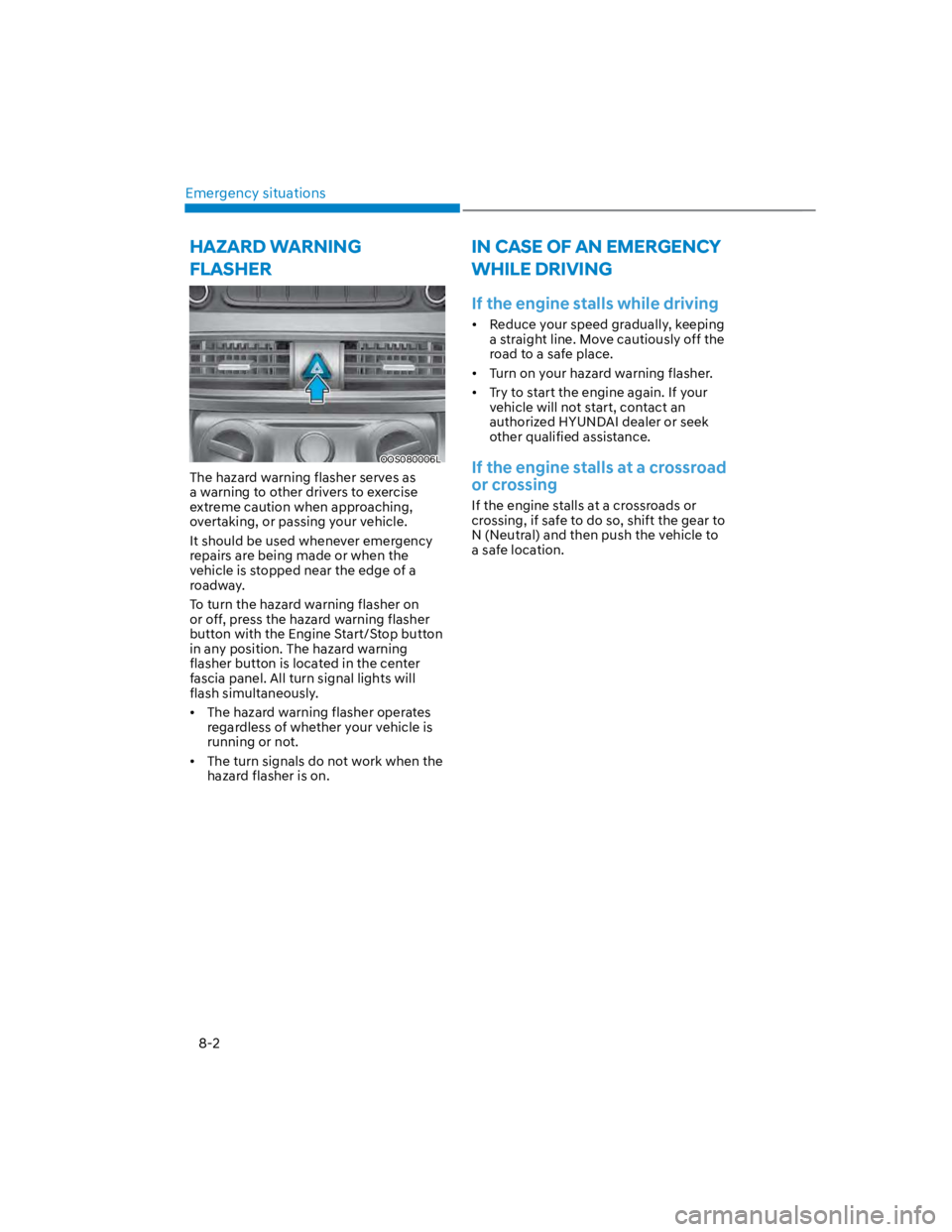
The hazard warning flasher serves as
a warning to other drivers to exercise
extreme caution when approaching,
overtaking, or passing your vehicle.
It should be used whenever emergency
repairs are being made or when the
vehicle is stopped near the edge of a
roadway.
To turn the hazard warning flasher on
or off, press the hazard warning flasher
button with the Engine Start/Stop button
in any position. The hazard warning
flasher button is located in the center
fascia panel. All turn signal lights will
flash simultaneously.
The hazard warning flasher operates
regardless of whether your vehicle is
running or not.
The turn signals do not work when the
hazard flasher is on.
IN CASE OF AN EMERGENCY
WHILE DRIVING
If the engine stalls while driving
Reduce your speed gradually, keeping
a straight line. Move cautiously off the
road to a safe place.
Turn on your hazard warning flasher.
Try to start the engine again. If your
vehicle will not start, contact an
authorized HYUNDAI dealer or seek
other qualified assistance.
If the engine stalls at a crossroad
or crossing
If the engine stalls at a crossroads or
crossing, if safe to do so, shift the gear to
N (Neutral) and then push the vehicle to
a safe location.
Page 453 of 579
08
8-3
If you have a flat tire while
driving
If a tire goes flat while you are driving:
Take your foot off the accelerator
pedal and let the vehicle slow down
while driving straight ahead. Do not
apply the brakes immediately or
attempt to pull off the road as this
may cause loss of vehicle control
resulting in an accident. When the
vehicle has slowed to such a speed
that it is safe to do so, brake carefully
and pull off the road. Drive off the
road as far as possible and park on
firm, level ground. If you are on a
divided highway, do not park in the
median area between the two traffic
lanes.
When the vehicle is stopped, press the
hazard warning flasher button, move
the shift lever into P (Park), apply the
parking brake, and place the ignition
switch in the LOCK/OFF position.
Have all passengers get out of the
vehicle. Be sure they all get out on the
side of the vehicle that is away from
traffic.
When changing a flat tire, follow the
instructions provided later in this
chapter.
IF THE ENGINE WILL NOT
START
If the Engine Doesn't Turn Over
or Turns Over Slowly
Be sure the shift lever is in N (Neutral)
or P (Park). The engine starts only
when the shift lever is in N (Neutral) or
P (Park).
Check the battery connections to be
sure they are clean and tight.
Turn on the interior light. If the light
dims or goes out when you operate
the starter, the battery is drained.
Do not push or pull the vehicle to start it.
This could cause damage to your vehicle.
See instructions for "Jump Starting"
provided in this chapter.
CAUTION
Push or pull starting the vehicle may
cause the catalytic converter to
overload which can lead to damage to
the emission control system.
If the Engine Turns Over
Normally but Doesn't Start
Check the fuel level and add fuel if
necessary.
If the engine still does not start, have
your vehicle checked by an authorized
HYUNDAI dealer.
Page 454 of 579
Emergency situations
8-4
Jump starting can be dangerous if done
incorrectly. Follow the jump starting
procedure in this section to avoid serious
injury or damage to your vehicle. If in
doubt about how to properly jump start
your vehicle, we strongly recommend
that you have a service technician or
towing service do it for you.
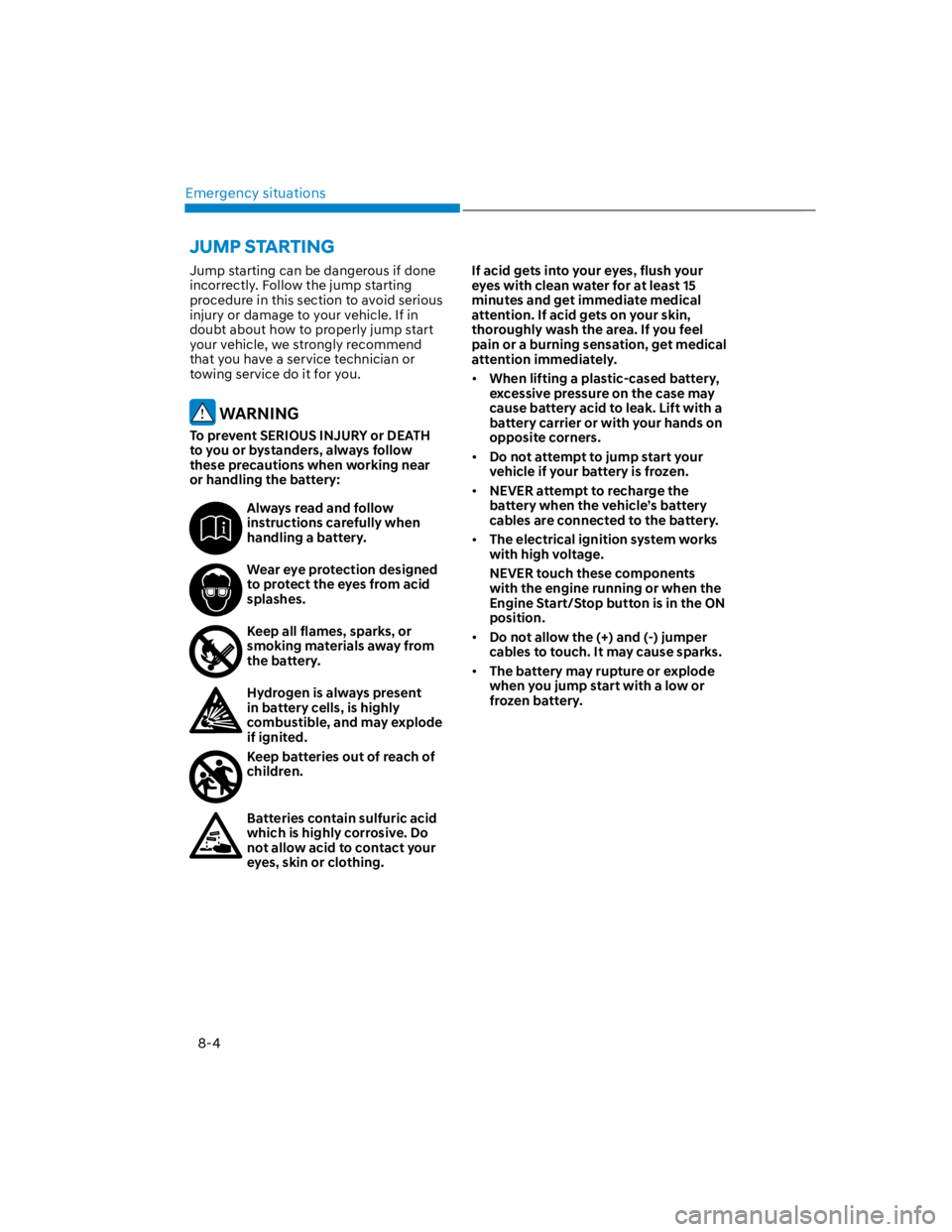
WARNING
To prevent SERIOUS INJURY or DEATH
to you or bystanders, always follow
these precautions when working near
or handling the battery:
Always read and follow
instructions carefully when
handling a battery.
Wear eye protection designed
to protect the eyes from acid
splashes.
Keep all flames, sparks, or
smoking materials away from
the battery.
Hydrogen is always present
in battery cells, is highly
combustible, and may explode
if ignited.
Keep batteries out of reach of
children.
Batteries contain sulfuric acid
which is highly corrosive. Do
not allow acid to contact your
eyes, skin or clothing.
If acid gets into your eyes, flush your
eyes with clean water for at least 15
minutes and get immediate medical
attention. If acid gets on your skin,
thoroughly wash the area. If you feel
pain or a burning sensation, get medical
attention immediately.
When lifting a plastic-cased battery,
excessive pressure on the case may
cause battery acid to leak. Lift with a
battery carrier or with your hands on
opposite corners.
Do not attempt to jump start your
vehicle if your battery is frozen.
NEVER attempt to recharge the
battery when the vehicle’s battery
cables are connected to the battery.
The electrical ignition system works
with high voltage.
NEVER touch these components
with the engine running or when the
Engine Start/Stop button is in the ON
position.
Do not allow the (+) and (-) jumper
cables to touch. It may cause sparks.
The battery may rupture or explode
when you jump start with a low or
frozen battery.
JUMP STARTING
Page 455 of 579
08
8-5
Jump starting procedure
Information
1. Position the vehicles close enough
that the jumper cables will reach, but
do not allow the vehicles to touch.
2. Avoid fans or any moving parts in the
engine compartment at all times, even
when the vehicles are turned off.
3. Turn off all electrical devices such as
radios, lights, air conditioning, etc.
Put the vehicles in P (Park) and set the
parking brake. Turn both vehicles OFF.
4. Open the engine hood.
OOS080008N
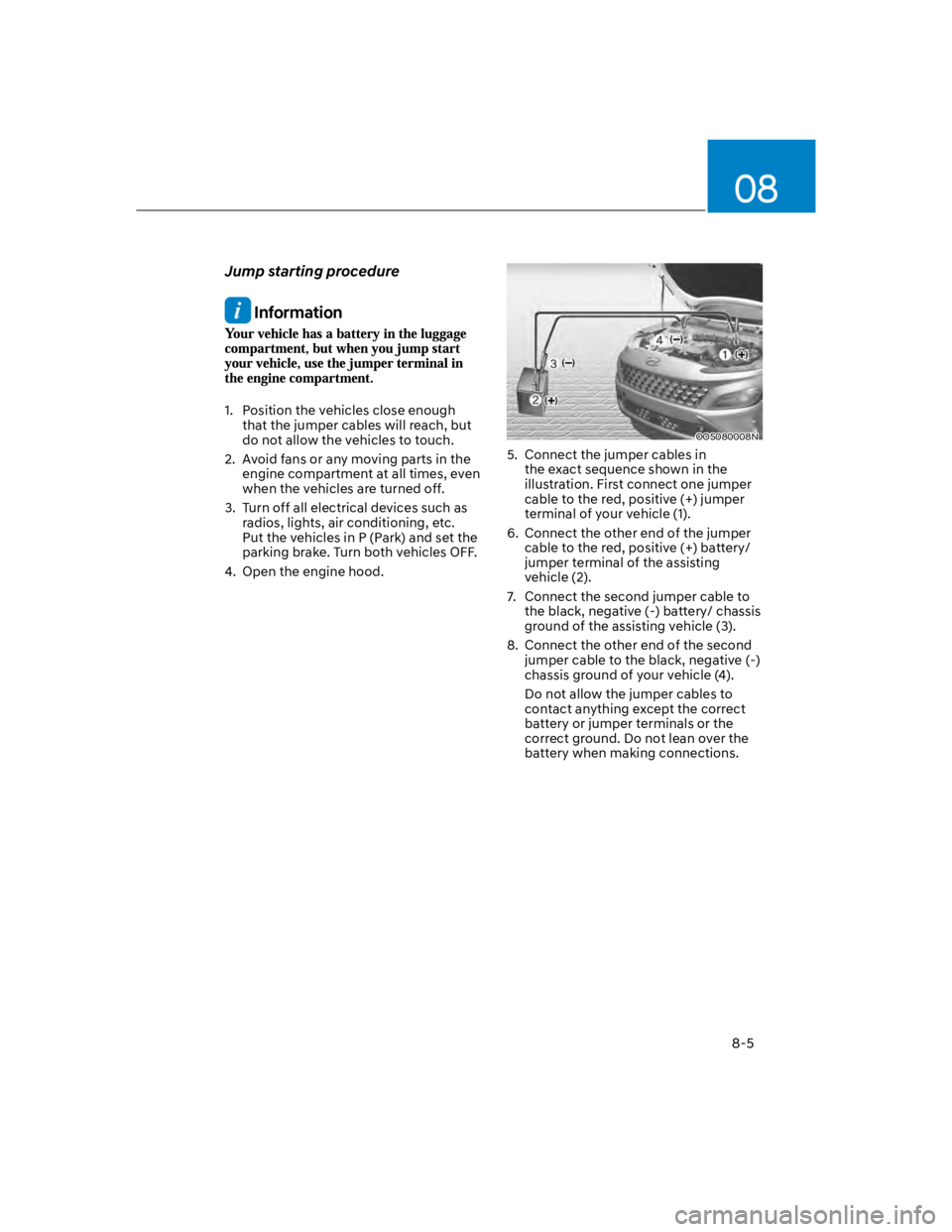
5. Connect the jumper cables in
the exact sequence shown in the
illustration. First connect one jumper
cable to the red, positive (+) jumper
terminal of your vehicle (1).
6. Connect the other end of the jumper
cable to the red, positive (+) battery/
jumper terminal of the assisting
vehicle (2).
7. Connect the second jumper cable to
the black, negative (-) battery/ chassis
ground of the assisting vehicle (3).
8. Connect the other end of the second
jumper cable to the black, negative (-)
chassis ground of your vehicle (4).
Do not allow the jumper cables to
contact anything except the correct
battery or jumper terminals or the
correct ground. Do not lean over the
battery when making connections.
Page 456 of 579

Emergency situations
8-6
9. Start the engine of the assisting
vehicle and let it run at approximately
2,000 rpm for a few minutes. Then
start your vehicle.
10.
Keep your vehicle operating for at
least 30 minutes at idle or driving to
assure your battery receives enough
charge to be able to start on its
own after the vehicle is shut off. A
complete dead battery may require
as long as 60 minutes runtime to fully
recharge it. If vehicle is run for less,
the battery may not restart.
If your vehicle will not start after a few
attempts, it probably requires servicing.
In this event please seek qualified
assistance. If the cause of your battery
discharging is not apparent, have your
vehicle checked by an authorized
HYUNDAI dealer.
Disconnect the jumper cables in the
exact reverse order you connected them:
1. Disconnect the jumper cable from the
black, negative (-) chassis ground of
your vehicle (4).
2. Disconnect the other end of the
jumper cable from the black, negative
(-) battery/chassis ground of the
assisting vehicle (3).
3. Disconnect the second jumper cable
from the red, positive (+) battery/
jumper terminal of the assisting
vehicle (2).
4. Disconnect the other end of the
jumper cable from the red, positive (+)
jumper terminal of your vehicle (1).
Information
NOTICE
To prevent damage to your vehicle:
Only use a 12-volt power supply
(battery or jumper system) to jump
start your vehicle.
Do not attempt to jump start your
vehicle by push-starting.