convenient HYUNDAI KONA 2022 Workshop Manual
[x] Cancel search | Manufacturer: HYUNDAI, Model Year: 2022, Model line: KONA, Model: HYUNDAI KONA 2022Pages: 579, PDF Size: 35.31 MB
Page 230 of 579
Convenient features
5-96
If the vehicle has been parked in
direct sunlight during hot weather,
open the windows for a short time
to let the hot air inside the vehicle
escape.
After sufficient cooling has been
achieved, switch back from the
recirculated air to the fresh outside air
position.
To help reduce moisture inside of
the windows on rainy or humid
days, decrease the humidity inside
the vehicle by operating the air
conditioning system with the windows
and sunroof closed.
Use the air conditioning system every
month for a few minutes to ensure
maximum system performance.
If you operate the air conditioner
excessively, the difference between
the temperature of the outside air and
that of the windshield could cause
the outer surface of the windshield to
fog up, causing loss of visibility. In this
case, set the mode selection button to
the position and set the fan speed
control knob to the lowest speed
setting.
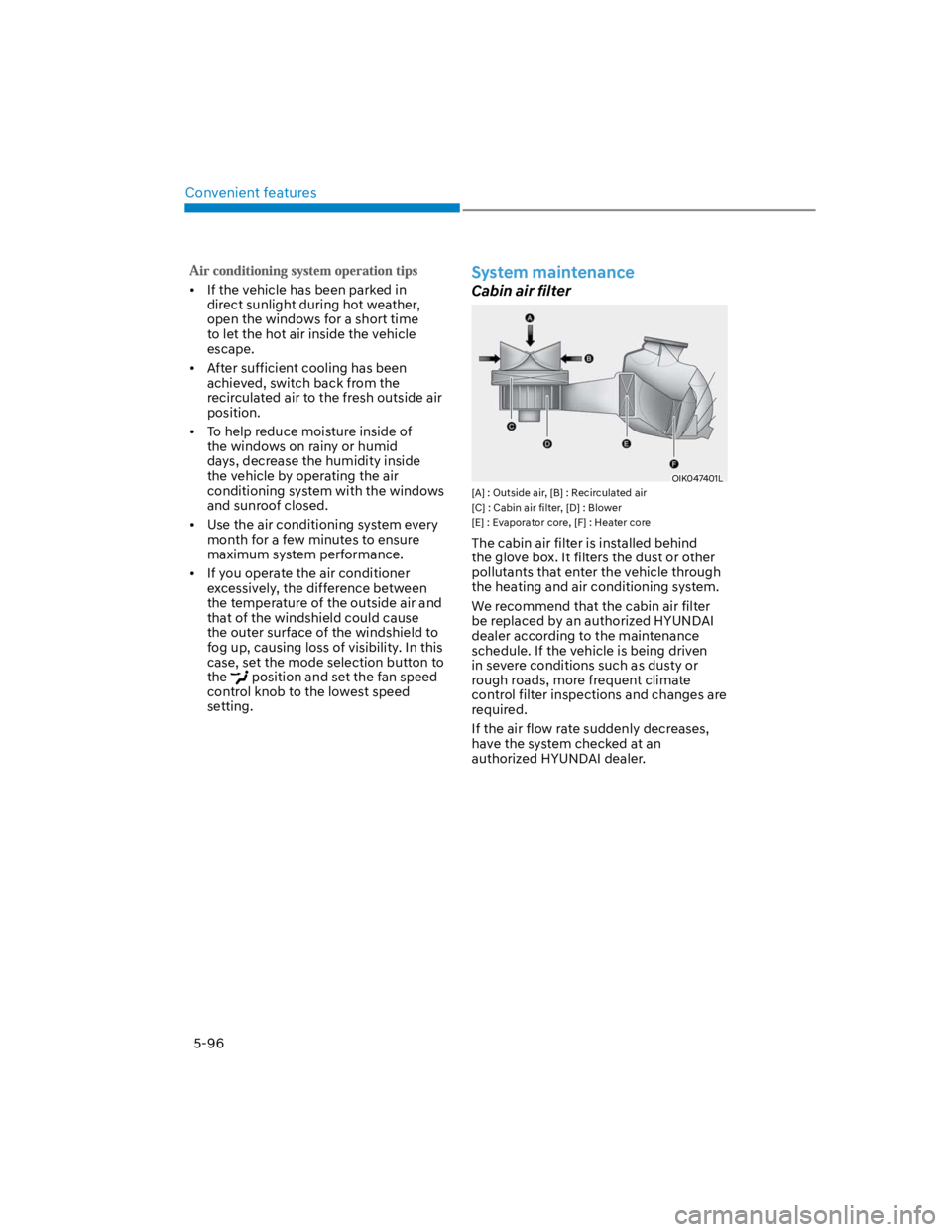
System maintenance
Cabin air filter
OIK047401L
[A] : Outside air, [B] : Recirculated air
[C] : Cabin air filter, [D] : Blower
[E] : Evaporator core, [F] : Heater core
The cabin air filter is installed behind
the glove box. It filters the dust or other
pollutants that enter the vehicle through
the heating and air conditioning system.
We recommend that the cabin air filter
be replaced by an authorized HYUNDAI
dealer according to the maintenance
schedule. If the vehicle is being driven
in severe conditions such as dusty or
rough roads, more frequent climate
control filter inspections and changes are
required.
If the air flow rate suddenly decreases,
have the system checked at an
authorized HYUNDAI dealer.
Page 232 of 579
Convenient features
5-98
WINDSHIELD DEFROSTING AND DEFOGGING
WARNING
Windshield heating
Do not use the position during
cooling operation in extremely humid
weather. The difference between the
temperature of the outside air and that
of the windshield could cause the outer
surface of the windshield to fog up,
causing loss of visibility could cause
an accident resulting in serious injury
or death. In this case, set the mode
selection button to the position
and fan speed control knob to a lower
speed.
For maximum defrost performance,
set the temperature control to the
highest temperature setting and
the fan speed control to the highest
setting.
If warm air to the floor is desired while
defrosting or defogging, set the mode
to the floor-defrost position.
Before driving, clear all snow and ice
from the windshield, rear window,
side view mirrors, and all side
windows.
Clear all snow and ice from the
hood and air inlet in the cowl grill
to improve heater and defroster
efficiency and to reduce the
probability of fogging up the inside of
the windshield.
NOTICE
If the engine temperature is still cold
after starting, then a brief engine warm
up period may be required for the
vented air flow to become warm or hot.
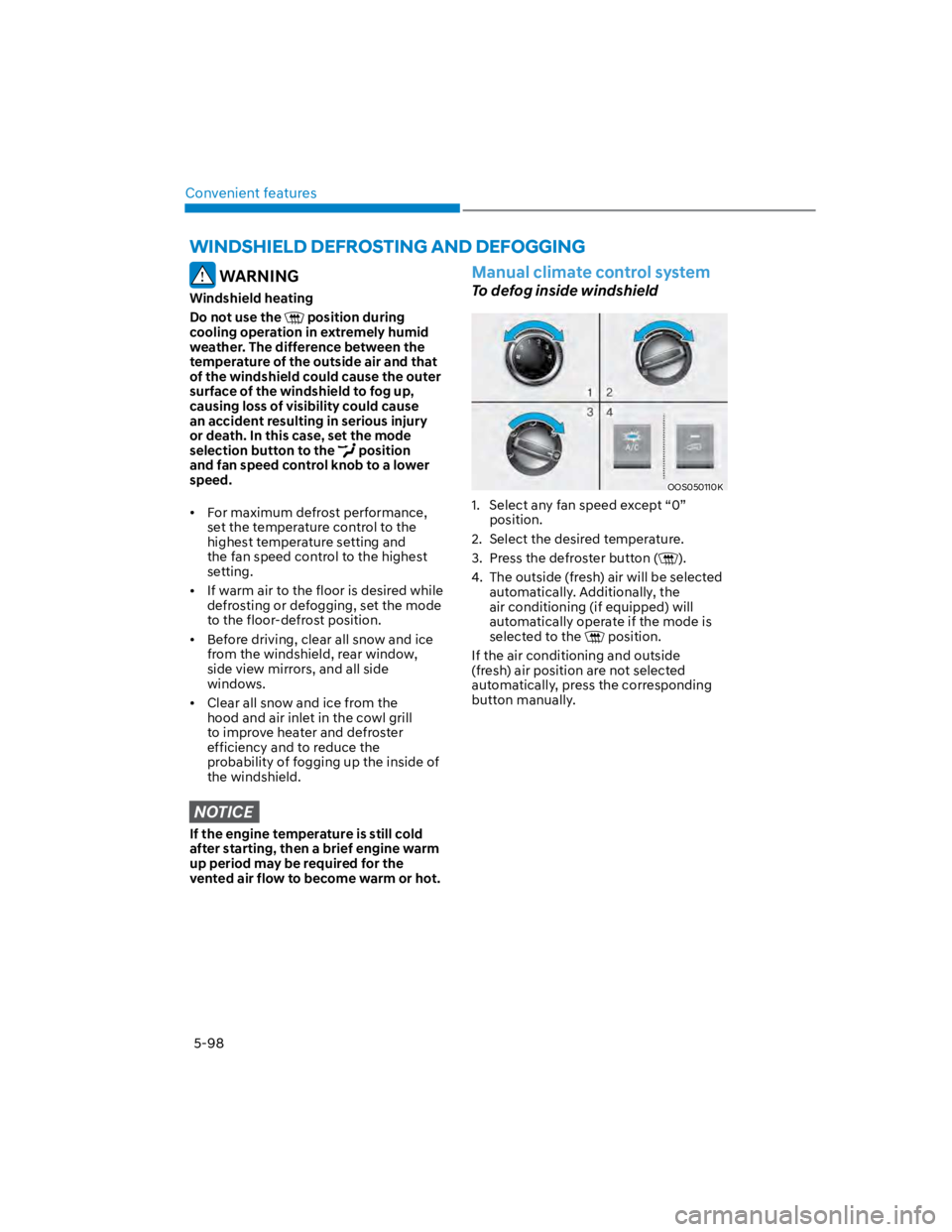
Manual climate control system
To defog inside windshield
OOS050110K
1. Select any fan speed except “0”
position.
2. Select the desired temperature.
3. Press the defroster button ().
4. The outside (fresh) air will be selected
automatically. Additionally, the
air conditioning (if equipped) will
automatically operate if the mode is
selected to the position.
If the air conditioning and outside
(fresh) air position are not selected
automatically, press the corresponding
button manually.
Page 234 of 579
Convenient features
5-100
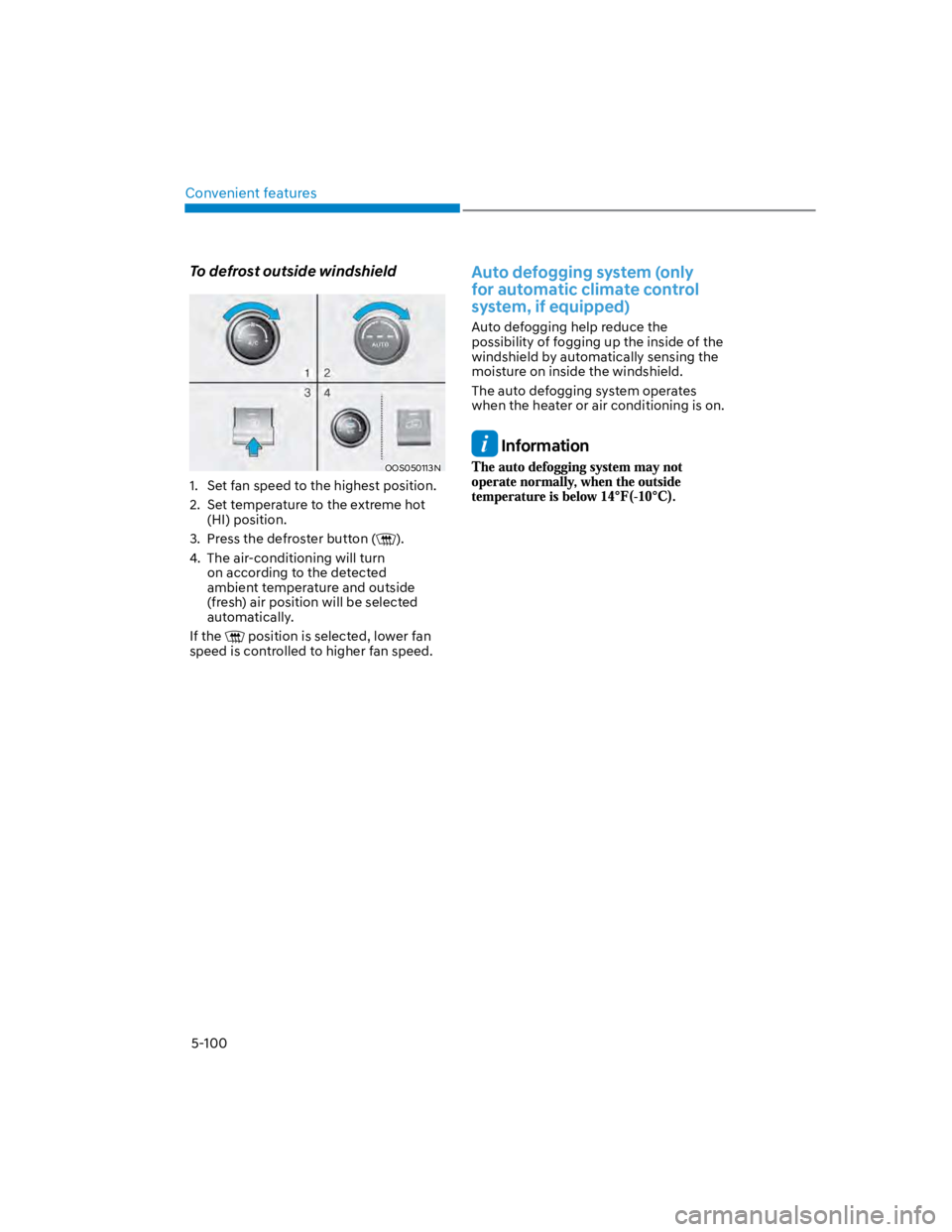
To defrost outside windshield
OOS050113N
1. Set fan speed to the highest position.
2. Set temperature to the extreme hot
(HI) position.
3. Press the defroster button ().
4. The air-conditioning will turn
on according to the detected
ambient temperature and outside
(fresh) air position will be selected
automatically.
If the position is selected, lower fan
speed is controlled to higher fan speed.
Auto defogging system (only
for automatic climate control
system, if equipped)
Auto defogging help reduce the
possibility of fogging up the inside of the
windshield by automatically sensing the
moisture on inside the windshield.
The auto defogging system operates
when the heater or air conditioning is on.
Information
Page 236 of 579
Convenient features
5-102
Defroster
NOTICE
To prevent damage to the rear window
defroster conducting elements bonded
to the inside surface of the rear window,
never use sharp instruments or window
cleaners containing abrasives to clean
the window.
Information
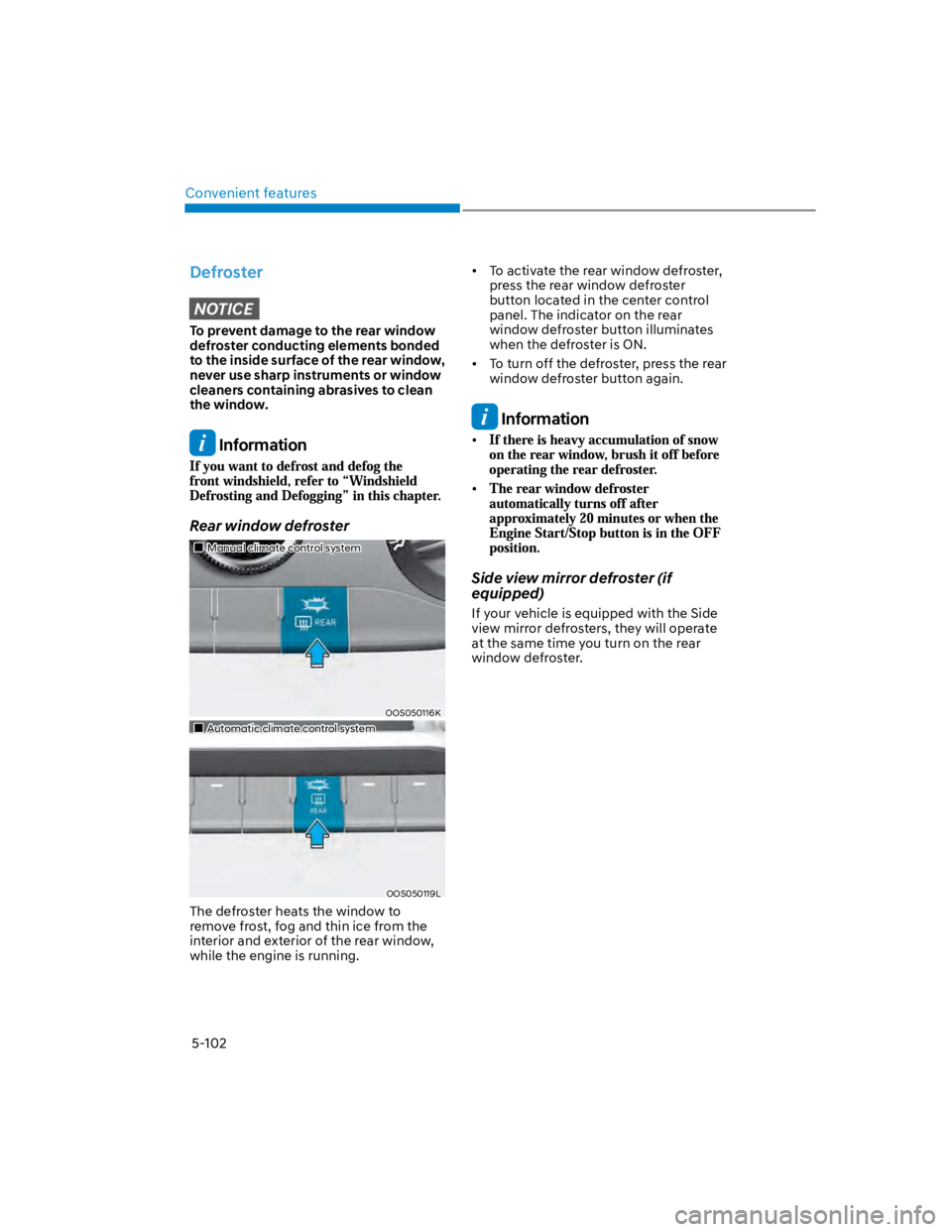
Rear window defroster
Manual climate control system
OOS050116K
Automatic climate control system
OOS050119L
The defroster heats the window to
remove frost, fog and thin ice from the
interior and exterior of the rear window,
while the engine is running.
To activate the rear window defroster,
press the rear window defroster
button located in the center control
panel. The indicator on the rear
window defroster button illuminates
when the defroster is ON.
To turn off the defroster, press the rear
window defroster button again.
Information
Side view mirror defroster (if
equipped)
If your vehicle is equipped with the Side
view mirror defrosters, they will operate
at the same time you turn on the rear
window defroster.
Page 238 of 579
Convenient features
5-104
WARNING
Never store cigarette lighters, propane
cylinders, or other flammable/explosive
materials in the vehicle. These items
may catch fire and/or explode if the
vehicle is exposed to hot temperatures
for extended periods.
WARNING
ALWAYS keep the storage compartment
covers closed securely while driving.
Items inside your vehicle are moving as
fast as the vehicle. If you have to stop
or turn quickly, or if there is a crash, the
items may fly out of the compartment
and may cause an injury if they strike
the driver or a passenger.
NOTICE
To avoid possible theft, do not leave
valuables in the storage compartments.
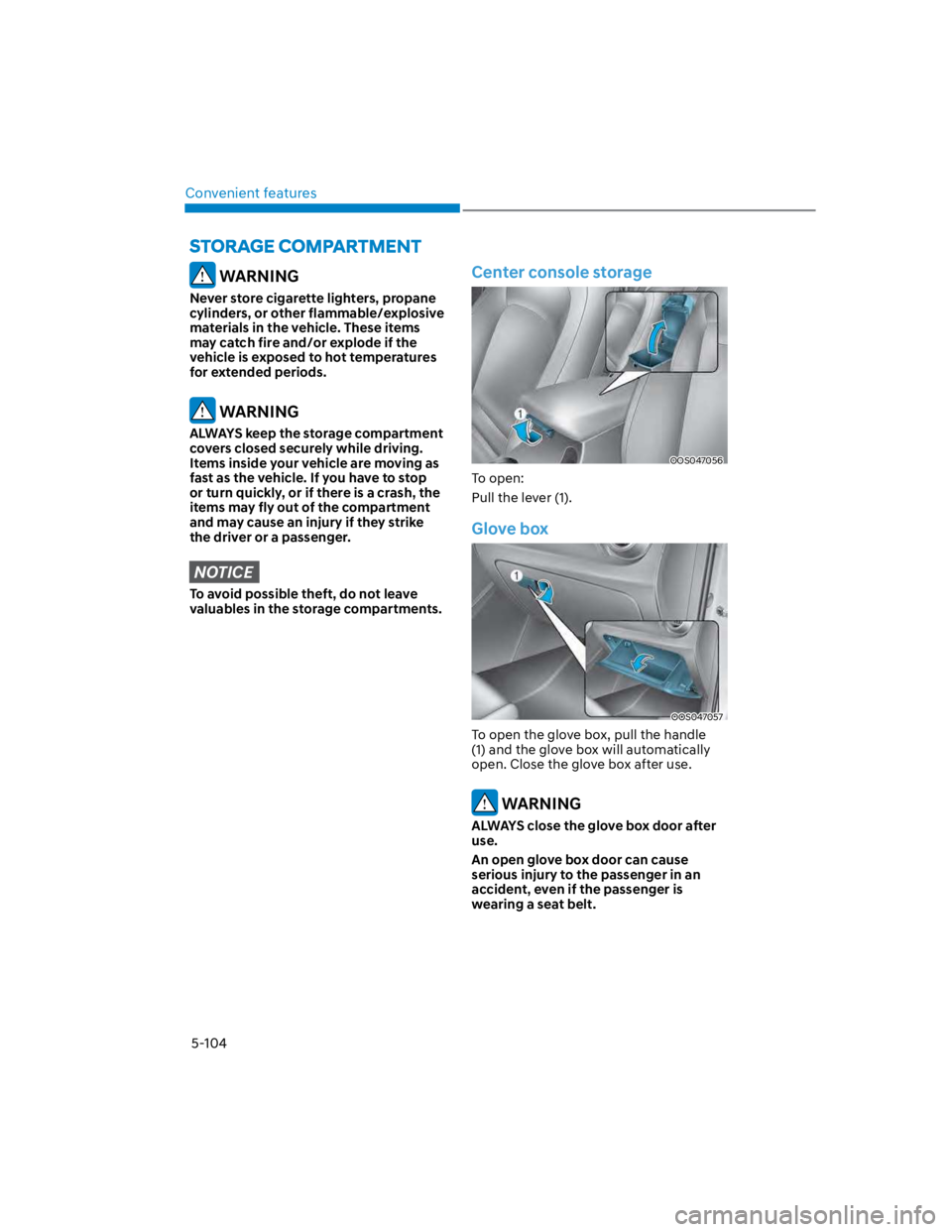
Center console storage
OOS047056
To open:
Pull the lever (1).
Glove box
OOS047057
To open the glove box, pull the handle
(1) and the glove box will automatically
open. Close the glove box after use.
WARNING
ALWAYS close the glove box door after
use.
An open glove box door can cause
serious injury to the passenger in an
accident, even if the passenger is
wearing a seat belt.
Page 240 of 579
Convenient features
5-106
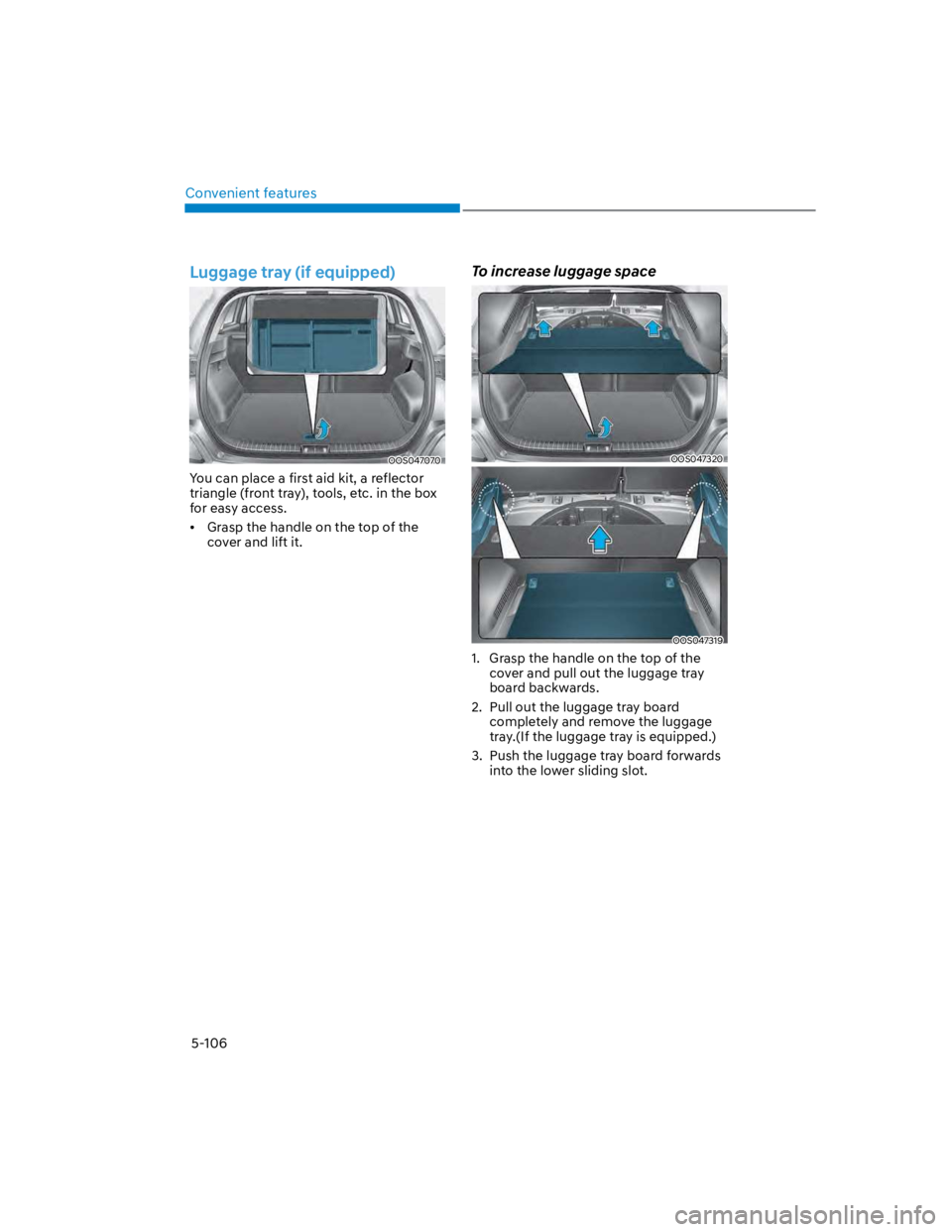
Luggage tray (if equipped)
OOS047070
You can place a first aid kit, a reflector
triangle (front tray), tools, etc. in the box
for easy access.
Grasp the handle on the top of the
cover and lift it.
To increase luggage space
OOS047320
OOS047319
1. Grasp the handle on the top of the
cover and pull out the luggage tray
board backwards.
2. Pull out the luggage tray board
completely and remove the luggage
tray.(If the luggage tray is equipped.)
3. Push the luggage tray board forwards
into the lower sliding slot.
Page 242 of 579
Convenient features
5-108
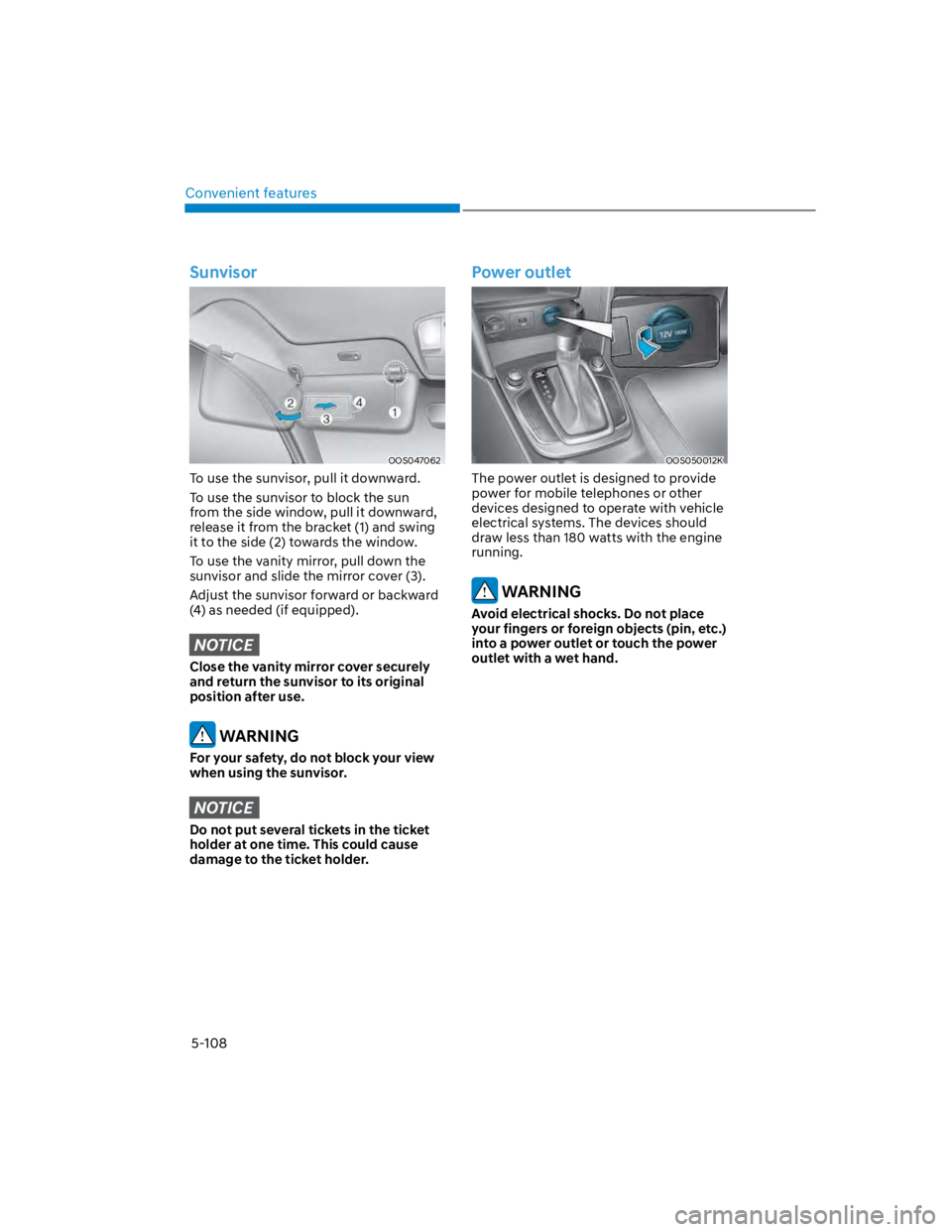
Sunvisor
OOS047062
To use the sunvisor, pull it downward.
To use the sunvisor to block the sun
from the side window, pull it downward,
release it from the bracket (1) and swing
it to the side (2) towards the window.
To use the vanity mirror, pull down the
sunvisor and slide the mirror cover (3).
Adjust the sunvisor forward or backward
(4) as needed (if equipped).
NOTICE
Close the vanity mirror cover securely
and return the sunvisor to its original
position after use.
WARNING
For your safety, do not block your view
when using the sunvisor.
NOTICE
Do not put several tickets in the ticket
holder at one time. This could cause
damage to the ticket holder.
Power outlet
OOS050012K
The power outlet is designed to provide
power for mobile telephones or other
devices designed to operate with vehicle
electrical systems. The devices should
draw less than 180 watts with the engine
running.
WARNING
Avoid electrical shocks. Do not place
your fingers or foreign objects (pin, etc.)
into a power outlet or touch the power
outlet with a wet hand.
Page 244 of 579
![HYUNDAI KONA 2022 Workshop Manual Convenient features
5-110
Wireless smart phone charging
system (if equipped)
OOS050015K
[A] : Indicator light, [B] : Charging pad
On certain models, the vehicle comes
equipped with a wireless smart](/img/35/41169/w960_41169-243.png "HYUNDAI KONA 2022 Workshop Manual Convenient features
5-110
Wireless smart phone charging
system (if equipped)
OOS050015K
[A] : Indicator light, [B] : Charging pad
On certain models, the vehicle comes
equipped with a wireless smart")
Convenient features
5-110
Wireless smart phone charging
system (if equipped)
OOS050015K
[A] : Indicator light, [B] : Charging pad
On certain models, the vehicle comes
equipped with a wireless smart phone
charger.
The system is available when all doors
are closed, and when the Engine Start/
Stop button is in the ACC or ON (or
START) position.
To charge a cellular phone
The wireless smart phone charging
system charges only the Qi-enabled
smart phones (). Read the label on
the smart phone accessory cover or
visit your smart phone manufacturer’s
website to check whether your smart
phone supports the Qi technology.
The wireless charging process starts
when you put a Qi-enabled smart phone
on the wireless charging unit.
1. Remove other items, including the
smart key, from the wireless charging
unit. If not, the wireless charging
process may be interrupted. Place
the smart phone on the center of the
charging pad.
2. The indicator light is orange when the
smart phone is charging. The indicator
light will turn blue when phone
charging is complete.
3. You can turn ON or OFF the wireless
charging function from the Settings
menu on the instrument cluster.
Select:
-
If your smart phone is not charging:
- Slightly change the position of the
smart phone on the charging pad.
- Make sure the indicator light is
orange.
The indicator light will blink orange for 10
seconds if there is a malfunction in the
wireless charging system.
In this case, temporarily stop the
charging process, and re-attempt to
charge your smart phone again.
The system warns you with a message on
the LCD display if the smart phone is still
on the wireless charging unit after the
vehicle is turned OFF and the front door
is opened.
For some manufacturer’s smart phones,
the system may not warn you even
though the smart phone is left on the
wireless charging unit. This is due to the
particular characteristic of the smart
phone and not a malfunction of the
wireless charging.
Information
Page 246 of 579
Convenient features
5-112
Clock
WARNING
Do not attempt to adjust the clock
while driving. Doing so may result in
distracted driving which may lead to
an accident involving personal injury or
death.
Vehicles with Audio system
Select the [SETUP/CLOCK] button on the
Set time: Set the time displayed on
the audio screen.
Time format: Choose between 12-hour
and 24-hour time formats.
Vehicles with Navigation system
Select the Settings menu on the
GPS time: Displays time according to
the received GNSS time.
24-hour: Switches to 12 hour or 24
hour.
For more details, please refer to the
separate manual that was supplied with
your vehicle.
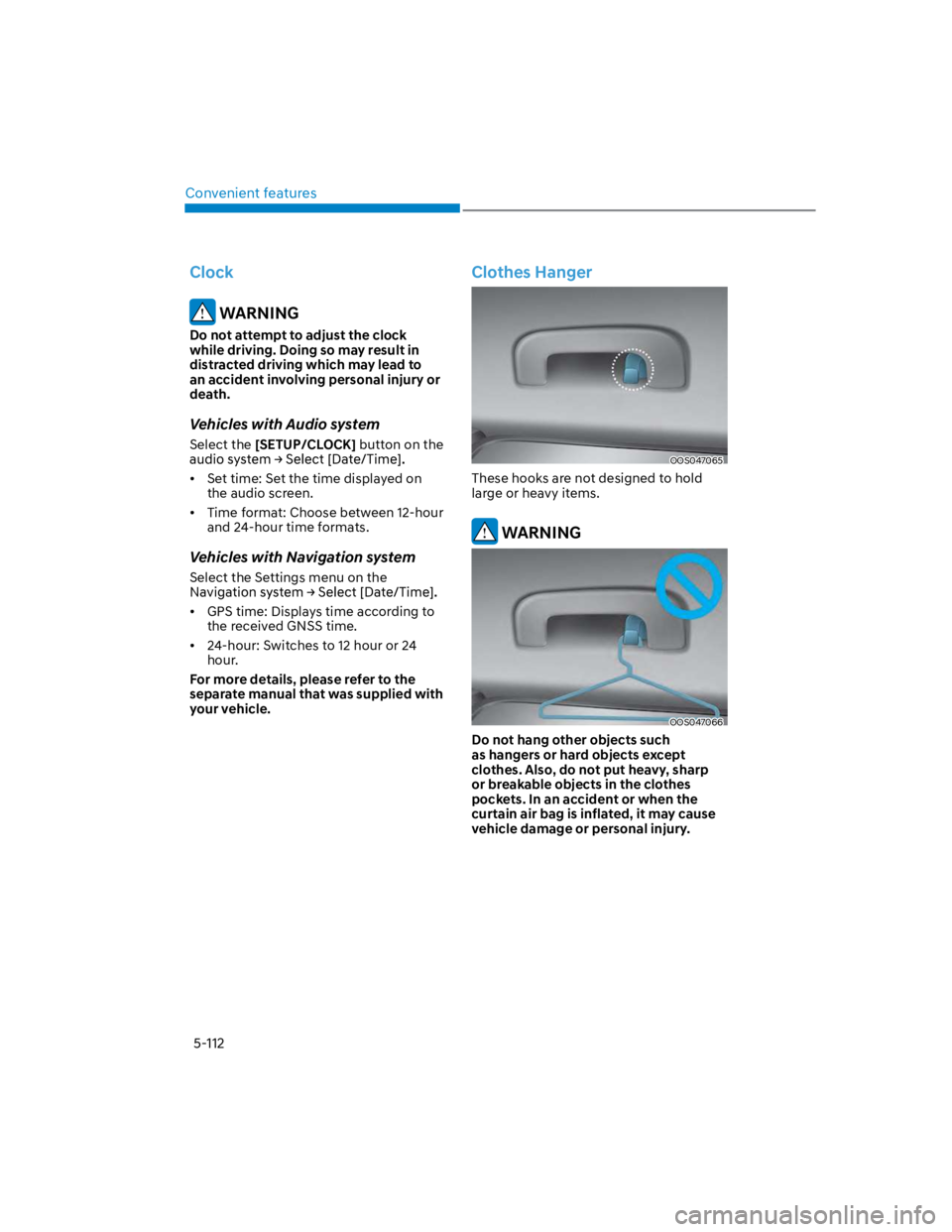
Clothes Hanger
OOS047065
These hooks are not designed to hold
large or heavy items.
WARNING
OOS047066
Do not hang other objects such
as hangers or hard objects except
clothes. Also, do not put heavy, sharp
or breakable objects in the clothes
pockets. In an accident or when the
curtain air bag is inflated, it may cause
vehicle damage or personal injury.
Page 248 of 579
Convenient features
5-114
Luggage net holder (if equipped)
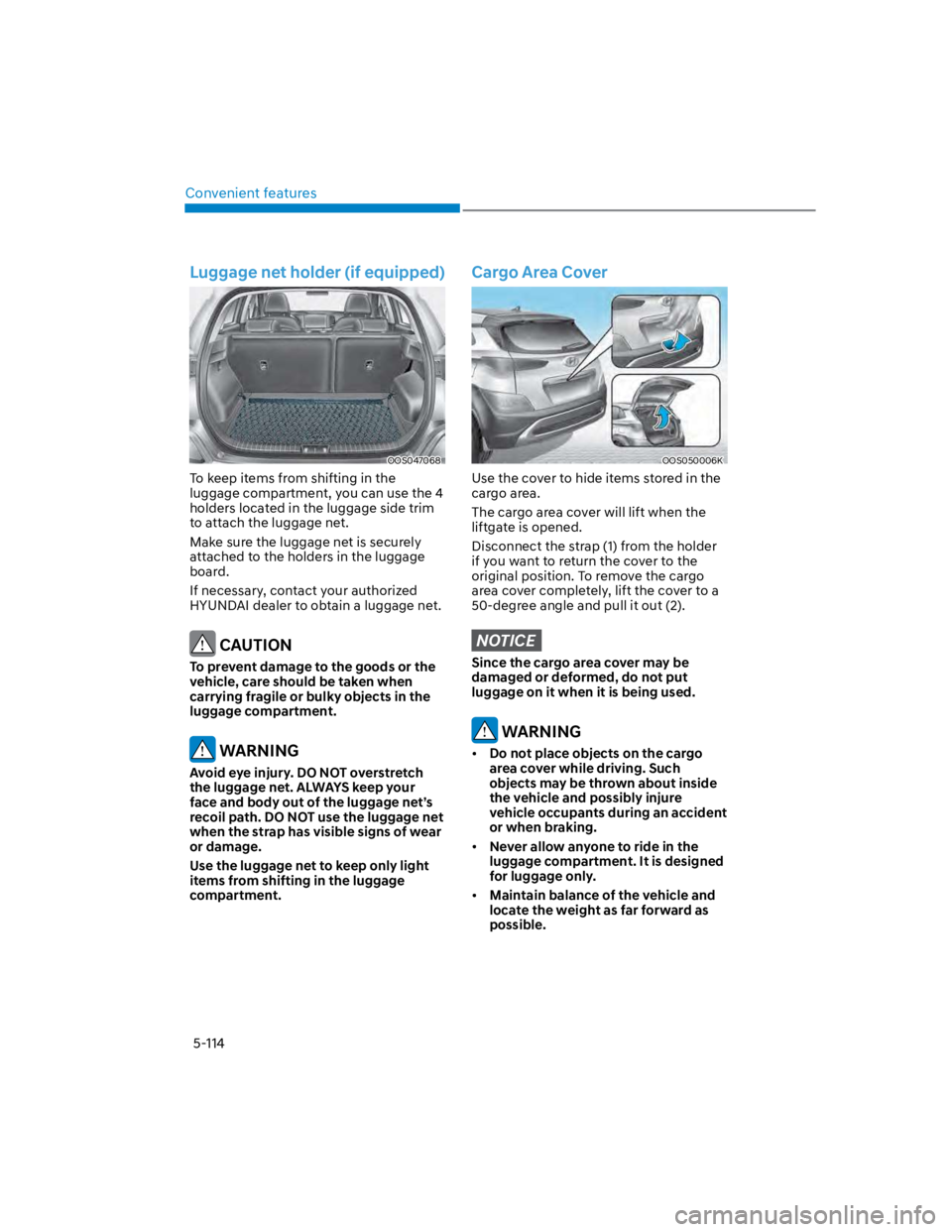
OOS047068
To keep items from shifting in the
luggage compartment, you can use the 4
holders located in the luggage side trim
to attach the luggage net.
Make sure the luggage net is securely
attached to the holders in the luggage
board.
If necessary, contact your authorized
HYUNDAI dealer to obtain a luggage net.
CAUTION
To prevent damage to the goods or the
vehicle, care should be taken when
carrying fragile or bulky objects in the
luggage compartment.
WARNING
Avoid eye injury. DO NOT overstretch
the luggage net. ALWAYS keep your
face and body out of the luggage net’s
recoil path. DO NOT use the luggage net
when the strap has visible signs of wear
or damage.
Use the luggage net to keep only light
items from shifting in the luggage
compartment.
Cargo Area Cover
OOS050006K
Use the cover to hide items stored in the
cargo area.
The cargo area cover will lift when the
liftgate is opened.
Disconnect the strap (1) from the holder
if you want to return the cover to the
original position. To remove the cargo
area cover completely, lift the cover to a
50-degree angle and pull it out (2).
NOTICE
Since the cargo area cover may be
damaged or deformed, do not put
luggage on it when it is being used.
WARNING
Do not place objects on the cargo
area cover while driving. Such
objects may be thrown about inside
the vehicle and possibly injure
vehicle occupants during an accident
or when braking.
Never allow anyone to ride in the
luggage compartment. It is designed
for luggage only.
Maintain balance of the vehicle and
locate the weight as far forward as
possible.