tow HYUNDAI KONA EV 2021 User Guide
[x] Cancel search | Manufacturer: HYUNDAI, Model Year: 2021, Model line: KONA EV, Model: HYUNDAI KONA EV 2021Pages: 478, PDF Size: 32.83 MB
Page 160 of 478
3-76
When this warning message is
displayed, do not accelerate or
start the vehicle suddenly.
When the high voltage battery
level is low, the power down
warning illuminates and the
power output from the vehicle is
limited. Charge the battery
immediately since your vehicle
may not drive uphill or skid on a
slope with the warning light ON.
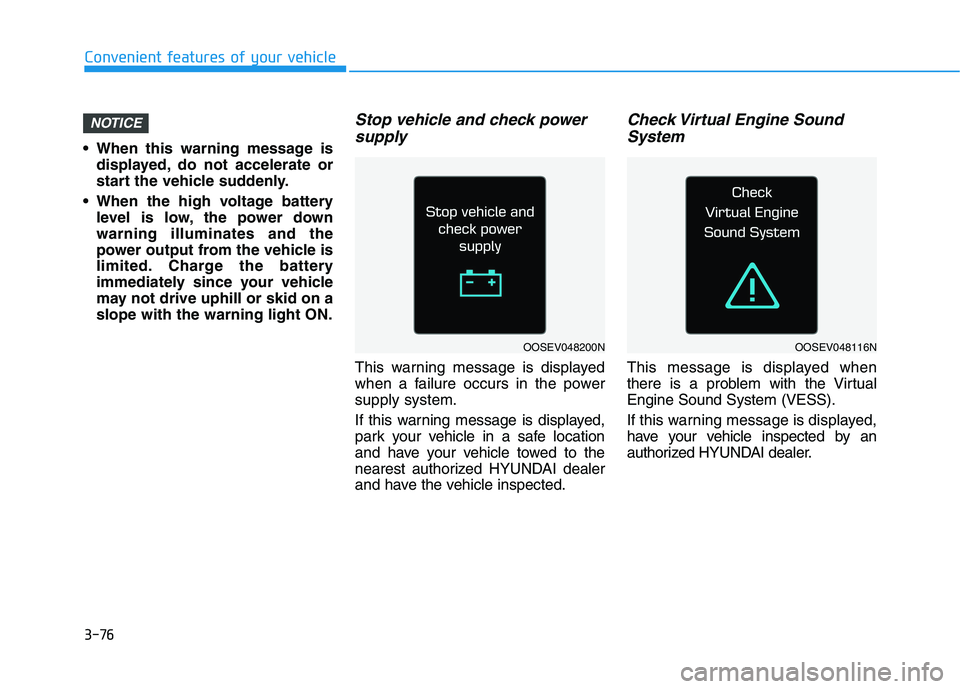
Stop vehicle and check power
supply
This warning message is displayed
when a failure occurs in the power
supply system.
If this warning message is displayed,
park your vehicle in a safe location
and have your vehicle towed to the
nearest authorized HYUNDAI dealer
and have the vehicle inspected.
Check Virtual Engine Sound
System
This message is displayed when
there is a problem with the Virtual
Engine Sound System (VESS).
If this warning message is displayed,
have your vehicle inspected by an
authorized HYUNDAI dealer.
NOTICE
Convenient features of your vehicle
OOSEV048200NOOSEV048116N
Page 185 of 478
3-101
Convenient features of your vehicle
3
High beam operation
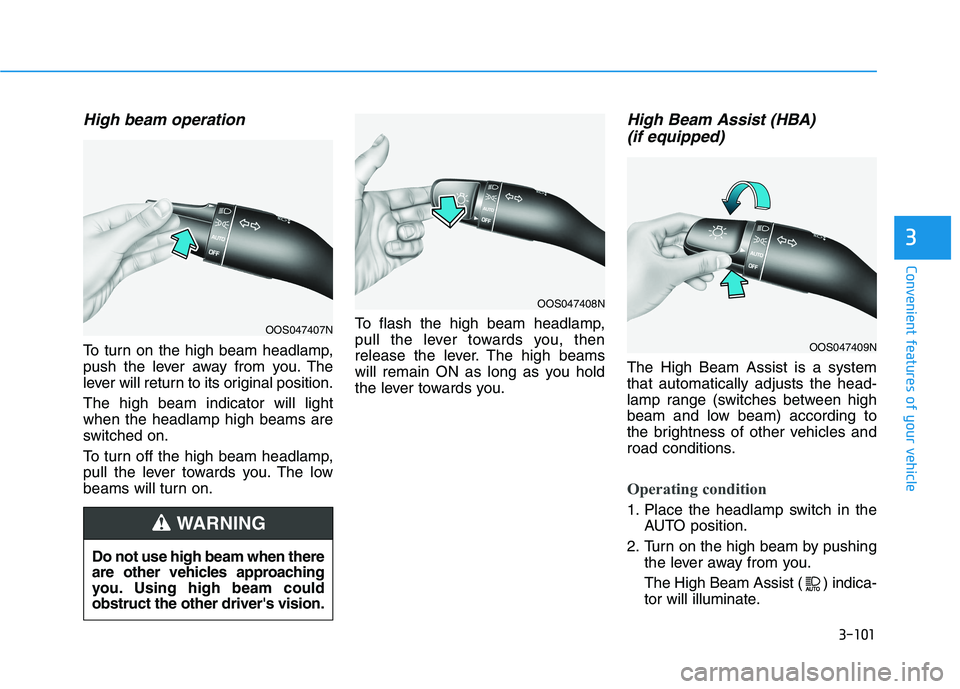
To turn on the high beam headlamp,
push the lever away from you. The
lever will return to its original position.
The high beam indicator will light
when the headlamp high beams are
switched on.
To turn off the high beam headlamp,
pull the lever towards you. The low
beams will turn on.To flash the high beam headlamp,
pull the lever towards you, then
release the lever. The high beams
will remain ON as long as you hold
the lever towards you.
High Beam Assist (HBA)
(if equipped)
The High Beam Assist is a system
that automatically adjusts the head-
lamp range (switches between high
beam and low beam) according to
the brightness of other vehicles and
road conditions.
Operating condition
1. Place the headlamp switch in the
AUTO position.
2. Turn on the high beam by pushing
the lever away from you.
The High Beam Assist ( ) indica-
tor will illuminate.
Do not use high beam when there
are other vehicles approaching
you. Using high beam could
obstruct the other driver's vision.
WARNING
OOS047407N
OOS047408N
OOS047409N
Page 186 of 478
3-102
Convenient features of your vehicle
3. High Beam Assist will turn on
when vehicle speed is above 25
mph (40 km/h).
If the headlamp switch is pushed
away when High Beam Assist is
operating, High Beam Assist will
turn off and the high beam will be
on continuously.
If the headlamp switch is pulled
towards you when the high beam
is off, the high beam will turn on
without High Beam Assist can-
celed. When you let go of the light
switch, the lever will move to the
middle and the high beam will
turn off.
If the headlamp switch is pulled
towards you when the high beam
is on by High Beam Assist, the
low beam will be on and High
Beam Assist will turn off.
If the headlamp switch is placed
to the headlamp ON position,
High Beam Assist will turn off
and the low beam will be on con-
tinuously.When High Beam Assist is operating,
the high beam switches to low beam if
any of the following conditions occur :
- When the headlamp of an on-com-
ing vehicle is detected.
- When the tail lamp of a vehicle in
front is detected.
- When the headlamp or tail lamp of
a motorcycle or a bicycle is detect-
ed.
- When the surrounding ambient light
is bright enough that high beams
are not required.
- When streetlights or other lights
are detected.
- When the headlamp switch is not in
the AUTO position.
- When High Beam Assist is off.
- When vehicle speed is below 20 mph
(30 km/h).
Warning light and message
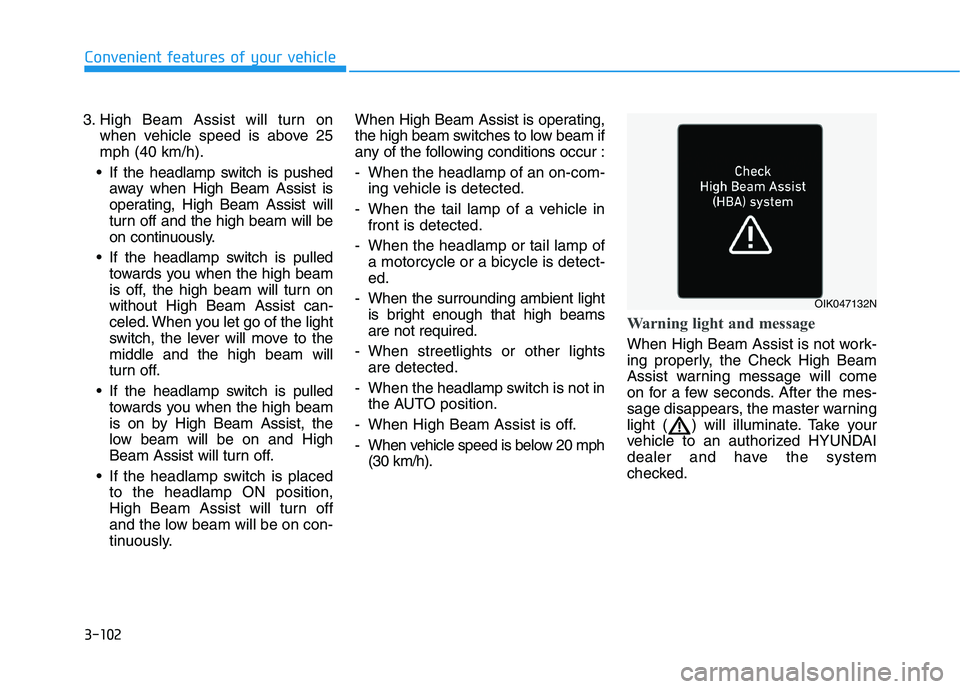
When High Beam Assist is not work-
ing properly, the Check High Beam
Assist warning message will come
on for a few seconds. After the mes-
sage disappears, the master warning
light ( ) will illuminate. Take your
vehicle to an authorized HYUNDAI
dealer and have the system
checked.
OIK047132N
Page 187 of 478
3-103
Convenient features of your vehicle
3
The system may not operate nor-
mally if any of the following con-
ditions should occur:
1) When the illumination from
an on-coming vehicle or a
vehicle in front is dim. Such
examples may include:
When the headlamps of an on-
coming vehicle or the tail
lamps of a vehicle in front is
covered with dust, snow, or
water.
When the headlamps on an on-
coming vehicle are OFF, but the
fog lamps are ON.
2) When the High Beam Assist
camera is adversely affected
by an external condition.
Such examples may include:
When the vehicle's head-
lamps have been damaged or
not repaired properly.
When the vehicle headlamps
are not aimed properly.
When the vehicle is driven on
a narrow curved road or rough
road.
When the vehicle is driven on
an uphill road or downhill
road.
When only part of the vehicle in
front is visible on a crossroad
or curved road.
When there is a traffic light,
reflecting sign, flashing sign or
mirror.
When the road conditions are
bad such as being wet or cov-
ered with snow.
When a vehicle suddenly
appears from a curve.
When the vehicle is tilted from
a flat tire or being towed.
When Lane Keeping Assist
system warning light illumi-
nates (if equipped).
When the light from the on-
coming or front vehicle is not
detected because of smoke,
fog, snow, etc.
When the front window is cov-
ered with foreign matters such
as ice, dust, fog, or is damaged.
3) When the forward visibility is
poor. Such examples may
include:
When the headlamps of an on-
coming vehicle or a vehicle in
front is not detected due to
poor outside visibility (smog,
smoke, dust, fog, heavy rain,
snow, etc.).
When the windshield visibility
is poor.
WARNING
Page 194 of 478
3-110
Convenient features of your vehicle
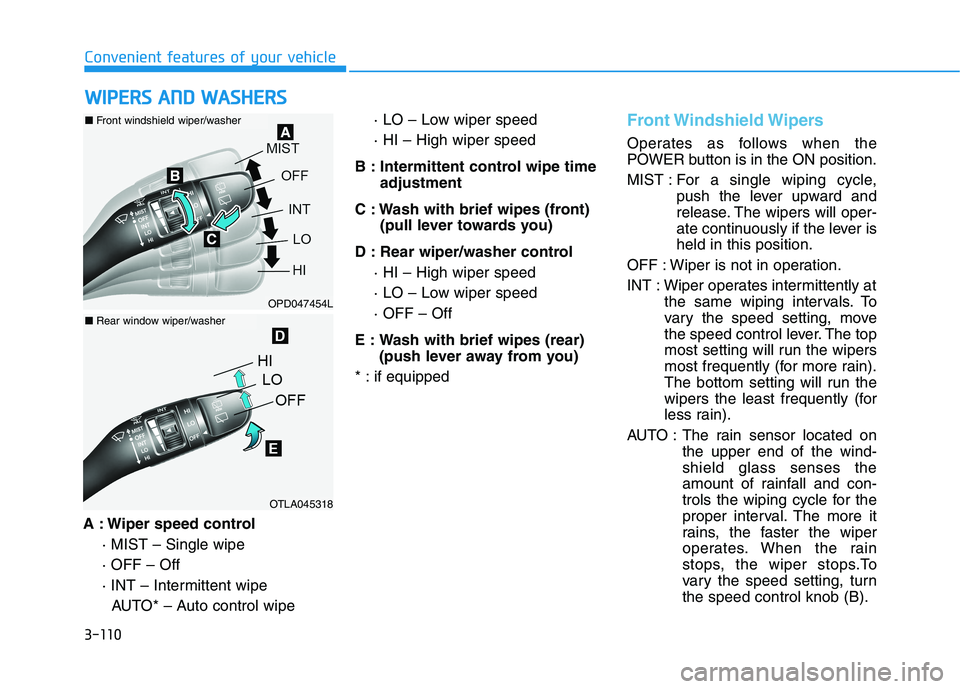
A : Wiper speed control
· MIST – Single wipe
· OFF – Off
· INT – Intermittent wipe
AUTO* – Auto control wipe· LO – Low wiper speed
· HI – High wiper speed
B : Intermittent control wipe time
adjustment
C : Wash with brief wipes (front)
(pull lever towards you)
D : Rear wiper/washer control
· HI – High wiper speed
· LO – Low wiper speed
· OFF – Off
E : Wash with brief wipes (rear)
(push lever away from you)
* : if equipped
Front Windshield Wipers
Operates as follows when the
POWER button is in the ON position.
MIST : For a single wiping cycle,
push the lever upward and
release. The wipers will oper-
ate continuously if the lever is
held in this position.
OFF : Wiper is not in operation.
INT : Wiper operates intermittently at
the same wiping intervals. To
vary the speed setting, move
the speed control lever. The top
most setting will run the wipers
most frequently (for more rain).
The bottom setting will run the
wipers the least frequently (for
less rain).
AUTO : The rain sensor located on
the upper end of the wind-
shield glass senses the
amount of rainfall and con-
trols the wiping cycle for the
proper interval. The more it
rains, the faster the wiper
operates. When the rain
stops, the wiper stops.To
vary the speed setting, turn
the speed control knob (B).
W WI
IP
PE
ER
RS
S
A
AN
ND
D
W
WA
AS
SH
HE
ER
RS
S
OPD047454L
OTLA045318
■Front windshield wiper/washer
■Rear window wiper/washer
Page 196 of 478
3-112
Convenient features of your vehicle
When washing the vehicle, set
the wiper switch in the OFF posi-
tion to stop the auto wiper oper-
ation. The wiper may operate
and be damaged if the switch is
set in the AUTO mode while
washing the vehicle.
Do not remove the sensor cover
located on the upper end of the
passenger side windshield
glass. Damage to system parts
could occur and may not be cov-
ered by your vehicle warranty.
Because of using a photo sen-
sor, temporary malfunction
could occur according to sud-
den ambient light change made
by stone and dust while driving.
Front Windshield Washers
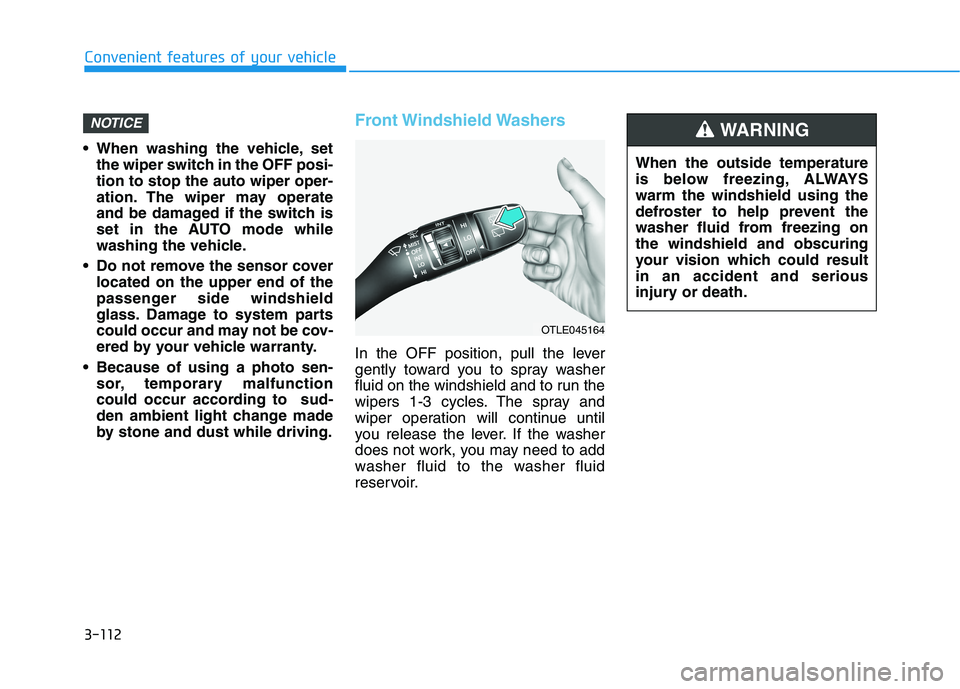
In the OFF position, pull the lever
gently toward you to spray washer
fluid on the windshield and to run the
wipers 1-3 cycles. The spray and
wiper operation will continue until
you release the lever. If the washer
does not work, you may need to add
washer fluid to the washer fluid
reservoir.
NOTICE
When the outside temperature
is below freezing, ALWAYS
warm the windshield using the
defroster to help prevent the
washer fluid from freezing on
the windshield and obscuring
your vision which could result
in an accident and serious
injury or death.
WARNING
OTLE045164
Page 207 of 478
3-123
Convenient features of your vehicle
3
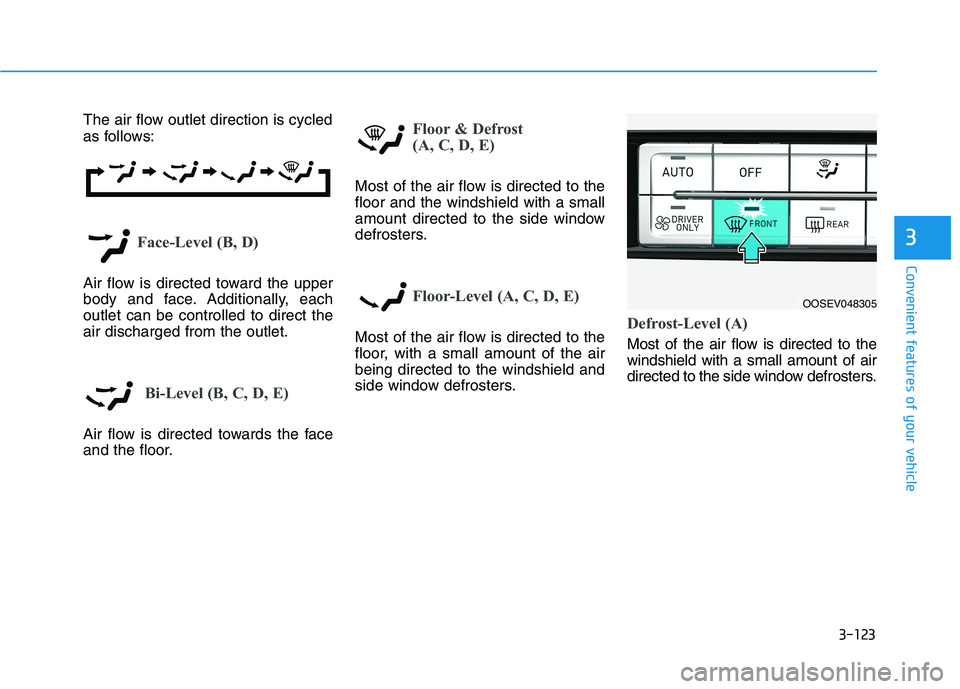
The air flow outlet direction is cycled
as follows:
Face-Level (B, D)
Air flow is directed toward the upper
body and face. Additionally, each
outlet can be controlled to direct the
air discharged from the outlet.
Bi-Level (B, C, D, E)
Air flow is directed towards the face
and the floor.
Floor & Defrost
(A, C, D, E)
Most of the air flow is directed to the
floor and the windshield with a small
amount directed to the side window
defrosters.
Floor-Level (A, C, D, E)
Most of the air flow is directed to the
floor, with a small amount of the air
being directed to the windshield and
side window defrosters.Defrost-Level (A)
Most of the air flow is directed to the
windshield with a small amount of air
directed to the side window defrosters.
OOSEV048305
Page 210 of 478
3-126
Convenient features of your vehicle
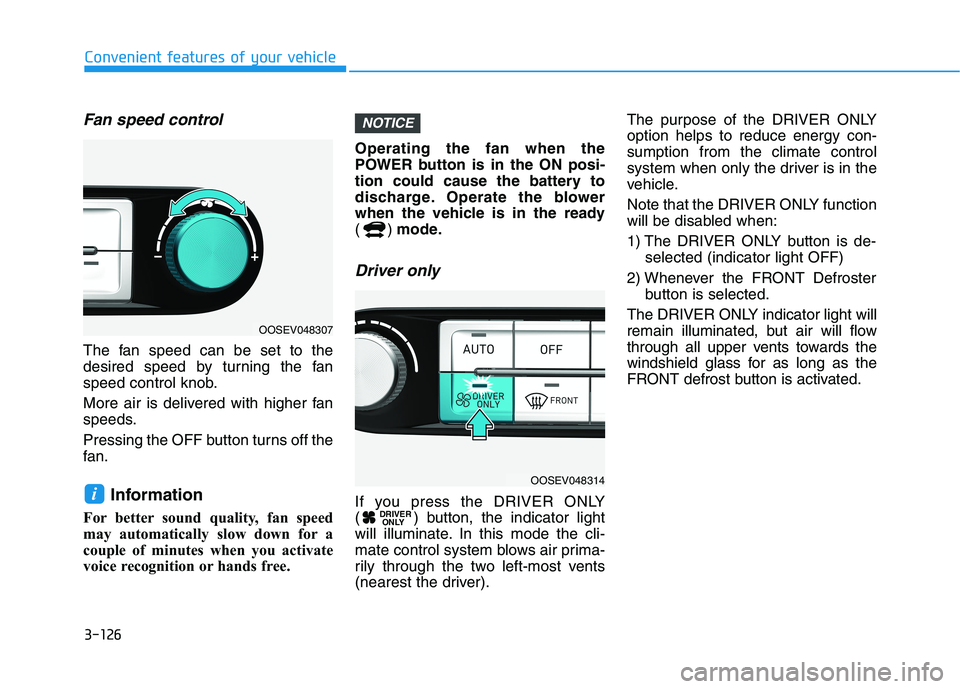
Fan speed control
The fan speed can be set to the
desired speed by turning the fan
speed control knob.
More air is delivered with higher fan
speeds.
Pressing the OFF button turns off the
fan.
Information
For better sound quality, fan speed
may automatically slow down for a
couple of minutes when you activate
voice recognition or hands free.Operating the fan when the
POWER button is in the ON posi-
tion could cause the battery to
discharge. Operate the blower
when the vehicle is in the ready
() mode.
Driver only
If you press the DRIVER ONLY
( ) button, the indicator light
will illuminate. In this mode the cli-
mate control system blows air prima-
rily through the two left-most vents
(nearest the driver).The purpose of the DRIVER ONLY
option helps to reduce energy con-
sumption from the climate control
system when only the driver is in the
vehicle.
Note that the DRIVER ONLY function
will be disabled when:
1) The DRIVER ONLY button is de-
selected (indicator light OFF)
2) Whenever the FRONT Defroster
button is selected.
The DRIVER ONLY indicator light will
remain illuminated, but air will flow
through all upper vents towards the
windshield glass for as long as the
FRONT defrost button is activated.DRIVER
ONLY
NOTICE
i
OOSEV048307
OOSEV048314
Page 224 of 478
3-140
Convenient features of your vehicle
Keep your drinks sealed while
driving to prevent spilling your
drink. If liquid spills, it may get
into the vehicle's electrical/elec-
tronic system and damage elec-
trical/electronic parts.
When cleaning spilled liquids do
not use hot air to blow out or dry
the cup holder. This may dam-
age the interior.
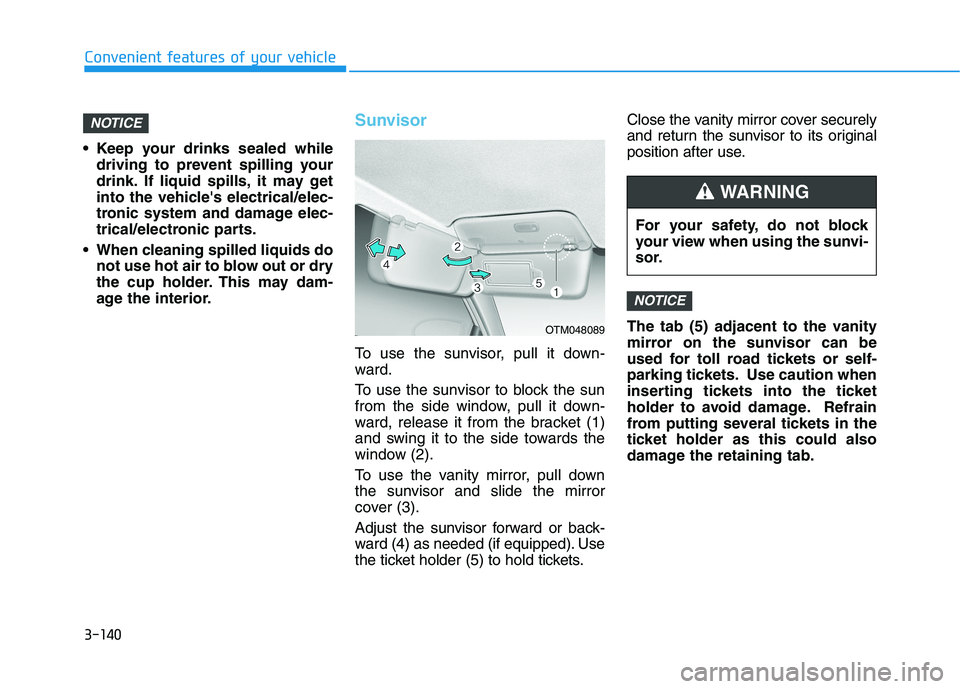
Sunvisor
To use the sunvisor, pull it down-
ward.
To use the sunvisor to block the sun
from the side window, pull it down-
ward, release it from the bracket (1)
and swing it to the side towards the
window (2).
To use the vanity mirror, pull down
the sunvisor and slide the mirror
cover (3).
Adjust the sunvisor forward or back-
ward (4) as needed (if equipped). Use
the ticket holder (5) to hold tickets.Close the vanity mirror cover securely
and return the sunvisor to its original
position after use.
The tab (5) adjacent to the vanity
mirror on the sunvisor can be
used for toll road tickets or self-
parking tickets. Use caution when
inserting tickets into the ticket
holder to avoid damage. Refrain
from putting several tickets in the
ticket holder as this could also
damage the retaining tab.
NOTICE
NOTICE
OTM048089
For your safety, do not block
your view when using the sunvi-
sor.
WARNING
Page 238 of 478
Winter Driving ....................................................5-116
Snow or Icy Conditions................................................5-116
Winter Precautions .......................................................5-118
Vehicle Load Limit..............................................5-120
Tire Loading Information Label .................................5-120
Trailer Towing .....................................................5-124
5