chapter 6 HYUNDAI KONA EV 2021 Owner's Manual
[x] Cancel search | Manufacturer: HYUNDAI, Model Year: 2021, Model line: KONA EV, Model: HYUNDAI KONA EV 2021Pages: 478, PDF Size: 32.83 MB
Page 151 of 478
3-67
Convenient features of your vehicle
3
Door, Hood, Liftgate open
indicator
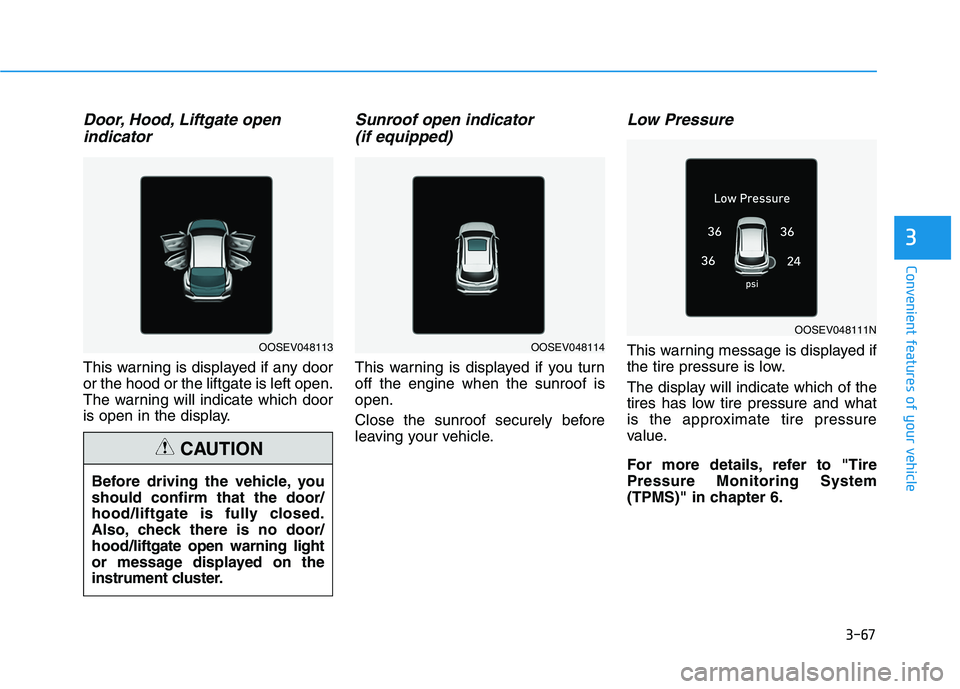
This warning is displayed if any door
or the hood or the liftgate is left open.
The warning will indicate which door
is open in the display.
Sunroof open indicator
(if equipped)
This warning is displayed if you turn
off the engine when the sunroof is
open.
Close the sunroof securely before
leaving your vehicle.
Low Pressure
This warning message is displayed if
the tire pressure is low.
The display will indicate which of the
tires has low tire pressure and what
is the approximate tire pressure
value.
For more details, refer to "Tire
Pressure Monitoring System
(TPMS)" in chapter 6.
OOSEV048111N
OOSEV048114
Before driving the vehicle, you
should confirm that the door/
hood/liftgate is fully closed.
Also, check there is no door/
hood/liftgate open warning light
or message displayed on the
instrument cluster.
CAUTION
OOSEV048113
Page 152 of 478
3-68
Convenient features of your vehicle
Lights mode
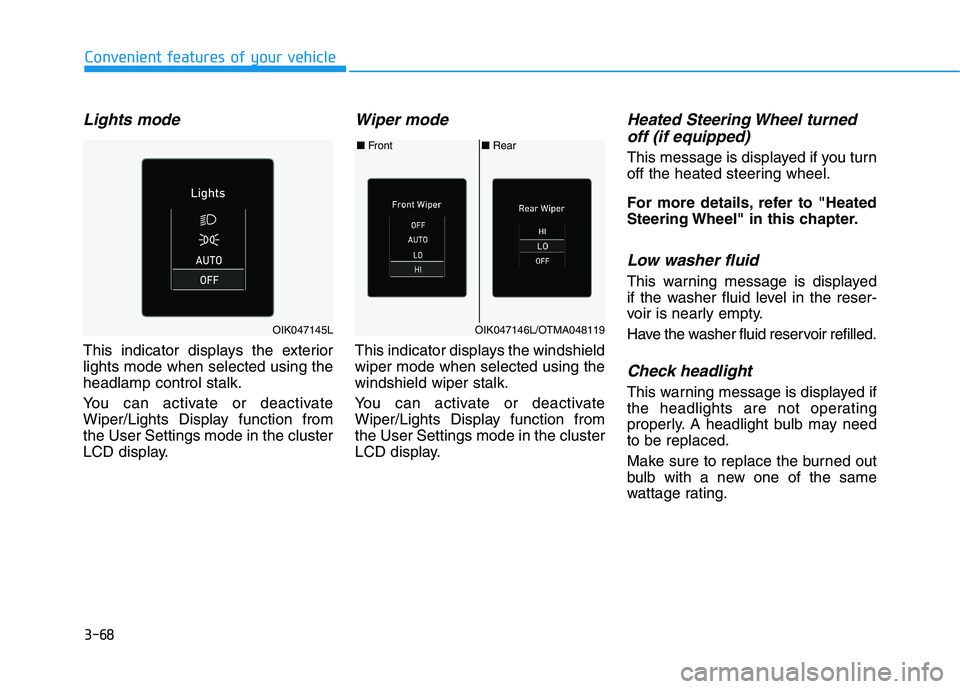
This indicator displays the exterior
lights mode when selected using the
headlamp control stalk.
You can activate or deactivate
Wiper/Lights Display function from
the User Settings mode in the cluster
LCD display.
Wiper mode
This indicator displays the windshield
wiper mode when selected using the
windshield wiper stalk.
You can activate or deactivate
Wiper/Lights Display function from
the User Settings mode in the cluster
LCD display.
Heated Steering Wheel turned
off (if equipped)
This message is displayed if you turn
off the heated steering wheel.
For more details, refer to "Heated
Steering Wheel" in this chapter.
Low washer fluid
This warning message is displayed
if the washer fluid level in the reser-
voir is nearly empty.
Have the washer fluid reservoir refilled.
Check headlight
This warning message is displayed if
the headlights are not operating
properly. A headlight bulb may need
to be replaced.
Make sure to replace the burned out
bulb with a new one of the same
wattage rating.
■Rear ■Front
OIK047146L/OTMA048119OIK047145L
Page 153 of 478
3-69
Convenient features of your vehicle
3
Check turn signal
This warning message is displayed if
the turn signal lamps are not operat-
ing properly. A lamp may need to be
replaced.
Make sure to replace the burned out
bulb with a new one of the same
wattage rating.
Check brake light
This warning message is displayed if
the stop lamps are not operating
properly. A lamp may need to be
replaced.
Make sure to replace the burned out
bulb with a new one of the same
wattage rating.
Check cornering lamp
(if equipped)
This warning message is displayed if
the cornering lamps are not operat-
ing properly. A lamp may need to be
replaced.
Make sure to replace the burned out
bulb with a new one of the same
wattage rating.
Check High Beam Assist (HBA)
system (if equipped)
This warning message is displayed if
there is a problem with High Beam
Assist system. Have the vehicle
inspected by an authorized HYUNDAI
dealer.
For more details, refer to "High
Beam Assist (HBA)" in chapter 3.
Check headlight LED (if equipped)
This warning message is displayed if
there is a problem with the LED
headlight. Have the vehicle inspected
by an authorized HYUNDAI dealer.
Check Forward Collision
Avoidance Assist system
This warning message is displayed if
there is a problem with Forward
Collision-Avoidance Assist system.
Have the vehicle inspected by an
authorized HYUNDAI dealer.
For more details, refer to "Forward
Collision-Avoidance Assist (FCA)"
in chapter 5.
Check Blind-Spot Collision
Warning (BCW) system
This warning message is displayed if
there is a problem with the Blind-
Spot Collision Warning system. Have
the vehicle inspected by an author-
ized HYUNDAI dealer.
For more details, refer to "Blind-
Spot Collision Warning/Rear Cross-
Traffic Collision Warning (RCCW)
System in chapter 5.
Page 154 of 478
3-70
Convenient features of your vehicle
Check Smart Cruise Control
System (if equipped)
This warning message is displayed if
there is a problem with the Smart
Cruise Control system. Have the
vehicle inspected by an authorized
HYUNDAI dealer.
For more details, refer to "Smart
Cruise Control (SCC)" in chapter
5.
Check Driver Attention Warning
(DAW) system
This warning message is displayed if
there is a problem with Driver
Attention Warning. Have the vehicle
inspected by an authorized HYUNDAI
dealer.
For more details, refer to "Driver
Attention Warning (DAW)" in chap-
ter 5.
Check Lane Keeping Assist
(LKA) system
This warning message is displayed if
there is a problem with Check Lane
Keeping Assist system. Have the
vehicle inspected by an authorized
HYUNDAI dealer.
For more details, refer to "Check
Lane Keeping Assist (LKA)" in
chapter 5.
Page 164 of 478
3-80
Convenient features of your vehicle
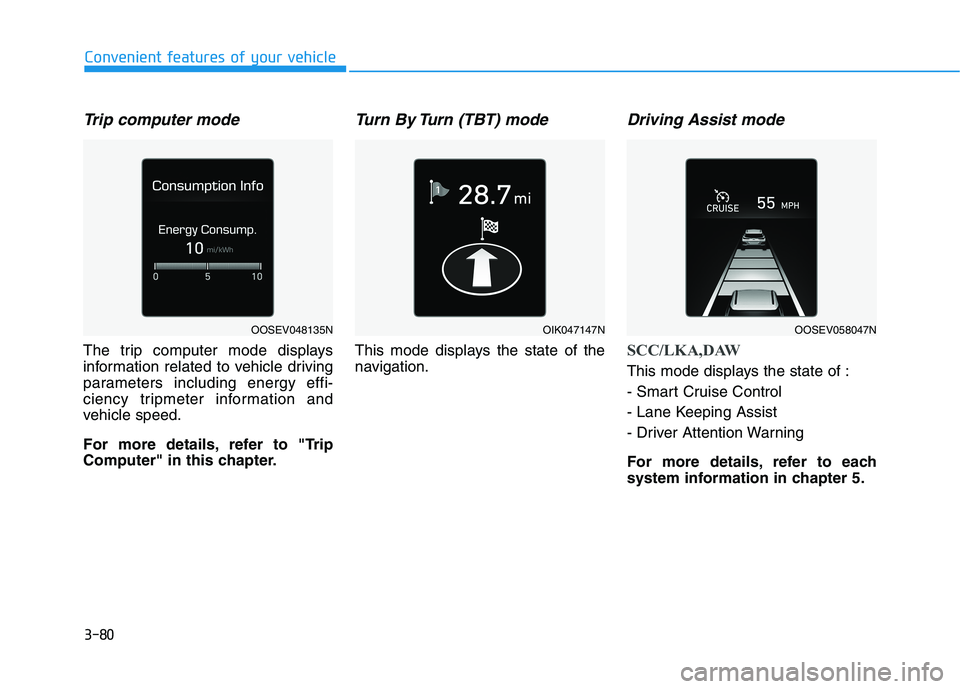
Trip computer mode
The trip computer mode displays
information related to vehicle driving
parameters including energy effi-
ciency tripmeter information and
vehicle speed.
For more details, refer to "Trip
Computer" in this chapter.
Turn By Turn (TBT) mode
This mode displays the state of the
navigation.
Driving Assist mode
SCC/LKA,DAW
This mode displays the state of :
- Smart Cruise Control
- Lane Keeping Assist
- Driver Attention Warning
For more details, refer to each
system information in chapter 5.
OOSEV048135NOIK047147NOOSEV058047N
Page 165 of 478
3-81
Convenient features of your vehicle
3
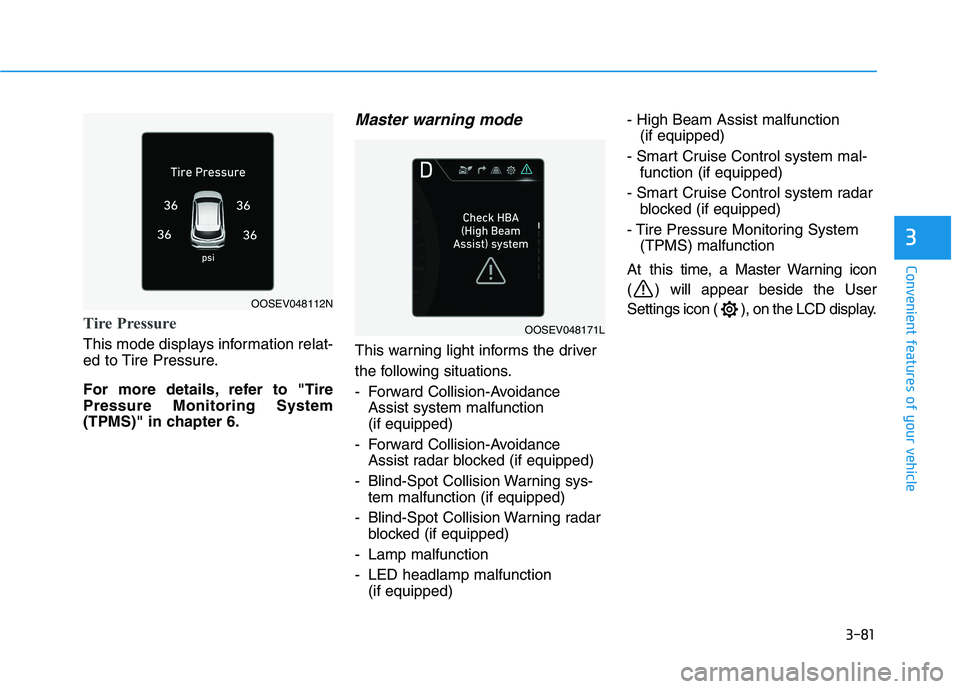
Tire Pressure
This mode displays information relat-
ed to Tire Pressure.
For more details, refer to "Tire
Pressure Monitoring System
(TPMS)" in chapter 6.
Master warning mode
This warning light informs the driver
the following situations.
- Forward Collision-Avoidance
Assist system malfunction
(if equipped)
- Forward Collision-Avoidance
Assist radar blocked (if equipped)
- Blind-Spot Collision Warning sys-
tem malfunction (if equipped)
- Blind-Spot Collision Warning radar
blocked (if equipped)
- Lamp malfunction
- LED headlamp malfunction
(if equipped)- High Beam Assist malfunction
(if equipped)
- Smart Cruise Control system mal-
function (if equipped)
- Smart Cruise Control system radar
blocked (if equipped)
- Tire Pressure Monitoring System
(TPMS) malfunction
At this time, a Master Warning icon
( ) will appear beside the User
Settings icon ( ), on the LCD display.
OOSEV048112N
OOSEV048171L
Page 167 of 478
3-83
Convenient features of your vehicle
3
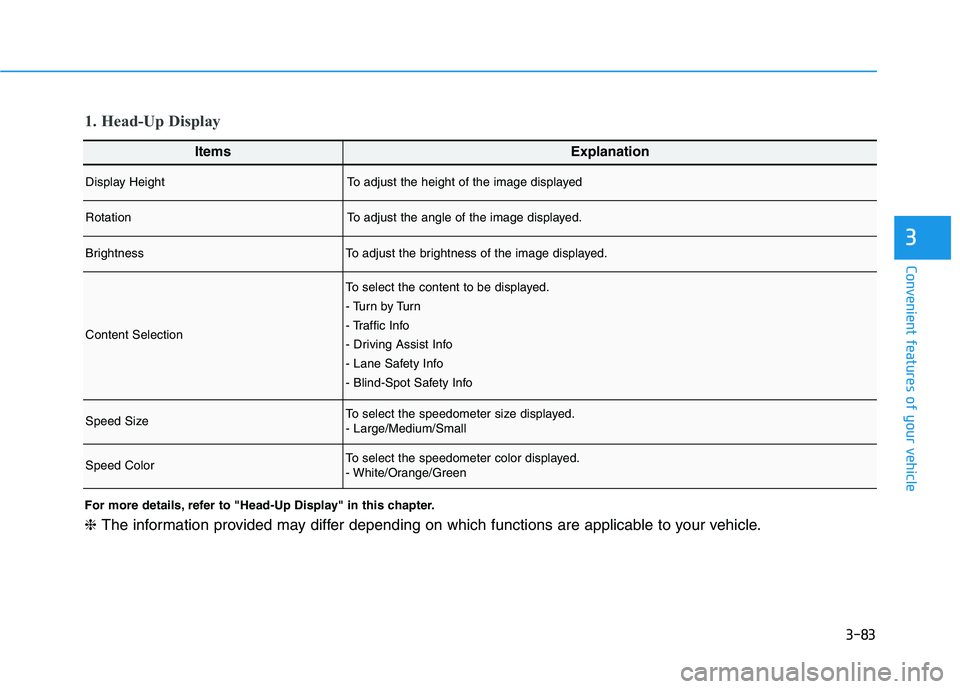
ItemsExplanation
Display HeightTo adjust the height of the image displayed
RotationTo adjust the angle of the image displayed.
BrightnessTo adjust the brightness of the image displayed.
Content Selection
To select the content to be displayed.
- Tu r n b y Tu r n
- Traffic Info
- Driving Assist Info
- Lane Safety Info
- Blind-Spot Safety Info
Speed SizeTo select the speedometer size displayed.
- Large/Medium/Small
Speed ColorTo select the speedometer color displayed.
- White/Orange/Green
1. Head-Up Display
For more details, refer to "Head-Up Display" in this chapter.
❈The information provided may differ depending on which functions are applicable to your vehicle.
Page 168 of 478
3-84
Convenient features of your vehicle
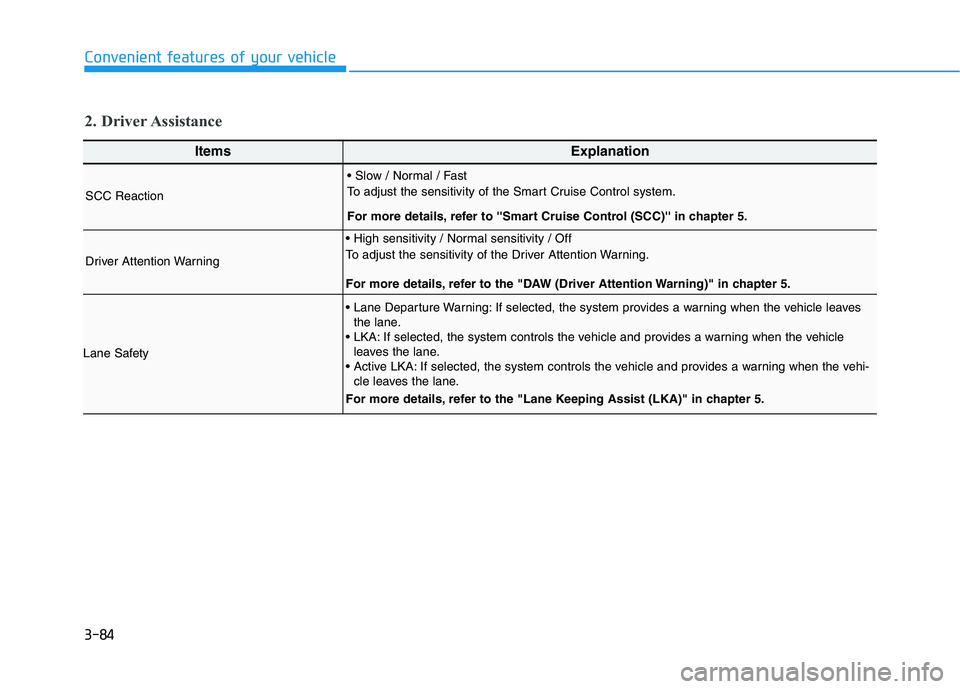
ItemsExplanation
SCC Reaction
To adjust the sensitivity of the Smart Cruise Control system.
For more details, refer to ''Smart Cruise Control (SCC)'' in chapter 5.
Driver Attention Warning
To adjust the sensitivity of the Driver Attention Warning.
For more details, refer to the "DAW (Driver Attention Warning)" in chapter 5.
Lane Safety
If selected, the system provides a warning when the vehicle leaves
the lane.
If selected, the system controls the vehicle and provides a warning when the vehicle
leaves the lane.
If selected, the system controls the vehicle and provides a warning when the vehi-
cle leaves the lane.
For more details, refer to the "Lane Keeping Assist (LKA)" in chapter 5.
2. Driver Assistance
Page 169 of 478
3-85
Convenient features of your vehicle
3
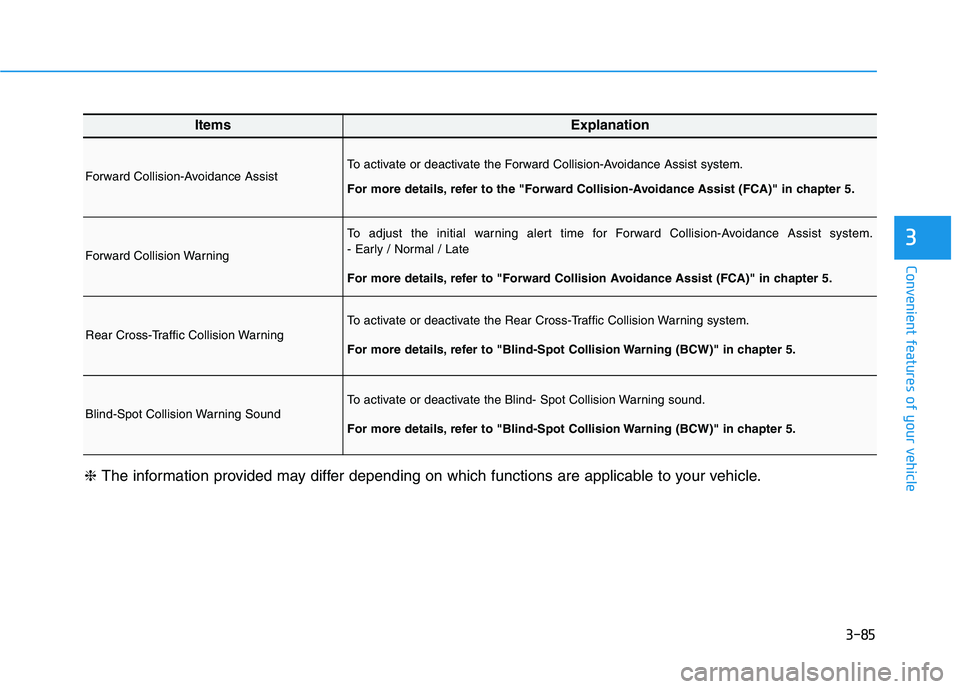
ItemsExplanation
Forward Collision-Avoidance AssistTo activate or deactivate the Forward Collision-Avoidance Assist system.
For more details, refer to the "Forward Collision-Avoidance Assist (FCA)" in chapter 5.
Forward Collision Warning
To adjust the initial warning alert time for Forward Collision-Avoidance Assist system.
- Early / Normal / Late
For more details, refer to "Forward Collision Avoidance Assist (FCA)" in chapter 5.
Rear Cross-Traffic Collision WarningTo activate or deactivate the Rear Cross-Traffic Collision Warning system.
For more details, refer to "Blind-Spot Collision Warning (BCW)" in chapter 5.
Blind-Spot Collision Warning SoundTo activate or deactivate the Blind- Spot Collision Warning sound.
For more details, refer to "Blind-Spot Collision Warning (BCW)" in chapter 5.
❈The information provided may differ depending on which functions are applicable to your vehicle.
Page 171 of 478
3-87
Convenient features of your vehicle
3
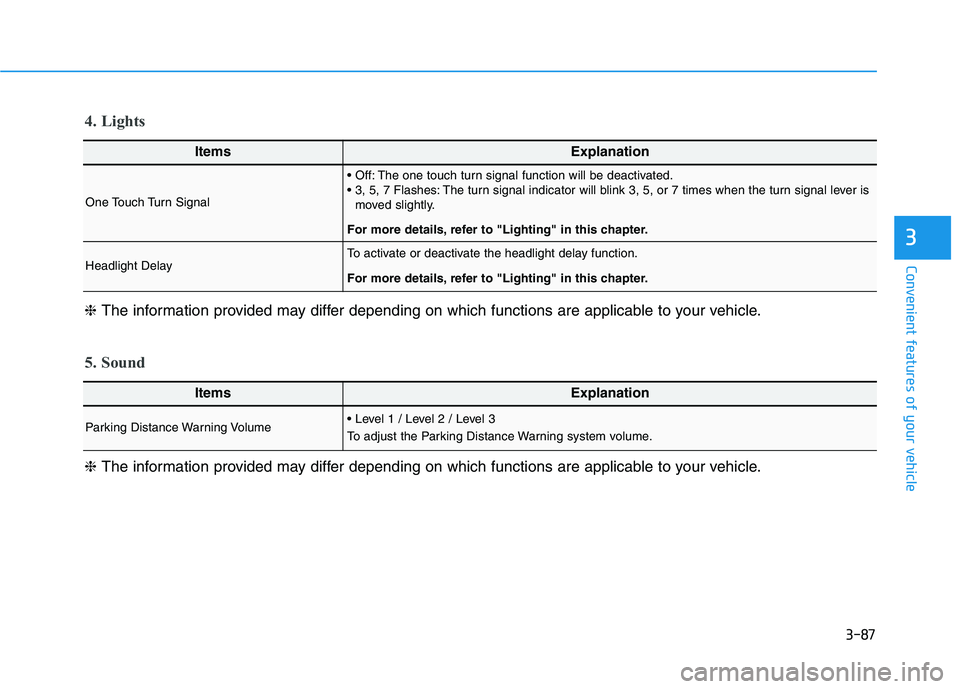
ItemsExplanation
One Touch Turn Signal
The one touch turn signal function will be deactivated.
The turn signal indicator will blink 3, 5, or 7 times when the turn signal lever is
moved slightly.
For more details, refer to "Lighting" in this chapter.
Headlight DelayTo activate or deactivate the headlight delay function.
For more details, refer to "Lighting" in this chapter.
4. Lights
ItemsExplanation
Parking Distance Warning Volume
To adjust the Parking Distance Warning system volume.
5. Sound
❈The information provided may differ depending on which functions are applicable to your vehicle. ❈The information provided may differ depending on which functions are applicable to your vehicle.