chapter 6 HYUNDAI KONA EV 2021 Service Manual
[x] Cancel search | Manufacturer: HYUNDAI, Model Year: 2021, Model line: KONA EV, Model: HYUNDAI KONA EV 2021Pages: 478, PDF Size: 32.83 MB
Page 255 of 478
5-20
Driving your vehicle
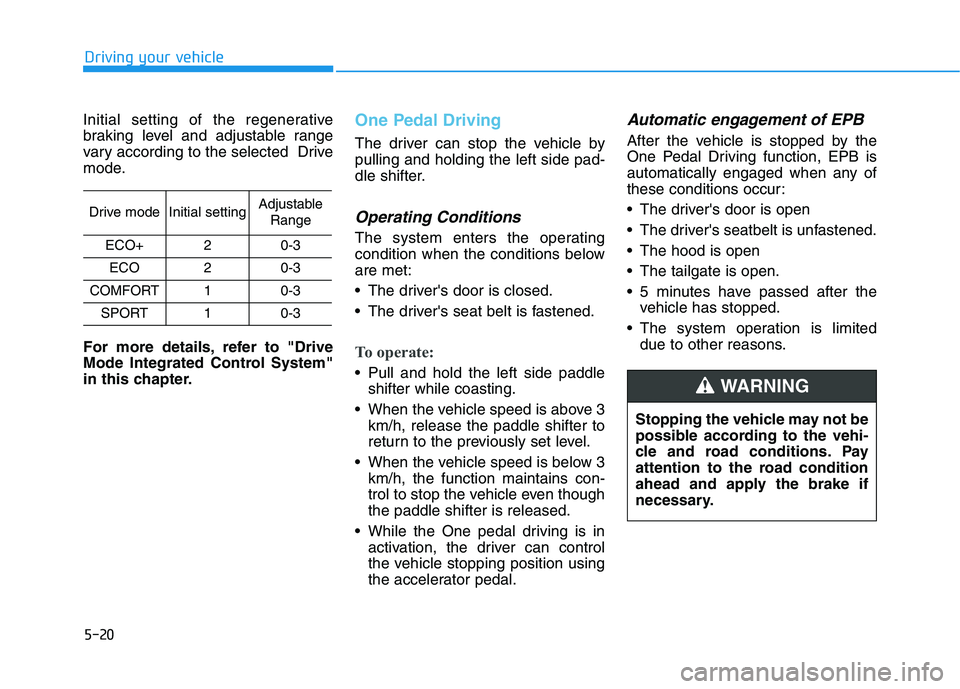
Initial setting of the regenerative
braking level and adjustable range
vary according to the selected Drive
mode.
For more details, refer to "Drive
Mode Integrated Control System"
in this chapter.
One Pedal Driving
The driver can stop the vehicle by
pulling and holding the left side pad-
dle shifter.
Operating Conditions
The system enters the operating
condition when the conditions below
are met:
The driver's door is closed.
The driver's seat belt is fastened.
To operate:
Pull and hold the left side paddle
shifter while coasting.
When the vehicle speed is above 3
km/h, release the paddle shifter to
return to the previously set level.
When the vehicle speed is below 3
km/h, the function maintains con-
trol to stop the vehicle even though
the paddle shifter is released.
While the One pedal driving is in
activation, the driver can control
the vehicle stopping position using
the accelerator pedal.
Automatic engagement of EPB
After the vehicle is stopped by the
One Pedal Driving function, EPB is
automatically engaged when any of
these conditions occur:
The driver's door is open
The driver's seatbelt is unfastened.
The hood is open
The tailgate is open.
5 minutes have passed after the
vehicle has stopped.
The system operation is limited
due to other reasons.
Drive modeInitial settingAdjustable
Range
ECO+20-3
ECO20-3
COMFORT10-3
SPORT10-3
Stopping the vehicle may not be
possible according to the vehi-
cle and road conditions. Pay
attention to the road condition
ahead and apply the brake if
necessary.
WARNING
Page 278 of 478
5-43
Driving your vehicle
5
ESC operation
ESC ON condition
When the POWER button is in the
ON position, the ESC and the ESC
OFF indicator lights illuminate for
approximately three seconds. After
both lights go off, the ESC is
enabled.
When operating
When the ESC is in opera-
tion, the ESC indicator light
blinks:
conditions which may lock the
wheels, you may hear sounds from
the brakes, or feel a corresponding
sensation in the brake pedal. This is
normal and it means your ESC is
active.
cle may not respond to the acceler-
ator as it does under routine condi-
tions.
when the ESC activates, the Cruise
Control automatically disengages.
The Cruise Control can be reen-
gaged when the road conditions
allow.See "Cruise Control System"
later in this chapter.
ESC OFF condition
To cancel ESC operation :
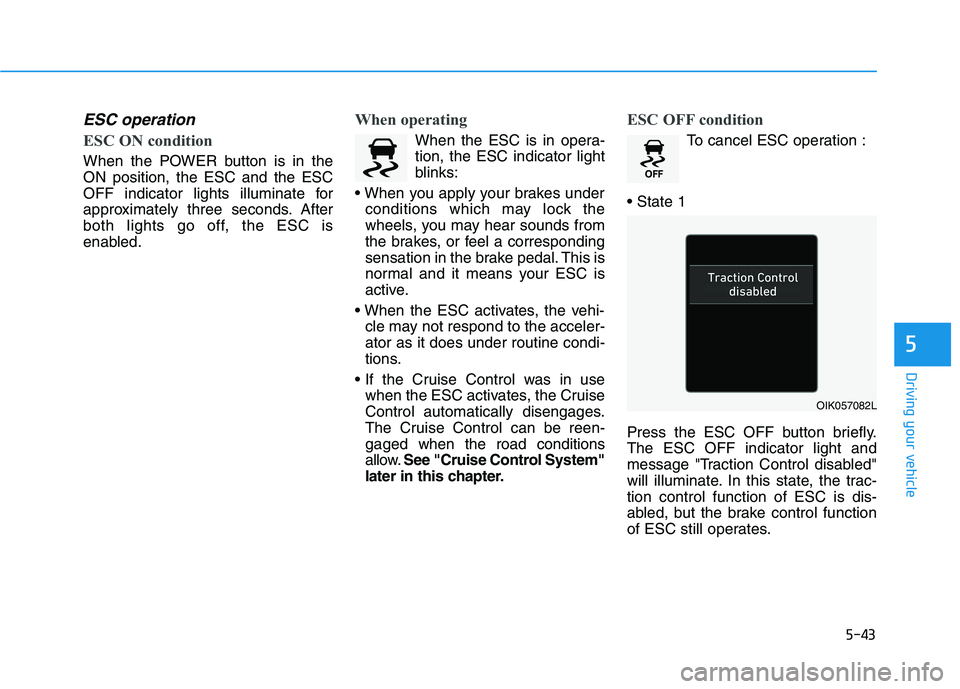
Press the ESC OFF button briefly.
The ESC OFF indicator light and
message "Traction Control disabled"
will illuminate. In this state, the trac-
tion control function of ESC is dis-
abled, but the brake control function
of ESC still operates.
OIK057082L
Page 300 of 478
5-65
Driving your vehicle
5
The second stage alarm may be
deactivated.
- To deactivate the warning chime:
Go to the 'User Settings →Driver
Assistance and deselect Blind-
Spot Collision Warning Sound' on
the LCD display.
- To activate the warning chime:
Go to the 'User Settings →Driver
Assistance and select Blind-Spot
Collision Warning Sound' on the
LCD display.
Information
The warning chime function helps
alert the driver. Deactivate this func-
tion only when it is necessary.
For more information, refer to
"LCD Display Modes" in chapter 3.
i
OOS057025
■ Left side
OOS057026
■ Right side
Second stage alert
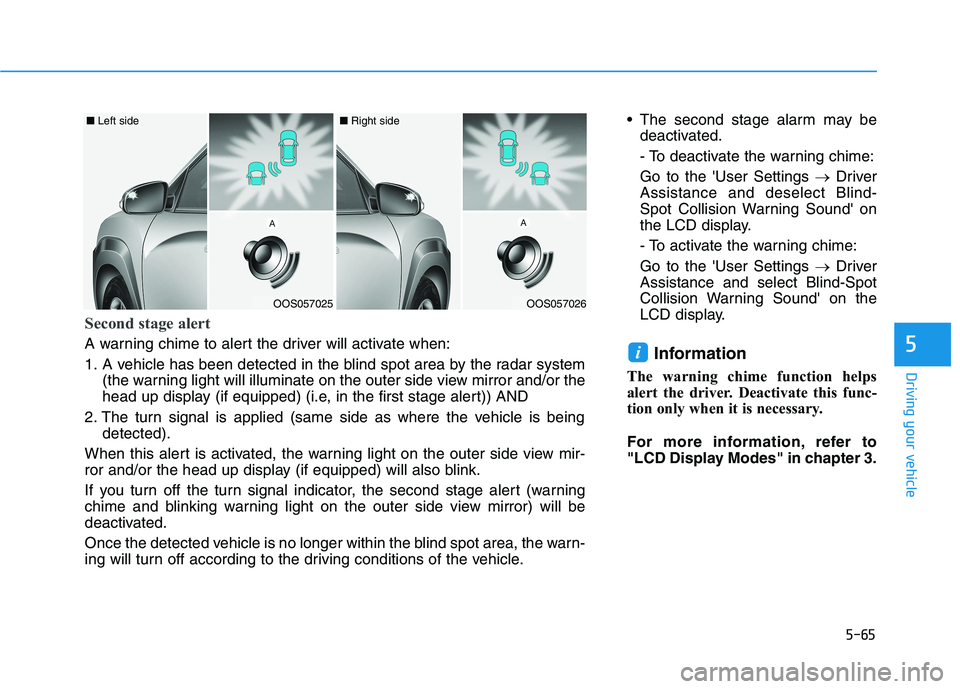
A warning chime to alert the driver will activate when:
1. A vehicle has been detected in the blind spot area by the radar system
(the warning light will illuminate on the outer side view mirror and/or the
head up display (if equipped) (i.e, in the first stage alert)) AND
2. The turn signal is applied (same side as where the vehicle is being
detected).
When this alert is activated, the warning light on the outer side view mir-
ror and/or the head up display (if equipped) will also blink.
If you turn off the turn signal indicator, the second stage alert (warning
chime and blinking warning light on the outer side view mirror) will be
deactivated.
Once the detected vehicle is no longer within the blind spot area, the warn-
ing will turn off according to the driving conditions of the vehicle.
Page 301 of 478
5-66
Driving your vehicle
Rear Cross-Traffic Collision
Warning (RCCW) (if equipped)
Rear Cross-Traffic Collision Warning
monitors approaching cross traffic
from the left and right side of the
vehicle when your vehicle is in
reverse.
Operating conditions
To operate:
Go to the 'User Settings →Driver
Assistance and select Rear Cross-
Traffic Collision Warning' on the LCD
display.For more details, refer to
"LCD Display Modes" in chapter 3.
The system will turn on and standby
to activate. The system will activate
when vehicle speed is below 6 mph
(10 km/h) and with the gear in R
(Reverse).
If the function is deselected from the
instrument cluster, the function will
deactivate.
Information
• The last selected setting (ON or
OFF) of RCCW is remained in the
system.
• The system will activate when vehi-
cle speed is below 6.2 mph (10 km/h)
and with the gear shifted to R
(Reverse).
• The RCCW (Rear Cross-Traffic
Collision Warning) detecting range
is approximately 1 ft ~ 65 ft (0.5 m ~
20 m) in the direction of both later-
al sides of the vehicle.
An approaching vehicle will be
detected if their vehicle speed is
within 2.5 ~ 22.5 mph (8 km/h ~36
km/h).
Note that the detecting range may
vary under certain conditions. As
always, use caution and pay close
attention to your surroundings
when backing up your vehicle.
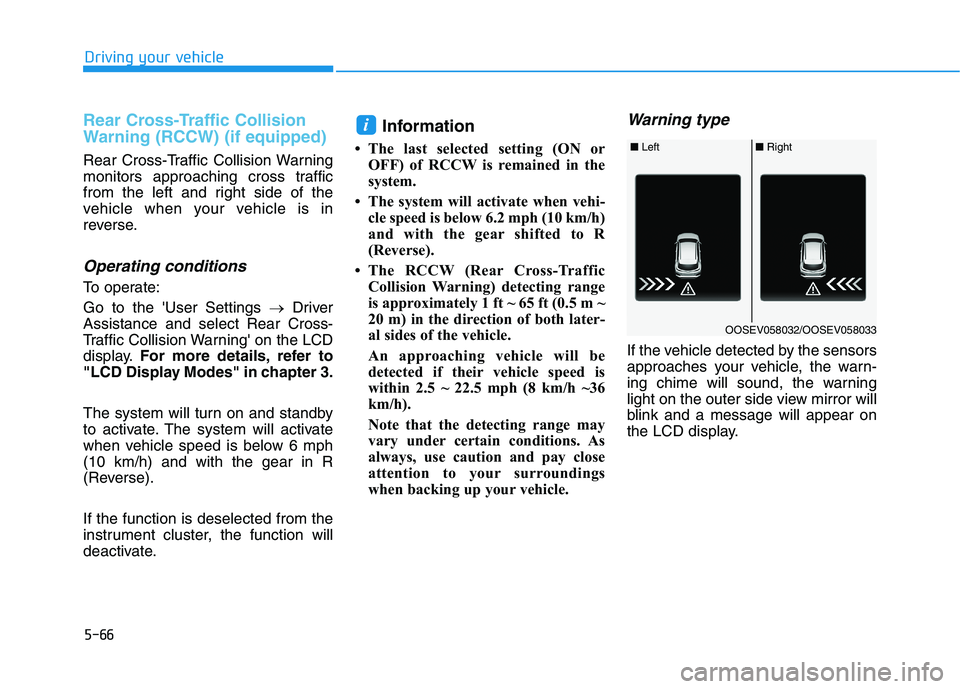
Warning type
If the vehicle detected by the sensors
approaches your vehicle, the warn-
ing chime will sound, the warning
light on the outer side view mirror will
blink and a message will appear on
the LCD display.
i
■ Left■ Right
OOSEV058032/OOSEV058033
Page 313 of 478
5-78
Driving your vehicle
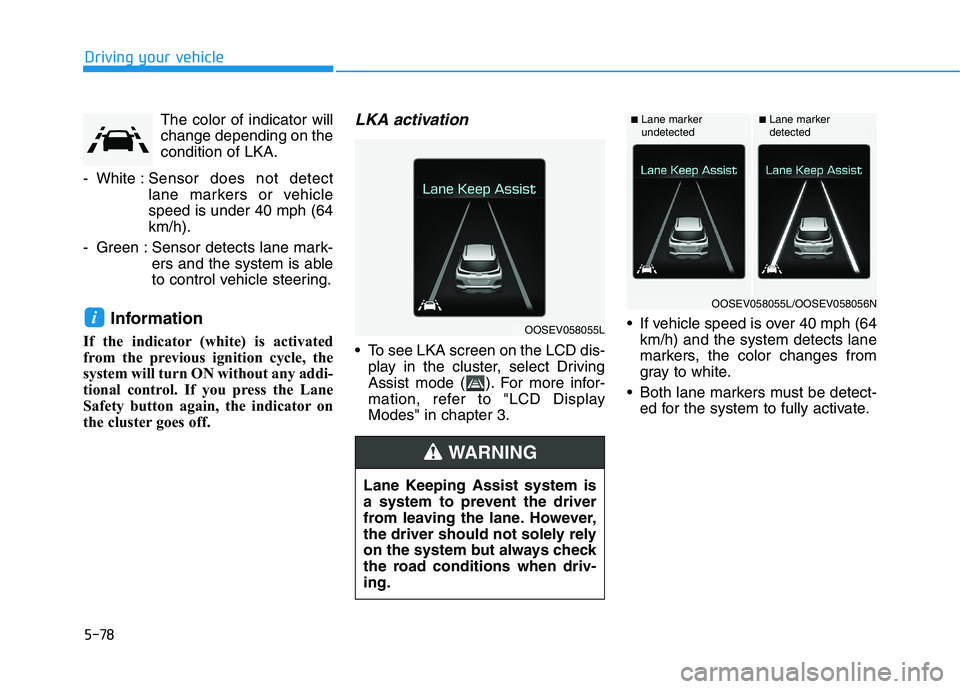
The color of indicator will
change depending on the
condition of LKA.
- White :Sensor does not detect
lane markers or vehicle
speed is under 40 mph (64
km/h).
- Green : Sensor detects lane mark-
ers and the system is able
to control vehicle steering.
Information
If the indicator (white) is activated
from the previous ignition cycle, the
system will turn ON without any addi-
tional control. If you press the Lane
Safety button again, the indicator on
the cluster goes off.
LKA activation
To see LKA screen on the LCD dis-
play in the cluster, select Driving
Assist mode ( ). For more infor-
mation, refer to "LCD Display
Modes" in chapter 3. If vehicle speed is over 40 mph (64
km/h) and the system detects lane
markers, the color changes from
gray to white.
Both lane markers must be detect-
ed for the system to fully activate.
iOOSEV058055L
Lane Keeping Assist system is
a system to prevent the driver
from leaving the lane. However,
the driver should not solely rely
on the system but always check
the road conditions when driv-
ing.
WARNING
■Lane marker
undetected■Lane marker
detected
OOSEV058055L/OOSEV058056N
Page 320 of 478
5-85
Driving your vehicle
5
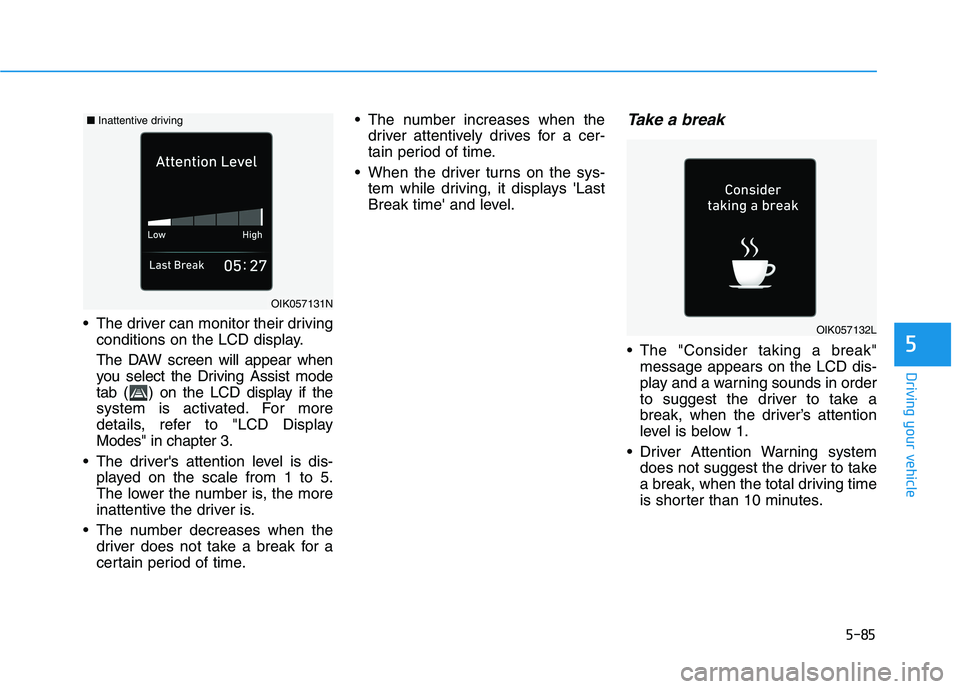
The driver can monitor their driving
conditions on the LCD display.
The DAW screen will appear when
you select the Driving Assist mode
tab ( ) on the LCD display if the
system is activated. For more
details, refer to "LCD Display
Modes" in chapter 3.
The driver's attention level is dis-
played on the scale from 1 to 5.
The lower the number is, the more
inattentive the driver is.
The number decreases when the
driver does not take a break for a
certain period of time. The number increases when the
driver attentively drives for a cer-
tain period of time.
When the driver turns on the sys-
tem while driving, it displays 'Last
Break time' and level.
Take a break
The "Consider taking a break"
message appears on the LCD dis-
play and a warning sounds in order
to suggest the driver to take a
break, when the driver’s attention
level is below 1.
Driver Attention Warning system
does not suggest the driver to take
a break, when the total driving time
is shorter than 10 minutes.
OIK057131N
OIK057132L
■Inattentive driving
Page 322 of 478
5-87
Driving your vehicle
5
Driver Attention Warning system
utilizes the camera sensor on the
front windshield for its operation.
To keep the camera sensor in the
best condition, you should
observe the followings:
Do not disassemble the camera
temporarily to tint the window or
to attach any types of coatings
and accessories. If you disas-
semble a camera and assemble
it again, take your vehicle to an
authorized HYUNDAI dealer and
have the system checked for cal-
ibration.
NEVER locate any reflective
objects (i.e. white paper, mirror)
over the dashboard. Any light
reflection may cause a malfunc-
tion of Driver Attention Alert
(DAW) system.
Pay extreme caution to keep the
camera sensor out of water.
NEVER arbitrarily disassemble
the camera assembly, nor apply
any impact on the camera
assembly.
NOTICE
Driver Attention Warning sys-
tem is not a substitute for safe
driving practices, but a con-
venience function only. It is
the responsibility of the driver
to always drive cautiously to
prevent unexpected and sud-
den situations from occur-
ring. Pay attention to the road
conditions at all times.
The system may suggest a
break according to the dri-
ver's driving pattern or habits
even if the driver doesn't feel
fatigue.
The driver, who feels fatigued,
should take a break, even
though there is no break sug-
gestion by Driver Attention
Warning system.
WARNING
Driver Attention Warning sys-
tem may not properly operate
with limited alerting in the fol-
lowing situations:
The lane detection perform-
ance is limited. (For more infor-
mation, refer to "Lane Keeping
Assist (LKA)" in this chapter.)
The vehicle is driven erratical-
ly or is abruptly turned for
obstacle avoidance (e.g. con-
struction area, other vehicles,
fallen objects, bumpy road).
Forward drivability of the vehi-
cle is severely undermined
(possibly due to wide variation
in tire pressures, uneven tire
wear-out, toe-in/toe-out align-
ment).
The vehicle drives on a curvy
road.
The vehicle drives on a bumpy
road.
CAUTION
Page 329 of 478
5-94
Driving your vehicle
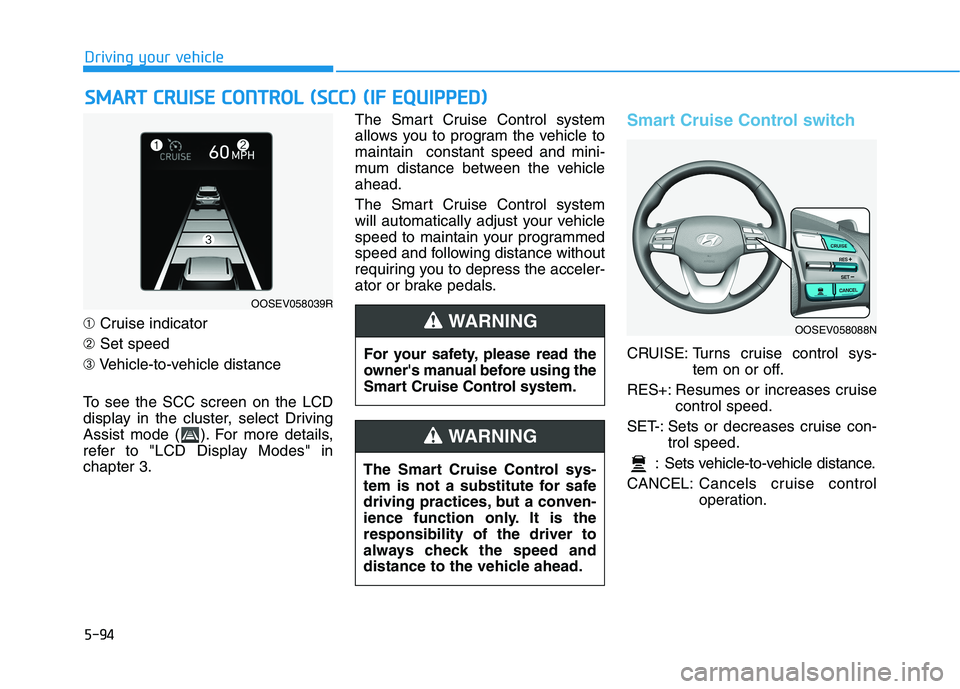
➀Cruise indicator
➁Set speed
➂Vehicle-to-vehicle distance
To see the SCC screen on the LCD
display in the cluster, select Driving
Assist mode ( ). For more details,
refer to "LCD Display Modes" in
chapter 3.The Smart Cruise Control system
allows you to program the vehicle to
maintain constant speed and mini-
mum distance between the vehicle
ahead.
The Smart Cruise Control system
will automatically adjust your vehicle
speed to maintain your programmed
speed and following distance without
requiring you to depress the acceler-
ator or brake pedals.
Smart Cruise Control switch
CRUISE: Turns cruise control sys-
tem on or off.
RES+: Resumes or increases cruise
control speed.
SET-: Sets or decreases cruise con-
trol speed.
: Sets vehicle-to-vehicle distance.
CANCEL:Cancels cruise control
operation.
S SM
MA
AR
RT
T
C
CR
RU
UI
IS
SE
E
C
CO
ON
NT
TR
RO
OL
L
(
(S
SC
CC
C)
)
(
(I
IF
F
E
EQ
QU
UI
IP
PP
PE
ED
D)
)
OOSEV058039R
For your safety, please read the
owner's manual before using the
Smart Cruise Control system.
WARNING
The Smart Cruise Control sys-
tem is not a substitute for safe
driving practices, but a conven-
ience function only. It is the
responsibility of the driver to
always check the speed and
distance to the vehicle ahead.
WARNING
OOSEV058088N
Page 348 of 478
5-113
Driving your vehicle
5
Information
The ESC system must be turned OFF
before rocking the vehicle.
If you are still stuck after rocking
the vehicle a few times, have the
vehicle pulled out by a tow vehicle
to avoid vehicle overheating, pos-
sible damage to the reduction
gear and tire damage. See
"Towing" in chapter 6.
Smooth Cornering
Avoid braking or gear changing in
corners, especially when roads are
wet. Ideally, corners should always
be taken under gentle acceleration.
Driving at Night
Night driving presents more hazards
than driving in the daylight. Here are
some important tips to remember:
Slow down and keep more dis-
tance between you and other vehi-
cles, as it may be more difficult to
see at night, especially in areas
where there may not be any street
lights.
Adjust your mirrors to reduce the
glare from other driver's head-
lamps.
Keep your headlamps clean and
properly aimed. Dirty or improperly
aimed headlamps will make it
much more difficult to see at night.
Avoid staring directly at the head-
lamps of oncoming vehicles. You
could be temporarily blinded, and it
will take several seconds for your
eyes to readjust to the darkness.
Driving in the Rain
Rain and wet roads can make driving
dangerous. Here are a few things to
consider when driving in the rain or
on slick pavement:
Slow down and allow extra follow-
ing distance. A heavy rainfall
makes it harder to see and increas-
es the distance needed to stop
your vehicle.
Turn OFF your Cruise Control. (if
equipped)
Replace your windshield wiper
blades when they show signs of
streaking or missing areas on the
windshield.
Be sure your tires have enough
tread. If your tires do not have
enough tread, making a quick stop
on wet pavement can cause a skid
and possibly lead to an accident.
See "Tire Tread" in chapter 7.
Turn on your headlamps to make it
easier for others to see you.
Driving too fast through large pud-
dles can affect your brakes. If you
must go through puddles, try to
drive through them slowly.
NOTICE
i
Page 349 of 478
5-114
Driving your vehicle
If you believe your brakes may be
wet, apply them lightly while driv-
ing until normal braking operation
returns.
Hydroplaning
If the road is wet enough and you are
going fast enough, your vehicle may
have little or no contact with the road
surface and actually ride on the
water. The best advice is SLOW
DOWN when the road is wet.
The risk of hydroplaning increas-
es as the depth of tire tread
decreases, refer to "Tire Tread" in
chapter 7.
Driving in Flooded Areas
Avoid driving through flooded areas
unless you are sure the water is no
higher than the bottom of the wheel
hub. Drive through any water slowly.
Allow adequate stopping distance
because brake performance may be
reduced.
After driving through water, dry the
brakes by gently applying them sev-
eral times while the vehicle is moving
slowly.
Highway Driving
Tires
Adjust the tire inflation, as specified.
Under-inflation may overheat or
damage the tires.
Do not install worn-out or damaged
tires, which may reduce traction or
fail the braking operation.
Information
Never over-inflate your tires above the
maximum inflation pressure, as speci-
fied on your tires.
Coolant and high voltage bat-
tery
Be sure to check both the coolant
level and the high voltage battery
level before driving.
i