wheel HYUNDAI KONA EV 2021 Owner's Guide
[x] Cancel search | Manufacturer: HYUNDAI, Model Year: 2021, Model line: KONA EV, Model: HYUNDAI KONA EV 2021Pages: 478, PDF Size: 32.83 MB
Page 261 of 478
5-26
Driving your vehicle
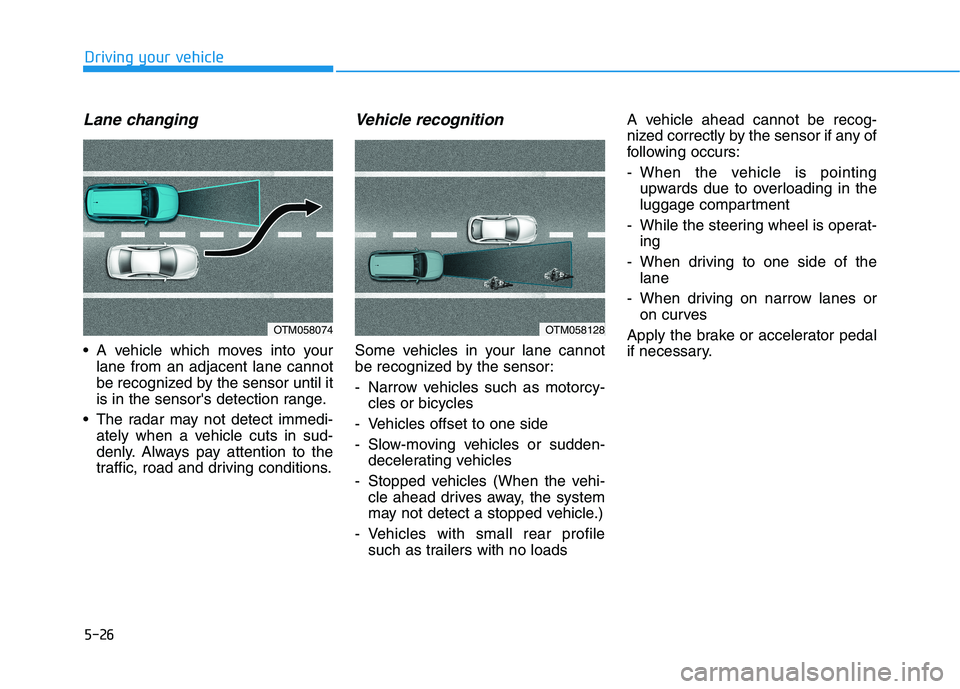
Lane changing
A vehicle which moves into your
lane from an adjacent lane cannot
be recognized by the sensor until it
is in the sensor's detection range.
The radar may not detect immedi-
ately when a vehicle cuts in sud-
denly. Always pay attention to the
traffic, road and driving conditions.
Vehicle recognition
Some vehicles in your lane cannot
be recognized by the sensor:
- Narrow vehicles such as motorcy-
cles or bicycles
- Vehicles offset to one side
- Slow-moving vehicles or sudden-
decelerating vehicles
- Stopped vehicles (When the vehi-
cle ahead drives away, the system
may not detect a stopped vehicle.)
- Vehicles with small rear profile
such as trailers with no loadsA vehicle ahead cannot be recog-
nized correctly by the sensor if any of
following occurs:
- When the vehicle is pointing
upwards due to overloading in the
luggage compartment
- While the steering wheel is operat-
ing
- When driving to one side of the
lane
- When driving on narrow lanes or
on curves
Apply the brake or accelerator pedal
if necessary.
OTM058128OTM058074
Page 276 of 478
5-41
Driving your vehicle
5
Using ABS
To obtain the maximum benefit from
your ABS in an emergency situation,
do not attempt to modulate your
brake pressure and do not try to
pump your brakes. Depress your
brake pedal as hard as possible.
When you apply your brakes under
conditions which may lock the
wheels, you may hear sounds from
the brakes, or feel a corresponding
sensation in the brake pedal. This is
normal and it means your ABS is
active.
ABS does not reduce the time or dis-
tance it takes to stop the vehicle.
Always maintain a safe distance from
the vehicle in front of you.
ABS will not prevent a skid that
results from sudden changes in
direction, such as trying to take a
corner too fast or making a sudden
lane change. Always drive at a safe
speed for the road and weather con-
ditions.ABS cannot prevent a loss of stabili-
ty. Always steer moderately when
braking hard. Severe or sharp steer-
ing wheel movement can still cause
your vehicle to veer into oncoming
traffic or off the road.
On loose or uneven road surfaces,
operation of the anti-lock brake sys-
tem may result in a longer stopping
distance than for vehicles equipped
with a conventional brake system.
The ABS warning light ( ) will stay
on for several seconds after the
POWER button is in the ON position.
During that time, the ABS will go
through self-diagnosis and the light
will go off if everything is normal. If
the light stays on, you may have a
problem with your ABS. Contact an
authorized HYUNDAI dealer as soon
as possible.
If the ABS warning light ( ) is
on and stays on, you may have
a problem with the ABS. Your
power brakes will work normal-
ly. To reduce the risk of serious
injury or death, contact your
HYUNDAI dealer as soon as
possible.
WARNING
Page 278 of 478
5-43
Driving your vehicle
5
ESC operation
ESC ON condition
When the POWER button is in the
ON position, the ESC and the ESC
OFF indicator lights illuminate for
approximately three seconds. After
both lights go off, the ESC is
enabled.
When operating
When the ESC is in opera-
tion, the ESC indicator light
blinks:
conditions which may lock the
wheels, you may hear sounds from
the brakes, or feel a corresponding
sensation in the brake pedal. This is
normal and it means your ESC is
active.
cle may not respond to the acceler-
ator as it does under routine condi-
tions.
when the ESC activates, the Cruise
Control automatically disengages.
The Cruise Control can be reen-
gaged when the road conditions
allow.See "Cruise Control System"
later in this chapter.
ESC OFF condition
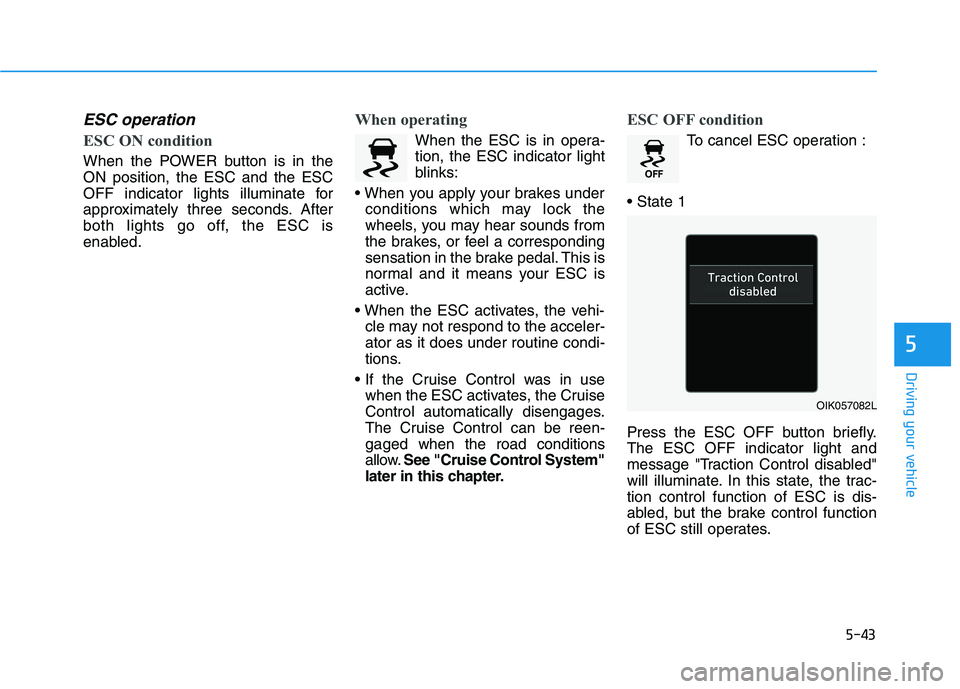
To cancel ESC operation :
Press the ESC OFF button briefly.
The ESC OFF indicator light and
message "Traction Control disabled"
will illuminate. In this state, the trac-
tion control function of ESC is dis-
abled, but the brake control function
of ESC still operates.
OIK057082L
Page 279 of 478
5-44
Driving your vehicle
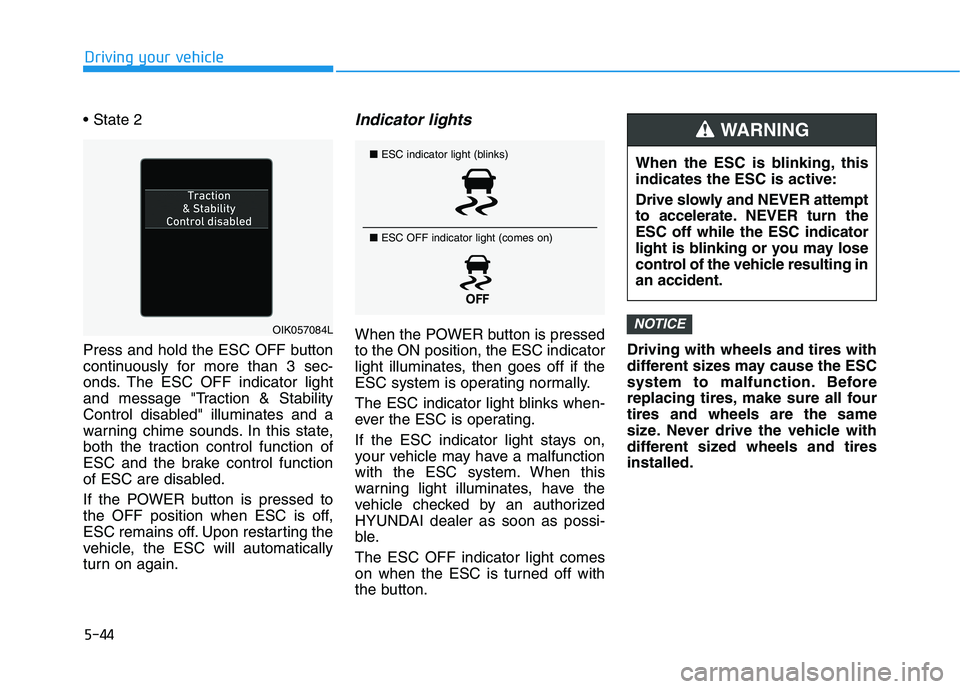
Press and hold the ESC OFF button
continuously for more than 3 sec-
onds. The ESC OFF indicator light
and message "Traction & Stability
Control disabled" illuminates and a
warning chime sounds. In this state,
both the traction control function of
ESC and the brake control function
of ESC are disabled.
If the POWER button is pressed to
the OFF position when ESC is off,
ESC remains off. Upon restarting the
vehicle, the ESC will automatically
turn on again.
Indicator lights
When the POWER button is pressed
to the ON position, the ESC indicator
light illuminates, then goes off if the
ESC system is operating normally.
The ESC indicator light blinks when-
ever the ESC is operating.
If the ESC indicator light stays on,
your vehicle may have a malfunction
with the ESC system. When this
warning light illuminates, have the
vehicle checked by an authorized
HYUNDAI dealer as soon as possi-
ble.
The ESC OFF indicator light comes
on when the ESC is turned off with
the button.Driving with wheels and tires with
different sizes may cause the ESC
system to malfunction. Before
replacing tires, make sure all four
tires and wheels are the same
size. Never drive the vehicle with
different sized wheels and tires
installed.NOTICEOIK057084L
■ESC indicator light (blinks)
■ ESC OFF indicator light (comes on)When the ESC is blinking, this
indicates the ESC is active:
Drive slowly and NEVER attempt
to accelerate. NEVER turn the
ESC off while the ESC indicator
light is blinking or you may lose
control of the vehicle resulting in
an accident.
WARNING
Page 280 of 478
5-45
Driving your vehicle
5
ESC OFF usage
When Driving
The ESC OFF mode should only be
used briefly to help free the vehicle if
stuck in snow or mud, by temporarily
stopping operation of the ESC, to
maintain wheel torque.
To turn ESC off while driving, press
the ESC OFF button while driving on
a flat road surface. Do not allow wheel(s) of one
axle to spin excessively while
the ESC, ABS, and parking brake
warning lights are displayed.
The repairs would not be cov-
ered by the vehicle warranty.
Reduce vehicle power and do
not spin the wheel(s) excessive-
ly while these lights are dis-
played.
When operating the vehicle on a
dynamometer, make sure the
ESC is turned off (ESC OFF light
illuminated).
Information
Turning the ESC off does not affect
ABS or standard brake system opera-
tion.
Vehicle Stability Management
(VSM)
The Vehicle Stability Management
(VSM) is a function of the Electronic
Stability Control (ESC) system. It
helps ensure the vehicle stays stable
when accelerating or braking sud-
denly on wet, slippery and rough
roads where traction over the four
tires can suddenly become uneven.
i
NOTICE
Take the following precautions
when using the Vehicle Stability
Management (VSM):
ALWAYS check the speed and
the distance to the vehicle
ahead. The VSM is not a substi-
tute for safe driving practices.
Never drive too fast for the
road conditions. The VSM sys-
tem will not prevent acci-
dents. Excessive speed in bad
weather, slippery and uneven
roads can result in severe
accidents.
WARNING
Page 281 of 478
5-46
Driving your vehicle
VSM operation
VSM ON condition
The VSM operates when:
The Electronic Stability Control
(ESC) is on.
Vehicle speed is approximately
under 93 mph (150 km/h) when the
vehicle is braking on rough roads.
When operating
When you apply your brakes under
conditions which may activate the
ESC, you may hear sounds from the
brakes, or feel a corresponding sen-
sation in the brake pedal. This is nor-
mal and it means your VSM is active.
Information
The VSM does not operate when:
• Driving on a banked road such as a
gradient or incline.
• Driving in reverse.
• The ESC OFF indicator light is on.
• The EPS (Electric power steering)
warning light ( ) is on or blinks. Driving with wheels and tires with
different sizes may cause the VSM
system to malfunction. Before
replacing tires, make sure all four
tires and wheels are the same
size. Never drive the vehicle with
different sized tires and wheels
installed.
NOTICEi
If the ESC indicator light ( ) or
EPS warning light ( ) stays
on or blinks, your vehicle may
have a malfunction with the
VSM system. When the warning
light illuminates, have the vehi-
cle checked by an authorized
HYUNDAI dealer as soon as
possible.
WARNING
Page 286 of 478
5-51
Driving your vehicle
5
- Early:
When this condition is selected, the
initial Forward Collision Warning is
activated earlier than normal. This
setting maximizes the amount of
distance between the vehicle
ahead before the initial warning
occurs.
Even though, 'Early' is selected if
the front vehicle suddenly stops the
initial warning activation time may
not seem fast.
If you feel the warning activates too
early, set Forward Collision
Warning to "Normal".Prerequisite for activation
FCA system is on and ready when
FCA is selected on the LCD display
and when the following prerequisites
are satisfied:
- The ESC (Electronic Stability
Control) is on.
- Driving speed exceeds approxi-
mately 6 mph (10 km/h). (FCA is
only activated within a certain
speed range.)
- The system detects a vehicle in
front, which may collide with your
vehicle. (FCA may not be activated
or may sound a warning alarm in
accordance with the driving situa-
tion or vehicle condition.)
Completely stop the vehicle
on a safe location before
operating the switch on the
steering wheel to activate/
deactivate FCA system.
FCA automatically activates
when the POWER button is in
the ON position. The driver
can deactivate FCA by cancel-
ing the system setting on the
LCD display.
If you cancel the ESC
(Electronic Stability Control)
when FCA system is turned
on FCA automatically deacti-
vates and the FCA warning
light illuminates. When the
ESC is canceled the FCA can-
not be activated on the LCD
display. The FCA warning light
will illuminate which is nor-
mal.
WARNING
Page 288 of 478
5-53
Driving your vehicle
5
Brake operation
The braking system enters into the
ready status to react promptly to
urgent situations.
FCA provides additional braking
power for optimum braking per-
formance, when the driver depress-
es the brake pedal.
The braking control is automatical-
ly deactivated, when the driver
sharply depresses the accelerator
pedal, or when the driver abruptly
operates the steering wheel.
FCA brake control is automatically
canceled, when risk factors disap-
pear.
The driver should always use
extreme caution while operat-
ing the vehicle, whether or not
there is a warning message or
alarm from FCA system.
If any other warning sound
such as seat belt warning
chime is already generated,
the Forward Collision-
Avoidance Assist (FCA) sys-
tem warning may not sound.
CAUTION
The braking control cannot
completely stop the vehicle nor
avoid all collisions. The driver
should hold the responsibility
to safely drive and control the
vehicle.
WARNING
FCA system logic operates
within certain parameters, such
as the distance from the vehicle
ahead, the speed of the vehicle
ahead, and the driver's vehicle
speed. Certain conditions such
as inclement weather and road
conditions may affect the oper-
ation of FCA system.
WARNING
Never deliberately drive danger-
ously to activate the system.
WARNING
Page 296 of 478
5-61
Driving your vehicle
5
Information
In some instances, FCA system may be
cancelled when subjected to electro-
magnetic interference.
i
Do not use Forward Collision-
Avoidance Assist system
when towing a vehicle.
Application of FCA system
while towing may adversely
affect the safety of your vehi-
cle or the towing vehicle.
Use extreme caution when the
vehicle in front of you has
cargo that extends rearward
from the cab, or when the
vehicle in front of you has
higher ground clearance.
FCA system is designed to
help detect and monitor the
vehicle ahead in the roadway
through camera recognition. It
is not designed to detect bicy-
cles, motorcycles, or smaller
wheeled objects such as lug-
gage bags, shopping carts, or
strollers.
Never try to test the operation
of FCA system. Doing so may
cause severe injury or death.
WARNING
Page 311 of 478
5-76
Driving your vehicle
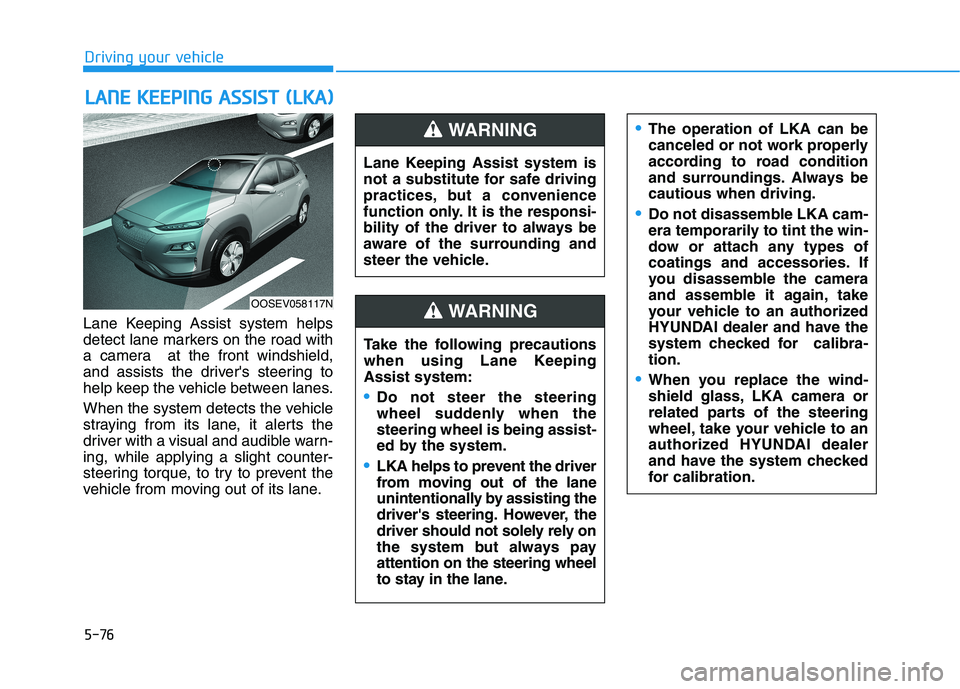
Lane Keeping Assist system helps
detect lane markers on the road with
a camera at the front windshield,
and assists the driver's steering to
help keep the vehicle between lanes.
When the system detects the vehicle
straying from its lane, it alerts the
driver with a visual and audible warn-
ing, while applying a slight counter-
steering torque, to try to prevent the
vehicle from moving out of its lane.
L LA
AN
NE
E
K
KE
EE
EP
PI
IN
NG
G
A
AS
SS
SI
IS
ST
T
(
(L
LK
KA
A)
)
OOSEV058117N
Lane Keeping Assist system is
not a substitute for safe driving
practices, but a convenience
function only. It is the responsi-
bility of the driver to always be
aware of the surrounding and
steer the vehicle.
WARNING
Take the following precautions
when using Lane Keeping
Assist system:
Do not steer the steering
wheel suddenly when the
steering wheel is being assist-
ed by the system.
LKA helps to prevent the driver
from moving out of the lane
unintentionally by assisting the
driver's steering. However, the
driver should not solely rely on
the system but always pay
attention on the steering wheel
to stay in the lane.
WARNING
The operation of LKA can be
canceled or not work properly
according to road condition
and surroundings. Always be
cautious when driving.
Do not disassemble LKA cam-
era temporarily to tint the win-
dow or attach any types of
coatings and accessories. If
you disassemble the camera
and assemble it again, take
your vehicle to an authorized
HYUNDAI dealer and have the
system checked for calibra-
tion.
When you replace the wind-
shield glass, LKA camera or
related parts of the steering
wheel, take your vehicle to an
authorized HYUNDAI dealer
and have the system checked
for calibration.