lock HYUNDAI KONA EV 2021 Workshop Manual
[x] Cancel search | Manufacturer: HYUNDAI, Model Year: 2021, Model line: KONA EV, Model: HYUNDAI KONA EV 2021Pages: 478, PDF Size: 32.83 MB
Page 202 of 478
3-118
Convenient features of your vehicle
Reverse Parking Distance
Warning system Precautions
The Parking Distance Warning
(Reverse) system may not operate
consistently in some circum-
stances depending on the speed of
the vehicle and the shapes of the
objects detected.
Reverse Parking Distance Warning
system may malfunction if the vehi-
cle bumper height or sensor instal-
lation has been modified or dam-
aged. Any non-factory installed
equipment or accessories may also
interfere with the sensor perform-
ance.
The sensor may not recognize
objects less than 12 in. (30 cm)
from the sensor, or it may sense an
incorrect distance. Use caution.
When the sensor is blocked with
snow, dirt, debris, or ice, the rear
parking assist system may be inop-
erative until the snow or ice melts,
or the debris is removed. Use a
soft cloth to wipe debris away from
the sensor. Do not push, scratch or strike the
sensor with any hard objects that
could damage the surface of the
sensor. Sensor damage could occur.
Do not spray the sensors or its sur-
rounding area directly with a high
pressure washer. Doing so may
cause the sensors to fail to operate
normally.
Extreme caution should always
be taken to avoid accidents or
vehicle injuries. Do not solely
rely on the Parking Distance
Warning (Reverse) system.
Always drive safely and cau-
tiously, especially when back-
ing up in reverse.
WARNING
Page 222 of 478
3-138
Convenient features of your vehicle
Sunglass Holder
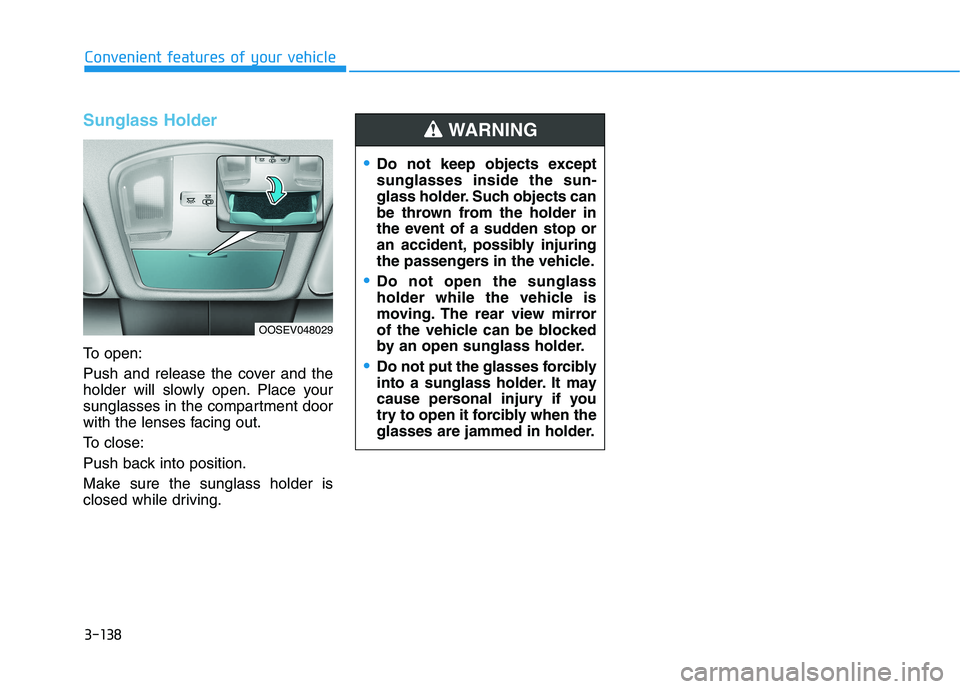
To open:
Push and release the cover and the
holder will slowly open. Place your
sunglasses in the compartment door
with the lenses facing out.
To close:
Push back into position.
Make sure the sunglass holder is
closed while driving.
Do not keep objects except
sunglasses inside the sun-
glass holder. Such objects can
be thrown from the holder in
the event of a sudden stop or
an accident, possibly injuring
the passengers in the vehicle.
Do not open the sunglass
holder while the vehicle is
moving. The rear view mirror
of the vehicle can be blocked
by an open sunglass holder.
Do not put the glasses forcibly
into a sunglass holder. It may
cause personal injury if you
try to open it forcibly when the
glasses are jammed in holder.
WARNING
OOSEV048029
Page 224 of 478
3-140
Convenient features of your vehicle
Keep your drinks sealed while
driving to prevent spilling your
drink. If liquid spills, it may get
into the vehicle's electrical/elec-
tronic system and damage elec-
trical/electronic parts.
When cleaning spilled liquids do
not use hot air to blow out or dry
the cup holder. This may dam-
age the interior.
Sunvisor
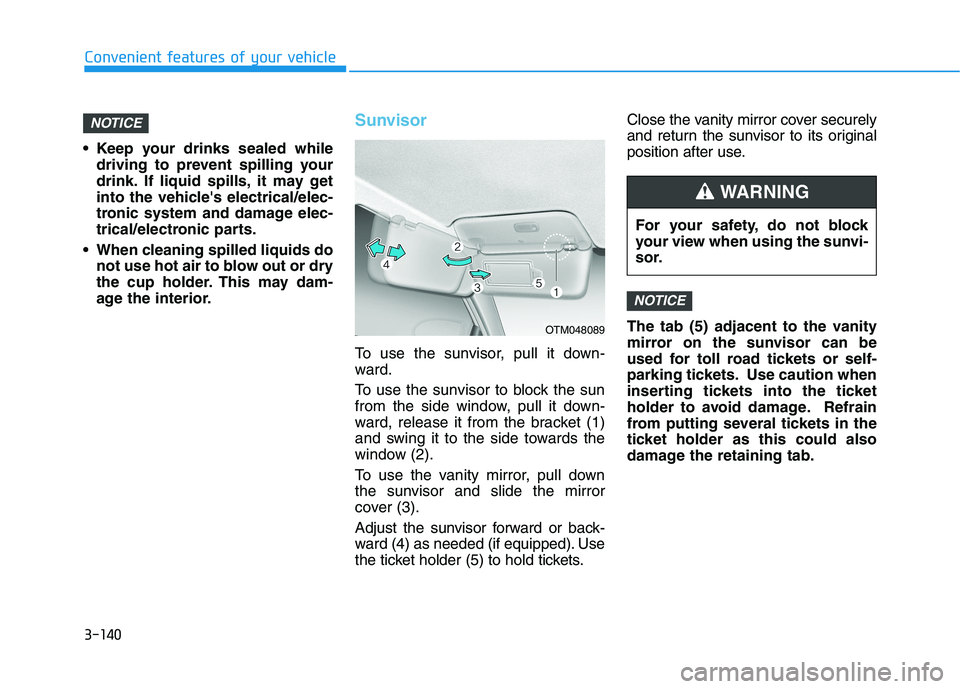
To use the sunvisor, pull it down-
ward.
To use the sunvisor to block the sun
from the side window, pull it down-
ward, release it from the bracket (1)
and swing it to the side towards the
window (2).
To use the vanity mirror, pull down
the sunvisor and slide the mirror
cover (3).
Adjust the sunvisor forward or back-
ward (4) as needed (if equipped). Use
the ticket holder (5) to hold tickets.Close the vanity mirror cover securely
and return the sunvisor to its original
position after use.
The tab (5) adjacent to the vanity
mirror on the sunvisor can be
used for toll road tickets or self-
parking tickets. Use caution when
inserting tickets into the ticket
holder to avoid damage. Refrain
from putting several tickets in the
ticket holder as this could also
damage the retaining tab.
NOTICE
NOTICE
OTM048089
For your safety, do not block
your view when using the sunvi-
sor.
WARNING
Page 227 of 478
3-143
Convenient features of your vehicle
3
To charge a cellular phone
The wireless cellular phone charging
system charges only the Qi-enabled
cellular phones ( ). Read the label
on the cellular phone accessory
cover or visit your cellular phone
manufacturer's website to check
whether your cellular phone supports
the Qi technology.
The wireless charging process starts
when you put a Qi-enabled cellular
phone on the wireless charging unit.
1. Remove other items, including the
smart key, from the wireless charg-
ing unit. If not, the wireless charg-
ing process may be interrupted.
Place the cellular phone on the
center of the charging pad ( ).
2. The indicator light is orange when
the cellular phone is charging. The
indicator light turns green when
phone charging is complete.
3. You can turn ON or OFF the wire-
less charging function in the user
settings mode on the instrument
cluster. For further information,
refer to the "LCD Display Modes"
in this chapter.If your cellular phone is not charging:
- Slightly change the position of the
cellular phone on the charging
pad.
- Make sure the indicator light is
orange.
The indicator light will blink orange for
10 seconds if there is a malfunction in
the wireless charging system.
In this case, temporarily stop the
charging process, and re-attempt to
charge your cellular phone again.
The system warns you with a mes-
sage on the LCD display if the cellular
phone is still on the wireless charging
unit after the vehicle is turned OFF
and the front door is opened.
Information
For some manufacturers' cellular
phones, the system may not warn you
even though the cellular phone is left
on the wireless charging unit. This is
due to the particular characteristic of
the cellular phone and not a malfunc-
tion of the wireless charging. The wireless cellular phone
charging system may not sup-
port certain cellular phones,
which are not verified for the Qi
specification ( ).
When placing your cellular
phone on the charging mat,
position the phone in the middle
of the mat for optimal charging
performance. If your cell phone
is off to the side, the charging
rate may be less and in some
cases the cell phone may experi-
ence higher heat conduction.
In some cases, the wireless
charging may stop temporarily
when the Smart Key is used,
either when starting the vehicle or
locking/unlocking the doors, etc.
When charging certain cellular
phones, the charging indicator
may not change to green when
the cell phone is fully charged.
NOTICE
i
Page 228 of 478
3-144
Convenient features of your vehicle
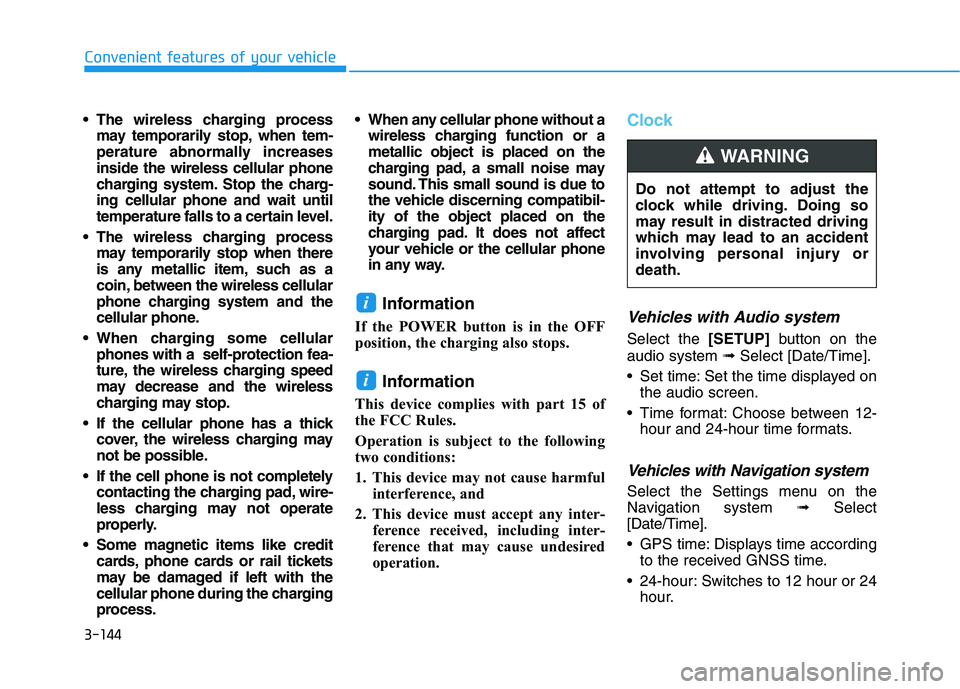
The wireless charging process
may temporarily stop, when tem-
perature abnormally increases
inside the wireless cellular phone
charging system. Stop the charg-
ing cellular phone and wait until
temperature falls to a certain level.
The wireless charging process
may temporarily stop when there
is any metallic item, such as a
coin, between the wireless cellular
phone charging system and the
cellular phone.
When charging some cellular
phones with a self-protection fea-
ture, the wireless charging speed
may decrease and the wireless
charging may stop.
If the cellular phone has a thick
cover, the wireless charging may
not be possible.
If the cell phone is not completely
contacting the charging pad, wire-
less charging may not operate
properly.
Some magnetic items like credit
cards, phone cards or rail tickets
may be damaged if left with the
cellular phone during the charging
process. When any cellular phone without a
wireless charging function or a
metallic object is placed on the
charging pad, a small noise may
sound. This small sound is due to
the vehicle discerning compatibil-
ity of the object placed on the
charging pad. It does not affect
your vehicle or the cellular phone
in any way.
Information
If the POWER button is in the OFF
position, the charging also stops.
Information
This device complies with part 15 of
the FCC Rules.
Operation is subject to the following
two conditions:
1. This device may not cause harmful
interference, and
2. This device must accept any inter-
ference received, including inter-
ference that may cause undesired
operation.
Clock
Vehicles with Audio system
Select the [SETUP]button on the
audio system ➟Select [Date/Time].
Set time: Set the time displayed on
the audio screen.
Time format: Choose between 12-
hour and 24-hour time formats.
Vehicles with Navigation system
Select the Settings menu on the
Navigation system➟Select
[Date/Time].
GPS time: Displays time according
to the received GNSS time.
24-hour: Switches to 12 hour or 24
hour.
i
i
Do not attempt to adjust the
clock while driving. Doing so
may result in distracted driving
which may lead to an accident
involving personal injury or
death.
WARNING
Page 236 of 478
Driving your vehicle
Before Driving ........................................................5-4
Before Entering the Vehicle ...........................................5-4
Before Starting ..................................................................5-4
Power Button..........................................................5-6
Power Button Positions ...................................................5-7
Starting the Vehicle ..........................................................5-9
Turning Off the Vehicle .................................................5-10
Push Button Gear Shift Selector .......................5-11
Vehicle Operation ............................................................5-11
Parking ...............................................................................5-13
LCD Display Messages ...................................................5-14
Good Driving Practices ..................................................5-17
Regenerative Braking System ............................5-19
Paddle Shifter Operation...............................................5-19
One Pedal Driving ...........................................................5-20
Smart Regeneration System .............................5-21
System Setting .................................................................5-21
Activating the Smart Regeneration System .............5-21
Cancelling the Smart Regeneration System .............5-23
Resuming the Smart Regeneration System ..............5-23Disabling the Smart Regeneration System ...............5-23
Vehicle-to-Vehicle Front Recognition
- Front Radar Sensor ....................................................5-23
Warning Message............................................................5-24
Limitations of the System .............................................5-24
Braking System ....................................................5-29
Power Brakes ...................................................................5-29
Disc Brake Wear Indicator ............................................5-30
Electronic Parking Brake (EPB)...................................5-30
Auto Hold ..........................................................................5-36
Anti-lock Brake System (ABS) ....................................5-40
Electronic Stability Control (ESC)................................5-42
Vehicle Stability Management (VSM).........................5-45
Hill-Start Assist Control (HAC) ....................................5-47
Good Braking Practices .................................................5-47
Initial Setting for Each Drive Mode ............................5-48
Drive Mode System .............................................5-48
Drive Mode .......................................................................5-48
5
Page 239 of 478
5-4
Driving your vehicle
Before Entering the Vehicle
• Be sure all windows, outside mir-
ror(s), and outside lights are clean
and unobstructed.
Remove any frost, snow, or ice that
has accumulated on your vehicle.
Visually check the tires for uneven
wear and damage.
Check under the vehicle for any
sign of leaks.
Be sure there are no obstacles
behind you if you intend to back up.
Before Starting
Make sure the hood, the liftgate,
and the doors are securely closed
and locked.
Adjust the position of the seat and
steering wheel.
Adjust the inside and outer side
view mirrors.
Verify all the lights work.
Fasten your seat belts. Check that
all passengers have fastened their
seat belts.
Check the gauges and indicators in
the instrument panel and the mes-
sages on the instrument display
when the POWER button is in the
ON position.
Check that any items you are car-
rying are stored properly or fas-
tened down securely. CALIFORNIA PROPOSITION 65
WARNING
Engine exhaust and a wide vari-
ety of automobile components
including components found in
the interior furnishings in a
vehicle, contain or emit harmful
chemicals known to the State of
California to cause cancer and
birth defects and reproductive
harm. In addition, certain fluids
contained in vehicles and cer-
tain products of components
contain or emit chemicals
known to the State of California
to cause cancer and birth
defects or other reproductive
harm.WARNING
B BE
EF
FO
OR
RE
E
D
DR
RI
IV
VI
IN
NG
G
Page 248 of 478
5-13
Driving your vehicle
5
When the driver's door is opened
within 3 minutes with the POWER
button in the ACC position and the
gear in N (Neutral), the vehicle is
automatically turned OFF and shifted
to the P (Park) position.
D (Drive)
This is the normal driving position.
To shift to D (Drive), press the [D]
button while depressing the brake
pedal.
Shift-lock system
For your safety, your vehicle has a
shift-lock system which prevents
shifting the gear from P (Park) or N
(Neutral) into R (Reverse) or D
(Drive) unless the brake pedal is
depressed.
To shift from P (Park) or N (Neutral)
into R (Reverse) or D (Drive), from R
(Reverse) into D (Drive) or from D
(Drive) into R (Reverse):
1. Depress and hold the brake pedal.
2. Start the vehicle or place the
POWER button in the ON position.
3. Press the R (Reverse) or D (Drive)
button.
Information
For your safety, you cannot shift the
gear while the charging cable is con-
nected.
When the battery (12 V) is dis-
charged
You cannot shift the gear when the
battery is discharged.
Jump start your vehicle (refer to
"Jump Starting" in chapter 6) or con-
tact an authorized HYUNDAI dealer.
Parking
Always come to a complete stop and
continue to depress the brake pedal.
Shift to the P (Park) position, apply
the parking brake, and place the
POWER button in the OFF position.
Take the Key with you when exiting
the vehicle.
i
Page 275 of 478
![HYUNDAI KONA EV 2021 Workshop Manual 5-40
Driving your vehicle
AUTO HOLD conditions not met.
Close door, hood and liftgate
When you press the [AUTO HOLD]
switch, if the drivers door, hood and
liftgate are not closed, a warning will
soun](/img/35/56172/w960_56172-274.png "HYUNDAI KONA EV 2021 Workshop Manual 5-40
Driving your vehicle
AUTO HOLD conditions not met.
Close door, hood and liftgate
When you press the [AUTO HOLD]
switch, if the drivers door, hood and
liftgate are not closed, a warning will
soun")
5-40
Driving your vehicle
AUTO HOLD conditions not met.
Close door, hood and liftgate
When you press the [AUTO HOLD]
switch, if the driver's door, hood and
liftgate are not closed, a warning will
sound and a message will appear on
the LCD display.
Press the [AUTO HOLD] switch after
closing the driver’s door, hood and
liftgate.
Anti-lock Brake System (ABS)
ABS is an electronic braking system
that helps prevent a braking skid.
ABS allows the driver to steer and
brake at the same time.
OOSEV058076N
On roads where the road sur-
face is pitted or has different
surface height.
Tire chains are installed on
your vehicle.
The safety features of an ABS
or ESC equipped vehicle should
not be tested by high speed
driving or cornering. This could
endanger the safety of yourself
or others.An Anti-Lock Braking System
(ABS) or an Electronic Stability
Control (ESC) system will not
prevent accidents due to
improper or dangerous driving
maneuvers. Even though vehi-
cle control is improved during
emergency braking, always
maintain a safe distance
between you and objects ahead
of you. Vehicle speeds should
always be reduced during
extreme road conditions. The
braking distance for cars
equipped with ABS or ESC may
be longer than for those without
these systems in the following
road conditions.
Drive your vehicle at reduced
speeds during the following
conditions:
Rough, gravel or snow-cov-
ered roads.
WARNING
Page 276 of 478
5-41
Driving your vehicle
5
Using ABS
To obtain the maximum benefit from
your ABS in an emergency situation,
do not attempt to modulate your
brake pressure and do not try to
pump your brakes. Depress your
brake pedal as hard as possible.
When you apply your brakes under
conditions which may lock the
wheels, you may hear sounds from
the brakes, or feel a corresponding
sensation in the brake pedal. This is
normal and it means your ABS is
active.
ABS does not reduce the time or dis-
tance it takes to stop the vehicle.
Always maintain a safe distance from
the vehicle in front of you.
ABS will not prevent a skid that
results from sudden changes in
direction, such as trying to take a
corner too fast or making a sudden
lane change. Always drive at a safe
speed for the road and weather con-
ditions.ABS cannot prevent a loss of stabili-
ty. Always steer moderately when
braking hard. Severe or sharp steer-
ing wheel movement can still cause
your vehicle to veer into oncoming
traffic or off the road.
On loose or uneven road surfaces,
operation of the anti-lock brake sys-
tem may result in a longer stopping
distance than for vehicles equipped
with a conventional brake system.
The ABS warning light ( ) will stay
on for several seconds after the
POWER button is in the ON position.
During that time, the ABS will go
through self-diagnosis and the light
will go off if everything is normal. If
the light stays on, you may have a
problem with your ABS. Contact an
authorized HYUNDAI dealer as soon
as possible.
If the ABS warning light ( ) is
on and stays on, you may have
a problem with the ABS. Your
power brakes will work normal-
ly. To reduce the risk of serious
injury or death, contact your
HYUNDAI dealer as soon as
possible.
WARNING