height HYUNDAI KONA EV 2022 User Guide
[x] Cancel search | Manufacturer: HYUNDAI, Model Year: 2022, Model line: KONA EV, Model: HYUNDAI KONA EV 2022Pages: 548, PDF Size: 49.14 MB
Page 110 of 548
03
3-31
Children Always in the Rear
WARNING
Always properly restrain children in the
vehicle. Children of all ages are safer
when restrained in the rear seat. A child
riding in the front passenger seat can
be forcefully struck by an inflating air
bag resulting in SERIOUS INJURY or
DEATH.
Children under age 13 should always
ride in the rear seats and must always be
properly restrained to minimize the risk
of injury in an accident, sudden stop or
sudden maneuver.
According to accident statistics, children
are safer when properly restrained in the
rear seats than in the front seat. Even
with air bags, children can be seriously
injured or killed. Children too large for a
Child Restraint System must use the seat
belts provided.
Most countries have child restraint
laws which require children to travel in
approved Child Restraint Systems.
The laws governing the age or height/
weight restrictions at which seat belts
can be used instead of Child Restraint
System differs among countries, so
you should be aware of the specific
requirements in your country, and where
you are travelling.
Child Restraint Systems must be properly
placed and installed in the rear seat.
You must use a commercially available
Child Restraint System that meets the
requirements of the Safety Standards of
your country.
Child Restraint Systems are generally
designed to be secured in a vehicle seat
by lap belt portion of a lap/shoulder belt,
or by a LATCH system in the rear seats of
the vehicle. Child Restraint System (CRS)
Infants and younger children must be
restrained in an appropriate rearward-
facing or forward-facing CRS that has
first been properly secured to the seat
of the vehicle. Read and comply with
the instructions for installation and use
provided by the manufacturer of the
Child Restraint System.
WARNING
An improperly secured child restraint
can increase the risk of SERIOUS
INJURY or DEATH in an accident. Always
take the following precautions when
using a Child Restraint System: • NEVER install a child or infant
restraint in the front passenger’s
seat.
• Always properly secure the child
restraint to a rear seat of the vehicle.
• Always follow the child restraint
system manufacturer’s instructions
for installation and use.
• Always properly restrain your child in
the child restraint.
• If the vehicle head restraint prevents
proper installation of a child seat
(as described in the child restraint
system manual), the head restraint of
the respective seating position shall
be readjusted or entirely removed.
• Do not use an infant carrier or a
child safety seat that “hooks” over
a seatback, it may not provide
adequate protection in an accident.
• After an accident, have an authorized
HYUNDAI dealer check the child
restraint system, seat belts, tether
anchors and lower anchors.
Child RestRaint system (CRs)
Page 111 of 548
Safety system
3-32
Selecting a Child Restraint
System (CRS)
When selecting a Child Restraint System
for your child, always: • Make sure the Child Restraint System
has a label certifying that it meets
applicable Safety Standards of your
country.
• Select a Child Restraint System based
on your child’s height and weight. The
required label or the instructions for
use typically provide this information.
• Select a Child Restraint System that
fits the vehicle seating position where it will be used.
• Read and comply with the warnings
and instructions for installation and
use provided with the Child Restraint
System.
Child Restraint System types
There are three main types of Child
Restraint Systems: rearward-facing,
forward-facing and booster Child
Restraint Systems.
They are classified according to the
child’s age, height and weight.
OOS037028N
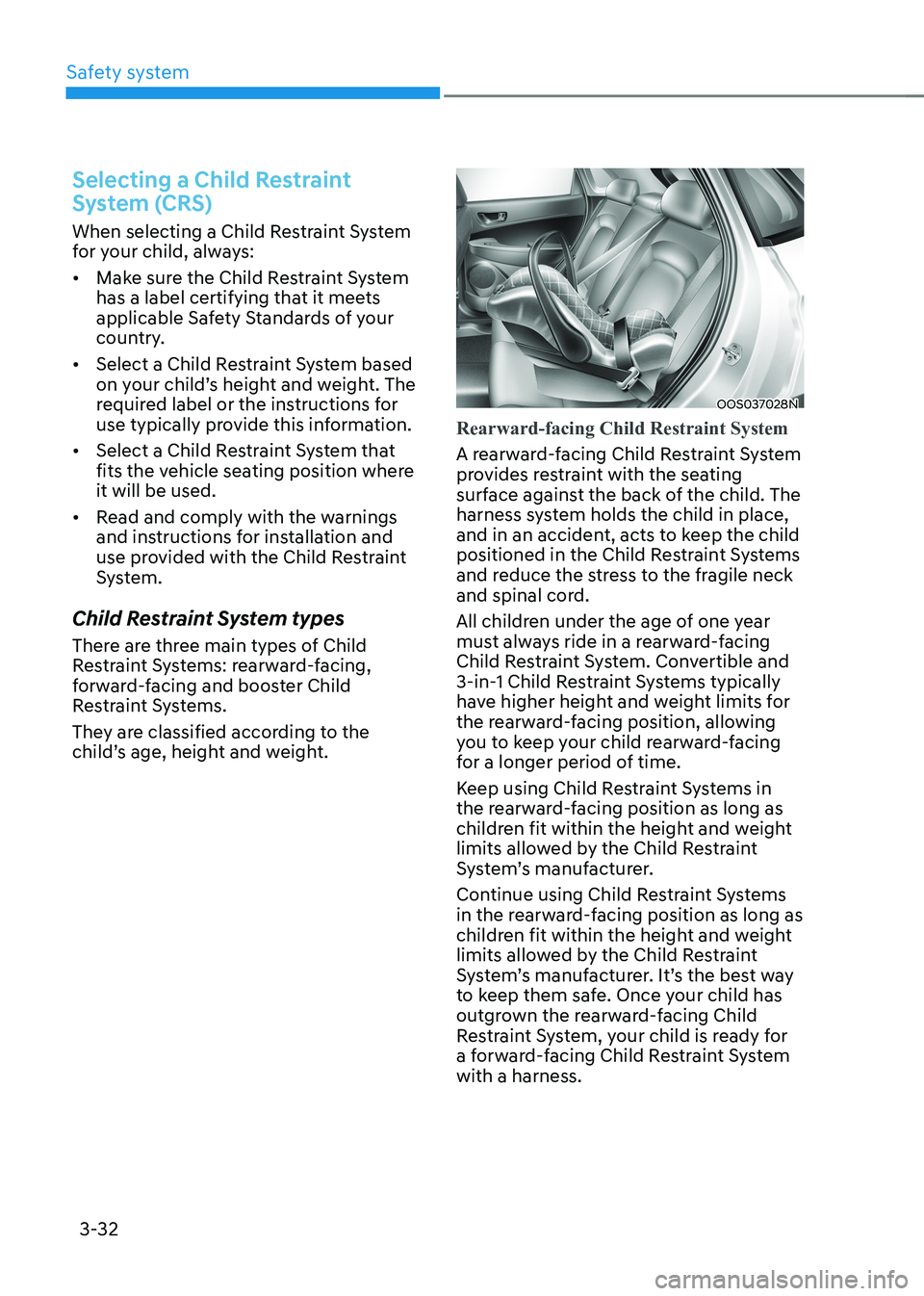
Rearward-facing Child Restraint System
A rearward-facing Child Restraint System
provides restraint with the seating
surface against the back of the child. The
harness system holds the child in place,
and in an accident, acts to keep the child
positioned in the Child Restraint Systems
and reduce the stress to the fragile neck
and spinal cord.
All children under the age of one year
must always ride in a rearward-facing
Child Restraint System. Convertible and
3-in-1 Child Restraint Systems typically
have higher height and weight limits for
the rearward-facing position, allowing
you to keep your child rearward-facing
for a longer period of time.
Keep using Child Restraint Systems in
the rearward-facing position as long as
children fit within the height and weight
limits allowed by the Child Restraint
System’s manufacturer.
Continue using Child Restraint Systems
in the rearward-facing position as long as
children fit within the height and weight
limits allowed by the Child Restraint
System’s manufacturer. It’s the best way
to keep them safe. Once your child has
outgrown the rearward-facing Child
Restraint System, your child is ready for
a forward-facing Child Restraint System with a harness.
Page 112 of 548
03
3-33
WARNING
NEVER install a child or infant restraint
in the front passenger’s seat.
Placing a rearward-facing child restraint
in the front seat can result in SERIOUS
INJURY or DEATH if the child restraint is
struck by an inflating air bag.
OOS037029N
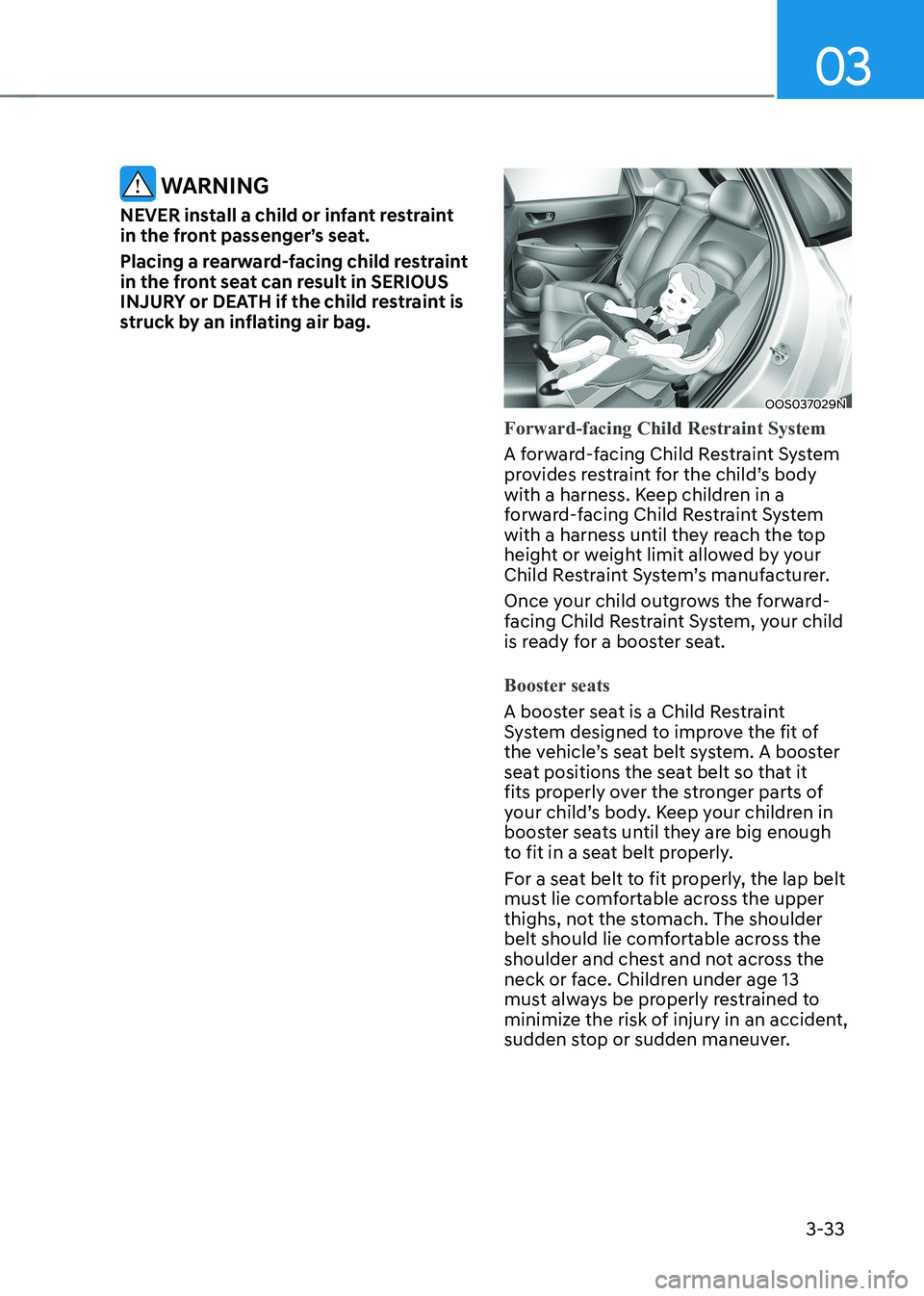
Forward-facing Child Restraint System
A forward-facing Child Restraint System
provides restraint for the child’s body
with a harness. Keep children in a
forward-facing Child Restraint System
with a harness until they reach the top
height or weight limit allowed by your
Child Restraint System’s manufacturer.
Once your child outgrows the forward-
facing Child Restraint System, your child
is ready for a booster seat.
Booster seats
A booster seat is a Child Restraint
System designed to improve the fit of
the vehicle’s seat belt system. A booster
seat positions the seat belt so that it
fits properly over the stronger parts of
your child’s body. Keep your children in
booster seats until they are big enough
to fit in a seat belt properly.
For a seat belt to fit properly, the lap belt
must lie comfortable across the upper
thighs, not the stomach. The shoulder
belt should lie comfortable across the
shoulder and chest and not across the
neck or face. Children under age 13
must always be properly restrained to
minimize the risk of injury in an accident,
sudden stop or sudden maneuver.
Page 143 of 548
Safety system
3-64
Additional safety precautions
Passengers should not move out of
or change seats while the vehicle is
moving. A passenger who is not wearing
a seat belt during a crash or emergency
stop can be thrown against the inside of
the vehicle, against other occupants, or
be ejected from the vehicle.
Do not use any accessories on seat belts. Devices claiming to improve
occupant comfort or reposition the seat
belt can reduce the protection provided
by the seat belt and increase the chance
of serious injury in a crash.
Do not modify the front seats.
Modification of the front seats could
interfere with the operation of the
supplemental restraint system sensing
components or side air bags.
Do not place items under the front
seats. Placing items under the front seats
could interfere with the operation of the
supplemental restraint system sensing
components and wiring harnesses.
Do not cause impact to the doors.
Impact to the doors when the START/
STOP button is in the ON position may
cause the air bags to inflate.
Modifications to accommodate disabilities. If you are considering
modification of your vehicle due to a
disability, please contact the HYUNDAI
Customer Center at 1-888-216-2626.
Adding equipment to or modifying
your air bag equipped vehicle
If you modify your vehicle by changing
your vehicle’s frame, bumper system,
front end or side sheet metal or ride
height, this may affect the operation of
your vehicle’s air bag system.
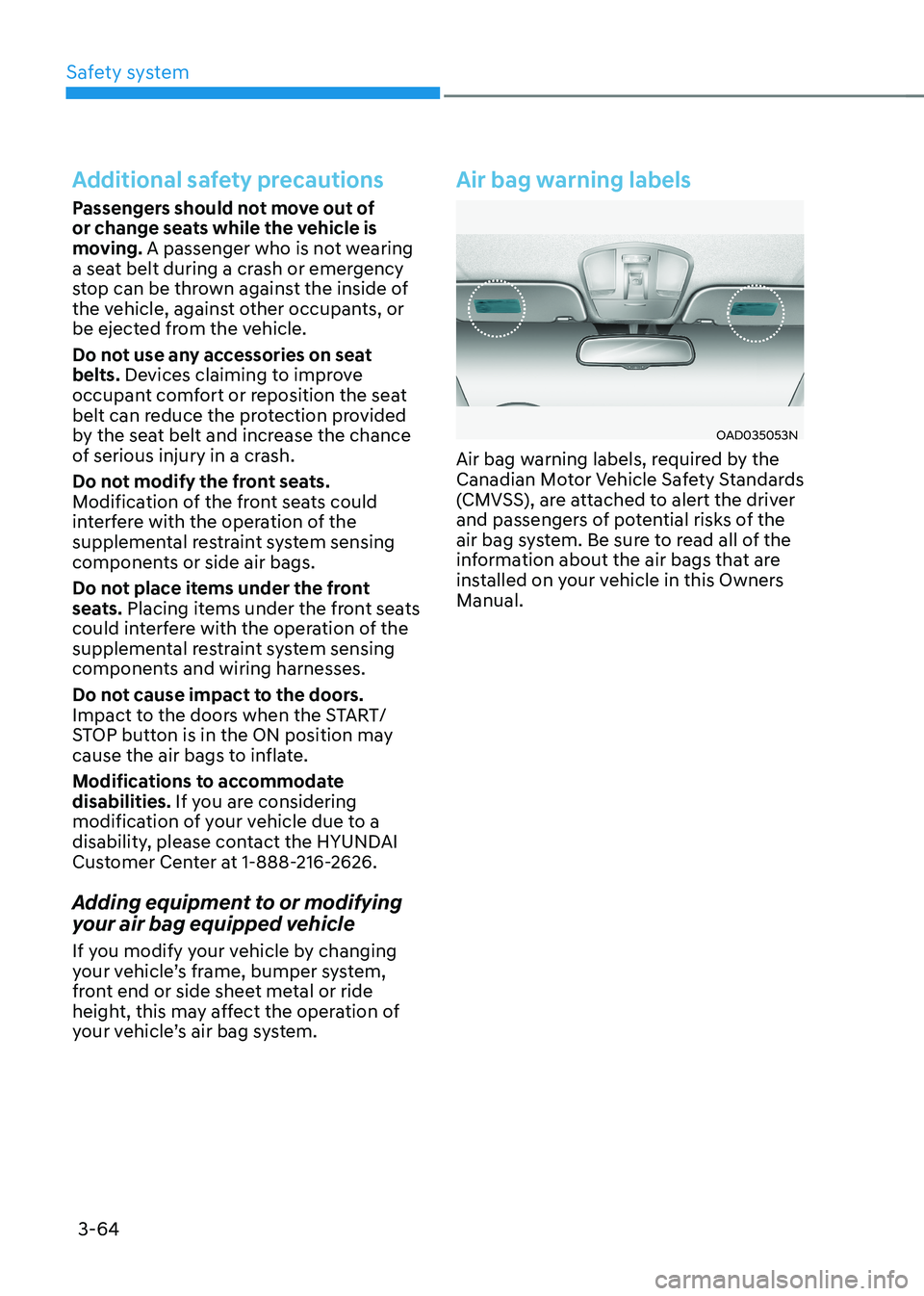
Air bag warning labels
OAD035053N
Air bag warning labels, required by the
Canadian Motor Vehicle Safety Standards
(CMVSS), are attached to alert the driver
and passengers of potential risks of the
air bag system. Be sure to read all of the
information about the air bags that are
installed on your vehicle in this Owners Manual.
Page 177 of 548
Instrument cluster
4-34
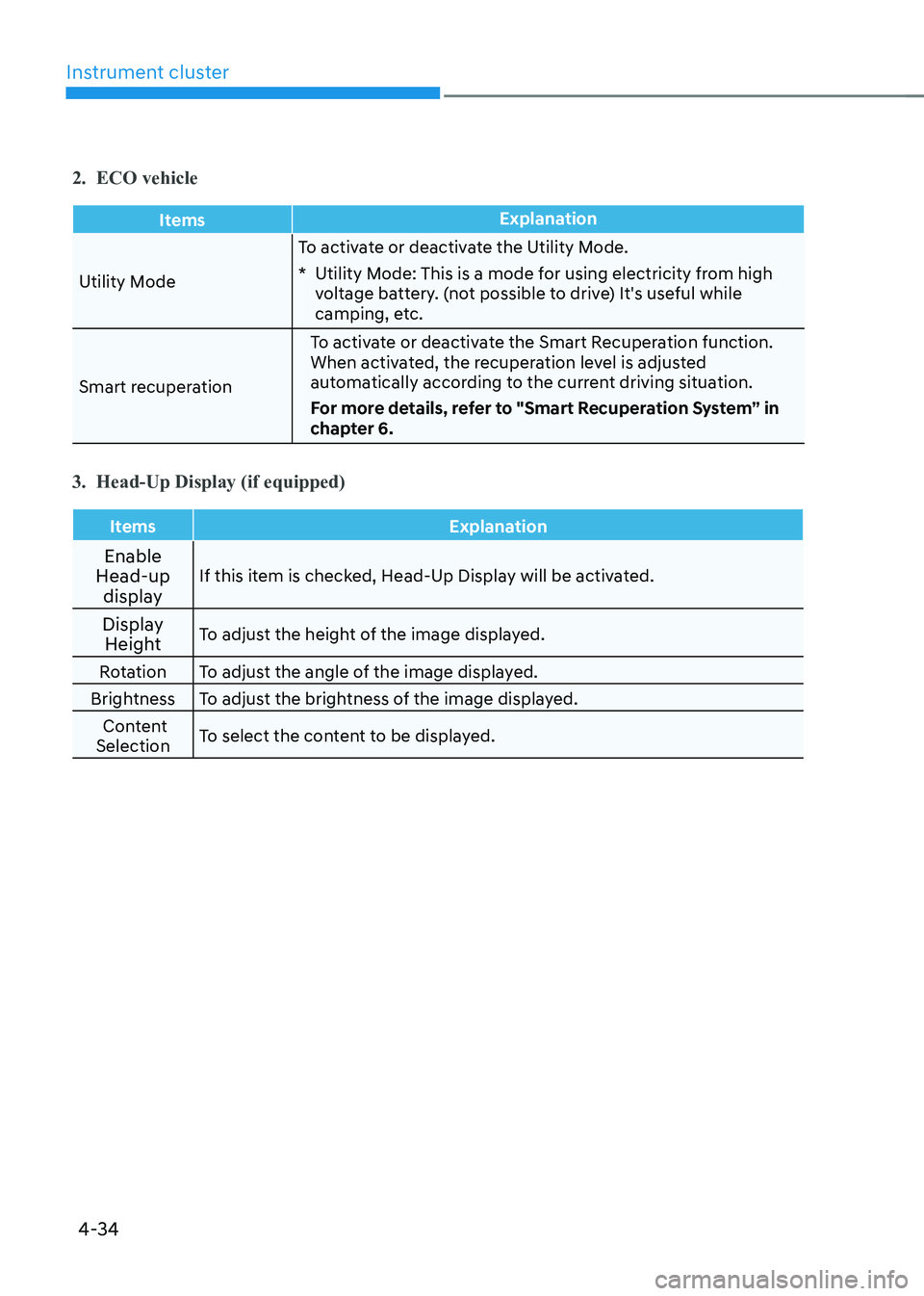
2. ECO vehicle
ItemsExplanation
Utility ModeTo activate or deactivate the Utility Mode.
* Utility Mode: This is a mode for using electricity from high
voltage battery. (not possible to drive) It's useful while
camping, etc.
Smart recuperation To activate or deactivate the Smart Recuperation function.
When activated, the recuperation level is adjusted
automatically according to the current driving situation.
For more details, refer to "Smart Recuperation System” in
chapter 6.
3. Head-Up Display (if equipped)
Items Explanation
Enable
Head-up
display If this item is checked, Head-Up Display will be activated.
Display Height To adjust the height of the image displayed.
Rotation To adjust the angle of the image displayed.
Brightness To adjust the brightness of the image displayed. Content
Selection To select the content to be displayed.
Page 201 of 548
05
5-17
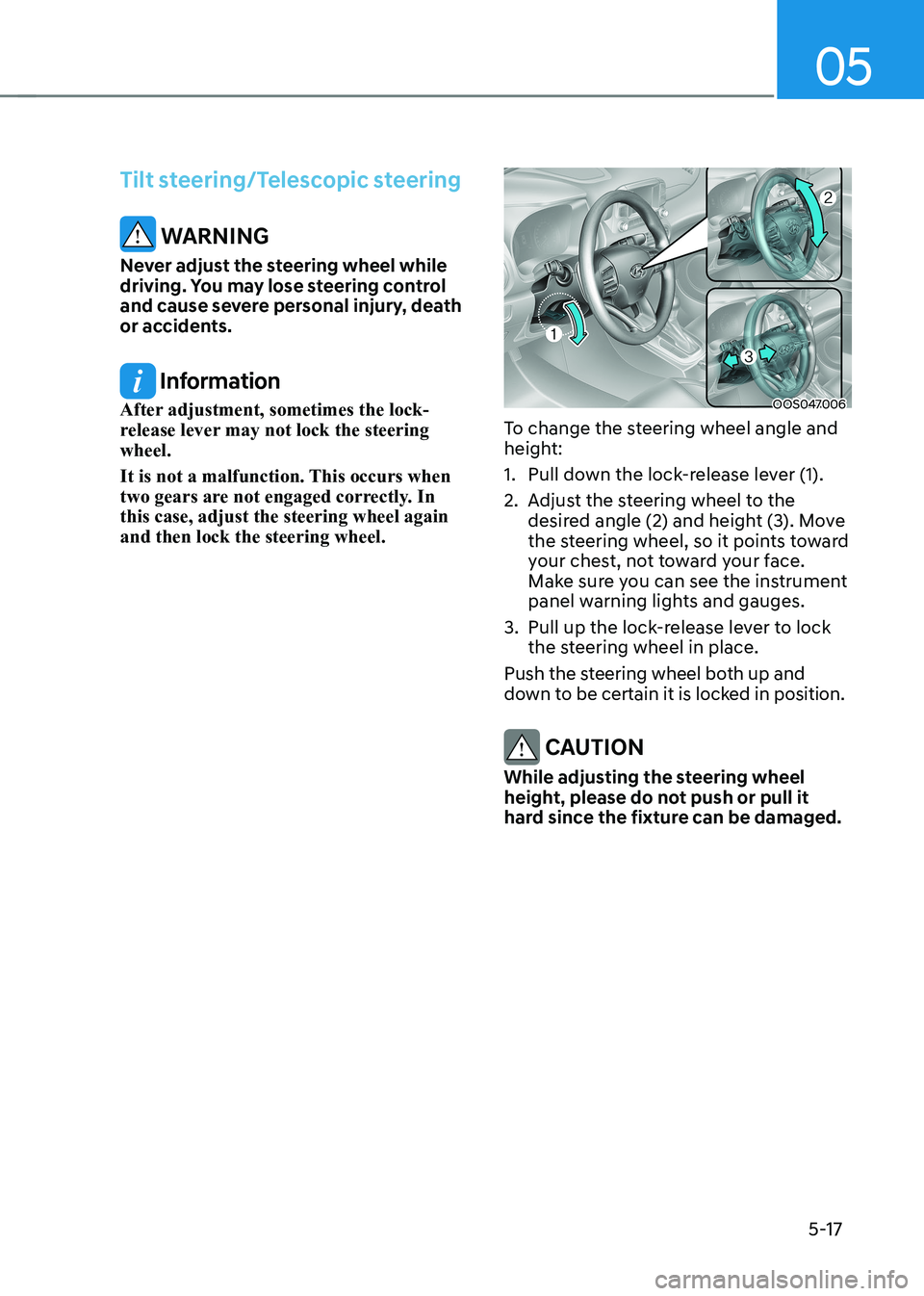
Tilt steering/Telescopic steering
WARNING
Never adjust the steering wheel while
driving. You may lose steering control
and cause severe personal injury, death
or accidents.
Information
After adjustment, sometimes the lock-
release lever may not lock the steering wheel.
It is not a malfunction. This occurs when
two gears are not engaged correctly. In this case, adjust the steering wheel again and then lock the steering wheel.OOS047006
To change the steering wheel angle and
height:
1. Pull down the lock-release lever (1).
2. Adjust the steering wheel to the desired angle (2) and height (3). Move
the steering wheel, so it points toward
your chest, not toward your face.
Make sure you can see the instrument
panel warning lights and gauges.
3. Pull up the lock-release lever to lock the steering wheel in place.
Push the steering wheel both up and
down to be certain it is locked in position.
CAUTION
While adjusting the steering wheel
height, please do not push or pull it
hard since the fixture can be damaged.
Page 230 of 548
Convenient features
5-46
OOSEV050125L
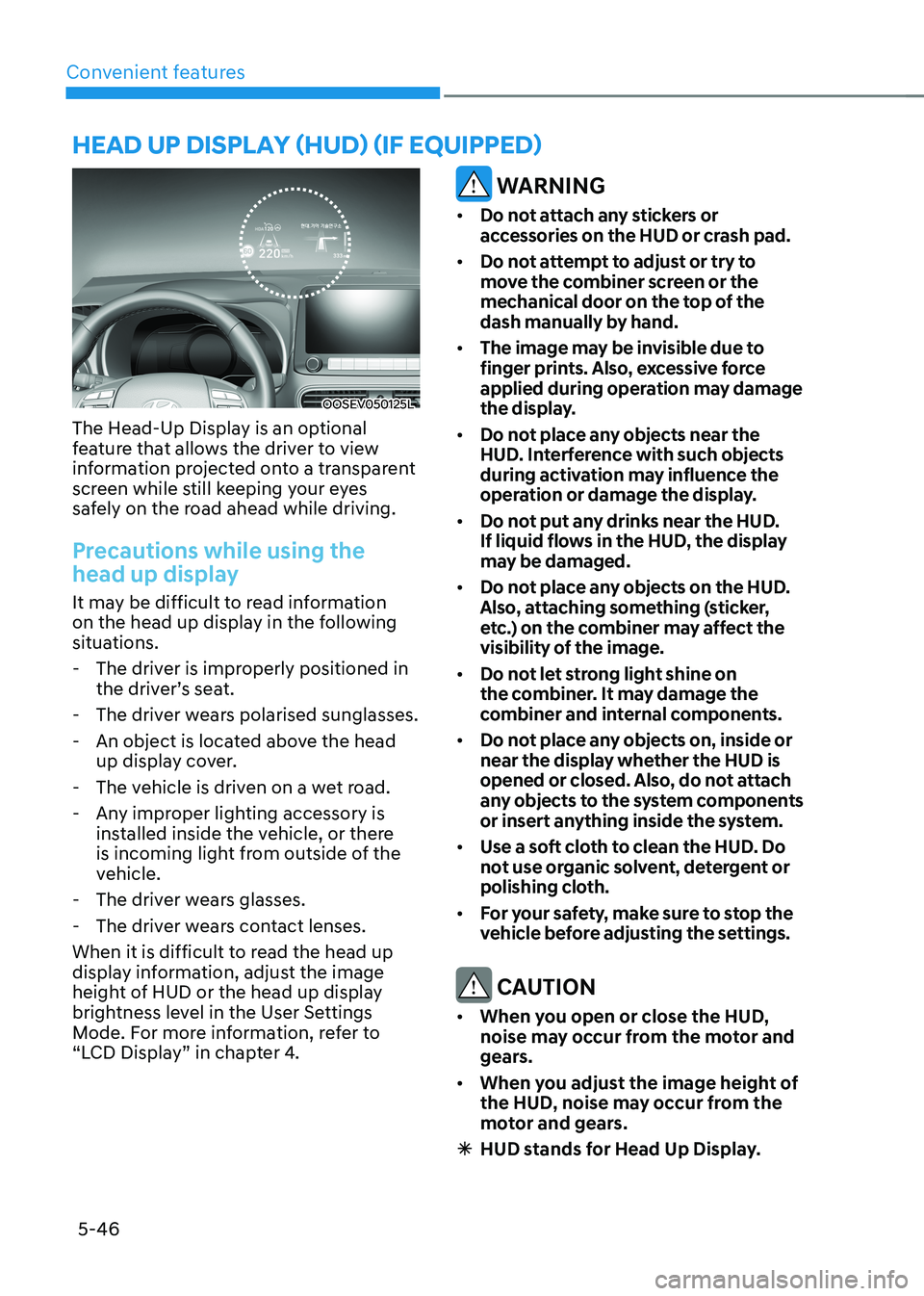
The Head-Up Display is an optional
feature that allows the driver to view
information projected onto a transparent
screen while still keeping your eyes
safely on the road ahead while driving.
Precautions while using the
head up display
It may be difficult to read information
on the head up display in the following
situations. - The driver is improperly positioned in the driver’s seat.
- The driver wears polarised sunglasses.
- An object is located above the head up display cover.
- The vehicle is driven on a wet road.
- Any improper lighting accessory is installed inside the vehicle, or there
is incoming light from outside of the
vehicle.
- The driver wears glasses.
- The driver wears contact lenses.
When it is difficult to read the head up
display information, adjust the image
height of HUD or the head up display
brightness level in the User Settings
Mode. For more information, refer to
“LCD Display” in chapter 4.
WARNING
• Do not attach any stickers or
accessories on the HUD or crash pad.
• Do not attempt to adjust or try to
move the combiner screen or the
mechanical door on the top of the
dash manually by hand.
• The image may be invisible due to
finger prints. Also, excessive force
applied during operation may damage
the display.
• Do not place any objects near the
HUD. Interference with such objects
during activation may influence the
operation or damage the display.
• Do not put any drinks near the HUD.
If liquid flows in the HUD, the display
may be damaged.
• Do not place any objects on the HUD.
Also, attaching something (sticker,
etc.) on the combiner may affect the
visibility of the image.
• Do not let strong light shine on
the combiner. It may damage the
combiner and internal components.
• Do not place any objects on, inside or
near the display whether the HUD is
opened or closed. Also, do not attach
any objects to the system components
or insert anything inside the system.
• Use a soft cloth to clean the HUD. Do
not use organic solvent, detergent or
polishing cloth.
• For your safety, make sure to stop the
vehicle before adjusting the settings.
CAUTION
• When you open or close the HUD,
noise may occur from the motor and
gears.
• When you adjust the image height of
the HUD, noise may occur from the
motor and gears.
à HUD stands for Head Up Display.
head up display (hud) (if equipped)
Page 231 of 548
05
5-47
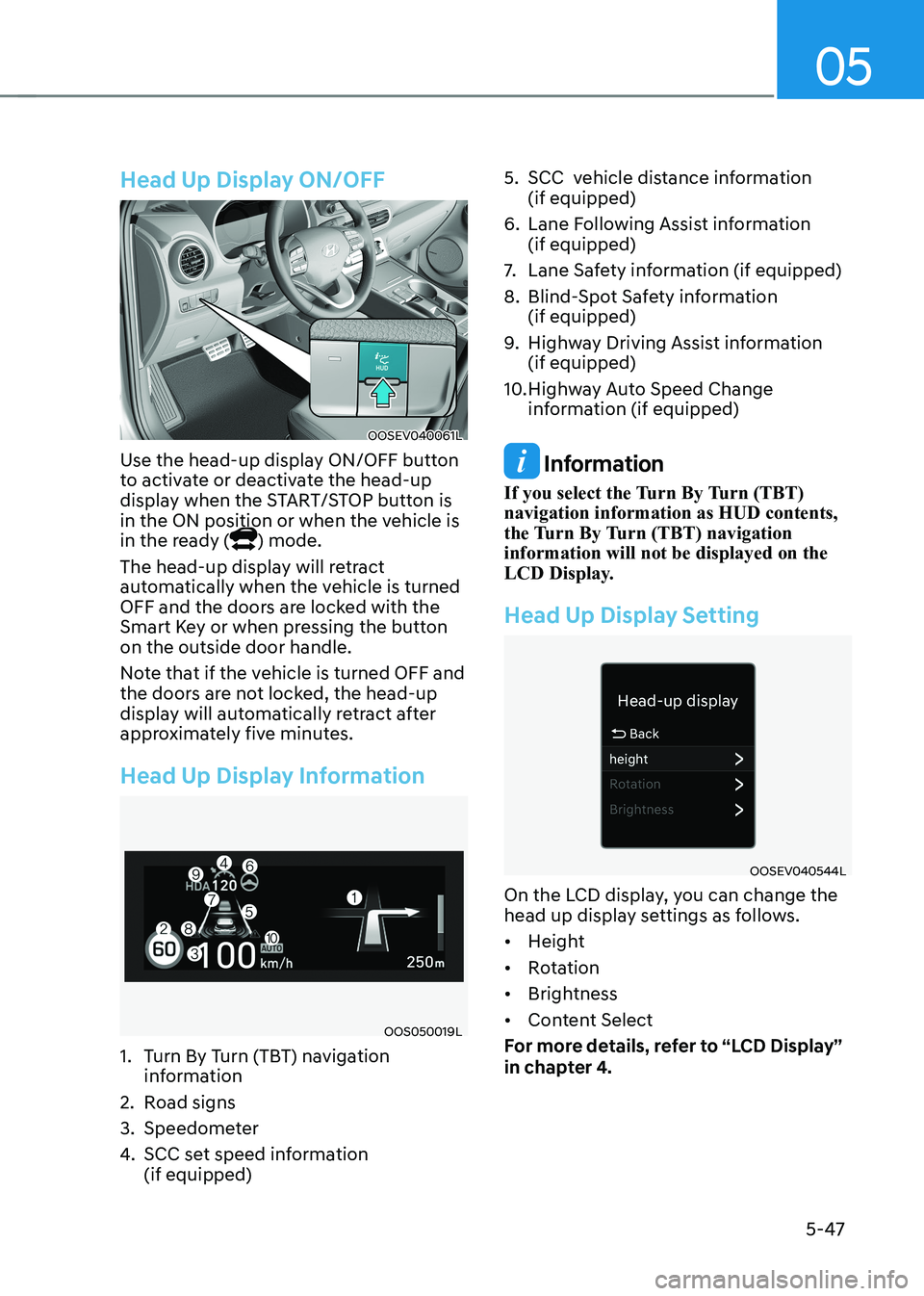
Head Up Display ON/OFF
OOSEV040061L
Use the head-up display ON/OFF button
to activate or deactivate the head-up
display when the START/STOP button is
in the ON position or when the vehicle is
in the ready (
) mode.
The head-up display will retract
automatically when the vehicle is turned
OFF and the doors are locked with the
Smart Key or when pressing the button on the outside door handle.
Note that if the vehicle is turned OFF and
the doors are not locked, the head-up
display will automatically retract after
approximately five minutes.
Head Up Display Information
OOS050019L
1. Turn By Turn (TBT) navigation information
2. Road signs
3. Speedometer
4. SCC set speed information (if equipped) 5. SCC vehicle distance information
(if equipped)
6. Lane Following Assist information (if equipped)
7. Lane Safety information (if equipped)
8. Blind-Spot Safety information (if equipped)
9. Highway Driving Assist information (if equipped)
10. Highway Auto Speed Change information (if equipped)
Information
If you select the Turn By Turn (TBT) navigation information as HUD contents,
the Turn By Turn (TBT) navigation information will not be displayed on the
LCD Display.
Head Up Display Setting
OOSEV040544L
On the LCD display, you can change the
head up display settings as follows. • Height
• Rotation
• Brightness
• Content Select
For more details, refer to “LCD Display”
in chapter 4.
Page 311 of 548
6-31
06
Anti-lock Brake System (ABS)
WARNING
Anti-Lock Braking System (ABS) or
Electronic Stability Control (ESC) will
not prevent accidents due to improper
or dangerous driving maneuvers. Even
though vehicle control is improved
during emergency braking, always
maintain a safe distance between
you and objects ahead of you. Vehicle
speeds should always be reduced
during extreme road conditions. The
braking distance for vehicles equipped
with ABS or ESC may be longer than
for those without these systems in the
following road conditions.
Drive your vehicle at reduced speeds
during the following conditions: • Rough, gravel or snow-covered
roads.
• On roads where the road surface is
pitted or has different surface height.
• Tire chains are installed on your
vehicle. Drive your vehicle at
reduced speeds during the above
conditions.
The safety features of ABS or ESC
equipped vehicle should not be tested
by high speed driving or cornering. This
could endanger the safety of yourself or
others.
ABS is an electronic braking system that
helps to prevent a braking skid. ABS
allows the driver to steer and brake at the same time. Using ABS
To obtain the maximum benefit from
your ABS in an emergency situation,
do not attempt to modulate your brake
pressure and do not try to pump your
brakes. Depress your brake pedal as hard as possible.
When you apply your brakes under
conditions which may lock the wheels,
you may hear sounds from the brakes,
or feel a corresponding sensation in the
brake pedal. This is normal and it means
your ABS is active.
ABS does not reduce the time or distance
it takes to stop the vehicle.
Always maintain a safe distance from the
vehicle in front of you.
ABS will not prevent a skid that results
from sudden changes in direction, such
as trying to take a corner too fast or
making a sudden lane change. Always
drive at a safe speed depending on the
road and weather conditions.
ABS cannot prevent a loss of stability.
Always steer moderately when braking
hard. Severe or sharp steering wheel
movement can still cause your vehicle to
veer into oncoming traffic or off the road.
On loose or uneven road surfaces,
operation of the anti-lock brake system
may result in a longer stopping distance
than for vehicles equipped with a
conventional brake system.
The ABS warning light (
) will stay on
for several seconds after the START/
STOP button is placed in the ON position.
During that time, the ABS will go through
self-diagnosis and the light will go off
if everything is normal. If the light stays
on, you may have a problem with your
ABS. We recommend that you contact an
authorized HYUNDAI dealer as soon as possible.
Page 343 of 548
Driver assistance system
7-10
•
You are driving by a pedestrian,
traffic signs, structures, etc. near the
intersection
• Driving in a parking lot
• Driving through a tollgate,
construction area, unpaved road,
partial paved road, uneven road,
speed bumps, etc.
• Driving on an incline road, curved
road, etc.
• Driving through a roadside with trees
or streetlights
• The adverse road conditions cause
excessive vehicle vibrations while driving
• Your vehicle height is low or high
due to heavy loads, abnormal tire
pressure, etc.
• Driving through a narrow road where
trees or grass are overgrown
• There is interference by
electromagnetic waves, such as
driving in an area with strong radio
waves or electrical noise
warning
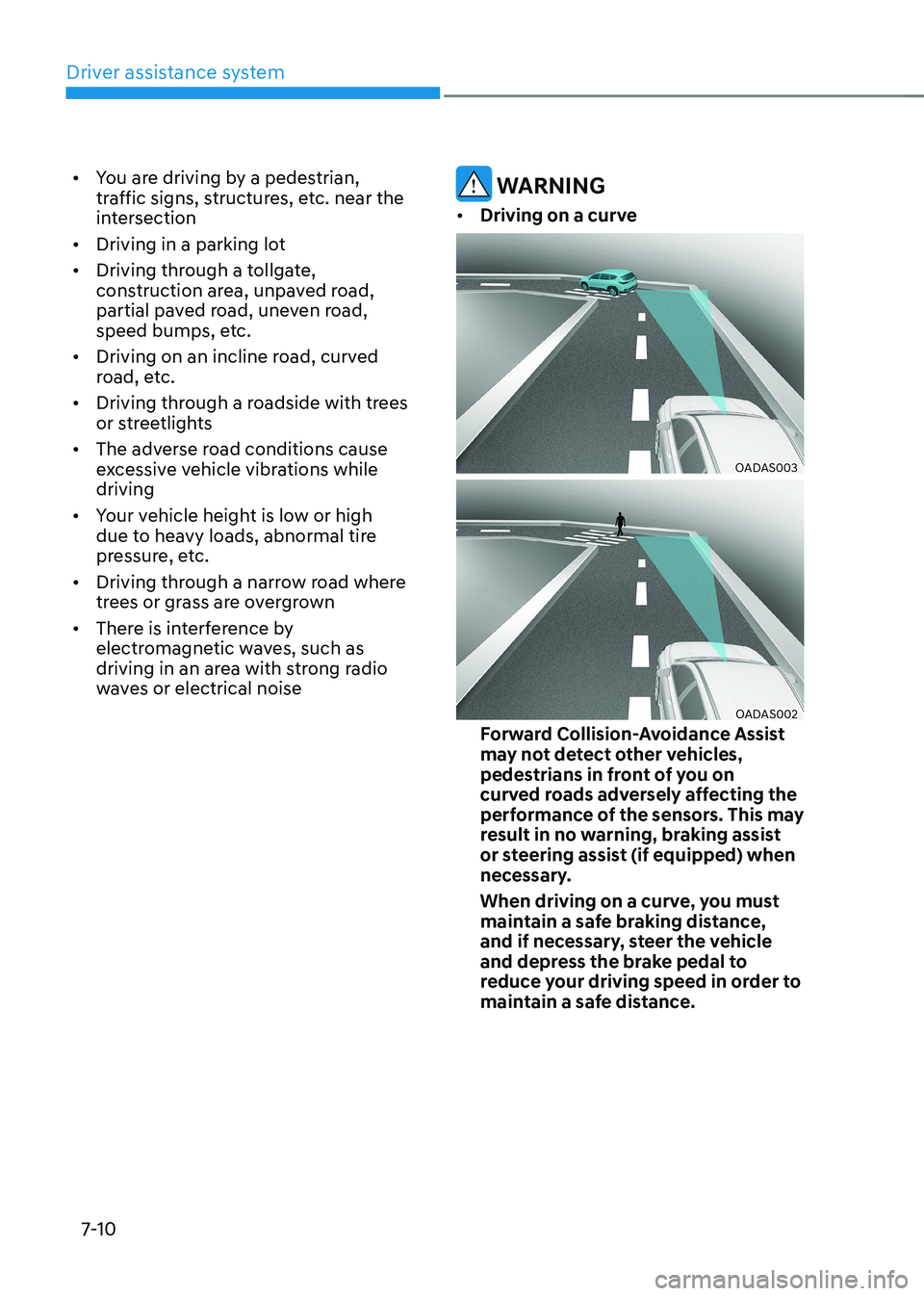
• Driving on a curve
OADAS003
OADAS002
Forward Collision-Avoidance Assist
may not detect other vehicles,
pedestrians in front of you on
curved roads adversely affecting the
performance of the sensors. This may
result in no warning, braking assist
or steering assist (if equipped) when
necessary.
When driving on a curve, you must
maintain a safe braking distance,
and if necessary, steer the vehicle
and depress the brake pedal to
reduce your driving speed in order to
maintain a safe distance.