infotainment HYUNDAI KONA EV 2022 User Guide
[x] Cancel search | Manufacturer: HYUNDAI, Model Year: 2022, Model line: KONA EV, Model: HYUNDAI KONA EV 2022Pages: 548, PDF Size: 49.14 MB
Page 416 of 548
07
7-83
Information
• Highway Set Speed Auto Change function only operates based on
the speed limits of the highway (or motorway), it does not work with the speed cameras.
• When Highway Set Speed Auto Change function is operating, the vehicle
automatically accelerates or decelerates
when the highway (or motorway) speed limit changes.
• The maximum set speed for Highway
Set Speed Auto Change function is 130 km/h (81 mph).
• If the speed limit of a new road is not updated in the navigation, Highway Set
Speed Auto Change function may not
operate properly.
• If the speed unit is set to a unit other
than the speed unit used in your
country, Highway Set Speed Auto Change function may not operate
properly.Limitations of Navigation-based
Smart Cruise Control
Navigation-based Smart Cruise Control
may not operate normally under the
following circumstances: • The navigation is not working properly
• Map information is not transmitted
due to infotainment system's
abnormal operation
• Speed limit and road information in
the navigation is not updated
• The map information and the actual
road is different because of real-time
GPS data or map information error
• The navigation searches for a route while driving
• GPS signals are blocked in areas such as a tunnel
• A road that divides into two or more
roads and joins again
Page 423 of 548
Driver assistance system
7-90
Information
• For more details on setting the functions in the infotainment system,
refer to “Vehicle Settings” section in
chapter 4.
• When both lane markings are detected,
the lane lines on the cluster will change
from grey to white.
„„Lane undetected „„Lane detected
OOSEV071126NOOSEV071127N
• Depending on the type and theme of
the Instrument cluster, images and
colors may differ.
• If lane markings are not detected,
steering wheel control by Lane
Following Assist can be limited
depending on whether a vehicle is in
front or the driving conditions of the
vehicle.
• Even though the steering is assisted
by Lane Following Assist, the driver
may control the steering wheel.
• The steering wheel may feel heavier
or lighter when the steering wheel is
assisted by Lane Following Assist than
when it is not.
Lane Following Assist
malfunction and limitations
Lane Following Assist malfunction
OTM070118N
When Lane Following Assist is not
working properly, the ‘Check Lane
Following Assist (LFA) system’ warning
message will appear for several seconds,
and the master (
) warning light will
illuminate on the cluster. If the master
warning light illuminates, we recommend
that the system be inspected by an
authorized HYUNDAI dealer.
Limitations of Lane Following Assist
For more details on system limitations,
refer to “Lane Keeping Assist (LKA)”
section in this chapter.
warning
For more details on Lane Following
Assist precautions, refer to “Lane
Keeping Assist (LKA)” section in this
chapter.
Page 430 of 548
07
7-97
Limitations of Highway Driving
Assist
Highway Driving Assist and Highway
Lane Change function may not operate
normally, or may not operate under the
following circumstances: •
The map information and the
actual road is different because the
navigation is not updated
• The map information and the actual
road is different because of real-time
GPS data or map information error
• The infotainment system is overloaded
by simultaneously performing
functions such as route search, video
playback, voice recognition, etc.
• GPS signals are blocked in areas such as a tunnel
• The driver goes off course or the
route to the destination is changed or
canceled by resetting the navigation
• The vehicle enters a service station or
rest area
• Android Auto or Car Play is operating
• The navigation cannot detect the
current vehicle position (ex: elevated
roads including overpass adjacent to
general roads or nearby roads exist in
a parallel way)
• White single dotted lane line or road
edge cannot be detected
• The road is temporarily controlled due
to construction, etc.
• There is no structure, such as a
medium strip, guardrails, etc., on the
road
• There is a changeable lane in the
direction of lane change
Information
For more details on the limitations of
the front view camera, front radar, front
corner radar and rear corner radar, refer
to “Forward Collision-Avoidance Assist
(FCA)” section in this chapter.
Information
This device complies with Industry Canada RSS-210 standard.
Operation is subject to the following three conditions: 1. This device may not cause harmful
interference, and
2. This device must accept any
interference received, including
interference that may cause undesired operation.
3. Changes or modifications not expressly
approved by the party responsible
for compliance could void the user's authority to operate the device.
Information
Radio frequency radiation exposure information: This equipment complies with RSS- 210
radiation exposure limits set forth for an
uncontrolled environment. This equipment should be installed and operated with minimum distance of 20cm
(8 in.) between the radiator (antenna) and
your body.
This transmitter must not be co-located or
operating in conjunction with any other
antenna or transmitter.
Page 436 of 548
07
7-103
OOS070110N
Warning Volume
With the vehicle on, select ‘Driver
Assistance → Warning volume’ or ‘Sound
→ Driver Assist Warning → Warning
Volume’ from the Settings menu to
change the Warning Volume to ‘High’,
‘Medium’, or ‘Low’ for Rear Cross-Traffic
Collision-Avoidance Assist.
If you change the Warning Volume,
the warning volume of other Driver
Assistance systems may change.
CAUTION
• The setting of the Warning Timing
and warning volume applies to
all functions of the Rear Collision-
Avoidance Assist.
• even though ‘standard’ is selected
for Warning Timing, if the vehicles
from the left and right side
approaches at high speed, the initial
warning activation time may seem
late.
• Select ‘Late’ for Warning Timing
when traffic is light and when driving
speed is slow.
Information
If the vehicle is restarted, Warning Timing
and Warning Volume will maintain the last setting.
Rear Cross-Traffic Collision-
Avoidance Assist operation
Warning and control
Rear Cross-Traffic Collision-Avoidance
Assist will warn and control the vehicle
depending on collision level: ‘Collision
Warning’, ‘Emergency Braking’ and
‘Stopping vehicle and ending brake
control’.
OHY059005OTM070168
OOS070019K
Collision Warning
• To warn the driver of an approaching
vehicle from the rear left/right side of
your vehicle, the warning light on the
outside rearview mirror will blink and
a warning will appear on the cluster.
At the same time, an audible warning
will sound and the steering wheel will
vibrate. If the Rear View Monitor is
operating, a warning will also appear
on the infotainment system screen.
Page 437 of 548
Driver assistance system
7-104
•
Rear Cross-Traffic Collision-Avoidance
Assist will operate when all the
following conditions are satisfied:
- The gear is shifted to R (Reverse)
- Vehicle speed is below 8 km/h (5 mph)
- The approaching vehicle is within approximately 25 m (82 ft.) from the
left and right side of your vehicle
- The speed of the vehicle approaching from the left and right
is above 5 km/h (3 mph)
Information
If the operating conditions are satisfied,
there will be a warning whenever the
vehicle approaches from the left or right
side even though your vehicle speed is 0 km/h (0 mph).
OHY059005OTM070122N
OOS070019K
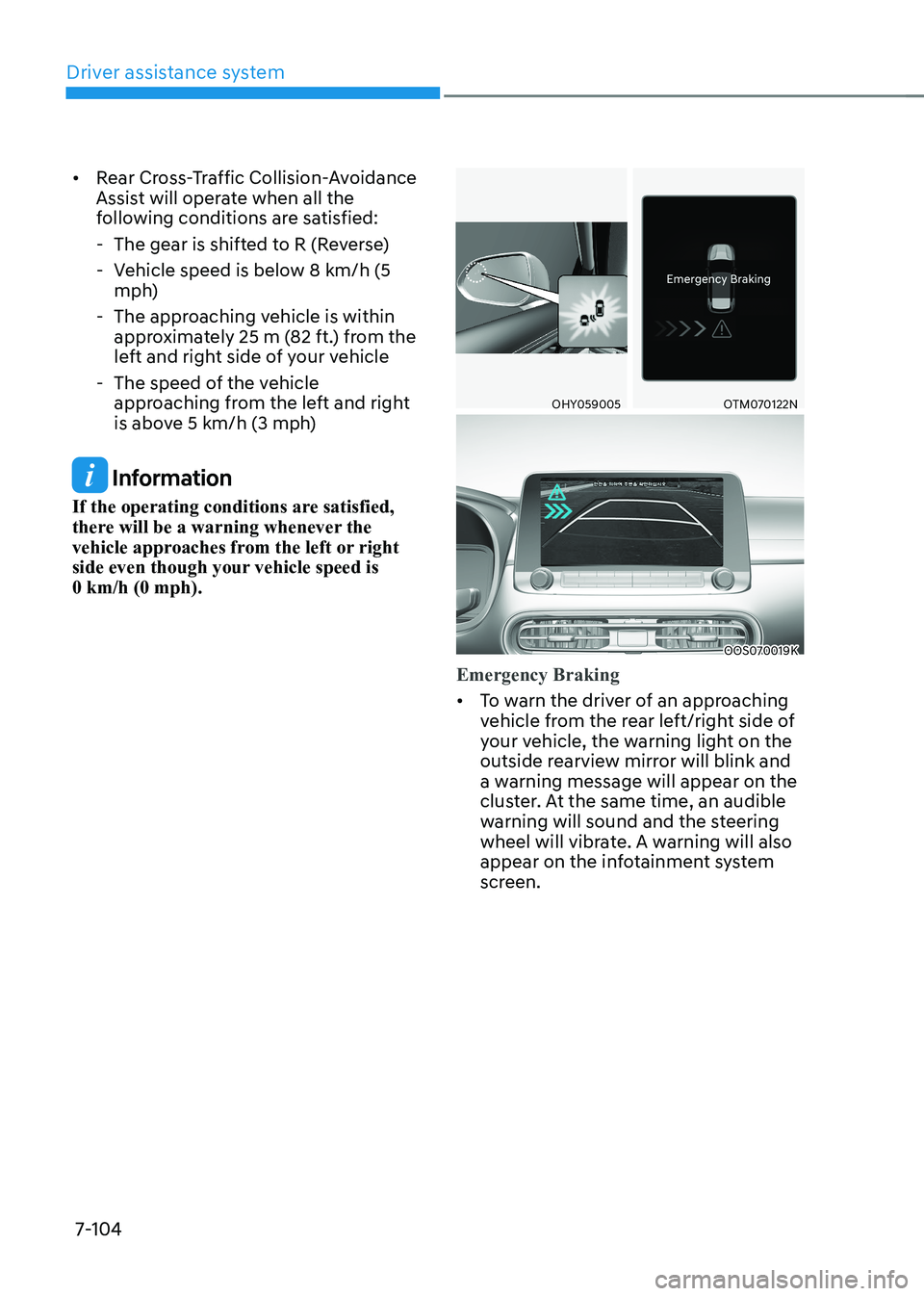
Emergency Braking
• To warn the driver of an approaching
vehicle from the rear left/right side of
your vehicle, the warning light on the
outside rearview mirror will blink and
a warning message will appear on the
cluster. At the same time, an audible
warning will sound and the steering
wheel will vibrate. A warning will also
appear on the infotainment system
screen.
Page 445 of 548
Driver assistance system
7-112
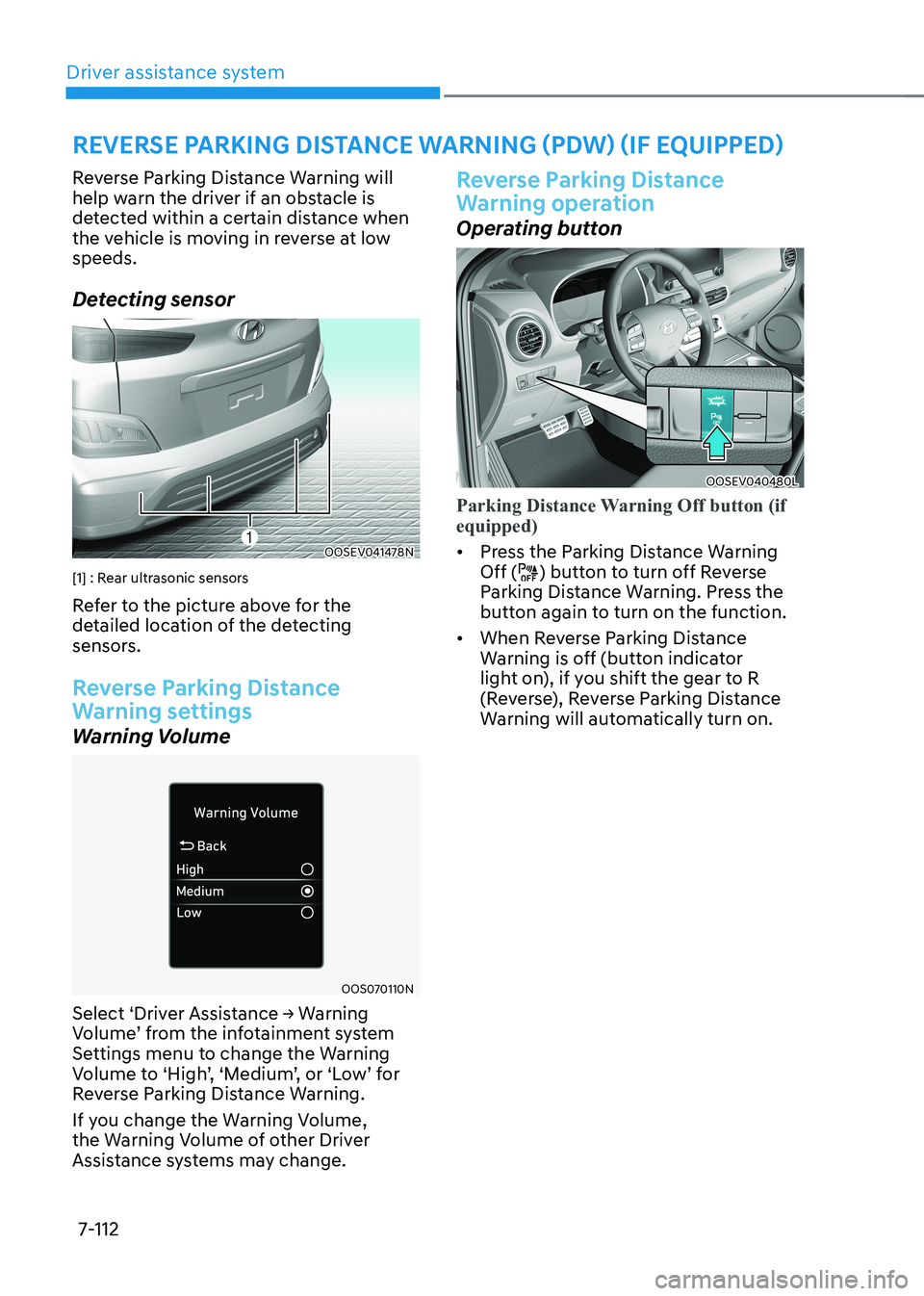
Reverse Parking Distance Warning will
help warn the driver if an obstacle is
detected within a certain distance when
the vehicle is moving in reverse at low speeds.
Detecting sensor
OOSEV041478N
[1] : Rear ultrasonic sensors
Refer to the picture above for the
detailed location of the detecting
sensors.
Reverse Parking Distance
Warning settings
Warning Volume
OOS070110N
Select ‘Driver Assistance → Warning
Volume’ from the infotainment system
Settings menu to change the Warning
Volume to ‘High’, ‘Medium’, or ‘Low’ for
Reverse Parking Distance Warning.
If you change the Warning Volume,
the Warning Volume of other Driver
Assistance systems may change.
Reverse Parking Distance
Warning operation
Operating button
OOSEV040480L
Parking Distance Warning Off button (if equipped)
• Press the Parking Distance Warning Off () button to turn off Reverse
Parking Distance Warning. Press the
button again to turn on the function.
• When Reverse Parking Distance
Warning is off (button indicator
light on), if you shift the gear to R
(Reverse), Reverse Parking Distance
Warning will automatically turn on.
reverse parKing distanCe warning (pdw) (iF equipped)
Page 448 of 548
07
7-115
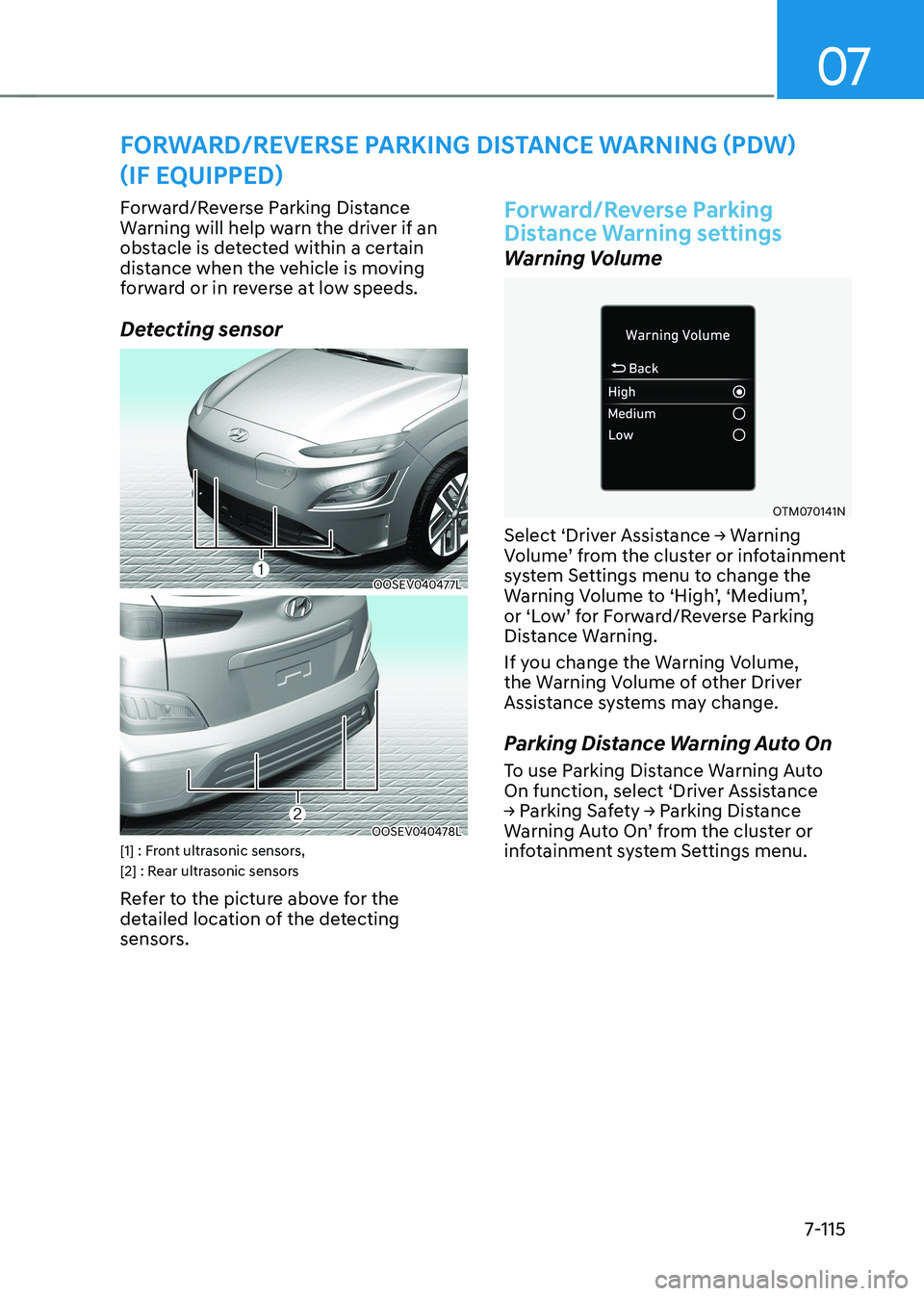
Forward/Reverse Parking Distance
Warning will help warn the driver if an
obstacle is detected within a certain
distance when the vehicle is moving
forward or in reverse at low speeds.
Detecting sensor
OOSEV040477L
OOSEV040478L
[1] : Front ultrasonic sensors,
[2] : Rear ultrasonic sensors
Refer to the picture above for the
detailed location of the detecting
sensors.
Forward/reverse parking
Distance Warning settings
Warning Volume
OTM070141N
Select ‘Driver Assistance → Warning
Volume’ from the cluster or infotainment
system Settings menu to change the
Warning Volume to ‘High’, ‘Medium’,
or ‘Low’ for Forward/Reverse Parking
Distance Warning.
If you change the Warning Volume,
the Warning Volume of other Driver
Assistance systems may change.
Parking Distance Warning Auto On
To use Parking Distance Warning Auto
On function, select ‘Driver Assistance
→ Parking Safety → Parking Distance
Warning Auto On’ from the cluster or
infotainment system Settings menu.
Forward/reverse parKing distanCe warning (pdw)
(iF equipped)
Page 541 of 548
Index
I-6
I If the vehicle will not start ..................................................................................... 8-3
Confirm the EV battery is not low on the charge gauge ....................................8-3
If you have a flat tire (with Tire Mobility Kit) ....................................................8-11
Components of the Tire Mobility Kit ............................................................... 8-12
How to adjust tire pressure .............................................................................. 8-16
Introduction ...................................................................................................... 8-11
Notes on the safe use of the Tire Mobility Kit .................................................8-17
Using the Tire Mobility Kit When a tire is flat ................................................8-13
Important safety precautions.................................................................................. 3-2
Air bag hazards ................................................................................................... 3-2
Always wear your seat belt ................................................................................ 3-2
Control your speed ............................................................................................. 3-2
Driver distraction ................................................................................................ 3-2
Keep your vehicle in safe condition ................................................................... 3-2
Restrain all children ........................................................................................... 3-2
In case of an emergency while driving .................................................................. 8-2
If the vehicle stalls at a crossroad or crossing ...................................................8-2
If the vehicle stalls while driving ....................................................................... 8-2
If you have a flat tire while driving ................................................................... 8-3
Infotainment system............................................................................................. 5-93 Antenna ............................................................................................................ 5-93
Audio / Video / Navigation system (AVN) ......................................................5-96
Bluetooth® Wireless Technology hands-free ..................................................5-95
Steering wheel audio controls ......................................................................... 5-94
USB and iPod® port ....................................................................................... 5-93
Voice recognition .............................................................................................. 5-96
Instrument cluster .................................................................................................. 4-2
Gauges and meters ............................................................................................. 4-3
Instrument cluster control ................................................................................... 4-3
Warning and indicator lights .............................................................................. 4-7