lights HYUNDAI KONA EV 2022 User Guide
[x] Cancel search | Manufacturer: HYUNDAI, Model Year: 2022, Model line: KONA EV, Model: HYUNDAI KONA EV 2022Pages: 548, PDF Size: 49.14 MB
Page 162 of 548
04
4-19
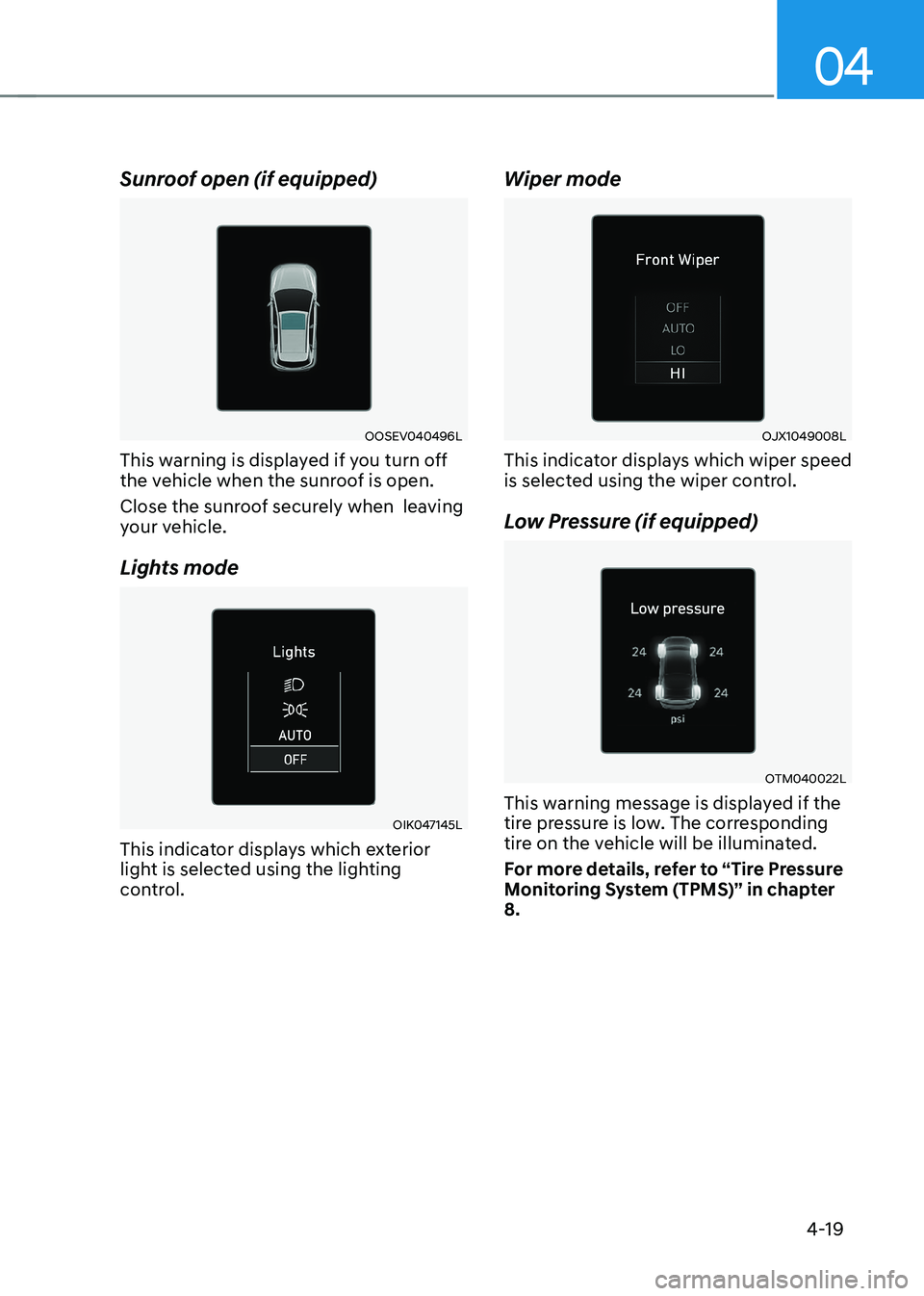
Sunroof open (if equipped)
OOSEV040496L
This warning is displayed if you turn off
the vehicle when the sunroof is open.
Close the sunroof securely when leaving
your vehicle.
Lights mode
OIK047145L
This indicator displays which exterior
light is selected using the lighting
control. Wiper mode
OJX1049008L
This indicator displays which wiper speed
is selected using the wiper control.
Low Pressure (if equipped)
OTM040022L
This warning message is displayed if the
tire pressure is low. The corresponding
tire on the vehicle will be illuminated.
For more details, refer to “Tire Pressure
Monitoring System (TPMS)” in chapter 8.
Page 174 of 548
04
4-31
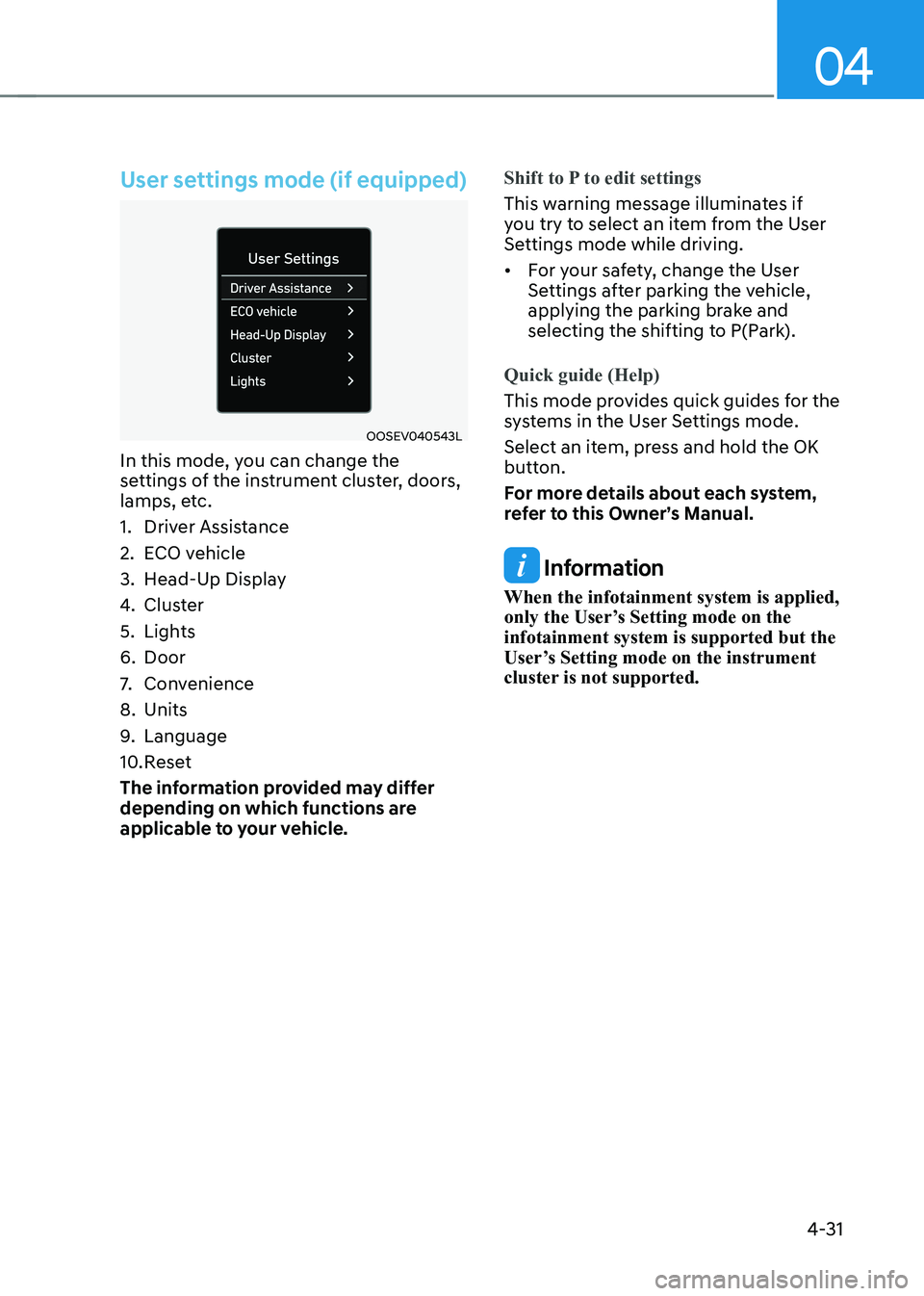
User settings mode (if equipped)
OOSEV040543L
In this mode, you can change the
settings of the instrument cluster, doors,
lamps, etc.
1. Driver Assistance
2. ECO vehicle
3. Head-Up Display
4. Cluster
5. Lights
6. Door
7. Convenience
8. Units
9. Language
10. Reset
The information provided may differ
depending on which functions are
applicable to your vehicle.
Shift to P to edit settings
This warning message illuminates if
you try to select an item from the User
Settings mode while driving. • For your safety, change the User
Settings after parking the vehicle,
applying the parking brake and
selecting the shifting to P(Park).
Quick guide (Help)
This mode provides quick guides for the
systems in the User Settings mode.
Select an item, press and hold the OK
button.
For more details about each system,
refer to this Owner’s Manual.
Information
When the infotainment system is applied,
only the User’s Setting mode on the infotainment system is supported but the
User’s Setting mode on the instrument
cluster is not supported.
Page 178 of 548
04
4-35
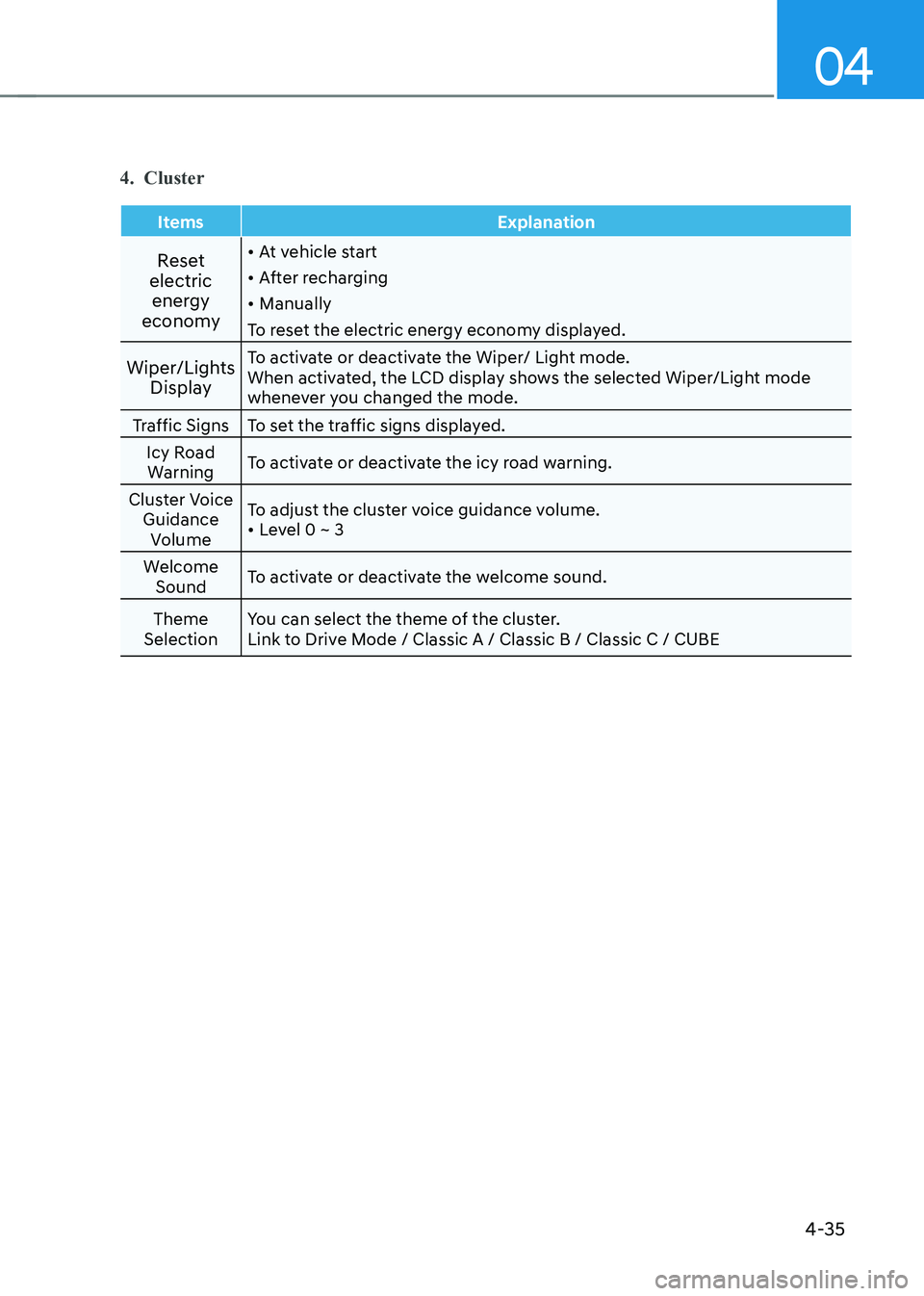
4. Cluster
Items Explanation
Reset
electric energy
economy •
At vehicle start
• After recharging
• Manually
To reset the electric energy economy displayed.
Wiper/Lights Display To activate or deactivate the Wiper/ Light mode.
When activated, the LCD display shows the selected Wiper/Light mode
whenever you changed the mode.
Traffic Signs To set the traffic signs displayed. Icy Road Warning To activate or deactivate the icy road warning.
Cluster Voice Guidance Volume To adjust the cluster voice guidance volume.•
Level 0 ~ 3
Welcome Sound To activate or deactivate the welcome sound.
Theme
Selection You can select the theme of the cluster.
Link to Drive Mode / Classic A / Classic B / Classic C / CUBE
Page 179 of 548
Instrument cluster
4-36
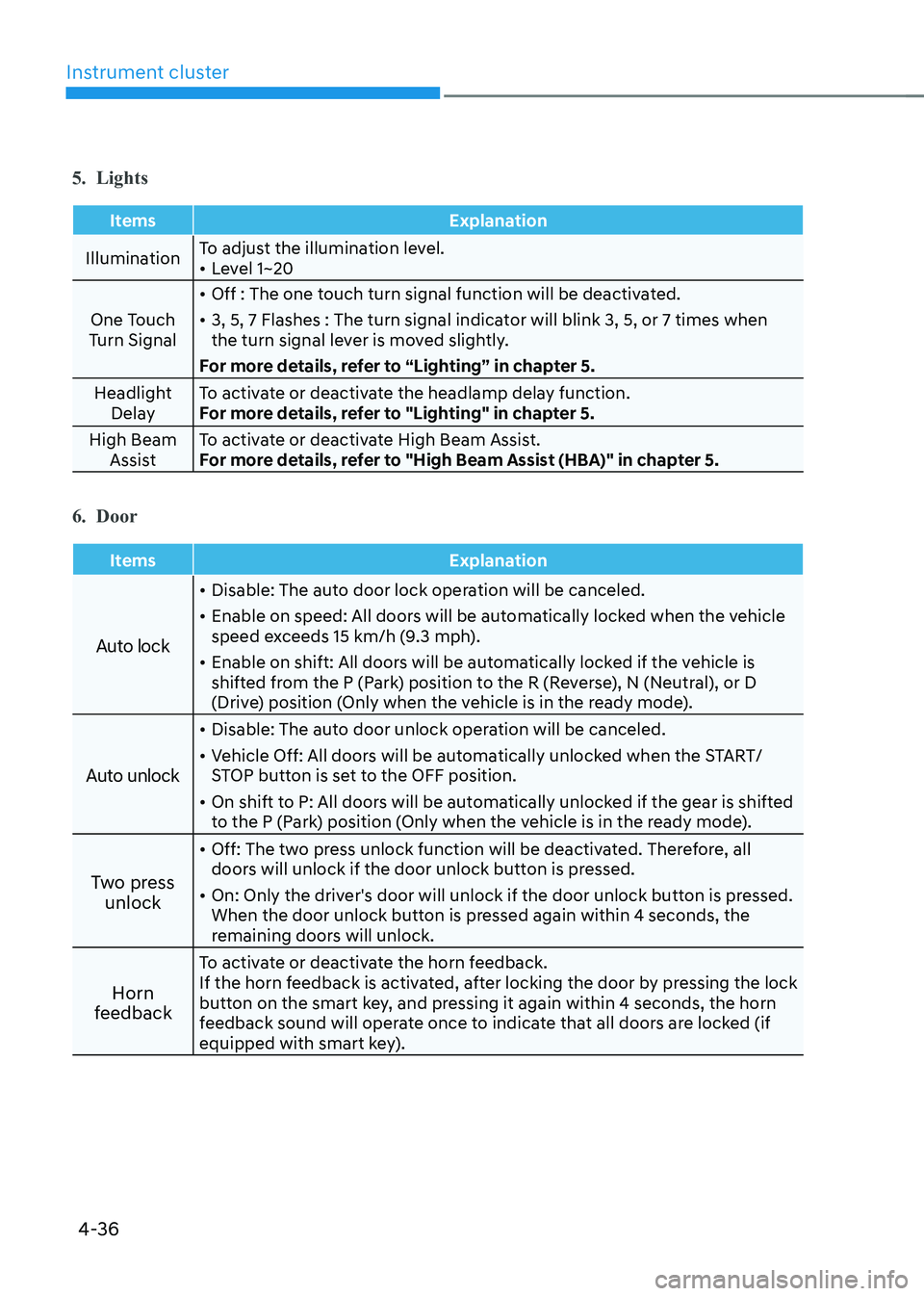
5. Lights
Items Explanation
IlluminationTo adjust the illumination level. •
Level 1~20
One Touch
Turn Signal •
Off : The one touch turn signal function will be deactivated.
• 3, 5, 7 Flashes : The turn signal indicator will blink 3, 5, or 7 times when
the turn signal lever is moved slightly.
For more details, refer to “Lighting” in chapter 5.
Headlight Delay To activate or deactivate the headlamp delay function.
For more details, refer to "Lighting" in chapter 5.
High Beam Assist To activate or deactivate High Beam Assist.
For more details, refer to "High Beam Assist (HBA)" in chapter 5.
6. Door
Items Explanation
Auto lock
•
Disable: The auto door lock operation will be canceled.
• Enable on speed: All doors will be automatically locked when the vehicle
speed exceeds 15 km/h (9.3 mph).
• Enable on shift: All doors will be automatically locked if the vehicle is
shifted from the P (Park) position to the R (Reverse), N (Neutral), or D
(Drive) position (Only when the vehicle is in the ready mode).
Auto unlock
• Disable: The auto door unlock operation will be canceled.
• Vehicle Off: All doors will be automatically unlocked when the START/
STOP button is set to the OFF position.
• On shift to P: All doors will be automatically unlocked if the gear is shifted
to the P (Park) position (Only when the vehicle is in the ready mode).
Two press unlock •
Off: The two press unlock function will be deactivated. Therefore, all
doors will unlock if the door unlock button is pressed.
• On: Only the driver's door will unlock if the door unlock button is pressed.
When the door unlock button is pressed again within 4 seconds, the
remaining doors will unlock.
Horn
feedback To activate or deactivate the horn feedback.
If the horn feedback is activated, after locking the door by pressing the lock
button on the smart key, and pressing it again within 4 seconds, the horn
feedback sound will operate once to indicate that all doors are locked (if
equipped with smart key).
Page 186 of 548
5
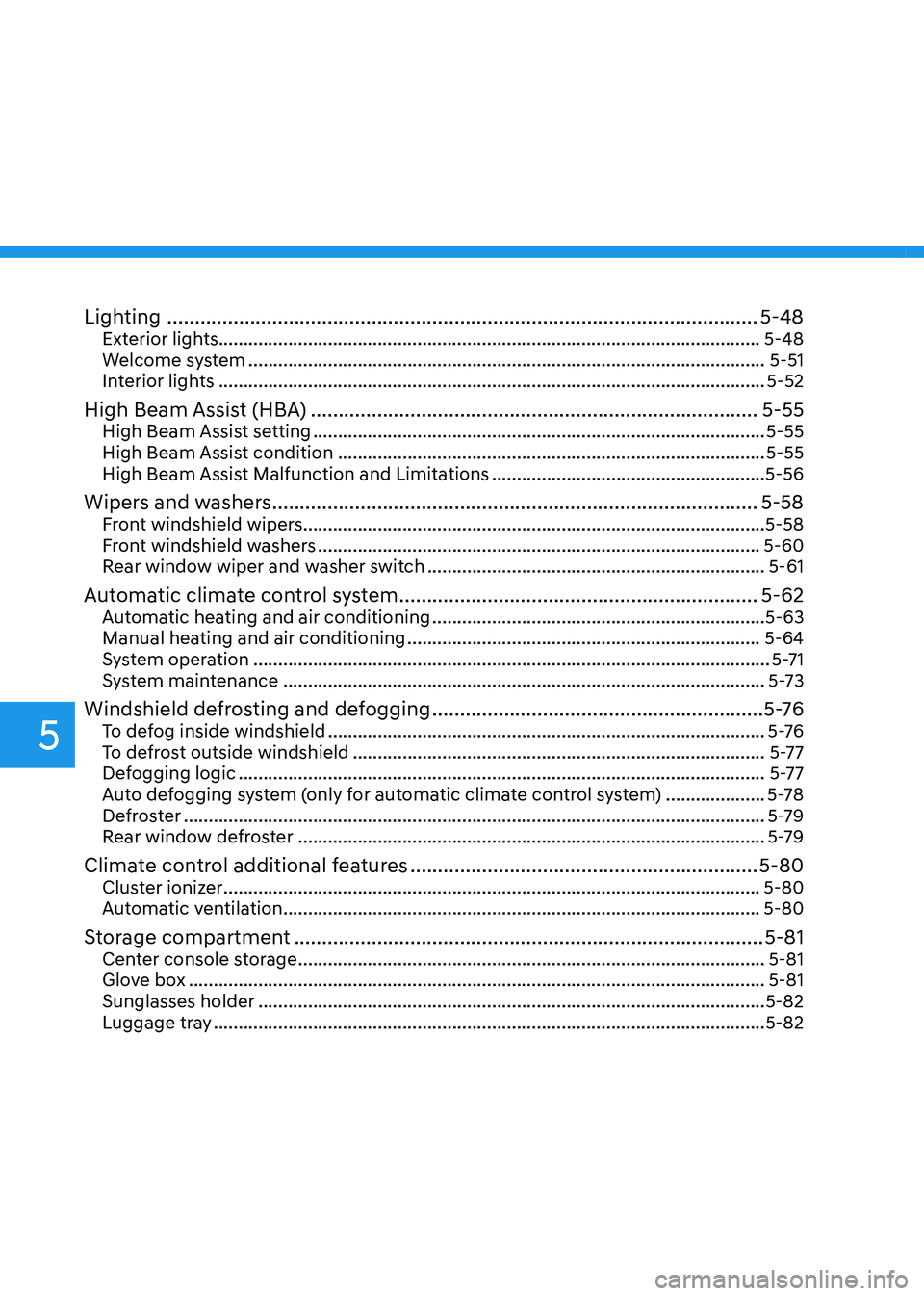
Lighting ........................................................................................................... 5-48
Exterior lights............................................................................................................. 5-48 Welcome system ........................................................................................................ 5-51
Interior lights .............................................................................................................. 5-52
High Beam Assist (HBA) ................................................................................. 5-55
High Beam Assist setting ........................................................................................... 5-55
High Beam Assist condition ...................................................................................... 5-55
High Beam Assist Malfunction and Limitations .......................................................5-56
Wipers and washers ........................................................................................ 5-58
Front windshield wipers ............................................................................................. 5-58
Front windshield washers ......................................................................................... 5-60
Rear window wiper and washer switch .................................................................... 5-61
Automatic climate control system ................................................................. 5-62
Automatic heating and air conditioning ................................................................... 5-63
Manual heating and air conditioning ....................................................................... 5-64
System operation ........................................................................................................ 5-71
System maintenance ................................................................................................. 5-73
Windshield defrosting and defogging ............................................................5 -76
To defog inside windshield ........................................................................................ 5 -76
To defrost outside windshield ................................................................................... 5-77
Defogging logic .......................................................................................................... 5-77
Auto defogging system (only for automatic climate control system) ....................5-78
Defroster ..................................................................................................................... 5-79
Rear window defroster .............................................................................................. 5-79
Climate control additional features ............................................................... 5-80
Cluster ionizer ............................................................................................................ 5-80
Automatic ventilation ................................................................................................ 5-80
Storage compartment ..................................................................................... 5-81
Center console storage .............................................................................................. 5-81
Glove box .................................................................................................................... 5-81
Sunglasses holder ...................................................................................................... 5-82
Luggage tray ............................................................................................................... 5-82
Page 188 of 548
Convenient features
5-4
Smart key
OOS050026N
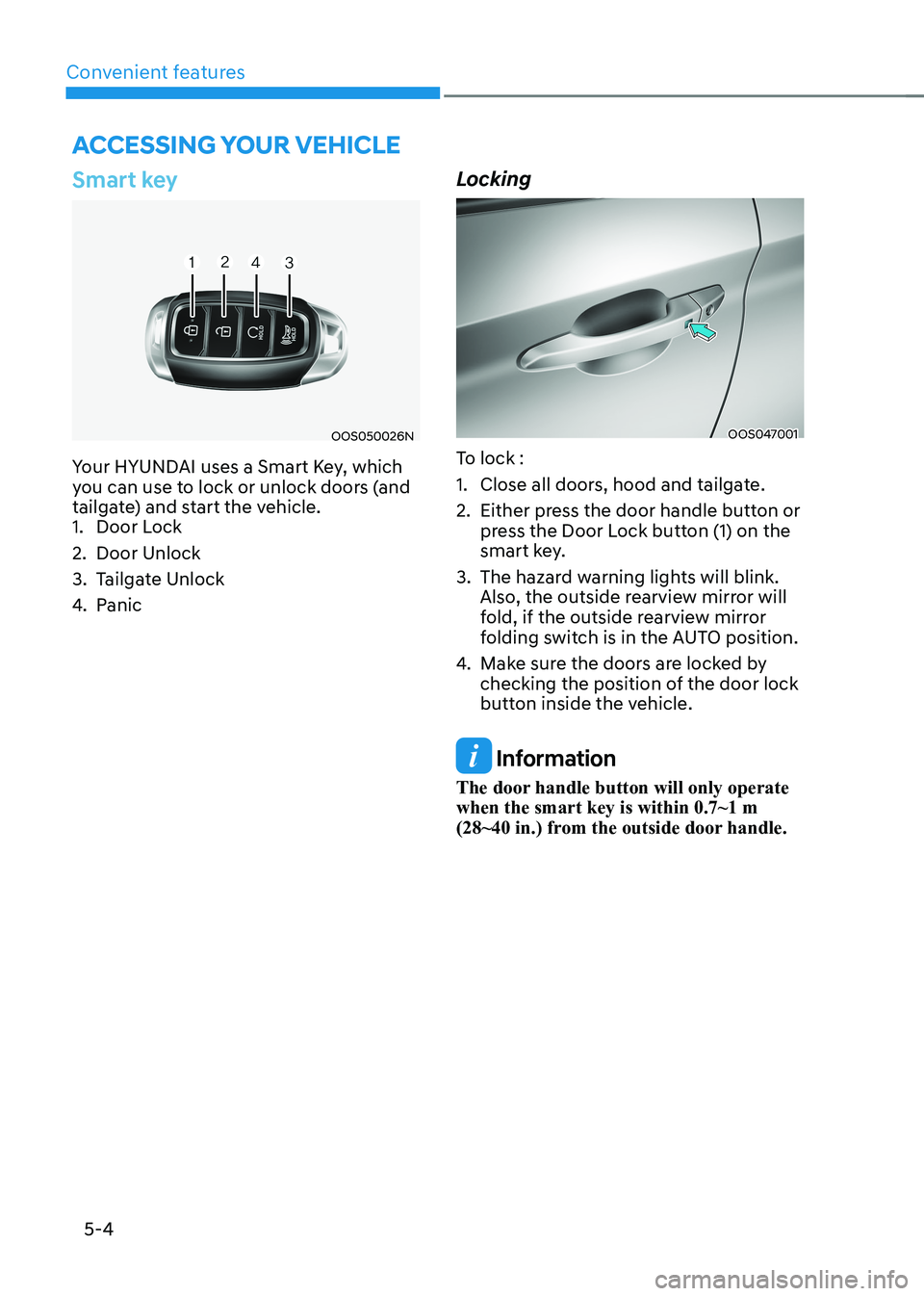
Your HYUNDAI uses a Smart Key, which
you can use to lock or unlock doors (and
tailgate) and start the vehicle.
1. Door Lock
2. Door Unlock
3. Tailgate Unlock
4. Panic LockingOOS047001
To lock :
1. Close all doors, hood and tailgate.
2. Either press the door handle button or press the Door Lock button (1) on the
smart key.
3. The hazard warning lights will blink. Also, the outside rearview mirror will
fold, if the outside rearview mirror
folding switch is in the AUTO position.
4. Make sure the doors are locked by
checking the position of the door lock
button inside the vehicle.
Information
The door handle button will only operate when the smart key is within 0.7~1 m
(28~40 in.) from the outside door handle.
Accessing your vehicle
Page 189 of 548
05
5-5
Even though you press the outside
door handle button, the doors will not
lock and the chime will sound for three
seconds if any of the following occur: •
The Smart Key is in the vehicle.
• The START/STOP button is ON position.
• Any door except the tailgate is open.
WARNING
Do not leave the Smart Key in your
vehicle with unsupervised children.
Unattended children could press the
START/STOP button and may operate
power windows or other controls, or
even make the vehicle move, which
could result in serious injury or death. Unlocking
OOS047001
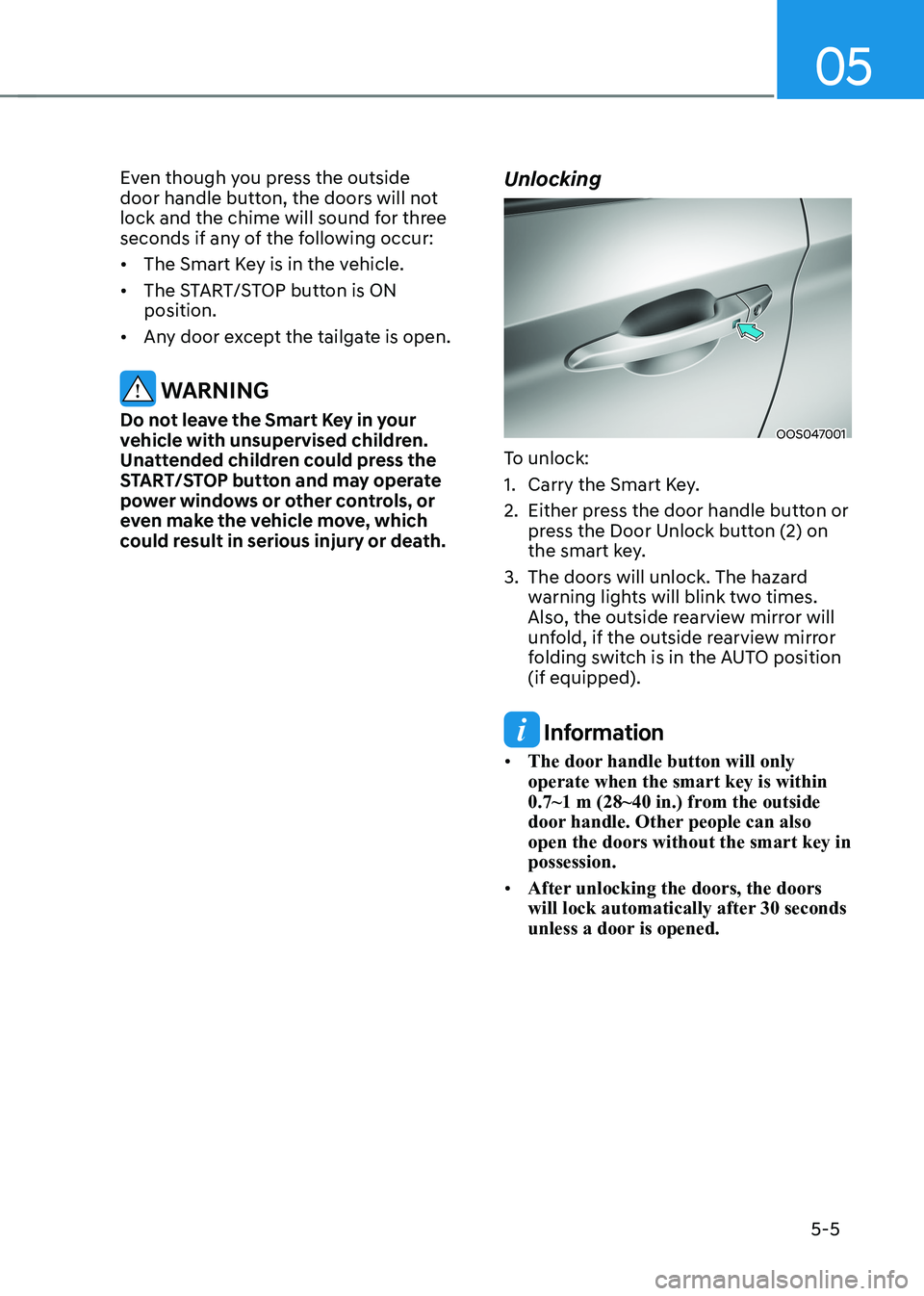
To unlock:
1. Carry the Smart Key.
2. Either press the door handle button or press the Door Unlock button (2) on
the smart key.
3. The doors will unlock. The hazard warning lights will blink two times.
Also, the outside rearview mirror will
unfold, if the outside rearview mirror
folding switch is in the AUTO position (if equipped).
Information
• The door handle button will only operate when the smart key is within
0.7~1 m (28~40 in.) from the outside
door handle. Other people can also open the doors without the smart key in possession.
• After unlocking the doors, the doors
will lock automatically after 30 seconds
unless a door is opened.
Page 190 of 548
Convenient features
5-6
Start-up
You can start the vehicle without
inserting the key.
For detailed information refer to the
START/STOP button in chapter 5.
NOTICE
To prevent damaging the smart key: • Keep the smart key away from water
or any liquid and fire. If the inside
of the smart key gets damp (due to
drinks or moisture), or is heated,
internal circuit may malfunction and
may void the vehicle warranty.
• Avoid dropping or throwing the
smart key.
• Protect the smart key from extreme
temperatures. Remotely starting vehicle
You can start the vehicle using the
Remote Start button on the smart key.
To start the vehicle remotely:
1. Press the door lock button on the
smart key within 10 m (32 feet) from
the vehicle.
2. Press the Remote Start button for more than 2 seconds within 4 seconds
after pressing the door lock button.
3. The hazard warning lights will blink and the vehicle will start.
4. To turn off the remote start function,
press the Remote Start button once.
Information
• The vehicle must be in P (Park) for the
remote start function to start.
• The motor turns off if you get on the
vehicle without a registered smart key.
• The motor turns off if you do not get
on the vehicle within 10 minutes after
remotely starting the vehicle.
• The Remote Start button may not operate if the smart key is not within 10 m (32 feet).
• The vehicle will not remotely start if the
hood or tailgate is opened.
• Do not idle the vehicle for a long period.
Page 199 of 548
05
5-15
This system helps to protect your vehicle
and valuables. The horn will sound and
the hazard warning lights will blink
continuously if any of the following
occurs:
- A door is opened without using the smart key.
- The tailgate is opened without using the smart key.
- The hood is opened.
The alarm continues for 30 seconds, then
the system resets. To turn off the alarm,
unlock the doors with the smart key.
The Theft Alarm System automatically
sets 30 seconds after you lock the doors
and the tailgate. For the system to
activate, you must lock the doors and the
tailgate from outside the vehicle with the
smart key or by pressing the button on
the outside of the door handles with the
smart key in your possession.
The hazard warning lights will blink and
the chime will sound once to indicate the
system is armed.
Once the security system is set, opening
any door, the tailgate, or the hood
without using the smart key will cause
the alarm to activate.
The Theft Alarm System will not set if the
hood, the tailgate, or any door is not fully
closed. If the system will not set, check
the hood, the tailgate, or the doors are fully closed.
Do not attempt to alter this system or
add other devices to it.
Information
• Do not lock the doors until all passengers have left the vehicle. If the
remaining passenger leaves the vehicle when the system is armed, the alarm will be activated.
• If the vehicle is not disarmed with the
smart key, open the doors by using the mechanical key and start the vehicle
(for smart key) and wait for 30 seconds.
• When the system is disarmed but a
door or tailgate is not opened within 30
seconds, the system will be rearmed.
ThefT-alarm sysTem
Page 201 of 548
05
5-17
Tilt steering/Telescopic steering
WARNING
Never adjust the steering wheel while
driving. You may lose steering control
and cause severe personal injury, death
or accidents.
Information
After adjustment, sometimes the lock-
release lever may not lock the steering wheel.
It is not a malfunction. This occurs when
two gears are not engaged correctly. In this case, adjust the steering wheel again and then lock the steering wheel.OOS047006
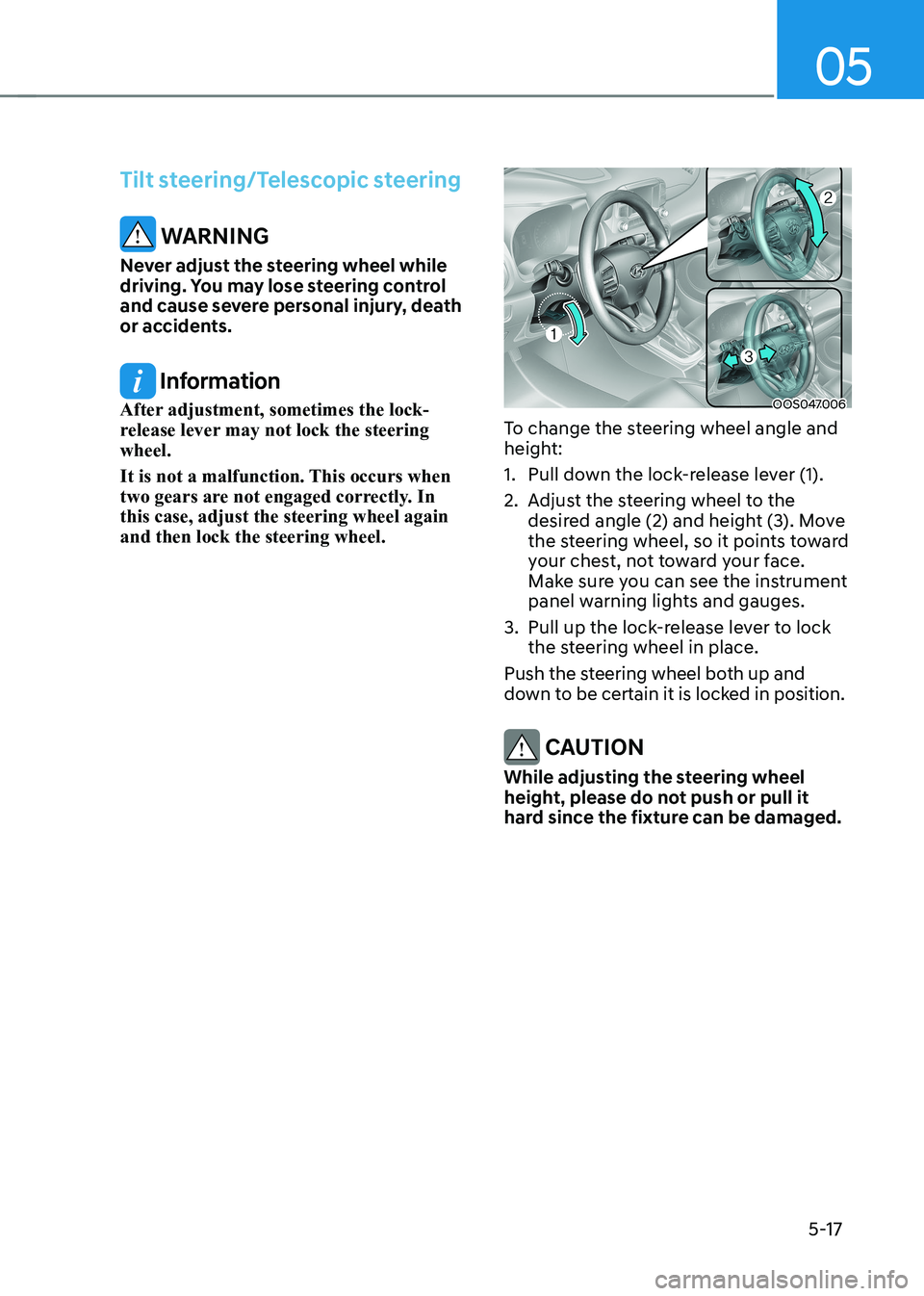
To change the steering wheel angle and
height:
1. Pull down the lock-release lever (1).
2. Adjust the steering wheel to the desired angle (2) and height (3). Move
the steering wheel, so it points toward
your chest, not toward your face.
Make sure you can see the instrument
panel warning lights and gauges.
3. Pull up the lock-release lever to lock the steering wheel in place.
Push the steering wheel both up and
down to be certain it is locked in position.
CAUTION
While adjusting the steering wheel
height, please do not push or pull it
hard since the fixture can be damaged.