reset HYUNDAI KONA EV 2022 Owner's Manual
[x] Cancel search | Manufacturer: HYUNDAI, Model Year: 2022, Model line: KONA EV, Model: HYUNDAI KONA EV 2022Pages: 548, PDF Size: 49.14 MB
Page 417 of 548
Driver assistance system
7-84
•
The driver goes off course the route
set in the navigation
• The route to the destination is
changed or canceled by resetting the
navigation
• The vehicle enters a service station or
rest area
• Android Auto or Car Play is operating
• The navigation cannot detect the
current vehicle position (ex: elevated
roads including overpass adjacent to
general roads or nearby roads exist in
a parallel way)
• The navigation is being updated while driving
• The navigation is being restarted while driving
• The speed limit of some sections
changes according to the road
situations
• Driving on a road under construction
• Driving on a road that is controlled
• There is bad weather, such as heavy
rain, heavy snow, etc.
• Driving on a road that is sharply
curved
OJX1070280L
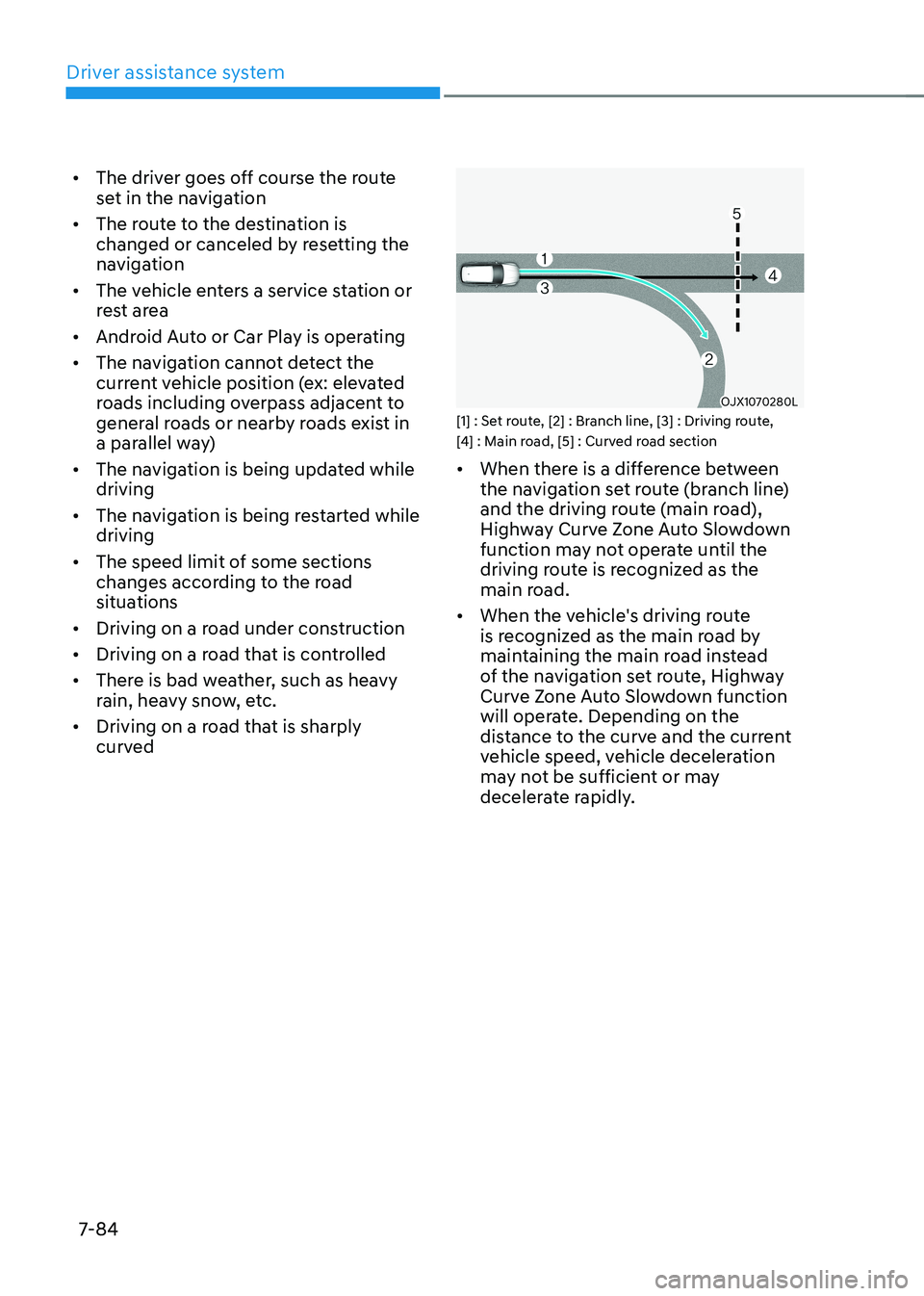
[1] : Set route, [2] : Branch line, [3] : Driving route,
[4] : Main road, [5] : Curved road section • When there is a difference between
the navigation set route (branch line)
and the driving route (main road),
Highway Curve Zone Auto Slowdown
function may not operate until the
driving route is recognized as the
main road.
• When the vehicle's driving route
is recognized as the main road by
maintaining the main road instead
of the navigation set route, Highway
Curve Zone Auto Slowdown function
will operate. Depending on the
distance to the curve and the current
vehicle speed, vehicle deceleration
may not be sufficient or may
decelerate rapidly.
Page 430 of 548
07
7-97
Limitations of Highway Driving
Assist
Highway Driving Assist and Highway
Lane Change function may not operate
normally, or may not operate under the
following circumstances: •
The map information and the
actual road is different because the
navigation is not updated
• The map information and the actual
road is different because of real-time
GPS data or map information error
• The infotainment system is overloaded
by simultaneously performing
functions such as route search, video
playback, voice recognition, etc.
• GPS signals are blocked in areas such as a tunnel
• The driver goes off course or the
route to the destination is changed or
canceled by resetting the navigation
• The vehicle enters a service station or
rest area
• Android Auto or Car Play is operating
• The navigation cannot detect the
current vehicle position (ex: elevated
roads including overpass adjacent to
general roads or nearby roads exist in
a parallel way)
• White single dotted lane line or road
edge cannot be detected
• The road is temporarily controlled due
to construction, etc.
• There is no structure, such as a
medium strip, guardrails, etc., on the
road
• There is a changeable lane in the
direction of lane change
Information
For more details on the limitations of
the front view camera, front radar, front
corner radar and rear corner radar, refer
to “Forward Collision-Avoidance Assist
(FCA)” section in this chapter.
Information
This device complies with Industry Canada RSS-210 standard.
Operation is subject to the following three conditions: 1. This device may not cause harmful
interference, and
2. This device must accept any
interference received, including
interference that may cause undesired operation.
3. Changes or modifications not expressly
approved by the party responsible
for compliance could void the user's authority to operate the device.
Information
Radio frequency radiation exposure information: This equipment complies with RSS- 210
radiation exposure limits set forth for an
uncontrolled environment. This equipment should be installed and operated with minimum distance of 20cm
(8 in.) between the radiator (antenna) and
your body.
This transmitter must not be co-located or
operating in conjunction with any other
antenna or transmitter.
Page 477 of 548
9
9. Maintenance
Motor compartment ......................................................................................... 9-3
Maintenance services ....................................................................................... 9-4
Owner’s responsibility ................................................................................................ 9-4
Owner maintenance precautions............................................................................... 9-4
Owner maintenance ......................................................................................... 9-5
Owner maintenance schedule .................................................................................... 9-5
Scheduled maintenance services ..................................................................... 9 -7
Maintenance Schedule ................................................................................................ 9 -7
Explanation of scheduled maintenance items ...............................................9-9
Cooling system ............................................................................................................ 9-9
Coolant ......................................................................................................................... 9-9
Reduction gear fluid.................................................................................................... 9-9
Brake hoses and lines.................................................................................................. 9-9Brake fluid ................................................................................................................... 9-9
Brake pads, calipers and rotors .................................................................................. 9-9
Suspension mounting bolts ........................................................................................ 9-9
Drive shafts and boots ................................................................................................ 9-9
Air conditioning refrigerant/compressor................................................................... 9-9
Coolant ............................................................................................................. 9-10
Brake fluid ......................................................................................................... 9-11
Checking the brake fluid level .................................................................................... 9-11
Washer fluid ..................................................................................................... 9-12
Checking the washer fluid level ................................................................................ 9-12
Climate control air filter................................................................................... 9-13
Filter inspection ............................................................................................... 9-13
Filter replacement ...................................................................................................... 9-13
Wiper blades .................................................................................................... 9-14
Blade inspection ......................................................................................................... 9-14
Blade replacement ................................................................................................... 9-14
Battery (12 Volt) ................................................................................................ 9-17
Battery usage.............................................................................................................. 9-18 Battery capacity label ................................................................................................ 9-18
Battery recharging ..................................................................................................... 9-18
Reset items ................................................................................................................. 9-19
Page 495 of 548
09
9-19
• Wear eye protection when checking
the battery during charging.
• The battery must be removed from
the vehicle and placed in a well
ventilated area.
• Watch the battery during charging,
and stop or reduce the charging
rate if the battery cells begin boiling
violently.
• The negative battery cable must
be removed first and installed last
when the battery is disconnected.
Disconnect the battery charger in the
following order:
(1) Turn off the battery charger main
switch.
(2) Unhook the negative clamp from the negative battery terminal.
(3) Unhook the positive clamp from the positive battery terminal.
• Always use a genuine HYUNDAI
approved battery or the equivalent
specified for your vehicle when you
replace the battery. By jump starting
After a jump start from a good battery,
drive the vehicle for 20-30 minutes
before it is shutoff. The vehicle may
not restart if you shut it off before the
battery had a chance to adequately
recharge. See “Jump Starting” in chapter
8 for more information on jump starting
procedures.
Information
An inappropriately disposed of battery can be harmful to the
environment and human health.
Dispose of the battery according to your
local law(s) or regulations.
Reset items
The following items may need to be reset
after the battery has been discharged or
the battery has been disconnected. • Auto up/down window
• Sunroof
• Trip computer
• Climate control system
• Clock
• Audio system
Page 498 of 548
Maintenance
9-22
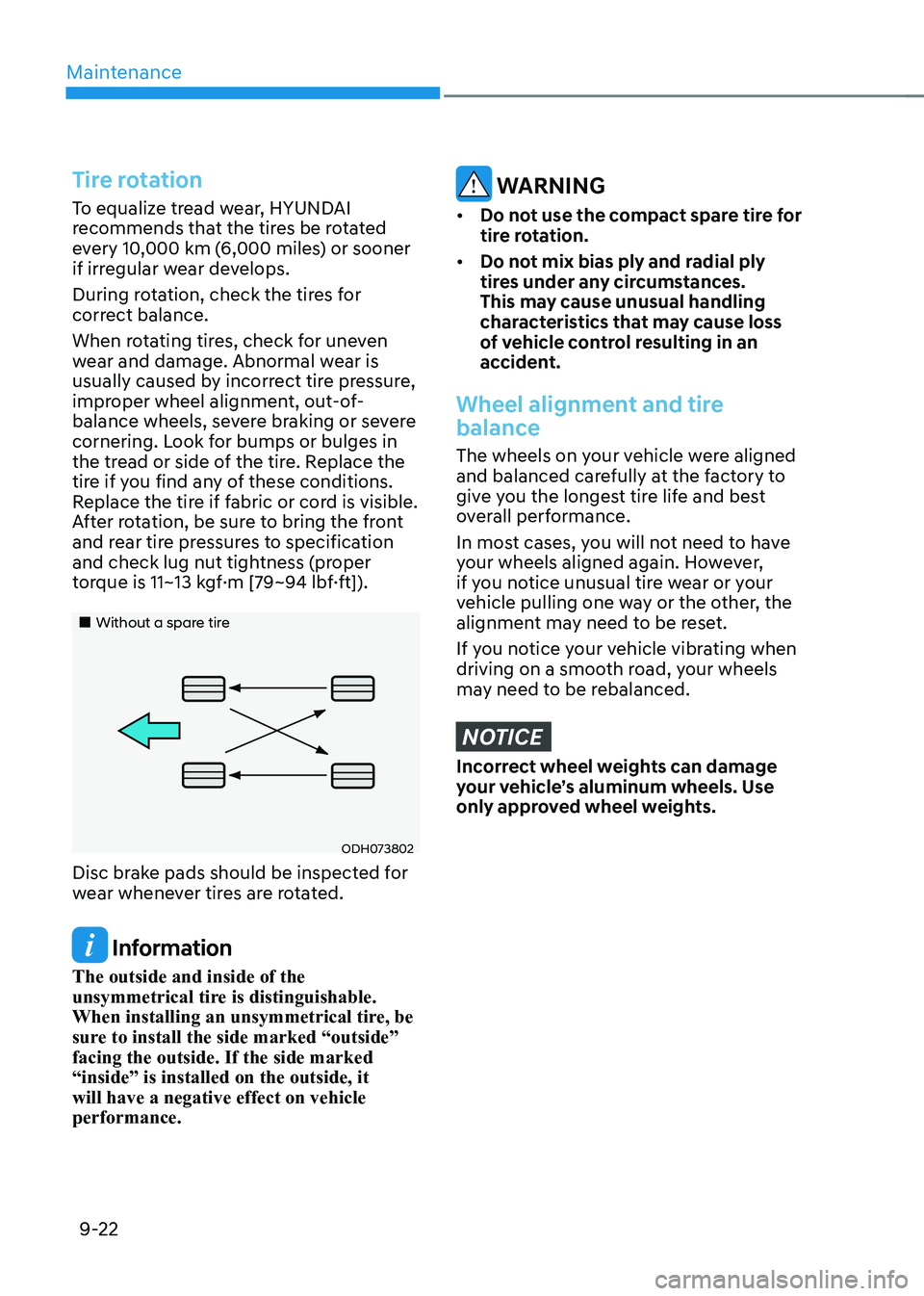
Tire rotation
To equalize tread wear, HYUNDAI
recommends that the tires be rotated
every 10,000 km (6,000 miles) or sooner
if irregular wear develops.
During rotation, check the tires for
correct balance.
When rotating tires, check for uneven
wear and damage. Abnormal wear is
usually caused by incorrect tire pressure,
improper wheel alignment, out-of-
balance wheels, severe braking or severe
cornering. Look for bumps or bulges in
the tread or side of the tire. Replace the
tire if you find any of these conditions.
Replace the tire if fabric or cord is visible.
After rotation, be sure to bring the front
and rear tire pressures to specification
and check lug nut tightness (proper
torque is 11~13 kgf·m [79~94 lbf·ft]).
„„Without a spare tire
ODH073802
Disc brake pads should be inspected for
wear whenever tires are rotated.
Information
The outside and inside of the
unsymmetrical tire is distinguishable.
When installing an unsymmetrical tire, be
sure to install the side marked “outside” facing the outside. If the side marked “inside” is installed on the outside, it will have a negative effect on vehicle performance.
WARNING
• Do not use the compact spare tire for
tire rotation.
• Do not mix bias ply and radial ply
tires under any circumstances.
This may cause unusual handling
characteristics that may cause loss
of vehicle control resulting in an
accident.
Wheel alignment and tire
balance
The wheels on your vehicle were aligned
and balanced carefully at the factory to
give you the longest tire life and best
overall performance.
In most cases, you will not need to have
your wheels aligned again. However,
if you notice unusual tire wear or your
vehicle pulling one way or the other, the
alignment may need to be reset.
If you notice your vehicle vibrating when
driving on a smooth road, your wheels
may need to be rebalanced.
NOTICE
Incorrect wheel weights can damage
your vehicle’s aluminum wheels. Use
only approved wheel weights.
Page 510 of 548
Maintenance
9-34
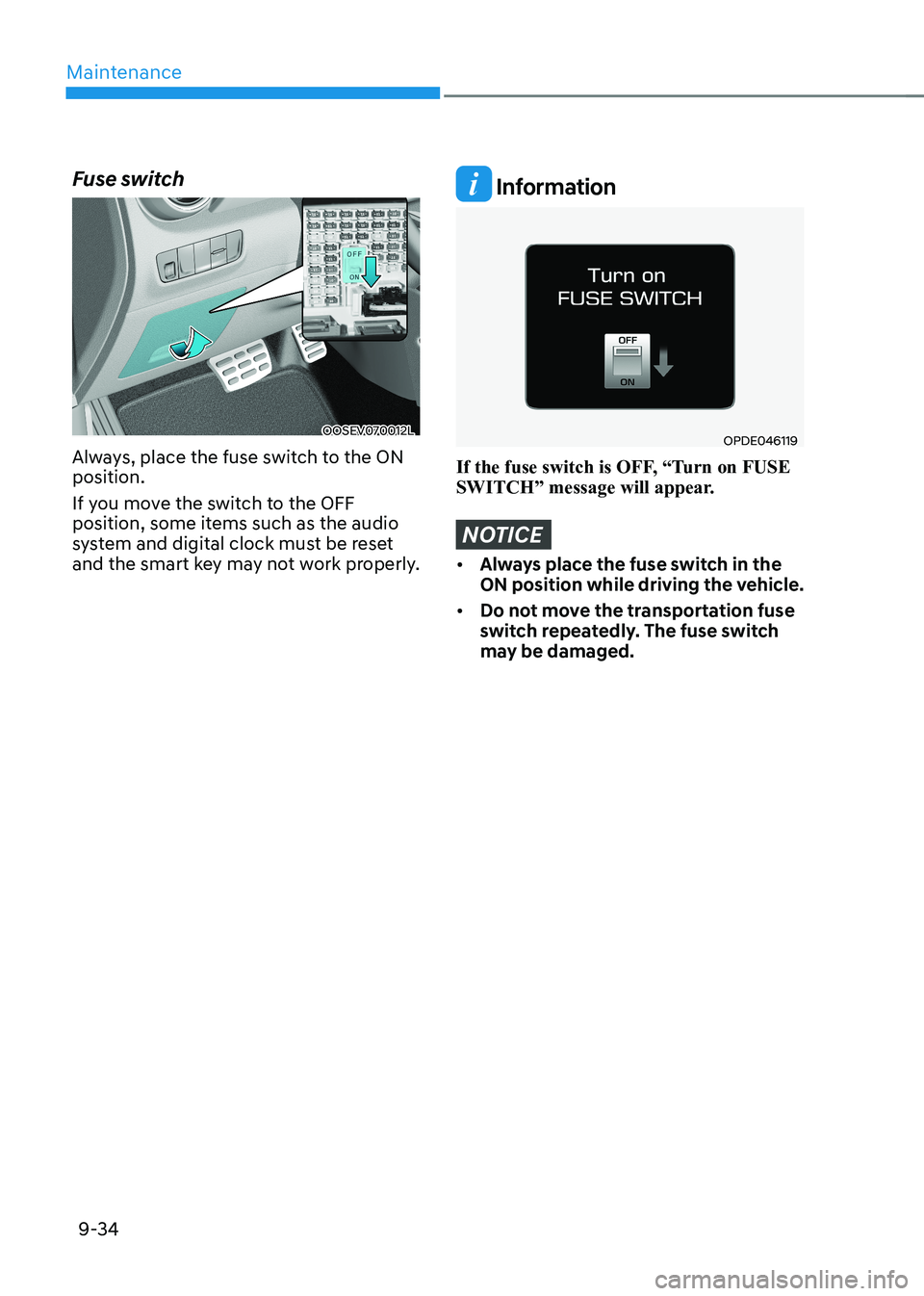
Fuse switch
OOSEV070012L
Always, place the fuse switch to the ON position.
If you move the switch to the OFF
position, some items such as the audio
system and digital clock must be reset
and the smart key may not work properly.
Information
OPDE046119
If the fuse switch is OFF, “Turn on FUSE
SWITCH” message will appear.
NOTICE
• Always place the fuse switch in the
ON position while driving the vehicle.
• Do not move the transportation fuse
switch repeatedly. The fuse switch
may be damaged.
Page 537 of 548
Index
I-2
A Accessing your vehicle .......................................................................................... 5-4
Auto door lock/unlock features ........................................................................ 5-13
Child-protector rear door locks ........................................................................ 5-14
Door locks ....................................................................................................... 5-10
Immobilizer system ............................................................................................ 5-9
Operating door locks from inside the vehicle ..................................................5-11
Operating door locks from outside the vehicle ................................................5-10
Rear Occupant Alert (ROA) ............................................................................. 5-14
Smart key .......................................................................................................... 5-4
Air bag - supplemental restraint system .............................................................. 3-42
Additional safety precautions ........................................................................... 3-64
Air bag warning labels ..................................................................................... 3-64
How does the air bags system operate? ............................................................3-47
Occupant Classification System (OCS) ...........................................................3-51
SRS care ........................................................................................................... 3-63
What to expect after an air bag inflates ............................................................3-51
Where are the air bags? .................................................................................... 3-44
Why didn’t my air bag go off in a collision? ...................................................3-57
Air conditioner compressor label......................................................................... 2-13 Air conditioning system ....................................................................................... 2-10
Appearance care................................................................................................... 9-52
Exterior care ..................................................................................................... 9-52
Interior care ...................................................................................................... 9-57
Automatic climate control system ....................................................................... 5-62
Automatic heating and air conditioning ...........................................................5-63
Manual heating and air conditioning ................................................................ 5-64
System maintenance ......................................................................................... 5-73
System operation .............................................................................................. 5-71
B
Battery (12 Volt) .................................................................................................. 9-17
Battery capacity label ....................................................................................... 9-18
Battery recharging ............................................................................................ 9-18
Battery usage .................................................................................................... 9-18
Reset items ....................................................................................................... 9-19
Page 546 of 548
I
I-11
Storage compartment ........................................................................................... 5-81
Center console storage ..................................................................................... 5-81
Glove box ......................................................................................................... 5-81
Luggage tray ..................................................................................................... 5-82
Sunglasses holder ............................................................................................. 5-82
Sunroof ................................................................................................................ 5-37
Resetting the sunroof ........................................................................................ 5-39
Sliding the sunroof ........................................................................................... 5-38
Sunroof open warning ...................................................................................... 5-40
Sunroof opening and closing ............................................................................ 5-38
Sunshade ........................................................................................................... 5-39
Tilting the sunroof ............................................................................................ 5-39
T Theft-alarm system .............................................................................................. 5-15
Tire and wheels .................................................................................................... 9-20
All season tires ................................................................................................. 9-30
Check tire inflation pressure ............................................................................ 9-21
Low aspect ratio tires ....................................................................................... 9-31
Radial-ply tires ................................................................................................. 9-30
Recommended cold tire inflation pressures ....................................................9-20
Snow tires ......................................................................................................... 9-30
Summer tires .................................................................................................... 9-30
Tire care ............................................................................................................ 9-20
Tire maintenance .............................................................................................. 9-24
Tire replacement ............................................................................................... 9-23
Tire rotation ...................................................................................................... 9-22
Tire sidewall labeling ....................................................................................... 9-24
Tire terminology and definitions ...................................................................... 9-27
Tire traction ..................................................................................................... 9-24
Wheel alignment and tire balance .................................................................... 9-22
Wheel replacement ........................................................................................... 9-24