rear view mirror HYUNDAI KONA EV 2022 Owners Manual
[x] Cancel search | Manufacturer: HYUNDAI, Model Year: 2022, Model line: KONA EV, Model: HYUNDAI KONA EV 2022Pages: 548, PDF Size: 49.14 MB
Page 67 of 548
2-2
Vehicle informationExtErior ovErviEw (i)
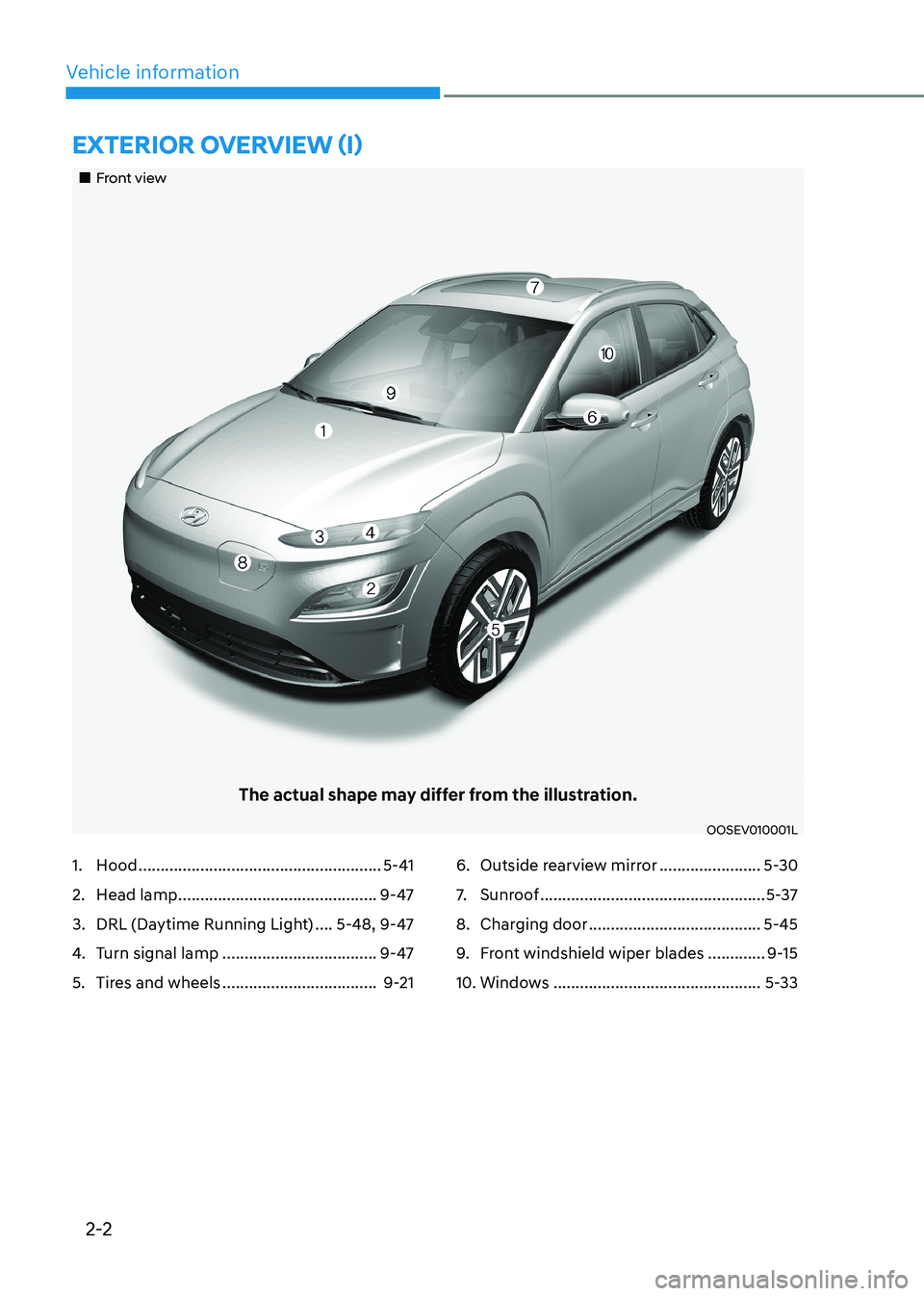
„„Front view
The actual shape may differ from the illustration.
OOSEV010001L
1. Hood ....................................................... 5-41
2. Head lamp ............................................. 9-47
3. DRL (Daytime Running Light) ....5-48, 9-47
4. Turn signal lamp ................................... 9-47
5. Tires and wheels ................................... 9-216. Outside rearview mirror
.......................5-30
7. Sunroof ................................................... 5-37
8. Charging door ....................................... 5-45
9. Front windshield wiper blades .............9-15
10. Windows ............................................... 5-33
Page 69 of 548
2-4
Vehicle information
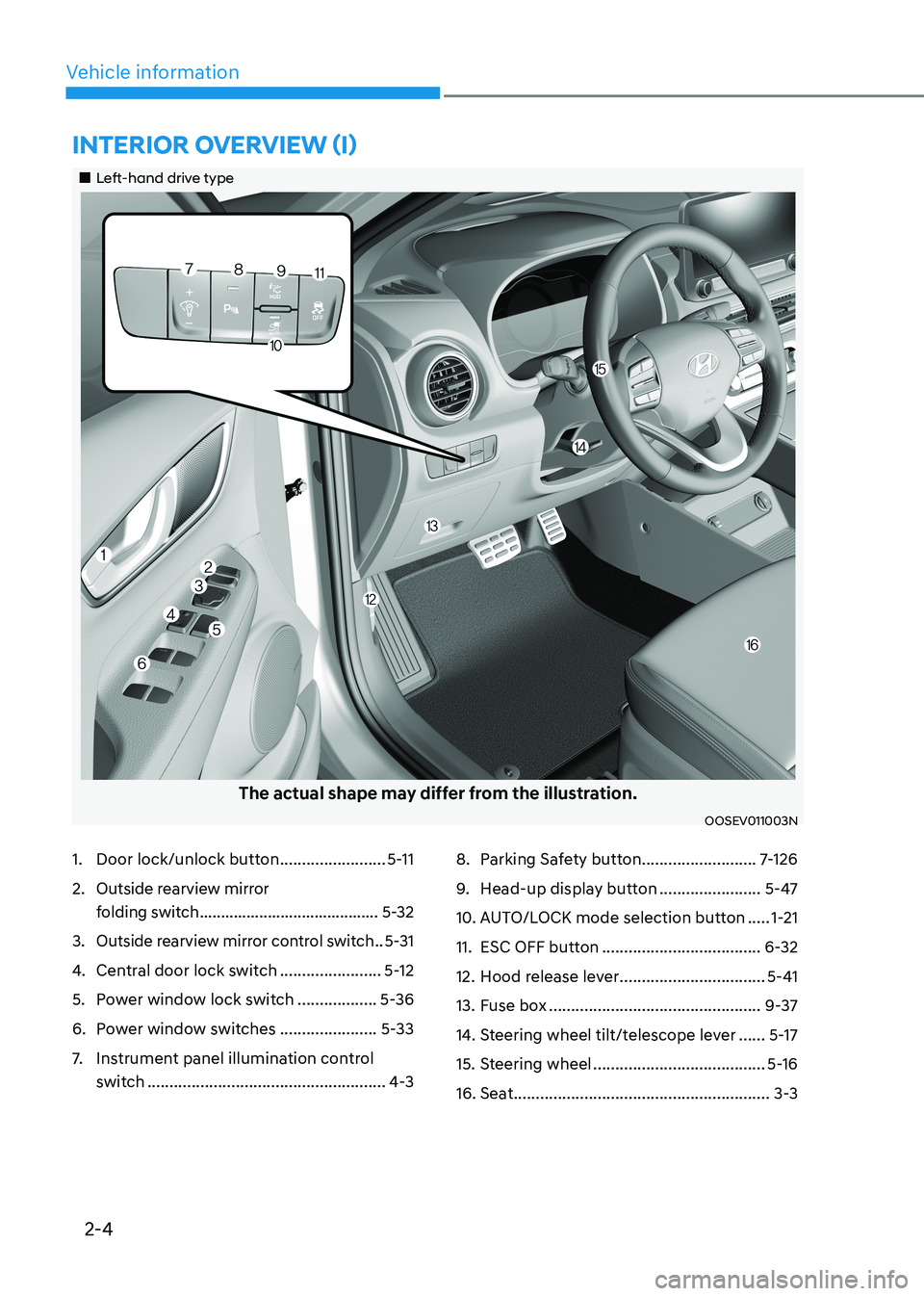
1. Door lock/unlock button ........................5-11
2. Outside rearview mirror
folding switch .......................................... 5-32
3. Outside rearview mirror control switch ..5-31
4. Central door lock switch .......................5-12
5. Power window lock switch ..................5-36
6. Power window switches ......................5-33
7. Instrument panel illumination control
switch ...................................................... 4-38. Parking Safety button
..........................7-126
9. Head-up display button .......................5-47
10. AUTO/LOCK mode selection button .....1-21
11. ESC OFF button .................................... 6-32
12. Hood release lever .................................5-41
13. Fuse box ................................................ 9-37
14. Steering wheel tilt/telescope lever ......5-17
15. Steering wheel ....................................... 5-16
16. Seat .......................................................... 3-3
intErior ovErviEw (i)
„„Left-hand drive type
The actual shape may differ from the illustration.
OOSEV011003N
Page 180 of 548
04
4-37
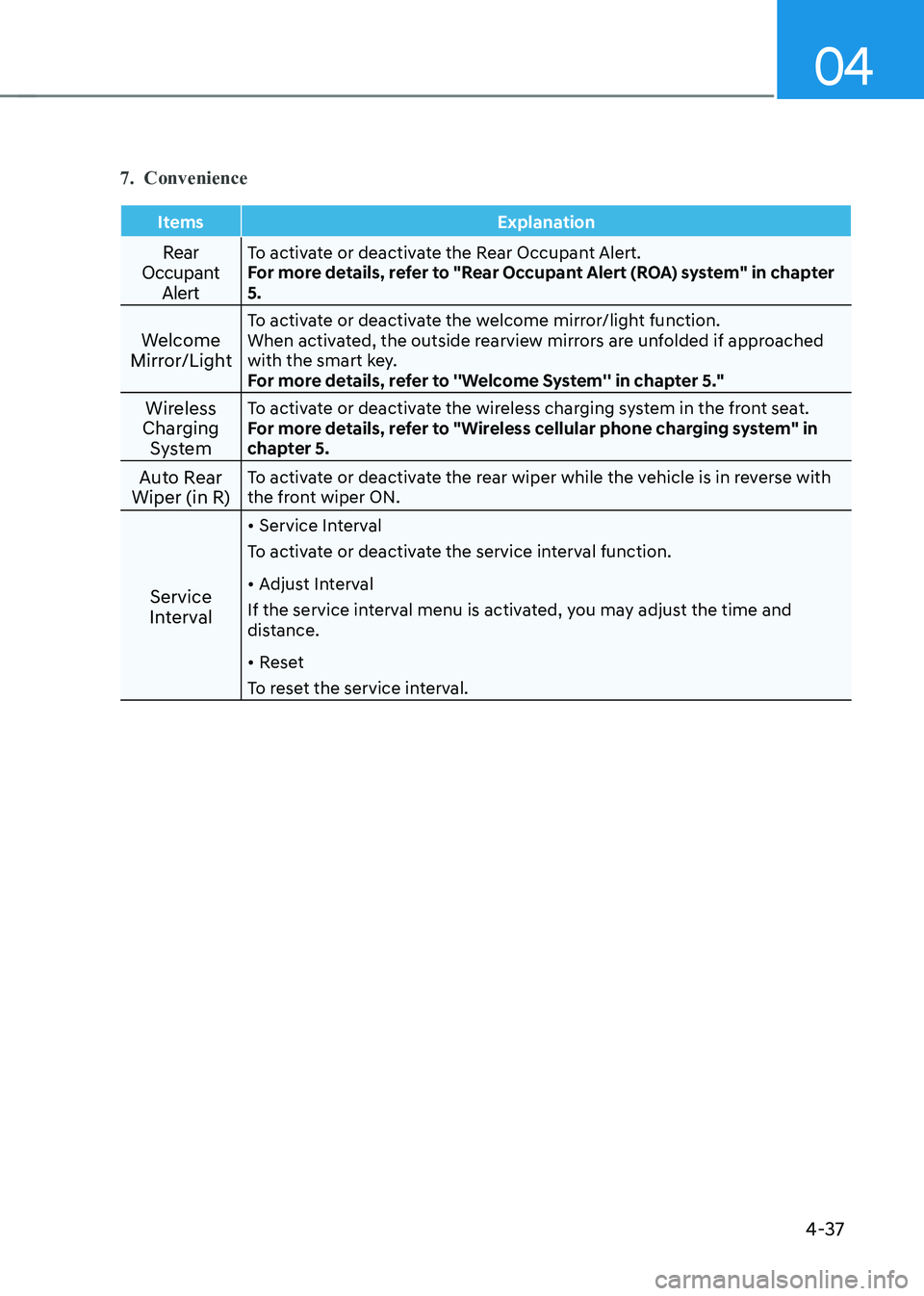
7. Convenience
Items Explanation
Rear
Occupant AlertTo activate or deactivate the Rear Occupant Alert.
For more details, refer to "Rear Occupant Alert (ROA) system" in chapter 5.
Welcome
Mirror/Light To activate or deactivate the welcome mirror/light function.
When activated, the outside rearview mirrors are unfolded if approached
with the smart key.
For more details, refer to ''Welcome System'' in chapter 5."
Wireless
Charging System To activate or deactivate the wireless charging system in the front seat.
For more details, refer to "Wireless cellular phone charging system" in
chapter 5.
Auto Rear
Wiper (in R) To activate or deactivate the rear wiper while the vehicle is in reverse with
the front wiper ON.
Service
Interval •
Service Interval
To activate or deactivate the service interval function. • Adjust Interval
If the service interval menu is activated, you may adjust the time and
distance. • Reset
To reset the service interval.
Page 185 of 548
5
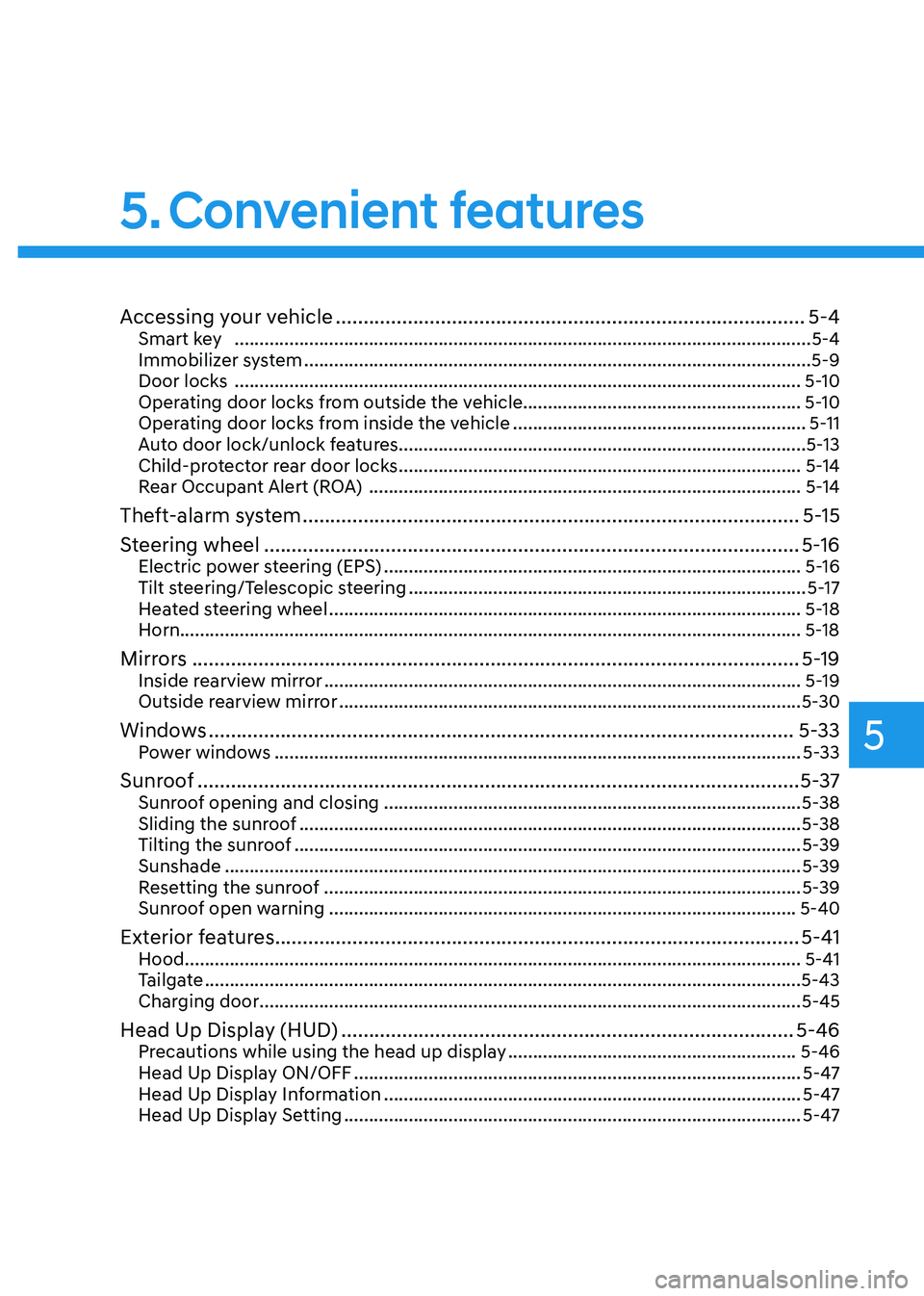
Accessing your vehicle ..................................................................................... 5-4
Smart key .................................................................................................................... 5-4
Immobilizer system ...................................................................................................... 5-9
Door locks .................................................................................................................. 5-10
Operating door locks from outside the vehicle........................................................ 5-10
Operating door locks from inside the vehicle ...........................................................5-11
Auto door lock/unlock features..................................................................................5-13
Child-protector rear door locks ................................................................................. 5-14
Rear Occupant Alert (ROA) ....................................................................................... 5-14
Theft-alarm system .......................................................................................... 5-15
Steering wheel ................................................................................................. 5-16
Electric power steering (EPS) .................................................................................... 5-16
Tilt steering/Telescopic steering ................................................................................ 5-17
Heated steering wheel ............................................................................................... 5-18
Horn............................................................................................................................. 5-18
Mirrors .............................................................................................................. 5-19
Inside rearview mirror ................................................................................................ 5-19
Outside rearview mirror ............................................................................................. 5-30
Windows .......................................................................................................... 5-33
Power windows .......................................................................................................... 5-33
Sunroof ............................................................................................................. 5-37
Sunroof opening and closing .................................................................................... 5-38
Sliding the sunroof ..................................................................................................... 5-38
Tilting the sunroof ...................................................................................................... 5-39
Sunshade .................................................................................................................... 5-39
Resetting the sunroof ................................................................................................ 5-39
Sunroof open warning .............................................................................................. 5-40
Exterior features ............................................................................................... 5-41
Hood ............................................................................................................................ 5-41
Tailgate ........................................................................................................................ 5-43
Charging door ............................................................................................................. 5-45
Head Up Display (HUD) .................................................................................. 5-46
Precautions while using the head up display ..........................................................5-46
Head Up Display ON/OFF .......................................................................................... 5-47
Head Up Display Information .................................................................................... 5-47
Head Up Display Setting ............................................................................................ 5-47
5. Convenient features
Page 188 of 548
Convenient features
5-4
Smart key
OOS050026N
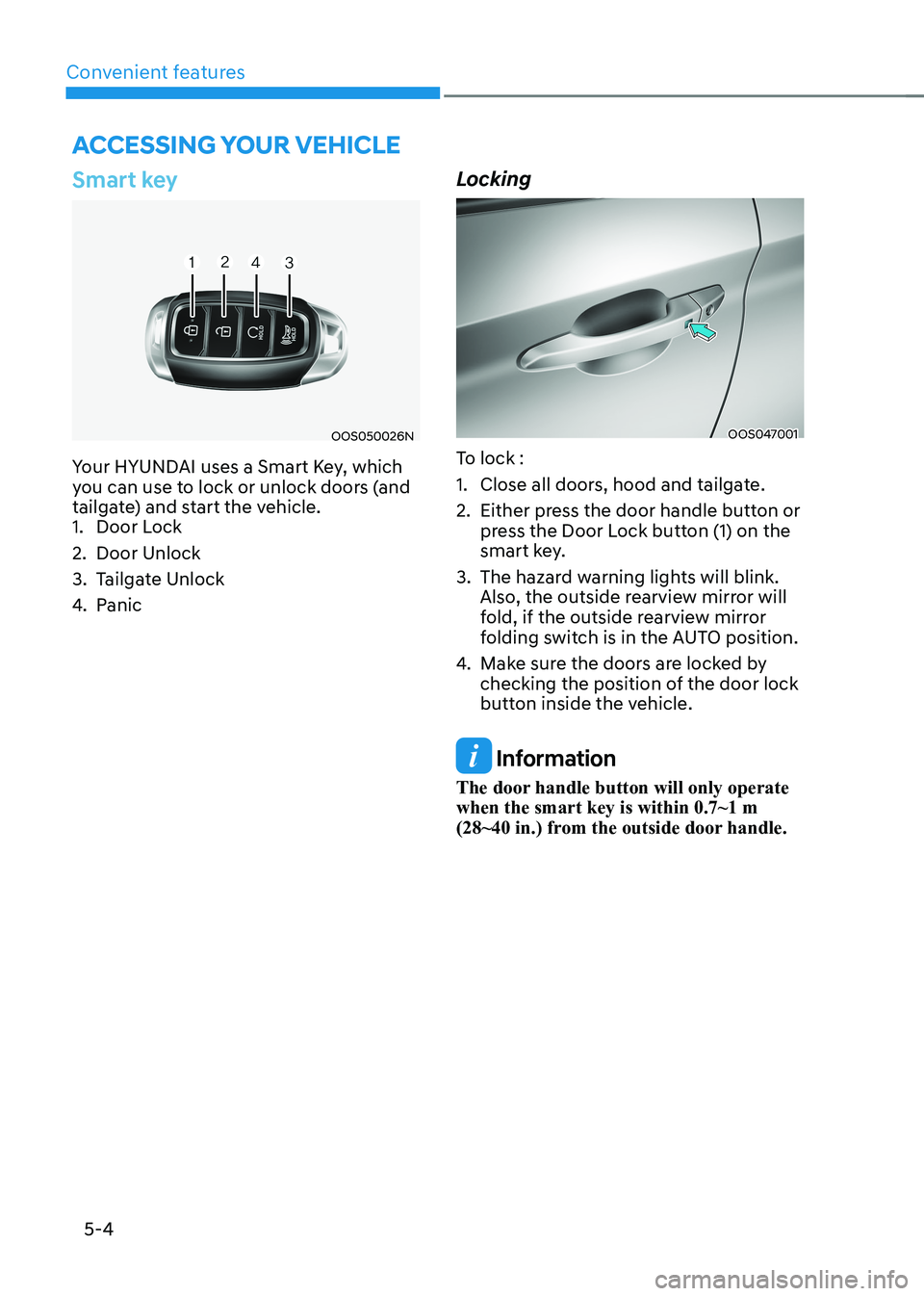
Your HYUNDAI uses a Smart Key, which
you can use to lock or unlock doors (and
tailgate) and start the vehicle.
1. Door Lock
2. Door Unlock
3. Tailgate Unlock
4. Panic LockingOOS047001
To lock :
1. Close all doors, hood and tailgate.
2. Either press the door handle button or press the Door Lock button (1) on the
smart key.
3. The hazard warning lights will blink. Also, the outside rearview mirror will
fold, if the outside rearview mirror
folding switch is in the AUTO position.
4. Make sure the doors are locked by
checking the position of the door lock
button inside the vehicle.
Information
The door handle button will only operate when the smart key is within 0.7~1 m
(28~40 in.) from the outside door handle.
Accessing your vehicle
Page 189 of 548
05
5-5
Even though you press the outside
door handle button, the doors will not
lock and the chime will sound for three
seconds if any of the following occur: •
The Smart Key is in the vehicle.
• The START/STOP button is ON position.
• Any door except the tailgate is open.
WARNING
Do not leave the Smart Key in your
vehicle with unsupervised children.
Unattended children could press the
START/STOP button and may operate
power windows or other controls, or
even make the vehicle move, which
could result in serious injury or death. Unlocking
OOS047001
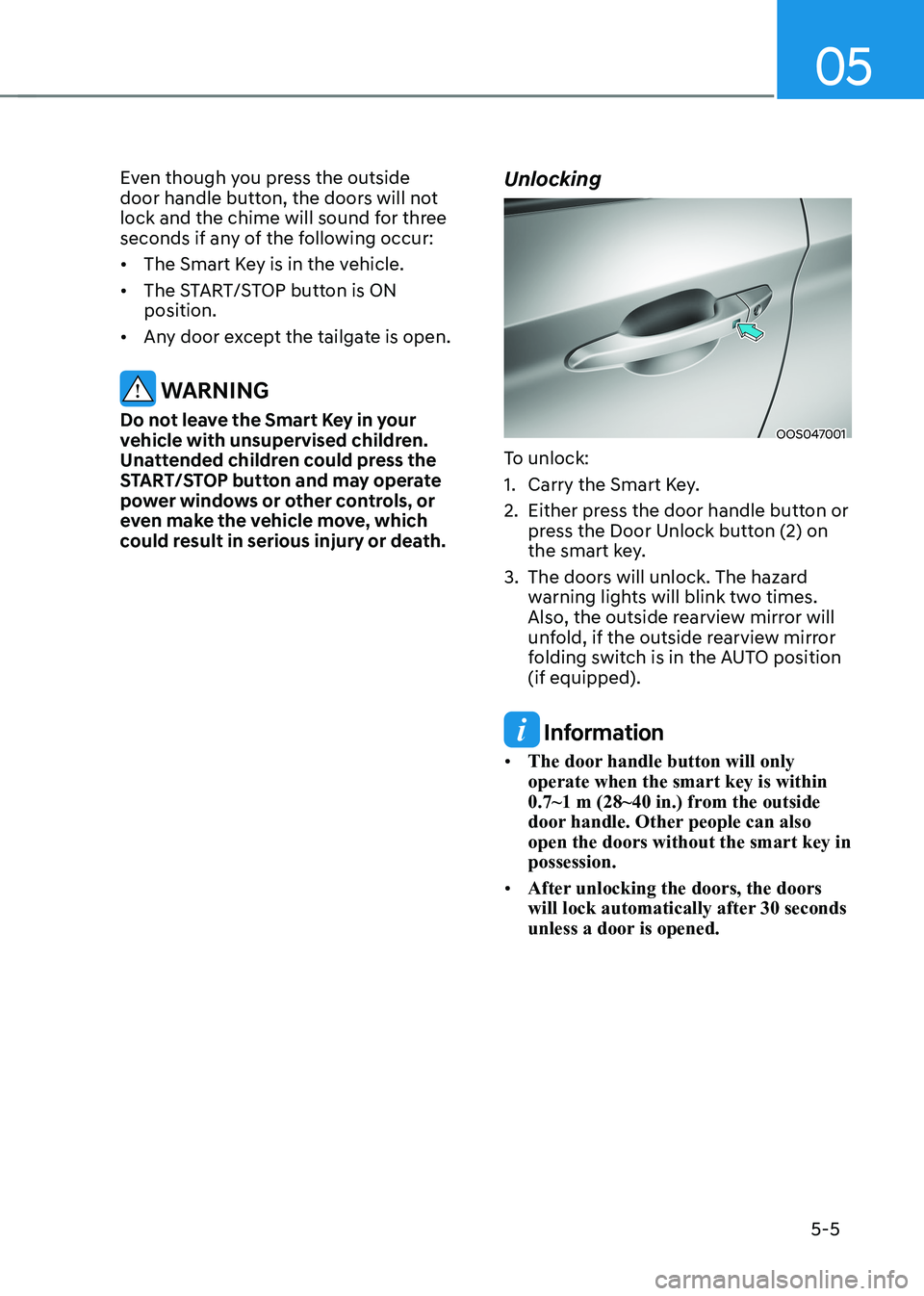
To unlock:
1. Carry the Smart Key.
2. Either press the door handle button or press the Door Unlock button (2) on
the smart key.
3. The doors will unlock. The hazard warning lights will blink two times.
Also, the outside rearview mirror will
unfold, if the outside rearview mirror
folding switch is in the AUTO position (if equipped).
Information
• The door handle button will only operate when the smart key is within
0.7~1 m (28~40 in.) from the outside
door handle. Other people can also open the doors without the smart key in possession.
• After unlocking the doors, the doors
will lock automatically after 30 seconds
unless a door is opened.
Page 203 of 548
05
5-19
mirrors
Inside rearview mirror
Before you start driving, adjust the
rearview mirror to the center on the view
through the rear window.
WARNING
Make sure your line of sight is not
obstructed. Do not place objects in the
rear seat, cargo area, or behind the rear
headrests which could interfere with
your vision through the rear window.
WARNING
To prevent serious injury during an
accident or deployment of the air bag,
do not modify the rearview mirror and
do not install a wide mirror.
WARNING
NEVER adjust the mirror while driving.
This may cause loss of vehicle control
resulting in an accident.
NOTICE
When cleaning the mirror, use a paper
towel or similar material dampened
with glass cleaner. Do not spray glass
cleaner directly on the mirror as that
may cause the liquid cleaner to enter
the mirror housing. Day/night rearview mirror (if equipped)
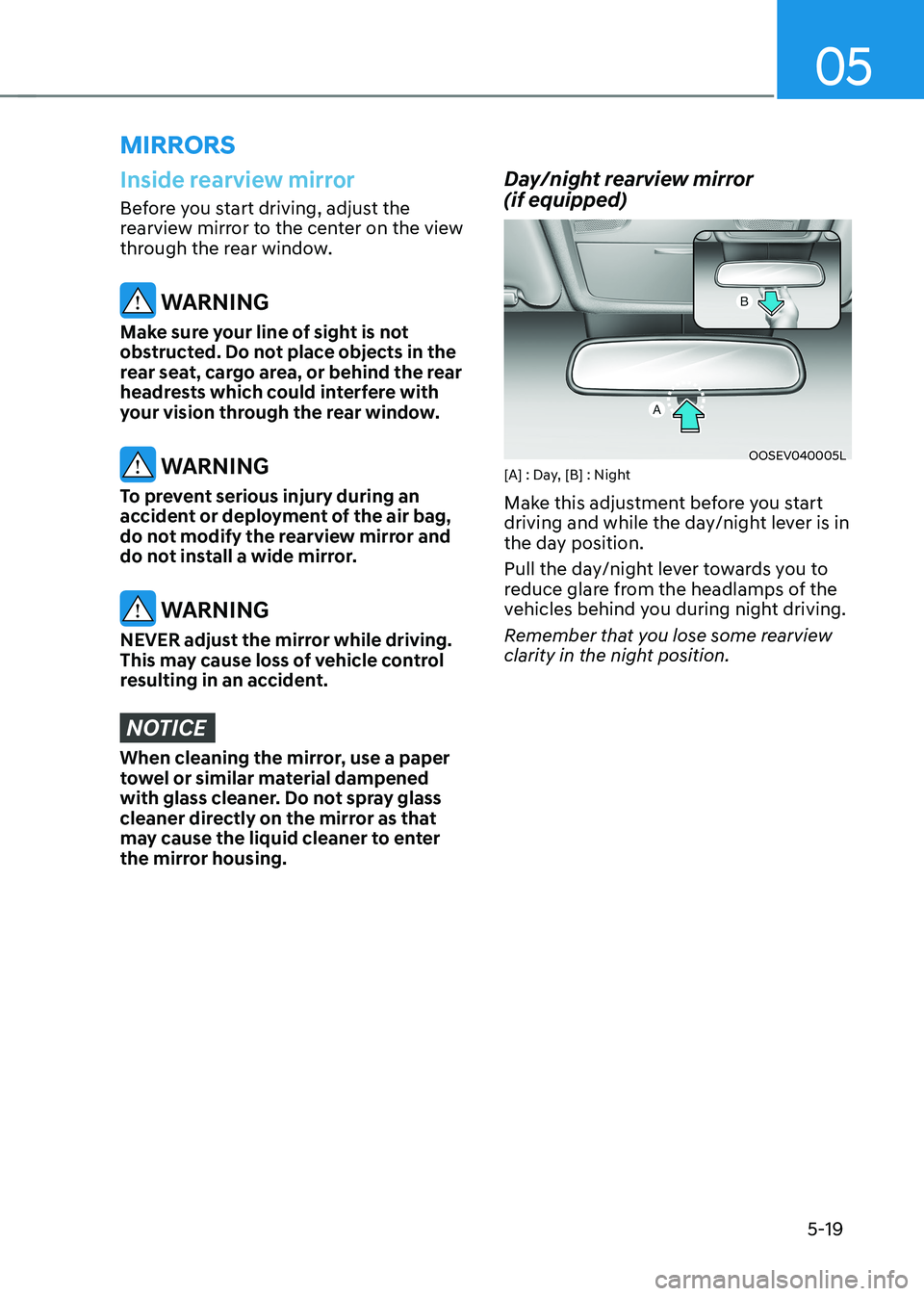
OOSEV040005L
[A] : Day, [B] : Night
Make this adjustment before you start
driving and while the day/night lever is in
the day position.
Pull the day/night lever towards you to
reduce glare from the headlamps of the
vehicles behind you during night driving.
Remember that you lose some rearview
clarity in the night position.
Page 204 of 548
![HYUNDAI KONA EV 2022 Owners Manual Convenient features
5-20
Electric Chromic Mirror (ECM) (if equipped)
OOSEV048006L
[A] : Indicator
The electric chromic rearview mirror
automatically controls the glare from
the headlamp of the v](/img/35/56171/w960_56171-203.png "HYUNDAI KONA EV 2022 Owners Manual Convenient features
5-20
Electric Chromic Mirror (ECM) (if equipped)
OOSEV048006L
[A] : Indicator
The electric chromic rearview mirror
automatically controls the glare from
the headlamp of the v")
Convenient features
5-20
Electric Chromic Mirror (ECM) (if equipped)
OOSEV048006L
[A] : Indicator
The electric chromic rearview mirror
automatically controls the glare from
the headlamp of the vehicle behind
you in nighttime or low light driving
conditions. When the vehicle is ON, the
glare is automatically controlled by the
sensor mounted in the rearview mirror.
The sensor detects the light level around
the vehicle, and automatically adjusts
to control the headlamp glare from
vehicles behind you. Whenever the gear
is shifted to R (Reverse), the mirror will
automatically go to the brightest setting
in order to improve the driver’s view
behind the vehicle. Electrochromic mirror (ECM) with
HomeLink® system and Genesis
Connected Service (if equipped)
Your vehicle may be equipped with
a Gentex Automatic-Dimming Mirror
with an Integrated HomeLink® Wireless
Control System.
During nighttime driving, this feature will
automatically detect and help reduce
rearview mirror glare. The HomeLink®
Universal Transceiver allows you to
activate your garage door(s), electric
gate, home lighting, etc.
OOS040477N
(1) HomeLink Channel 1
(2) HomeLink Channel 2
(3) HomeLink Channel 3
(4) Garage Door Opener Status Indicator : Closing or Closed
(5) HomeLink Operation Indicator
(6) Garage Door Opener Status Indicator : Opening or Opened
(7) HomeLink User Interface Indicator
Page 214 of 548
Convenient features
5-30
Outside rearview mirror
OOS047012
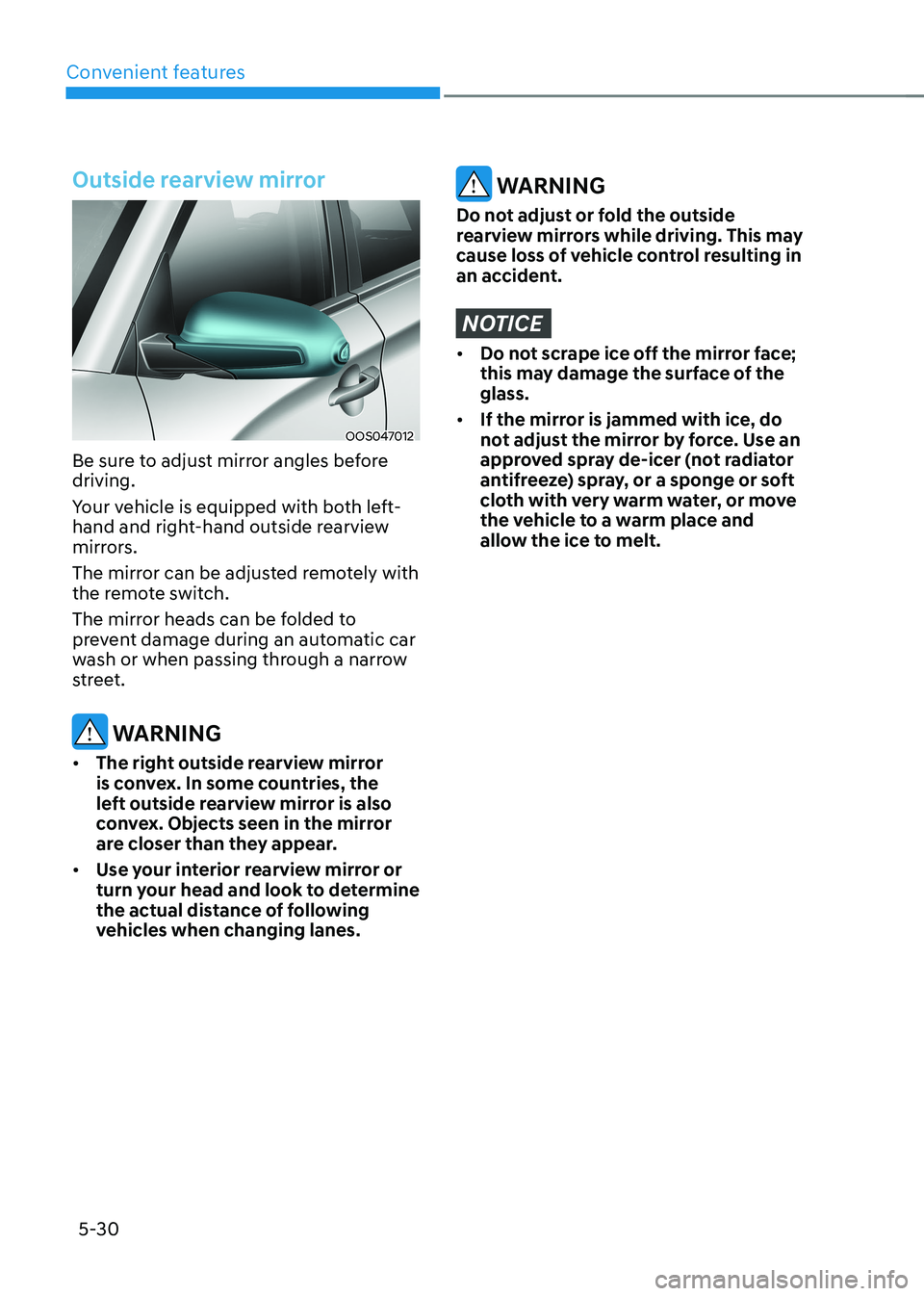
Be sure to adjust mirror angles before driving.
Your vehicle is equipped with both left-
hand and right-hand outside rearview
mirrors.
The mirror can be adjusted remotely with
the remote switch.
The mirror heads can be folded to
prevent damage during an automatic car
wash or when passing through a narrow
street.
WARNING
• The right outside rearview mirror
is convex. In some countries, the
left outside rearview mirror is also
convex. Objects seen in the mirror
are closer than they appear.
• Use your interior rearview mirror or
turn your head and look to determine
the actual distance of following
vehicles when changing lanes.
WARNING
Do not adjust or fold the outside
rearview mirrors while driving. This may
cause loss of vehicle control resulting in
an accident.
NOTICE
• Do not scrape ice off the mirror face;
this may damage the surface of the glass.
• If the mirror is jammed with ice, do
not adjust the mirror by force. Use an
approved spray de-icer (not radiator
antifreeze) spray, or a sponge or soft
cloth with very warm water, or move
the vehicle to a warm place and
allow the ice to melt.
Page 215 of 548
05
5-31
Adjusting the rearview mirrors
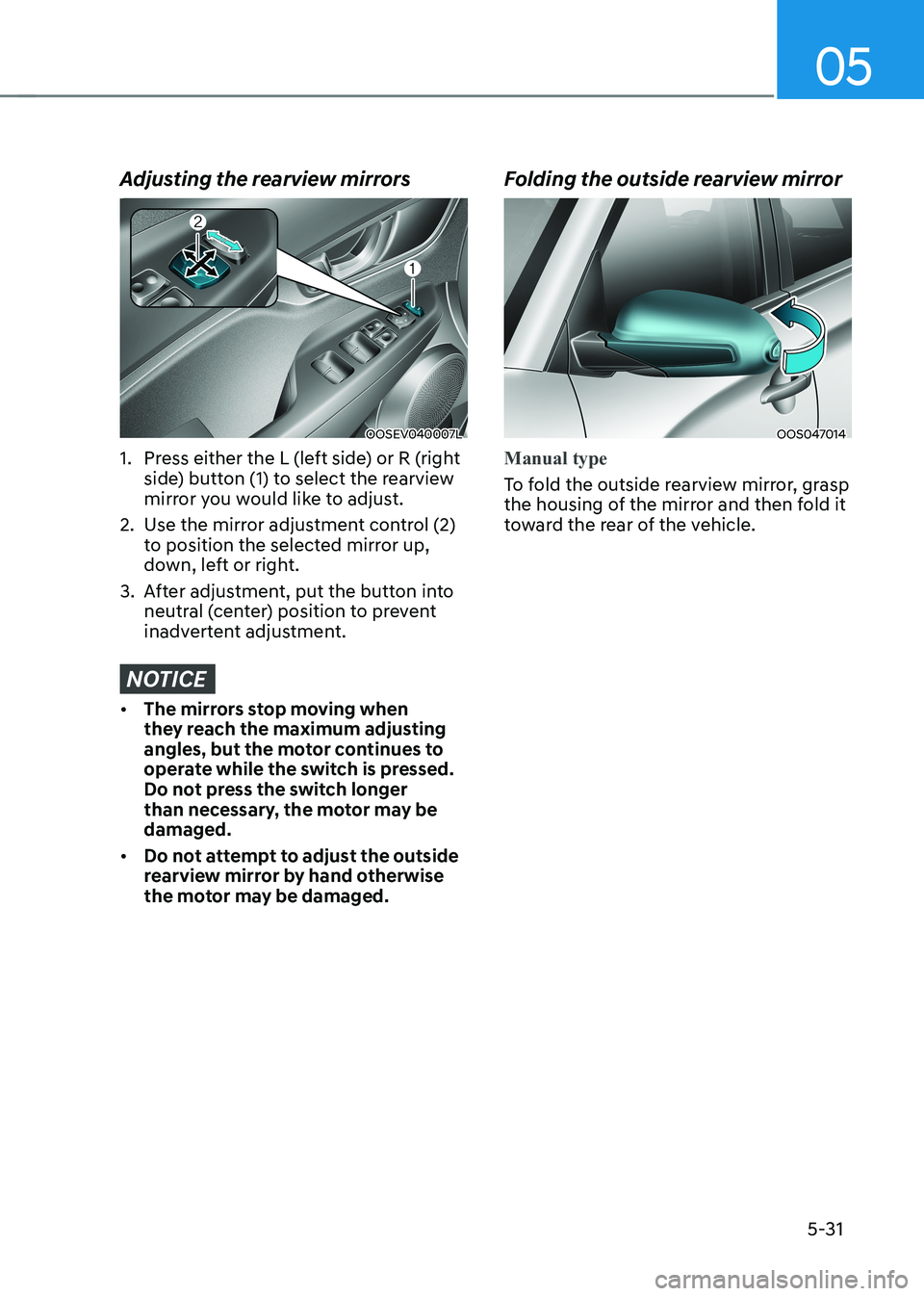
OOSEV040007L
1. Press either the L (left side) or R (right side) button (1) to select the rearview
mirror you would like to adjust.
2. Use the mirror adjustment control (2) to position the selected mirror up,
down, left or right.
3. After adjustment, put the button into neutral (center) position to prevent
inadvertent adjustment.
NOTICE
• The mirrors stop moving when
they reach the maximum adjusting
angles, but the motor continues to
operate while the switch is pressed.
Do not press the switch longer
than necessary, the motor may be damaged.
• Do not attempt to adjust the outside
rearview mirror by hand otherwise
the motor may be damaged. Folding the outside rearview mirror
OOS047014
Manual type
To fold the outside rearview mirror, grasp
the housing of the mirror and then fold it
toward the rear of the vehicle.