lock HYUNDAI KONA EV 2023 Owners Manual
[x] Cancel search | Manufacturer: HYUNDAI, Model Year: 2023, Model line: KONA EV, Model: HYUNDAI KONA EV 2023Pages: 548, PDF Size: 49.14 MB
Page 416 of 548
07
7-83
Information
• Highway Set Speed Auto Change function only operates based on
the speed limits of the highway (or motorway), it does not work with the speed cameras.
• When Highway Set Speed Auto Change function is operating, the vehicle
automatically accelerates or decelerates
when the highway (or motorway) speed limit changes.
• The maximum set speed for Highway
Set Speed Auto Change function is 130 km/h (81 mph).
• If the speed limit of a new road is not updated in the navigation, Highway Set
Speed Auto Change function may not
operate properly.
• If the speed unit is set to a unit other
than the speed unit used in your
country, Highway Set Speed Auto Change function may not operate
properly.Limitations of Navigation-based
Smart Cruise Control
Navigation-based Smart Cruise Control
may not operate normally under the
following circumstances: • The navigation is not working properly
• Map information is not transmitted
due to infotainment system's
abnormal operation
• Speed limit and road information in
the navigation is not updated
• The map information and the actual
road is different because of real-time
GPS data or map information error
• The navigation searches for a route while driving
• GPS signals are blocked in areas such as a tunnel
• A road that divides into two or more
roads and joins again
Page 430 of 548
07
7-97
Limitations of Highway Driving
Assist
Highway Driving Assist and Highway
Lane Change function may not operate
normally, or may not operate under the
following circumstances: •
The map information and the
actual road is different because the
navigation is not updated
• The map information and the actual
road is different because of real-time
GPS data or map information error
• The infotainment system is overloaded
by simultaneously performing
functions such as route search, video
playback, voice recognition, etc.
• GPS signals are blocked in areas such as a tunnel
• The driver goes off course or the
route to the destination is changed or
canceled by resetting the navigation
• The vehicle enters a service station or
rest area
• Android Auto or Car Play is operating
• The navigation cannot detect the
current vehicle position (ex: elevated
roads including overpass adjacent to
general roads or nearby roads exist in
a parallel way)
• White single dotted lane line or road
edge cannot be detected
• The road is temporarily controlled due
to construction, etc.
• There is no structure, such as a
medium strip, guardrails, etc., on the
road
• There is a changeable lane in the
direction of lane change
Information
For more details on the limitations of
the front view camera, front radar, front
corner radar and rear corner radar, refer
to “Forward Collision-Avoidance Assist
(FCA)” section in this chapter.
Information
This device complies with Industry Canada RSS-210 standard.
Operation is subject to the following three conditions: 1. This device may not cause harmful
interference, and
2. This device must accept any
interference received, including
interference that may cause undesired operation.
3. Changes or modifications not expressly
approved by the party responsible
for compliance could void the user's authority to operate the device.
Information
Radio frequency radiation exposure information: This equipment complies with RSS- 210
radiation exposure limits set forth for an
uncontrolled environment. This equipment should be installed and operated with minimum distance of 20cm
(8 in.) between the radiator (antenna) and
your body.
This transmitter must not be co-located or
operating in conjunction with any other
antenna or transmitter.
Page 441 of 548
Driver assistance system
7-108
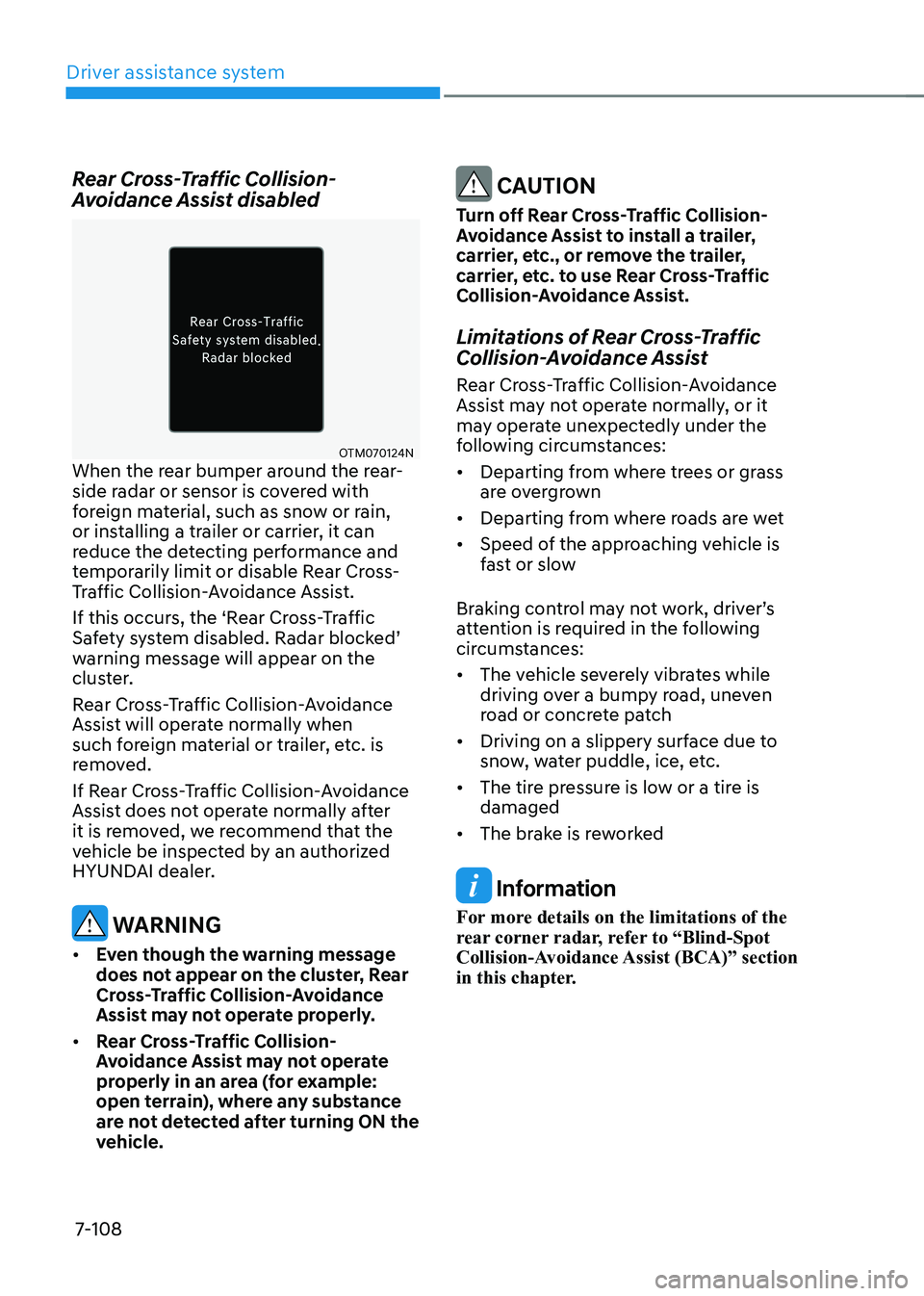
Rear Cross-Traffic Collision-
Avoidance Assist disabled
OTM070124N
When the rear bumper around the rear-
side radar or sensor is covered with
foreign material, such as snow or rain,
or installing a trailer or carrier, it can
reduce the detecting performance and
temporarily limit or disable Rear Cross-
Traffic Collision-Avoidance Assist.
If this occurs, the ‘Rear Cross-Traffic
Safety system disabled. Radar blocked’
warning message will appear on the
cluster.
Rear Cross-Traffic Collision-Avoidance
Assist will operate normally when
such foreign material or trailer, etc. is
removed.
If Rear Cross-Traffic Collision-Avoidance
Assist does not operate normally after
it is removed, we recommend that the
vehicle be inspected by an authorized
HYUNDAI dealer.
warning
• even though the warning message
does not appear on the cluster, Rear
Cross-Traffic Collision-Avoidance
Assist may not operate properly.
• Rear Cross-Traffic Collision-
Avoidance Assist may not operate
properly in an area (for example:
open terrain), where any substance
are not detected after turning ON the
vehicle.
CAUTION
Turn off Rear Cross-Traffic Collision-
Avoidance Assist to install a trailer,
carrier, etc., or remove the trailer,
carrier, etc. to use Rear Cross-Traffic
Collision-Avoidance Assist.
Limitations of Rear Cross-Traffic
Collision-Avoidance Assist
Rear Cross-Traffic Collision-Avoidance
Assist may not operate normally, or it
may operate unexpectedly under the
following circumstances: • Departing from where trees or grass
are overgrown
• Departing from where roads are wet
• Speed of the approaching vehicle is
fast or slow
Braking control may not work, driver’s
attention is required in the following
circumstances: • The vehicle severely vibrates while
driving over a bumpy road, uneven
road or concrete patch
• Driving on a slippery surface due to
snow, water puddle, ice, etc.
• The tire pressure is low or a tire is damaged
• The brake is reworked
Information
For more details on the limitations of the
rear corner radar, refer to “Blind-Spot
Collision-Avoidance Assist (BCA)” section
in this chapter.
Page 446 of 548
07
7-113
Reverse Parking Distance Warning •
Reverse Parking Distance Warning
will operate when the gear is in R
(Reverse).
• Reverse Parking Distance Warning
detects a person, animal or object in
the rear when the vehicle’s rearward
speed is below 10 km/h (6 mph).
Distance
from object Warning
indicator Warning
sound
When
driving
backward
60~120 cm (24~48 in.)Buzzer beeps
intermittently
30~60 cm (12~24 in.)
Beeps more
frequently
within 30 cm (12 in.)
Beeps
continuously
• The corresponding indicator will
illuminate whenever each ultrasonic
sensor detects a person, animal or
object in its sensing range. Also an
audible warning will sound.
• When more than two objects are
detected at the same time, the closest
one will be warned with an audible
warning.
• The shape of the indicator in the
illustration may differ from the actual
vehicle.
Reverse Parking Distance
Warning malfunction and
precautions
Reverse Parking Distance Warning
malfunction
After starting the vehicle, a beep will
sound when the gear is shifted to R
(Reverse) to indicate Reverse Parking
Distance Warning is operating normally.
However, if one or more of the following
occurs, first check whether the ultrasonic
sensor is damaged or blocked with
foreign material. If it still does not work
properly, we recommend that the vehicle
be inspected by an authorized HYUNDAI
dealer. • The audible warning does not sound.
• The buzzer sounds intermittently.
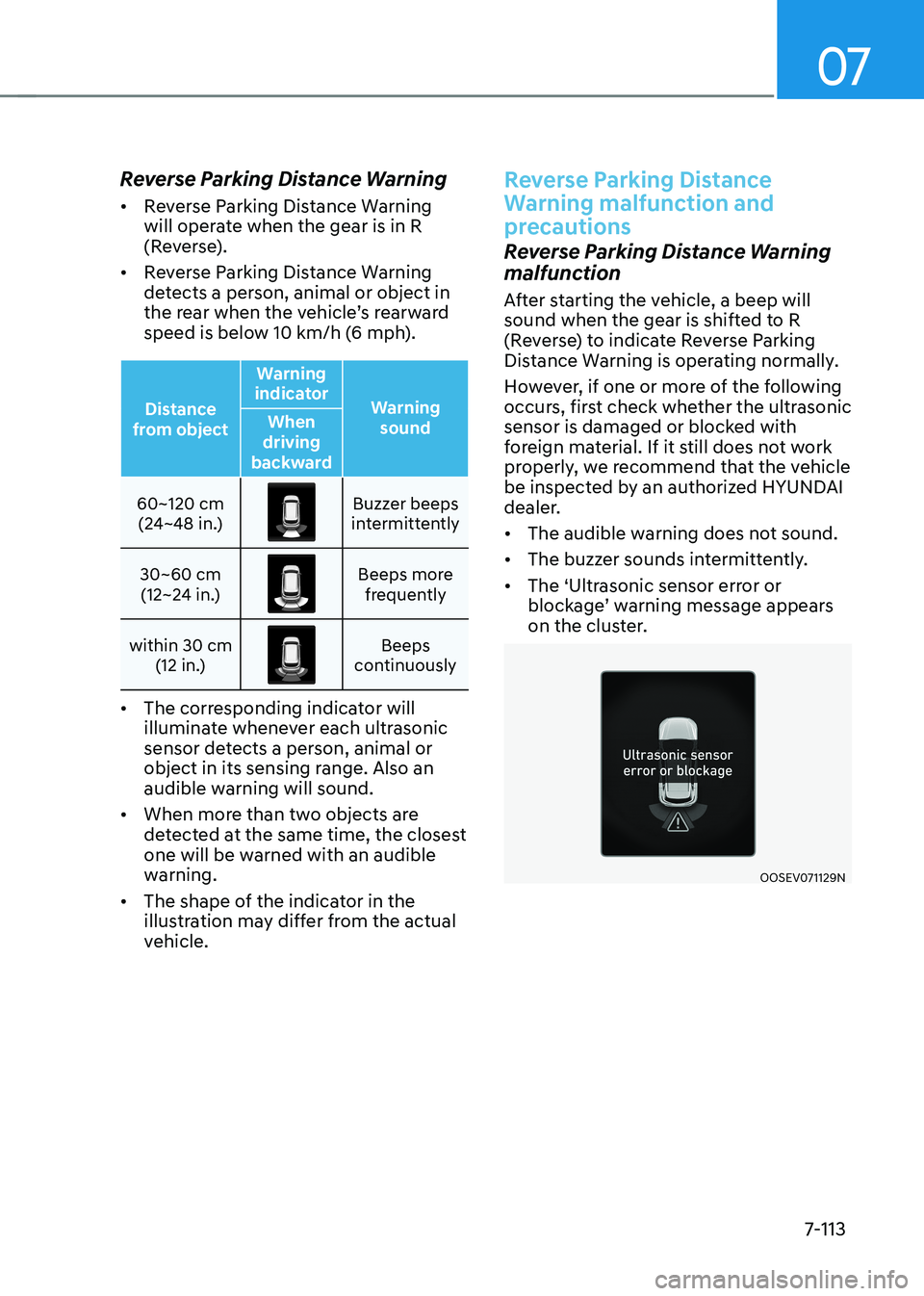
• The ‘Ultrasonic sensor error or
blockage’ warning message appears
on the cluster.
OOSEV071129N
Page 451 of 548
Driver assistance system
7-118
Forward/reverse parking
Distance Warning malfunction
and precautions
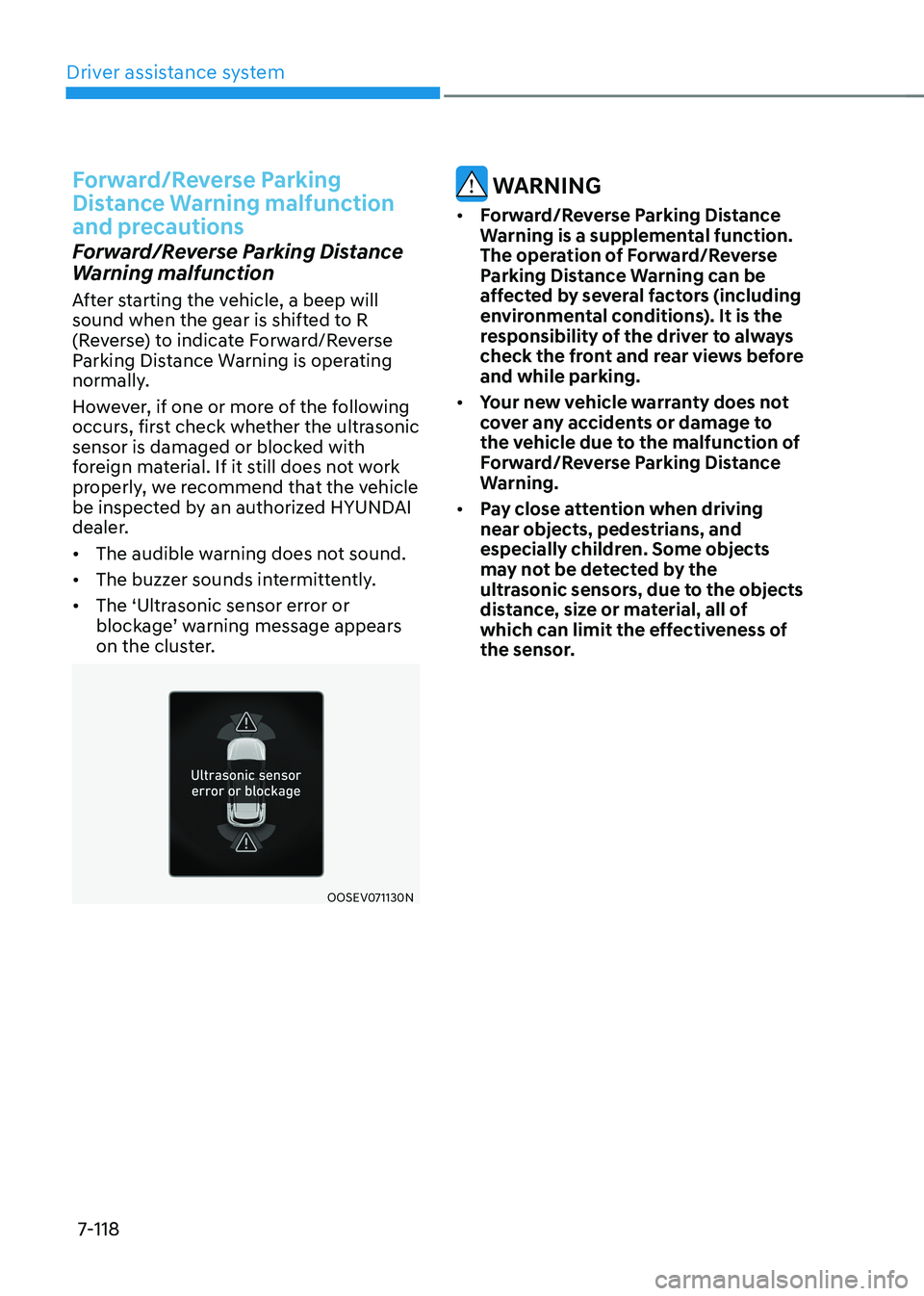
Forward/Reverse Parking Distance
Warning malfunction
After starting the vehicle, a beep will
sound when the gear is shifted to R
(Reverse) to indicate Forward/Reverse
Parking Distance Warning is operating
normally.
However, if one or more of the following
occurs, first check whether the ultrasonic
sensor is damaged or blocked with
foreign material. If it still does not work
properly, we recommend that the vehicle
be inspected by an authorized HYUNDAI
dealer. • The audible warning does not sound.
• The buzzer sounds intermittently.
• The ‘Ultrasonic sensor error or
blockage’ warning message appears
on the cluster.
OOSEV071130N
warning
• Forward/reverse parking distance
Warning is a supplemental function.
the operation of Forward/reverse
Parking Distance Warning can be
affected by several factors (including
environmental conditions). It is the
responsibility of the driver to always
check the front and rear views before and while parking.
• Your new vehicle warranty does not
cover any accidents or damage to
the vehicle due to the malfunction of
Forward/reverse parking distance
Warning.
• Pay close attention when driving
near objects, pedestrians, and
especially children. Some objects
may not be detected by the
ultrasonic sensors, due to the objects
distance, size or material, all of
which can limit the effectiveness of
the sensor.
Page 474 of 548
08
8-19
When towing your vehicle in an
emergency without wheel dollies:
1. While depressing the brake pedal
shift to the N (Neutral) position and
turn the vehicle off. The START/STOP
button will be in the ACC position.
2. Release the parking brake.
CAUTION
Failure to place the shift lever in N
(Neutral) may cause internal damage to
the vehicle.
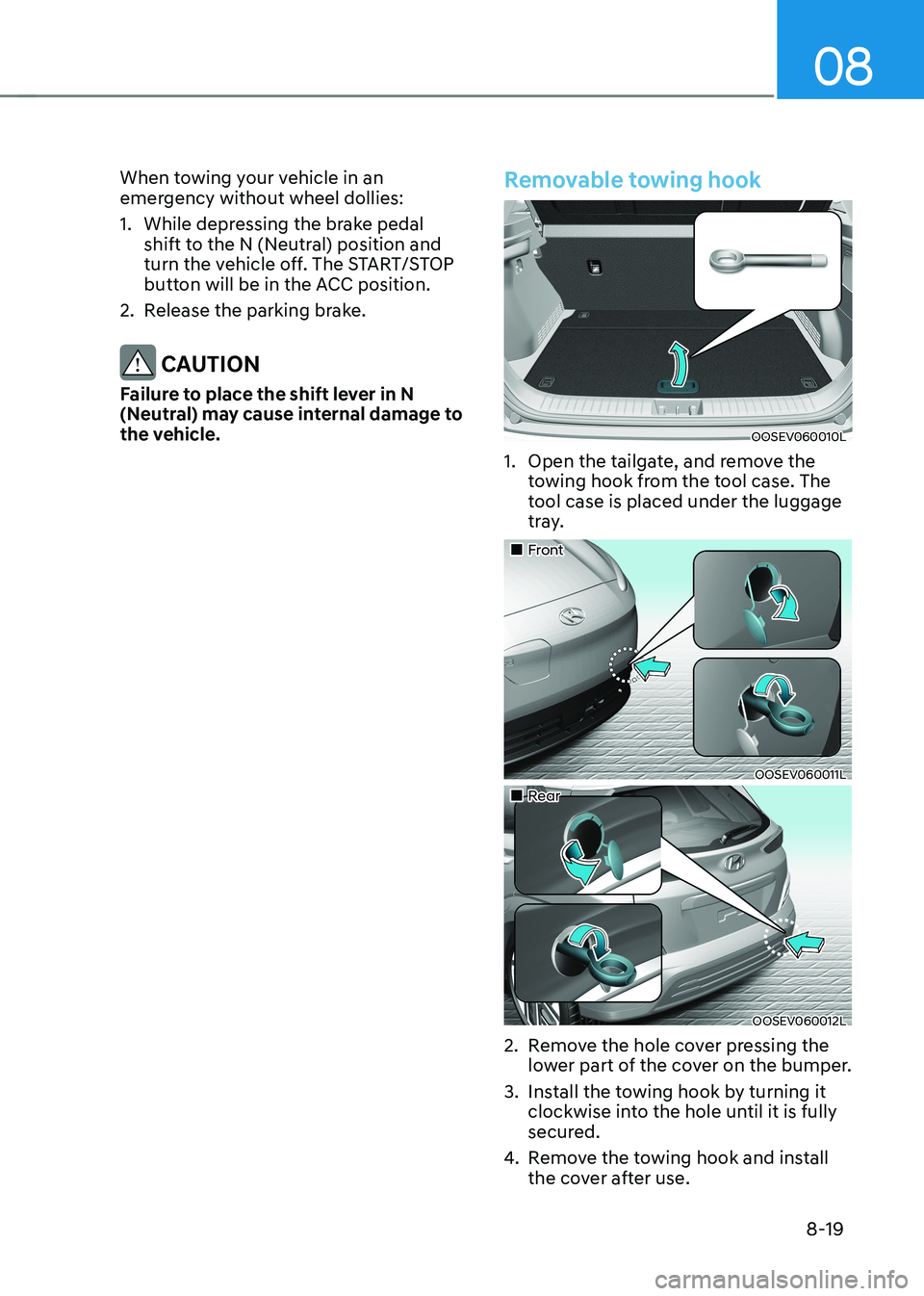
Removable towing hook
OOSEV060010L
1. Open the tailgate, and remove the towing hook from the tool case. The
tool case is placed under the luggage
tray.
„„Front
OOSEV060011L
„„Rear
OOSEV060012L
2. Remove the hole cover pressing the lower part of the cover on the bumper.
3. Install the towing hook by turning it clockwise into the hole until it is fully
secured.
4. Remove the towing hook and install
the cover after use.
Page 481 of 548

09
9-5
OWNER MAINTENANCE
WARNING
Performing maintenance work on a
vehicle can be dangerous. If you lack
sufficient knowledge and experience
or the proper tools and equipment to
do the work, we recommend that the
system be serviced by an authorized
HYUNDAI dealer. ALWAYS follow
these precautions for performing
maintenance work: • Park your vehicle on level ground,
shift to P (Park) position, apply the
parking brake, place the START/STOP
button in the OFF position.
• Block the tires (front and back) to
prevent the vehicle from moving.
Remove loose clothing or jewelry
that can become entangled in
moving parts.
• Keep flames, sparks, or smoking
materials away from the battery and
motor related parts.
The following lists are vehicle checks and
inspections that should be performed
by the owner or an authorized HYUNDAI
dealer at the frequencies indicated to
help ensure safe, dependable operation
of your vehicle.
Any adverse conditions should be
brought to the attention of your dealer as soon as possible.
These Owner Maintenance vehicle
checks are generally not covered by
warranties and you may be charged for
labor, parts and lubricants used.Owner maintenance schedule
When you stop for charging: • Check the coolant level in the coolant
reservoir.
• Check the windshield washer fluid
level.
• Check for low or under-inflated tires.
WARNING
Be careful when checking your coolant
level when the motor compartment is
hot. This may result in coolant being
blown out of the opening and cause
serious burns and other injuries.
Page 482 of 548

Maintenance
9-6
While operating your vehicle: •
Check for vibrations in the steering
wheel. Notice if there is any increased
steering effort or looseness in the
steering wheel, or change in its
straight-ahead position.
• Notice if your vehicle constantly turns
slightly or “pulls” to one side when
traveling on smooth, level road.
• When stopping, listen and check for
unusual sounds, pulling to one side,
increased brake pedal travel or “hard-
to-push” brake pedal.
• If any slipping or changes in the
operation of your reduction gear
occurs, check the reduction gear fluid
level.
• Check the reduction gear p (park) function.
• Check the parking brake.
• Check for fluid leaks under your
vehicle (water dripping from the air
conditioning system during or after use is normal).
At least monthly: • Check coolant level in the coolant
reservoir.
• Check the operation of all exterior
lights, including the stoplights, turn
signals and hazard warning flashers.
• Check the inflation pressures of all
tires including the spare for tires that
are worn, show uneven wear, or are damaged.
• Check for loose wheel lug nuts.
• Do not add regular green coolant. •
At least twice a year:
(i.e., every Spring and Autumn)
• Check radiator, heater and air
conditioning hoses for leaks or damage.
• Check windshield washer spray and
wiper operation. Clean wiper blades
with a clean cloth dampened with
washer fluid.
• Check headlamp alignment.
• Check the seat belts for wear and function.
At least once a year: • Clean body and door drain holes.
• Lubricate door hinges and hood hinges.
• Lubricate door and hood locks and
latches.
• Lubricate door rubber weather strips.
• Check the air conditioning system.
• Inspect and lubricate reduction gear
linkage and controls.
• Clean the battery and terminals.
• Check the brake fluid level.
Page 489 of 548
09
9-13
CLIMATE CONTROL AIR FILTER
Filter inspection
Replace the filter according to the
Maintenance Schedule.
If the vehicle is operated in the severely
air-polluted cities or on dusty rough
roads for a long period, it should be
inspected more frequently and replaced
earlier. When you, the owner, replace
the climate control air filter, replace it
performing the following procedure,
and be careful to avoid damaging other
components.
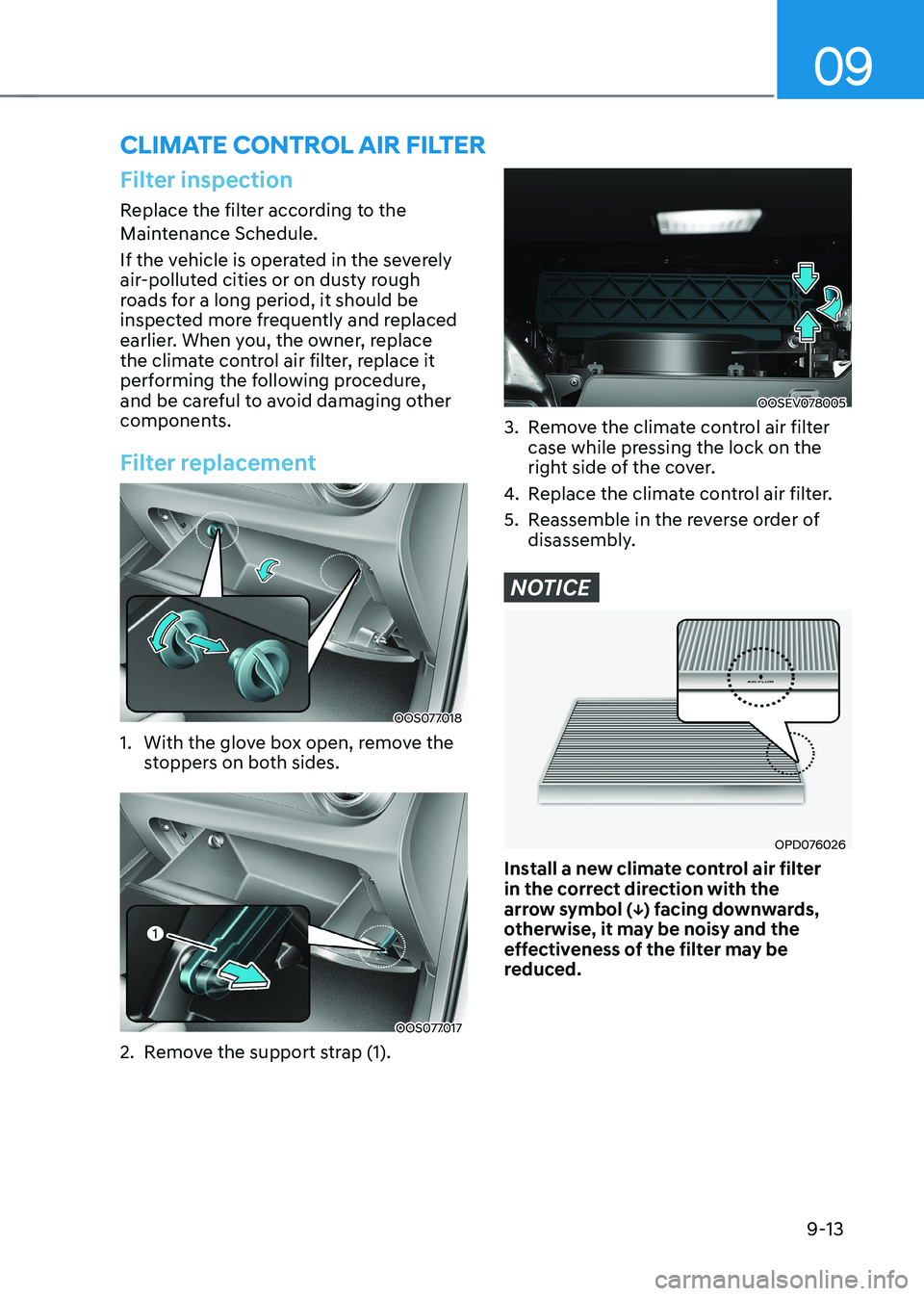
Filter replacement
OOS077018
1. With the glove box open, remove the stoppers on both sides.
OOS077017
2. Remove the support strap (1).
OOSEV078005
3. Remove the climate control air filter case while pressing the lock on the
right side of the cover.
4. Replace the climate control air filter.
5. Reassemble in the reverse order of disassembly.
NOTICE
OPD076026
Install a new climate control air filter
in the correct direction with the
arrow symbol (↓) facing downwards,
otherwise, it may be noisy and the
effectiveness of the filter may be
reduced.
Page 491 of 548
09
9-15
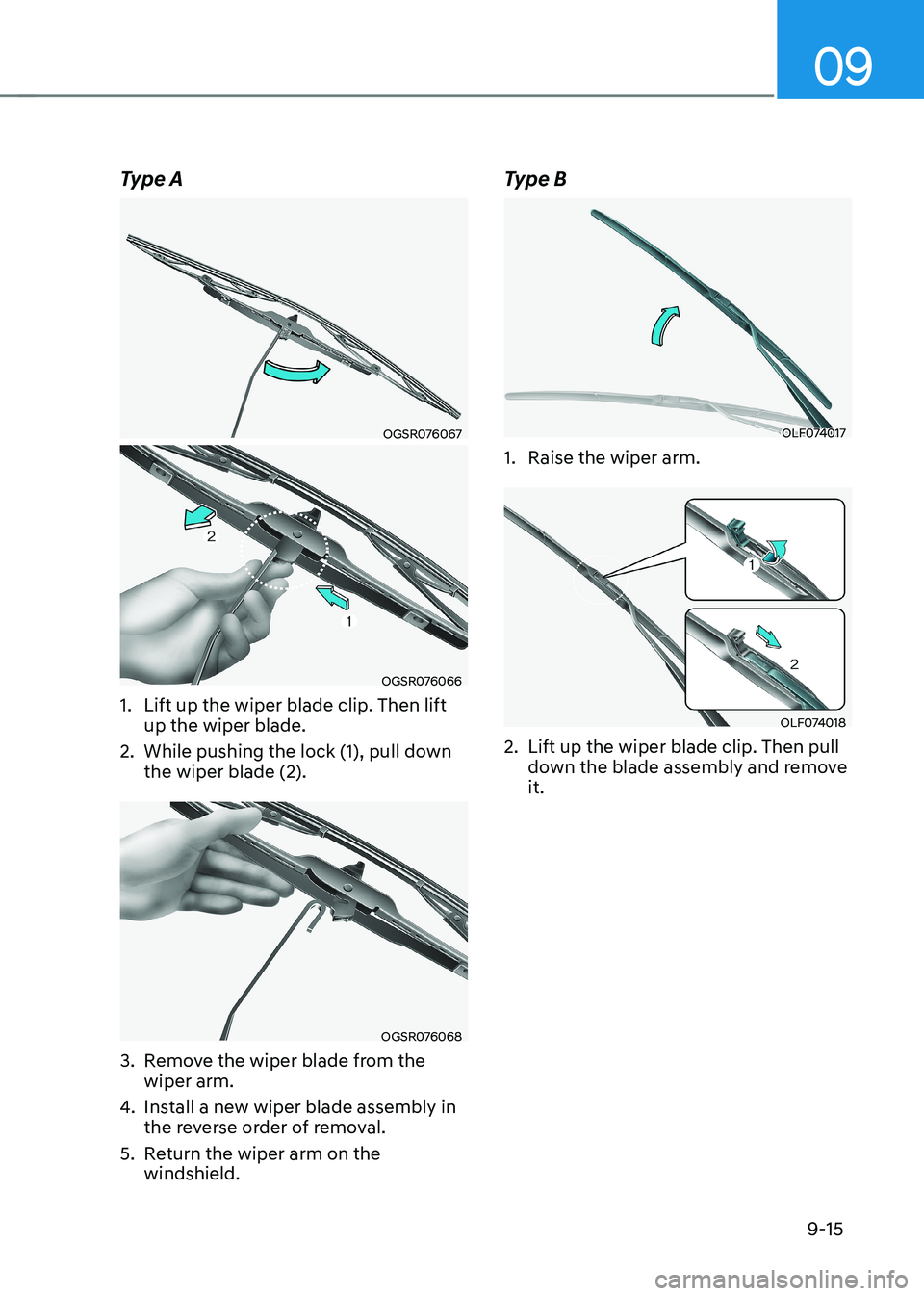
Type A
OGSR076067
OGSR076066
1. Lift up the wiper blade clip. Then lift up the wiper blade.
2. While pushing the lock (1), pull down the wiper blade (2).
OGSR076068
3. Remove the wiper blade from the wiper arm.
4. Install a new wiper blade assembly in
the reverse order of removal.
5. Return the wiper arm on the windshield. Type B
OLF074017
1. Raise the wiper arm.
OLF074018
2. Lift up the wiper blade clip. Then pull down the blade assembly and remove it.