lock HYUNDAI KONA EV 2023 Repair Manual
[x] Cancel search | Manufacturer: HYUNDAI, Model Year: 2023, Model line: KONA EV, Model: HYUNDAI KONA EV 2023Pages: 548, PDF Size: 49.14 MB
Page 229 of 548
05
5-45
Charging door
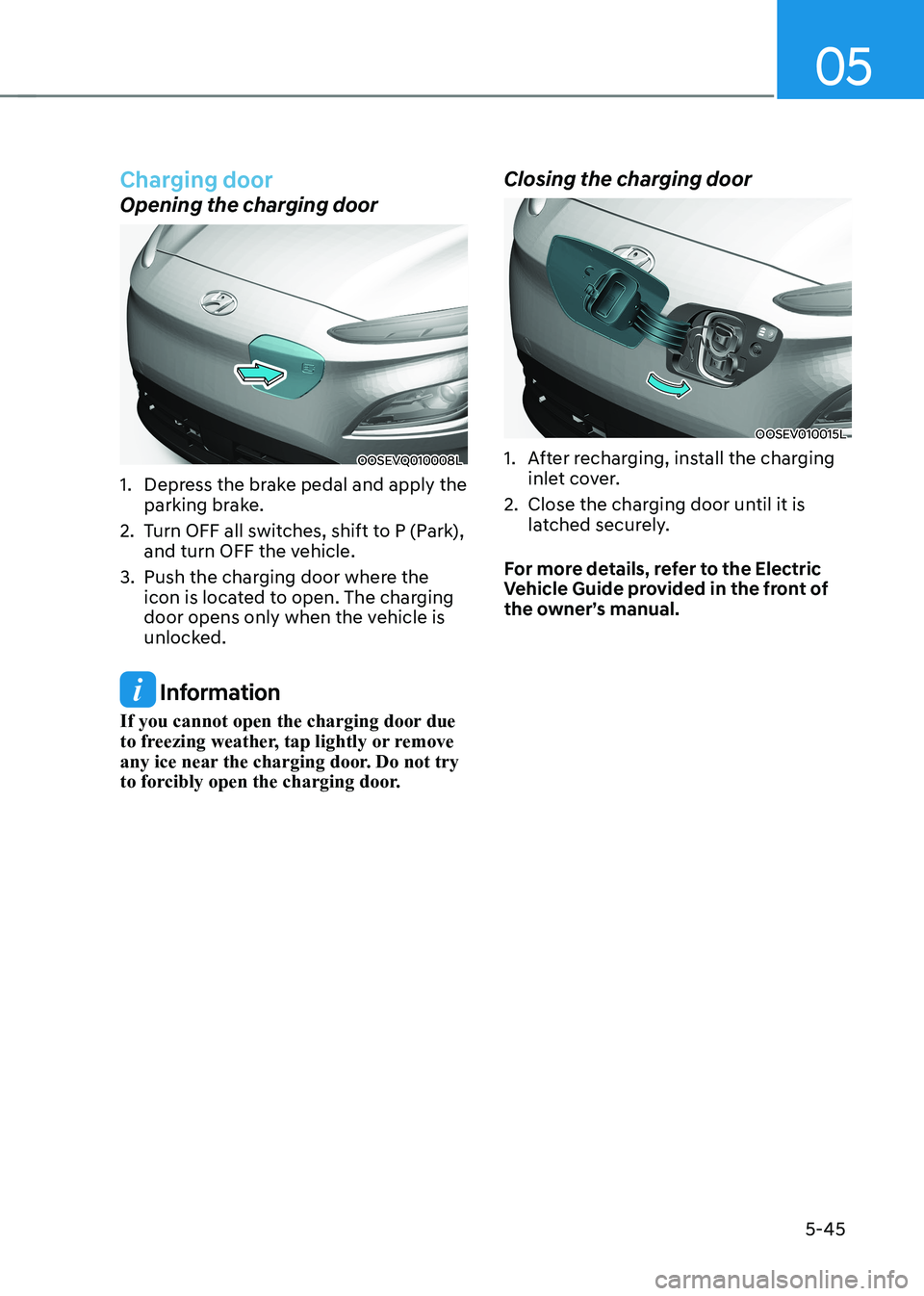
Opening the charging door
OOSEVQ010008L
1. Depress the brake pedal and apply the parking brake.
2. Turn OFF all switches, shift to P (Park), and turn OFF the vehicle.
3. Push the charging door where the icon is located to open. The charging
door opens only when the vehicle is
unlocked.
Information
If you cannot open the charging door due
to freezing weather, tap lightly or remove
any ice near the charging door. Do not try
to forcibly open the charging door. Closing the charging door
OOSEV010015L
1. After recharging, install the charging
inlet cover.
2. Close the charging door until it is latched securely.
For more details, refer to the Electric
Vehicle Guide provided in the front of
the owner’s manual.
Page 231 of 548
05
5-47
Head Up Display ON/OFF
OOSEV040061L
Use the head-up display ON/OFF button
to activate or deactivate the head-up
display when the START/STOP button is
in the ON position or when the vehicle is
in the ready (
) mode.
The head-up display will retract
automatically when the vehicle is turned
OFF and the doors are locked with the
Smart Key or when pressing the button on the outside door handle.
Note that if the vehicle is turned OFF and
the doors are not locked, the head-up
display will automatically retract after
approximately five minutes.
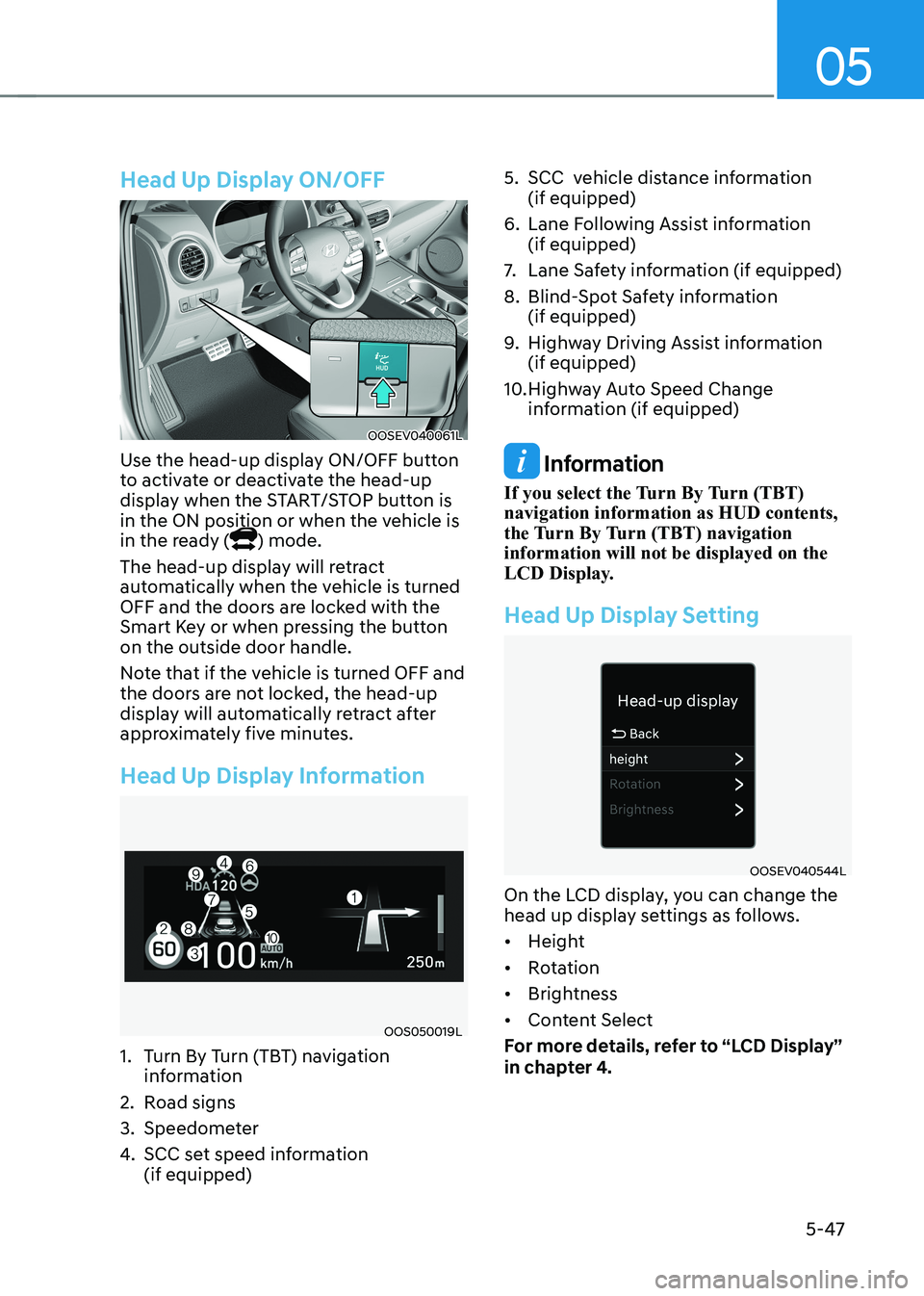
Head Up Display Information
OOS050019L
1. Turn By Turn (TBT) navigation information
2. Road signs
3. Speedometer
4. SCC set speed information (if equipped) 5. SCC vehicle distance information
(if equipped)
6. Lane Following Assist information (if equipped)
7. Lane Safety information (if equipped)
8. Blind-Spot Safety information (if equipped)
9. Highway Driving Assist information (if equipped)
10. Highway Auto Speed Change information (if equipped)
Information
If you select the Turn By Turn (TBT) navigation information as HUD contents,
the Turn By Turn (TBT) navigation information will not be displayed on the
LCD Display.
Head Up Display Setting
OOSEV040544L
On the LCD display, you can change the
head up display settings as follows. • Height
• Rotation
• Brightness
• Content Select
For more details, refer to “LCD Display”
in chapter 4.
Page 235 of 548
05
5-51
Headlamp delay function (if equipped)
If you place the START/STOP button
to the ACC or OFF position with the
headlamps ON, the headlamps (and/or
position lamps) remain on for about 5
minutes. However, with the vehicle off if
the driver’s door is opened and closed,
the headlamps (and/or position lamps)
are turned off after 15 seconds.
The headlamps (and/or position lamps)
can be turned off by pressing the lock
button on the smart key twice or turning
the light switch to the OFF or AUTO
position. However, if you turn the light
switch to the AUTO position when it is
dark outside, the headlamps will not be
turned off.
You can activate or deactivate the
Headlamp Delay function from the User
Settings mode on the LCD display. For
more details, refer to “LCD Display” in
chapter 4.
NOTICE
If the driver gets out of the vehicle
through other doors (except driver’s
door), the battery saver function
does not operate and the headlamp
delay function does not turn off
automatically. Therefore, It causes the
battery to be discharged. In this case,
make sure to turn off the headlamps
before getting out of the vehicle.
Welcome system (if equipped)
Headlamp and position lamp
When the headlamp (lamp switch in the
headlamp or AUTO position) is on and
all doors (and tailgate) are locked and closed, the position lamp and headlamp
will come on for 15 seconds when the
door unlock button is pressed on the
smart key.
At this time, if you press the door lock
or unlock button, the position lamp and
headlamp will turn off immediately
Interior lamp
When the interior lamp switch is in
the DOOR position and all doors (and
tailgate) are closed and locked, the room
lamp will come on for 30 seconds if any
of the below is performed. • When the door unlock button is
pressed on the smart key.
• When the button of the outside door
handle is pressed with the smart key in possession.
At this time, if you press the door lock or
unlock button, the room lamp will turn
off immediately.
Page 236 of 548
Convenient features
5-52
Interior lights
WARNING
Do not use the interior lights when
driving in the dark. The interior lights
may obscure your view and cause an
accident.
NOTICE
Do not use the interior lights for
extended periods when the vehicle is
turned off or the battery will discharge.
Interior lamp AUTO cut
The interior lamps will automatically go
off approximately 20 minutes after the
vehicle is turned off and the doors are closed. If a door is opened, the lamp
will go off 40 minutes after the vehicle
is turned off. If the doors are locked and
the vehicle enters the armed stage of the
theft alarm system, the lamps will go off
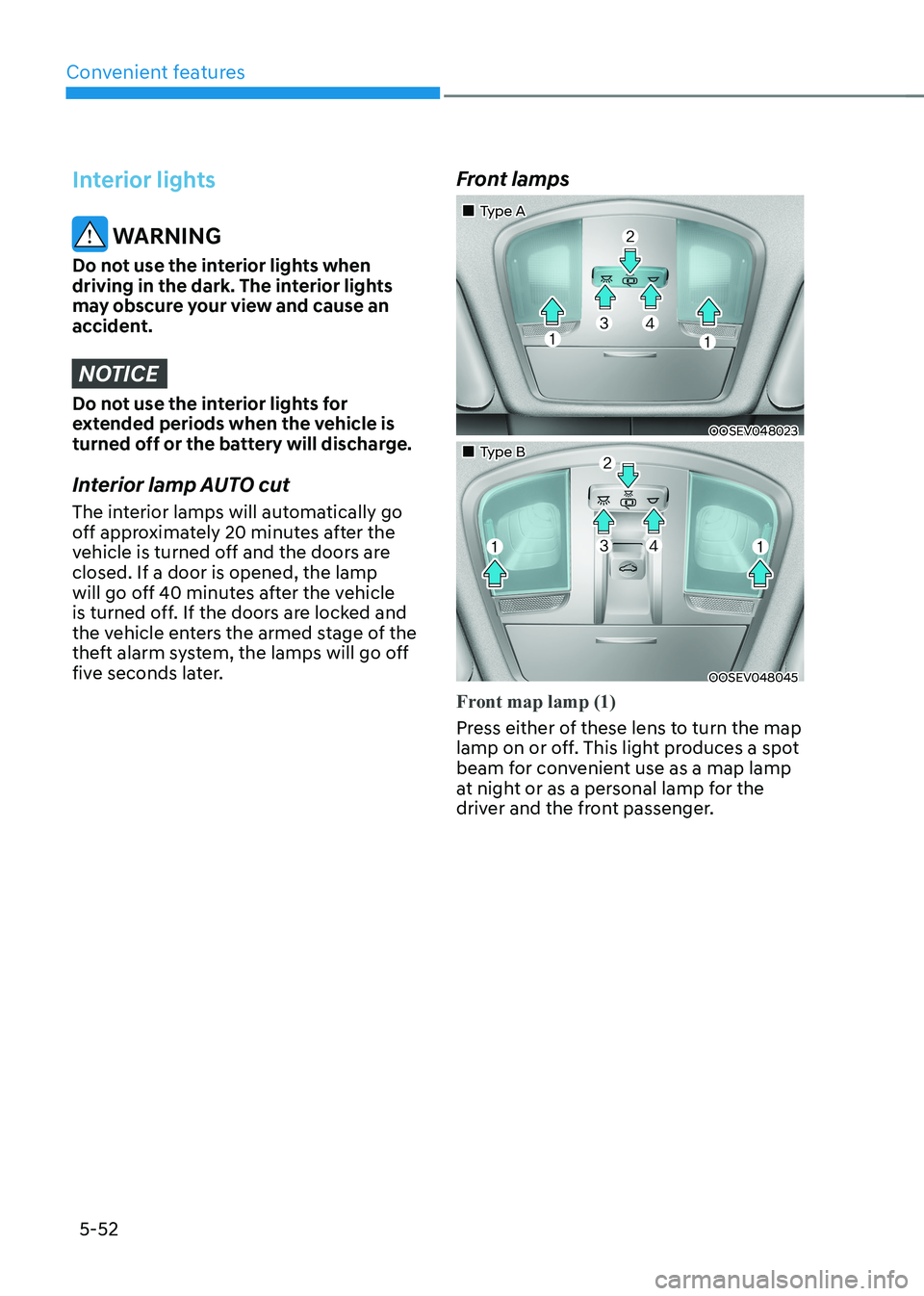
five seconds later. Front lamps
„„Type A
OOSEV048023
„„Type B
OOSEV048045
Front map lamp (1)
Press either of these lens to turn the map
lamp on or off. This light produces a spot
beam for convenient use as a map lamp
at night or as a personal lamp for the
driver and the front passenger.
Page 237 of 548
05
5-53
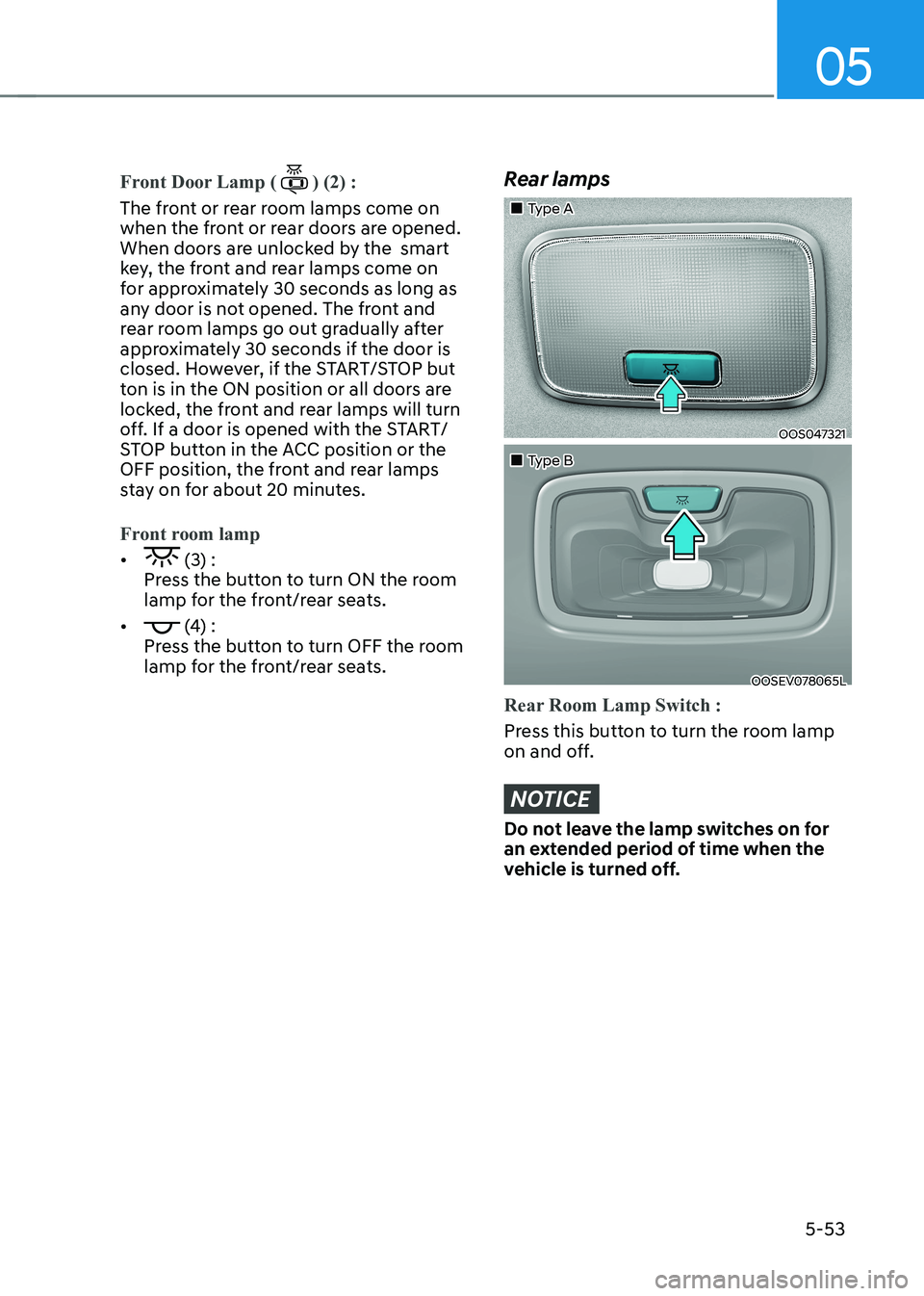
Front Door Lamp () (2) :
The front or rear room lamps come on
when the front or rear doors are opened.
When doors are unlocked by the smart
key, the front and rear lamps come on
for approximately 30 seconds as long as
any door is not opened. The front and
rear room lamps go out gradually after
approximately 30 seconds if the door is
closed. However, if the START/STOP but
ton is in the ON position or all doors are
locked, the front and rear lamps will turn
off. If a door is opened with the START/
STOP button in the ACC position or the
OFF position, the front and rear lamps
stay on for about 20 minutes.
Front room lamp
• (3) :
Press the button to turn ON the room
lamp for the front/rear seats.
•
(4) :
Press the button to turn OFF the room
lamp for the front/rear seats.
Rear lamps
„„Type A
OOS047321
„„Type B
OOSEV078065L
Rear Room Lamp Switch :
Press this button to turn the room lamp
on and off.
NOTICE
Do not leave the lamp switches on for
an extended period of time when the
vehicle is turned off.
Page 266 of 548
Convenient features
5-82
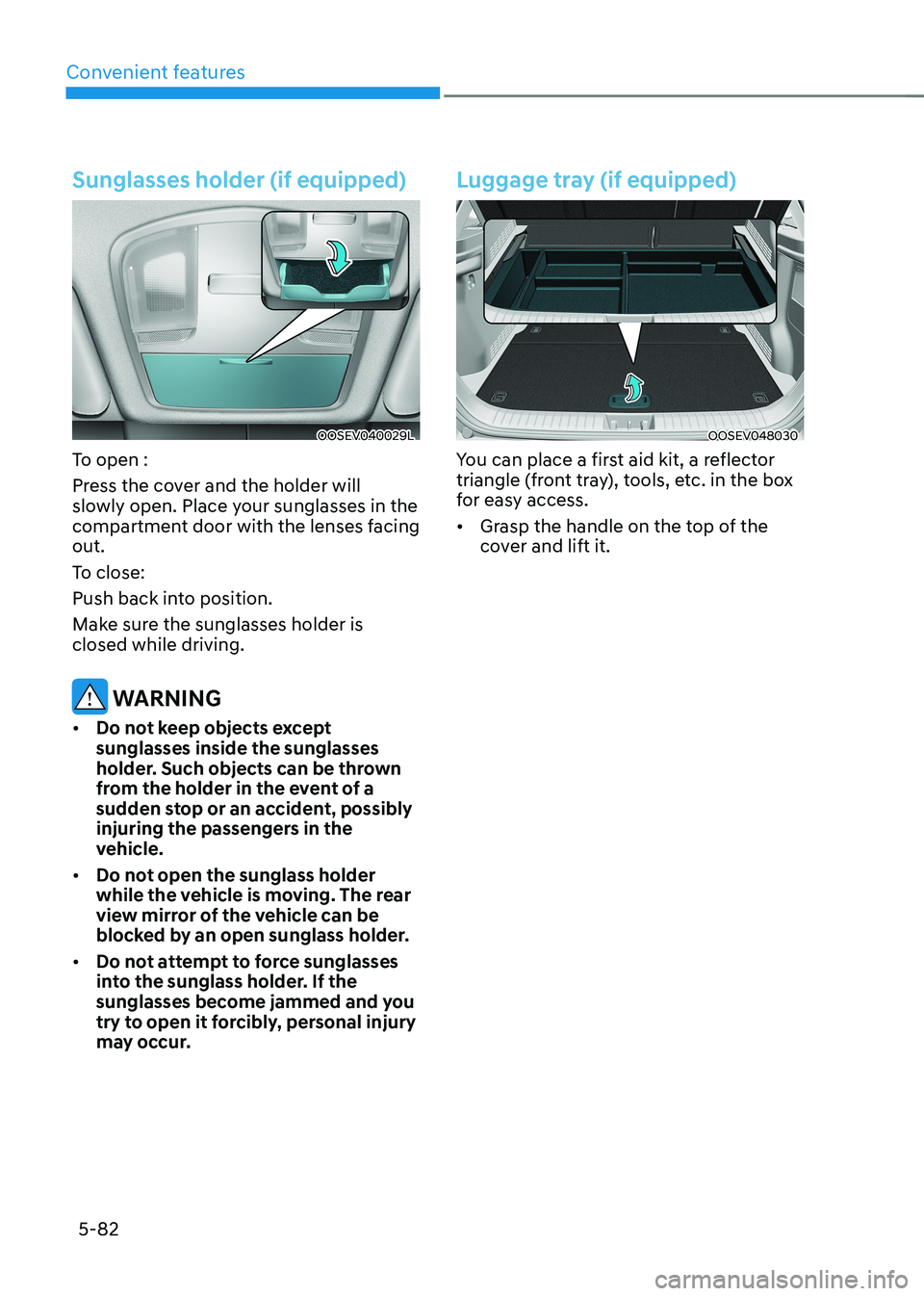
Sunglasses holder (if equipped)
OOSEV040029L
To open :
Press the cover and the holder will
slowly open. Place your sunglasses in the
compartment door with the lenses facing out.
To close:
Push back into position.
Make sure the sunglasses holder is closed while driving.
WARNING
• Do not keep objects except sunglasses inside the sunglasses
holder. Such objects can be thrown
from the holder in the event of a
sudden stop or an accident, possibly
injuring the passengers in the
vehicle.
• Do not open the sunglass holder
while the vehicle is moving. The rear
view mirror of the vehicle can be
blocked by an open sunglass holder.
• Do not attempt to force sunglasses
into the sunglass holder. If the
sunglasses become jammed and you
try to open it forcibly, personal injury
may occur.
Luggage tray (if equipped)
OOSEV048030
You can place a first aid kit, a reflector
triangle (front tray), tools, etc. in the box
for easy access. • Grasp the handle on the top of the
cover and lift it.
Page 269 of 548
05
5-85
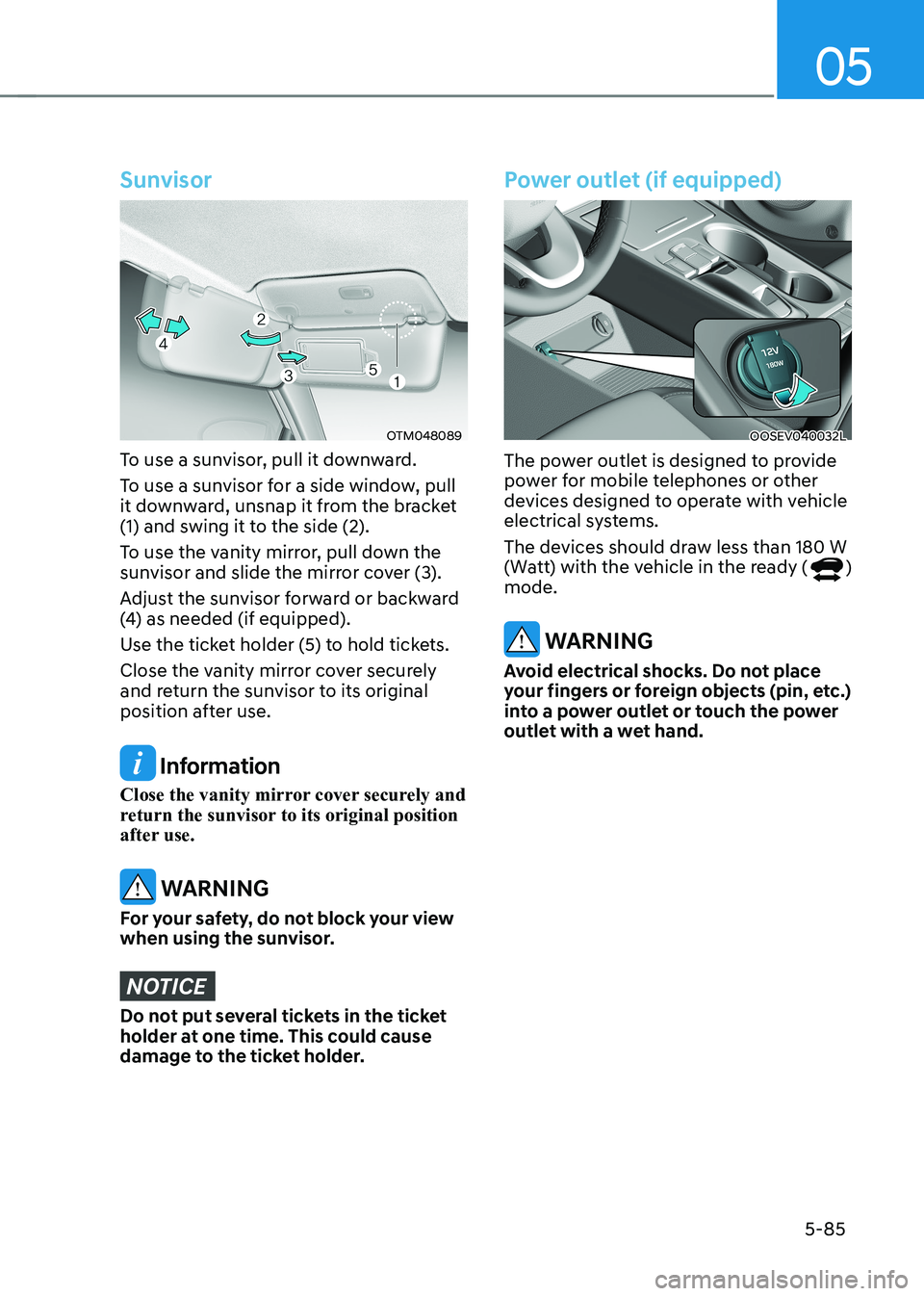
Sunvisor
OTM048089
To use a sunvisor, pull it downward.
To use a sunvisor for a side window, pull
it downward, unsnap it from the bracket
(1) and swing it to the side (2).
To use the vanity mirror, pull down the
sunvisor and slide the mirror cover (3).
Adjust the sunvisor forward or backward
(4) as needed (if equipped).
Use the ticket holder (5) to hold tickets.
Close the vanity mirror cover securely
and return the sunvisor to its original
position after use.
Information
Close the vanity mirror cover securely and
return the sunvisor to its original position
after use.
WARNING
For your safety, do not block your view
when using the sunvisor.
NOTICE
Do not put several tickets in the ticket
holder at one time. This could cause
damage to the ticket holder.
Power outlet (if equipped)
OOSEV040032L
The power outlet is designed to provide
power for mobile telephones or other
devices designed to operate with vehicle
electrical systems.
The devices should draw less than 180 W
(Watt) with the vehicle in the ready (
)
mode.
WARNING
Avoid electrical shocks. Do not place
your fingers or foreign objects (pin, etc.)
into a power outlet or touch the power
outlet with a wet hand.
Page 272 of 548
Convenient features
5-88
NOTICE
• The wireless smart phone charging
system may not support certain
smart phones, which are not verified
for the Qi specification (
).
• When placing your smart phone on
the charging pad, position the phone
in the middle of the mat for optimal
charging performance. If your smart
phone is off to the side, the charging
rate may be less and in some cases
the smart phone may experience
higher heat conduction.
• In some cases, the wireless charging
may stop temporarily when the
smart key is used, either when
starting the vehicle or locking/
unlocking the doors, etc.
• When charging certain smart
phones, the charging indicator may
not change to blue when the smart
phone is fully charged.
• The wireless charging process may
temporarily stop, when temperature
abnormally increases inside the
wireless smart phone charging
system. The wireless charging
process restarts, when temperature
falls to a certain level.
• The wireless charging process may
temporarily stop when there is
any metallic item, such as a coin,
between the wireless smart phone
charging system and smart phone.
• When charging some smart phones
with a self-protection feature,
the wireless charging speed may
decrease and the wireless charging
may stop.
• If the smart phone has a thick cover,
the wireless charging may not be possible.
• If the smart phone is not completely
contacting the charging pad,
wireless charging may not operate
properly. •
Some magnetic items like credit
cards, phone cards or rail tickets may
be damaged if left with the smart
phone during the charging process.
• When any smart phone without
a wireless charging function or a
metallic object is placed on the
charging pad, a small noise may
sound. This small sound is due to the
vehicle discerning compatibility of
the object placed on the charging
pad. It does not affect your vehicle or
the smart phone in any way.
Information
If the START/STOP button is OFF, the charging also stops.
Information
This device complies with Industry Canada RSS-210 standard. Operation is subject to the following two conditions: 1. This device may not cause harmful
interference, and
2. This device must accept any
interference received, including
interference that may cause undesired operation.
Page 273 of 548
05
5-89
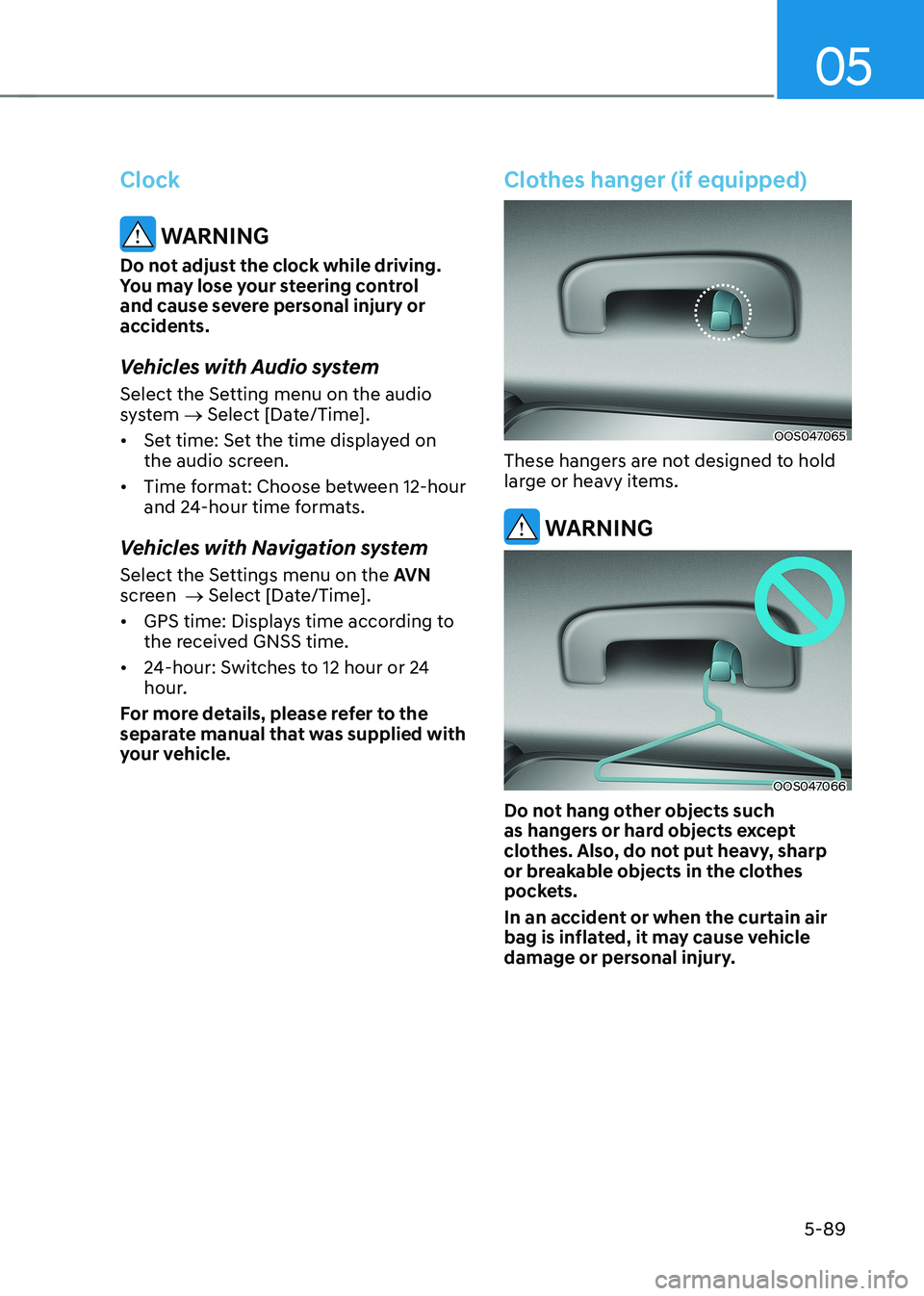
Clock
WARNING
Do not adjust the clock while driving.
You may lose your steering control
and cause severe personal injury or
accidents.
Vehicles with Audio system
Select the Setting menu on the audio
system → Select [Date/Time].
• Set time: Set the time displayed on
the audio screen.
• Time format: Choose between 12-hour
and 24-hour time formats.
Vehicles with Navigation system
Select the Settings menu on the AVN
screen → Select [Date/Time].
• GPS time: Displays time according to
the received GNSS time.
• 24-hour: Switches to 12 hour or 24
hour.
For more details, please refer to the
separate manual that was supplied with
your vehicle.
Clothes hanger (if equipped)
OOS047065
These hangers are not designed to hold
large or heavy items.
WARNING
OOS047066
Do not hang other objects such
as hangers or hard objects except
clothes. Also, do not put heavy, sharp
or breakable objects in the clothes
pockets.
In an accident or when the curtain air
bag is inflated, it may cause vehicle
damage or personal injury.
Page 281 of 548
6
Before driving .................................................................................................... 6-3
Before entering the vehicle ........................................................................................ 6-3
Before starting ............................................................................................................. 6-3
START/STOP button .......................................................................................... 6-4
START/STOP button positions ..................................................................................... 6-5
Starting the vehicle ..................................................................................................... 6-6
Turning off the vehicle ................................................................................................. 6 -7
Reduction gear .................................................................................................. 6-8
Reduction gear operation .......................................................................................... 6-8
LCD display messages ............................................................................................... 6-10
Good driving practices ............................................................................................... 6-13
Regenerative braking system .......................................................................... 6-14
Regenerative braking (Paddle shifter) ...................................................................... 6-14
One pedal driving ....................................................................................................... 6-15
Smart recuperation system
(if equipped with smart cruise control system) ............................................6-16
System setting ............................................................................................................ 6-16
To activate smart recuperation system..................................................................... 6-16
Smart recuperation system will be temporarily cancelled when: ..........................6-18
To resume smart recuperation system ..................................................................... 6-18
To turn smart recuperation system off ..................................................................... 6-18
Vehicle-to-vehicle distance recognition sensor (front radar) .................................6-18
System malfunction ................................................................................................... 6-19
Limitations of the system .......................................................................................... 6-19
Braking system ................................................................................................ 6-22
Power brakes ............................................................................................................. 6-22
Disc brakes wear indicator ........................................................................................ 6-22
Electronic Parking Brake (EPB) .................................................................................. 6-23
Auto Hold .................................................................................................................... 6-27
Anti-Lock Brake System (ABS) ................................................................................... 6-31
Electronic Stability Control (ESC) ............................................................................. 6-32
Vehicle Stability Management (VSM) ....................................................................... 6-35
Hill-Start Assist Control (FAC) .................................................................................. 6-36
Good braking practices ............................................................................................. 6-37
Drive mode integrated control system ..........................................................6-38
Initial setting for each drive mode ............................................................................ 6-39
6. Driving your vehicle