light HYUNDAI KONA EV 2023 Owners Manual
[x] Cancel search | Manufacturer: HYUNDAI, Model Year: 2023, Model line: KONA EV, Model: HYUNDAI KONA EV 2023Pages: 548, PDF Size: 49.14 MB
Page 260 of 548
Convenient features
5 -76
WARNING
Windshield heating
Do not use the (
) or () position
during cooling operation in extremely
humid weather. The difference between
the temperature of the outside air and
that of the windshield could cause the
outer surface of the windshield to fog
up, causing loss of visibility. In this case,
set the mode selection knob or button
to the (
) position and fan speed
control knob or button to lower speed. • For maximum windshield defrosting,
set the temperature control knob to
the highest temperature setting and
the fan control knob to the highest fan
speed. Select the front defrost button
on the climate control display.
• If warm air to the floor is desired while
defrosting or defogging, set the mode
to the floor-defrost position.
• Before driving, clear all snow and ice
from the windshield, rear window,
outside rear view mirrors, and all side
windows.
• Clear all snow and ice from the
hood and air inlet in the cowl grill
to improve heater and defroster
efficiency and to reduce the
probability of fogging up inside of the windshield.
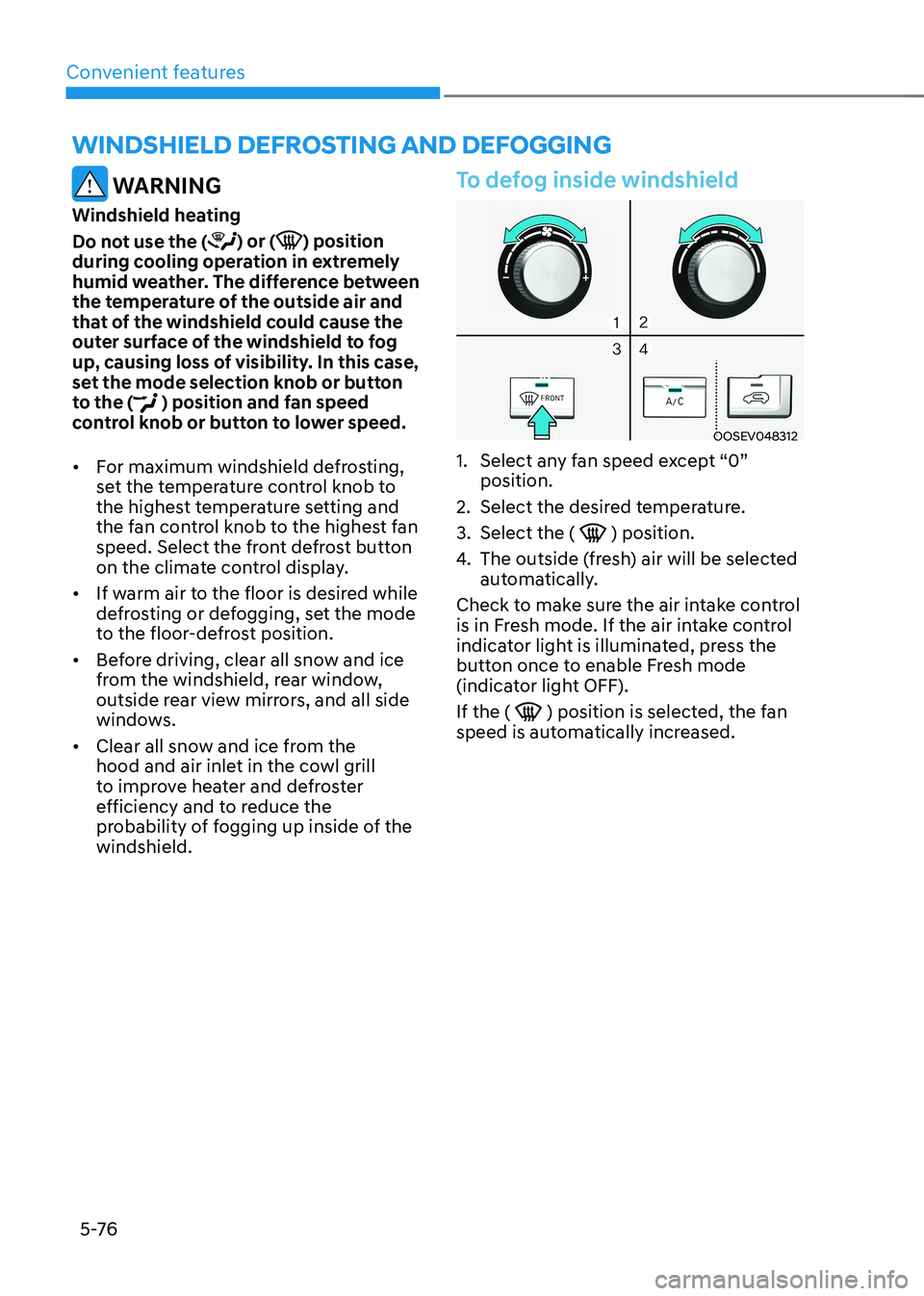
To defog inside windshield
OOSEV048312
1. Select any fan speed except “0” position.
2. Select the desired temperature.
3. Select the (
) position.
4. The outside (fresh) air will be selected
automatically.
Check to make sure the air intake control
is in Fresh mode. If the air intake control
indicator light is illuminated, press the
button once to enable Fresh mode
(indicator light OFF). If the (
) position is selected, the fan
speed is automatically increased.
winDshielD DeFrosting AnD DeFogging
Page 261 of 548
05
5-77
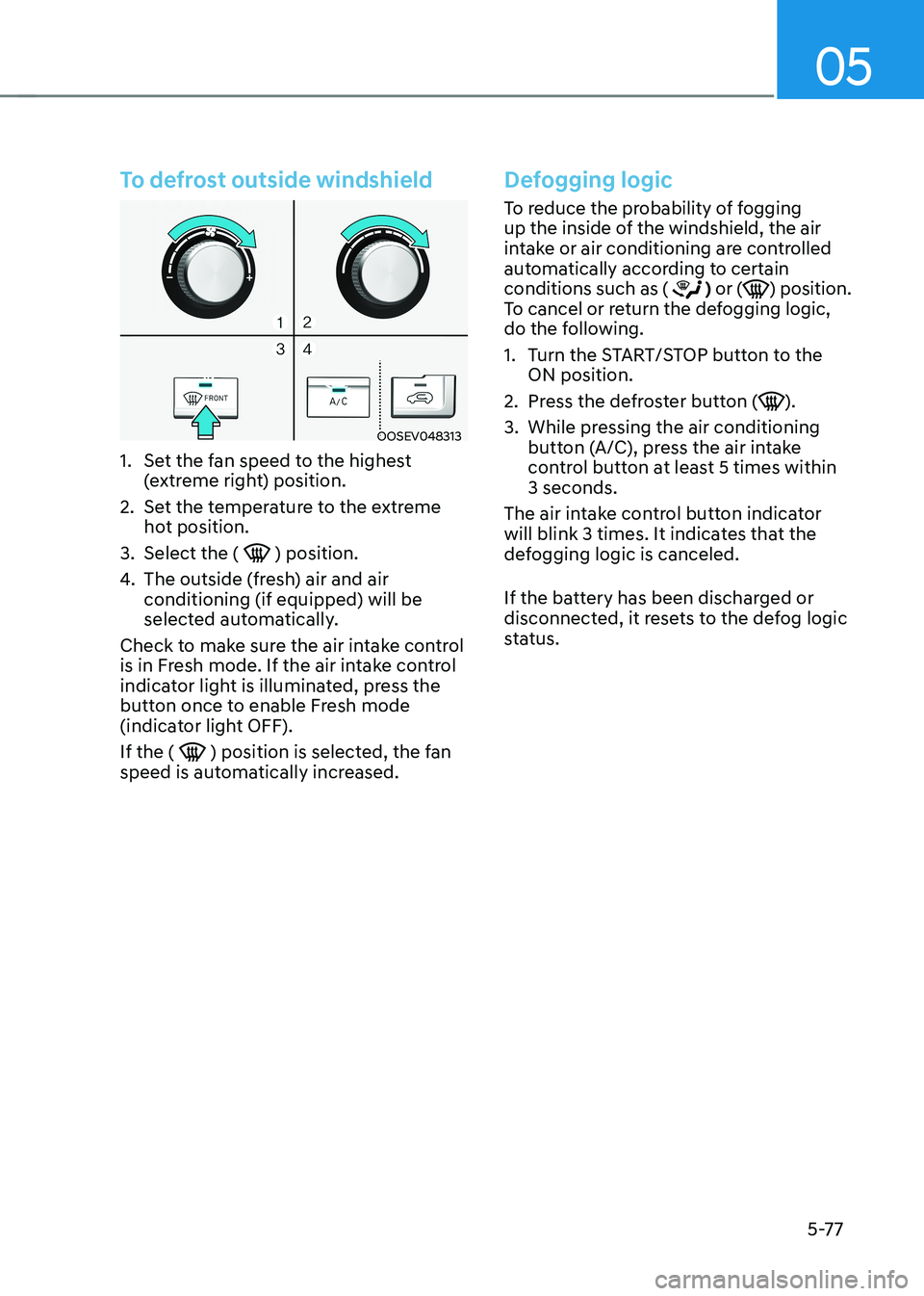
To defrost outside windshield
OOSEV048313
1. Set the fan speed to the highest (extreme right) position.
2. Set the temperature to the extreme hot position.
3. Select the (
) position.
4. The outside (fresh) air and air conditioning (if equipped) will be
selected automatically.
Check to make sure the air intake control
is in Fresh mode. If the air intake control
indicator light is illuminated, press the
button once to enable Fresh mode
(indicator light OFF). If the (
) position is selected, the fan
speed is automatically increased.
Defogging logic
To reduce the probability of fogging
up the inside of the windshield, the air
intake or air conditioning are controlled
automatically according to certain conditions such as (
) or () position.
To cancel or return the defogging logic,
do the following.
1. Turn the START/STOP button to the ON position.
2. Press the defroster button (
).
3. While pressing the air conditioning button (A/C), press the air intake
control button at least 5 times within 3 seconds.
The air intake control button indicator
will blink 3 times. It indicates that the
defogging logic is canceled.
If the battery has been discharged or
disconnected, it resets to the defog logic
status.
Page 265 of 548
05
5-81
WARNING
Never store cigarette lighters, propane
cylinders, or other flammable/explosive
materials in the vehicle. These items
may catch fire and/or explode if the
vehicle is exposed to hot temperatures
for extended periods.
WARNING
ALWAYS keep the storage compartment
covers closed securely while driving.
Items inside your vehicle are moving as
fast as the vehicle. If you have to stop
or turn quickly, or if there is a crash, the
items may fly out of the compartment
and may cause an injury if they strike
the driver or a passenger.
NOTICE
To avoid possible theft, do not leave
valuables in the storage compartments.
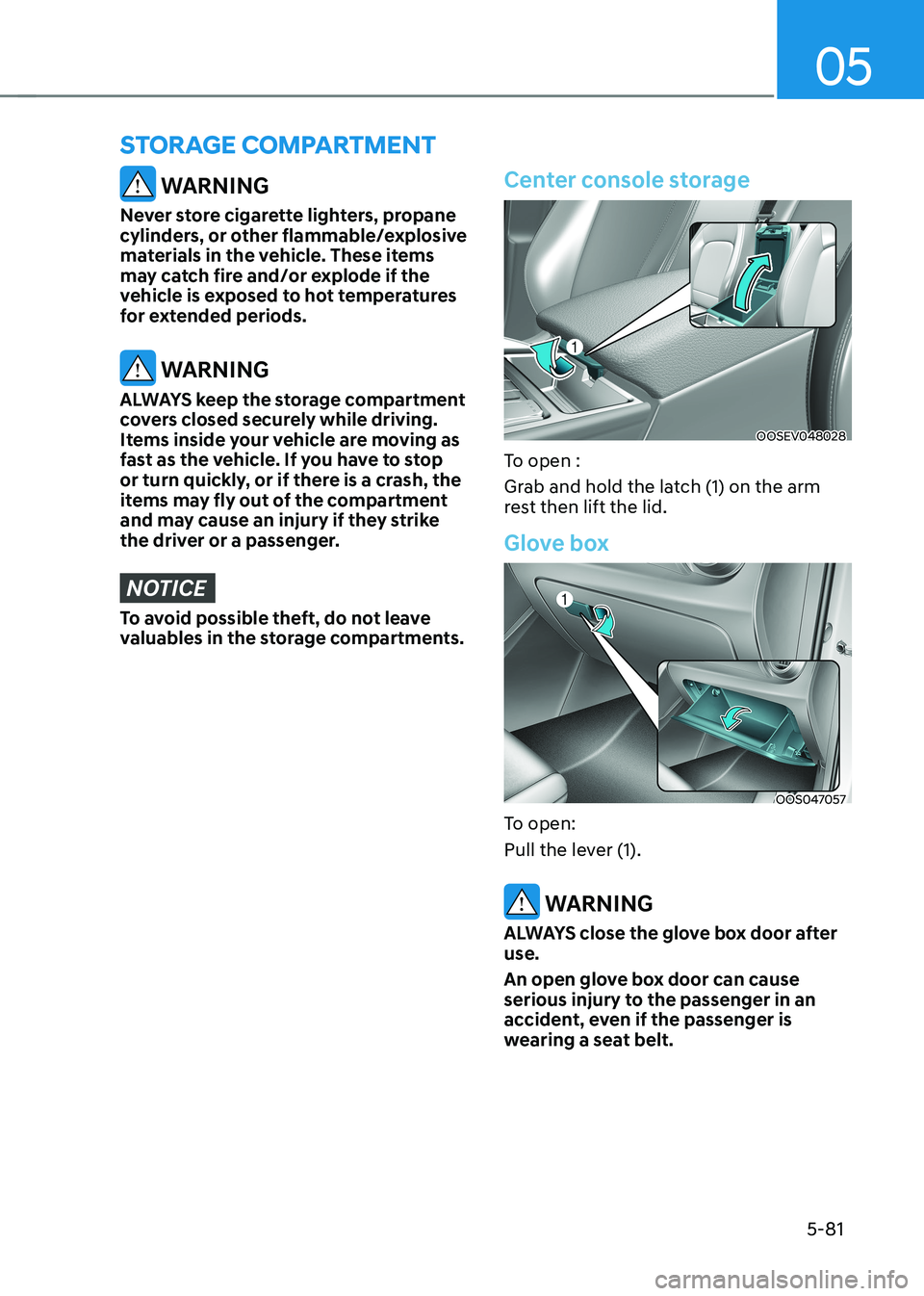
Center console storage
OOSEV048028
To open :
Grab and hold the latch (1) on the arm
rest then lift the lid.
Glove box
OOS047057
To open:
Pull the lever (1).
WARNING
ALWAYS close the glove box door after use.
An open glove box door can cause
serious injury to the passenger in an
accident, even if the passenger is
wearing a seat belt.
sTorage ComparTmenT
Page 268 of 548
Convenient features
5-84
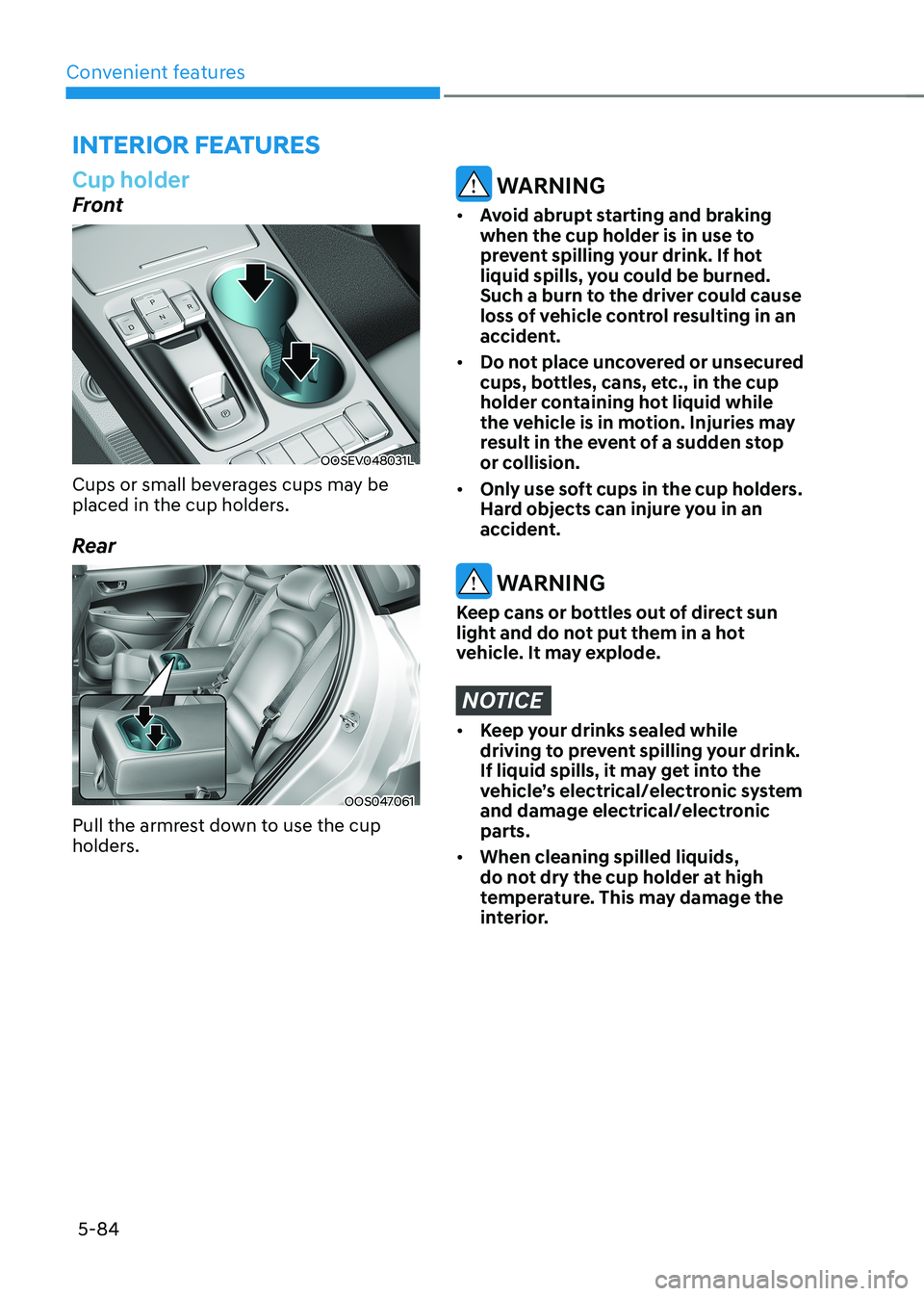
Cup holder
Front
OOSEV048031L
Cups or small beverages cups may be
placed in the cup holders.
Rear
OOS047061
Pull the armrest down to use the cup
holders.
WARNING
• Avoid abrupt starting and braking
when the cup holder is in use to
prevent spilling your drink. If hot
liquid spills, you could be burned.
Such a burn to the driver could cause
loss of vehicle control resulting in an
accident.
• Do not place uncovered or unsecured
cups, bottles, cans, etc., in the cup
holder containing hot liquid while
the vehicle is in motion. Injuries may
result in the event of a sudden stop
or collision.
• Only use soft cups in the cup holders.
Hard objects can injure you in an
accident.
WARNING
Keep cans or bottles out of direct sun
light and do not put them in a hot
vehicle. It may explode.
NOTICE
• Keep your drinks sealed while
driving to prevent spilling your drink.
If liquid spills, it may get into the
vehicle’s electrical/electronic system
and damage electrical/electronic parts.
• When cleaning spilled liquids,
do not dry the cup holder at high
temperature. This may damage the
interior.
interior FeAtures
Page 271 of 548
![HYUNDAI KONA EV 2023 Owners Manual 05
5-87
Wireless cellular phone charging
system (if equipped)
OOSEV041034N
[A] : Indicator light, [B] : Charging pad
There is a wireless cellular phone charger
inside the front console.
The sy](/img/35/56170/w960_56170-270.png "HYUNDAI KONA EV 2023 Owners Manual 05
5-87
Wireless cellular phone charging
system (if equipped)
OOSEV041034N
[A] : Indicator light, [B] : Charging pad
There is a wireless cellular phone charger
inside the front console.
The sy")
05
5-87
Wireless cellular phone charging
system (if equipped)
OOSEV041034N
[A] : Indicator light, [B] : Charging pad
There is a wireless cellular phone charger
inside the front console.
The system is available when all doors
are closed, and when the START/STOP
button is in the ON position (1).
After use, to close the cover, slightly pull
down the cover.
The system is available when all doors
are closed, and when the START/STOP
button is in the ON or START position.
To charge a cellular phone
The wireless cellular phone charging
system charges only the Qi-enabled cellular phones (
). Read the label on
the cellular phone accessory cover or
visit your cellular phone manufacturer’s
website to check whether your cellular
phone supports the Qi technology.
The wireless charging process starts
when you put a Qi-enabled cellular
phone on the wireless charging unit.
1. Remove other items, including the smart key, from the wireless charging
unit. If not, the wireless charging
process may be interrupted. Place
the cellular phone on the center of
charging pad.
2. The indicator light is orange when the cellular phone is charging. The
indicator light turns green when
phone charging is complete. 3. You can turn ON or OFF the wireless
charging function in the User Settings
mode on the instrument cluster. For
further information, refer to the “User
setting mode” in chapter 4.
If your cellular phone is not charging: - Slightly change the position of the cellular phone on the charging pad.
- Make sure the indicator light is orange.
The indicator light will blink orange for 10
seconds if there is a malfunction in the
wireless charging system.
In this case, temporarily stop the
charging process, and re-attempt to
wirelessly charge your cellular phone again.
The system warns you with a message
on the LCD display if the cellular phone
is still on the wireless charging unit after
the vehicle is turned OFF and the front door is opened. • High speed wireless charging can
be activated only when the cellular
phones equipped with a wireless
charging function is on the charging pad. Information
For some manufacturers’ cellular phones, the system may not warn you even though
the cellular phone is left on the wireless
charging unit. This is due to the particular
characteristic of the cellular phone and
not a malfunction of the wireless charging.
Page 277 of 548
05
5-93
Information
• If you install an aftermarket HID
headlamp, your vehicle’s audio and
electronic devices may malfunction.
• Prevent chemicals such as perfume,
cosmetic oil, sun cream, hand cleaner,
and air freshener from contacting the
interior parts because they may cause
damage or discoloration.
USB and iPod ®
port
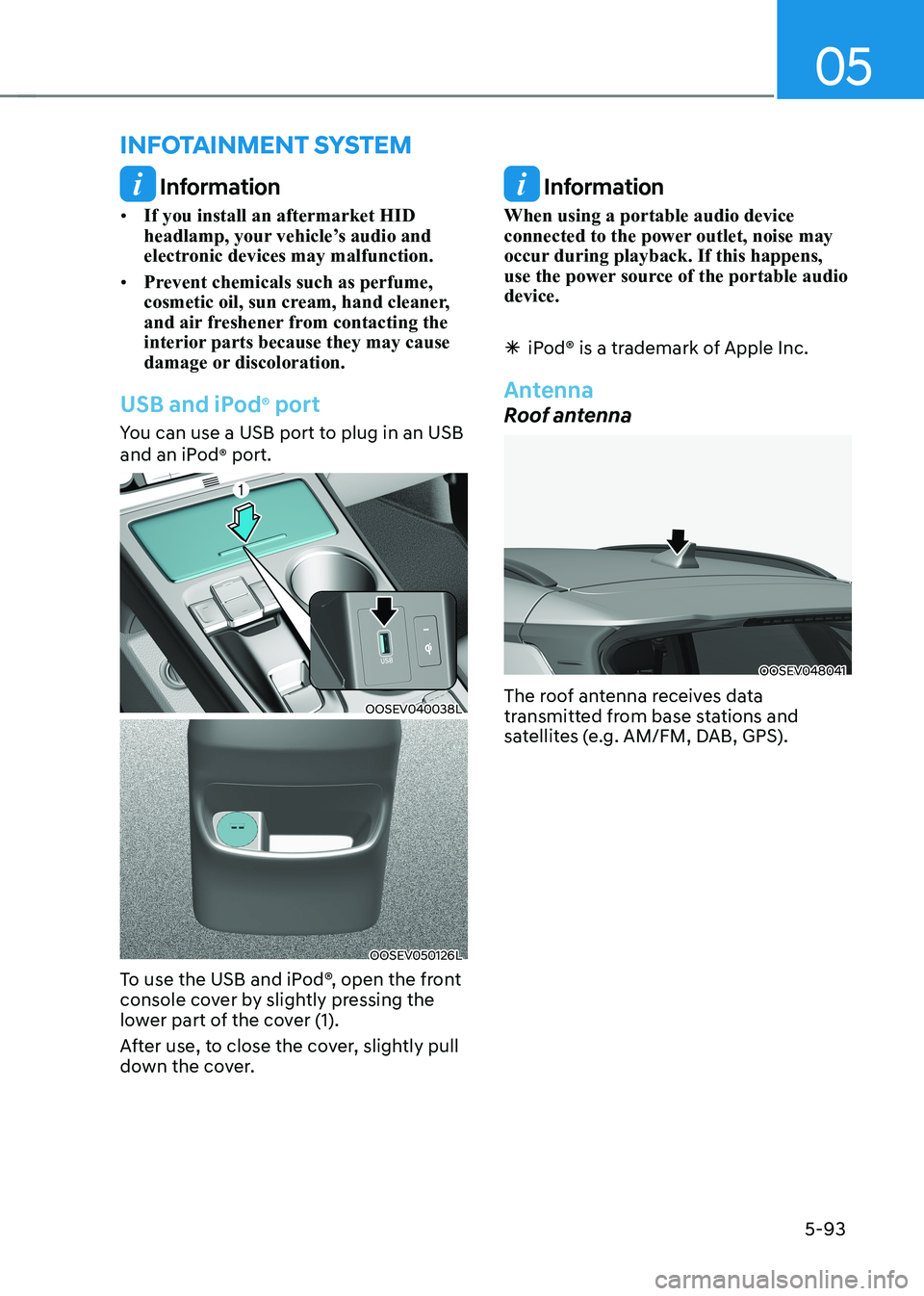
You can use a USB port to plug in an USB
and an iPod ®
port.
OOSEV040038L
OOSEV050126L
To use the USB and iPod®, open the front
console cover by slightly pressing the
lower part of the cover (1).
After use, to close the cover, slightly pull
down the cover.
Information
When using a portable audio device
connected to the power outlet, noise may
occur during playback. If this happens,
use the power source of the portable audio device.
à iPod® is a trademark of Apple Inc.
Antenna
Roof antenna
OOSEV048041
The roof antenna receives data
transmitted from base stations and
satellites (e.g. AM/FM, DAB, GPS).
infoTainmenT sysTem
Page 283 of 548
06
6-3
Before entering the vehicle
• Be sure all windows, outside mirror(s),
and outside lights are clean and
unobstructed.
• Remove frost, snow, or ice.
• Visually check the tires for uneven
wear and damage.
• Check under the vehicle for any sign
of leaks.
• Be sure there are no obstacles behind
you if you intend to back up.
Before starting
• Make sure the hood, the tailgate, and
the doors are securely closed and
locked.
• Adjust the position of the seat and
steering wheel.
• Adjust the inside and outside rearview
mirrors.
• Verify all the lights work.
• Fasten your seat belt. Check that all
passengers have fastened their seat belt.
• Check the gauges and indicators
in the instrument panel and the
messages on the instrument display
when the START/STOP button is in the ON position.
• Check that any items you are carrying
are stored properly or fastened down
securely.
WARNING
To reduce the risk of SERIOUS INJURY or
DEATH, take the following precautions: • ALWAYS wear your seat belt. All
passengers must be properly belted
whenever the vehicle is moving.
For more information, refer to “Seat
Belts” in chapter 3.
• Always drive defensively. Assume
other drivers or pedestrians may be
careless and make mistakes.
• Stay focused on the task of driving.
Driver distraction can cause
accidents.
• Leave plenty of space between you
and the vehicle in front of you.
WARNING
NEVER drink or take drugs and drive. Drinking or taking drugs and driving
is dangerous and may result in an
accident and SERIOUS INJURY or
DEATH. Drunk driving is the number one
contributor to the highway death
toll each year. Even a small amount
of alcohol will affect your reflexes,
perceptions and judgment. Just
one drink can reduce your ability to
respond to changing conditions and
emergencies and your reaction time
gets worse with each additional drink.
Driving while under the influence
of drugs is as dangerous or more
dangerous than driving under the
influence of alcohol.
You are much more likely to have a
serious accident if you drink or take
drugs and drive. If you are drinking or
taking drugs, don’t drive. Do not ride
with a driver who has been drinking
or taking drugs. Choose a designated
driver or call a taxi.
BEFORE DRIVING
Page 285 of 548
06
6-5
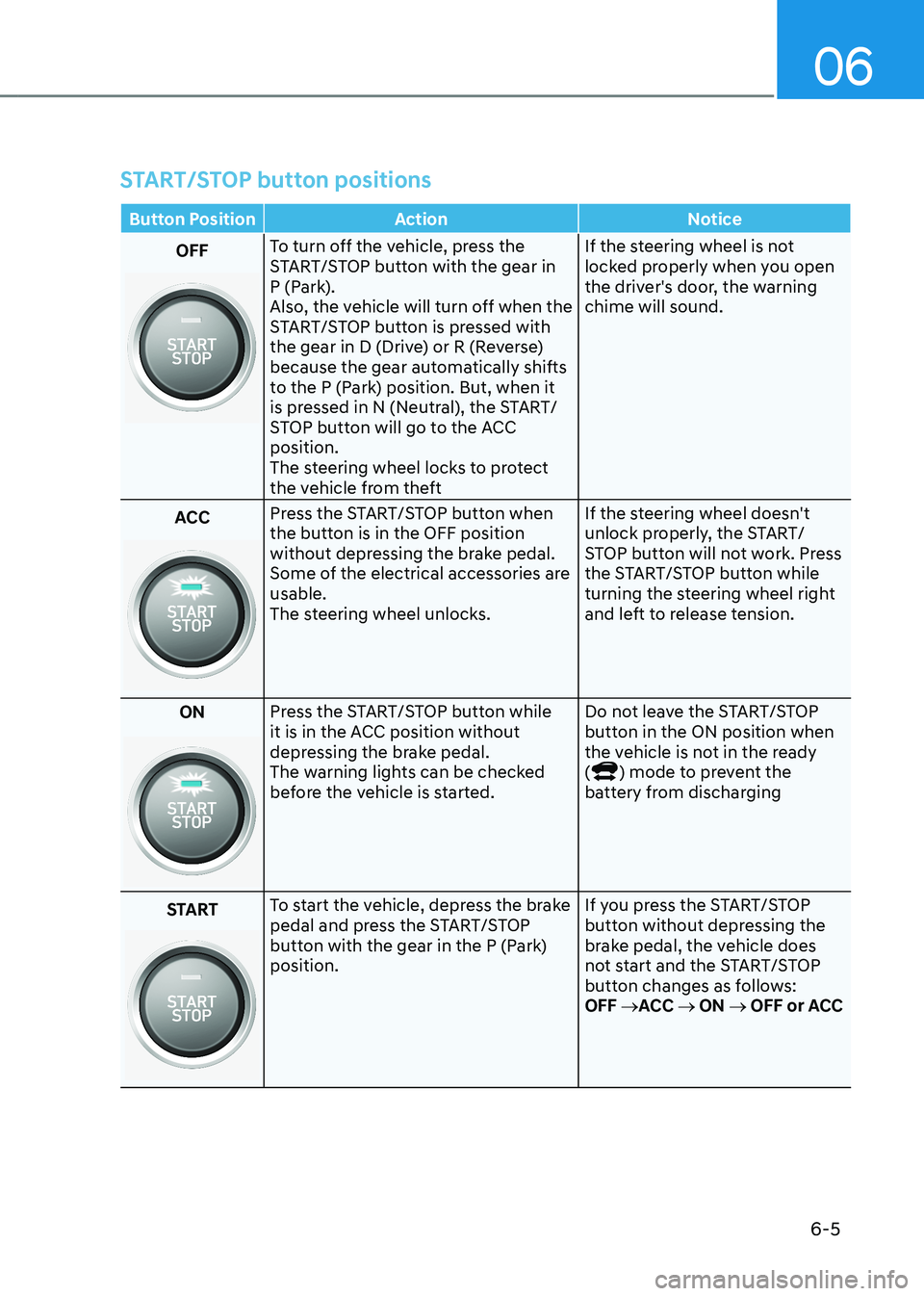
START/STOP button positions
Button Position Action Notice
OFFTo turn off the vehicle, press the
START/STOP button with the gear in
P (Park).
Also, the vehicle will turn off when the
START/STOP button is pressed with
the gear in D (Drive) or R (Reverse)
because the gear automatically shifts
to the P (Park) position. But, when it
is pressed in N (Neutral), the START/
STOP button will go to the ACC position.
The steering wheel locks to protect
the vehicle from theft If the steering wheel is not
locked properly when you open
the driver's door, the warning chime will sound.
ACC Press the START/STOP button when
the button is in the OFF position
without depressing the brake pedal.
Some of the electrical accessories are usable.
The steering wheel unlocks.
If the steering wheel doesn't
unlock properly, the START/
STOP button will not work. Press
the START/STOP button while
turning the steering wheel right
and left to release tension.
ON
Press the START/STOP button while
it is in the ACC position without
depressing the brake pedal.
The warning lights can be checked
before the vehicle is started. Do not leave the START/STOP
button in the ON position when
the vehicle is not in the ready (
) mode to prevent the
battery from discharging
START
To start the vehicle, depress the brake
pedal and press the START/STOP
button with the gear in the P (Park) position. If you press the START/STOP
button without depressing the
brake pedal, the vehicle does
not start and the START/STOP
button changes as follows:OFF
→ACC → ON → OFF or ACC
Page 287 of 548
06
6 -7
NOTICE
To prevent damage to the vehicle:
Do not press the START/STOP button for
more than 10 seconds except when the
stop lamp fuse is blown.
When the stop lamp fuse is blown, you
can’t start the vehicle normally. Replace
the fuse with a new one. If you are not
able to replace the fuse, you can start
the vehicle by pressing and holding
the START/STOP button for 10 seconds
with the START/STOP button in the ACC position.
For your safety always depress the
brake before starting the vehicle.
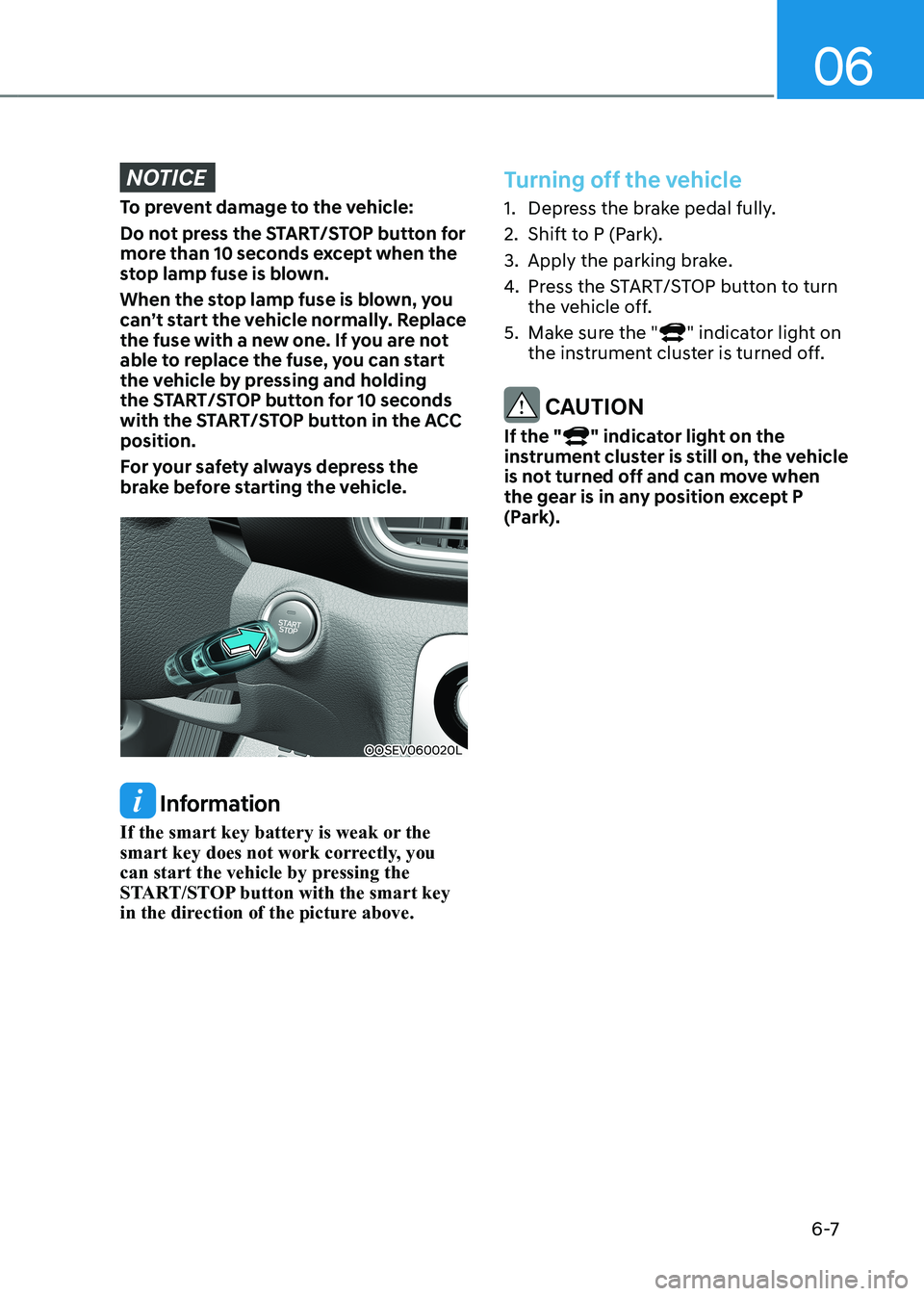
OOSEV060020L
Information
If the smart key battery is weak or the
smart key does not work correctly, you
can start the vehicle by pressing the
START/STOP button with the smart key
in the direction of the picture above.
Turning off the vehicle
1. Depress the brake pedal fully.
2. Shift to P (Park).
3. Apply the parking brake.
4. Press the START/STOP button to turn
the vehicle off.
5. Make sure the "
" indicator light on
the instrument cluster is turned off.
CAUTION
If the "
" indicator light on the
instrument cluster is still on, the vehicle
is not turned off and can move when
the gear is in any position except P
(Park).
Page 293 of 548
06
6-13
Good driving practices
• Never move the shift lever from P
(Park) or N (Neutral) to any other
position with the accelerator pedal
depressed.
• Never move the shift lever into P
(Park) when the vehicle is in motion.
Be sure the vehicle is completely
stopped before you attempt to shift
into R (Reverse) or D (Drive).
• Do not move the shift lever to N
(Neutral) when driving. Doing so may
result in an accident.
• Driving uphill or downhill, always shift
to D (Drive) when driving forward or to
R (Reverse) when driving backwards,
and check the gear position indicated
on the cluster before driving. If you
drive in the opposite direction of the
selected gear, the vehicle will turn
off and a serious accident might be
occurred due to the degraded brake
performance.
• Do not drive with your foot resting
on the brake pedal. Even light, but
consistent pedal pressure can result
in the brakes overheating, brake wear
and possibly even brake failure.
• Always apply the parking brake when
leaving the vehicle. Do not depend on
placing the transmission in P (Park) to
keep the vehicle from moving.
• Exercise extreme caution when
driving on a slippery surface. Be
especially careful when braking,
accelerating or shifting gears. On a
slippery surface, an abrupt change
in vehicle speed can cause the drive
wheels to lose traction and may cause
loss of vehicle control resulting in an
accident
• Optimum vehicle performance and
economy is obtained by smoothly
depressing and releasing the
accelerator. WARNING
To reduce the risk of SERIOUS INJURY
or DEATH: • ALWAYS wear your seatbelt. In a
collision, an unbelted occupant
is significantly more likely to be
seriously injured or killed than a
properly belted occupant.
• Avoid high speeds when cornering or turning.
• Do not make quick steering wheel
movements, such as sharp lane
changes or fast, sharp turns.
• The risk of rollover is greatly
increased if you lose control of your
vehicle at highway speeds.
• Loss of control often occurs if two or
more wheels drop off the roadway
and the driver over steers to reenter
the roadway.
• In the event your vehicle leaves
the roadway, do not steer sharply.
Instead, slow down before pulling
back into the travel lanes.
• HYUNDAI recommends you follow all
posted speed limits.