light HYUNDAI KONA EV 2023 Owners Manual
[x] Cancel search | Manufacturer: HYUNDAI, Model Year: 2023, Model line: KONA EV, Model: HYUNDAI KONA EV 2023Pages: 548, PDF Size: 49.14 MB
Page 236 of 548
Convenient features
5-52
Interior lights
WARNING
Do not use the interior lights when
driving in the dark. The interior lights
may obscure your view and cause an
accident.
NOTICE
Do not use the interior lights for
extended periods when the vehicle is
turned off or the battery will discharge.
Interior lamp AUTO cut
The interior lamps will automatically go
off approximately 20 minutes after the
vehicle is turned off and the doors are closed. If a door is opened, the lamp
will go off 40 minutes after the vehicle
is turned off. If the doors are locked and
the vehicle enters the armed stage of the
theft alarm system, the lamps will go off
five seconds later. Front lamps
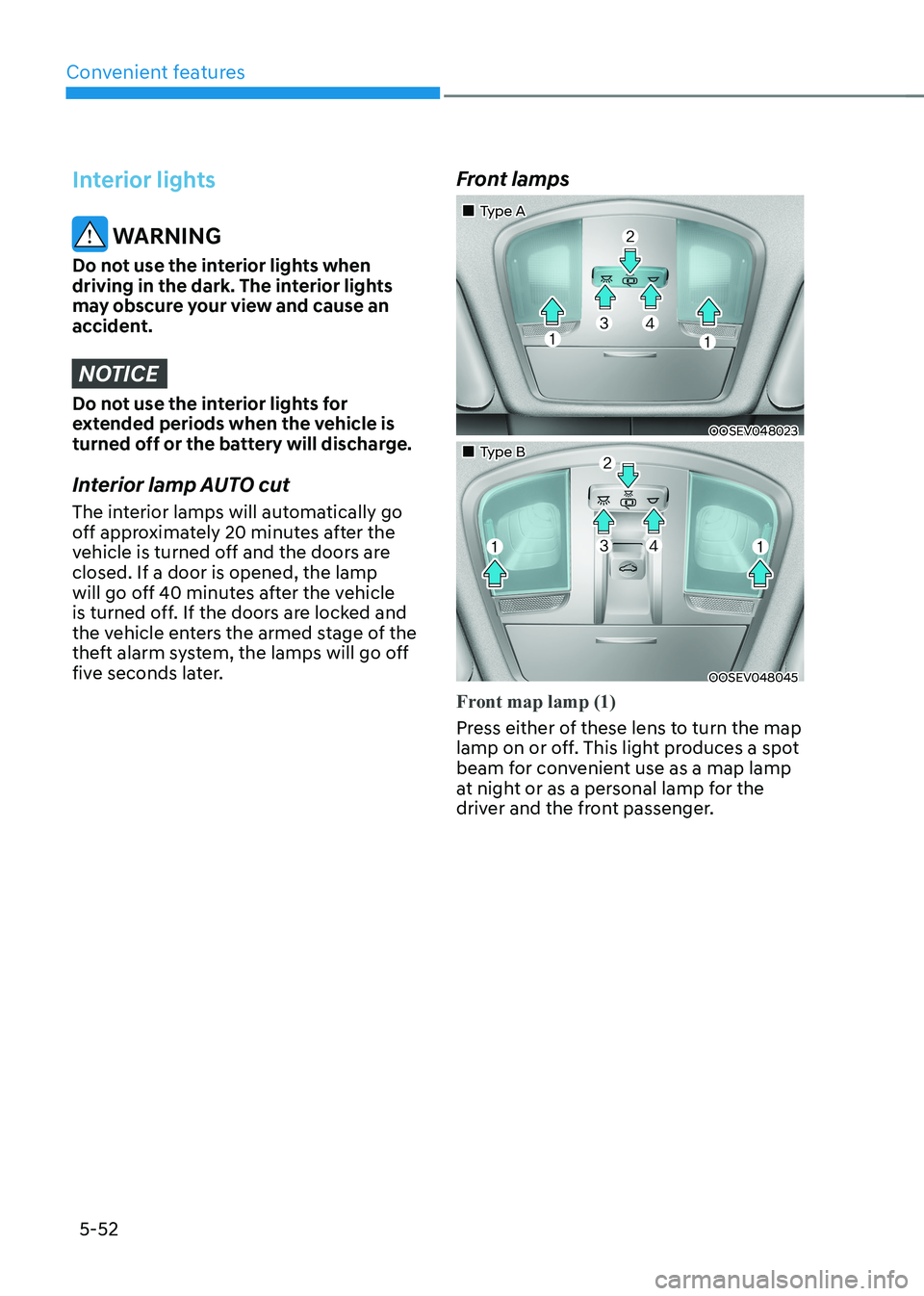
„„Type A
OOSEV048023
„„Type B
OOSEV048045
Front map lamp (1)
Press either of these lens to turn the map
lamp on or off. This light produces a spot
beam for convenient use as a map lamp
at night or as a personal lamp for the
driver and the front passenger.
Page 238 of 548
Convenient features
5-54
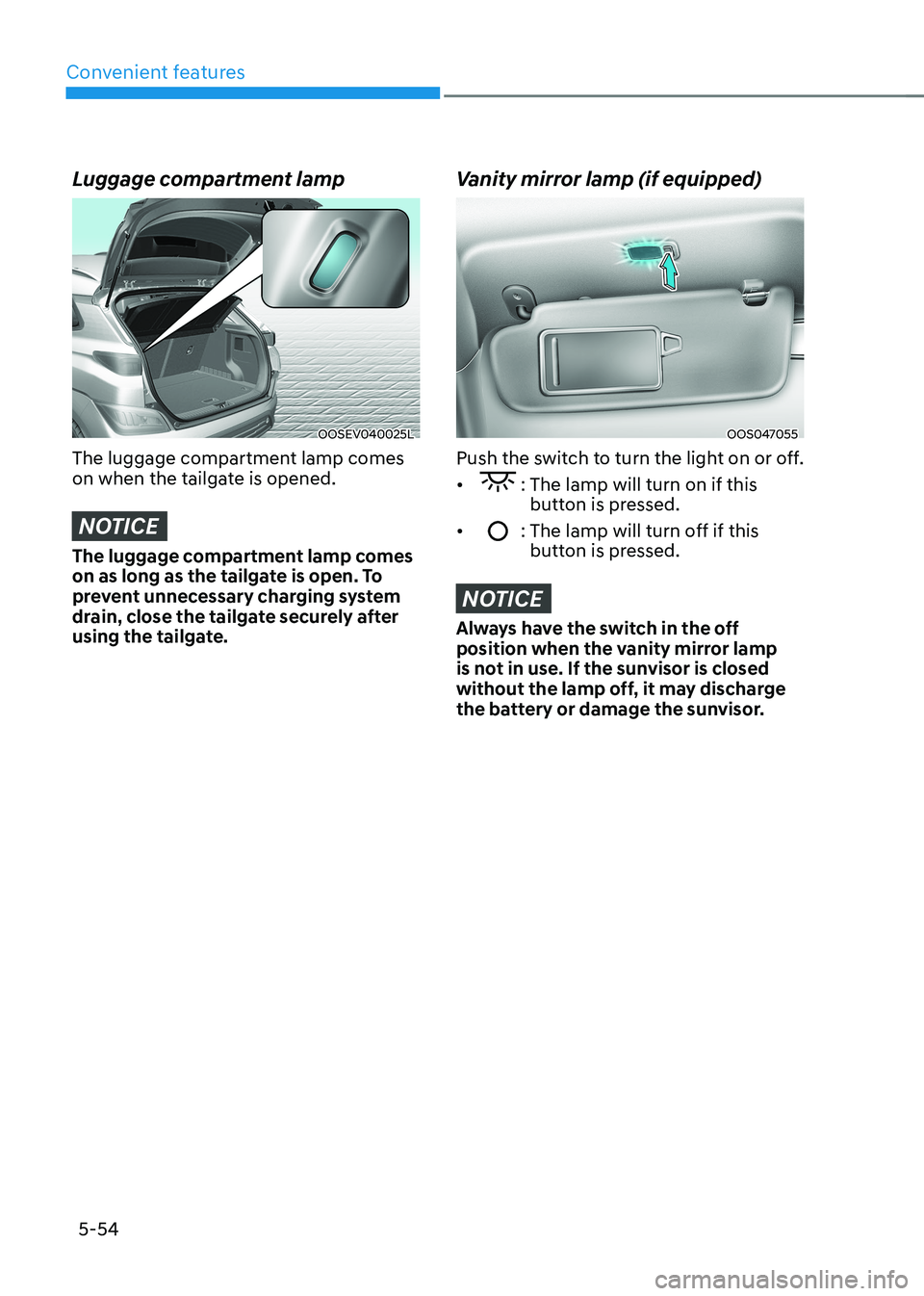
Luggage compartment lamp
OOSEV040025L
The luggage compartment lamp comes
on when the tailgate is opened.
NOTICE
The luggage compartment lamp comes
on as long as the tailgate is open. To
prevent unnecessary charging system
drain, close the tailgate securely after
using the tailgate.
Vanity mirror lamp (if equipped)
OOS047055
Push the switch to turn the light on or off. •
: The lamp will turn on if this button is pressed.
•
: The lamp will turn off if this button is pressed.
NOTICE
Always have the switch in the off
position when the vanity mirror lamp
is not in use. If the sunvisor is closed
without the lamp off, it may discharge
the battery or damage the sunvisor.
Page 239 of 548
05
5-55
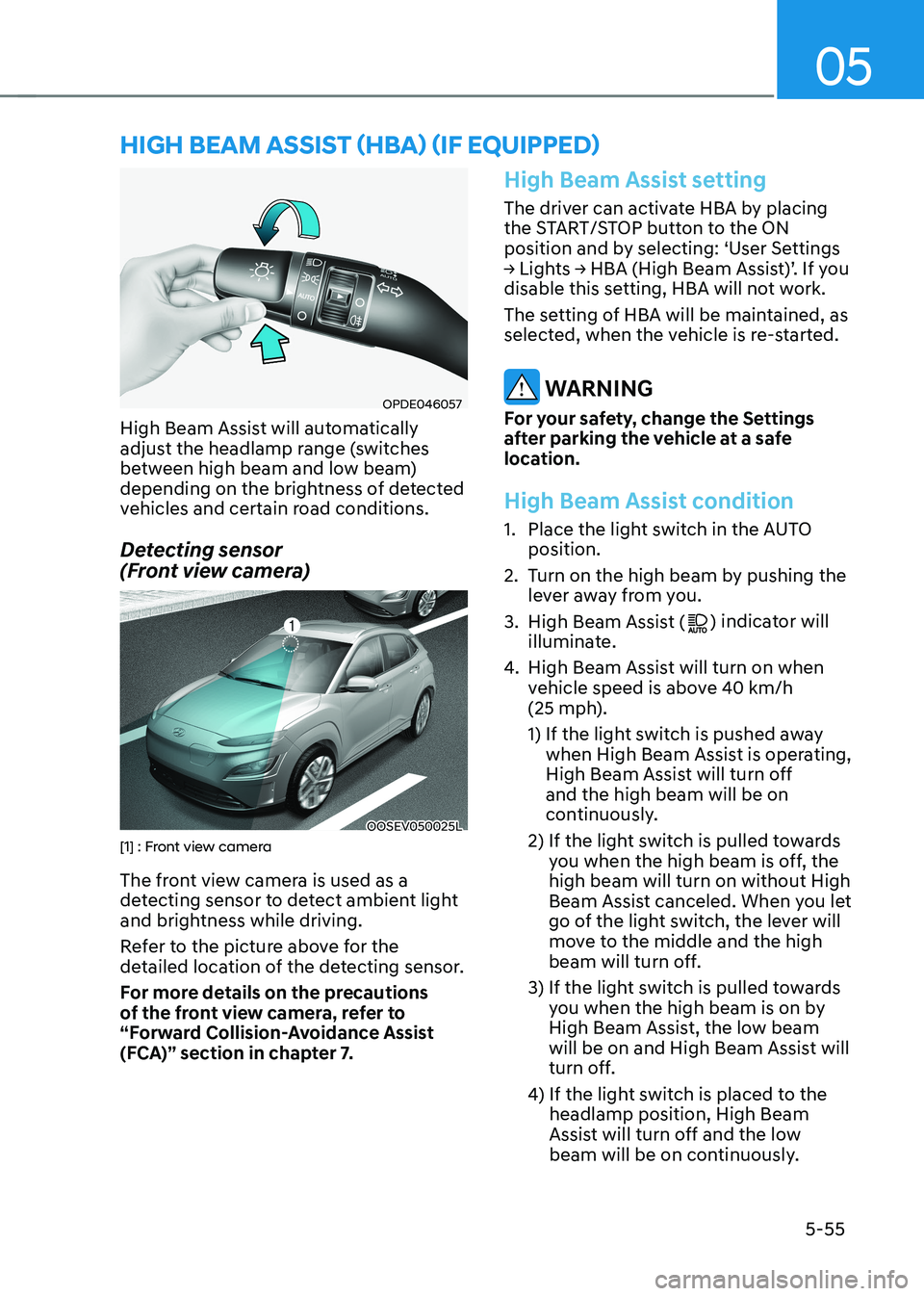
OPDE046057
High Beam Assist will automatically
adjust the headlamp range (switches
between high beam and low beam)
depending on the brightness of detected
vehicles and certain road conditions.
Detecting sensor
(Front view camera)
OOSEV050025L[1] : Front view camera
The front view camera is used as a
detecting sensor to detect ambient light
and brightness while driving.
Refer to the picture above for the
detailed location of the detecting sensor.
For more details on the precautions
of the front view camera, refer to
“Forward Collision-Avoidance Assist
(FCA)” section in chapter 7.
High Beam Assist setting
The driver can activate HBA by placing
the START/STOP button to the ON
position and by selecting: ‘User Settings
→ Lights → HBA (High Beam Assist)’. If you
disable this setting, HBA will not work.
The setting of HBA will be maintained, as
selected, when the vehicle is re-started.
WARNING
For your safety, change the Settings
after parking the vehicle at a safe
location.
High Beam Assist condition
1. Place the light switch in the AUTO position.
2. Turn on the high beam by pushing the lever away from you.
3. High Beam Assist (
) indicator will
illuminate.
4. High Beam Assist will turn on when
vehicle speed is above 40 km/h
(25 mph).
1) If the light switch is pushed away
when High Beam Assist is operating,
High Beam Assist will turn off and the high beam will be on
continuously.
2) If the light switch is pulled towards you when the high beam is off, the high beam will turn on without High
Beam Assist canceled. When you let
go of the light switch, the lever will
move to the middle and the high
beam will turn off.
3) If the light switch is pulled towards you when the high beam is on by
High Beam Assist, the low beam
will be on and High Beam Assist will
turn off.
4) If the light switch is placed to the headlamp position, High Beam
Assist will turn off and the low
beam will be on continuously.
high Beam assisT (hBa) (if equipped)
Page 240 of 548
Convenient features
5-56
When High Beam Assist is operating, the
high beam switches to low beam in the
following conditions.
- When the headlamp of an on-coming vehicle is detected.
- When the tail lamp of a vehicle in front
is detected.
- When headlamp/tail lamp of bicycle/ motorcycle is detected.
- When the surroundings are bright enough high beams are not needed.
- When street lights or other lights are detected.
- When the light switch is not in the AUTO position.
- When High Beam Assist is off.
- When vehicle speed is below 25 km/h (15 mph).
High Beam Assist Malfunction
and Limitations
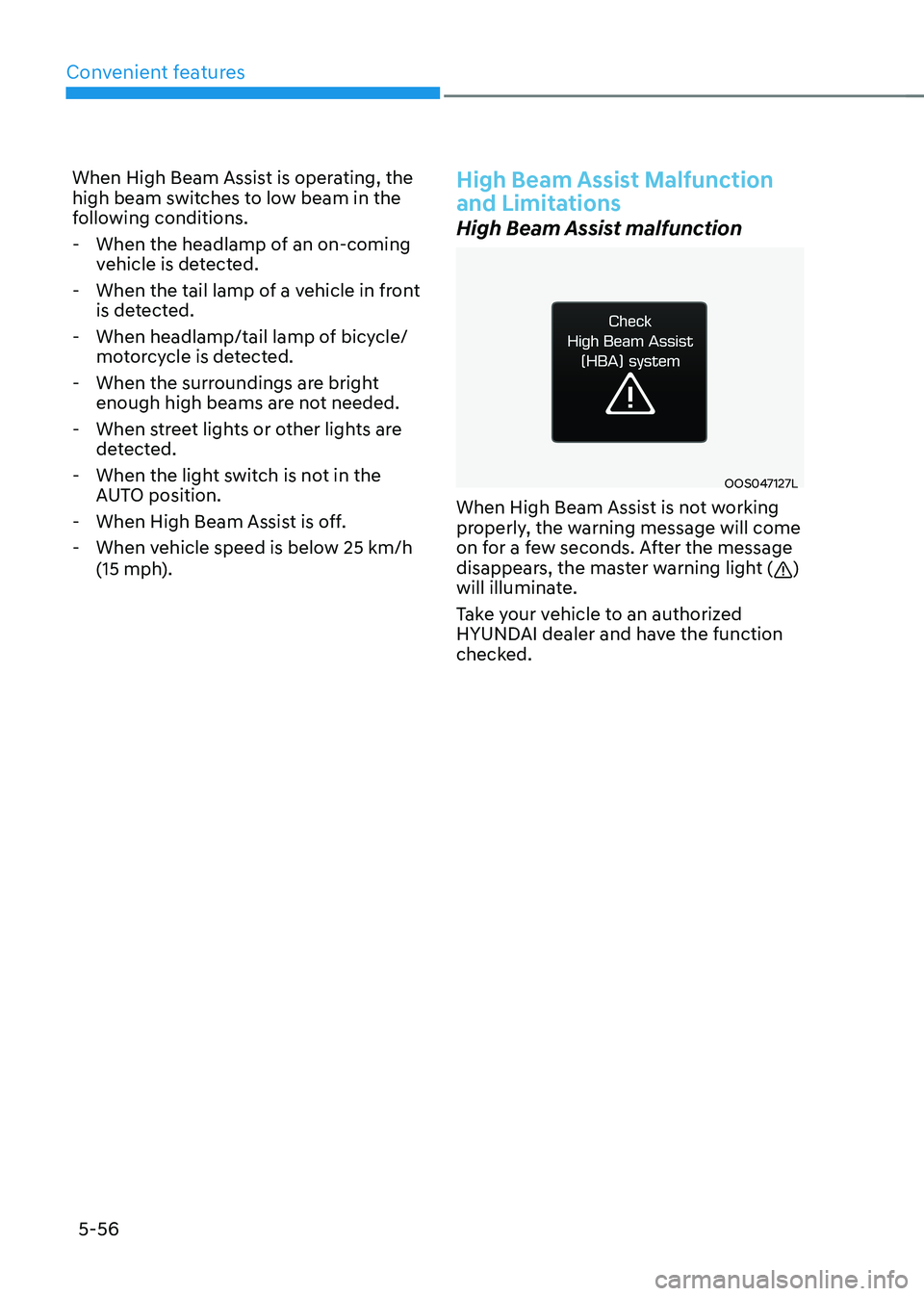
High Beam Assist malfunction
OOS047127L
When High Beam Assist is not working
properly, the warning message will come
on for a few seconds. After the message
disappears, the master warning light (
)
will illuminate.
Take your vehicle to an authorized
HYUNDAI dealer and have the function
checked.
Page 241 of 548
05
5-57
Limitations of High Beam Assist
High Beam Assist may not work properly
in the following situations: •
Light from a vehicle is not detected
because of lamp damage, or because
it is hidden from sight, etc.
• Headlamp of a vehicle is covered with
dust, snow or water.
• A vehicle’s headlamps are off but the
fog lamps are on and etc.
• There is a lamp that has a similar
shape as a vehicle’s lamp.
• Headlamps have been damaged or
not repaired properly.
• Headlamps are not aimed properly.
• Driving on a narrow curved road,
rough road, uphill or downhill.
• Vehicle in front is partially visible on a
crossroad or curved road.
• There is a traffic light, reflecting sign,
flashing sign or mirror ahead.
• There is a temporary reflector or flash
ahead (construction area).
• The road conditions are bad such as
being wet, iced or covered with snow.
• A vehicle suddenly appears from a
curve.
• The vehicle is tilted from a flat tire or
is being towed.
• Light from a vehicle is not detected
because of exhaust fume, smoke, fog,
snow, etc.
NOTICE
For more details on the limitations
of the front view camera, refer to
“Forward Collision-Avoidance Assist
(FCA)” section in chapter 7.
WARNING
• At times, High Beam Assist may
not work properly. The system is
for your convenience only. It is the
responsibility of the driver for safe
driving practices and always check
the road conditions for your safety.
• When High Beam Assist does
not operate normally, change the headlamp position manually
between high beam and low beam.
Page 242 of 548
Convenient features
5-58
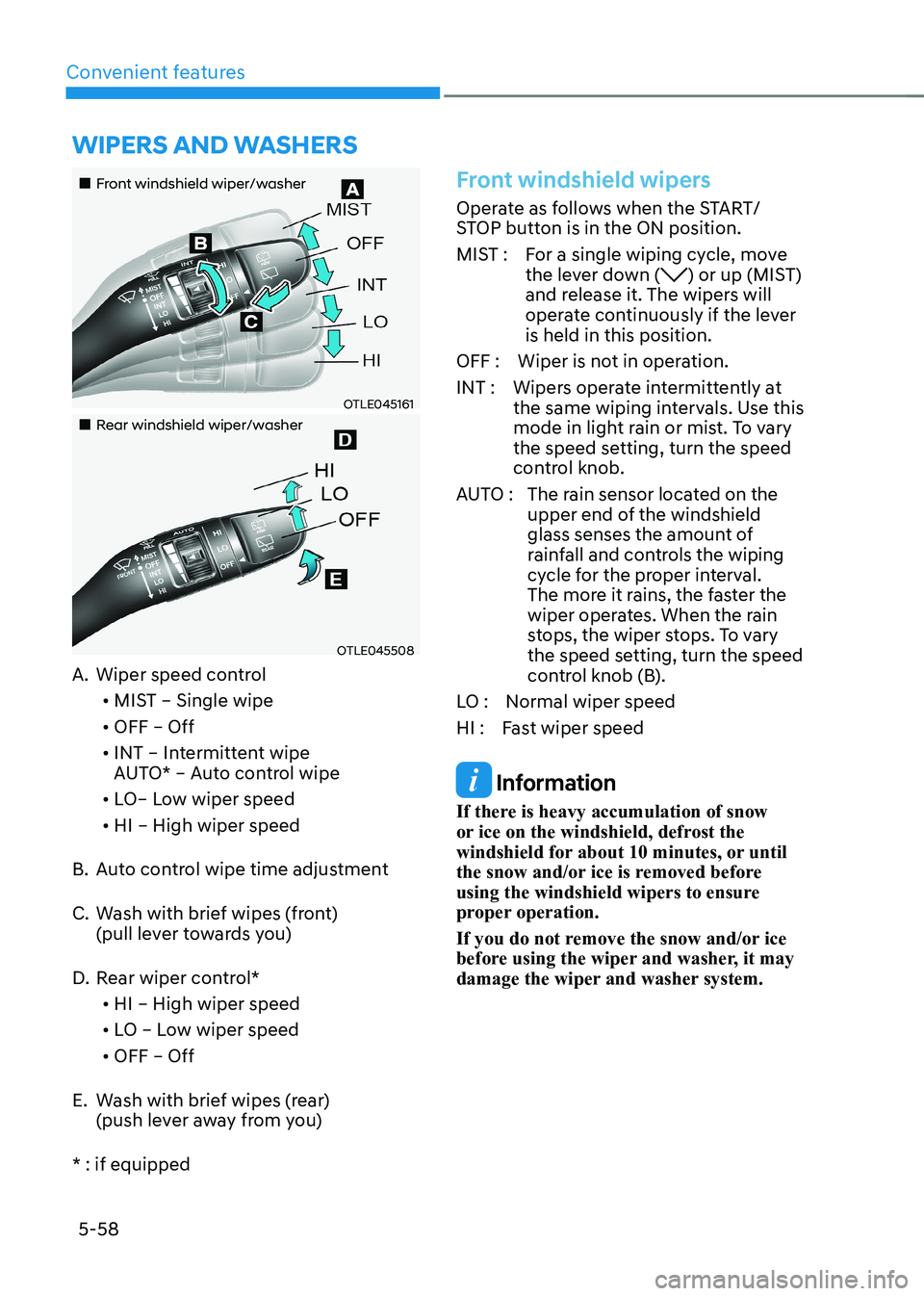
„„Front windshield wiper/washer
OTLE045161
„„Rear windshield wiper/washer
OTLE045508
A. Wiper speed control
• MIST – Single wipe
• OFF – Off
• INT – Intermittent wipe
AUTO* – Auto control wipe
• LO– Low wiper speed
• HI – High wiper speed
B. Auto control wipe time adjustment
C. Wash with brief wipes (front)
(pull lever towards you)
D. Rear wiper control*
• HI – High wiper speed
• LO – Low wiper speed
• OFF – Off
E. Wash with brief wipes (rear) (push lever away from you)
* : if equipped
Front windshield wipers
Operate as follows when the START/
STOP button is in the ON position.
MIST : For a single wiping cycle, move the lever down (
) or up (MIST)
and release it. The wipers will
operate continuously if the lever is held in this position.
OFF : Wiper is not in operation.
INT : Wipers operate intermittently at the same wiping intervals. Use this
mode in light rain or mist. To vary
the speed setting, turn the speed
control knob.
AUTO : The rain sensor located on the
upper end of the windshield
glass senses the amount of
rainfall and controls the wiping
cycle for the proper interval.
The more it rains, the faster the
wiper operates. When the rain
stops, the wiper stops. To vary
the speed setting, turn the speed
control knob (B).
LO : Normal wiper speed
HI : Fast wiper speed
Information
If there is heavy accumulation of snow
or ice on the windshield, defrost the
windshield for about 10 minutes, or until
the snow and/or ice is removed before
using the windshield wipers to ensure
proper operation.
If you do not remove the snow and/or ice
before using the wiper and washer, it may
damage the wiper and washer system.
Wipers and Washers
Page 243 of 548
05
5-59
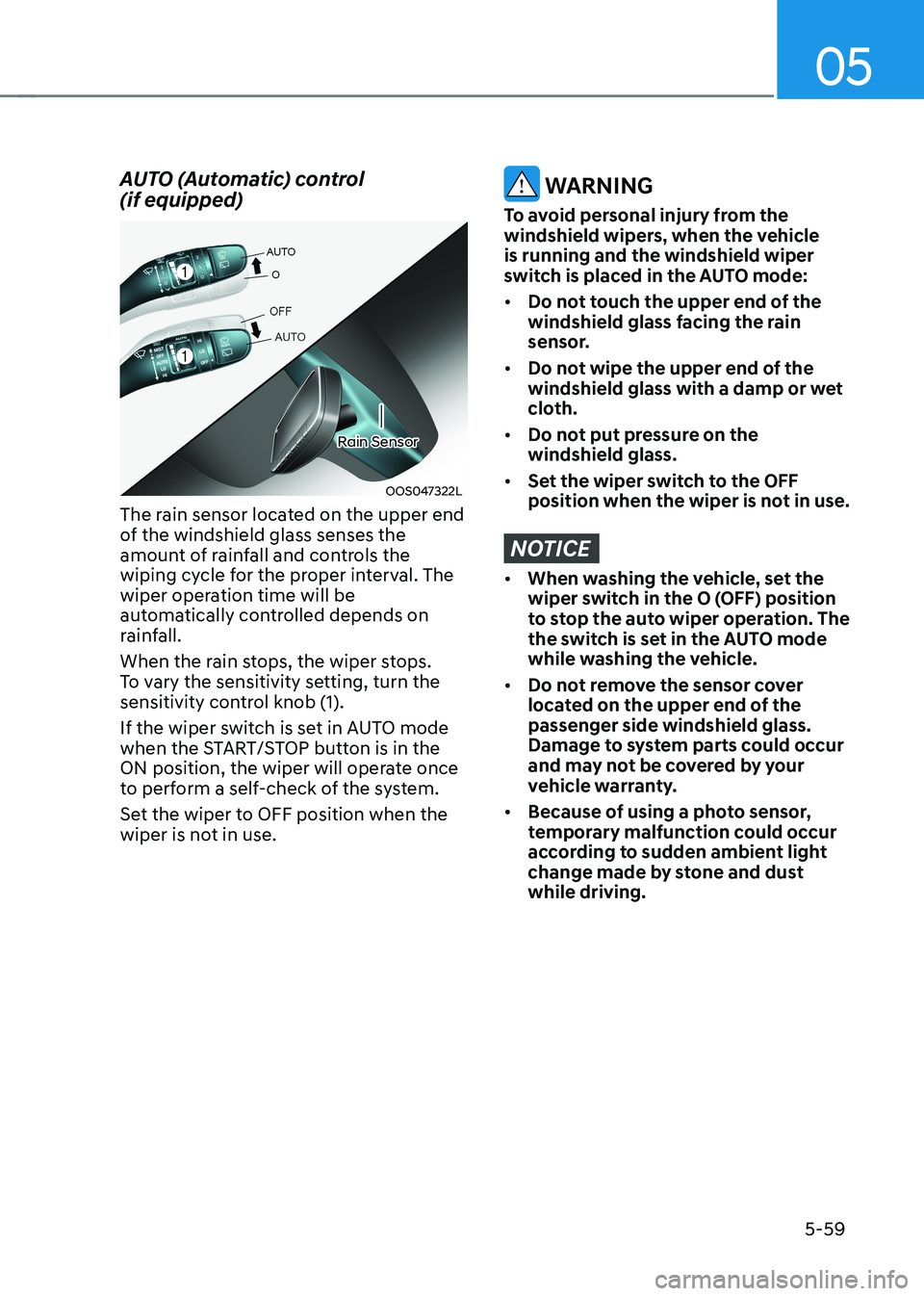
AUTO (Automatic) control (if equipped)
OOS047322L
Rain Sensor
The rain sensor located on the upper end
of the windshield glass senses the
amount of rainfall and controls the
wiping cycle for the proper interval. The
wiper operation time will be
automatically controlled depends on
rainfall.
When the rain stops, the wiper stops.
To vary the sensitivity setting, turn the
sensitivity control knob (1).
If the wiper switch is set in AUTO mode
when the START/STOP button is in the
ON position, the wiper will operate once
to perform a self-check of the system.
Set the wiper to OFF position when the
wiper is not in use.
WARNING
To avoid personal injury from the
windshield wipers, when the vehicle is running and the windshield wiper
switch is placed in the AUTO mode: • Do not touch the upper end of the
windshield glass facing the rain
sensor.
• Do not wipe the upper end of the
windshield glass with a damp or wet
cloth.
• Do not put pressure on the windshield glass.
• Set the wiper switch to the OFF
position when the wiper is not in use.
NOTICE
• When washing the vehicle, set the
wiper switch in the O (OFF) position
to stop the auto wiper operation. The
the switch is set in the AUTO mode
while washing the vehicle.
• Do not remove the sensor cover
located on the upper end of the passenger side windshield glass.
Damage to system parts could occur
and may not be covered by your
vehicle warranty.
• Because of using a photo sensor,
temporary malfunction could occur
according to sudden ambient light
change made by stone and dust while driving.
Page 253 of 548
05
5-69
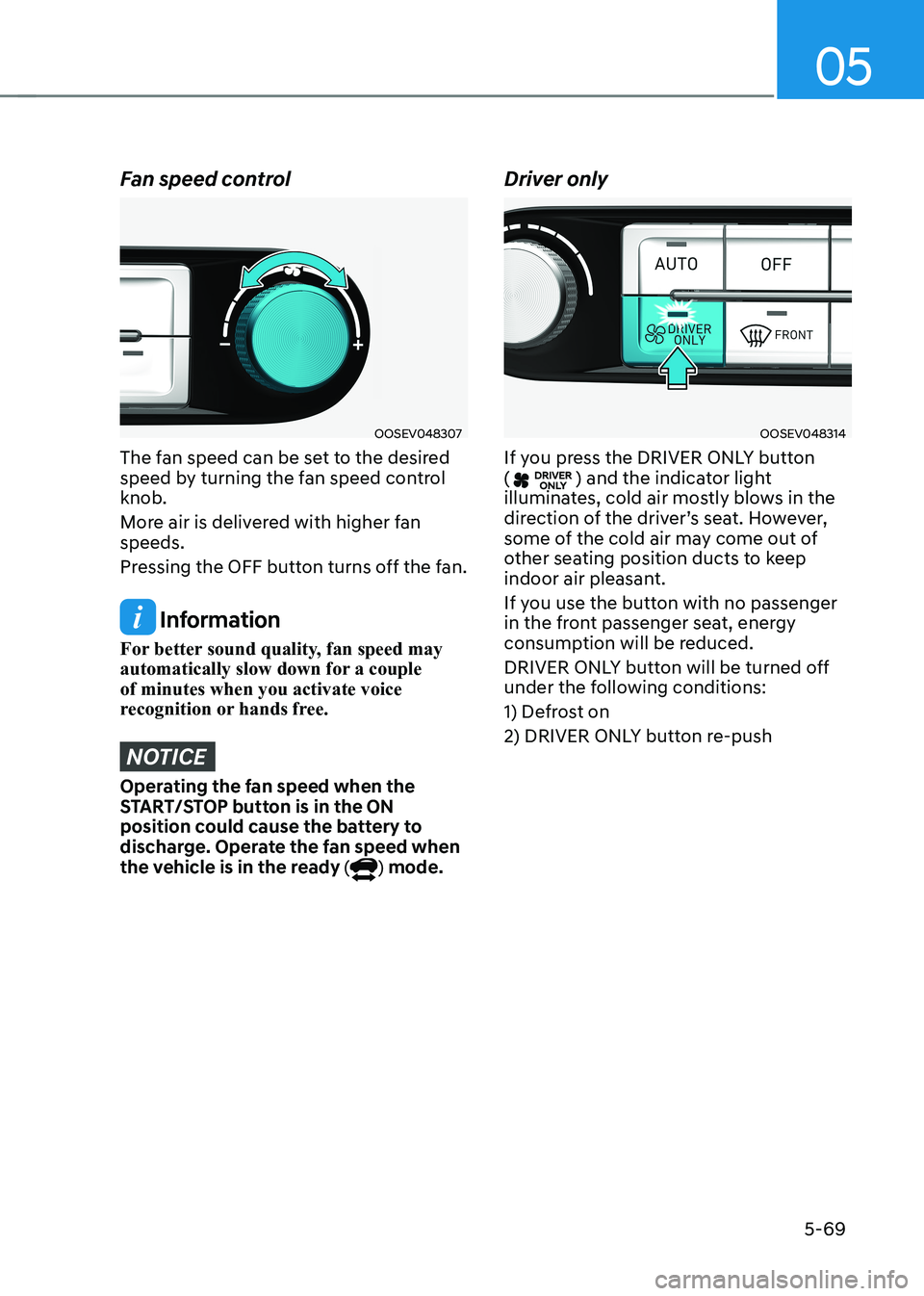
Fan speed control
OOSEV048307
The fan speed can be set to the desired
speed by turning the fan speed control knob.
More air is delivered with higher fan speeds.
Pressing the OFF button turns off the fan.
Information
For better sound quality, fan speed may
automatically slow down for a couple of minutes when you activate voice
recognition or hands free.
NOTICE
Operating the fan speed when the
START/STOP button is in the ON
position could cause the battery to
discharge. Operate the fan speed when
the vehicle is in the ready (
) mode. Driver only
OOSEV048314
If you press the DRIVER ONLY button (
) and the indicator light
illuminates, cold air mostly blows in the
direction of the driver’s seat. However,
some of the cold air may come out of
other seating position ducts to keep
indoor air pleasant.
If you use the button with no passenger
in the front passenger seat, energy
consumption will be reduced.
DRIVER ONLY button will be turned off
under the following conditions:
1) Defrost on
2) DRIVER ONLY button re-push
Page 254 of 548
Convenient features
5-70
Air conditioning
OOSEV048308
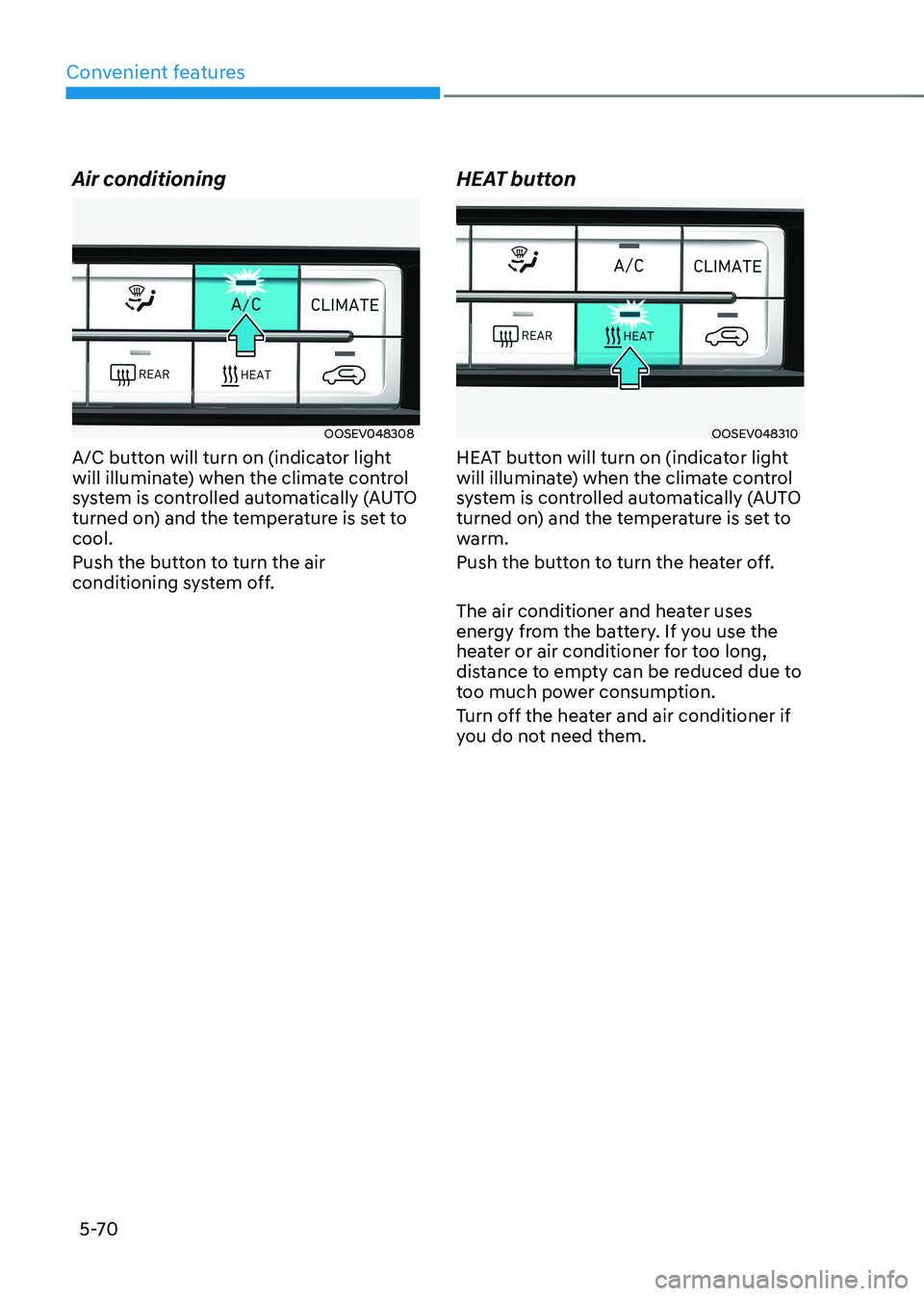
A/C button will turn on (indicator light
will illuminate) when the climate control
system is controlled automatically (AUTO
turned on) and the temperature is set to cool.
Push the button to turn the air
conditioning system off. HEAT buttonOOSEV048310
HEAT button will turn on (indicator light
will illuminate) when the climate control
system is controlled automatically (AUTO
turned on) and the temperature is set to
warm.
Push the button to turn the heater off.
The air conditioner and heater uses
energy from the battery. If you use the
heater or air conditioner for too long,
distance to empty can be reduced due to
too much power consumption.
Turn off the heater and air conditioner if
you do not need them.
Page 257 of 548
05
5-73
Air conditioning system operation tips
• If the vehicle has been parked in
direct sunlight during hot weather,
open the windows for a short time
to let the hot air inside the vehicle escape.
• After sufficient cooling has been
achieved, switch back from the
recirculated air to the fresh outside air position.
• To help reduce moisture inside of
the windows on rainy or humid
days, decrease the humidity inside
the vehicle by operating the air
conditioning system with the windows
and sunroof closed.
• Use the air conditioning system every
month for a few minutes to ensure
maximum system performance.
• If you operate the air conditioner
excessively, the difference between
the temperature of the outside air and
that of the windshield could cause
the outer surface of the windshield to
fog up, causing loss of visibility. In this
case, set the mode selection button
to the (
) position and set the fan
speed control knob to the lowest
speed setting.
System maintenance
Climate control air filter
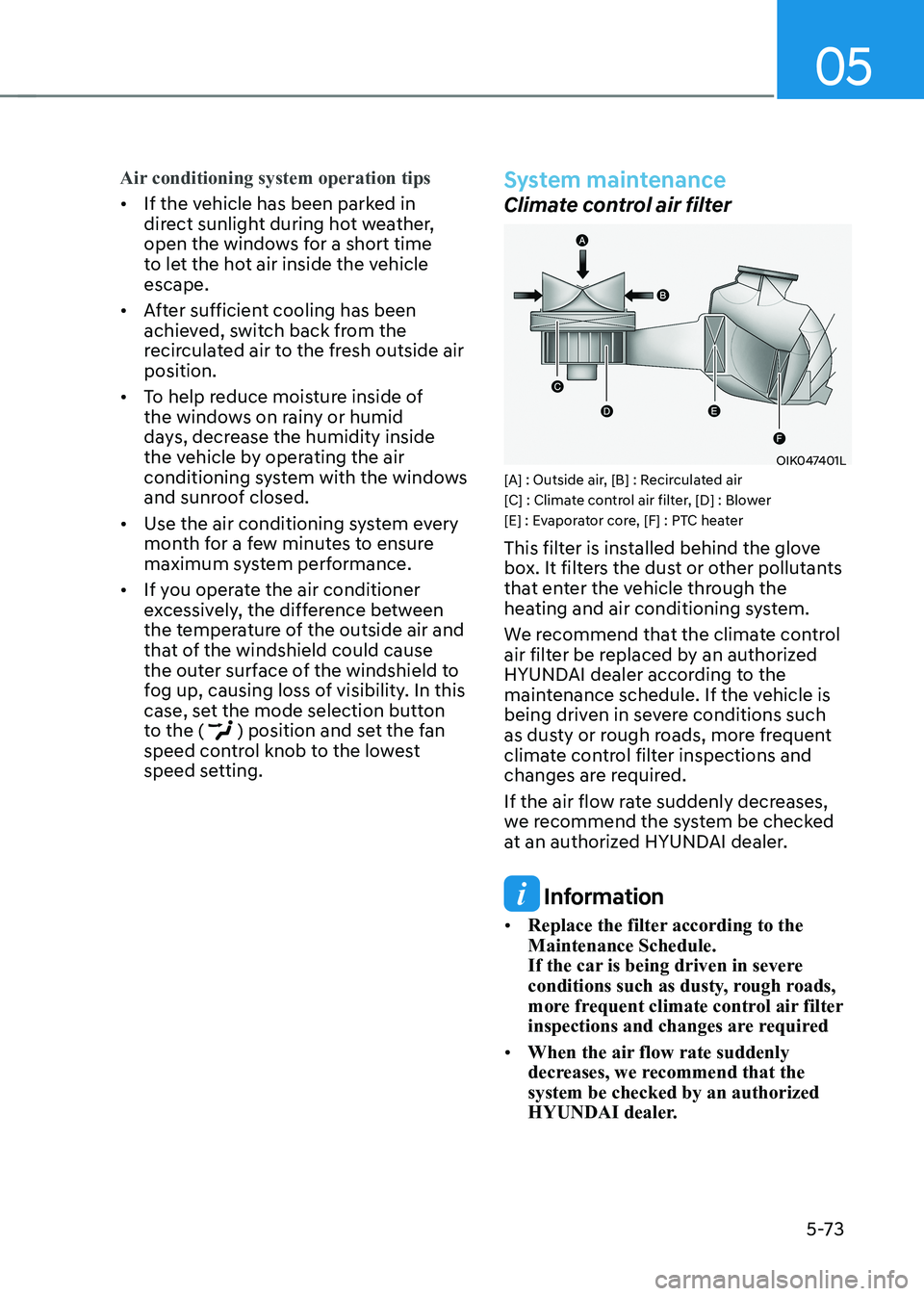
OIK047401L
[A] : Outside air, [B] : Recirculated air
[C] : Climate control air filter, [D] : Blower
[E] : Evaporator core, [F] : PTC heater
This filter is installed behind the glove
box. It filters the dust or other pollutants
that enter the vehicle through the
heating and air conditioning system.
We recommend that the climate control
air filter be replaced by an authorized
HYUNDAI dealer according to the
maintenance schedule. If the vehicle is
being driven in severe conditions such
as dusty or rough roads, more frequent
climate control filter inspections and
changes are required.
If the air flow rate suddenly decreases,
we recommend the system be checked
at an authorized HYUNDAI dealer.
Information
• Replace the filter according to the Maintenance Schedule.
If the car is being driven in severe
conditions such as dusty, rough roads,
more frequent climate control air filter
inspections and changes are required
• When the air flow rate suddenly
decreases, we recommend that the system be checked by an authorized
HYUNDAI dealer.