reset HYUNDAI KONA EV 2023 User Guide
[x] Cancel search | Manufacturer: HYUNDAI, Model Year: 2023, Model line: KONA EV, Model: HYUNDAI KONA EV 2023Pages: 548, PDF Size: 49.14 MB
Page 219 of 548
05
5-35
Auto up/down window (if equipped)
Pressing or pulling up the power window
switch momentarily to the second
detent position (6) completely lowers or
lifts the window even when the switch
is released. To stop the window at the
desired position while the window is in
operation, pull up or press down and
release the switch.
To reset the power windows
If the power windows do not operate
normally, the automatic power window
system must be reset as follows:
1. Place the START/STOP button to the
ON position.
2. Close the window and continue pulling up on the power window
switch for at least one second.
If the power windows do not
operate properly after resetting, it is
recommended that the system be
checked by an authorized HYUNDAI
dealer. Automatic reverse (if equipped)
OLF044032
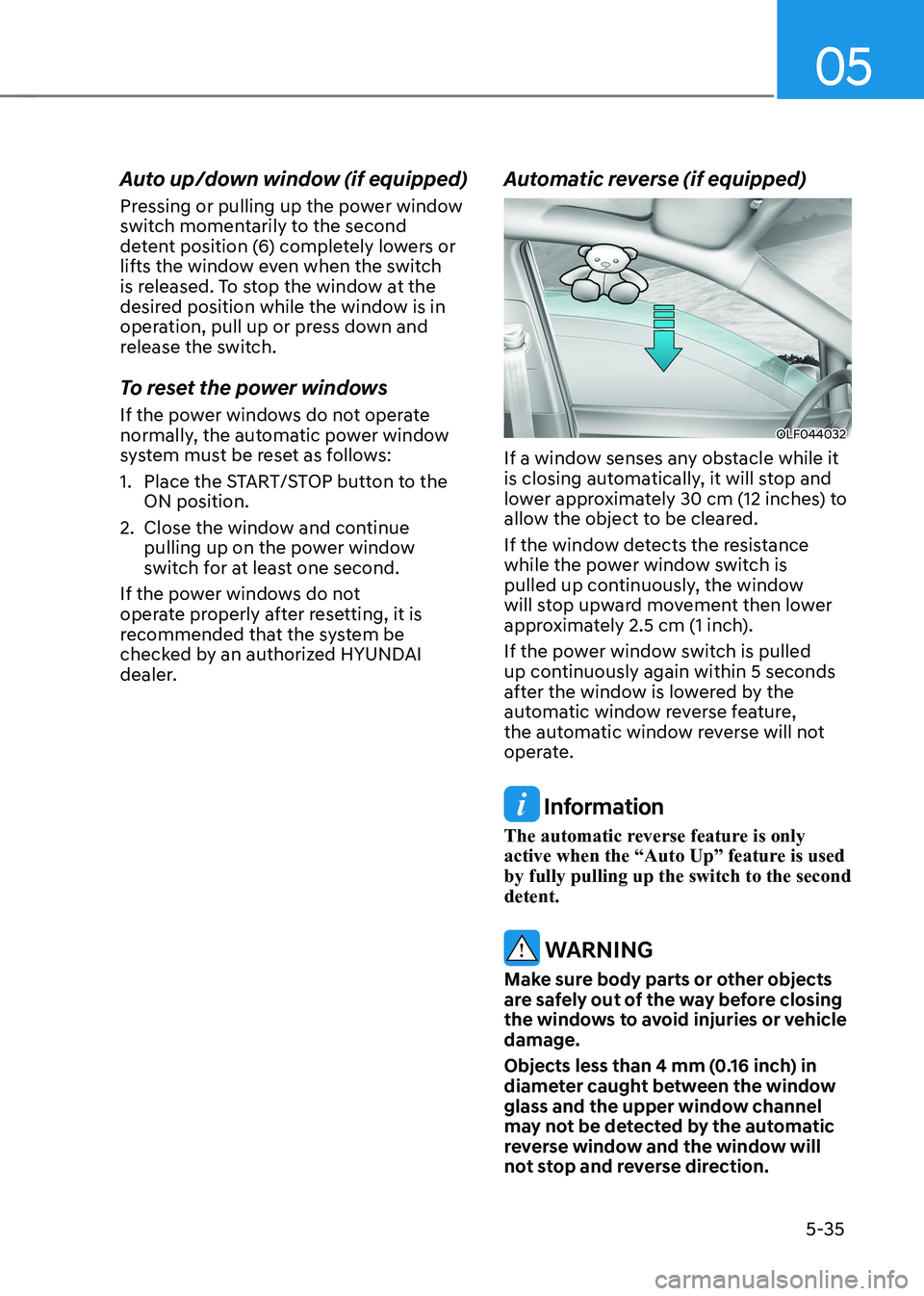
If a window senses any obstacle while it
is closing automatically, it will stop and
lower approximately 30 cm (12 inches) to
allow the object to be cleared.
If the window detects the resistance
while the power window switch is
pulled up continuously, the window
will stop upward movement then lower
approximately 2.5 cm (1 inch).
If the power window switch is pulled
up continuously again within 5 seconds
after the window is lowered by the
automatic window reverse feature,
the automatic window reverse will not
operate.
Information
The automatic reverse feature is only
active when the “Auto Up” feature is used by fully pulling up the switch to the second detent.
WARNING
Make sure body parts or other objects
are safely out of the way before closing
the windows to avoid injuries or vehicle damage.
Objects less than 4 mm (0.16 inch) in
diameter caught between the window
glass and the upper window channel
may not be detected by the automatic
reverse window and the window will
not stop and reverse direction.
Page 223 of 548
05
5-39
Tilting the sunroof
OOSEV048053L
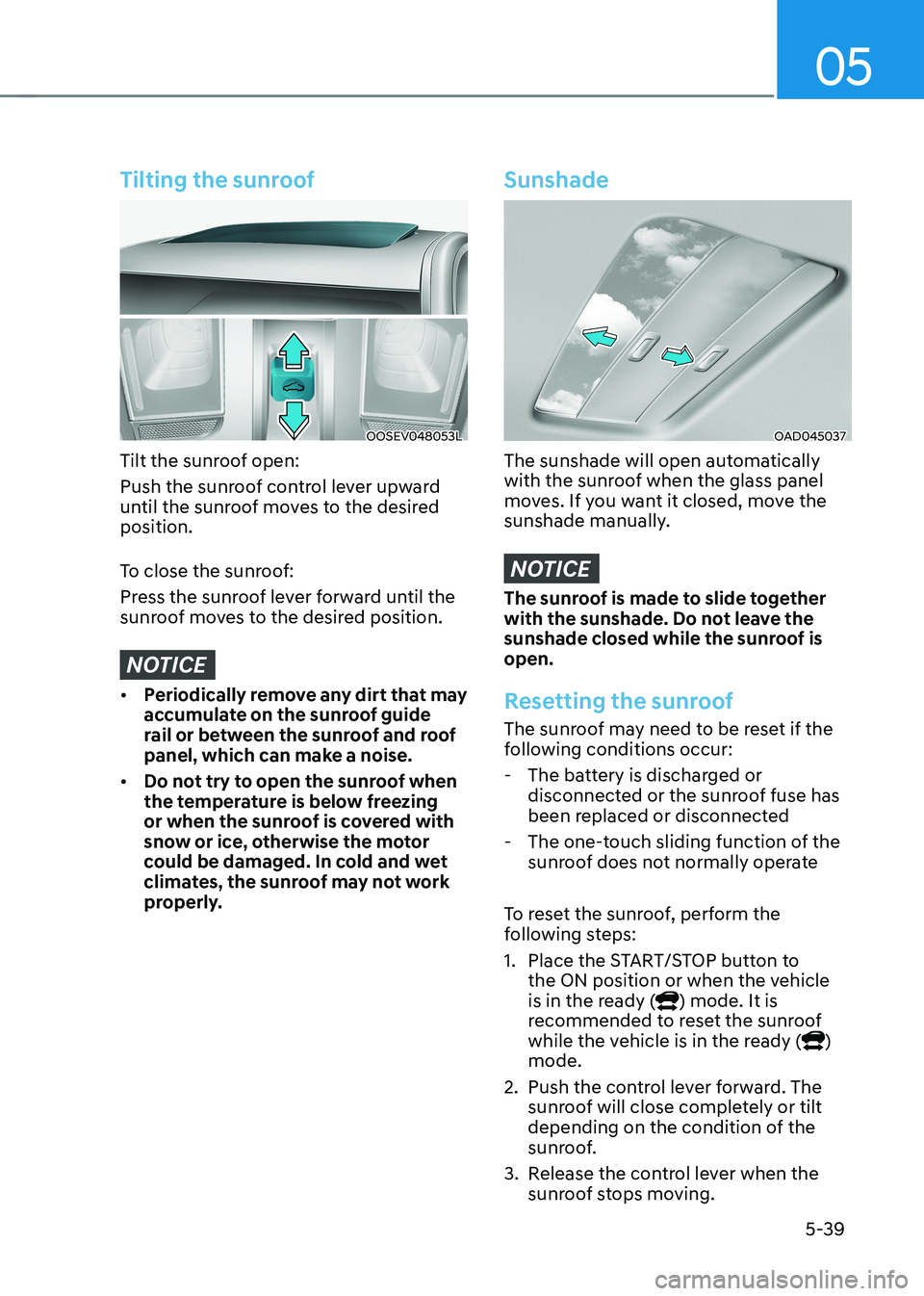
Tilt the sunroof open:
Push the sunroof control lever upward
until the sunroof moves to the desired position.
To close the sunroof:
Press the sunroof lever forward until the
sunroof moves to the desired position.
NOTICE
• Periodically remove any dirt that may
accumulate on the sunroof guide
rail or between the sunroof and roof
panel, which can make a noise.
• Do not try to open the sunroof when
the temperature is below freezing
or when the sunroof is covered with
snow or ice, otherwise the motor
could be damaged. In cold and wet
climates, the sunroof may not work
properly.
Sunshade
OAD045037
The sunshade will open automatically
with the sunroof when the glass panel
moves. If you want it closed, move the
sunshade manually.
NOTICE
The sunroof is made to slide together
with the sunshade. Do not leave the
sunshade closed while the sunroof is open.
Resetting the sunroof
The sunroof may need to be reset if the
following conditions occur:
- The battery is discharged or disconnected or the sunroof fuse has
been replaced or disconnected
- The one-touch sliding function of the sunroof does not normally operate
To reset the sunroof, perform the
following steps:
1. Place the START/STOP button to the ON position or when the vehicle
is in the ready (
) mode. It is
recommended to reset the sunroof
while the vehicle is in the ready (
)
mode.
2. Push the control lever forward. The sunroof will close completely or tilt
depending on the condition of the
sunroof.
3. Release the control lever when the sunroof stops moving.
Page 224 of 548
Convenient features
5-40
4.
Push the control lever forward for about 10 seconds.
- When the sunroof is in the closed position :
- The glass will tilt and slightly move up and down.
- When the sunroof is in the tilt position:
The glass will slightly move up and
down.
Do not release the lever until the
operation is completed.
If you release the lever during operation,
try again from step 2.
5. Within 3 seconds, push the control lever forward until the sunroof
operates as follows:
Tilt down → Slide Open → Slide Close.
Do not release the lever until the
operation is completed.
If you release the lever during operation,
try again from step 2.
6. Release the sunroof control lever after all operation has completed (The
sunroof system has been reset).
Information
• If the sunroof does not reset when
the vehicle battery is disconnected or
discharged, or related fuse is blown, the
sunroof may not operate normally.
• For more detailed information, we
recommend that you contact an
authorized HYUNDAI dealer.
Sunroof open warning (if equipped)
• If the driver turns off the vehicle
when the sunroof is not fully closed,
the warning chime will sound for
approximately 3 seconds and the
open sunroof warning appear on the
LCD display.
• If the driver turns off the vehicle and
opens the door when the sunroof is
not fully closed, the open sunroof
warning will appear on the LCD
display until the door is closed or the
sunroof is fully closed.
Close the sunroof securely when leaving
your vehicle.
Page 251 of 548
05
5-67
OOSEV040306CZ
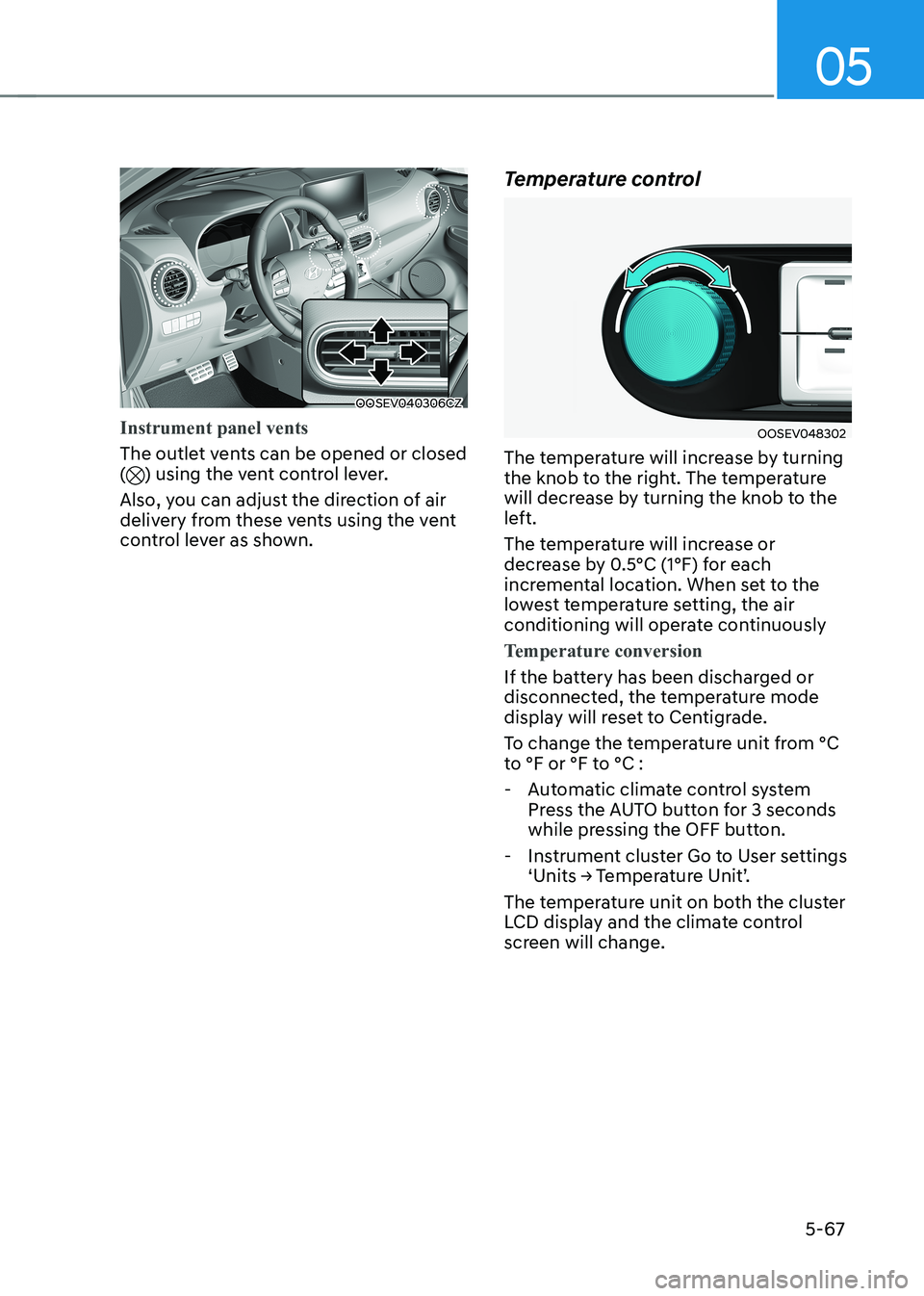
Instrument panel vents
The outlet vents can be opened or closed () using the vent control lever.
Also, you can adjust the direction of air
delivery from these vents using the vent
control lever as shown. Temperature control
OOSEV048302
The temperature will increase by turning
the knob to the right. The temperature
will decrease by turning the knob to the
left.
The temperature will increase or
decrease by 0.5°C (1°F) for each
incremental location. When set to the
lowest temperature setting, the air
conditioning will operate continuously
Temperature conversion
If the battery has been discharged or
disconnected, the temperature mode
display will reset to Centigrade.
To change the temperature unit from °C
to °F or °F to °C :
- Automatic climate control system Press the AUTO button for 3 seconds
while pressing the OFF button.
- Instrument cluster Go to User settings ‘Units → Temperature Unit’.
The temperature unit on both the cluster
LCD display and the climate control
screen will change.
Page 261 of 548
05
5-77
To defrost outside windshield
OOSEV048313
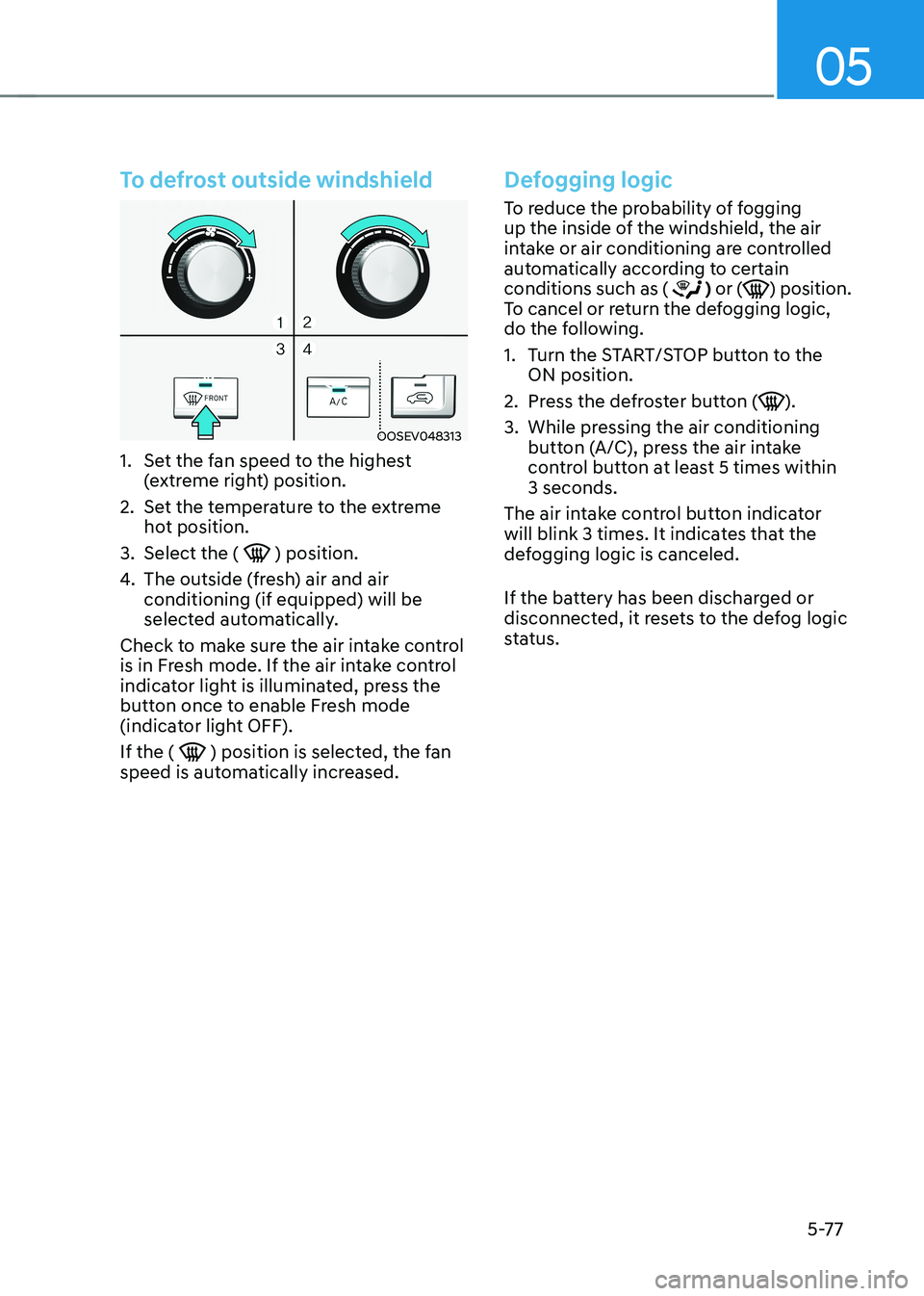
1. Set the fan speed to the highest (extreme right) position.
2. Set the temperature to the extreme hot position.
3. Select the (
) position.
4. The outside (fresh) air and air conditioning (if equipped) will be
selected automatically.
Check to make sure the air intake control
is in Fresh mode. If the air intake control
indicator light is illuminated, press the
button once to enable Fresh mode
(indicator light OFF). If the (
) position is selected, the fan
speed is automatically increased.
Defogging logic
To reduce the probability of fogging
up the inside of the windshield, the air
intake or air conditioning are controlled
automatically according to certain conditions such as (
) or () position.
To cancel or return the defogging logic,
do the following.
1. Turn the START/STOP button to the ON position.
2. Press the defroster button (
).
3. While pressing the air conditioning button (A/C), press the air intake
control button at least 5 times within 3 seconds.
The air intake control button indicator
will blink 3 times. It indicates that the
defogging logic is canceled.
If the battery has been discharged or
disconnected, it resets to the defog logic
status.
Page 278 of 548
Convenient features
5-94
Steering wheel audio controls
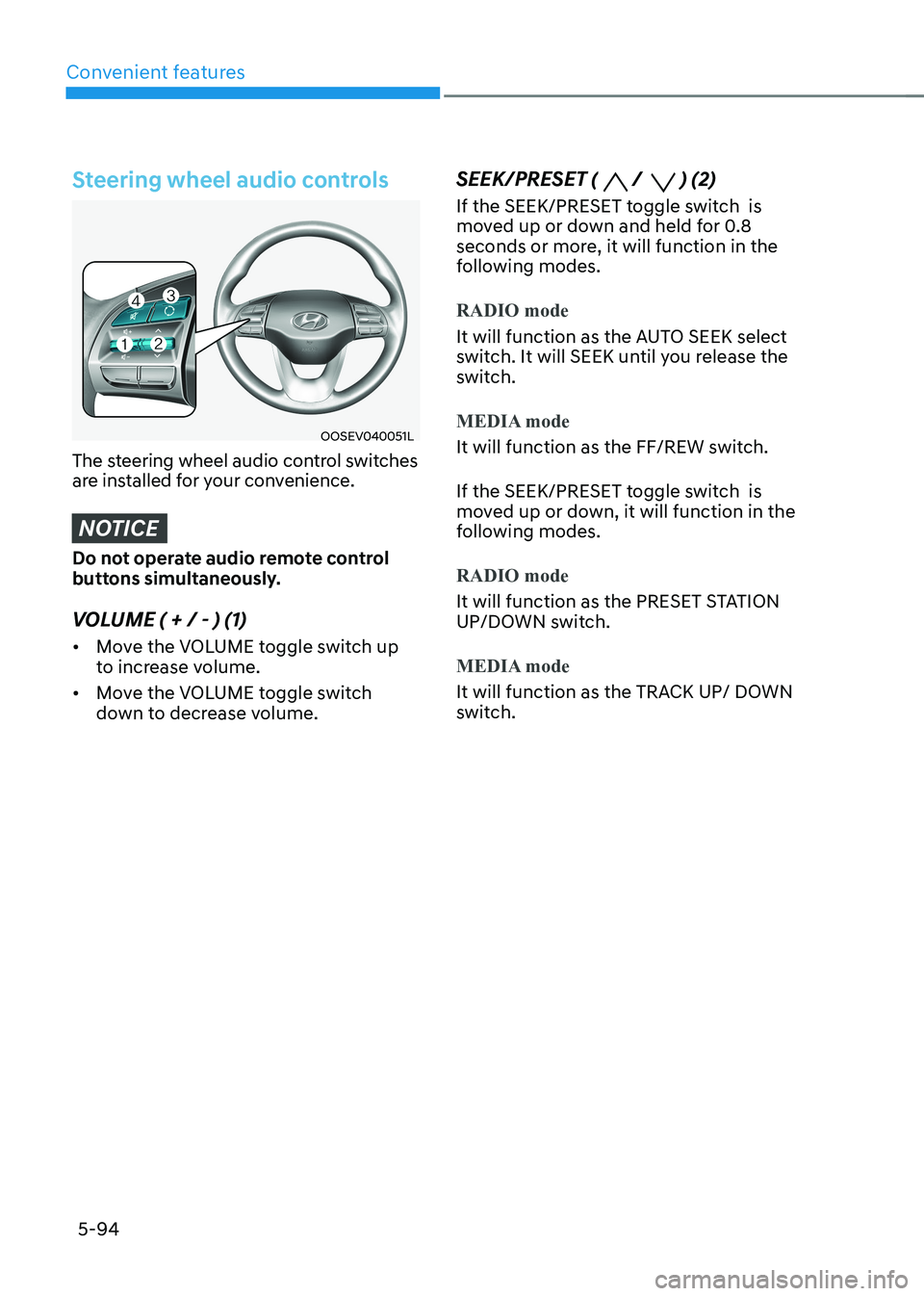
OOSEV040051L
The steering wheel audio control switches
are installed for your convenience.
NOTICE
Do not operate audio remote control
buttons simultaneously.
VOLUME ( + / - ) (1) • Move the VOLUME toggle switch up
to increase volume.
• Move the VOLUME toggle switch
down to decrease volume. SEEK/PRESET (
/ ) (2)
If the SEEK/PRESET toggle switch is
moved up or down and held for 0.8
seconds or more, it will function in the
following modes.
RADIO mode
It will function as the AUTO SEEK select
switch. It will SEEK until you release the
switch.
MEDIA mode
It will function as the FF/REW switch.
If the SEEK/PRESET toggle switch is
moved up or down, it will function in the
following modes.
RADIO mode
It will function as the PRESET STATION
UP/DOWN switch.
MEDIA mode
It will function as the TRACK UP/ DOWN
switch.
Page 318 of 548
Driving your vehicle
6-38
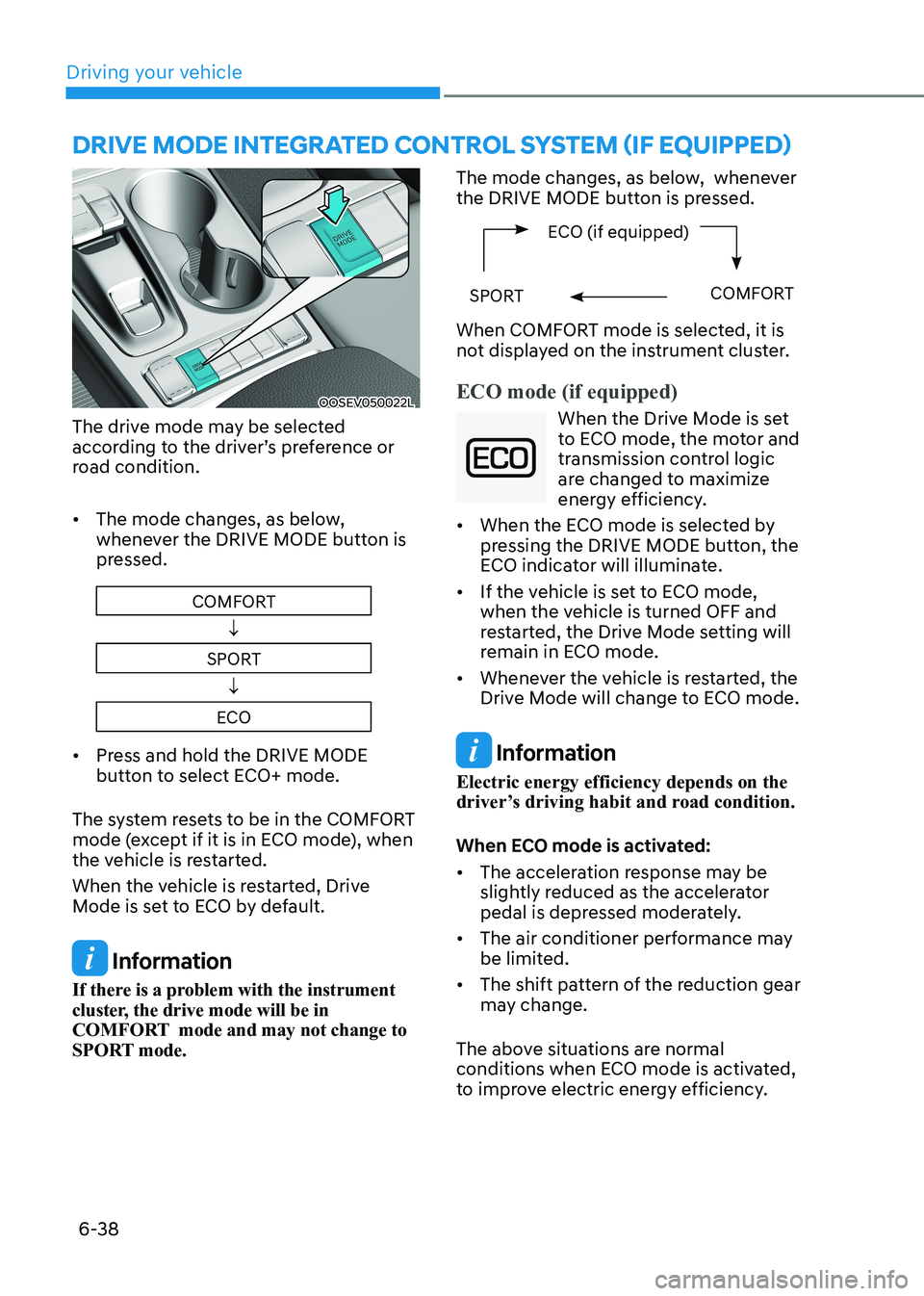
OOSEV050022L
The drive mode may be selected
according to the driver’s preference or
road condition. • The mode changes, as below,
whenever the DRIVE MODE button is
pressed.
COMFORT
↓
SPORT ↓
ECO
• Press and hold the DRIVE MODE
button to select ECO+ mode.
The system resets to be in the COMFORT
mode (except if it is in ECO mode), when
the vehicle is restarted.
When the vehicle is restarted, Drive
Mode is set to ECO by default.
Information
If there is a problem with the instrument
cluster, the drive mode will be in
COMFORT mode and may not change to
SPORT mode. The mode changes, as below, whenever
the DRIVE MODE button is pressed.
ECO (if equipped)
SPORTCOMFORT
When COMFORT mode is selected, it is
not displayed on the instrument cluster.
ECO mode (if equipped)
When the Drive Mode is set
to ECO mode, the motor and
transmission control logic
are changed to maximize
energy efficiency.
• When the ECO mode is selected by
pressing the DRIVE MODE button, the
ECO indicator will illuminate.
• If the vehicle is set to ECO mode,
when the vehicle is turned OFF and
restarted, the Drive Mode setting will
remain in ECO mode.
• Whenever the vehicle is restarted, the
Drive Mode will change to ECO mode.
Information
Electric energy efficiency depends on the
driver’s driving habit and road condition.
When ECO mode is activated: • The acceleration response may be
slightly reduced as the accelerator
pedal is depressed moderately.
• The air conditioner performance may
be limited.
• The shift pattern of the reduction gear
may change.
The above situations are normal
conditions when ECO mode is activated,
to improve electric energy efficiency.
dRIvE MOdE INTEgRATEd CONTROl SYSTEM (If EqUIPPEd)
Page 389 of 548
Driver assistance system
7-56
• The driver’s attention level is displayed
on the scale of 1 to 5. The lower the
level is, the more inattentive the driver is.
• The level decreases when the driver
does not take a break for a certain
period of time.
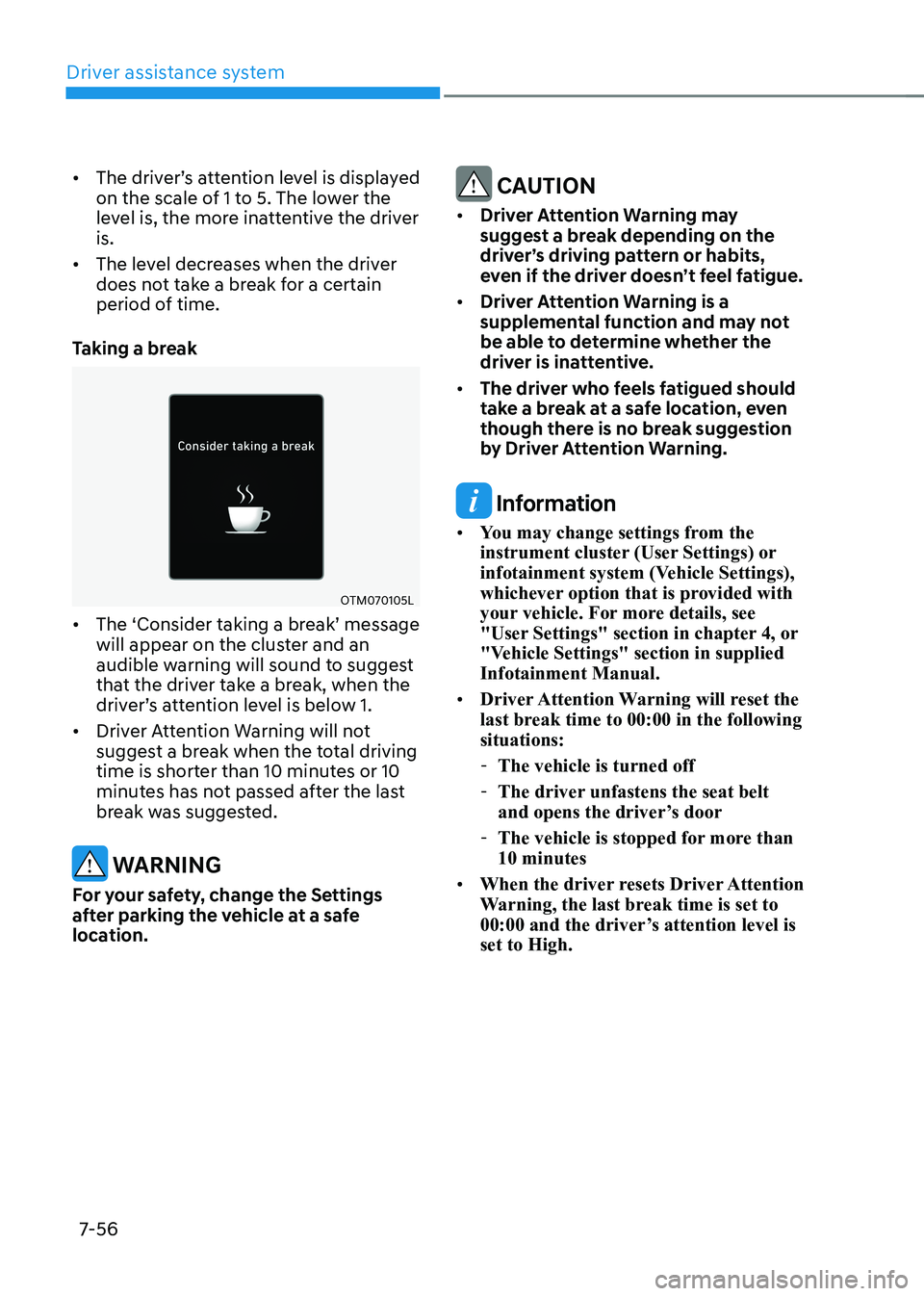
Taking a break
OTM070105L
• The ‘Consider taking a break’ message will appear on the cluster and an
audible warning will sound to suggest
that the driver take a break, when the
driver’s attention level is below 1.
• Driver Attention Warning will not
suggest a break when the total driving
time is shorter than 10 minutes or 10
minutes has not passed after the last
break was suggested.
warning
For your safety, change the Settings
after parking the vehicle at a safe
location.
CAUTION
• Driver Attention Warning may
suggest a break depending on the
driver’s driving pattern or habits,
even if the driver doesn’t feel fatigue.
• Driver Attention Warning is a
supplemental function and may not
be able to determine whether the
driver is inattentive.
• The driver who feels fatigued should
take a break at a safe location, even
though there is no break suggestion
by Driver Attention Warning.
Information
• You may change settings from the
instrument cluster (User Settings) or
infotainment system (Vehicle Settings),
whichever option that is provided with
your vehicle. For more details, see
"User Settings" section in chapter 4, or
"Vehicle Settings" section in supplied Infotainment Manual.
• Driver Attention Warning will reset the
last break time to 00:00 in the following situations:
- The vehicle is turned off
- The driver unfastens the seat belt
and opens the driver’s door
- The vehicle is stopped for more than 10 minutes
• When the driver resets Driver Attention
Warning, the last break time is set to
00:00 and the driver’s attention level is set to High.
Page 395 of 548
Driver assistance system
7-62
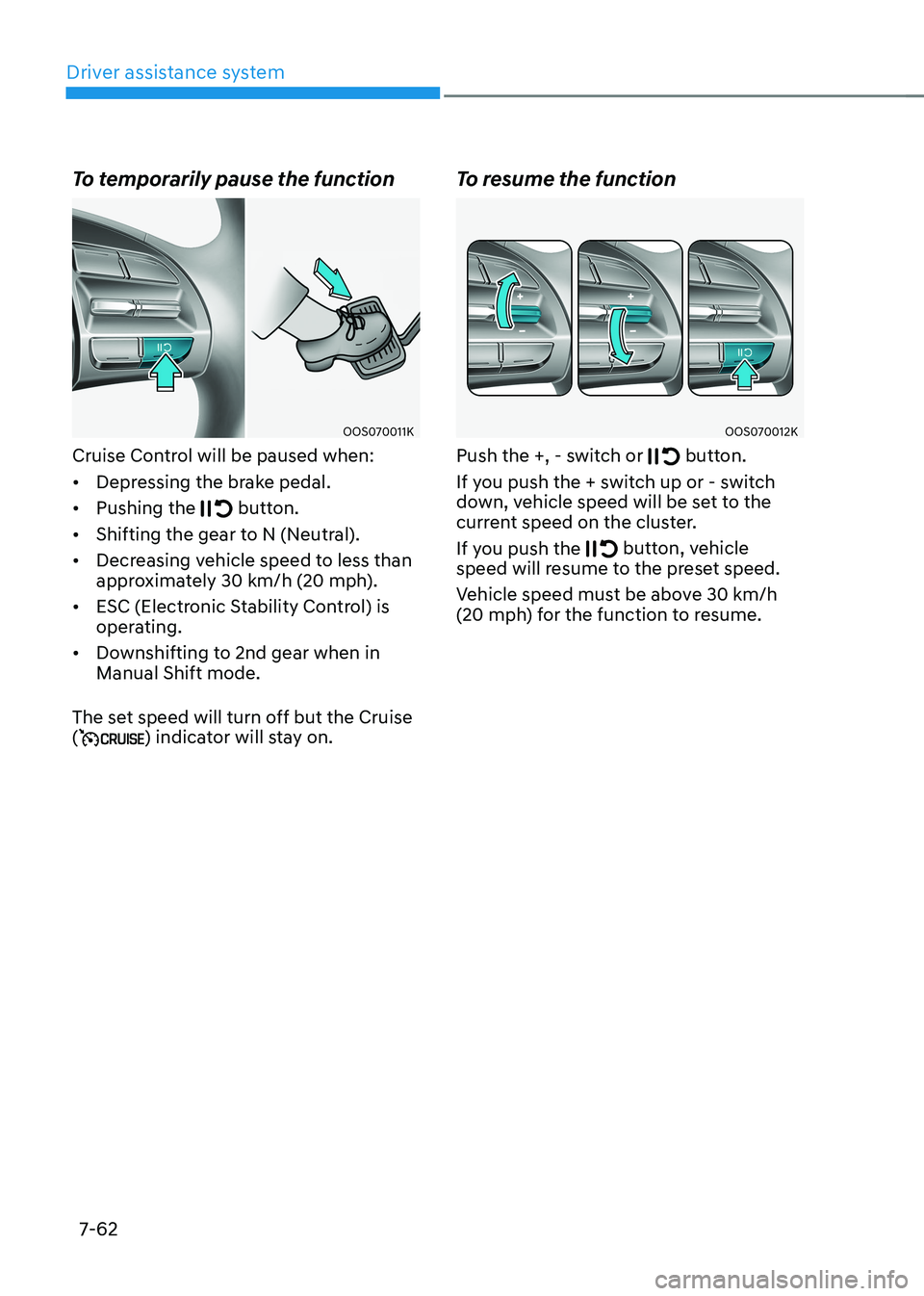
To temporarily pause the function
OOS070011K
Cruise Control will be paused when: • Depressing the brake pedal.
• Pushing the
button.
• Shifting the gear to N (Neutral).
• Decreasing vehicle speed to less than
approximately 30 km/h (20 mph).
• ESC (Electronic Stability Control) is
operating.
• Downshifting to 2nd gear when in Manual Shift mode.
The set speed will turn off but the Cruise (
) indicator will stay on. To resume the function
OOS070012K
Push the +, - switch or
button.
If you push the + switch up or - switch
down, vehicle speed will be set to the
current speed on the cluster.
If you push the
button, vehicle
speed will resume to the preset speed.
Vehicle speed must be above 30 km/h
(20 mph) for the function to resume.
Page 400 of 548
07
7-67
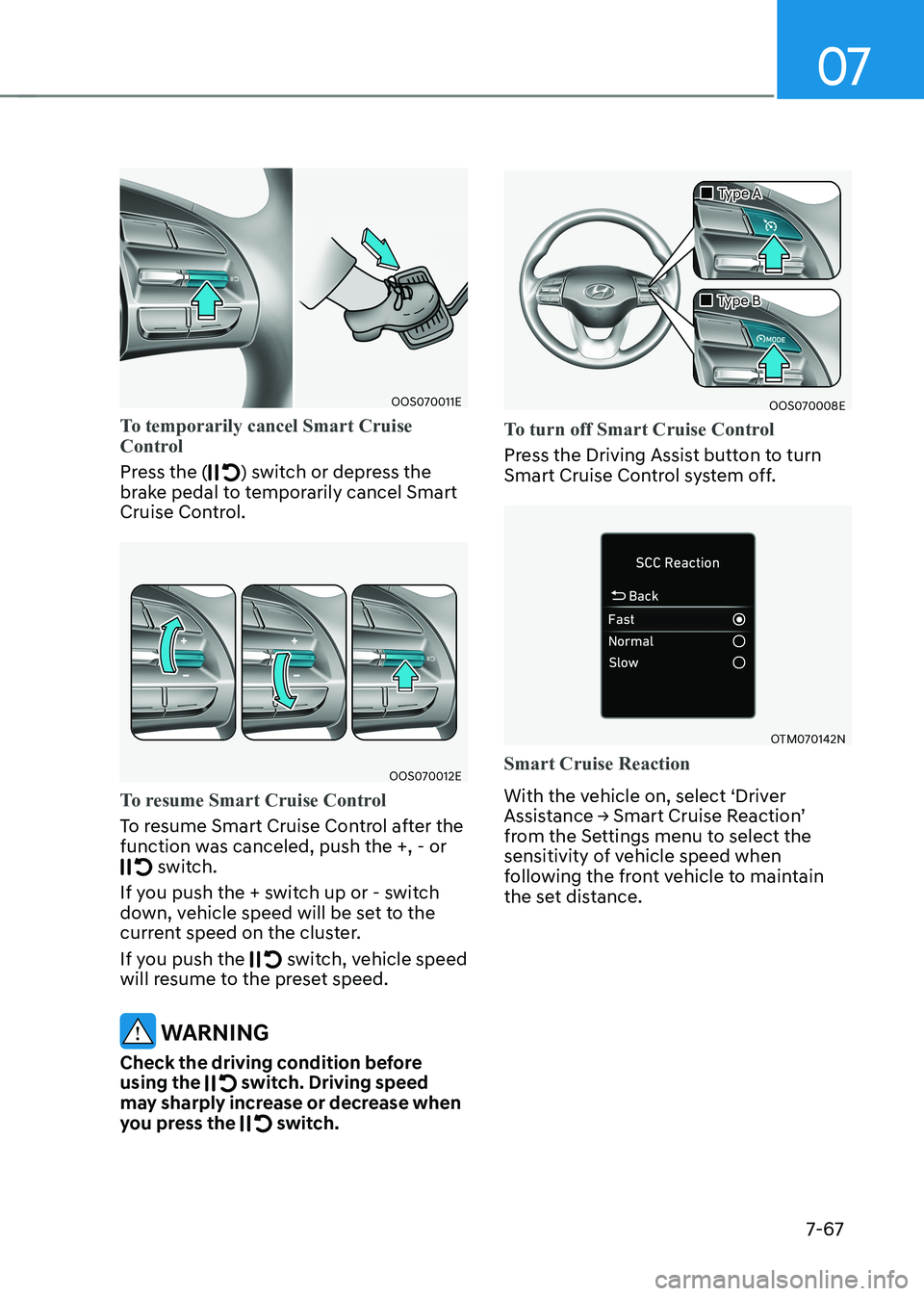
OOS070011E
To temporarily cancel Smart Cruise
Control
Press the () switch or depress the
brake pedal to temporarily cancel Smart
Cruise Control.
OOS070012E
To resume Smart Cruise Control
To resume Smart Cruise Control after the
function was canceled, push the +, - or
switch.
If you push the + switch up or - switch
down, vehicle speed will be set to the
current speed on the cluster.
If you push the
switch, vehicle speed
will resume to the preset speed.
warning
Check the driving condition before using the
switch. Driving speed
may sharply increase or decrease when
you press the
switch.
OOS070008E
„
„Type A
„
„Type B
To turn off Smart Cruise Control
Press the Driving Assist button to turn
Smart Cruise Control system off.
OTM070142N
Smart Cruise Reaction
With the vehicle on, select ‘Driver
Assistance → Smart Cruise Reaction’
from the Settings menu to select the
sensitivity of vehicle speed when
following the front vehicle to maintain
the set distance.