trip computer Hyundai Matrix 2003 Owner's Manual
[x] Cancel search | Manufacturer: HYUNDAI, Model Year: 2003, Model line: Matrix, Model: Hyundai Matrix 2003Pages: 312, PDF Size: 4.1 MB
Page 38 of 312
FEATURES OF YOUR HYUNDAI
1- 30
B260A01FC-GAT
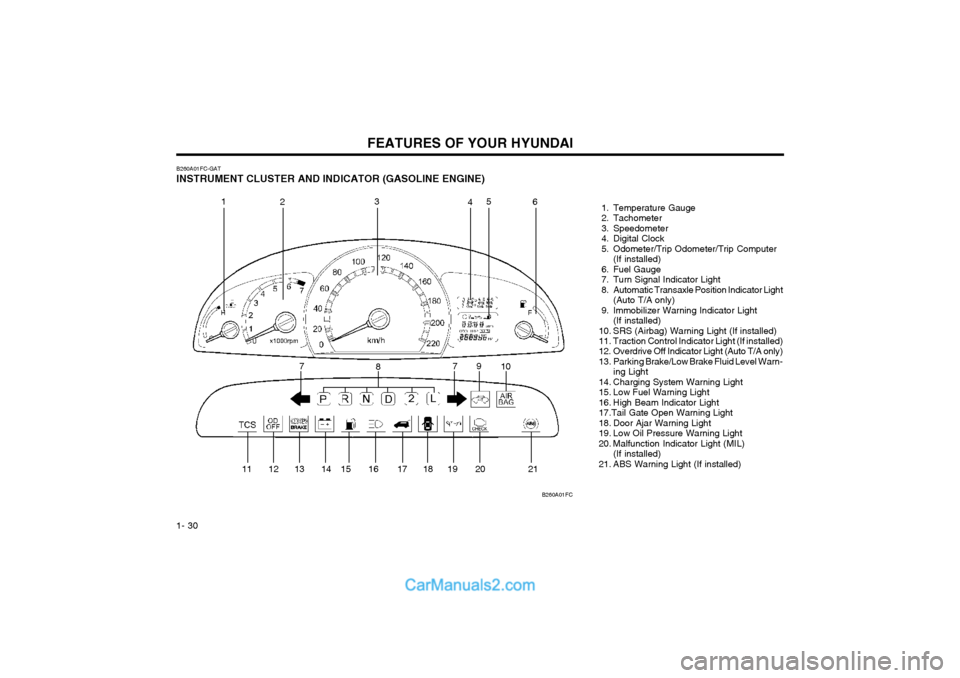
INSTRUMENT CLUSTER AND INDICATOR (GASOLINE ENGINE) 1. Temperature Gauge
2. Tachometer
3. Speedometer
4. Digital Clock
5. Odometer/Trip Odometer/Trip Computer(If installed)
6. Fuel Gauge
7. Turn Signal Indicator Light
8. Automatic Transaxle Position Indicator Light (Auto T/A only)
9. Immobilizer Warning Indicator Light (If installed)
10. SRS (Airbag) Warning Light (If installed)
11. Traction Control Indicator Light (If installed)
12. Overdrive Off Indicator Light (Auto T/A only)
13. Parking Brake/Low Brake Fluid Level Warn- ing Light
14. Charging System Warning Light
15. Low Fuel Warning Light
16. High Beam Indicator Light17.Tail Gate Open Warning Light
18. Door Ajar Warning Light
19. Low Oil Pressure Warning Light
20. Malfunction Indicator Light (MIL) (If installed)
21. ABS Warning Light (If installed)
B260A01FC
1
2 3
45
6
7 8 9
10
11 12 13 14 15 16 17 18 19 20 21 7
Page 39 of 312
FEATURES OF YOUR HYUNDAI 1- 31
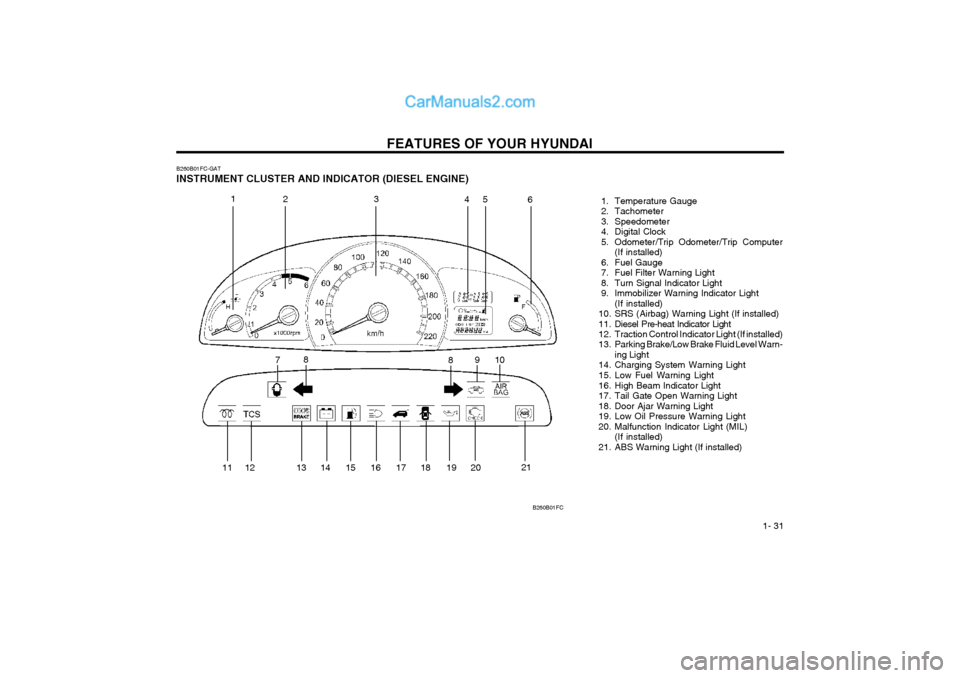
B260B01FC-GAT INSTRUMENT CLUSTER AND INDICATOR (DIESEL ENGINE)
1. Temperature Gauge
2. Tachometer
3. Speedometer
4. Digital Clock
5. Odometer/Trip Odometer/Trip Computer(If installed)
6. Fuel Gauge
7. Fuel Filter Warning Light
8. Turn Signal Indicator Light
9. Immobilizer Warning Indicator Light (If installed)
10. SRS (Airbag) Warning Light (If installed)
11. Diesel Pre-heat Indicator Light
12. Traction Control Indicator Light (If installed)
13. Parking Brake/Low Brake Fluid Level Warn- ing Light
14. Charging System Warning Light
15. Low Fuel Warning Light
16. High Beam Indicator Light
17. Tail Gate Open Warning Light
18. Door Ajar Warning Light
19. Low Oil Pressure Warning Light
20. Malfunction Indicator Light (MIL) (If installed)
21. ABS Warning Light (If installed)
B260B01FC
1 23 45
6
7 8
910
8
11 12 13 14 15 16 17 18 19 20 21
Page 44 of 312
FEATURES OF YOUR HYUNDAI
1- 36
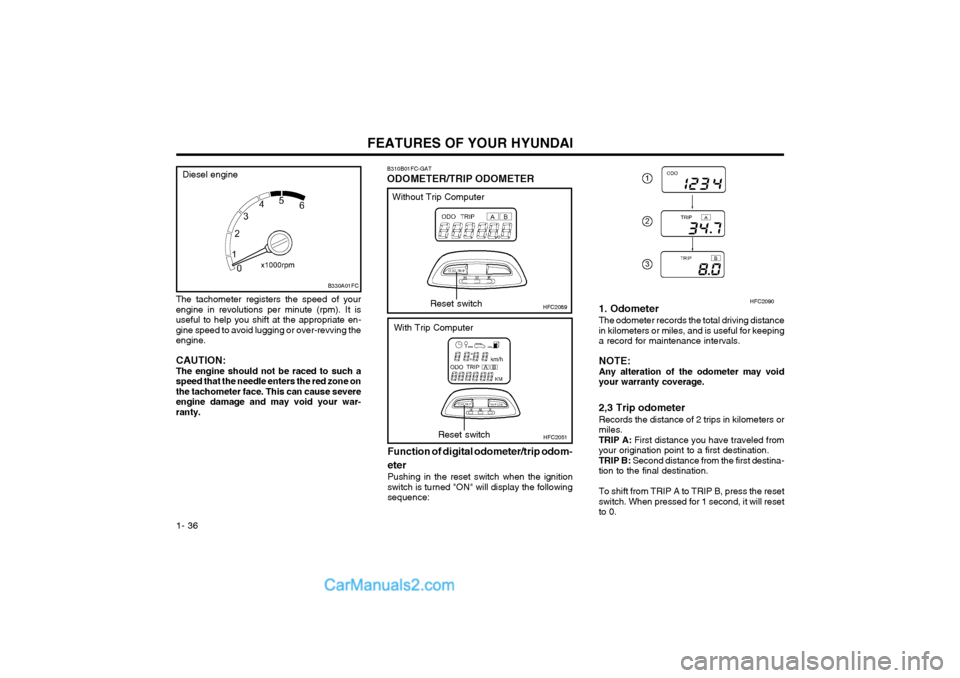
The tachometer registers the speed of your engine in revolutions per minute (rpm). It isuseful to help you shift at the appropriate en-gine speed to avoid lugging or over-revving theengine. CAUTION: The engine should not be raced to such aspeed that the needle enters the red zone onthe tachometer face. This can cause severeengine damage and may void your war-ranty.
B310B01FC-GAT ODOMETER/TRIP ODOMETER
HFC2089
Function of digital odometer/trip odom- eter
Pushing in the reset switch when the ignition switch is turned "ON" will display the followingsequence:Reset switch
HFC2051Reset switch
Without Trip Computer
With Trip Computer 1. Odometer The odometer records the total driving distance in kilometers or miles, and is useful for keepinga record for maintenance intervals. NOTE: Any alteration of the odometer may voidyour warranty coverage. 2,3 Trip odometer Records the distance of 2 trips in kilometers or miles.TRIP A:
First distance you have traveled from
your origination point to a first destination.TRIP B: Second distance from the first destina-
tion to the final destination. To shift from TRIP A to TRIP B, press the reset switch. When pressed for 1 second, it will resetto 0.
HFC2090
B330A01FC
Diesel engine
Page 45 of 312
FEATURES OF YOUR HYUNDAI 1- 37
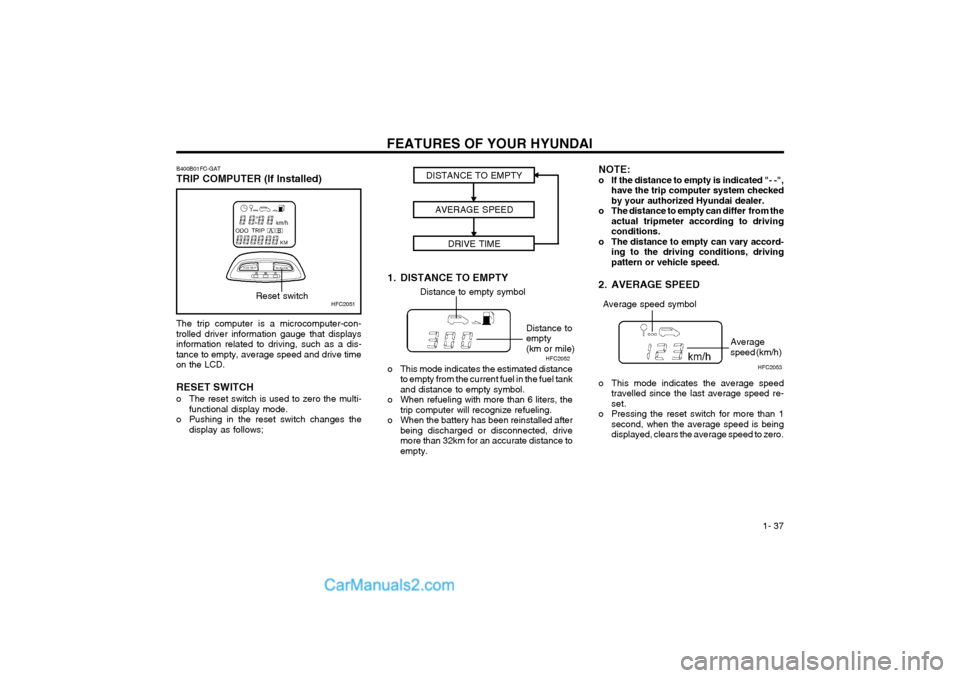
The trip computer is a microcomputer-con- trolled driver information gauge that displaysinformation related to driving, such as a dis-tance to empty, average speed and drive timeon the LCD. RESET SWITCH
o The reset switch is used to zero the multi-
functional display mode.
o Pushing in the reset switch changes the display as follows;
HFC2051
B400B01FC-GAT TRIP COMPUTER (If Installed)Reset switch
1. DISTANCE TO EMPTYDISTANCE TO EMPTY
AVERAGE SPEED DRIVE TIMEDistance to empty symbol
Distance to empty(km or mile)
o This mode indicates the estimated distance to empty from the current fuel in the fuel tankand distance to empty symbol.
o When refueling with more than 6 liters, the trip computer will recognize refueling.
o When the battery has been reinstalled after being discharged or disconnected, drivemore than 32km for an accurate distance toempty. NOTE:
o If the distance to empty is indicated "- -",
have the trip computer system checkedby your authorized Hyundai dealer.
o The distance to empty can differ from the actual tripmeter according to drivingconditions.
o The distance to empty can vary accord- ing to the driving conditions, drivingpattern or vehicle speed.
2. AVERAGE SPEED
o This mode indicates the average speed travelled since the last average speed re- set.
o Pressing the reset switch for more than 1 second, when the average speed is beingdisplayed, clears the average speed to zero.
Average speed symbol
Average speed (km/h)
HFC2052
HFC2053
Page 173 of 312
INDEX
10-4 Sunroof
................................................................................... 1-44 ~ 1-45
Sunshade .......................................................................................... 1-44
Sun Visor .......................................................................................... 1-54
T
Tail Gate ........................................................................................... 1-51
Tail Gate Wiper And Washer Switch ................................................1-40
Tachometer ............................................................................ 1-35 ~ 1-36
Theft Alarm System ................................................................... 1-6 ~ 1-7
Tires Balancing ......................................................................................... 8-3
Chains ............................................................................................. 8-2
Changing a flat tire .......................................................................... 3-4
If you have a flat tire ....................................................................... 3-4
Information ....................................................................................... 8-1
Pressure .......................................................................................... 8-1
Replacement ................................................................................... 8-3
Rotation ........................................................................................... 8-2
Snow tires ....................................................................................... 8-2
Spare tire ......................................................................................... 3-4 Traction ........................................................................................... 8-3
Towing A trailer (or vehicle) ...................................................................... 2-12
Emergency ...................................................................................... 3-9
If your car must be towed ............................................................... 3-8
Transaxle Automatic ............................................................................... 2-5 ~ 2-8
Automatic transaxle fluid checking .................................... 6-13 ~ 6-14
Manual ....................................................................................... 2-4 ~ 2-5
Manual transaxle oil checking .................... ...................................6-13
Trip Computer ............................... ......................................... 1-37 ~ 1-38
Trip Odometer ................................................................................... 1-36U
Under Tray ........................................................................................
1-10
VVehicle Identificati on Number (VIN) .................................................... 8-1
Vehicle Specification ........................................................................... 9-1Ventilation Center ventilator ............................................................................ 1-55
Side ventilator ............................................................................... 1-55
W
Warning Lights ....................................................................... 1-32 ~ 1-34
Windows Manual ............................................................................................. 1-8
Power .............................................................................................. 1-8
Windshield Wiper and Washer Switch ..............................................1-39
Windshield Wiper Blades .................................................................. 6-12
Page 208 of 312
1- 27
CONTROLS AND EQUIPMENT
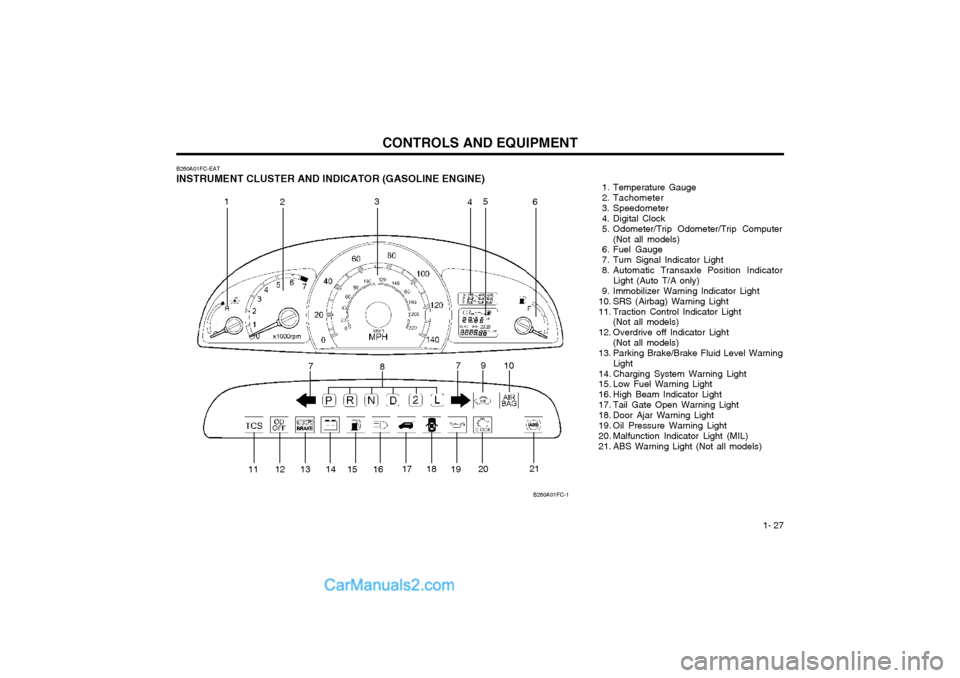
B260A01FC-EAT INSTRUMENT CLUSTER AND INDICATOR (GASOLINE ENGINE) 1. Temperature Gauge
2. Tachometer
3. Speedometer
4. Digital Clock
5. Odometer/Trip Odometer/Trip Computer
(Not all models)
6. Fuel Gauge
7. Turn Signal Indicator Light
8. Automatic Transaxle Position Indicator Light (Auto T/A only)
9. Immobilizer Warning Indicator Light
10. SRS (Airbag) Warning Light
11. Traction Control Indicator Light (Not all models)
12. Overdrive off Indicator Light (Not all models)
13. Parking Brake/Brake Fluid Level Warning Light
14. Charging System Warning Light
15. Low Fuel Warning Light
16. High Beam Indicator Light
17. Tail Gate Open Warning Light
18. Door Ajar Warning Light
19. Oil Pressure Warning Light
20. Malfunction Indicator Light (MIL)
21. ABS Warning Light (Not all models)
B260A01FC-1
1
2 3
45
6
7 8 910
11 12 13 14 15 16 17 18
1920 21
7
Page 209 of 312
CONTROLS AND EQUIPMENT
1- 28
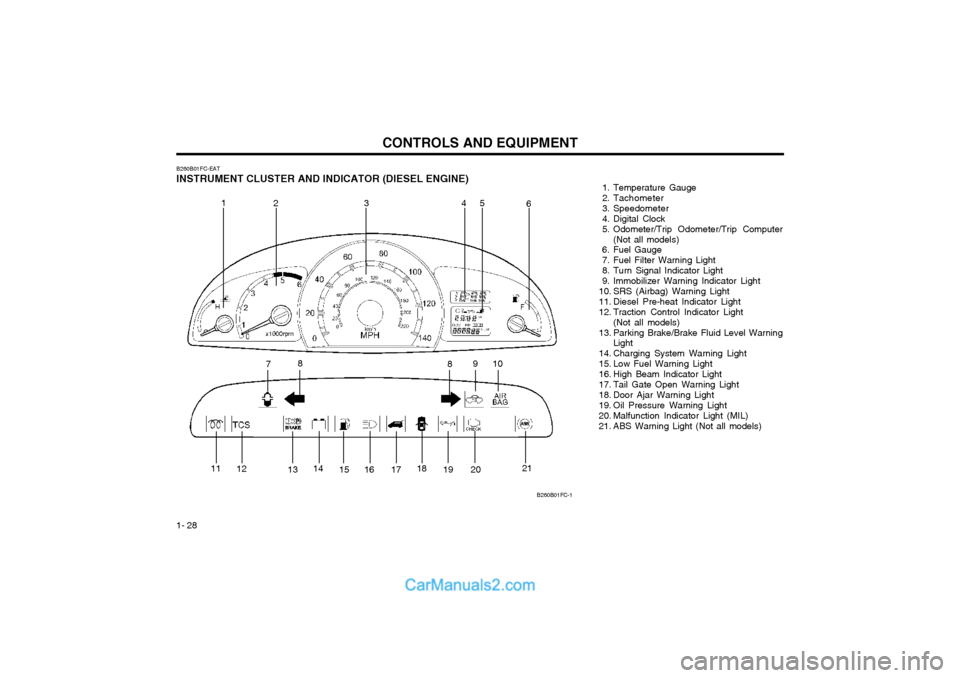
B260B01FC-EAT INSTRUMENT CLUSTER AND INDICATOR (DIESEL ENGINE) 1. Temperature Gauge
2. Tachometer
3. Speedometer
4. Digital Clock
5. Odometer/Trip Odometer/Trip Computer
(Not all models)
6. Fuel Gauge
7. Fuel Filter Warning Light
8. Turn Signal Indicator Light
9. Immobilizer Warning Indicator Light
10. SRS (Airbag) Warning Light
11. Diesel Pre-heat Indicator Light
12. Traction Control Indicator Light
(Not all models)
13. Parking Brake/Brake Fluid Level Warning Light
14. Charging System Warning Light
15. Low Fuel Warning Light
16. High Beam Indicator Light
17. Tail Gate Open Warning Light
18. Door Ajar Warning Light
19. Oil Pressure Warning Light
20. Malfunction Indicator Light (MIL)
21. ABS Warning Light (Not all models)
B260B01FC-1
1 23 4 5
6
7 8
910
8
11 12
1314
15 16 17 18
19 20 21
Page 214 of 312
1- 33
CONTROLS AND EQUIPMENT
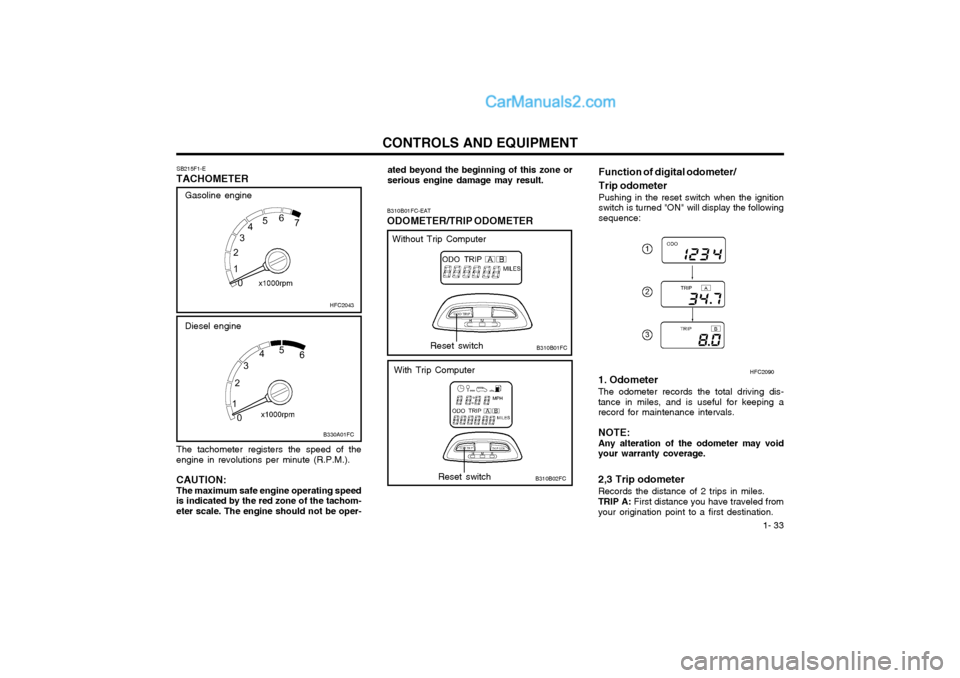
The tachometer registers the speed of the engine in revolutions per minute (R.P.M.). CAUTION: The maximum safe engine operating speed is indicated by the red zone of the tachom-eter scale. The engine should not be oper- SB215F1-E
TACHOMETER
HFC2043
B330A01FC
Diesel engine
Gasoline engine
ated beyond the beginning of this zone or serious engine damage may result.
B310B01FC-EAT ODOMETER/TRIP ODOMETER
B310B01FC Function of digital odometer/ Trip odometer
Pushing in the reset switch when the ignition switch is turned "ON" will display the followingsequence:Reset switch
B310B02FCReset switch
Without Trip Computer
With Trip Computer 1. Odometer The odometer records the total driving dis- tance in miles, and is useful for keeping arecord for maintenance intervals. NOTE: Any alteration of the odometer may voidyour warranty coverage. 2,3 Trip odometer Records the distance of 2 trips in miles. TRIP A: First distance you have traveled from
your origination point to a first destination. HFC2090
Page 215 of 312

CONTROLS AND EQUIPMENT
1- 34
The trip computer is the microcomputer-con- trolled driver information gauge that displaysinformation related to driving, such as dis-tance to empty, average speed and drive timeon the LCD.
B310B02FC
B400B01FC-EAT TRIP COMPUTER (Not all models)Reset switch
1. DISTANCE TO EMPTYDISTANCE TO EMPTY
AVERAGE SPEED DRIVE TIME
Distance to empty symbol
Distance to empty (mile)
o This mode indicates the estimated dis- tance to empty from the current fuel in the fuel tank and distance to empty symbol.
o When refueling with more than 6.3 quarts, the trip computer will recognize refueling.
o When the battery has been reinstalled af- ter being discharged or disconnected, drivemore than 20 miles for an accurate dis-tance to empty. NOTE:
o If the distance to empty is indicated "- -",
have the trip computer system checked by your authorized Hyundai dealer.
o The distance to empty can differ from the actual tripmeter according to driv-ing conditions.
o The distance to empty can vary accord- ing to the driving conditions, drivingpattern or vehicle speed.
2. AVERAGE SPEED
o This mode indicates the average speed travelled since the last average speed re- set.
o Pressing the reset switch for more than 1 second, when the average speed is beingdisplayed, clears the average speed tozero.
Average speed symbol
Average speed (mph)
HFC2052 B400B02FC
TRIP B:
Second distance from the first des-
tination to the final destination. To shift from TRIP A to TRIP B, press the reset switch. When pressed for 1 second, itwill reset to 0.
RESET SWITCH
o The reset switch is used to zero the multi- functional display mode.
o Pushing in the reset switch changes the display as follows;
Page 312 of 312
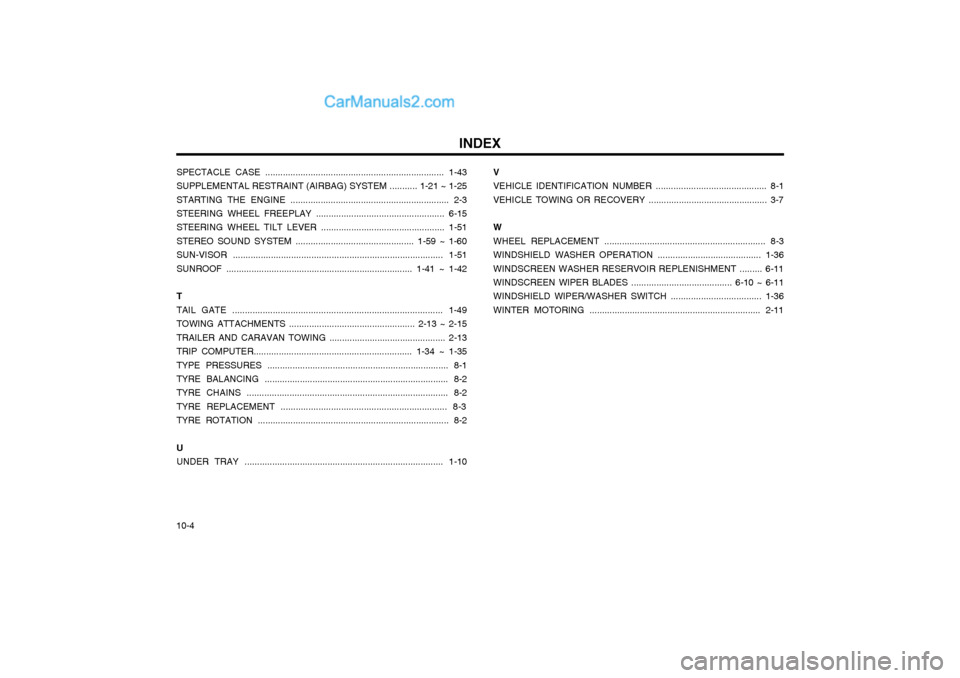
INDEX
10-4 SPECTACLE CASE ....................................................................... 1-43 SUPPLEMENTAL RESTRAINT (AIRBAG) SYSTEM ........... 1-21 ~ 1-25STARTING THE ENGINE ............................................................... 2-3 STEERING WHEEL FREEPLAY ................................................... 6-15 STEERING WHEEL TILT LEVER ................................................. 1-51STEREO SOUND SYSTEM ............................................... 1-59 ~ 1-60SUN-VISOR ................................................................................... 1-51SUNROOF .......................................................................... 1-41 ~ 1-42 T TAIL GATE ................................................................................... 1-49TOWING ATTACHMENTS .................................................. 2-13 ~ 2-15TRAILER AND CARAVAN TOWING .............................................. 2-13TRIP COMPUTER............................................................... 1-34 ~ 1-35TYPE PRESSURES ........................................................................ 8-1 TYRE BALANCING ......................................................................... 8-2 TYRE CHAINS ................................................................................ 8-2TYRE REPLACEMENT .................................................................. 8-3TYRE ROTATION ............................................................................ 8-2 U UNDER TRAY ............................................................................... 1-10
V VEHICLE IDENTIFICATION NUMBER ............................................ 8-1VEHICLE TOWING OR RECOVERY ............................................... 3-7 W WHEEL REPLACEMENT ................................................................ 8-3WINDSHIELD WASHER OPERATION ......................................... 1-36WINDSCREEN WASHER RESERVOIR REPLENISHMENT ......... 6-11WINDSCREEN WIPER BLADES ........................................ 6-10 ~ 6-11 WINDSHIELD WIPER/WASHER SWITCH .................................... 1-36 WINTER MOTORING .................................................................... 2-11