wheel Hyundai Matrix 2007 Service Manual
[x] Cancel search | Manufacturer: HYUNDAI, Model Year: 2007, Model line: Matrix, Model: Hyundai Matrix 2007Pages: 490, PDF Size: 12.81 MB
Page 333 of 490

1CONTROLS AND EQUIPMENT
54
B340C03FC-EAT Lighting Switch The vehicle sidelights and headlights are operated by rotating the end of the turn signal switch barrel. To operate the parking lights, rotating the switch to thefirst detent with ignition switch at the"OFF" position will cause the lights toilluminate. To operate the headlights,the turn signal switch barrel should be rotated to the second detent. The head- lights will only operate when the ignitionswitch is at the "ON" position. If theignition switch is turned to the "OFF" position, only the parking lights will function. NOTE: The ignition must be in the "ON" position to turn on the headlights.MULTI-FUNCTION SWITCH
SB220A1-E Turn Signal Operation To signal an intention to turn right, the switch lever should be pressed down.To signal an intention to turn left, the switch lever should be pushed upwards. In both instances, the turn signal lightsthe instrument cluster warning light will flash. Upon completion of the manoeu- vre, the lever will, under normal circum-
stances, return to the "OFF" position. However, if the manoeuvre involved only a small movement of the steeringwheel, the signal may need to be can- celled manually. If either turn signal indicator flashes more rapidly than nor-mal or refuses to flash at all, a malfunc- tion of the turn signal system may exist. SB220B1-E Lane Change Signal To indicate an intention to change lanes, moving the lever slightly towards the direction of the relevant turn signal will cause the turn signal lights to flash.When the lever is released, it will return to the "OFF" position.
B340B01FC-DB340C01FC-D
fcuk-1.p65
12/27/2006, 10:12 AM
54
Page 334 of 490

1
CONTROLS AND EQUIPMENT
55
Sidelight auto cut (Not all models)
o The purpose of this feature is to prevent the battery from being dis- charged. The system automatically turns off the small light when the driver removes the ignition key andopens the driver- side door.
o With this feature, the sidelight will be
turned off automatically if the driverparks on the side of road at night.
If necessary, to keep the lights on whenthe ignition key is removed, perform thefollowing :
1) Open the driver-side door.
2) Turn the sidelights OFF and ON
again using the light switch on the steering column. SB220E1-E Headlight Flash
The headlights may be flashed by pull- ing the turn signal switch lever towards the steering wheel. The headlights will be extinguished when the switch isreleased.
SB220D1-E High And Low Beam To turn on the headlight high beams, push the lever forward (away from you). For low beams, pull the lever back(toward you). The appropriate headlight beam indicator light will come on at the same time.
B340E01FC-D
WINDSCREEN WIPER/ WASHER SWITCH
SB230A1-E The windscreen wiper switch, depen- dent upon model, has three operating positions.
1.Intermittent wiper operation
(Not all models)
2.Low speed operation
3.High speed operation NOTE: To prevent damage to the wiper sys- tem, do not attempt to wipe away heavy accumulations of snow or ice. Accumulated snow and ice should be removed manually. If there is onlya light layer of snow or ice, operate the heater in the defrost mode to melt the snow or ice before using the wiper.
B350A01FC-D
(1)
(2)
(3)
fcuk-1.p65 12/27/2006, 10:12 AM
55
Page 335 of 490

1CONTROLS AND EQUIPMENT
56
B350B02O-EAT Windscreen Washer Operation To use the windshield washer, pull the wiper/washer lever toward the steering wheel. Type A When the washer lever is operated, the wipers automatically make two passesacross the windshield (If insatalled). Type B To wipe off the windshield washer, you will have to additionally activate the windshield wiper. The washer continues to operate until the lever is released.
B350B01FC-D
B350B02FC-D
NOTE:
o Do not operate the washer more
than 15 seconds at a time or when the fluid reservoir is empty.
o In icy or freezing weather, be sure the wiper blades are not frozen tothe glass prior to operating thewipers.
o In areas where water freezes in
winter, use windscreen washer an-tifreeze.
Single Sweep Operation If a single wipe is desired, push the windscreen wiper and washer controllever upwards. B350C02FC-DAT Adjustable Intermittent Wiper Operation
B350C01FC-D
To use the intermittent wiper feature, place the wiper switch in the "INT" position. With the switch in this posi- tion, the interval between wipes can bevaried from approximately 1 to 18 sec- onds by turning the interval adjuster barrel.
fcuk-1.p65 12/27/2006, 10:12 AM
56
Page 354 of 490

1
CONTROLS AND EQUIPMENT
75AUTO FUEL CUT SWITCH
!
To adjust the steering wheel:
1. Push the lever downward to unlock.
2. Raise or lower the steering wheel to
the desired position.
3. After adjustment, securely tighten the lever by pulling it upward
SB520A1-F
STEERING WHEEL TILT LEVER
HORN
HFC2041
WARNING:
Do not attempt to adjust the steering wheel whilst driving as this mayresult in loss of control of the vehicle and result in death or serious injury. B610A01S-EATHFC2099
Press the pad of the steering wheel to sound the horn.
!
B560B01O-GAT (Petrol Engine)
The auto fuel cut switch is located on the driver's side of the engine compartment. In the event of a collision or suddenimpact, the auto fuel cut device cuts off the fuel supply. If this device is acti- vated, it must be reset by pressing in onthe top of the switch before the engine can be restarted.
HFC4001
WARNING:
Before resetting the auto fuel cut switch, the fuel line should be checked for fuel leaks. With Airbag
fcuk-1.p65
12/27/2006, 10:12 AM
75
Page 378 of 490

2 DRIVING YOUR HYUNDAI
4
!
KEY POSITIONS
SB050B1-E STEERING WHEEL LOCK When the key is removed, the steering column lock will be activated and willengage when the steering wheel is turned to the appropriate position. It is not necessary to turn the wheel until lockedeach time the key is removed since in the event of any unauthorised attempt at removal, the lock will become effec-tive as soon as the steering wheel is turned. To unlock the steering, insert the key and turn to the "ACC" position.If the steering is locked, it may be necessary to rock the steering wheel slightly to facilitate turning the key.Under no circumstances should the key be forced since breakage of the key will occur.
NOTE: Do not hold the key in the "START" position for more than 15 seconds.
o "ON" When the key is at the "ON" position, the ignition and all accessories are available for use. If the engine is not running, the keyshould not be left at this position since the battery will become discharged and damage to the ignition system mayalso result. For information regarding engine starting, refer to "STARTING THE ENGINE".
o "ACC" When the ignition key is at the "ACC" position, the radio and other accesso- ries may be used.
o "LOCK" The ignition key may only be inserted or removed at this position.
SC050A2-E
C040A01E
LOCK
ACC
ON
START
WARNING:
The engine must never be turned offand the key removed from the igni- tion key cylinder whilst the vehicle is in motion since the steering lock willoperate and control of the vehicle will be lost.
o "START" The engine is started in this position. It will crank until you release the key.
fcuk-2.p65 12/27/2006, 10:14 AM
4
Page 383 of 490
2
DRIVING YOUR HYUNDAI
9
!WARNING:
o Avoid high cornering speeds.
o Do not make quick steering wheel movements, such as sharp lane changes or fast, sharp turns.
o Always wear your seat belts.
In a collision, an unbelted personis significantly more likely to die than a person wearing a seat belt.
o The risk of rollover is greatly in- creased if you lose control of yourvehicle at highway speeds.
o Loss of control often occurs if two or more wheels drop off the road-way and the driver oversteers to reenter the roadway.
o In the event your vehicle leaves the roadway, do not steer sharply.Instead, slow down before pullingback into the travel lanes.
o Never exceed posted speed limits. SC090B1-F Using the Clutch The clutch should be pressed all the way to the floor before shifting, thenreleased slowly. Do not rest your foot on the clutch pedal whilst driving. This can cause unnecessary wear.Do not partially engage the clutch to hold the car on an incline. This causes unnecessary wear.Use the parking brake to hold the car on an incline. Do not operate the clutch pedal rapidly and repeatedly.
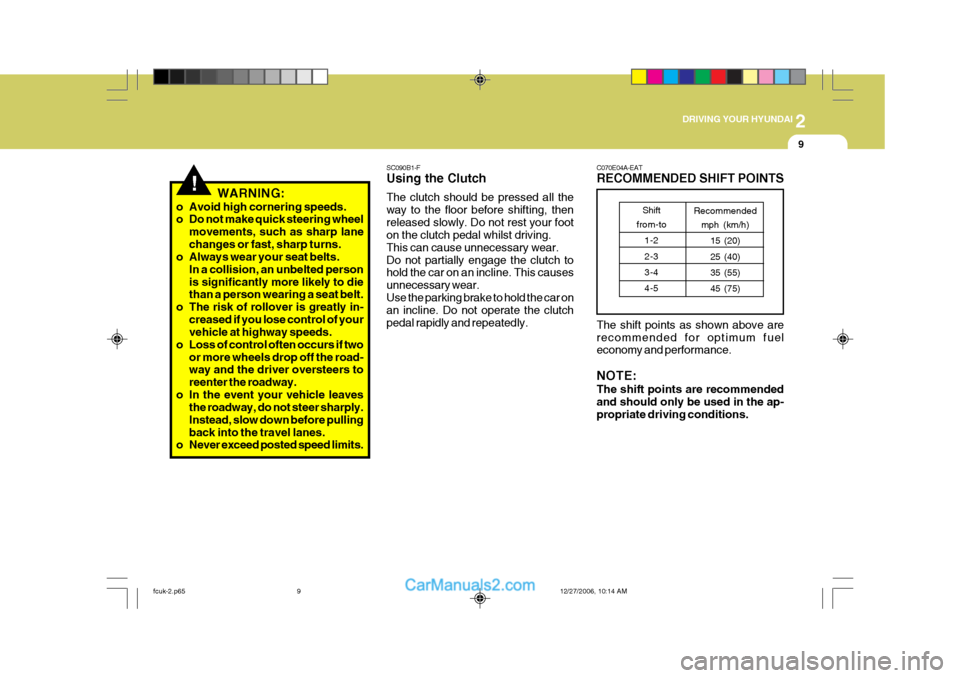
C070E04A-EAT RECOMMENDED SHIFT POINTS The shift points as shown above are recommended for optimum fuel economy and performance. NOTE: The shift points are recommended and should only be used in the ap- propriate driving conditions.Shift
from-to
1-2 2-3 3-4 4-5 Recommended
mph (km/h)
15 (20)25 (40)35 (55) 45 (75)
fcuk-2.p65 12/27/2006, 10:14 AM
9
Page 384 of 490
2 DRIVING YOUR HYUNDAI
10
!
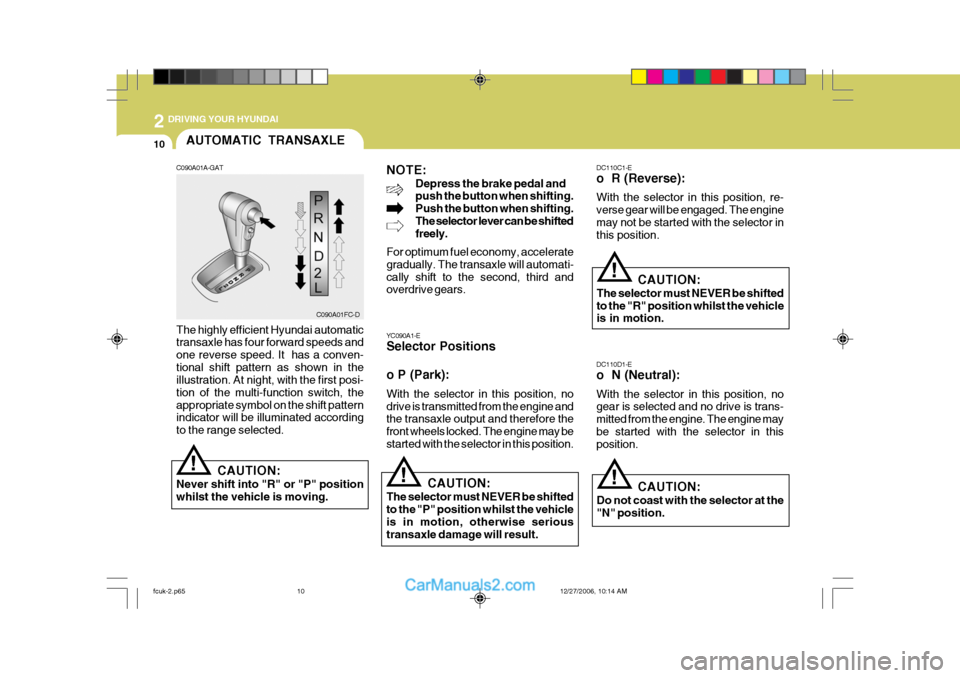
C090A01A-GAT
NOTE:
Depress the brake pedal and push the button when shifting. Push the button when shifting.The selector lever can be shifted freely.
For optimum fuel economy, accelerate gradually. The transaxle will automati-cally shift to the second, third and overdrive gears.
The highly efficient Hyundai automatic transaxle has four forward speeds and one reverse speed. It has a conven-tional shift pattern as shown in the illustration. At night, with the first posi- tion of the multi-function switch, theappropriate symbol on the shift pattern indicator will be illuminated according to the range selected.
CAUTION:
Never shift into "R" or "P" position whilst the vehicle is moving. AUTOMATIC TRANSAXLE
YC090A1-E Selector Positions o P (Park): With the selector in this position, no drive is transmitted from the engine and the transaxle output and therefore the front wheels locked. The engine may bestarted with the selector in this position.
!CAUTION:
The selector must NEVER be shifted to the "P" position whilst the vehicle is in motion, otherwise serioustransaxle damage will result. DC110C1-E o R (Reverse): With the selector in this position, re- verse gear will be engaged. The enginemay not be started with the selector in this position.
!
CAUTION:
The selector must NEVER be shifted to the "R" position whilst the vehicle is in motion.
DC110D1-E o N (Neutral): With the selector in this position, no gear is selected and no drive is trans- mitted from the engine. The engine maybe started with the selector in this position.
! CAUTION:
Do not coast with the selector at the "N" position.
C090A01FC-D
fcuk-2.p65 12/27/2006, 10:14 AM
10
Page 387 of 490
2
DRIVING YOUR HYUNDAI
13
!WARNING:
o Avoid high cornering speeds.
o Do not make quick steering wheel movements, such as sharp lane changes or fast, sharp turns.
o Always wear your seat belts.
In a collision, an unbelted personis significantly more likely to die than a person wearing a seat belt.
o The risk of rollover is greatly in- creased if you lose control of yourvehicle at highway speeds.
o Loss of control often occurs if two or more wheels drop off the road-way and the driver oversteers to reenter the roadway.
o In the event your vehicle leaves the roadway, do not steer sharply.Instead, slow down before pullingback into the travel lanes.
o Never exceed posted speed limits. o Excessive depressing of the
accelerater pedal under the tyresslip condition such as moving out of the mud or fresh snow etc, may cause severe damage to the trans-mission. If this condition exists, it may be adviseable to have the vehicle towed.
o The automatic transaxle may be used
to great effect if the vehicle becomesstuck in snow or mud by allowing the vehicle to be rocked to and fro. The engine speed should be held at ap-proximately 1,000rpm by means of the accelerator pedal and the selec- tor lever moved between the "D" and"R" positions to induce a rocking motion.
o Do not depress the accelerator pedal
with the brakes applied and the se-lector at the "R", "D", "2" or "L" position.
o Turn the overdrive switch on for good fuel economy and smooth driving.But if engine braking is needed in the"D" range or if repeated upshifting and downshifting between the 3rd and 4th gear is needed when climb-ing a gentle slope, it is recommended that the overdrive switch be turned off. Turn the overdrive switch backon immediately afterward.
fcuk-2.p65 12/27/2006, 10:14 AM
13
Page 388 of 490
2 DRIVING YOUR HYUNDAI
14ANTI-LOCK BRAKE SYSTEM (ABS)
SC140B2-E (Not all models) The Anti-Lock Brake System (ABS) is designed to prevent wheel lock-up dur-ing sudden braking or on hazardous road surfaces. The ABS control module monitors the wheel speed and controlsthe pressure applied to each brake. Thus, in emergency situations or on slick roads, ABS will increase vehiclecontrol during braking. NOTE: A click sound may be heard in the engine compartment when the ve- hicle begins to move after the engine is started. These conditions are nor-mal and indicate that the anti-lock brake system (Electronic Stability Program) is functioning properly. During ABS (ESP) operation, a slight pulsation may be felt in the brake pedalwhen the brakes are applied. Also, a noise may be heard in the engine com- partment whilst braking. These condi-tions are normal and indicate that the anti-lock brake system is functioning properly. WARNING:
ABS (ESP) will not prevent accidents due to improper or dangerous driv-ing maneuvers. Even though vehicle control is improved during emer- gency braking, always maintain a safe distance between you and ob- jects ahead. Vehicle speeds should always be reduced during extreme road conditions. The braking distance for cars equipped with an anti-lock braking system may be longer than for those without it, in the following road con- ditions.
o Driving on rough, gravel or snow- covered roads.
o Driving with tyre chains installed.
o Driving on roads where the road surface is pitted or has differentsurface height.
These roads should be driven at reduced speeds. The safety features of an ABS (ESP) equipped vehicle should not be tested by high speed driving or cornering. This could en- danger the safety of yourself or oth- ers.
!
BRAKE TRACTION CON- TROL SYSTEM (BTCS)
C300A01O-EAT (Not all models) On slippery road surfaces, the traction control system (TCS) limits the drive wheels from spinning excessively, thushelping the car to accelerate. It alsoprovides sufficient driving force andsteering performance as the car turns at accelerated speeds. SLIP Control Limits the drive wheels from spinning excessively during starting or whilstmaking accelerated turns on slipperyroads to avoid losing the driving force of the front wheels. Driving hints TCS does not actively apply brakes. Be sure to decelerate the car sufficiently
before entering curves.
fcuk-2.p65 12/27/2006, 10:14 AM
14
Page 390 of 490

2 DRIVING YOUR HYUNDAI
16
!
Factors including speed, road condi- tions and driver steering input can allaffect whether ESP will be effective in preventing a loss of control. It is still your responsibility to drive and cornerat reasonable speeds and to leave a sufficient margin of safety.
CAUTION:
Driving with varying tyre or wheel size may cause the ESP system to malfunction. When replacing tyres, make sure they are the same size asyour original tyres.
WARNING:
Electronic stability program is a driv-ing aid; all normal precautions for driving in inclement weather and on slippery road surfaces should beobserved.
!
ELECTRONIC STABILITY PROGRAM (ESP)
C310A01JM-EAT (Not all models) The Electronic Stability Program (ESP) system is designed to stabilise thevehicle during cornering manuevers. ESP checks where you are steering and where the vehicle is actually going.ESP applies the brakes at individual wheels and intervenes in the engine management system to stabilize thevehicle. The Electronic Stability Program (ESP) system is an electronic system de- signed to help the driver maintain ve- hicle control under adverse conditions.It is not a substitute for safe driving practices. C310A01FC-D
C310B01JM-AAT ESP ON/OFF Mode When the ESP is operating, the ESP indicator in the instrument cluster willblink. If you turn the system off by pressing the ESP switch, the ESP-OFF indica-tor will come on and stay on. In the ESP-OFF mode, the stability control will be deactivated. Adjust your drivingaccordingly. To turn the system back on, press the switch again. The ESP- OFF indicator should go off. NOTE: The ESP mode will automatically be turned ON after the engine is turnedoff and restarted.
fcuk-2.p65
12/27/2006, 10:14 AM
16