key HYUNDAI NEXO 2020 User Guide
[x] Cancel search | Manufacturer: HYUNDAI, Model Year: 2020, Model line: NEXO, Model: HYUNDAI NEXO 2020Pages: 561, PDF Size: 48.42 MB
Page 97 of 561
3-10
If the system repeatedly does not
recognize the coding of the key, it is
recommended that you contact your
HYUNDAI dealer.
Do not attempt to alter this system or
add other devices to it. Electrical
problems could result that may make
your vehicle inoperable.
The transponder in your key is an
important part of the immobilizer
system. It is designed to give
years of trouble-free service, how-
ever you should avoid exposure to
moisture, static electricity and
rough handling. Immobilizer sys-
tem malfunction could occur.Information
This device complies with Part 15 of
the FCC rules.
Operation is subject to the following
three conditions:
1. This device may not cause harmful
interference.
2. This device must accept any inter-
ference received, including interfer-
ence that may cause undesired
operation.
3. Changes or modifications not
expressly approved by the party
responsible for compliance could
void the user's authority to operate
the device.
i
NOTICE
Convenient features of your vehicle
In order to prevent theft of your
vehicle, do not leave spare keys
anywhere in your vehicle. Your
immobilizer password is a cus-
tomer unique password and
should be kept confidential.
WARNING
Page 98 of 561
3-11
Convenient features of your vehicle
D DO
OO
OR
R
L
LO
OC
CK
KS
S
3
Door unlocking from outside
the vehicle
Smart key
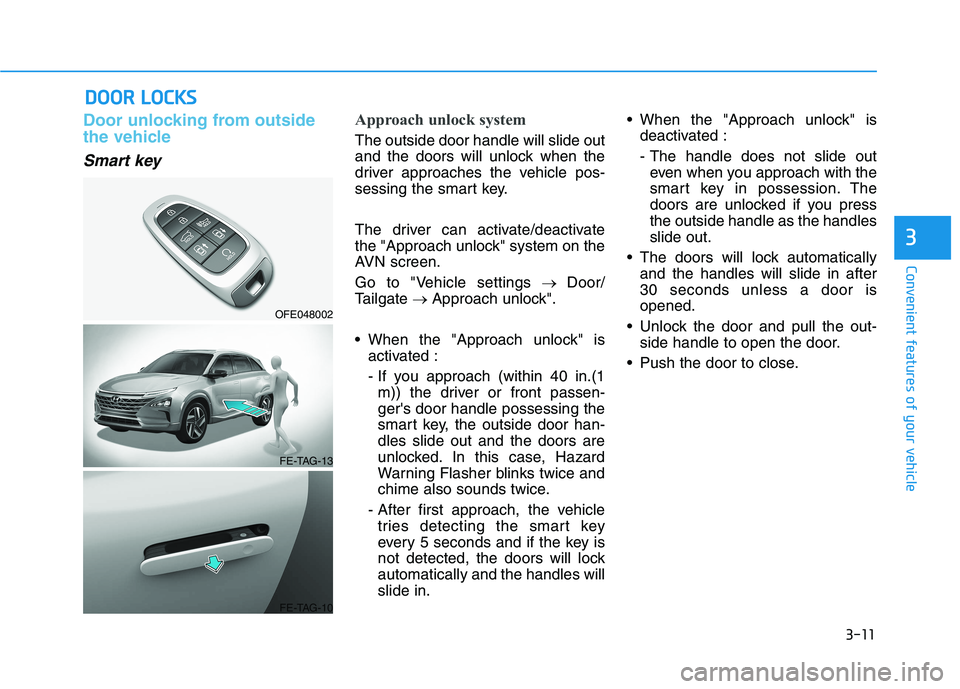
Approach unlock system
The outside door handle will slide out
and the doors will unlock when the
driver approaches the vehicle pos-
sessing the smart key.
The driver can activate/deactivate
the "Approach unlock" system on the
AVN screen.
Go to "Vehicle settings→ Door/
Tailgate→ Approach unlock".
When the "Approach unlock" is
activated :
- If you approach (within 40 in.(1
m)) the driver or front passen-
ger's door handle possessing the
smart key, the outside door han-
dles slide out and the doors are
unlocked. In this case, Hazard
Warning Flasher blinks twice and
chime also sounds twice.
- After first approach, the vehicle
tries detecting the smart key
every 5 seconds and if the key is
not detected, the doors will lock
automatically and the handles will
slide in. When the "Approach unlock" is
deactivated :
- The handle does not slide out
even when you approach with the
smart key in possession. The
doors are unlocked if you press
the outside handle as the handles
slide out.
The doors will lock automatically
and the handles will slide in after
30 seconds unless a door is
opened.
Unlock the door and pull the out-
side handle to open the door.
Push the door to close.
OFE048002
FE-TAG-13
FE-TAG-10
Page 99 of 561
3-12
If the door is locked/unlocked
multiple times in rapid succes-
sion with the smart key, door
lock button or door lock switch,
the system may stop operating
temporarily in order to protect
the circuit. Also, the "Approach
unlock" system may not oper-
ate. Try operation after a suffi-
cient time in case the system
does not operate due to multiple
operations.
"Approach unlock" system is
not operated continuously.
Retry after a certain period of
time when all the doors are
closed.
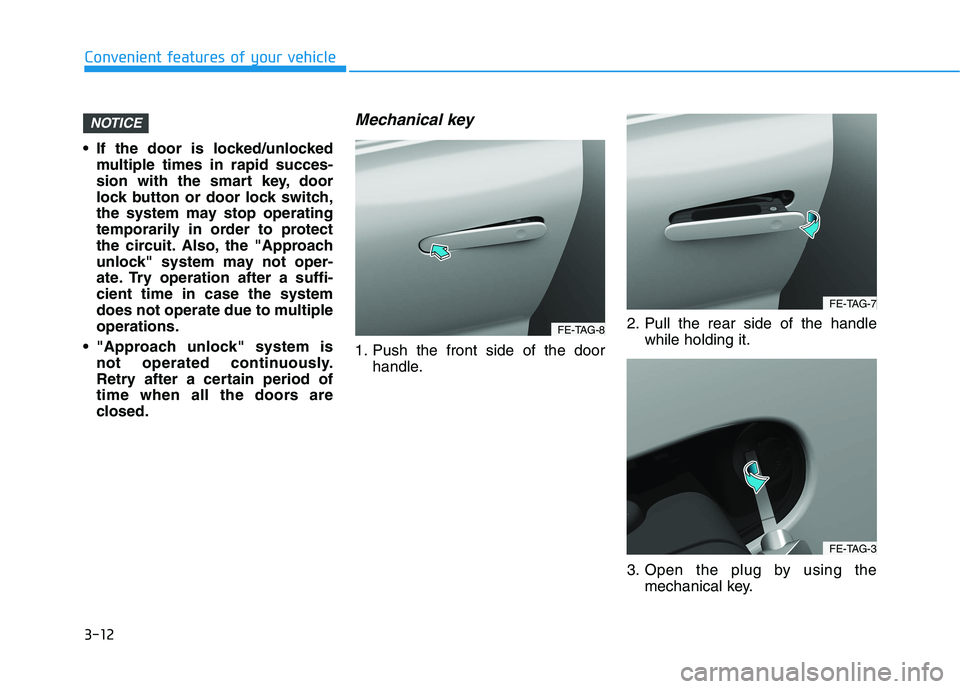
Mechanical key
1. Push the front side of the door
handle.2. Pull the rear side of the handle
while holding it.
3. Open the plug by using the
mechanical key.
NOTICE
Convenient features of your vehicle
FE-TAG-8
FE-TAG-7
FE-TAG-3
Page 100 of 561
3-13
Convenient features of your vehicle
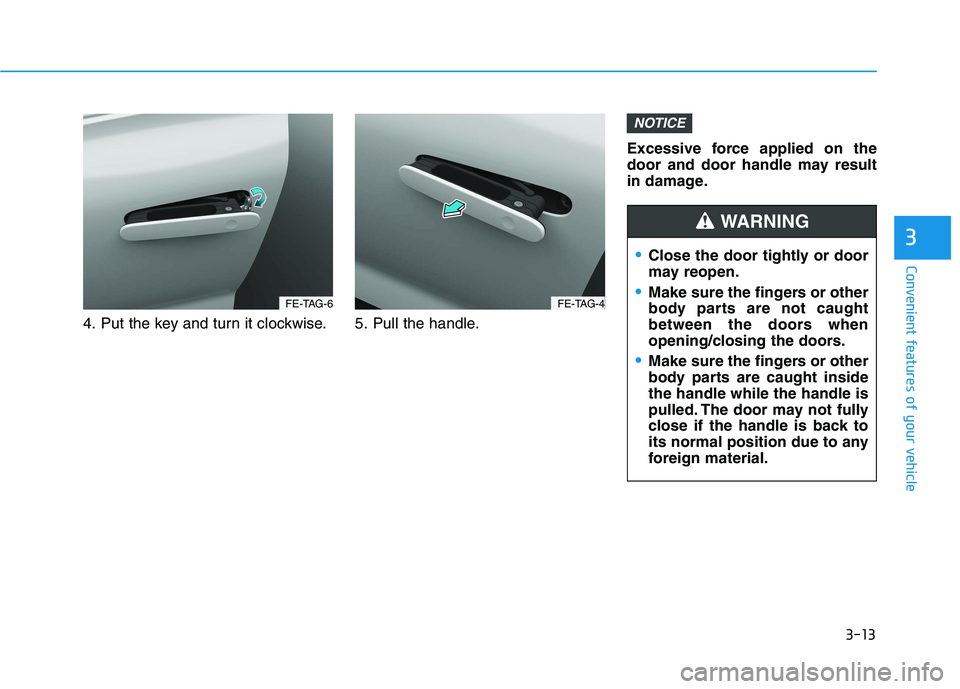
4. Put the key and turn it clockwise. 5. Pull the handle.Excessive force applied on the
door and door handle may result
in damage.
NOTICE
3
FE-TAG-6FE-TAG-4
Close the door tightly or door
may reopen.
Make sure the fingers or other
body parts are not caught
between the doors when
opening/closing the doors.
Make sure the fingers or other
body parts are caught inside
the handle while the handle is
pulled. The door may not fully
close if the handle is back to
its normal position due to any
foreign material.
WARNING
Page 101 of 561
3-14
Convenient features of your vehicle
Door locking from outside the
vehicle
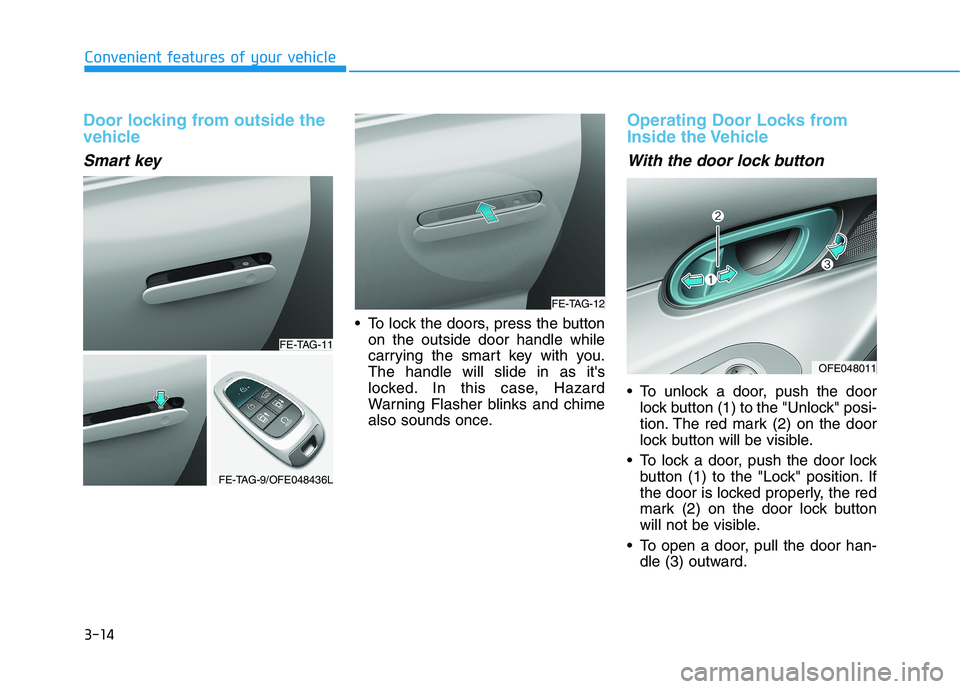
Smart key
To lock the doors, press the button
on the outside door handle while
carrying the smart key with you.
The handle will slide in as it's
locked. In this case, Hazard
Warning Flasher blinks and chime
also sounds once.
Operating Door Locks from
Inside the Vehicle
With the door lock button
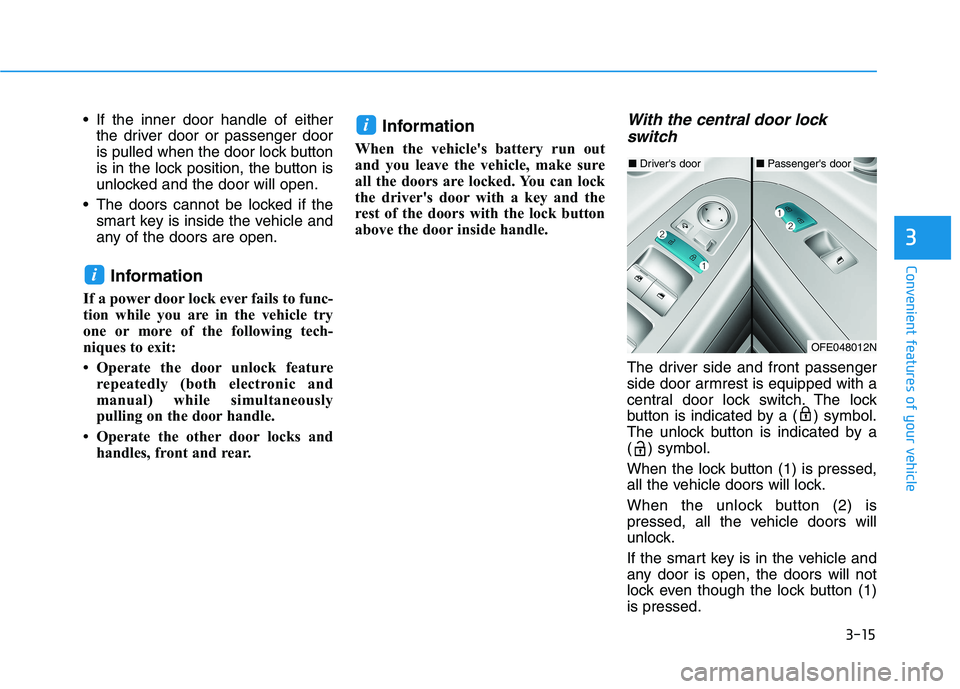
To unlock a door, push the door
lock button (1) to the "Unlock" posi-
tion. The red mark (2) on the door
lock button will be visible.
To lock a door, push the door lock
button (1) to the "Lock" position. If
the door is locked properly, the red
mark (2) on the door lock button
will not be visible.
To open a door, pull the door han-
dle (3) outward.
FE-TAG-11
FE-TAG-9/OFE048436L
FE-TAG-12
OFE048011
Page 102 of 561
3-15
Convenient features of your vehicle
3
If the inner door handle of either
the driver door or passenger door
is pulled when the door lock button
is in the lock position, the button is
unlocked and the door will open.
The doors cannot be locked if the
smart key is inside the vehicle and
any of the doors are open.
Information
If a power door lock ever fails to func-
tion while you are in the vehicle try
one or more of the following tech-
niques to exit:
• Operate the door unlock feature
repeatedly (both electronic and
manual) while simultaneously
pulling on the door handle.
• Operate the other door locks and
handles, front and rear.
Information
When the vehicle's battery run out
and you leave the vehicle, make sure
all the doors are locked. You can lock
the driver's door with a key and the
rest of the doors with the lock button
above the door inside handle.
With the central door lock
switch
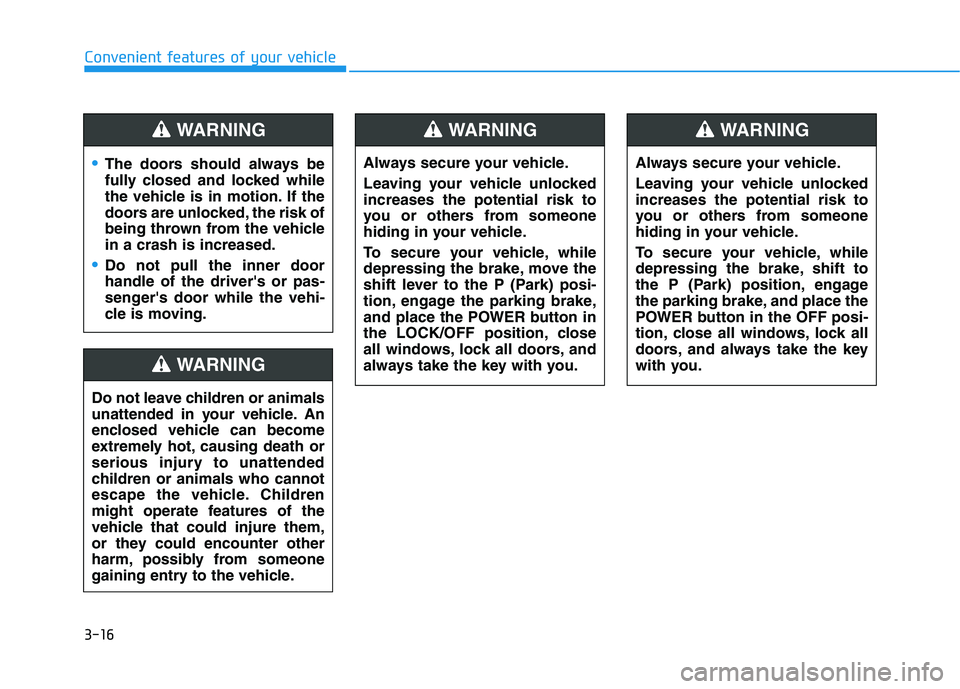
The driver side and front passenger
side door armrest is equipped with a
central door lock switch. The lock
button is indicated by a ( ) symbol.
The unlock button is indicated by a
( ) symbol.
When the lock button (1) is pressed,
all the vehicle doors will lock.
When the unlock button (2) is
pressed, all the vehicle doors will
unlock.
If the smart key is in the vehicle and
any door is open, the doors will not
lock even though the lock button (1)
is pressed.
i
i
■Driver's door■Passenger's door
OFE048012N
Page 103 of 561
3-16
Convenient features of your vehicle
The doors should always be
fully closed and locked while
the vehicle is in motion. If the
doors are unlocked, the risk of
being thrown from the vehicle
in a crash is increased.
Do not pull the inner door
handle of the driver's or pas-
senger's door while the vehi-
cle is moving.
WARNING
Do not leave children or animals
unattended in your vehicle. An
enclosed vehicle can become
extremely hot, causing death or
serious injury to unattended
children or animals who cannot
escape the vehicle. Children
might operate features of the
vehicle that could injure them,
or they could encounter other
harm, possibly from someone
gaining entry to the vehicle.
WARNING
Always secure your vehicle.
Leaving your vehicle unlocked
increases the potential risk to
you or others from someone
hiding in your vehicle.
To secure your vehicle, while
depressing the brake, move the
shift lever to the P (Park) posi-
tion, engage the parking brake,
and place the POWER button in
the LOCK/OFF position, close
all windows, lock all doors, and
always take the key with you.
WARNING
Always secure your vehicle.
Leaving your vehicle unlocked
increases the potential risk to
you or others from someone
hiding in your vehicle.
To secure your vehicle, while
depressing the brake, shift to
the P (Park) position, engage
the parking brake, and place the
POWER button in the OFF posi-
tion, close all windows, lock all
doors, and always take the key
with you.
WARNING
Page 106 of 561
3-19
Convenient features of your vehicle
This system helps to protect your
vehicle and valuables. The horn will
sound and the hazard warning lights
will blink continuously if any of the
following occurs:
- A door is opened without using the
smart key.
- The liftgate is opened without
using the smart key.
- The hood is opened.
The alarm continues for 30 seconds,
then the system resets. To turn off
the alarm, unlock the doors with the
smart key.
The Theft Alarm System automati-
cally sets 30 seconds after you lock
the doors and the liftgate. For the
system to activate, you must lock the
doors and the liftgate from outside
the vehicle with the smart key or by
pressing the button on the outside of
the door handles with the smart key
in your possession.
The hazard warning lights will blink
and the chime will sound once to
indicate the system is armed.Once the security system is set,
opening any door, the liftgate, or the
hood without using the smart key will
cause the alarm to activate.
The Theft Alarm System will not set if
the hood, the liftgate, or any door is
not fully closed. If the system will not
set, check the hood, the liftgate, or
the doors are fully closed.
Do not attempt to alter this system or
add other devices to it.Information
• Do not lock the doors until all pas-
sengers have left the vehicle. If the
remaining passenger leaves the
vehicle when the system is armed,
the alarm will be activated.
• If the vehicle is not disarmed with the
smart key, open the doors by using
the mechanical key and start the
vehicle ( indicator ON) by
directly pressing the POWER button
with the smart key.
• When the system is disarmed but a
door or liftgate is not opened within
30 seconds, the system will be
rearmed.
i
T TH
HE
EF
FT
T-
-A
AL
LA
AR
RM
M
S
SY
YS
ST
TE
EM
M
3
Page 119 of 561
3-32
Convenient features of your vehicle
The mirrors stop moving when
they reach the maximum adjust-
ing angles, but the motor contin-
ues to operate while the switch
is pressed. Do not press the
switch longer than necessary,
because this can damage the
motor.
Do not attempt to adjust the side
view mirrors by hand, because
this can damage the motor.
Folding the side view mirror
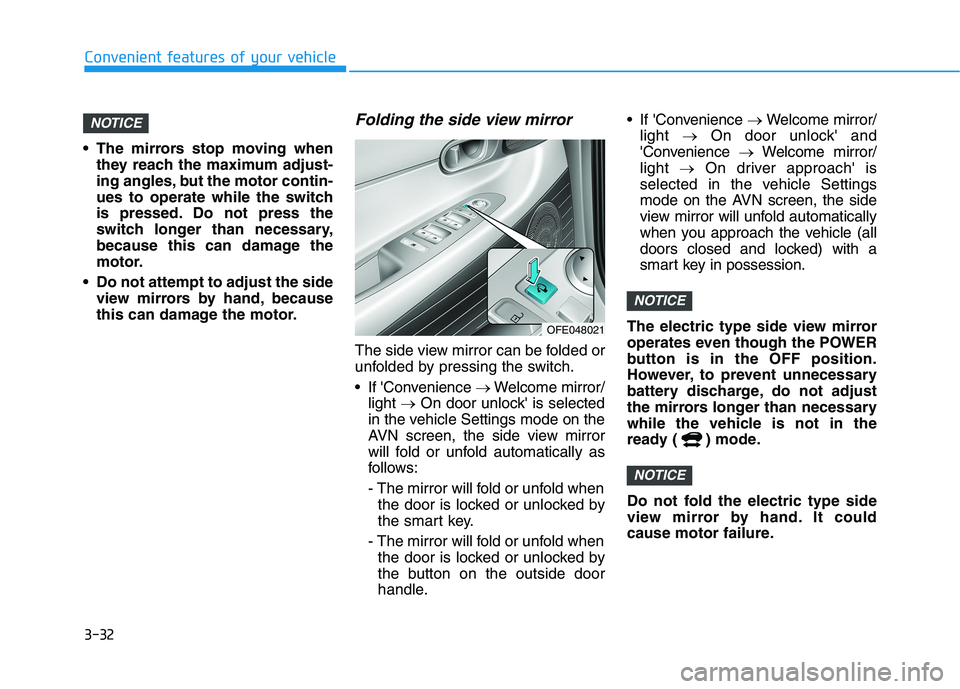
The side view mirror can be folded or
unfolded by pressing the switch.
If 'Convenience →Welcome mirror/
light →On door unlock' is selected
in the vehicle Settings mode on the
AVN screen, the side view mirror
will fold or unfold automatically as
follows:
- The mirror will fold or unfold when
the door is locked or unlocked by
the smart key.
- The mirror will fold or unfold when
the door is locked or unlocked by
the button on the outside door
handle. If 'Convenience →Welcome mirror/
light →On door unlock' and
'Convenience →Welcome mirror/
light →On driver approach' is
selected in the vehicle Settings
mode on the AVN screen, the side
view mirror will unfold automatically
when you approach the vehicle (all
doors closed and locked) with a
smart key in possession.
The electric type side view mirror
operates even though the POWER
button is in the OFF position.
However, to prevent unnecessary
battery discharge, do not adjust
the mirrors longer than necessary
while the vehicle is not in the
ready ( ) mode.
Do not fold the electric type side
view mirror by hand. It could
cause motor failure.
NOTICE
NOTICE
NOTICE
OFE048021
Page 124 of 561
3-37
Convenient features of your vehicle
3
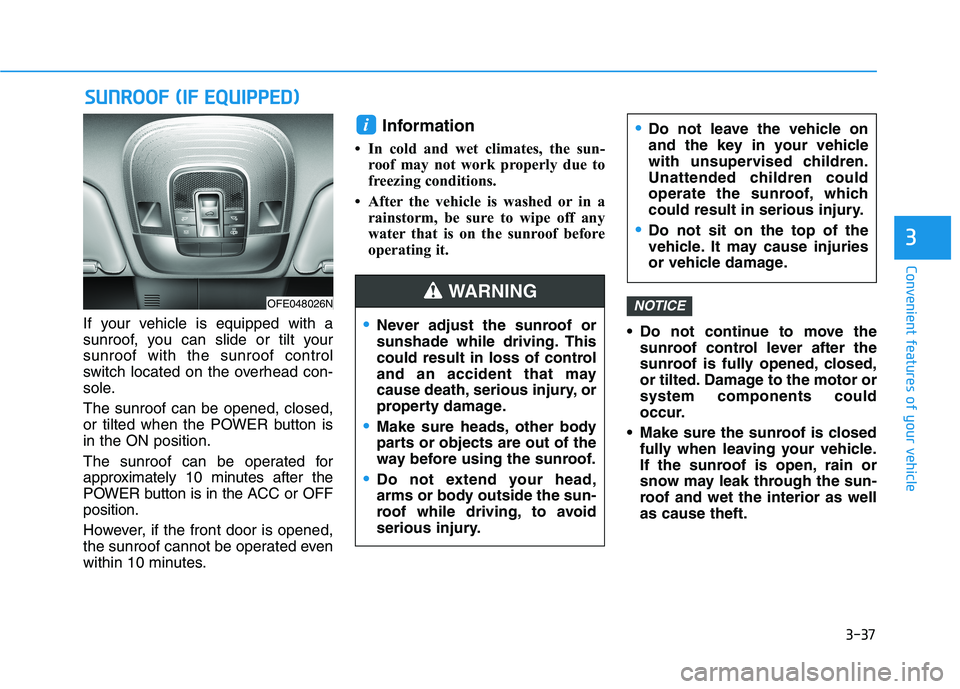
If your vehicle is equipped with a
sunroof, you can slide or tilt your
sunroof with the sunroof control
switch located on the overhead con-
sole.
The sunroof can be opened, closed,
or tilted when the POWER button is
in the ON position.
The sunroof can be operated for
approximately 10 minutes after the
POWER button is in the ACC or OFF
position.
However, if the front door is opened,
the sunroof cannot be operated even
within 10 minutes.
Information
• In cold and wet climates, the sun-
roof may not work properly due to
freezing conditions.
• After the vehicle is washed or in a
rainstorm, be sure to wipe off any
water that is on the sunroof before
operating it.
Do not continue to move the
sunroof control lever after the
sunroof is fully opened, closed,
or tilted. Damage to the motor or
system components could
occur.
Make sure the sunroof is closed
fully when leaving your vehicle.
If the sunroof is open, rain or
snow may leak through the sun-
roof and wet the interior as well
as cause theft.
NOTICE
i
S SU
UN
NR
RO
OO
OF
F
(
(I
IF
F
E
EQ
QU
UI
IP
PP
PE
ED
D)
)
OFE048026N
Never adjust the sunroof or
sunshade while driving. This
could result in loss of control
and an accident that may
cause death, serious injury, or
property damage.
Make sure heads, other body
parts or objects are out of the
way before using the sunroof.
Do not extend your head,
arms or body outside the sun-
roof while driving, to avoid
serious injury.
Do not leave the vehicle on
and the key in your vehicle
with unsupervised children.
Unattended children could
operate the sunroof, which
could result in serious injury.
Do not sit on the top of the
vehicle. It may cause injuries
or vehicle damage.
WARNING