ECO mode HYUNDAI NEXO 2023 Owner's Manual
[x] Cancel search | Manufacturer: HYUNDAI, Model Year: 2023, Model line: NEXO, Model: HYUNDAI NEXO 2023Pages: 558, PDF Size: 35.01 MB
Page 186 of 558
3-99
Convenient features of your vehicle
3
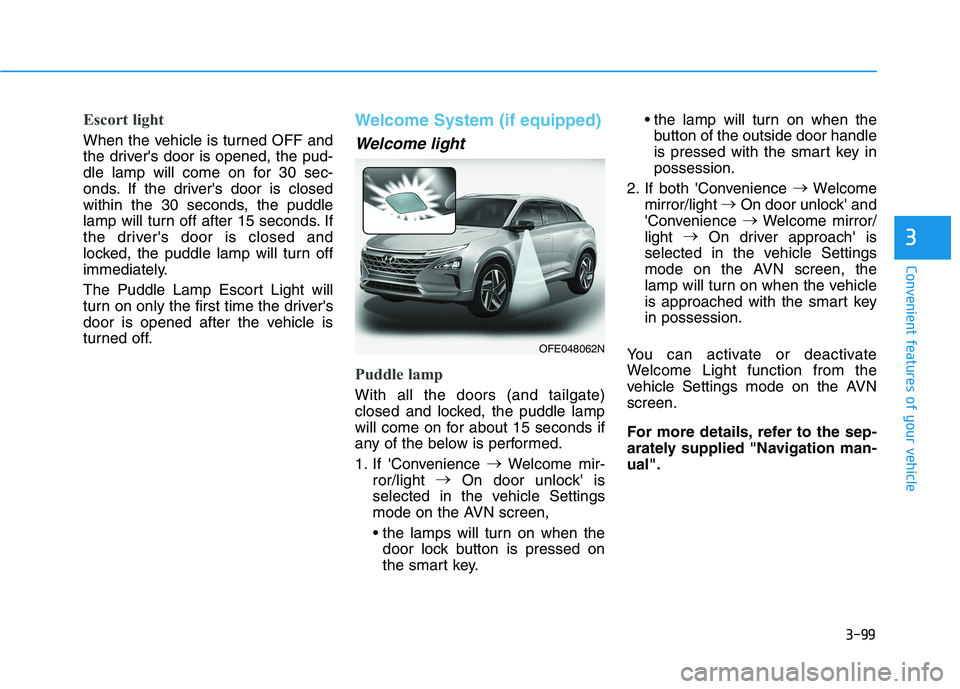
Escort light
When the vehicle is turned OFF and
the driver's door is opened, the pud-
dle lamp will come on for 30 sec-
onds. If the driver's door is closed
within the 30 seconds, the puddle
lamp will turn off after 15 seconds. If
the driver's door is closed and
locked, the puddle lamp will turn off
immediately.
The Puddle Lamp Escort Light will
turn on only the first time the driver's
door is opened after the vehicle is
turned off.
Welcome System (if equipped)
Welcome light
Puddle lamp
With all the doors (and tailgate)
closed and locked, the puddle lamp
will come on for about 15 seconds if
any of the below is performed.
1. If 'Convenience
Welcome mir-
ror/light
On door unlock' is
selected in the vehicle Settings
mode on the AVN screen,
door lock button is pressed on
the smart key. the lamp will turn on when the
button of the outside door handle
is pressed with the smart key inpossession.
2. If both 'Convenience
Welcome
mirror/light
On door unlock' and
'Convenience
Welcome mirror/
light
On driver approach' is
selected in the vehicle Settings
mode on the AVN screen, the
lamp will turn on when the vehicle
is approached with the smart keyin possession.
You can activate or deactivate
Welcome Light function from the
vehicle Settings mode on the AVNscreen.
For more details, refer to the sep-
arately supplied "Navigation man-ual".
OFE048062N
Page 216 of 558
3-129
Convenient features of your vehicle
3
If the driver releases the button thevehicle will stop and the assist will
stop temporarily. Press and hold
the button again to resume the
operation.
❈ You will hear frequent beep
sounds if the driver gets off the
vehicle after setting the Remote
Parking mode.
❈ Press the moving forward or back-
ward button again after checkingthe distance (within about 3 ~ 5 m
(10 ~ 16 ft.)) from the vehicles if
the vehicle didn't move after
pressing and holding the smart
key button for about 5 seconds.7. Remote smart parking com-
plete
When the parking is complete, the
message is displayed on the AVN
screen and the vehicle is automati-
cally turned off. Drivers always
should check whether the door, win-
dow and sunroof are closed and the
door is locked.
When parking is complete:
- The parking complete sound (fre-quent beep) is generated.
- The gear P (Park) and Electronic Parking Brake (EPB) are engaged
automatically.
❈ Release the moving forward/back-
ward button on the smart key.
❈ The parking may complete bump-
ing on the stopper.
❈ When parking is complete, check
the surrounding conditions.Always check for obstacles
around your vehicle beforedriving.
The function may be can-
celled if you attach something
(cover, etc.) to the steeringwheel.
Make sure all the passengers
exit the vehicle when the
Remote Smart Parking isassisted.
Make sure all the smart keys
are outside the vehicle.
The smart key detection
range from the vehicle may
vary depending on the sur-
rounding environment
(indoor/outdoor, strong elec-tric field area).
The smart key detection
range may change as the
vehicle moves. Maintain an
appropriate distance from the
vehicle.
CAUTION
Page 220 of 558
3-133
Convenient features of your vehicle
3
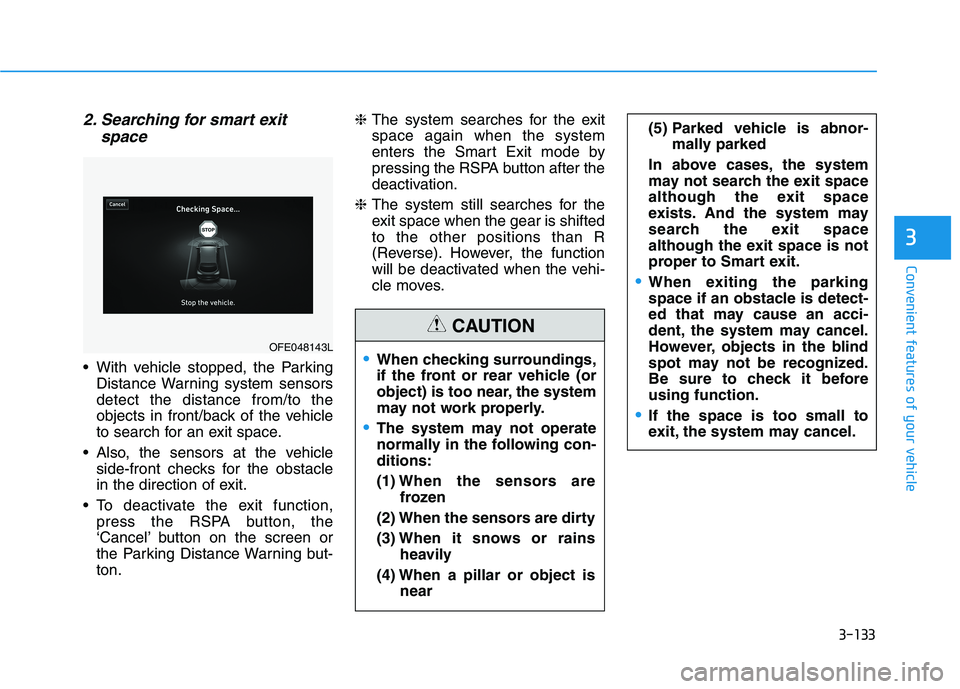
2. Searching for smart exitspace
With vehicle stopped, the ParkingDistance Warning system sensors detect the distance from/to the
objects in front/back of the vehicle
to search for an exit space.
Also, the sensors at the vehicle side-front checks for the obstacle
in the direction of exit.
To deactivate the exit function, press the RSPA button, the
‘Cancel’ button on the screen or
the Parking Distance Warning but-ton. ❈
The system searches for the exitspace again when the system
enters the Smart Exit mode by
pressing the RSPA button after the
deactivation.
❈ The system still searches for the
exit space when the gear is shiftedto the other positions than R
(Reverse). However, the function
will be deactivated when the vehi-
cle moves.
OFE048143LWhen checking surroundings,
if the front or rear vehicle (or
object) is too near, the system
may not work properly.
The system may not operate
normally in the following con-ditions: (1) When the sensors are
frozen
(2) When the sensors are dirty(3) When it snows or rains
heavily
(4) When a pillar or object is near
(5) Parked vehicle is abnor-mally parked
In above cases, the system
may not search the exit space
although the exit space
exists. And the system may
search the exit space
although the exit space is not
proper to Smart exit.
When exiting the parking
space if an obstacle is detect-
ed that may cause an acci-
dent, the system may cancel.
However, objects in the blind
spot may not be recognized.
Be sure to check it beforeusing function.
If the space is too small to
exit, the system may cancel.
CAUTION
Page 239 of 558
3-152
Convenient features of your vehicle
Adjusting the driver and passenger
side temperature individually
Press the "SYNC" button again to
operate the driver and passenger
side temperature individually. The
button indicator will turn off.
Temperature conversion
If the battery has been discharged or
disconnected, the temperature mode
display will reset to Fahrenheit.
To change the temperature unit from °C to °F or °F to °C:
- Press the AUTO button while press-ing the OFF button on the climate
control unit for 3 seconds.
- Go to General settings mode Unit
Temperature in the AVN display.
The temperature unit on both the
cluster LCD display and climate con-
trol screen will change.
Air intake control (8)
The air intake control button is used
to select either Fresh mode (outsideair) or Recirculation mode (cabin air).
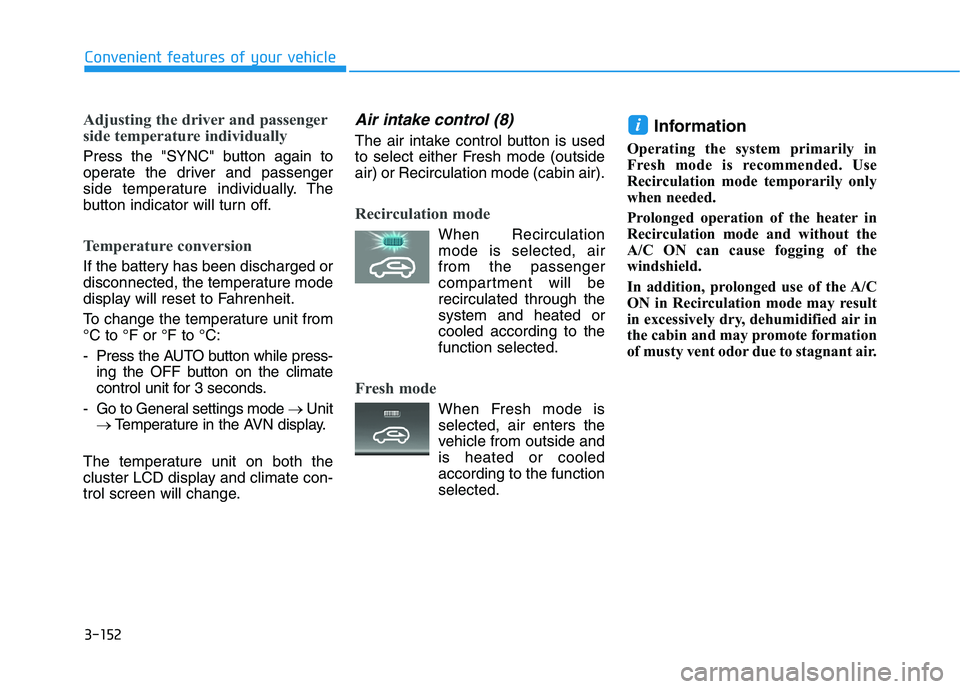
Recirculation mode
When Recirculation mode is selected, air from the passenger
compartment will berecirculated through thesystem and heated or
cooled according to thefunction selected.
Fresh mode
When Fresh mode is selected, air enters the
vehicle from outside andis heated or cooled
according to the functionselected. Information
Operating the system primarily in
Fresh mode is recommended. Use
Recirculation mode temporarily only
when needed.
Prolonged operation of the heater in
Recirculation mode and without the
A/C ON can cause fogging of the
windshield.
In addition, prolonged use of the A/C
ON in Recirculation mode may result
in excessively dry, dehumidified air in
the cabin and may promote formation
of musty vent odor due to stagnant air.
i
Page 247 of 558
3-160
Convenient features of your vehicle
Auto Defogging System
(Additional Feature with
Automatic Temperature
Control System) (if equipped)
Auto defogging helps reduce the pos-
sibility of fogging up the inside of the
windshield by automatically sensingthe moisture on inside the windshield.
The auto defogging system operates when the heater or air conditioning ison.Information
The auto defogging system may not
operate normally, when the outside
temperature is below -10°C (14°F). When the Auto Defogging
System operates, the indi-
cator will illuminate.
If a high amount of humidity is
detected in the vehicle, the Auto
Defogging System will be enabled.
The following steps will be performedautomatically:
Step 1) The A/C button will turn ON.
Step 2) The air intake control will change to Fresh mode.
Step 3) The mode will be changed to defrost to direct airflow to the windshield.
Step 4) The fan speed will be set to MAX.
If the air conditioning is off or recircu-
lated air position is manually select-
ed while Auto Defogging System is
ON, the Auto Defogging System
Indicator will blink 3 times to signal
that the manual operation has beencanceled.
To cancel or reset the
Auto Defogging System
Press the front windshield defroster
button for 3 seconds when the
POWER button is in the ON position.
When the Auto Defogging System iscanceled, the ADS OFF symbol will
blink 3 times and ADS OFF will be
displayed on the climate control
information screen.
When the Auto Defogging System is
reset, the ADS OFF symbol will blink6 times without a signal.
i
Page 249 of 558
3-162
Convenient features of your vehicle
Automatic Ventilation (if equipped)
When the POWER button is in the
ON position or when the vehicle is in
the ready ( ) mode and tempera-
ture is below 15°C (59°F) with therecirculated air position selected
more than five minutes, the air intakeposition will automatically change tothe outside (fresh) air position.
To cancel or reset the Automatic
Ventilation
When the air conditioning system is
on, select Face Level mode and
press the recirculation mode button
five times within three seconds while
pressing A/C button.
When the Automatic Ventilation fea-
ture is enabled, the recirculation but-
ton LED indicator will blink 6 times.
When the Automatic Ventilation fea-
ture is disabled, the recirculation but-
ton LED indicator will blink 3 times.
Sunroof Inside Air
Recirculation (if equipped)
When the heater or air conditioning system is on with the sunroofopened, the fresh mode will be auto-
matically selected. If you press the
recirculation mode button with thesunroof open, recirculation mode
activate but will only remain enabled
for 3 minutes. After 3 minutes the air
intake control will revert back to
Fresh mode. When the sunroof is closed, the air
intake position will return to the orig-
inal position that was selected.
CCLLIIMM AATTEE CC OO NNTTRR OO LL AA DDDDIITT IIOO NNAALL FF EE AA TTUU RREESS
Page 257 of 558
3-170
Convenient features of your vehicle
To charge a cellular phone
The wireless cellular phone charging
system charges only the Qi-enabled
cellular phones ( ). Read the label
on the cellular phone accessory
cover or visit your cellular phone
manufacturer's website to check
whether your cellular phone supports
the Qi technology.
The wireless charging process starts
when you put a Qi-enabled cellularphone on the wireless charging unit.
1. Remove other items, including thesmart key, from the wireless charg-
ing unit. If not, the wireless charg-
ing process may be interrupted.Place the cellular phone on the
center of the charging pad ( ).
2. The indicator light is orange when the cellular phone is charging. The
indicator light turns green when
phone charging is complete.
3. You can turn ON or OFF the wire- less charging function in the
Vehicle Settings mode on the AVN
screen. For further information,
refer to the separately supplied
"Navigation manual". If your cellular phone is not charging:
- Slightly change the position of the
cellular phone on the charging pad.
- Make sure the indicator light is orange.
The indicator light will blink orange for10 seconds if there is a malfunction inthe wireless charging system.
In this case, temporarily stop the
charging process, and re-attempt to
charge your cellular phone again.
The system warns you with a mes-
sage on the LCD display if the cellularphone is still on the wireless charging
unit after the POWER button is in theOFF position and the front door isopened.
Information
For some manufacturer's cellular
phones, the system may not warn you
even though the cellular phone is left
on the wireless charging unit. This is
due to the particular characteristic of
the cellular phone and not a malfunc-
tion of the wireless charging. The wireless cellular phone
charging system may not sup-
port certain cellular phones,
which are not verified for the Qi
specification ( ).
When placing your cellular phone on the charging mat,
position the phone in the middle
of the mat for optimal charging
performance. If your cell phone
is off to the side, the charging
rate may be less and in some
cases the cell phone may experi-ence higher heat conduction.
In some cases, the wireless charging may stop temporarily
when the Smart Key is used,
either when starting the vehicle or
locking/unlocking the doors, etc.
When charging certain cellular phones, the charging indicator
may not change to green when
the cell phone is fully charged.
NOTICE
i
Page 266 of 558
4-3
Infotainment System
4
Steering Wheel Audio Control
Do not operate multiple audio
remote control buttons simultane-
ously.
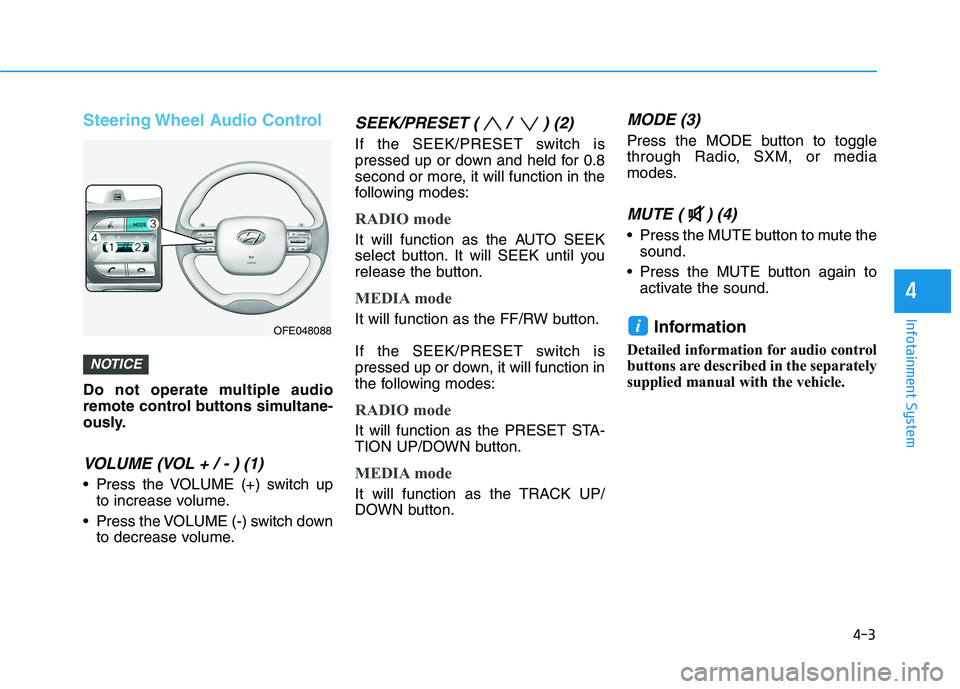
VOLUME (VOL + / - ) (1)
Press the VOLUME (+) switch upto increase volume.
Press the VOLUME (-) switch down to decrease volume.
SEEK/PRESET ( / ) (2)
If the SEEK/PRESET switch is
pressed up or down and held for 0.8
second or more, it will function in the
following modes:
RADIO mode
It will function as the AUTO SEEK
select button. It will SEEK until you
release the button.
MEDIA mode
It will function as the FF/RW button.
If the SEEK/PRESET switch is
pressed up or down, it will function in
the following modes:
RADIO mode
It will function as the PRESET STA-
TION UP/DOWN button.
MEDIA mode
It will function as the TRACK UP/
DOWN button.
MODE (3)
Press the MODE button to toggle
through Radio, SXM, or media
modes.
MUTE ( ) (4)
Press the MUTE button to mute thesound.
Press the MUTE button again to activate the sound.
Information
Detailed information for audio control
buttons are described in the separately
supplied manual with the vehicle.
i
NOTICE
OFE048088
Page 268 of 558
Driving your vehicle
5
Before Driving ........................................................5-4Before Entering the Vehicle ...........................................5-4
Before Starting ..................................................................5-4
Power Button..........................................................5-6 POWER Button Positions.................................................5-7
Starting the Vehicle ..........................................................5-9
Turning Off the Vehicle .................................................5-10
Reduction Gear.....................................................5-11 Reduction Gear Operation ............................................5-11
Parking ...............................................................................5-13
LCD Display Messages ...................................................5-13
Good Driving Practices ..................................................5-16
Paddle Shifter (Regenerative Braking
Control)..................................................................5-17
Braking System ....................................................5-18 Power Brakes ...................................................................5-18
Disc Brake Wear Indicator ............................................5-19
Electronic Parking Brake (EPB)...................................5-19
Auto Hold ..........................................................................5-25
Anti-lock Brake System (ABS) ....................................5-29
Electronic Stability Control (ESC)................................5-31
Vehicle Stability Management (VSM).........................5-34
Hill-Start Assist Control (HAC) ....................................5-36
Good Braking Practices .................................................5-36 Drive Mode Integrated Control System ............5-37
Drive Mode Change Alert..............................................5-38
ECO Mode Climate Control ...........................................5-38
Forward Collision-Avoidance Assist (FCA)
System ...................................................................5-39 System Setting and Activation.....................................5-39
FCA Warning Message and System Control ............5-41
FCA Sensor (Front Radar/Front View Camera).......5-44
System Malfunction .......................................................5-46
Limitations of the System .............................................5-47
Blind-Spot Collision Warning/
Blind-Spot Collision-Avoidance Assist .............5-53 System Description .........................................................5-53
System Setting and Activation.....................................5-54
Warning and System Control .......................................5-57
Detecting Sensor (Front View Camera and
Rear Corner Radar) ........................................................5-59 Limitations of the System .............................................5-62
Rear Cross-traffic Collision Warning (RCCW)/
Rear Cross-traffic Collision-Avoidance Assist
(RCCA) ...................................................................5-67 System Description .........................................................5-67
System Setting and Activation.....................................5-68
Warning and System Control .......................................5-69
Limitations of the System .............................................5-73
Page 276 of 558
5-9
Driving your vehicle
5
Starting the VehicleInformation
The vehicle will start by pressing the POWER button, only when the
smart key is in the vehicle.
Even if the smart key is in the vehi- cle, and when it is far away from the
driver, the vehicle may not start.
When the POWER button is in the ACC or ON position, any door is
open, the system checks for the
smart key. When the smart key is
not in the vehicle, the " " indica-
tor will blink and the warning "Key
not in vehicle" will come on. When
all doors are closed, the chime will
also sound for about 5 seconds.
Keep the smart key in the vehicle
when in the ACC position or if the
vehicle is in the ready ( ) mode. 1. Always carry the smart key with
you.
2. Make sure the parking brake is applied.
3. Make sure the gear is in P (Park).
4. Depress the brake pedal.
5. Press the POWER button. If the vehicle starts, the " " indicator will come on.
Information
Always start the vehicle with your foot on the brake pedal.
If ambient temperature is low, the " " indicator may remain illumi-
nated longer than the normal amount
of time.
i
i
Always wear appropriate shoes
when operating your vehicle.
Unsuitable shoes, such as high
heels, ski boots, sandals, flip-
flops, etc., may interfere with
your ability to use the brakeand accelerator pedals.
Do not start the vehicle with the accelerator pedal depressed.
The vehicle can move and lead to an accident.
WARNING