sensor HYUNDAI PALISADE 2021 Owner's Guide
[x] Cancel search | Manufacturer: HYUNDAI, Model Year: 2021, Model line: PALISADE, Model: HYUNDAI PALISADE 2021Pages: 612, PDF Size: 33.36 MB
Page 362 of 612
5-53
Driving your vehicle
5
To Deactivate the ISG System
Press the ISG OFF button to deac-
tivate the ISG system. Then, the
ISG OFF button indicator illumi-
nates.
Press the ISG OFF button again to
reactivate the ISG system. Then,
the ISG OFF button indicator turns
OFF.
ISG System Malfunction
The ISG system may not operate:
When there is a malfunction with the
ISG sensors or the ISG system.
The followings occur, when there is
a malfunction with the ISG system:
The auto stop indicator ( ) will
blink in yellow on the instrument
cluster.
The light on the ISG OFF button
will illuminate.
Information
• When you cannot turn OFF the ISG
OFF button indicator by pressing the
ISG OFF button, or when the mal-
function with the ISG system per-
sists, contact an authorized
HYUNDAI dealer.
• You can turn off the ISG OFF but-
ton indicator by driving over 50
mph (80 km/h) for up to 2 hours
with the fan speed below the 2nd
position. If the ISG OFF button
indicator remains ON, contact an
authorized HYUNDAI dealer.
i
When the engine is in auto stop
mode, the engine may restart.
Before leaving the vehicle or
checking the engine compart-
ment, stop the engine placing
the ignition switch to the
LOCK/OFF position or remove
the ignition key.
WARNING
Page 363 of 612
5-54
Driving your vehicle
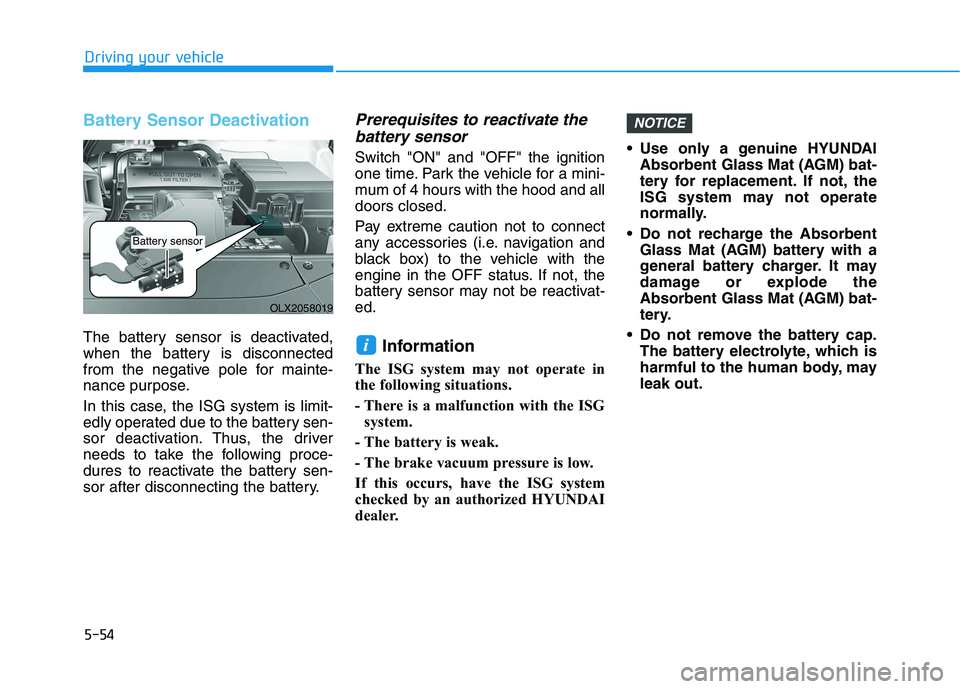
Battery Sensor Deactivation
The battery sensor is deactivated,
when the battery is disconnected
from the negative pole for mainte-
nance purpose.
In this case, the ISG system is limit-
edly operated due to the battery sen-
sor deactivation. Thus, the driver
needs to take the following proce-
dures to reactivate the battery sen-
sor after disconnecting the battery.
Prerequisites to reactivate the
battery sensor
Switch "ON" and "OFF" the ignition
one time. Park the vehicle for a mini-
mum of 4 hours with the hood and all
doors closed.
Pay extreme caution not to connect
any accessories (i.e. navigation and
black box) to the vehicle with the
engine in the OFF status. If not, the
battery sensor may not be reactivat-
ed.
Information
The ISG system may not operate in
the following situations.
- There is a malfunction with the ISG
system.
- The battery is weak.
- The brake vacuum pressure is low.
If this occurs, have the ISG system
checked by an authorized HYUNDAI
dealer. Use only a genuine HYUNDAI
Absorbent Glass Mat (AGM) bat-
tery for replacement. If not, the
ISG system may not operate
normally.
Do not recharge the Absorbent
Glass Mat (AGM) battery with a
general battery charger. It may
damage or explode the
Absorbent Glass Mat (AGM) bat-
tery.
Do not remove the battery cap.
The battery electrolyte, which is
harmful to the human body, may
leak out.
NOTICE
i
OLX2058019
Battery sensor
Page 372 of 612
5-63
Driving your vehicle
5
The Forward Collision-Avoidance
Assist (FCA) system is designed to
help detect and monitor the vehicle
ahead or help detect a pedestrian in
the roadway through radar signals
and camera recognition to warn the
driver that a collision is imminent,
and if necessary, apply emergency
braking.System Setting and Operation
System setting
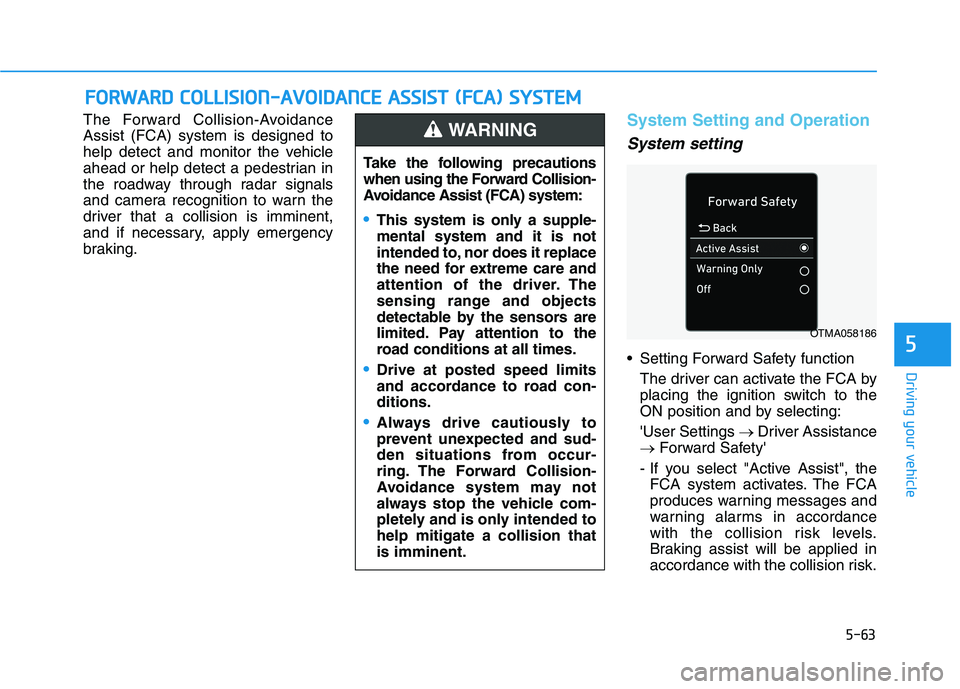
Setting Forward Safety function
The driver can activate the FCA by
placing the ignition switch to the
ON position and by selecting:
'User Settings →Driver Assistance
→Forward Safety'
- If you select "Active Assist", the
FCA system activates. The FCA
produces warning messages and
warning alarms in accordance
with the collision risk levels.
Braking assist will be applied in
accordance with the collision risk.
F FO
OR
RW
WA
AR
RD
D
C
CO
OL
LL
LI
IS
SI
IO
ON
N-
-A
AV
VO
OI
ID
DA
AN
NC
CE
E
A
AS
SS
SI
IS
ST
T
(
(F
FC
CA
A)
)
S
SY
YS
ST
TE
EM
M
Take the following precautions
when using the Forward Collision-
Avoidance Assist (FCA) system:
This system is only a supple-
mental system and it is not
intended to, nor does it replace
the need for extreme care and
attention of the driver. The
sensing range and objects
detectable by the sensors are
limited. Pay attention to the
road conditions at all times.
Drive at posted speed limits
and accordance to road con-
ditions.
Always drive cautiously to
prevent unexpected and sud-
den situations from occur-
ring. The Forward Collision-
Avoidance system may not
always stop the vehicle com-
pletely and is only intended to
help mitigate a collision that
is imminent.
WARNING
OTMA058186
Page 377 of 612
5-68
Driving your vehicle
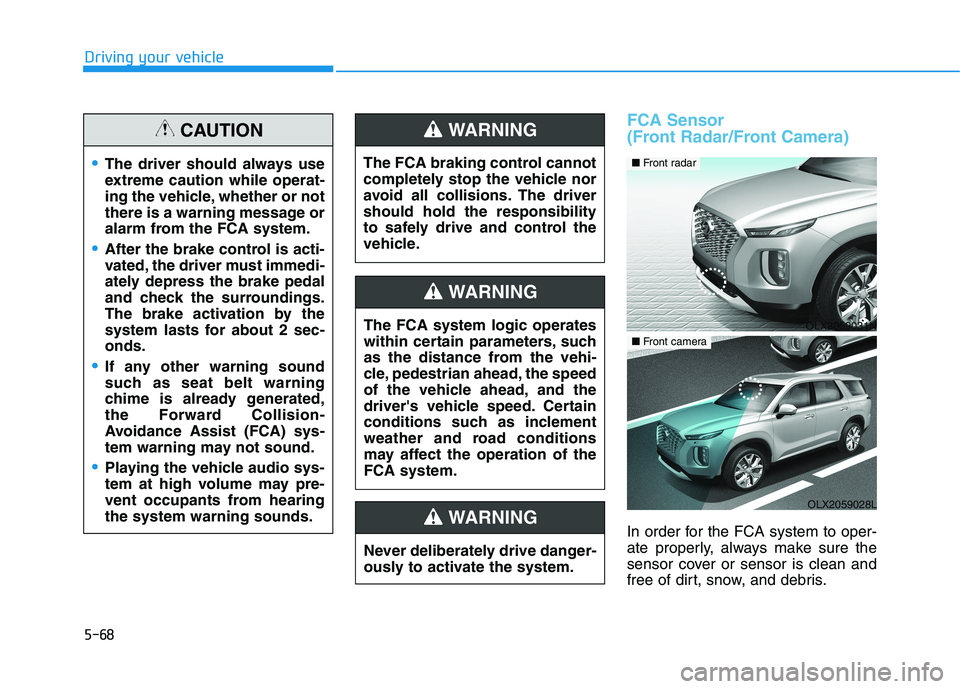
FCA Sensor
(Front Radar/Front Camera)
In order for the FCA system to oper-
ate properly, always make sure the
sensor cover or sensor is clean and
free of dirt, snow, and debris.
The driver should always use
extreme caution while operat-
ing the vehicle, whether or not
there is a warning message or
alarm from the FCA system.
After the brake control is acti-
vated, the driver must immedi-
ately depress the brake pedal
and check the surroundings.
The brake activation by the
system lasts for about 2 sec-
onds.
If any other warning sound
such as seat belt warning
chime is already generated,
the Forward Collision-
Avoidance Assist (FCA) sys-
tem warning may not sound.
Playing the vehicle audio sys-
tem at high volume may pre-
vent occupants from hearing
the system warning sounds.
CAUTION
The FCA system logic operates
within certain parameters, such
as the distance from the vehi-
cle, pedestrian ahead, the speed
of the vehicle ahead, and the
driver's vehicle speed. Certain
conditions such as inclement
weather and road conditions
may affect the operation of the
FCA system.
WARNING
The FCA braking control cannot
completely stop the vehicle nor
avoid all collisions. The driver
should hold the responsibility
to safely drive and control the
vehicle.
WARNING
Never deliberately drive danger-
ously to activate the system.
WARNING
OLX2059031N
■ Front radar
OLX2059028L
■ Front camera
Page 378 of 612
5-69
Driving your vehicle
5
Dirt, snow, or foreign substances on
the sensor cover or sensor may
adversely affect the sensing perform-
ance of the sensor.
Do not apply license plate frame
or foreign objects such as a
bumper sticker or a bumper
guard near the sensor. Doing so
may adversely affect the sens-
ing performance of the radar.
Always keep the sensor and
cover clean and free of dirt and
debris.
Use only a soft cloth to wash the
vehicle. Do not spray pressur-
ized water directly on the sensor
or sensor cover.
Be careful not to apply unneces-
sary force on the sensor or sen-
sor cover. If the sensor is
forcibly moved out of proper
alignment, the FCA system may
not operate correctly. In this
case, a warning message may
not be displayed. Have the vehi-
cle inspected by an authorized
HYUNDAI dealer. If the front bumper becomes
damaged in the area around the
sensor, the FCA system may not
operate properly. Have the vehi-
cle inspected by an authorized
HYUNDAI dealer.
Use only genuine HYUNDAI
parts to repair or replace a dam-
aged sensor or sensor cover. Do
not apply paint to the sensor
cover.
NEVER install any accessories
or stickers on the front wind-
shield, or tint the front wind-
shield.
NEVER place any reflective
objects (i.e. white paper, mirror)
over the crash pad. Any light
reflection may prevent the sys-
tem from functioning properly.
Pay extreme caution to keep the
camera dry.
NEVER disassemble the camera
assembly, or apply any impact
on the camera assembly. If the sensor is forcibly moved
out of proper alignment, the FCA
system may not operate correct-
ly. In this case, a warning mes-
sage may not be displayed. Have
the vehicle inspected by an
authorized HYUNDAI dealer.
Information
Have the system checked by an
authorized HYUNDAI dealer when:
• The windshield glass is replaced.
• The radar sensor or cover gets dam-
aged or replaced.
i
NOTICE
NOTICE
Page 379 of 612
5-70
Driving your vehicle
Warning message and warning
light
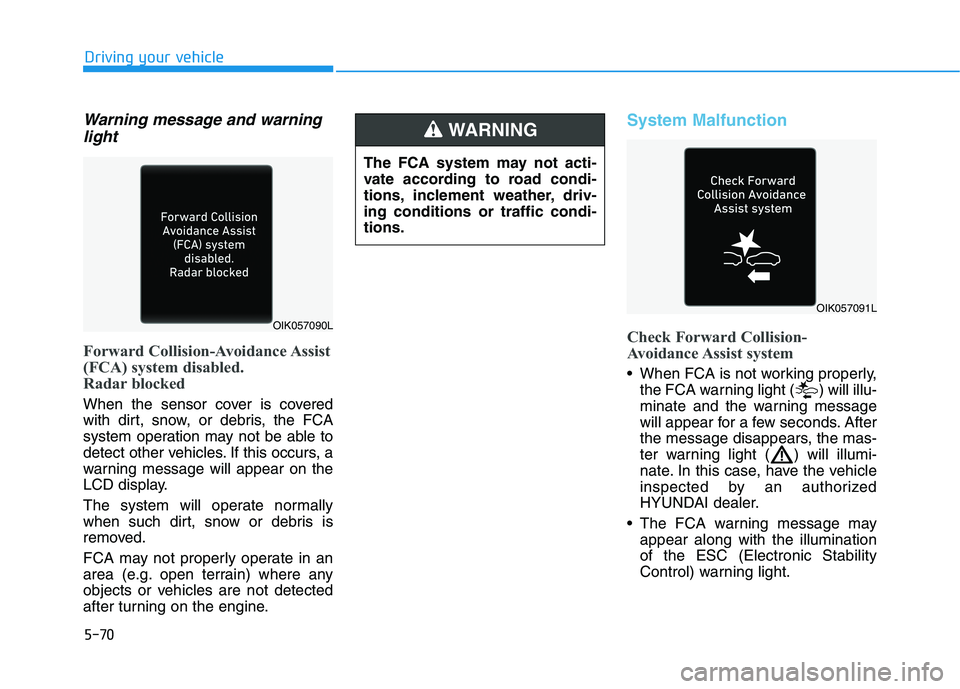
Forward Collision-Avoidance Assist
(FCA) system disabled.
Radar blocked
When the sensor cover is covered
with dirt, snow, or debris, the FCA
system operation may not be able to
detect other vehicles. If this occurs, a
warning message will appear on the
LCD display.
The system will operate normally
when such dirt, snow or debris is
removed.
FCA may not properly operate in an
area (e.g. open terrain) where any
objects or vehicles are not detected
after turning on the engine.
System Malfunction
Check Forward Collision-
Avoidance Assist system
When FCA is not working properly,
the FCA warning light ( ) will illu-
minate and the warning message
will appear for a few seconds. After
the message disappears, the mas-
ter warning light ( ) will illumi-
nate. In this case, have the vehicle
inspected by an authorized
HYUNDAI dealer.
The FCA warning message may
appear along with the illumination
of the ESC (Electronic Stability
Control) warning light.
The FCA system may not acti-
vate according to road condi-
tions, inclement weather, driv-
ing conditions or traffic condi-
tions.
WARNING
OIK057090L
OIK057091L
Page 380 of 612
5-71
Driving your vehicle
5
Both FCA warning light and warn-
ing message will disappear once
the ESC warning light issue is
resolved.The FCA system may not acti-
vate if the driver applies the
brake pedal to avoid collision.
The brake control may be
insufficient, possibly causing
a collision, if a vehicle in front
abruptly stops. Always pay
extreme caution.
The FCA system may not acti-
vate according to the road
conditions, inclement weath-
er, driving conditions or traffic
conditions.
Occupants may get injured, if
the vehicle abruptly stops by
the activated FCA system. Pay
extreme caution.
The FCA system operates
only to detect vehicles, pedes-
trian in front of the vehicle.
FCA is only a supplemental
system for the driver's con-
venience. It is the driver's
responsibility to control the
vehicle operation. Do not
solely depend on the FCA
system. Rather, maintain a
safe braking distance, and, if
necessary, depress the brake
pedal to reduce the driving
speed or to stop the vehicle.
In certain instances and
under certain driving condi-
tions, the FCA system may
activate prematurely. This ini-
tial warning message appears
on the LCD display with a
warning chime.
WARNING
Also due to sensing limita-
tions, in certain situations, the
front radar sensor or camera
recognition system may not
detect the vehicle, pedestrian
ahead. The FCA system may
not activate and the warning
message may not be dis-
played.
If there is a malfunction with
the FCA system, the Forward
Collision avoidance assist
system is not applied even
though the braking system is
operating normally.
If the vehicle in front stops
suddenly, you may have less
control of the brake system.
Therefore, always keep a safe
distance between your vehicle
and the vehicle in front of you.
The FCA system may activate
during braking and the vehi-
cle may stop suddenly shift-
ing loose objects toward the
passengers. Always keep
loose objects secured.
Page 382 of 612
5-73
Driving your vehicle
5
Detecting vehicles
The sensor may be limited when:
The system may not operate for 15
seconds after the engine is started
or the camera is initialized
The radar sensor or camera is cov-
ered with a foreign object or debris
The camera lens is contaminated
due to tinted, filmed or coated
windshield, damaged glass, or
stuck of foreign matter (sticker,
bug, etc.) on the glass
Inclement weather such as heavy
rain or snow obscures the field of
view of the radar sensor or camera
There is interference by electro-
magnetic waves
There is severe irregular reflection
from the radar sensor
The radar/camera sensor recogni-
tion is limited
The vehicle in front is too small to
be detected (for example a motor-
cycle or a bicycle, etc.) The vehicle in front is an oversize
vehicle or trailer that is too big to
be detected by the camera recog-
nition system (for example a tractor
trailer, etc.)
The camera's field of view is not
well illuminated (either too dark or
too much reflection or too much
backlight that obscures the field of
view)
The vehicle in front does not have
their rear lights properly turned ON
or their rear lights are located
unusually
The outside brightness changes
suddenly, for example when enter-
ing or exiting a tunnel
Light coming from a street light or
an oncoming vehicle is reflected on
a wet road surface such as a pud-
dle in the road
The field of view in front is obstruct-
ed by sun glare
The windshield glass is fogged up;
a clear view of the road is obstruct-
ed
The vehicle in front is driving errati-
cally The vehicle is on unpaved or
uneven rough surfaces, or road
with sudden gradient changes
The vehicle is driven near areas
containing metal substances as a
construction zone, railroad, etc.
The vehicle drives inside a building,
such as a basement parking lot
The camera does not recognize
the entire vehicle in front
The camera is damaged
The brightness outside is too low
such as when the headlamps are
not on at night or the vehicle is
going through a tunnel
The shadow is on the road by a
median strip, trees, etc.
The vehicle drives through a toll-
gate.
The rear part of the vehicle in front
is not normally visible (the vehicle
turns in other direction or the vehi-
cle is overturned.)
The adverse road conditions cause
excessive vehicle vibrations while
driving
Page 383 of 612
5-74
Driving your vehicle
The sensor recognition changes
suddenly when passing over a
speed bump
The vehicle in front is moving verti-
cally to the driving direction
The vehicle in front is stopped ver-
tically
The vehicle in front is driving
towards your vehicle or reversing
You are on a roundabout and the
vehicle in front circles
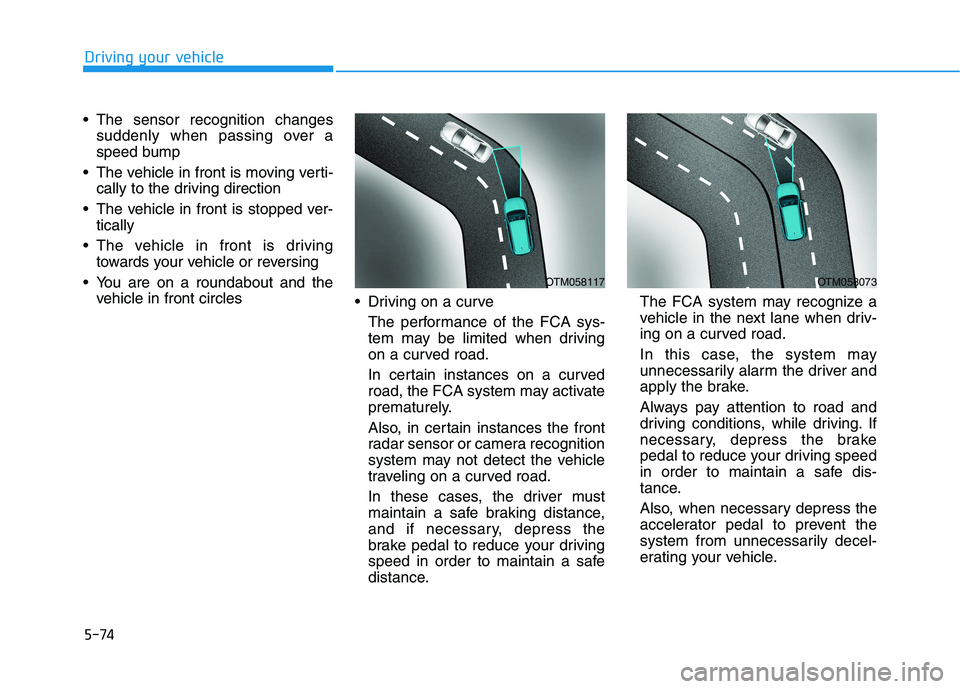
Driving on a curve
The performance of the FCA sys-
tem may be limited when driving
on a curved road.
In certain instances on a curved
road, the FCA system may activate
prematurely.
Also, in certain instances the front
radar sensor or camera recognition
system may not detect the vehicle
traveling on a curved road.
In these cases, the driver must
maintain a safe braking distance,
and if necessary, depress the
brake pedal to reduce your driving
speed in order to maintain a safe
distance.The FCA system may recognize a
vehicle in the next lane when driv-
ing on a curved road.
In this case, the system may
unnecessarily alarm the driver and
apply the brake.
Always pay attention to road and
driving conditions, while driving. If
necessary, depress the brake
pedal to reduce your driving speed
in order to maintain a safe dis-
tance.
Also, when necessary depress the
accelerator pedal to prevent the
system from unnecessarily decel-
erating your vehicle.
OTM058117OTM058073
Page 385 of 612
5-76
Driving your vehicle
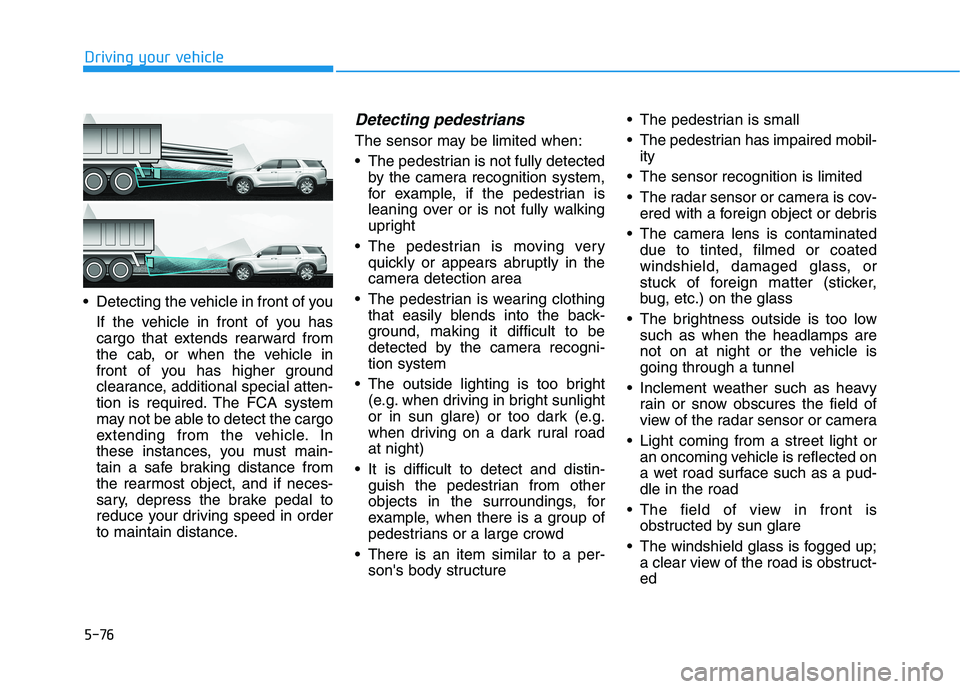
Detecting the vehicle in front of you
If the vehicle in front of you has
cargo that extends rearward from
the cab, or when the vehicle in
front of you has higher ground
clearance, additional special atten-
tion is required. The FCA system
may not be able to detect the cargo
extending from the vehicle. In
these instances, you must main-
tain a safe braking distance from
the rearmost object, and if neces-
sary, depress the brake pedal to
reduce your driving speed in order
to maintain distance.
Detecting pedestrians
The sensor may be limited when:
The pedestrian is not fully detected
by the camera recognition system,
for example, if the pedestrian is
leaning over or is not fully walking
upright
The pedestrian is moving very
quickly or appears abruptly in the
camera detection area
The pedestrian is wearing clothing
that easily blends into the back-
ground, making it difficult to be
detected by the camera recogni-
tion system
The outside lighting is too bright
(e.g. when driving in bright sunlight
or in sun glare) or too dark (e.g.
when driving on a dark rural road
at night)
It is difficult to detect and distin-
guish the pedestrian from other
objects in the surroundings, for
example, when there is a group of
pedestrians or a large crowd
There is an item similar to a per-
son's body structure The pedestrian is small
The pedestrian has impaired mobil-
ity
The sensor recognition is limited
The radar sensor or camera is cov-
ered with a foreign object or debris
The camera lens is contaminated
due to tinted, filmed or coated
windshield, damaged glass, or
stuck of foreign matter (sticker,
bug, etc.) on the glass
The brightness outside is too low
such as when the headlamps are
not on at night or the vehicle is
going through a tunnel
Inclement weather such as heavy
rain or snow obscures the field of
view of the radar sensor or camera
Light coming from a street light or
an oncoming vehicle is reflected on
a wet road surface such as a pud-
dle in the road
The field of view in front is
obstructed by sun glare
The windshield glass is fogged up;
a clear view of the road is obstruct-
ed
OLX2058077