automatic transmission HYUNDAI PALISADE 2022 Owners Manual
[x] Cancel search | Manufacturer: HYUNDAI, Model Year: 2022, Model line: PALISADE, Model: HYUNDAI PALISADE 2022Pages: 663, PDF Size: 15.74 MB
Page 16 of 663
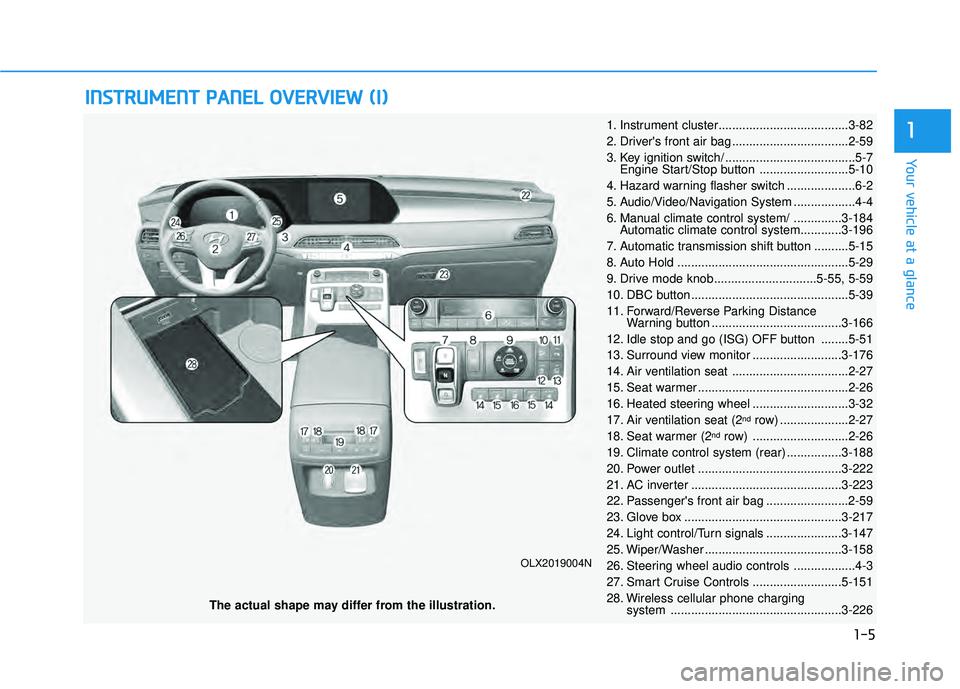
I IN N S ST T R R U U M M E EN N T T P P A A N N E EL L O O V VE ER R V V I IE E W W ( ( I I) )
The actual shape may differ from the illustration.
1-5
Your vehicle at a glance
1
OLX2019004N
1. Instrument cluster......................................3-82
2. Driver's front air bag ..................................2-59
3. Key ignition switch/ ......................................5-7
Engine Start/Stop button ..........................5-10
4. Hazard warning flasher switch ....................6-2
5. Audio/Video/Navigation System ..................4-4
6. Manual climate control system/ ..............3-184 Automatic climate control system............3-196
7. Automatic transmission shift button ..........5-15
8. Auto Hold ..................................................5-29
9. Drive mode knob..............................5-55, 5-59
10. DBC button ..............................................5-39
11. Forward/Reverse Parking Distance Warning button ......................................3-166
12. Idle stop and go (ISG) OFF button ........5-51
13. Surround view monitor ..........................3-176
14. Air ventilation seat ..................................2-27
15. Seat warmer ............................................2-26
16. Heated steering wheel ............................3-32
17. Air ventilation seat (2
ndrow) ....................2-27
18. Seat warmer (2ndrow) ............................2-26
19. Climate control system (rear) ................3-188
20. Power outlet ..........................................3-222
21. AC inverter ............................................3-223
22. Passenger's front air bag ........................2-59
23. Glove box ..............................................3-217
24. Light control/Turn signals ......................3-147
25. Wiper/Washer ........................................3-158
26. Steering wheel audio controls ..................4-3
27. Smart Cruise Controls ..........................5-151
28. Wireless cellular phone charging system ..................................................3-226
Page 185 of 663
3-89
Convenience Features
3
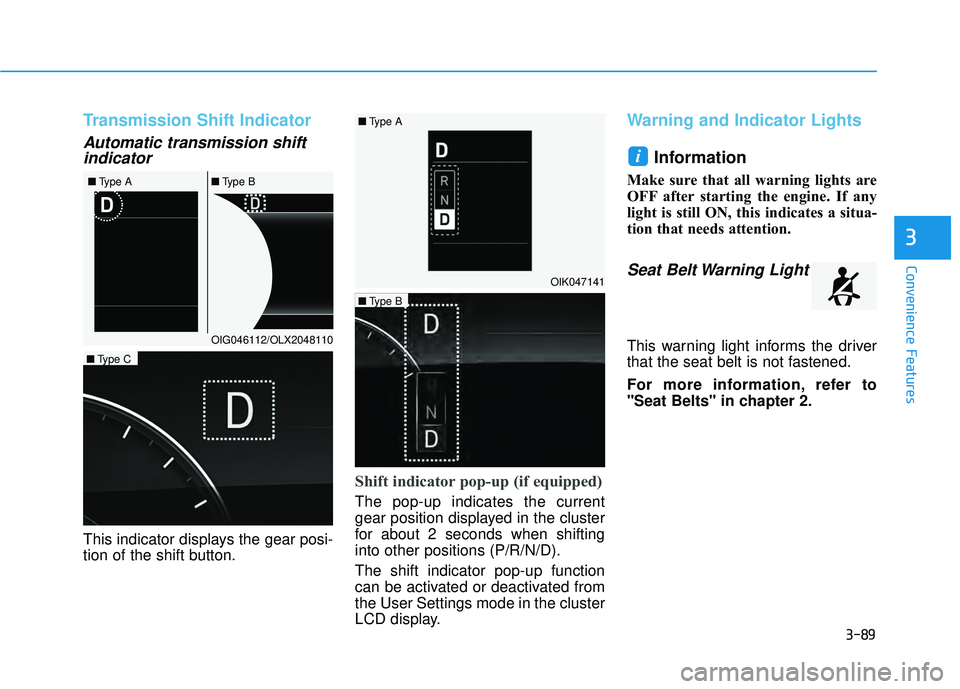
Transmission Shift Indicator
Automatic transmission shiftindicator
This indicator displays the gear posi-
tion of the shift button.
Shift indicator pop-up (if equipped)
The pop-up indicates the current
gear position displayed in the cluster
for about 2 seconds when shifting
into other positions (P/R/N/D).
The shift indicator pop-up function
can be activated or deactivated from
the User Settings mode in the cluster
LCD display.
Warning and Indicator Lights
Information
Make sure that all warning lights are
OFF after starting the engine. If any
light is still ON, this indicates a situa-
tion that needs attention.
Seat Belt Warning Light
This warning light informs the driver
that the seat belt is not fastened.
For more information, refer to
"Seat Belts" in chapter 2.
i
OIG046112/OLX2048110
■
Type A ■Type B
OIK047141
OLX2049133N
■Type C
OLX2049134N
■Type B
■
Type A
Page 213 of 663
3-117
Convenience Features
3
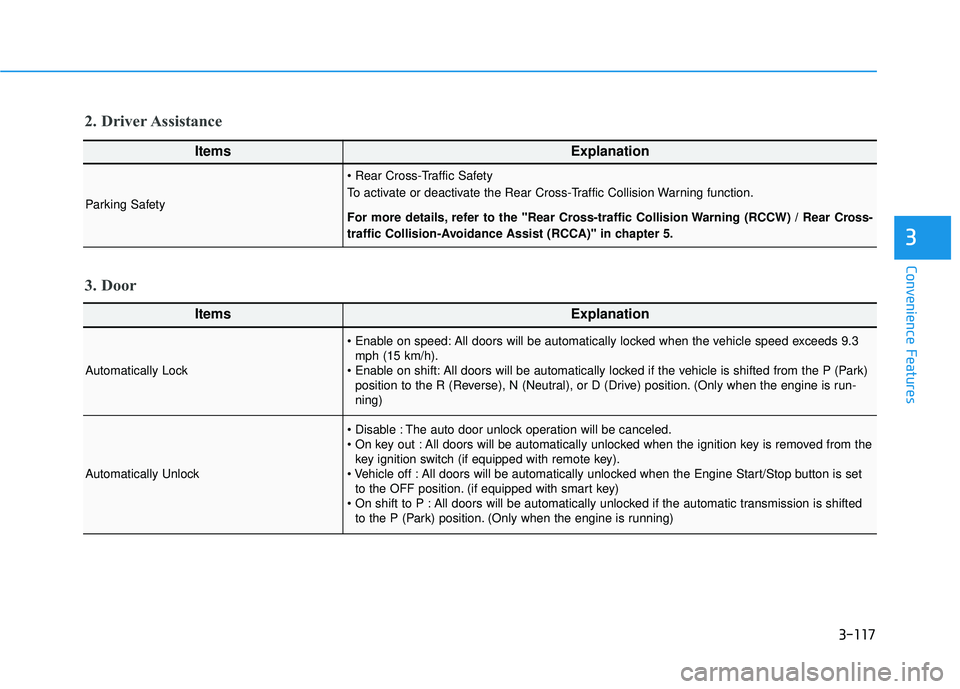
ItemsExplanation
Automatically Lock
All doors will be automatically locked when the vehicle speed exceeds 9.3mph (15 km/h).
All doors will be automatically locked if the vehicle is shifted from the P (Park) position to the R (Reverse), N (Neutral), or D (Drive) position. (Only when the engine is run-
ning)
Automatically Unlock
The auto door unlock operation will be canceled.
All doors will be automatically unlocked when the ignition key is removed from thekey ignition switch (if equipped with remote key).
All doors will be automatically unlocked when the Engine Start/Stop button is set to the OFF position. (if equipped with smart key)
All doors will be automatically unlocked if the automatic transmission is shifted to the P (Park) position. (Only when the engine is running)
3. Door
ItemsExplanation
Parking Safety
To activate or deactivate the Rear Cross-Traffic Collision Warning function.
For more details, refer to the "Rear Cross-traffic Collision Warning (RCCW) / Rear Cross-
traffic Collision-Avoidance Assist (RCCA)" in chapter 5.
2. Driver Assistance
Page 233 of 663
3-137
Convenience Features
3
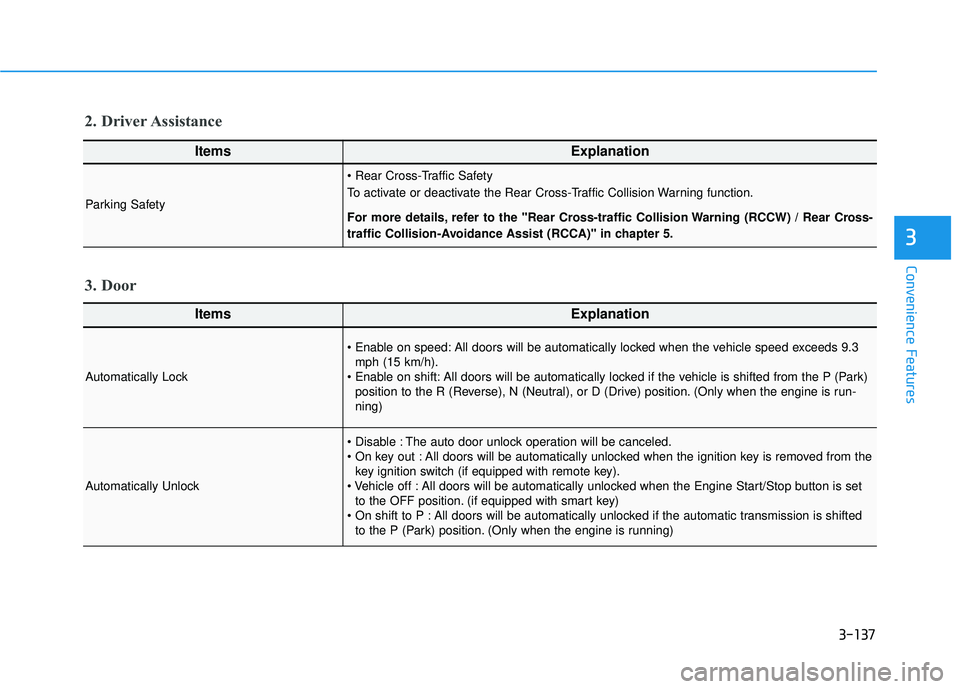
ItemsExplanation
Automatically Lock
All doors will be automatically locked when the vehicle speed exceeds 9.3mph (15 km/h).
All doors will be automatically locked if the vehicle is shifted from the P (Park) position to the R (Reverse), N (Neutral), or D (Drive) position. (Only when the engine is run-
ning)
Automatically Unlock
The auto door unlock operation will be canceled.
All doors will be automatically unlocked when the ignition key is removed from thekey ignition switch (if equipped with remote key).
All doors will be automatically unlocked when the Engine Start/Stop button is set to the OFF position. (if equipped with smart key)
All doors will be automatically unlocked if the automatic transmission is shifted to the P (Park) position. (Only when the engine is running)
3. Door
ItemsExplanation
Parking Safety
To activate or deactivate the Rear Cross-Traffic Collision Warning function.
For more details, refer to the "Rear Cross-traffic Collision Warning (RCCW) / Rear Cross-
traffic Collision-Avoidance Assist (RCCA)" in chapter 5.
2. Driver Assistance
Page 335 of 663
Driving your vehicle
5
Before driving.........................................................5-5
Before Entering the Vehicle ...........................................5-5
Before Starting ..................................................................5-5
Ignition switch ........................................................5-7
Key Ignition Switch ...........................................................5-7
Engine Start/Stop Button .............................................5-10
Automatic transmission .......................................5-15
Automatic transmission operation .............................5-15
Parking ........................................................................\
.......5-18
LCD display message ......................................................5-19
Good driving practices ..................................................5-20
Paddle Shifter (Manual Shift Mode) ..........................5-22
Braking system ...................................................5-23
Power Brakes ...................................................................5-23
Disc Brakes Wear Indicator ..........................................5-24
Electronic Parking Brake (EPB)...................................5-24
Auto Hold ........................................................................\
..5-29
Anti-lock Brake System (ABS) ....................................5-33
Electronic Stability Control (ESC)................................5-35
Vehicle Stability Management (VSM).........................5-38
Hill-Start Assist Control (HAC) ....................................5-39
Downhill Brake Control (DBC) .....................................5-39
Trailer Stability Assist (TSA) .........................................5-42
Good Braking Practices ................................................5-42
All Wheel Drive (AWD) ........................................5-43
AWD Operation ................................................................5-44
LCD display message ......................................................5-47
Emergency Precautions.................................................5-48
ISG (Idle Stop and Go) system ...........................5-50
To Activate the ISG System ..........................................5-50
To Deactivate the ISG System ....................................5-53
ISG System Malfunction ................................................5-53
Calibrating the Battery Sensor ....................................5-54
Drive Mode Integrated Control
System (2WD) .......................................................5-55
Drive Mode .......................................................................5\
-55
Drive mode integrated control system (AWD) ..5-59
Drive Mode .......................................................................5\
-59
Forward collision-avoidance assist (FCA)
(Sensor Fusion) ....................................................5-63
Forward Collision-Avoidance Assist settings ...........5-64
Forward Collision-Avoidance Assist operation ......5-66
Forward Collision-Avoidance Assist malfunction
and limitations ..................................................................5-70
Lane Keeping Assist (LKA) ................................5-78
Lane Keeping Assist settings ......................................5-78
Lane Keeping Assist operation ....................................5-80
Lane Keeping Assist malfunction and limitations ...5-82
Page 349 of 663
5-15
Driving your vehicle
5
Automatic transmission opera-
tion
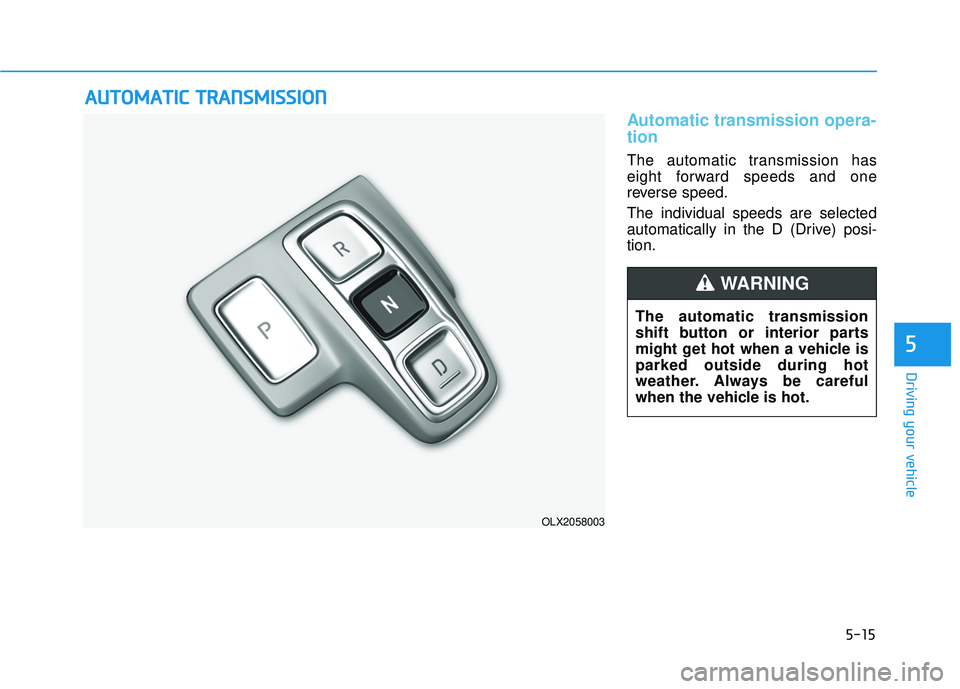
The automatic transmission has
eight forward speeds and one
reverse speed.
The individual speeds are selected
automatically in the D (Drive) posi-
tion.
A AU U T TO O M M A AT TI IC C T T R R A A N N S SM M I IS S S SI IO O N N
OLX2058003
The automatic transmission
shift button or interior parts
might get hot when a vehicle is
parked outside during hot
weather. Always be careful
when the vehicle is hot.
WARNING
Page 350 of 663
Driving your vehicle
Transmission ranges
The indicator in the instrument cluster
displays the gear position when the
ignition switch is in the ON position.
P (Park)
Always come to a complete stop
before shifting into P (Park).
To shift from P (Park), you must
depress firmly on the brake pedal
and make sure your foot is off the
accelerator pedal.
The gear must be in P (Park) before
turning the engine off.
R (Reverse)
Use this position to drive the vehicle
backward.
Always come to a complete stop
before shifting into or out of R
(Reverse); you may damage the
transmission if you shift into R
(Reverse) while the vehicle is in
motion.
When the vehicle is stopped in R
(Reverse) position, if you open the
driver's door with the seat belt unfas-
tened, the gear is shifted to P (Park)
position automatically.
However when the vehicle moves in
R (Reverse) position, if you open the
driver's door with the seat belt unfas-
tened, the gear may be not shifted to
P (Park) position automatically for
protecting the automatic transmis-
sion.
NOTICE
To reduce the risk of serious
injury or death:
ALWAYS check the surround-
ing areas near your vehicle for
people, especially children,
before shifting a vehicle into
D (Drive) or R (Reverse).
Before leaving the driver’s
seat, always make sure the
gear is in the P (Park) posi-
tion, then set the parking
brake, and place the ignition
switch in the LOCK/OFF posi-
tion. Unexpected and sudden
vehicle movement can occur
if these precautions are not
followed.
Do not use the engine brake
(shifting from a high gear to
lower gear) rapidly on slip-
pery roads. The vehicle may
slip causing an accident.
WARNING
Shifting into P (Park) while the
vehicle is in motion may
cause you to lose control of
the vehicle.
After the vehicle has stopped,
always make sure the gear is
in P (Park), apply the parking
brake, and turn the engine
off.
Do not use the P (Park) posi-
tion in place of the parking
brake.
WARNING
5-16
Page 351 of 663
5-17
Driving your vehicle
5
N (Neutral)
The wheels and transmission are not
engaged.
Use N (Neutral) if you need to restart
a stalled engine, or if it is necessary
to stop with the engine ON. Shift into
P (Park) if you need to leave your
vehicle for any reason.
Always depress the brake pedal
when you are shifting from N
(Neutral) to another gear.
D (Drive)
This is the normal driving position.
The transmission will automatically
shift through a 8-gear sequence, pro-
viding the best fuel economy and
power.
To start the vehicle forward, push the
D (Drive) button by depressing the
brake pedal with the engine ON.
Then depress the accelerator pedal
smoothly.
For extra power when passing anoth-
er vehicle or driving uphill, depress
the accelerator fully. The transmis-
sion will automatically downshift to
the next lower gear (or gears, as
appropriate).
When the vehicle is stopped in D
(Drive) position, if you open the dri-
ver's door with the seat belt unfas-
tened, the gear is shifted to P (Park)
position automatically.
However when the vehicle moves in
D (Drive) position, if you open the dri-
ver's door with the seat belt unfas-
tened, the gear may not shift to P
(Park) position automatically to pro-
tect the automatic transmission.
Shift-lock system
For your safety, the automatic trans-
mission has a shift-lock system
which prevents shifting the gear
from P (Park) or N (Neutral) to R
(Reverse) or D (Drive) unless the
brake pedal is depressed.
To shift the gear from P (Park) or N
(Neutral) to R (Reverse) or D (Drive):
1. Depress and hold the brake pedal.
2. Start the engine or place the igni-tion switch in the ON position.
3. Depress the brake pedal and push the R (Reverse) or D (Drive) but-
ton.
Do not shift into gear unless
your foot is firmly on the brake
pedal. Shifting into gear when
the engine is running at high
speed can cause the vehicle to
move very rapidly. You could
lose control of the vehicle and
hit people or objects.
WARNING
Page 382 of 663
5-48
Driving your vehicle
If the vehicle continues to be driven and the automatic transmission
temperatures reach the maximum
temperature limit, the "Transmission
hot! Park with engine On" warning
will be displayed. When this occurs
the automatic transmission is dis-
abled until the automatic transmis-
sion cools to normal temperatures.
The warning will display a time to wait for the transmission to cool.
If this occurs, pull over to a safe location, stop the vehicle with the
engine running, apply the brakes
and shift the vehicle to P (Park),
and allow the transmission to cool.
When the message "Transmission cooled down. Resume driving"
appears you can continue to drive
your vehicle.
When possible, drive the vehicle smoothly.
Emergency Precautions
Tires
Do not use a tire and wheel package
with a different size and type from
the one originally installed on your
vehicle. It can affect the safety and
performance of your vehicle, which
could lead to steering failure or
rollover causing serious injury.
When replacing the tires, be sure to
equip all four tires with the tire and
wheel of the same size, type, tread,
brand and load-carrying capacity. If
you equip your vehicle with any
tire/wheel combination not recom-
mended by HYUNDAI for off-road
driving, you should not use these
tires for highway driving.
Towing
AWD vehicles must be towed with a
wheel lift and dollies or flatbed equip-
ment with all the wheels off the
ground. For more details, refer to
"Towing" in chapter 6.
Dynamometer testing
A full-time AWD vehicle must be test-
ed on a special four wheel chassis
dynamometer.
Never start or run the engine
while a full-time AWD vehicle is
raised on a jack. The vehicle can
slip or roll off of a jack causing
serious injury or death to you or
those nearby.
WARNING
Page 391 of 663
5-57
Driving your vehicle
5
Limitation of SMART mode
The SMART mode may be limited in
following situations. (The OFF indica-
tor illuminates in those situations.)
The driver uses the paddle shifter(manual shift mode) :
It deactivates SMART mode. The
vehicle drives, as the driver manu-
ally changes gear with the paddle
shifter.
Smart Cruise Control is activated : Smart Cruise Control may deacti-
vate the SMART mode when the
vehicle is controlled by the set
speed of Smart Cruise Control.
(SMART mode is not deactivated
just by activating Smart Cruise
Control.)
The transmission oil temperature is either extremely low or extremely
high :
The SMART mode can be active in
most of the normal driving situa-
tions. However, an extremely high/
low transmission oil temperature
may temporarily deactivate the
SMART mode, because the trans-
mission condition is out of normal
operation condition.
SPORT
SPORT mode manages
the driving dynamics by
automatically adjusting
the steering effort, and
the engine and transmission control
logic for enhanced driver perform-
ance.
When SPORT mode is selected by rotating the DRIVE MODE selec-
tion knob, the SPORT indicator will
illuminate.
Whenever the engine is restarted, the drive mode will revert back to
COMFORT mode. If SPORT mode
is desired, re-select SPORT mode.
When SPORT mode is activated: - The engine RPM will tend toremain a little higher for a brief
time even after releasing the
accelerator. This is typical when
the SPORT mode is activated.
- Upshifts are delayed when accel- erating
Information
In SPORT mode, the fuel efficiency
may decrease.
ECO mode
When the drive mode isset to ECO mode, the
engine and transmission
control logic are changed
to maximize fuel efficien-
cy.
When ECO mode is selected by rotating the DRIVE MODE selec-
tion knob, the ECO indicator will
illuminate.
The vehicle starts in ECO mode, when the engine was turned OFF
in ECO mode.
Information
Fuel efficiency depends on the driver's
driving habit and road condition.
i
i
SPORTECO