display HYUNDAI PALISADE 2022 Owners Manual
[x] Cancel search | Manufacturer: HYUNDAI, Model Year: 2022, Model line: PALISADE, Model: HYUNDAI PALISADE 2022Pages: 663, PDF Size: 15.74 MB
Page 494 of 663
5-160
Driving your vehicle
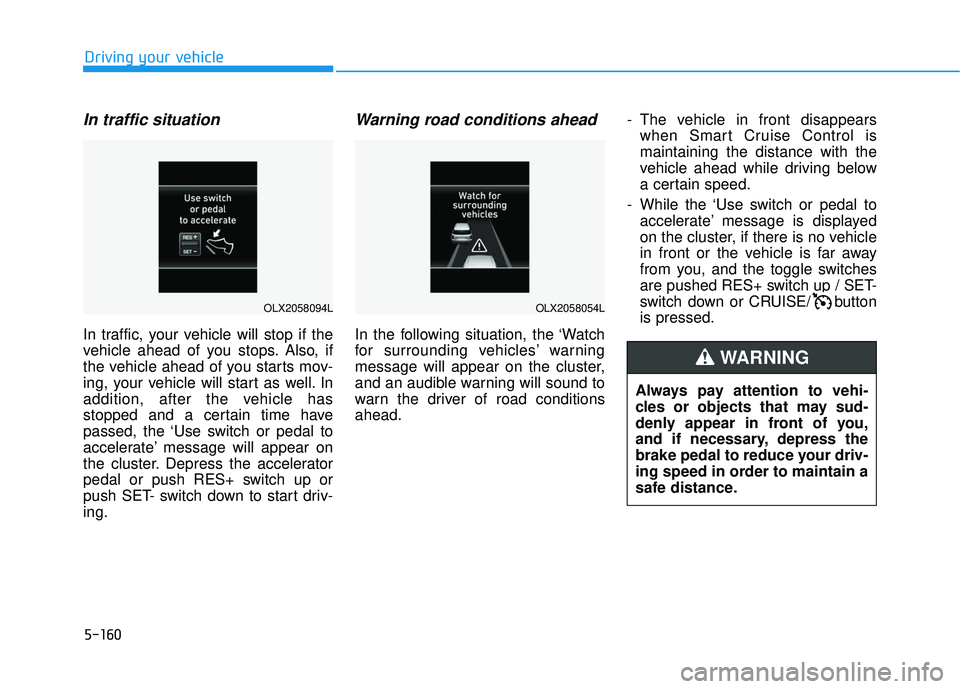
In traffic situation
In traffic, your vehicle will stop if the
vehicle ahead of you stops. Also, if
the vehicle ahead of you starts mov-
ing, your vehicle will start as well. In
addition, after the vehicle has
stopped and a certain time have
passed, the ‘Use switch or pedal to
accelerate’ message will appear on
the cluster. Depress the accelerator
pedal or push RES+ switch up or
push SET- switch down to start driv-
ing.
Warning road conditions ahead
In the following situation, the ‘Watch
for surrounding vehicles’ warning
message will appear on the cluster,
and an audible warning will sound to
warn the driver of road conditions
ahead.- The vehicle in front disappears
when Smart Cruise Control is
maintaining the distance with the
vehicle ahead while driving below
a certain speed.
- While the ‘Use switch or pedal to accelerate’ message is displayed
on the cluster, if there is no vehicle
in front or the vehicle is far away
from you, and the toggle switches
are pushed RES+ switch up / SET-
switch down or CRUISE/ button
is pressed.
Always pay attention to vehi-
cles or objects that may sud-
denly appear in front of you,
and if necessary, depress the
brake pedal to reduce your driv-
ing speed in order to maintain a
safe distance.
WARNING
OLX2058054LOLX2058094L
Page 496 of 663
5-162
Driving your vehicleTurn off Smart Cruise Control
when your vehicle is being
towed.
Smart Cruise Control may not
operate normally if interfered
by strong electromagnetic
waves.
Smart Cruise Control may not
detect an obstacle in front and
lead to a collision. Always
look ahead cautiously to pre-
vent unexpected and sudden
situations from occurring.
Vehicles moving in front of
you with a frequent lane
change may cause a delay in
Smart Cruise Control reaction
or may cause Smart Cruise
Control to react to a vehicle
actually in an adjacent lane.
Always drive cautiously to
prevent unexpected and sud-
den situations from occur-
ring.
Always be aware of the sur-
roundings and drive safely,
even though a warning mes-
sage does not appear or an
audible warning does not
sound.
If any other system’s warning
message is displayed or
warning sound is generated,
Smart Cruise Control warning
message may not be dis-
played and warning sound
may not be generated.
You may not hear the warning
sound of Forward Collision-
Avoidance Assist if the sur-
rounding is noisy.
The vehicle manufacturer is
not responsible for any traffic
violation or accidents caused
by the driver.
Always set the vehicle speed
under the speed limit in your
country.Always be aware of the select-
ed speed and headway dis-
tance.
Keep a safe distance accord-
ing to road conditions and
vehicle speed. If the headway
distance is too close during
high-speed driving, a serious
collision may result.
When maintaining distance
with the vehicle ahead, if the
front vehicle disappears,
Smart Cruise Control may
suddenly accelerate to the set
speed. Always be aware of
unexpected and sudden situa-
tions from occurring.
Vehicle speed may decrease
on an upward slope and
increase on a downward
slope.
Always be aware of situations
such as when a vehicle cuts in
suddenly.
When you are towing a trailer
or another vehicle, we recom-
mend that Smart Cruise
Control is turned off due to
safety reasons.
Page 505 of 663
5-171
Driving your vehicle
Information
When there is a problem with
Navigation-based Smart Cruise
Control, the function cannot be set
from the Settings menu.
Navigation-based Smart
Cruise Control Operation
Operating conditions
Navigation-based Smart Cruise
Control is ready to operate if all of
the following conditions are satisfied:
Smart Cruise Control is operating
Driving on main roads of highways(or motorways)
Information
For more details on how to operate
Smart Cruise Control, refer to “Smart
Cruise Control (SCC)” section in this
chapter.
Navigation-based Smart CruiseControl display and control
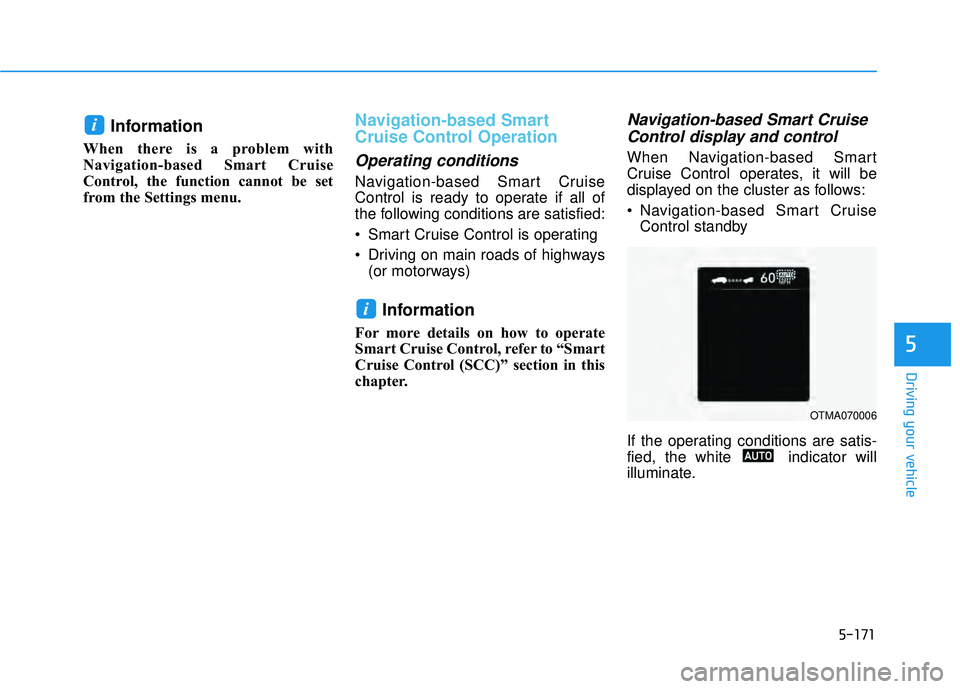
When Navigation-based Smart
Cruise Control operates, it will be
displayed on the cluster as follows:
Navigation-based Smart Cruise
Control standby
If the operating conditions are satis-
fied, the white indicator will
illuminate.
i
i
5
OTMA070006
Page 535 of 663
What to do in an emergency
6
Hazard Warning Flasher .......................................6-2
In Case of an Emergency While Driving.............6-2
If the Engine Stalls While Driving .................................6-2
If the Engine Stalls at a Crossroad or Crossing ........6-2
If you Have a Flat Tire While Driving ..........................6-3
If the Engine Will Not Start..................................6-3
If the Engine Doesn't Turn Over or
Turns Over Slowly .............................................................6-3
If the Engine Turns Over Normally but
Doesn't Start ......................................................................6-\
3
Jump Starting ..........................................................6-4
If the Engine Overheats........................................6-6
Tire Pressure Monitoring System (TPMS).........6-8
Check Tire Pressure .........................................................6-8
Tire Pressure Monitoring System .................................6-9
Low Tire Pressure Telltale ............................................6-10
Low Tire Pressure LCD Display with
Position Indicator ............................................................6-10
TPMS Malfunction Indicator ........................................6-11
Changing a Tire with TPMS..........................................6-12
If You Have a Flat Tire........................................6-14
Jack and Tools .................................................................6-14
Removing and Storing the Spare Tire .......................6-15
Changing Tires .................................................................6-16
Towing ...................................................................6-22
Towing Service .................................................................6-22
Removable Towing Hook ...............................................6-23
Emergency Towing..........................................................6-24
Page 542 of 663
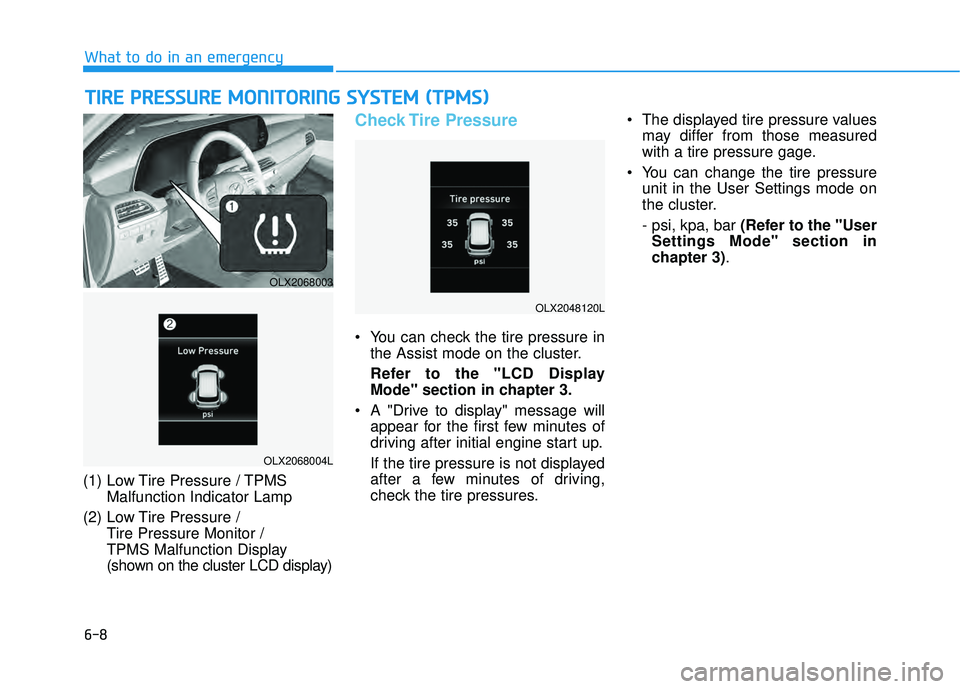
6-8
What to do in an emergency
(1) Low Tire Pressure / TPMS Malfunction Indicator Lamp
(2) Low Tire Pressure / Tire Pressure Monitor /
TPMS Malfunction Display
(shown on the cluster LCD display)
Check Tire Pressure
You can check the tire pressure inthe Assist mode on the cluster.
Refer to the "LCD Display Mode" section in chapter 3.
A "Drive to display" message will appear for the first few minutes of
driving after initial engine start up.
If the tire pressure is not displayed
after a few minutes of driving,
check the tire pressures. The displayed tire pressure values
may differ from those measured
with a tire pressure gage.
You can change the tire pressure unit in the User Settings mode on
the cluster.
- psi, kpa, bar (Refer to the "UserSettings Mode" section in
chapter 3).
T TI IR R E E P P R R E ES SS SU U R RE E M M O ON NI IT T O O R RI IN N G G S S Y Y S ST T E EM M ( ( T T P P M M S S) )
OLX2068003
OLX2068004L
OLX2048120L
Page 544 of 663
6-10
What to do in an emergency
If any of the below happens, have
the system checked by an author-
ized HYUNDAI dealer.
1.The Low Tire Pressure TPMS Malfunction Indicator does not
illuminate for 3 seconds when
the ignition switch is placed to
the ON position or engine is run-
ning.
2.The TPMS Malfunction Indicator remains illuminated after blink-
ing for approximately 1 minute.
3.The Low Tire Pressure LCD dis- play remains illuminated
Low Tire Pressure
Telltale
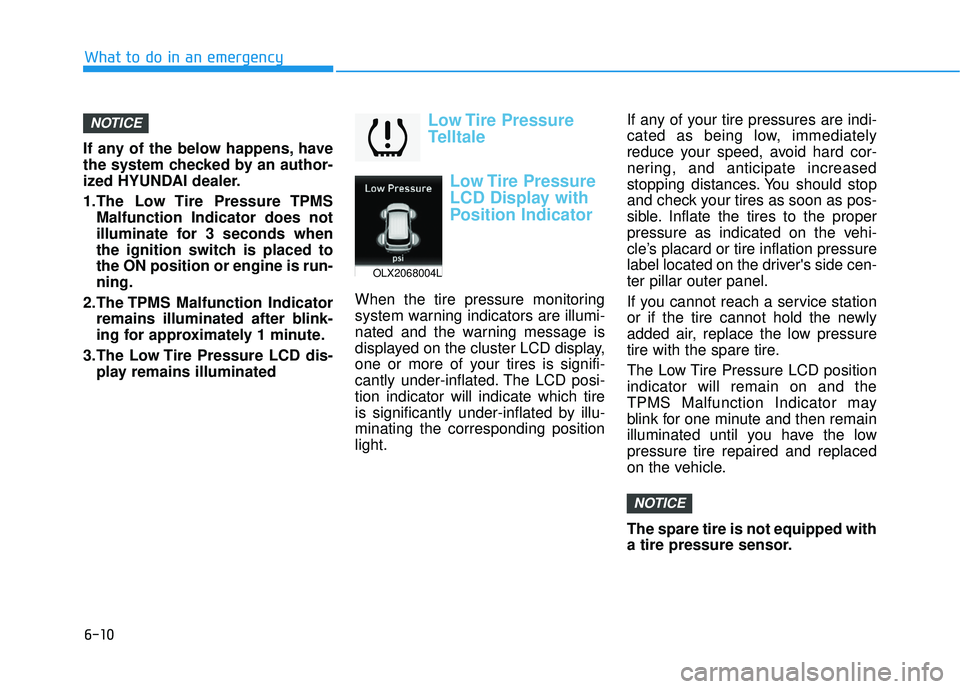
Low Tire Pressure
LCD Display with
Position Indicator
When the tire pressure monitoring
system warning indicators are illumi-
nated and the warning message is
displayed on the cluster LCD display,
one or more of your tires is signifi-
cantly under-inflated. The LCD posi-
tion indicator will indicate which tire
is significantly under-inflated by illu-
minating the corresponding position
light. If any of your tire pressures are indi-
cated as being low, immediately
reduce your speed, avoid hard cor-
nering, and anticipate increased
stopping distances. You should stop
and check your tires as soon as pos-
sible. Inflate the tires to the proper
pressure as indicated on the vehi-
cle’s placard or tire inflation pressure
label located on the driver's side cen-
ter pillar outer panel.
If you cannot reach a service station
or if the tire cannot hold the newly
added air, replace the low pressure
tire with the spare tire.
The Low Tire Pressure LCD position
indicator will remain on and the
TPMS Malfunction Indicator may
blink for one minute and then remain
illuminated until you have the low
pressure tire repaired and replaced
on the vehicle.
The spare tire is not equipped with
a tire pressure sensor.
NOTICE
NOTICE
OLX2068004L
Page 545 of 663
6-11
What to do in an emergency
6
TPMS Malfunction
Indicator
The TPMS Malfunction Indicator will
illuminate after it blinks for approxi-
mately one minute when there is a
problem with the Tire Pressure
Monitoring System.
Have the system checked by an
authorized HYUNDAI dealer as soon
as possible.
If there is a malfunction with the
TPMS, the individual tire pres-
sures in the cluster LCD display
will not be available. Have the sys-
tem checked by an authorized
HYUNDAI dealer as soon as possi-
ble.
NOTICE
In winter or cold weather, the
Low Tire Pressure Telltale may
be illuminated if the tire pres-
sure was adjusted to the recom-
mended tire inflation pressure
in warm weather. It does not
mean your TPMS is malfunc-
tioning because the decreased
temperature leads to a propor-
tional lowering of tire pressure.
When you drive your vehicle
from a warm area to a cold area
or from a cold area to a warm
area, or the outside temperature
is greatly higher or lower, you
should check the tire inflation
pressure and adjust the tires to
the recommended tire inflation
pressure.
CAUTION
Low pressure damage
Significantly low tire pressure
makes the vehicle unstable and
can contribute to loss of vehicle
control and increased braking
distances.
Continued driving on low pres-
sure tires can cause the tires to
overheat and fail.
WARNING
Page 599 of 663
7-40
Maintenance
Wheel size designation
Wheels are also marked with impor-
tant information that you need if you
ever have to replace one. The follow-
ing explains what the letters and
numbers in the wheel size designa-
tion mean.
Example wheel size designation:
7.5J x 18
7.5 - Rim width in inches.
J - Rim contour designation.
18 - Rim diameter in inches.
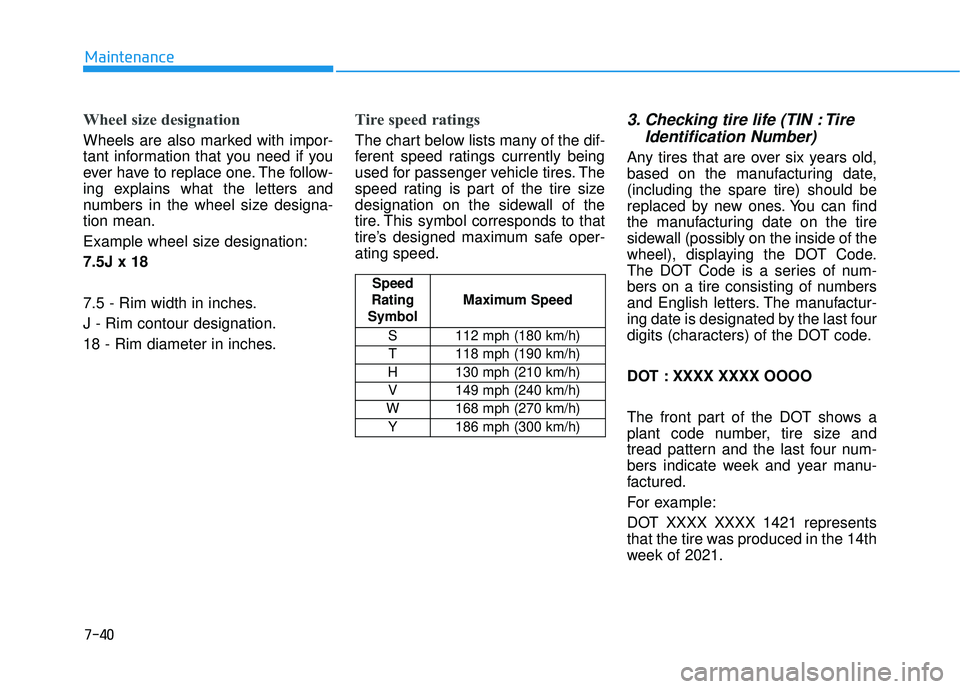
Tire speed ratings
The chart below lists many of the dif-
ferent speed ratings currently being
used for passenger vehicle tires. The
speed rating is part of the tire size
designation on the sidewall of the
tire. This symbol corresponds to that
tire’s designed maximum safe oper-
ating speed.
3. Checking tire life (TIN : TireIdentification Number)
Any tires that are over six years old,
based on the manufacturing date,
(including the spare tire) should be
replaced by new ones. You can find
the manufacturing date on the tire
sidewall (possibly on the inside of the
wheel), displaying the DOT Code.
The DOT Code is a series of num-
bers on a tire consisting of numbers
and English letters. The manufactur-
ing date is designated by the last four
digits (characters) of the DOT code.
DOT : XXXX XXXX OOOO
The front part of the DOT shows a
plant code number, tire size and
tread pattern and the last four num-
bers indicate week and year manu-
factured.
For example:
DOT XXXX XXXX 1421 represents
that the tire was produced in the 14th
week of 2021.
Speed
Rating
Symbol Maximum Speed
S 112 mph (180 km/h) T 118 mph (190 km/h)
H 130 mph (210 km/h) V 149 mph (240 km/h)
W 168 mph (270 km/h)
Y186 mph (300 km/h)
Page 611 of 663
7-52
Maintenance
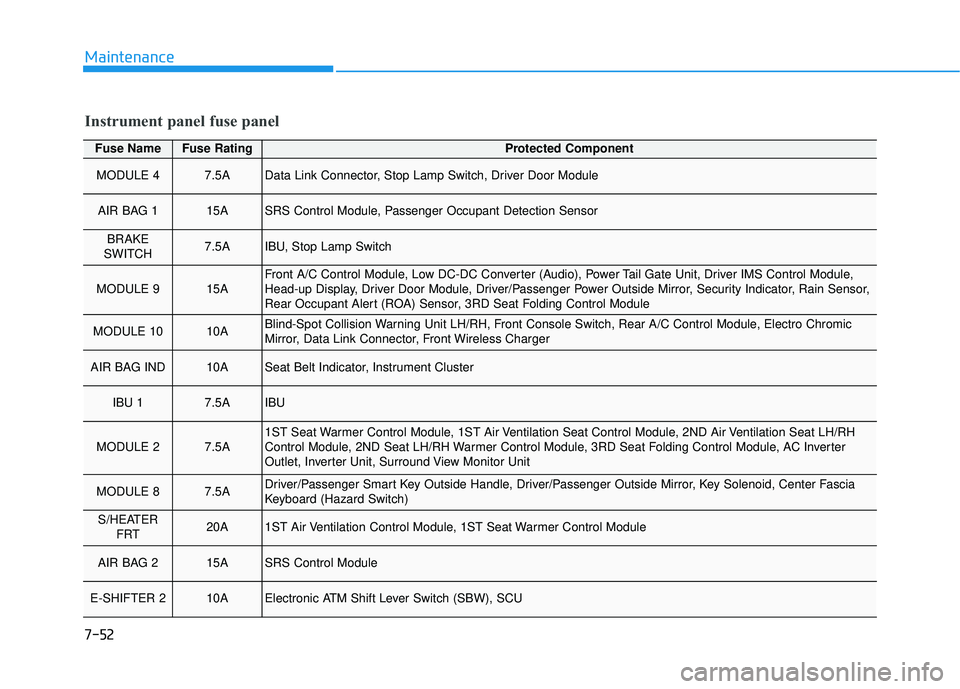
Fuse NameFuse RatingProtected Component
MODULE 47.5AData Link Connector, Stop Lamp Switch, Driver Door Module
AIR BAG 115ASRS Control Module, Passenger Occupant Detection Sensor
BRAKE
SWITCH7.5AIBU, Stop Lamp Switch
MODULE 915AFront A/C Control Module, Low DC-DC Converter (Audio), Power Tail Gate Unit, Driver IMS Control Module,
Head-up Display, Driver Door Module, Driver/Passenger Power Outside Mirror, Security Indicator, Rain Sensor,
Rear Occupant Alert (ROA) Sensor, 3RD Seat Folding Control Module
MODULE 1010ABlind-Spot Collision Warning Unit LH/RH, Front Console Switch, Rear A/C Control Module, Electro Chromic
Mirror, Data Link Connector, Front Wireless Charger
AIR BAG IND10ASeat Belt Indicator, Instrument Cluster
IBU 17.5AIBU
MODULE 27.5A1ST Seat Warmer Control Module, 1ST Air Ventilation Seat Control Module, 2ND Air Ventilation Seat LH/RH
Control Module, 2ND Seat LH/RH Warmer Control Module, 3RD Seat Folding Control Module, AC Inverter
Outlet, Inverter Unit, Surround View Monitor Unit
MODULE 87.5ADriver/Passenger Smart Key Outside Handle, Driver/Passenger Outside Mirror, Key Solenoid, Center Fascia
Keyboard (Hazard Switch)
S/HEATER FRT20A1ST Air Ventilation Control Module, 1ST Seat Warmer Control Module
AIR BAG 215ASRS Control Module
E-SHIFTER 210AElectronic ATM Shift Lever Switch (SBW), SCU
Instrument panel fuse panel
Page 612 of 663
7-53
7
Maintenance
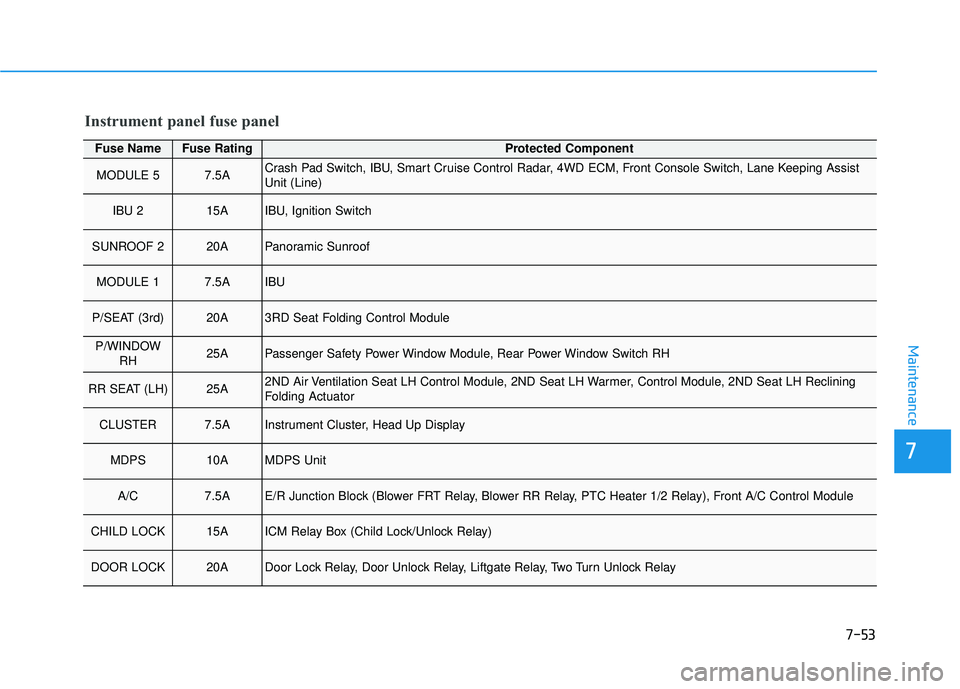
Fuse NameFuse RatingProtected Component
MODULE 57.5ACrash Pad Switch, IBU, Smart Cruise Control Radar, 4WD ECM, Front Console Switch, Lane Keeping Assist
Unit (Line)
IBU 215AIBU, Ignition Switch
SUNROOF 220APanoramic Sunroof
MODULE 17.5AIBU
P/SEAT (3rd)20A3RD Seat Folding Control Module
P/WINDOWRH25APassenger Safety Power Window Module, Rear Power Window Switch RH
RR SEAT (LH)25A2ND Air Ventilation Seat LH Control Module, 2ND Seat LH Warmer, Control Module, 2ND Seat LH Reclining
Folding Actuator
CLUSTER7.5AInstrument Cluster, Head Up Display
MDPS10AMDPS Unit
A/C7.5AE/R Junction Block (Blower FRT Relay, Blower RR Relay, PTC Heater 1/2 Relay), Front A/C Control Module
CHILD LOCK15AICM Relay Box (Child Lock/Unlock Relay)
DOOR LOCK20ADoor Lock Relay, Door Unlock Relay, Liftgate Relay, Two Turn Unlock Relay
Instrument panel fuse panel