display HYUNDAI PALISADE 2022 Manual PDF
[x] Cancel search | Manufacturer: HYUNDAI, Model Year: 2022, Model line: PALISADE, Model: HYUNDAI PALISADE 2022Pages: 663, PDF Size: 15.74 MB
Page 293 of 663
3-197
Convenience Features
3
Automatic Temperature
Control Mode
The Automatic Climate Control
System is controlled by setting the
desired temperature.
For your convenience and to improve
the efficiency of the climate control,
use the AUTO button and set the
temperature to 72°F (22°C).
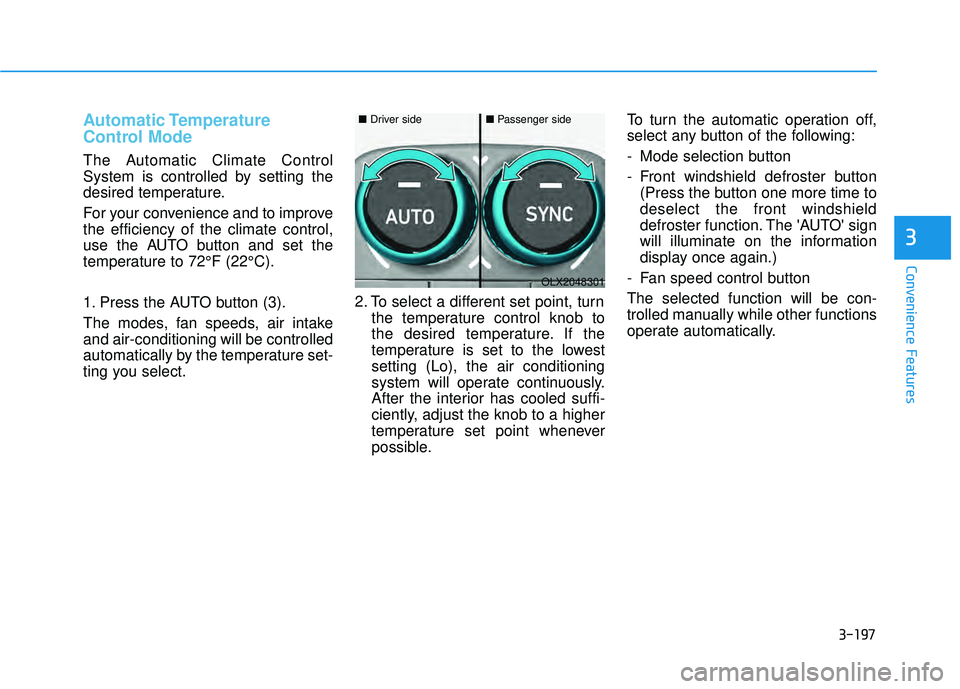
1. Press the AUTO button (3).
The modes, fan speeds, air intake
and air-conditioning will be controlled
automatically by the temperature set-
ting you select.2. To select a different set point, turn
the temperature control knob to
the desired temperature. If the
temperature is set to the lowest
setting (Lo), the air conditioning
system will operate continuously.
After the interior has cooled suffi-
ciently, adjust the knob to a higher
temperature set point whenever
possible. To turn the automatic operation off,
select any button of the following:
- Mode selection button
- Front windshield defroster button
(Press the button one more time to
deselect the front windshield
defroster function. The 'AUTO' sign
will illuminate on the information
display once again.)
- Fan speed control button
The selected function will be con-
trolled manually while other functions
operate automatically.
OLX2048301
■ Driver side■Passenger side
Page 297 of 663
3-201
Convenience Features
3
Adjusting the driver and passenger
side temperature equally
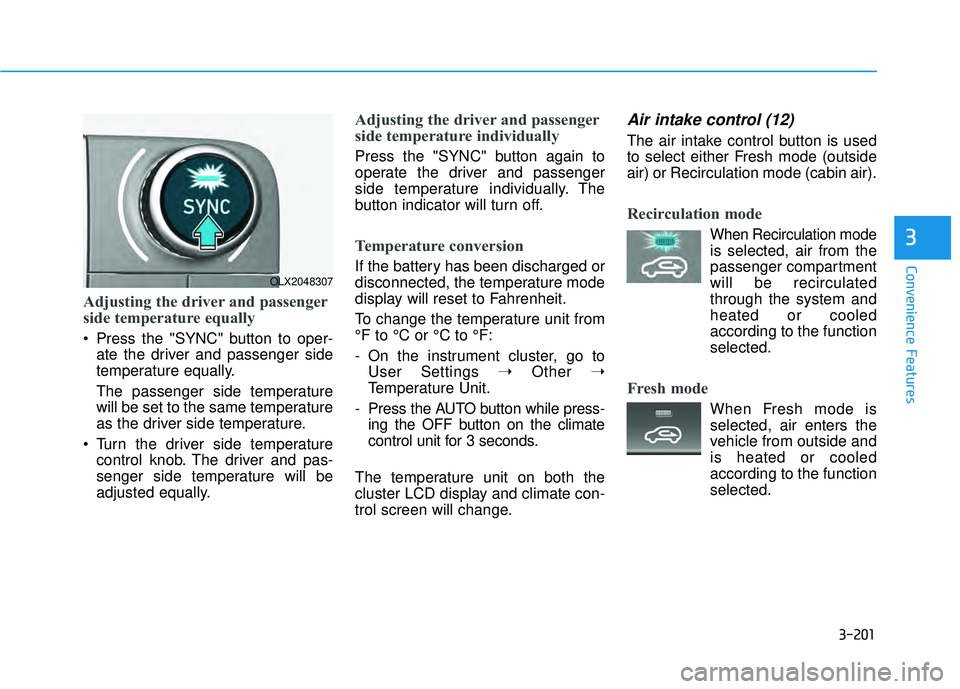
Press the "SYNC" button to oper-ate the driver and passenger side
temperature equally.
The passenger side temperature
will be set to the same temperature
as the driver side temperature.
Turn the driver side temperature control knob. The driver and pas-
senger side temperature will be
adjusted equally.
Adjusting the driver and passenger
side temperature individually
Press the "SYNC" button again to
operate the driver and passenger
side temperature individually. The
button indicator will turn off.
Temperature conversion
If the battery has been discharged or
disconnected, the temperature mode
display will reset to Fahrenheit.
To change the temperature unit from
°F to °C or °C to °F:
- On the instrument cluster, go toUser Settings ➝ Other ➝
Temperature Unit.
- Press the AUTO button while press- ing the OFF button on the climate
control unit for 3 seconds.
The temperature unit on both the
cluster LCD display and climate con-
trol screen will change.
Air intake control (12)
The air intake control button is used
to select either Fresh mode (outside
air) or Recirculation mode (cabin air).
Recirculation mode
When Recirculation mode
is selected, air from the
passenger compartment
will be recirculated
through the system and
heated or cooled
according to the function
selected.
Fresh mode
When Fresh mode is selected, air enters the
vehicle from outside and
is heated or cooled
according to the function
selected.
OLX2048307
Page 310 of 663
3-214
Convenience FeaturesWhen the Auto Defogging
System operates, the indi-
cator will illuminate.
If a high amount of humidity is
detected in the vehicle, the Auto
Defogging System will be enabled.
The following steps will be performed
automatically:
Step 1) The A/C button will turn ON.
Step 2) The air intake control will change to Fresh mode.
Step 3) The mode will be changed to defrost to direct airflow to the
windshield.
Step 4) The fan speed will be set to MAX.
If the air conditioning is off or recircu-
lated air position is manually select-
ed while Auto Defogging System is
ON, the Auto Defogging System
Indicator will blink 3 times to signal
that the manual operation has been
canceled.
To cancel or reset the
Auto Defogging System
Press the front windshield defroster
button for 3 seconds when the igni-
tion switch is in the ON position.
When the Auto Defogging System is
canceled, the ADS OFF symbol will
blink 3 times and ADS OFF will be
displayed on the climate control
information screen.
When the Auto Defogging System is
reset, the ADS OFF symbol will blink
6 times without a signal.
Information
• When the air conditioning is turned on by Auto defogging system, if you
try to turn off the air conditioning, the
indicator will blink 3 times and the air
conditioning will not be turned off.
• To maintain the effectiveness and efficiency of the Auto Defogging
System, do not select Recirculation
mode while the system is operating.
• When the Auto Defogging System is operating, the fan speed adjustment
button, the temperature adjustment
knob, and the air intake control but-
ton are all disabled.
Do not remove the sensor cover
located on the upper end of the
windshield glass.
Damage to system parts could
occur and may not be covered by
your vehicle warranty.
NOTICE
i
Page 322 of 663
3-226
Convenience Features
A smart phone or a tablet PC may get warmer during the re-charging
process. It does not indicate any
malfunction with the charging sys-
tem.
A smart phone or a tablet PC, which adopts a different re-charg-
ing method, may not be properly
re-charged. In this case, use an
exclusive charger of your device.
The charging terminal is only to recharge a device. Do not use the
charging terminal either to turn ON
an audio or to play media.
Wireless Cellular Phone
Charging System (if equipped)
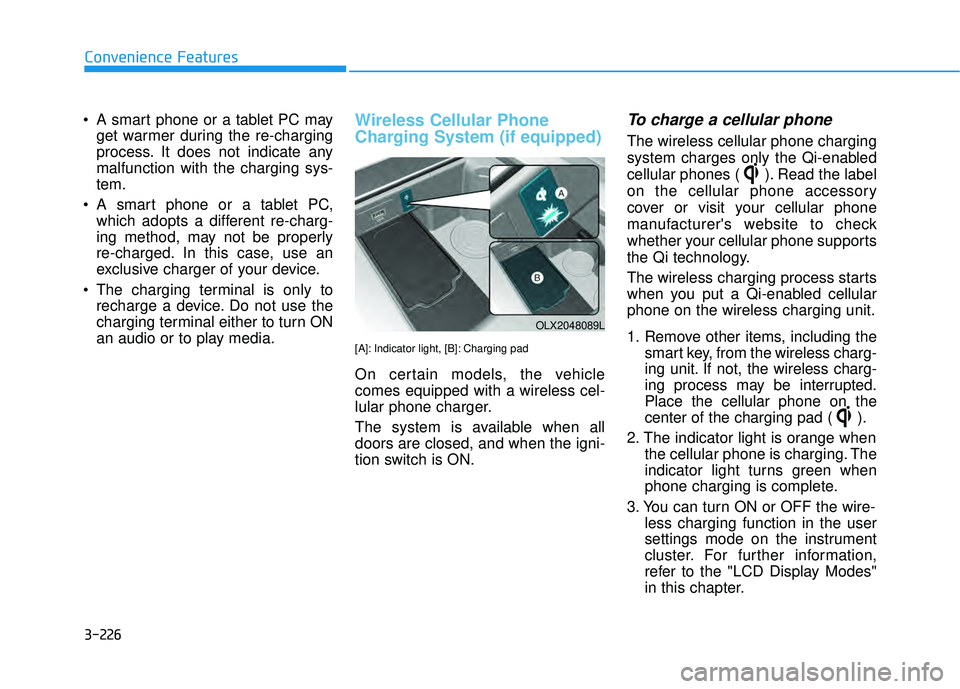
[A]: Indicator light, [B]: Charging pad
On certain models, the vehicle
comes equipped with a wireless cel-
lular phone charger.
The system is available when all
doors are closed, and when the igni-
tion switch is ON.
To charge a cellular phone
The wireless cellular phone charging
system charges only the Qi-enabled
cellular phones ( ). Read the label
on the cellular phone accessory
cover or visit your cellular phone
manufacturer's website to check
whether your cellular phone supports
the Qi technology.
The wireless charging process starts
when you put a Qi-enabled cellular
phone on the wireless charging unit.
1. Remove other items, including the smart key, from the wireless charg-
ing unit. If not, the wireless charg-
ing process may be interrupted.
Place the cellular phone on the
center of the charging pad ( ).
2. The indicator light is orange when the cellular phone is charging. The
indicator light turns green when
phone charging is complete.
3. You can turn ON or OFF the wire- less charging function in the user
settings mode on the instrument
cluster. For further information,
refer to the "LCD Display Modes"
in this chapter.
OLX2048089L
Page 323 of 663
3-227
Convenience Features
3
If your cellular phone is not charging:
- Slightly change the position of thecellular phone on the charging
pad.
- Make sure the indicator light is orange.
The indicator light will blink orange for
10 seconds if there is a malfunction in
the wireless charging system.
In this case, temporarily stop the
charging process, and re-attempt to
charge your cellular phone again.
The system warns you with a mes-
sage on the LCD display if the cellular
phone is still on the wireless charging
unit after the engine is turned OFF
and the front door is opened.
Information
For some manufacturers' cellular
phones, the system may not warn you
even though the cellular phone is left
on the wireless charging unit. This is
due to the particular characteristic of
the cellular phone and not a malfunc-
tion of the wireless charging. The wireless cellular phone
charging system may not sup-
port certain cellular phones,
which are not verified for the Qi
specification ( ).
When placing your cellular phone on the charging mat,
position the phone in the middle
of the mat for optimal charging
performance. If your cell phone
is off to the side, the charging
rate may be less and in some
cases the cell phone may experi-
ence higher heat conduction.
In some cases, the wireless charging may stop temporarily
when the Remote Key or Smart
Key is used, either when starting
the vehicle or locking/unlocking
the doors, etc.
When charging certain cellular phones, the charging indicator
may not change to green when
the cell phone is fully charged.
The wireless charging process may temporarily stop, when tem-
perature abnormally increases
inside the wireless cellular phone
charging system. Stop the charg-
ing cellular phone and wait until
temperature falls to a certain level.
The wireless charging process may temporarily stop when there
is any metallic item, such as a
coin, between the wireless cellular
phone charging system and the
cellular phone.
When charging some cellular phones with a self-protection fea-
ture, the wireless charging speed
may decrease and the wireless
charging may stop.
If the cellular phone has a thick cover, the wireless charging may
not be possible.
If the cell phone is not completely contacting the charging pad, wire-
less charging may not operate
properly.
Some magnetic items like credit cards, phone cards or rail tickets
may be damaged if left with the
cellular phone during the charging
process.NOTICE
i
Page 331 of 663

Multimedia System
Infotainment System..............................................4-2
USB Port ........................................................................\
......4-2
Antenna ........................................................................\
.......4-2
Steering Wheel Audio Controls ......................................4-3
Bluetooth®Wireless Technology ..................................4-4
Audio (Display Audio) / Video /
Navigation System (AVN).................................................4-4
4
Page 334 of 663
4-4
Multimedia System
MODE (3)
Press the MODE button to select
Radio and Media.
MUTE ( ) (4)
Press the MUTE button to mute thesound.
Press the MUTE button again to activate the sound.
Information
Detailed information for audio control
buttons are described in the separately
supplied manual with the vehicle.
Bluetooth®Wireless
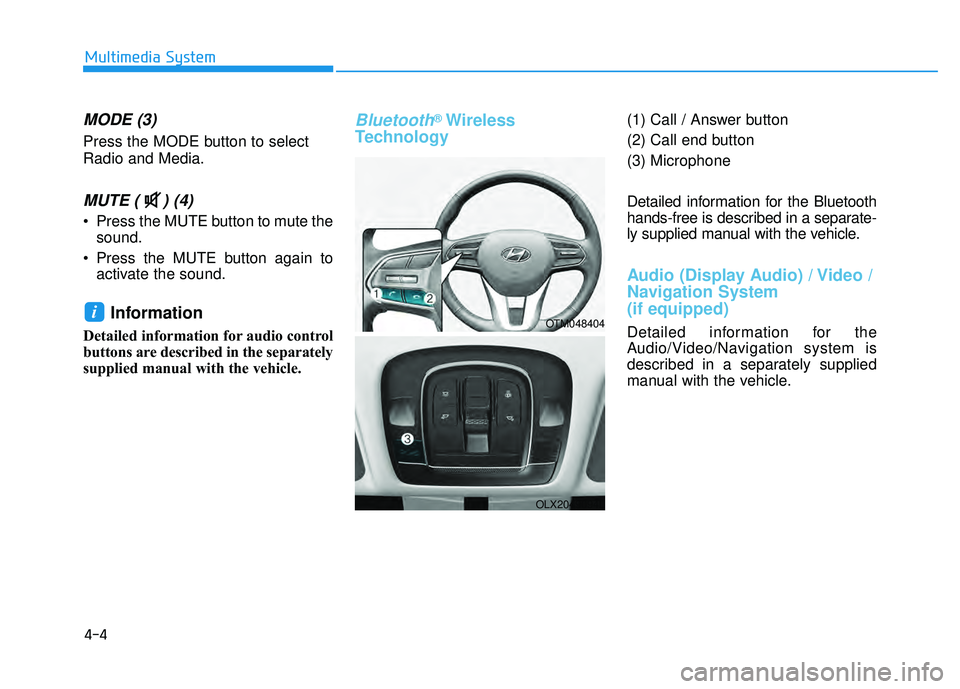
Technology(1) Call / Answer button
(2) Call end button
(3) Microphone
Detailed information for the Bluetooth
hands-free is described in a separate-
ly supplied manual with the vehicle.
Audio (Display Audio) / Video /
Navigation System
(if equipped)
Detailed information for the
Audio/Video/Navigation system is
described in a separately supplied
manual with the vehicle.
iOTM048404
OLX2049094L
Page 335 of 663
Driving your vehicle
5
Before driving.........................................................5-5
Before Entering the Vehicle ...........................................5-5
Before Starting ..................................................................5-5
Ignition switch ........................................................5-7
Key Ignition Switch ...........................................................5-7
Engine Start/Stop Button .............................................5-10
Automatic transmission .......................................5-15
Automatic transmission operation .............................5-15
Parking ........................................................................\
.......5-18
LCD display message ......................................................5-19
Good driving practices ..................................................5-20
Paddle Shifter (Manual Shift Mode) ..........................5-22
Braking system ...................................................5-23
Power Brakes ...................................................................5-23
Disc Brakes Wear Indicator ..........................................5-24
Electronic Parking Brake (EPB)...................................5-24
Auto Hold ........................................................................\
..5-29
Anti-lock Brake System (ABS) ....................................5-33
Electronic Stability Control (ESC)................................5-35
Vehicle Stability Management (VSM).........................5-38
Hill-Start Assist Control (HAC) ....................................5-39
Downhill Brake Control (DBC) .....................................5-39
Trailer Stability Assist (TSA) .........................................5-42
Good Braking Practices ................................................5-42
All Wheel Drive (AWD) ........................................5-43
AWD Operation ................................................................5-44
LCD display message ......................................................5-47
Emergency Precautions.................................................5-48
ISG (Idle Stop and Go) system ...........................5-50
To Activate the ISG System ..........................................5-50
To Deactivate the ISG System ....................................5-53
ISG System Malfunction ................................................5-53
Calibrating the Battery Sensor ....................................5-54
Drive Mode Integrated Control
System (2WD) .......................................................5-55
Drive Mode .......................................................................5\
-55
Drive mode integrated control system (AWD) ..5-59
Drive Mode .......................................................................5\
-59
Forward collision-avoidance assist (FCA)
(Sensor Fusion) ....................................................5-63
Forward Collision-Avoidance Assist settings ...........5-64
Forward Collision-Avoidance Assist operation ......5-66
Forward Collision-Avoidance Assist malfunction
and limitations ..................................................................5-70
Lane Keeping Assist (LKA) ................................5-78
Lane Keeping Assist settings ......................................5-78
Lane Keeping Assist operation ....................................5-80
Lane Keeping Assist malfunction and limitations ...5-82
Page 336 of 663
5
Blind-spot Collison Warning (BCW) ..................5-85
Blind-Spot Collision Warning settings settings .......5-86
Blind-Spot Collision Warning operation ...................5-89
Blind-Spot Collision Warning malfunction and
limitations ........................................................................\
..5-90
Blind-Spot Collision-Avoidance Assist (BCA)..5-96
Blind-Spot Collision Warning settings .......................5-98
Blind-Spot Collision-Avoidance Assist
operation ........................................................................\
.5-101
Blind-Spot Collision-Avoidance Assist
malfunction and limitations ........................................5-105
Rear Cross-Traffic Collision
Warning (RCCW) ...............................................5-111
Rear Cross-Traffic Collision Warning settings ......5-112
Rear Cross-Traffic Collision Warning operation ...5-113
Rear Cross-Traffic Collision Warning
malfunction and limitations ........................................5-115
Rear Cross-Traffic Collision-Avoidance
Assist (RCCA) ....................................................5-119
Rear Cross-Traffic Collision-Avoidance Assist .....5-120
Rear Cross-Traffic Collision-Avoidance Assist
operation ........................................................................\
.5-121
Rear Cross-Traffic Collision-Avoidance Assist
malfunction and limitations ........................................5-125
Lane Following Assist (LFA).............................5-131
Lane Following Assist settings ..................................5-131
Lane Following Assist operation ...............................5-132
Lane Following Assist malfunction and
limitations ........................................................................\
5-134
Driver Attention Warning (DAW) .....................5-136
Driver Attention Warning settings ..........................5-137
Driver Attention Warning operation ........................5-138
Driver Attention Warning malfunction and
limitations ........................................................................\
5-140
Highway Driving Assist (HDA) .........................5-143
Highway Driving Assist Settings ...............................5-144
Highway Driving Assist Operation ............................5-145
Highway Driving Assist Malfunction and
Limitations.......................................................................5\
-148
Smart Cruise Control (SCC) ..............................5-151
Smart Cruise Control settings ....................................5-152
Smart Cruise Control operation.................................5-156
Smart Cruise Control display and control ...............5-157
Smart Cruise Control malfunction and
limitations ........................................................................\
5-163
Page 339 of 663
5-5
Driving your vehicle
5
Before Entering the Vehicle
• Be sure all windows, outside mir-ror(s), and outside lights are clean
and unobstructed.
Remove frost, snow, or ice.
Visually check the tires for uneven wear and damage.
Check under the vehicle for any sign of leaks.
Be sure there are no obstacles behind you if you intend to back up.
Before Starting
Make sure the hood, the liftgate,and the doors are securely closed
and locked.
Adjust the position of the seat and steering wheel.
Adjust the inside and outside rearview mirrors.
Verify all the lights work.
Fasten your seatbelt. Check that all passengers have fastened their
seatbelts.
Check the gauges and indicators in the instrument panel and the mes-
sages on the instrument display
when the ignition switch is in the
ON position.
Check that any items you are car- rying are stored properly or fas-
tened down securely.
CALIFORNIA PROPOSITION 65
WARNING
Engine exhaust and a wide vari-
ety of automobile components
including components found in
the interior furnishings in a
vehicle, contain or emit harmful
chemicals known to the State of
California to cause cancer and
birth defects and reproductive
harm. In addition, certain fluids
contained in vehicles and cer-
tain products of components
contain or emit chemicals
known to the State of California
to cause cancer and birth
defects or other reproductive
harm.
For more information go to
https://www.p65warnings.ca.go
v/passenger-vehicleWARNING
B B
E EF FO O R RE E D D R RI IV V I IN N G G