reset HYUNDAI PALISADE 2022 Owner's Manual
[x] Cancel search | Manufacturer: HYUNDAI, Model Year: 2022, Model line: PALISADE, Model: HYUNDAI PALISADE 2022Pages: 663, PDF Size: 15.74 MB
Page 309 of 663
3-213
Convenience Features
3
Defogging logic
To reduce the probability of fogging
up the inside of the windshield, the
air intake or air conditioning are con-
trolled automatically according to
certain conditions such as or
positions. To cancel or reset the
defogging logic, do the following.
Manual climate control system
1. Turn the ignition switch to the ONposition.
2. Press the defroster button ( ).
3. Press the air intake control button at least 5 times within 3 seconds.
The LED indicator on the air intake
button will blink 3 times to indicate
that the defogging logic has been
disabled.
Repeat the steps again to re-enable
the defogging logic.
If the battery has been discharged or
disconnected, it resets to the defog
logic status.
Automatic climate control system
1. Turn the ignition switch to the ON position.
2. Press the defroster button ( ).
3. While pressing the air conditioning button (A/C), press the air intake
control button at least 5 times
within 3 seconds.
The Automatic Climate Control infor-
mation screen will blink 3 times to
indicate that the defogging logic has
been disabled.
Repeat the steps again to re-enable
the defogging logic.
If the battery has been discharged or
disconnected, it resets to the defog
logic status.
Auto Defogging System
(Additional Feature with
Automatic Temperature
Control System) (if equipped)
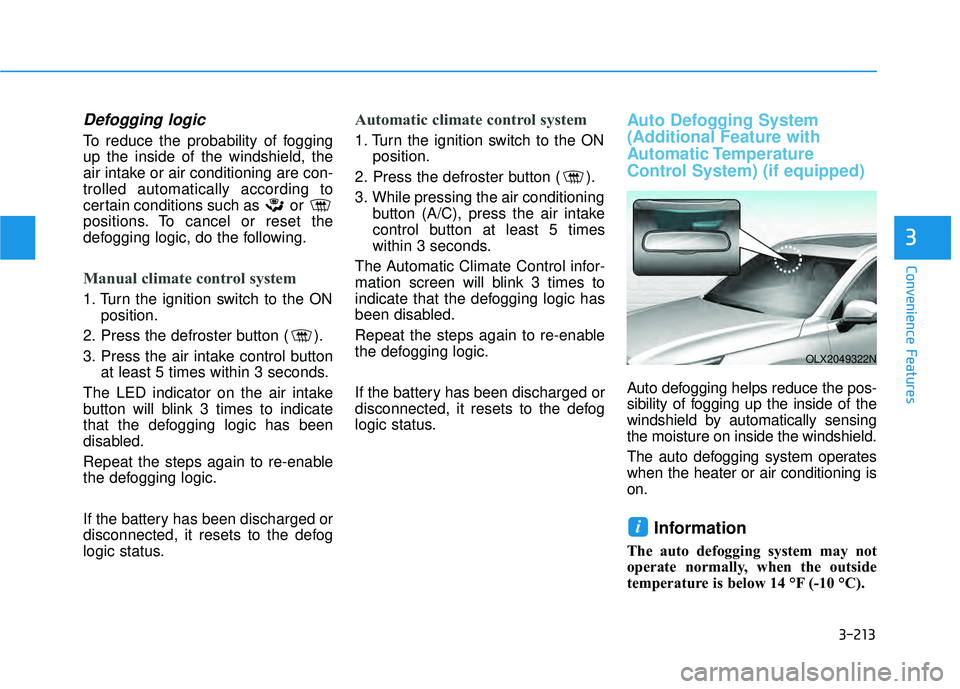
Auto defogging helps reduce the pos-
sibility of fogging up the inside of the
windshield by automatically sensing
the moisture on inside the windshield.
The auto defogging system operates
when the heater or air conditioning is
on.
Information
The auto defogging system may not
operate normally, when the outside
temperature is below 14 °F (-10 °C).
i
OLX2049322N
Page 310 of 663
3-214
Convenience FeaturesWhen the Auto Defogging
System operates, the indi-
cator will illuminate.
If a high amount of humidity is
detected in the vehicle, the Auto
Defogging System will be enabled.
The following steps will be performed
automatically:
Step 1) The A/C button will turn ON.
Step 2) The air intake control will change to Fresh mode.
Step 3) The mode will be changed to defrost to direct airflow to the
windshield.
Step 4) The fan speed will be set to MAX.
If the air conditioning is off or recircu-
lated air position is manually select-
ed while Auto Defogging System is
ON, the Auto Defogging System
Indicator will blink 3 times to signal
that the manual operation has been
canceled.
To cancel or reset the
Auto Defogging System
Press the front windshield defroster
button for 3 seconds when the igni-
tion switch is in the ON position.
When the Auto Defogging System is
canceled, the ADS OFF symbol will
blink 3 times and ADS OFF will be
displayed on the climate control
information screen.
When the Auto Defogging System is
reset, the ADS OFF symbol will blink
6 times without a signal.
Information
• When the air conditioning is turned on by Auto defogging system, if you
try to turn off the air conditioning, the
indicator will blink 3 times and the air
conditioning will not be turned off.
• To maintain the effectiveness and efficiency of the Auto Defogging
System, do not select Recirculation
mode while the system is operating.
• When the Auto Defogging System is operating, the fan speed adjustment
button, the temperature adjustment
knob, and the air intake control but-
ton are all disabled.
Do not remove the sensor cover
located on the upper end of the
windshield glass.
Damage to system parts could
occur and may not be covered by
your vehicle warranty.
NOTICE
i
Page 312 of 663
3-216
Convenience Features
Cluster ionizer (if equipped)
When the ignition switch is in the ON
position, the clean air function turns
on automatically.
Also, the clean air function turns off
automatically, when the ignition
switch is in the OFF position.
Automatic Ventilation
(if equipped)
When the ignition switch is in the ON
position or when the engine is run-
ning and temperature is below 59°F
(15°C) with the recirculation mode
selected more than three to five min-
utes, the air intake position will auto-
matically change to fresh mode.
To cancel or reset the Automatic
Ventilation
When the air conditioning system is
on, select Face Level mode and
press the recirculation mode button
five times within three seconds while
pressing A/C button.
When the Automatic Ventilation fea-
ture is enabled, the recirculation but-
ton LED indicator will blink 6 times.
When the Automatic Ventilation fea-
ture is disabled, the recirculation but-
ton LED indicator will blink 3 times.
Sunroof Inside Air
Recirculation (if equipped)
When the sunroof is opened, outside
(fresh) air will be automatically
selected. At this time, if you press the
air intake control button, recirculated
air position will be selected but will
change back to outside (fresh) air
after 3 minutes. When the sunroof is
closed, the air intake position will
return to the original position that
was selected.
C CL LI IM M A AT TE E C C O O N NT TR R O O L L A A D DD DI IT T I IO O N NA AL L F F E E A A T TU U R RE ES S
Page 333 of 663
• When reinstalling your roof anten-na, it is important that it is fully
tightened and adjusted to the
upright position to ensure proper
reception.
When cargo is loaded on the roof rack, do not place the cargo near
the antenna pole to ensure proper
reception.
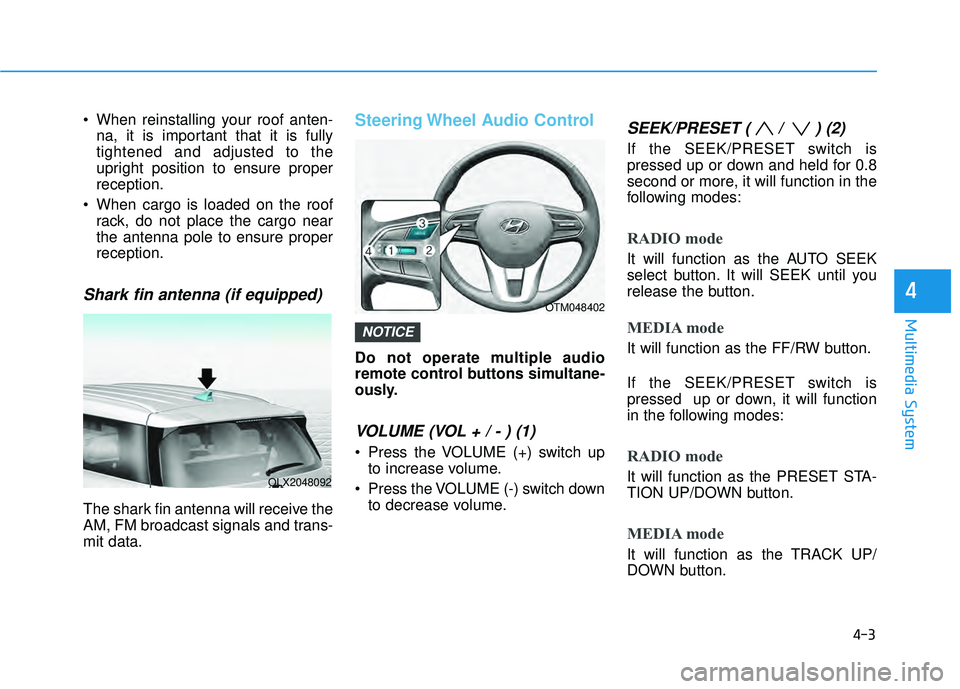
Shark fin antenna (if equipped)
The shark fin antenna will receive the
AM, FM broadcast signals and trans-
mit data.
Steering Wheel Audio Control
Do not operate multiple audio
remote control buttons simultane-
ously.
VOLUME (VOL + / - ) (1)
Press the VOLUME (+) switch upto increase volume.
Press the VOLUME (-) switch down to decrease volume.
SEEK/PRESET ( / ) (2)
If the SEEK/PRESET switch is
pressed up or down and held for 0.8
second or more, it will function in the
following modes:
RADIO mode
It will function as the AUTO SEEK
select button. It will SEEK until you
release the button.
MEDIA mode
It will function as the FF/RW button.
If the SEEK/PRESET switch is
pressed up or down, it will function
in the following modes:
RADIO mode
It will function as the PRESET STA-
TION UP/DOWN button.
MEDIA mode
It will function as the TRACK UP/
DOWN button.
NOTICE
4-3
Multimedia System
4
OLX2048092
OTM048402
Page 473 of 663
5-139
Driving your vehicle
5
Taking a break
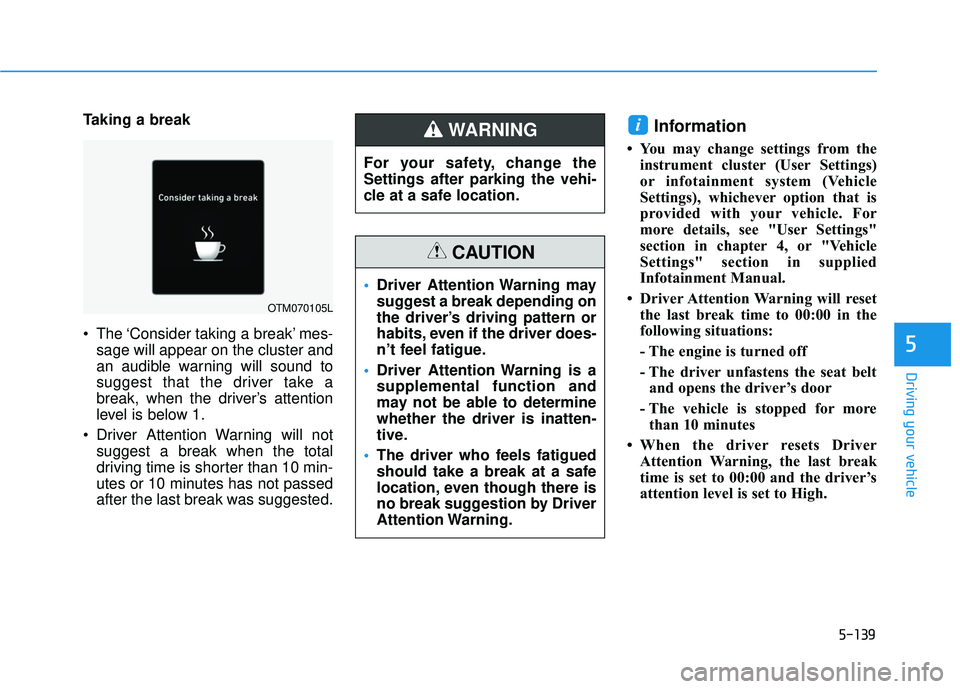
The ‘Consider taking a break’ mes-sage will appear on the cluster and
an audible warning will sound to
suggest that the driver take a
break, when the driver’s attention
level is below 1.
Driver Attention Warning will not suggest a break when the total
driving time is shorter than 10 min-
utes or 10 minutes has not passed
after the last break was suggested.Information
• You may change settings from theinstrument cluster (User Settings)
or infotainment system (Vehicle
Settings), whichever option that is
provided with your vehicle. For
more details, see "User Settings"
section in chapter 4, or "Vehicle
Settings" section in supplied
Infotainment Manual.
• Driver Attention Warning will reset the last break time to 00:00 in the
following situations:
- The engine is turned off
- The driver unfastens the seat beltand opens the driver’s door
- The vehicle is stopped for more than 10 minutes
• When the driver resets Driver Attention Warning, the last break
time is set to 00:00 and the driver’s
attention level is set to High.
i
OTM070105L
For your safety, change the
Settings after parking the vehi-
cle at a safe location.
WARNING
Driver Attention Warning may
suggest a break depending on
the driver’s driving pattern or
habits, even if the driver does-
n’t feel fatigue.
Driver Attention Warning is a
supplemental function and
may not be able to determine
whether the driver is inatten-
tive.
The driver who feels fatigued
should take a break at a safe
location, even though there is
no break suggestion by Driver
Attention Warning.
CAUTION
Page 483 of 663
5-149
Driving your vehicle
Limitations of Highway DrivingAssist
Highway Driving Assist may not
operate normally, or may not operate
under the following circumstances:
The map information and the actu-
al road is different because the
navigation is not updated
The map information and the actu- al road is different because of real-
time GPS data or map information
error
The infotainment system is over- loaded by simultaneously perform-
ing functions such as route search,
video playback, voice recognition,
etc.
GPS signals are blocked in areas such as a tunnel
The driver goes off course or the route to the destination is changed
or canceled by resetting the navi-
gation
The vehicle enters a service sta- tion or rest area
Android Auto or Car Play is operat- ing
5
Highway Driving Assist may
inadvertently operate or turn
off depending on road condi-
tions (navigation information)
and surroundings.
Lane Following Assist func-
tion may be temporarily dis-
abled when the front view
camera cannot detect lanes
properly or the hands-off
warning is on.
You may not hear the warning
sound of Highway Driving
Assist if the surrounding is
noisy.
If the vehicle is driven at high
speed above a certain speed
at a curve, your vehicle may
drive to one side or may
depart from the driving lane.
When you are towing a trailer
or another vehicle, we recom-
mend that Highway Driving
Assist is turned off due to
safety reasons.The hands–off warning mes-
sage may appear early or late
depending on how the steer-
ing wheel is held or road con-
ditions. Always have your
hands on the steering wheel
while driving.
For your safety, please read
the owner's manual before
using the Highway Driving
Assist.
Highway Driving Assist will
not operate when the engine
is started, or when the detect-
ing sensors or navigation is
being initialized.
Page 508 of 663
5-174
Limitations of Navigation-
based Smart Cruise Control
Navigation-based Smart Cruise
Control may not operate normally
under the following circumstances:
The navigation is not working prop-erly
Speed limit and road information in the navigation is not updated
The map information and the actu- al road is different because of real-
time GPS data or map information
error
The navigation searches for a route while driving
GPS signals are blocked in areas such as a tunnel
The navigation is updated while driving
Map information is not transmitted due to infotainment system's
abnormal operation
A road that divides into two or more roads and joins again
The driver goes off course the route set in the navigation The route to the destination is
changed or canceled by resetting
the navigation
The vehicle enters a service sta- tion or rest area
The speed limit of some sections changes according to the road sit-
uations
Android Auto or Car Play is operat- ing
The navigation cannot detect the current vehicle position (ex: elevat-
ed roads including overpass adja-
cent to general roads or nearby
roads exist in a parallel way)
The navigation is being updated while driving
The navigation is being restarted while driving
There is bad weather, such as heavy rain, heavy snow, etc.
Driving on a road under construc- tion
Driving on a road that is controlled
Driving on a road that is sharply curved
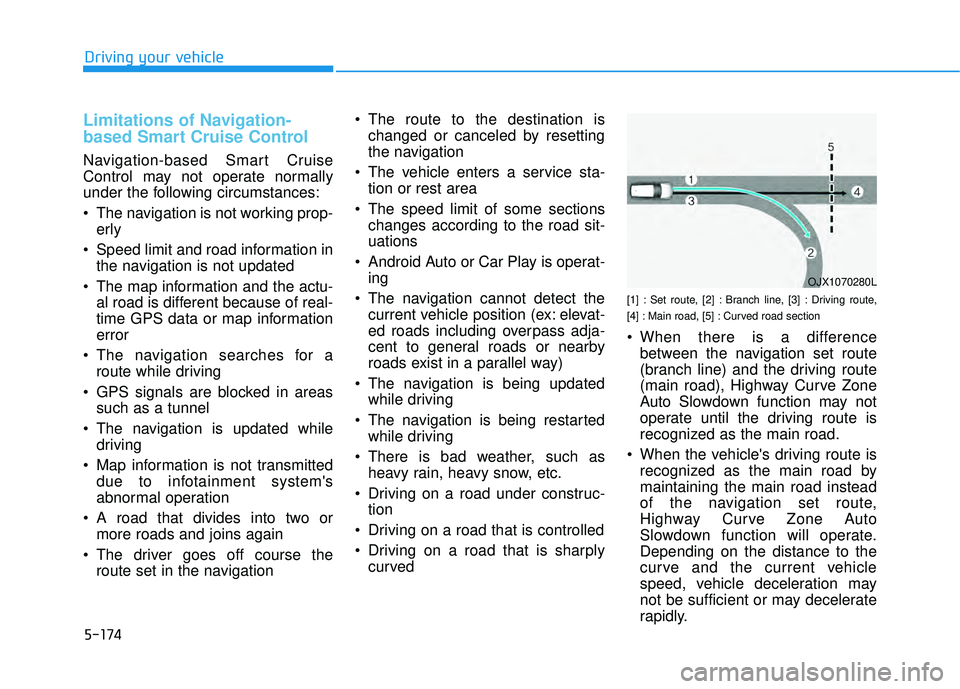
[1] : Set route, [2] : Branch line, [3] : Driving route,
[4] : Main road, [5] : Curved road section
When there is a differencebetween the navigation set route
(branch line) and the driving route
(main road), Highway Curve Zone
Auto Slowdown function may not
operate until the driving route is
recognized as the main road.
When the vehicle's driving route is recognized as the main road by
maintaining the main road instead
of the navigation set route,
Highway Curve Zone Auto
Slowdown function will operate.
Depending on the distance to the
curve and the current vehicle
speed, vehicle deceleration may
not be sufficient or may decelerate
rapidly.
Driving your vehicle
OJX1070280L
Page 560 of 663
7
Maintenance
7
Maintenance
Engine compartment .............................................7-3
Maintenance services ...........................................7-4
Owner's Responsibility .....................................................7-4
Owner Maintenance Precautions..................................7-4
Owner maintenance ...............................................7-5
Owner Maintenance Schedule .......................................7-6
Scheduled maintenance services.........................7-7
Normal Maintenance Schedule (3.8 GDI) ....................7-8
Maintenance Under Severe Usage Conditions
(3.8 GDI) ........................................................................\
.....7-11
Explanation of scheduled maintenance items .7-13
Engine oil ..............................................................7-16
Checking the Engine Oil Level .....................................7-16
Checking the Engine Oil and Filter .............................7-17
Engine coolant......................................................7-18
Checking the Engine Coolant Level ............................7-18
Changing Engine Coolant ..............................................7-20
Brake fluid ............................................................7-21
Checking the Brake Fluid Level ...................................7-21
Washer fluid .........................................................7-22
Checking the Washer Fluid Level................................7-22
Air cleaner ............................................................7-22
Filter Replacement ..........................................................7-22
Climate control air filter .....................................7-24
Filter Inspection ...............................................................7-24
Wiper blades .........................................................7-26
Blade Inspection ..............................................................7-26
Blade Replacement .........................................................7-26
Battery...................................................................7-29
For Best Battery Service ..............................................7-30
Battery Recharging ........................................................7-31
Reset Features.................................................................7-32
Tires and wheels ..................................................7-33
Tire Care ........................................................................\
....7-33
Recommended Cold Tire Inflation Pressures ...........7-34
Check Tire Inflation Pressure ......................................7-35
Tire Rotation...................................................................\
..7-35
Wheel Alignment and Tire Balance ............................7-36
Tire Replacement ...........................................................7-37
Wheel Replacement ........................................................7-38
Tire Traction .....................................................................7-3\
8
Tire Maintenance ............................................................7-39
Tire Sidewall Labeling ....................................................7-39
Tire Terminology and Definitions................................7-43
All Season Tires ...............................................................7-46
Snow Tires ........................................................................\
7-46
Radial-Ply Tires ...............................................................7-46
7
Page 590 of 663
7-31
7
Maintenance
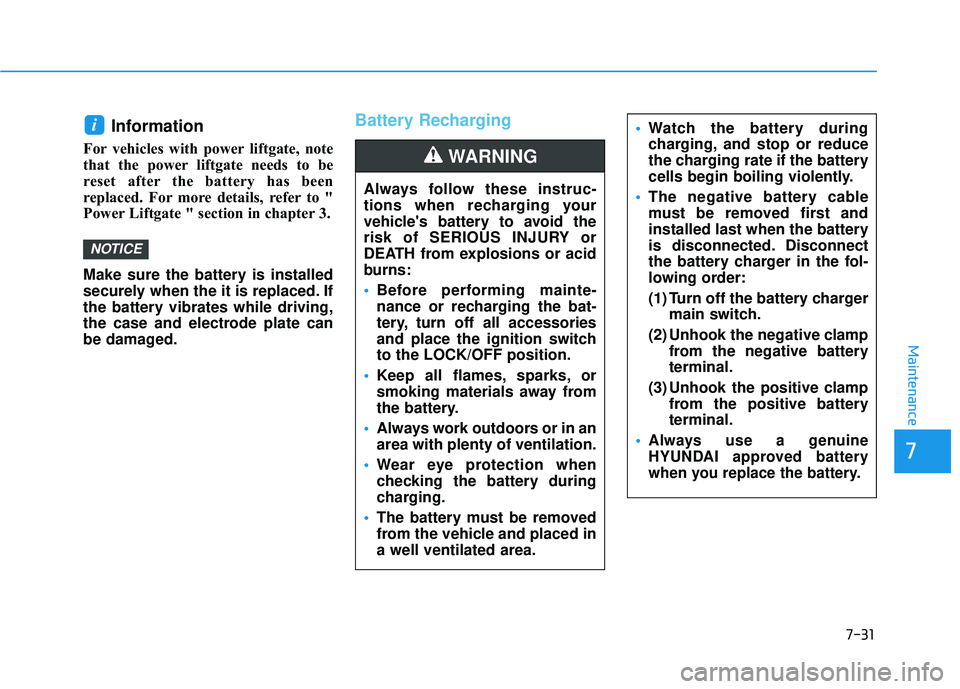
Information
For vehicles with power liftgate, note
that the power liftgate needs to be
reset after the battery has been
replaced. For more details, refer to "
Power Liftgate " section in chapter 3.
Make sure the battery is installed
securely when the it is replaced. If
the battery vibrates while driving,
the case and electrode plate can
be damaged.
Battery Recharging
NOTICE
i
Always follow these instruc-
tions when recharging your
vehicle's battery to avoid the
risk of SERIOUS INJURY or
DEATH from explosions or acid
burns:
Before performing mainte-
nance or recharging the bat-
tery, turn off all accessories
and place the ignition switch
to the LOCK/OFF position.
Keep all flames, sparks, or
smoking materials away from
the battery.
Always work outdoors or in an
area with plenty of ventilation.
Wear eye protection when
checking the battery during
charging.
The battery must be removed
from the vehicle and placed in
a well ventilated area.
WARNING
Watch the battery during
charging, and stop or reduce
the charging rate if the battery
cells begin boiling violently.
The negative battery cable
must be removed first and
installed last when the battery
is disconnected. Disconnect
the battery charger in the fol-
lowing order:
(1) Turn off the battery charger
main switch.
(2) Unhook the negative clamp from the negative battery
terminal.
(3) Unhook the positive clamp from the positive battery
terminal.
Always use a genuine
HYUNDAI approved battery
when you replace the battery.
Page 591 of 663
7-32
Maintenance
AGM battery
Absorbent Glass Matt (AGM) batteries are maintenance-free
and we recommend that the
AGM battery be serviced by an
authorized retailer of HYUNDAI
dealer. For charging your AGM
battery, use only fully automatic
battery chargers that are spe-
cially developed for AGM batter-
ies.
When replacing the AGM bat- tery, we recommend that you
use parts for replacement from
an authorized retailer of
HYUNDAI dealer.
Do not open or remove the cap on top of the battery. This may
cause leaks of internal elec-
trolyte that could result in
severe injury.
By jump starting
After a jump start from a good bat-
tery, drive the vehicle for at least 30
minutes or operate at idle for at least
60 minutes before it is shutoff.
Alternatively you may visit a dealer
for charge and battery test.
The vehicle may not restart if you
shut it off before the battery had a
chance to adequately recharge. See
"Jump Starting" in chapter 6 for more
information on jump starting proce-
dures.
Information
An inappropriately disposedbattery can be harmful to
the environment and human
health. Dispose of the bat-
tery according to your local
law(s) or regulations.
Reset Features
The following items may need to be
reset after the battery has been dis-
charged or the battery has been dis-
connected. See chapter 3 or 4 for:
Power Windows
Driver Position Memory System
Trip Computer
Climate Control System
Clock
Audio System
Sunroof
i
NOTICE