trailer HYUNDAI PALISADE 2022 Owner's Manual
[x] Cancel search | Manufacturer: HYUNDAI, Model Year: 2022, Model line: PALISADE, Model: HYUNDAI PALISADE 2022Pages: 663, PDF Size: 15.74 MB
Page 460 of 663
5-126
Driving your vehicle
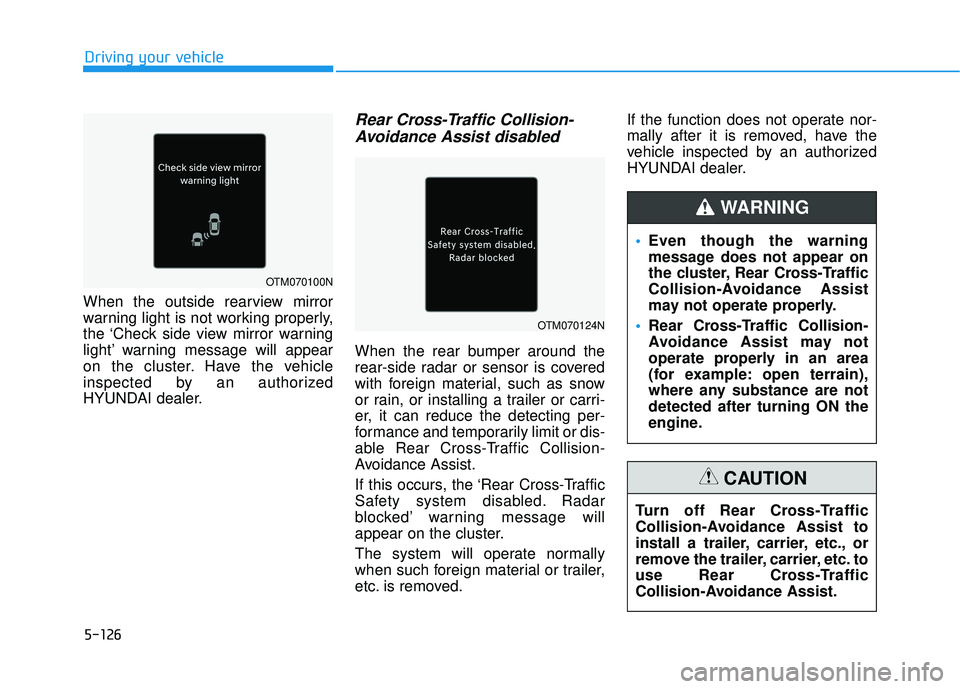
When the outside rearview mirror
warning light is not working properly,
the ‘Check side view mirror warning
light’ warning message will appear
on the cluster. Have the vehicle
inspected by an authorized
HYUNDAI dealer.
Rear Cross-Traffic Collision- Avoidance Assist disabled
When the rear bumper around the
rear-side radar or sensor is covered
with foreign material, such as snow
or rain, or installing a trailer or carri-
er, it can reduce the detecting per-
formance and temporarily limit or dis-
able Rear Cross-Traffic Collision-
Avoidance Assist.
If this occurs, the ‘Rear Cross-Traffic
Safety system disabled. Radar
blocked’ warning message will
appear on the cluster.
The system will operate normally
when such foreign material or trailer,
etc. is removed. If the function does not operate nor-
mally after it is removed, have the
vehicle inspected by an authorized
HYUNDAI dealer.
Even though the warning
message does not appear on
the cluster, Rear Cross-Traffic
Collision-Avoidance Assist
may not operate properly.
Rear Cross-Traffic Collision-
Avoidance Assist may not
operate properly in an area
(for example: open terrain),
where any substance are not
detected after turning ON the
engine.
WARNING
Turn off Rear Cross-Traffic
Collision-Avoidance Assist to
install a trailer, carrier, etc., or
remove the trailer, carrier, etc. to
use Rear Cross-Traffic
Collision-Avoidance Assist.
CAUTION
OTM070100N
OTM070124N
Page 463 of 663
5-129
Driving your vehicle
5
When you are towing a trailer
or another vehicle, we recom-
mend that Rear Cross-Traffic
Collision-Avoidance Assist is
turned off due to safety rea-
sons.
Rear Cross-Traffic Collision-
Avoidance Assist may not
operate normally if interfered
by strong electromagnetic
waves.
Rear Cross-Traffic Collision-
Avoidance Assist may not
operate for 15 seconds after
the vehicle is started, or the
rear corner radars are initial-
ized.
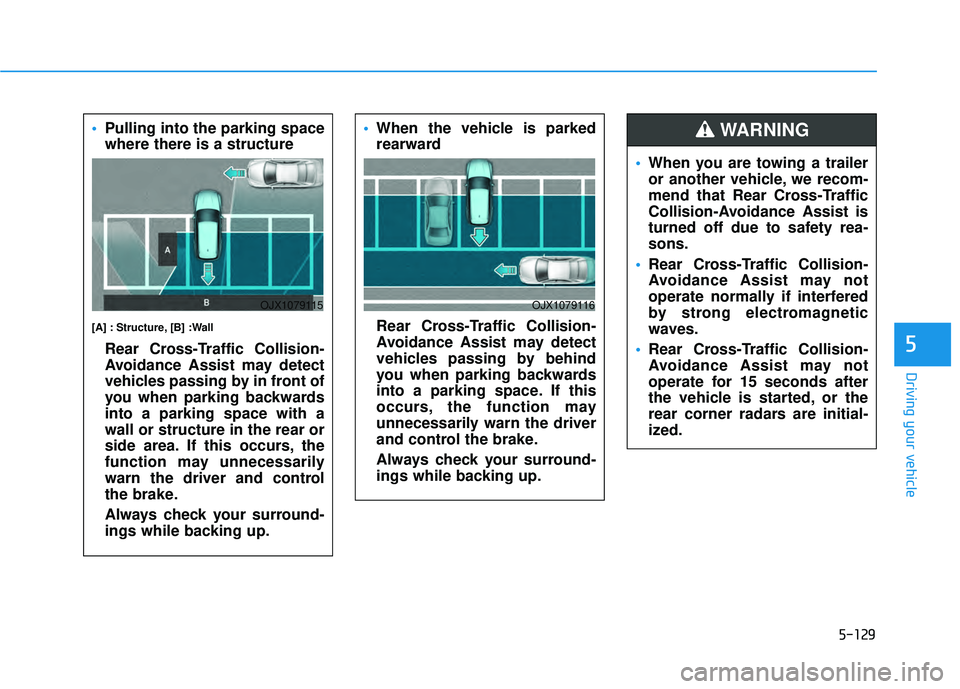
WARNING Pulling into the parking space
where there is a structure
[A] : Structure, [B] :Wall
Rear Cross-Traffic Collision-
Avoidance Assist may detect
vehicles passing by in front of
you when parking backwards
into a parking space with a
wall or structure in the rear or
side area. If this occurs, the
function may unnecessarily
warn the driver and control
the brake.
Always check your surround-
ings while backing up.
OJX1079115
When the vehicle is parked
rearward
Rear Cross-Traffic Collision-
Avoidance Assist may detect
vehicles passing by behind
you when parking backwards
into a parking space. If this
occurs, the function may
unnecessarily warn the driver
and control the brake.
Always check your surround-
ings while backing up.
OJX1079116
Page 483 of 663
5-149
Driving your vehicle
Limitations of Highway DrivingAssist
Highway Driving Assist may not
operate normally, or may not operate
under the following circumstances:
The map information and the actu-
al road is different because the
navigation is not updated
The map information and the actu- al road is different because of real-
time GPS data or map information
error
The infotainment system is over- loaded by simultaneously perform-
ing functions such as route search,
video playback, voice recognition,
etc.
GPS signals are blocked in areas such as a tunnel
The driver goes off course or the route to the destination is changed
or canceled by resetting the navi-
gation
The vehicle enters a service sta- tion or rest area
Android Auto or Car Play is operat- ing
5
Highway Driving Assist may
inadvertently operate or turn
off depending on road condi-
tions (navigation information)
and surroundings.
Lane Following Assist func-
tion may be temporarily dis-
abled when the front view
camera cannot detect lanes
properly or the hands-off
warning is on.
You may not hear the warning
sound of Highway Driving
Assist if the surrounding is
noisy.
If the vehicle is driven at high
speed above a certain speed
at a curve, your vehicle may
drive to one side or may
depart from the driving lane.
When you are towing a trailer
or another vehicle, we recom-
mend that Highway Driving
Assist is turned off due to
safety reasons.The hands–off warning mes-
sage may appear early or late
depending on how the steer-
ing wheel is held or road con-
ditions. Always have your
hands on the steering wheel
while driving.
For your safety, please read
the owner's manual before
using the Highway Driving
Assist.
Highway Driving Assist will
not operate when the engine
is started, or when the detect-
ing sensors or navigation is
being initialized.
Page 496 of 663
5-162
Driving your vehicleTurn off Smart Cruise Control
when your vehicle is being
towed.
Smart Cruise Control may not
operate normally if interfered
by strong electromagnetic
waves.
Smart Cruise Control may not
detect an obstacle in front and
lead to a collision. Always
look ahead cautiously to pre-
vent unexpected and sudden
situations from occurring.
Vehicles moving in front of
you with a frequent lane
change may cause a delay in
Smart Cruise Control reaction
or may cause Smart Cruise
Control to react to a vehicle
actually in an adjacent lane.
Always drive cautiously to
prevent unexpected and sud-
den situations from occur-
ring.
Always be aware of the sur-
roundings and drive safely,
even though a warning mes-
sage does not appear or an
audible warning does not
sound.
If any other system’s warning
message is displayed or
warning sound is generated,
Smart Cruise Control warning
message may not be dis-
played and warning sound
may not be generated.
You may not hear the warning
sound of Forward Collision-
Avoidance Assist if the sur-
rounding is noisy.
The vehicle manufacturer is
not responsible for any traffic
violation or accidents caused
by the driver.
Always set the vehicle speed
under the speed limit in your
country.Always be aware of the select-
ed speed and headway dis-
tance.
Keep a safe distance accord-
ing to road conditions and
vehicle speed. If the headway
distance is too close during
high-speed driving, a serious
collision may result.
When maintaining distance
with the vehicle ahead, if the
front vehicle disappears,
Smart Cruise Control may
suddenly accelerate to the set
speed. Always be aware of
unexpected and sudden situa-
tions from occurring.
Vehicle speed may decrease
on an upward slope and
increase on a downward
slope.
Always be aware of situations
such as when a vehicle cuts in
suddenly.
When you are towing a trailer
or another vehicle, we recom-
mend that Smart Cruise
Control is turned off due to
safety reasons.
Page 501 of 663
![HYUNDAI PALISADE 2022 Owners Manual 5-167
Driving your vehicle
5
Changing lanes
[A] : Your vehicle, [B] : Lane changing vehicle
When a vehicle moves into your
lane from an adjacent lane, it can-
not be detected by the sensor until
it i](/img/35/41170/w960_41170-500.png "HYUNDAI PALISADE 2022 Owners Manual 5-167
Driving your vehicle
5
Changing lanes
[A] : Your vehicle, [B] : Lane changing vehicle
When a vehicle moves into your
lane from an adjacent lane, it can-
not be detected by the sensor until
it i")
5-167
Driving your vehicle
5
Changing lanes
[A] : Your vehicle, [B] : Lane changing vehicle
When a vehicle moves into your
lane from an adjacent lane, it can-
not be detected by the sensor until
it is in the sensor's detection range.Smart Cruise Control may not
immediately detect the vehicle
when the vehicle changes lanes
abruptly. In this case, you must
maintain a safe braking distance,
and if necessary, depress the
brake pedal to reduce your driving
speed in order to maintain a safe
distance.
Detecting vehicle
In the following cases, some vehi-
cles in your lane cannot be detect-
ed by the sensor:
- Vehicles offset to one side
- Slow-moving vehicles or sudden-decelerating vehicles
- Vehicles within approximately 6 feet (2 m) from your vehicle
- Oncoming vehicles
- Stopped vehicles
- Vehicles with small rear profile, such as trailers
- Narrow vehicles, such as motor- cycles or bicycles
- Special vehicles
OJX1070181R
OADAS030
Page 510 of 663
5-176
Information
• The time gap could occur betweenthe navigation’s guidance and when
Navigation-based Smart Cruise
Control operation starts and ends.
• The speed information on the clus- ter and navigation may differ.
• Even if you are driving at a speed lower than Smart Cruise Control set
speed, acceleration may be limited
by the curve sections ahead.
• If Navigation-based Smart Cruise Control is operating while leaving
the main road to enter an inter-
change, junction, rest area, etc., the
function may operate for a certain
period of time.
• Deceleration by Navigation-based Smart Cruise Control may feel it is
not sufficient due to road conditions
such as uneven road surfaces, nar-
row lanes, etc.
i
Driving your vehicle
Navigation-based Smart
Cruise Control may not oper-
ate due to the existence of
leading vehicles and the driv-
ing conditions of the vehicle.
Always pay attention to road
and driving conditions while
driving.
When you are towing a trailer
or another vehicle, we recom-
mend that Navigation-based
Smart Cruise Control is
turned off due to safety rea-
sons.
After you pass through a toll-
gate on a highway (or motor-
way), Navigation-based Smart
Cruise Control will operate
based on the first lane. If you
enter one of the other lanes,
Navigation-based Smart
Cruise Control may not oper-
ate properly.
The vehicle will accelerate if
the driver depresses the
accelerator pedal while
Navigation-based Smart
Cruise Control is operating,
and the function will not
decelerate the vehicle.
However, if the accelerator
pedal is depressed insuffi-
ciently, the vehicle may decel-
erate.
If the driver accelerates and
releases the accelerator pedal
while Navigation-based Smart
Cruise Control is operating,
the vehicle may not deceler-
ate sufficiently or may rapidly
decelerate to a safe speed.
If the curve is too large or too
small, Navigation-based
Smart Cruise Control may not
operate.
Page 520 of 663
5-186
Driving your vehicle
If you are considering to tow with your
vehicle, you should first check with
your state's Department of Motor
Vehicles to determine legal require-
ments. Since laws vary from state to
state the requirements for towing
trailers, vehicles, or other types of
vehicles or apparatus may differ. Ask
an authorized HYUNDAI dealer for
further details before towing.
Remember that trailering is different
than just driving your vehicle by itself.
Trailering means changes in han-
dling, durability, and fuel economy.
Successful, safe trailering requires
correct equipment, and it has to be
used properly. Damage to your vehi-
cle caused by improper trailer towing
is not covered by your vehicle manu-
facturer’s warranty.
This section contains many time-
tested, important trailering tips and
safety rules. Many of these are
important for your safety and that of
your passengers. Please read this
section carefully before you pull a
trailer.
If you decide to pull a trailer
Here are some important points if
you decide to pull a trailer:
Consider using a sway control. You can ask a trailer hitch dealer about
sway control.
Do not do any towing with your vehicle during its first 1,200 miles
(2,000 km) in order to allow the
engine to properly break in. Failure
to heed this caution may result in
serious engine or transmission
damage.
When towing a trailer, be sure to consult an authorized HYUNDAI
dealer for further information on
additional requirements such as a
towing kit, etc.
Always drive your vehicle at a mod- erate speed (less than 60 mph
(100 km/h)) or posted towing
speed limit.
On a long uphill grade, do not exceed 45 mph (70 km/h) or the
posted towing speed limit,
whichever is lower.
Carefully observe the weight and load limits provided in the following
pages.
T TR R A A I IL L E E R R T T O O W W I IN N G G
Take the following precautions:
If you don't use the correct
towing equipment, or if you
drive improperly while towing,
you can lose control of the
vehicle when pulling a trailer.
For example, if the trailer is
too heavy, the braking per-
formance may be reduced.
You and your passengers
could be seriously or fatally
injured. Pull a trailer only if
you have followed all the
steps in this section.
Before towing, make sure the
total trailer weight, GCW
(Gross Combination Weight),
GVW (Gross Vehicle Weight),
GAW (Gross Axle Weight ) and
trailer tongue load are all with-
in the limits.
When you tow a trailer, make
sure to turn off the Idle Stop
and Go system.
WARNING
Page 521 of 663
5-187
Driving your vehicle
5
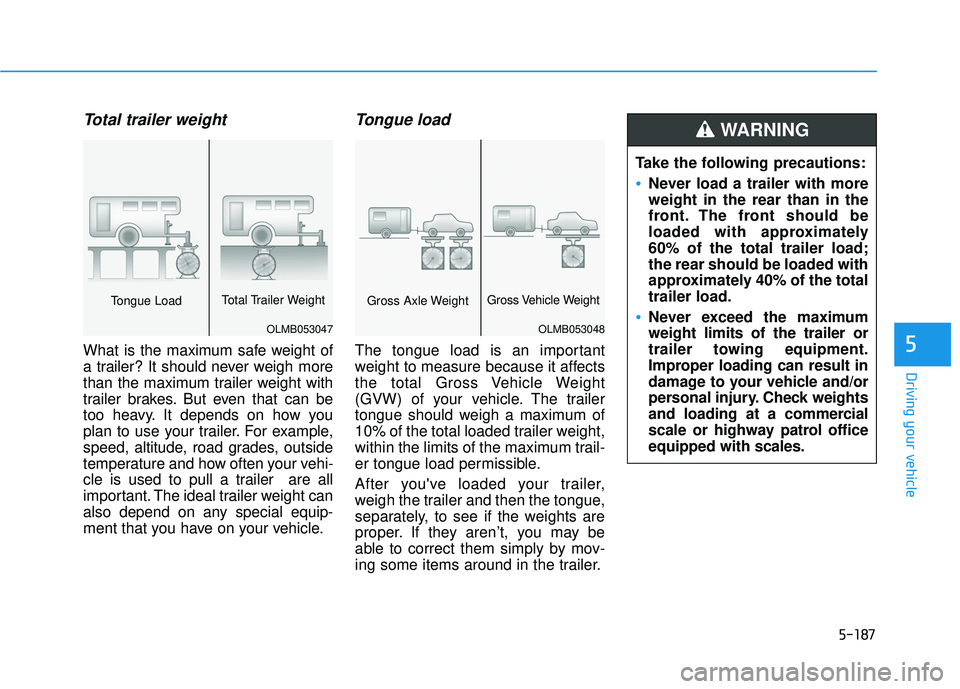
Total trailer weight
What is the maximum safe weight of
a trailer? It should never weigh more
than the maximum trailer weight with
trailer brakes. But even that can be
too heavy. It depends on how you
plan to use your trailer. For example,
speed, altitude, road grades, outside
temperature and how often your vehi-
cle is used to pull a trailer are all
important. The ideal trailer weight can
also depend on any special equip-
ment that you have on your vehicle.
Tongue load
The tongue load is an important
weight to measure because it affects
the total Gross Vehicle Weight
(GVW) of your vehicle. The trailer
tongue should weigh a maximum of
10% of the total loaded trailer weight,
within the limits of the maximum trail-
er tongue load permissible.
After you've loaded your trailer,
weigh the trailer and then the tongue,
separately, to see if the weights are
proper. If they aren’t, you may be
able to correct them simply by mov-
ing some items around in the trailer.
OLMB053047
Tongue LoadTotal Trailer Weight
OLMB053048
Gross Axle WeightGross Vehicle Weight
Take the following precautions:
Never load a trailer with more
weight in the rear than in the
front. The front should be
loaded with approximately
60% of the total trailer load;
the rear should be loaded with
approximately 40% of the total
trailer load.
Never exceed the maximum
weight limits of the trailer or
trailer towing equipment.
Improper loading can result in
damage to your vehicle and/or
personal injury. Check weights
and loading at a commercial
scale or highway patrol office
equipped with scales.
WARNING
Page 522 of 663
5-188
Driving your vehicle
lbs (kg)
Trailer towing equipment
Hitches
It's important to have the correct
hitch equipment. Crosswinds, large
trucks going by, and rough roads are
a few reasons why you'll need the
right hitch. Here are some rules to
follow:
The bumpers on your vehicle arenot intended for hitches. Do not
attach rental hitches or other
bumper-type hitches to them. Use
only a frame-mounted hitch that
does not attach to the bumper.
A HYUNDAI trailer hitch accessory is available at an authorized
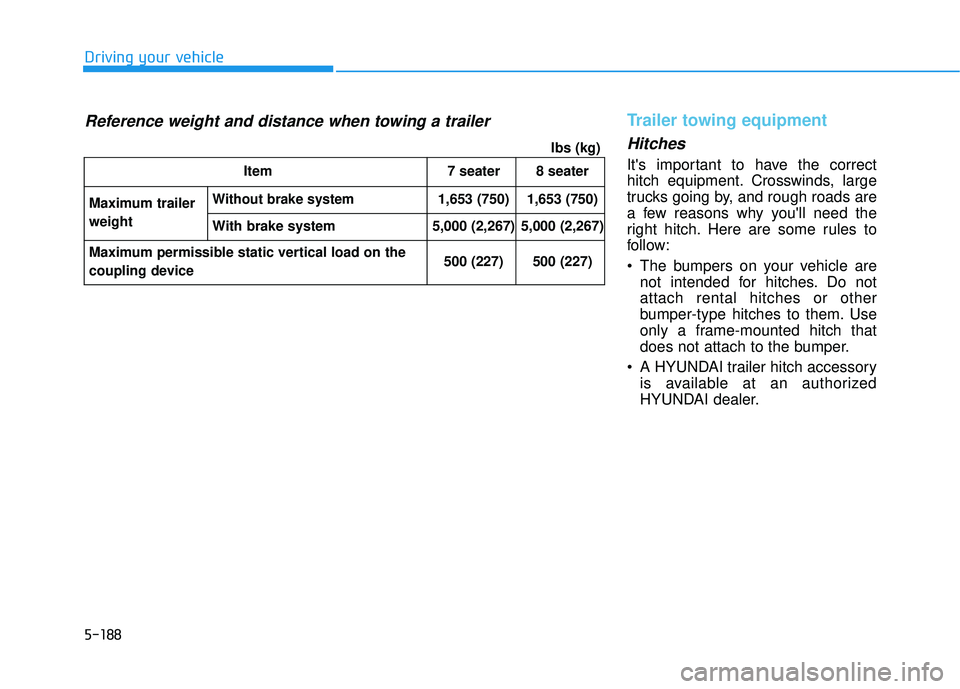
HYUNDAI dealer.Item 7 seater 8 seater
Maximum trailer
weight
Without brake system1,653 (750) 1,653 (750)
With brake system 5,000 (2,267) 5,000 (2,267)
Maximum permissible static vertical load on the
coupling device 500 (227) 500 (227)
Reference weight and distance when towing a trailer
Page 523 of 663
5-189
Driving your vehicle
5
Safety chains
You should always attach chains
between your vehicle and your trail-
er. Cross the safety chains under the
tongue of the trailer so that the
tongue will not drop to the road if it
becomes separated from the hitch.
Instructions about safety chains may
be provided by the hitch manufactur-
er or trailer manufacturer. Follow the
manufacturer's recommendation for
attaching safety chains. Always leave
just enough slack so you can turn
with your trailer. And, never allow
safety chains to drag on the ground.
Trailer brakes
If your trailer is equipped with a brak-
ing system, make sure it conforms to
federal and/or local regulations and
that it is properly installed and oper-
ating correctly.
If your trailer weighs more than the
maximum trailer weight without trail-
er brakes loaded, then it needs its
own brakes and they must be ade-
quate. Be sure to read and follow the
instructions for the trailer brakes so
you’ll be able to install, adjust and
maintain them properly. Do not tap
into your vehicle's brake system.
Trailer brakes must be applied sepa-
rately from your vehicle's brake sys-
tem.
Driving with a trailer
Towing a trailer requires a certain
amount of experience. Before setting
out for the open road, you must get
to know your trailer. Acquaint your-
self with the feel of handling and
braking with the added weight of the
trailer. And always keep in mind that
the vehicle you are driving is now
longer and not nearly as responsive
as your vehicle is by itself.
Before you start, check the trailer
hitch and platform, safety chains,
electrical connector(s), lights, tires
and brakes.
During your trip, occasionally check
to be sure that the load is secure,
and that the lights and trailer brakes
are still working.
Do not use a trailer with its own
brakes unless you are absolute-
ly certain that you have properly
set up the brake system. Use an
experienced, competent trailer
shop for this work.
WARNING