radar HYUNDAI PALISADE 2022 Owner's Guide
[x] Cancel search | Manufacturer: HYUNDAI, Model Year: 2022, Model line: PALISADE, Model: HYUNDAI PALISADE 2022Pages: 663, PDF Size: 15.74 MB
Page 461 of 663
5-127
Driving your vehicle
5
Limitations of Rear Cross-Traffic Collision-AvoidanceAssist
Rear Cross-Traffic Collision-
Avoidance Assist may not operate
normally, or the function may operate
unexpectedly under the following cir-
cumstances:
Departing from where trees or
grass are overgrown
Departing from where roads are wet
Speed of the approaching vehicle is fast or slow Braking control may not work, dri-
ver’s attention is required in the fol-
lowing circumstances:
The vehicle severely vibrates while
driving over a bumpy road, uneven
road or concrete patch
Driving on a slippery surface due to snow, water puddle, ice, etc.
The tire pressure is low or a tire is damaged
The brake is reworked
Remote Smart Parking Assist is operating (if equipped)
For more details on the limita-
tions of the rear corner radar,
refer to “Blind-Spot Collision-
Avoidance Assist (BCA)” sec-
tion in chapter 5.
CAUTION
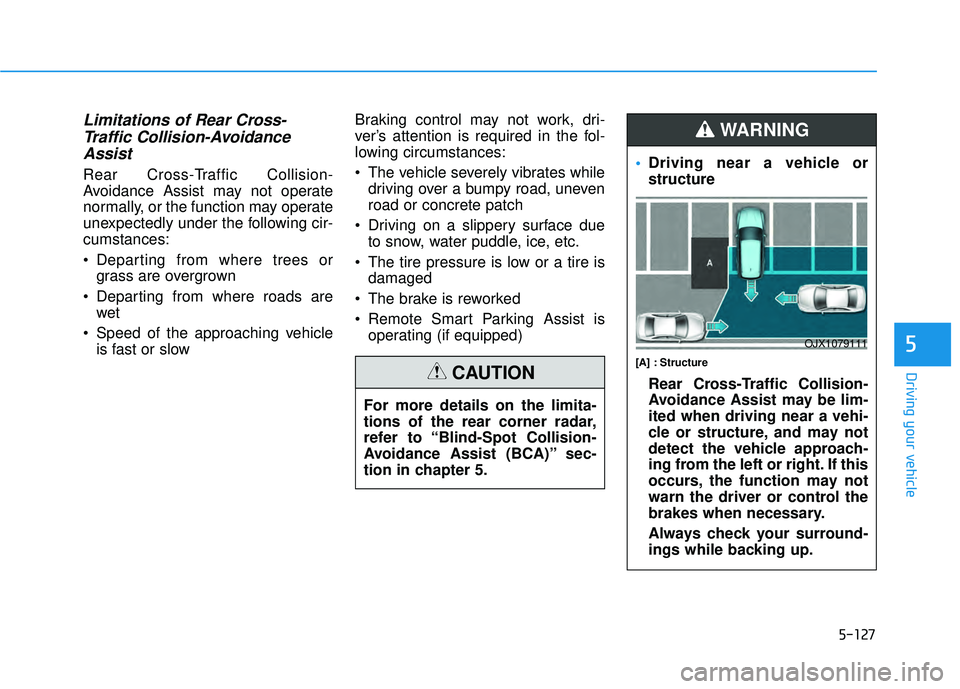
Driving near a vehicle or
structure
[A] : Structure
Rear Cross-Traffic Collision-
Avoidance Assist may be lim-
ited when driving near a vehi-
cle or structure, and may not
detect the vehicle approach-
ing from the left or right. If this
occurs, the function may not
warn the driver or control the
brakes when necessary.
Always check your surround-
ings while backing up.
WARNING
OJX1079111
Page 463 of 663
5-129
Driving your vehicle
5
When you are towing a trailer
or another vehicle, we recom-
mend that Rear Cross-Traffic
Collision-Avoidance Assist is
turned off due to safety rea-
sons.
Rear Cross-Traffic Collision-
Avoidance Assist may not
operate normally if interfered
by strong electromagnetic
waves.
Rear Cross-Traffic Collision-
Avoidance Assist may not
operate for 15 seconds after
the vehicle is started, or the
rear corner radars are initial-
ized.
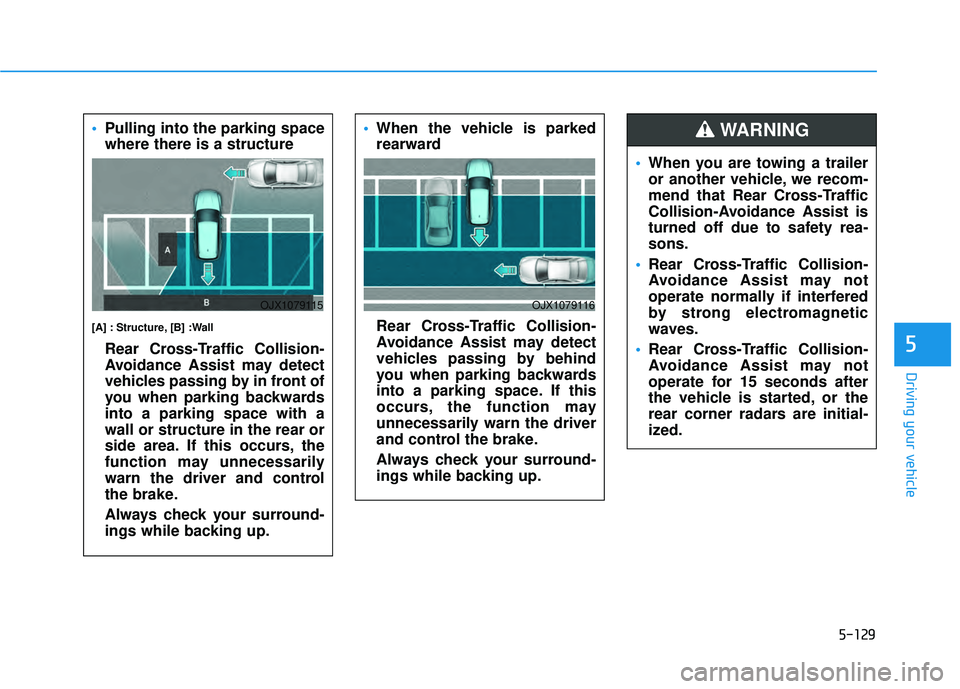
WARNING Pulling into the parking space
where there is a structure
[A] : Structure, [B] :Wall
Rear Cross-Traffic Collision-
Avoidance Assist may detect
vehicles passing by in front of
you when parking backwards
into a parking space with a
wall or structure in the rear or
side area. If this occurs, the
function may unnecessarily
warn the driver and control
the brake.
Always check your surround-
ings while backing up.
OJX1079115
When the vehicle is parked
rearward
Rear Cross-Traffic Collision-
Avoidance Assist may detect
vehicles passing by behind
you when parking backwards
into a parking space. If this
occurs, the function may
unnecessarily warn the driver
and control the brake.
Always check your surround-
ings while backing up.
OJX1079116
Page 477 of 663
5-143
Driving your vehicle
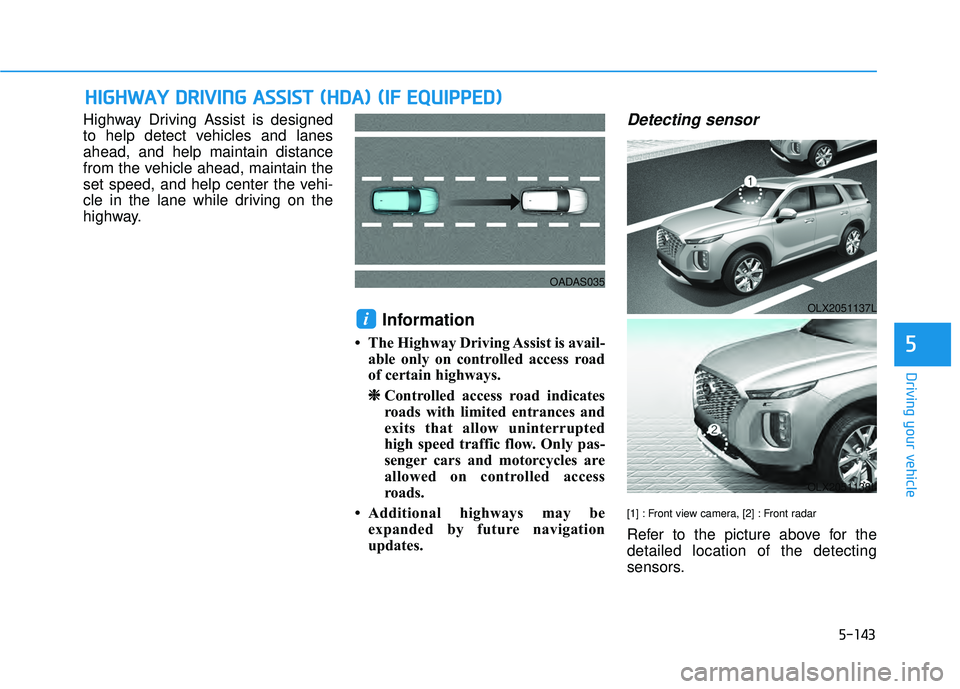
Highway Driving Assist is designed
to help detect vehicles and lanes
ahead, and help maintain distance
from the vehicle ahead, maintain the
set speed, and help center the vehi-
cle in the lane while driving on the
highway.
Information
• The Highway Driving Assist is avail-able only on controlled access road
of certain highways.
❈ ❈ Controlled access road indicates
roads with limited entrances and
exits that allow uninterrupted
high speed traffic flow. Only pas-
senger cars and motorcycles are
allowed on controlled access
roads.
• Additional highways may be expanded by future navigation
updates.
Detecting sensor
[1] : Front view camera, [2] : Front radar
Refer to the picture above for the
detailed location of the detecting
sensors.
i
H HI IG G H H W W A AY Y D D R RI IV V I IN N G G A A S SS SI IS S T T ( ( H H D DA A ) ) ( ( I IF F E E Q Q U UI IP P P PE ED D ) )
5
OADAS035
OLX2051137L
OLX2051138L
Page 484 of 663
5-150
The navigation cannot detect thecurrent vehicle position (ex: elevat-
ed roads including overpass adja-
cent to general roads or nearby
roads exist in a parallel way)
Information
For more details on the limitations of
the front view camera, front radar,
front corner radar and rear corner
radar, refer to “Forward Collision-
Avoidance Assist (FCA)” section in
chapter 5.
Information
This device complies with Part 15 of
the FCC rules.
Operation is subject to the following
three conditions:
1. This device may not cause harmful interference, and
2. This device must accept any inter- ference received, including interfer-
ence that may cause undesired
operation.
3. Changes or modifications not expressly approved by the party
responsible for compliance could
void the user's authority to operate
the device.
Information
Radio frequency radiation exposure
information:
This equipment complies with FCC
radiation exposure limits set forth for
an uncontrolled environment.
This equipment should be installed
and operated with minimum distance
of 8 in. (20 cm) between the radiator
(antenna) and your body.
This transmitter must not be co-locat-
ed or operating in conjunction with
any other antenna or transmitter.
ii
i
Driving your vehicle
Page 485 of 663
5-151
Driving your vehicle
5
S SM M A AR RT T C C R R U U I IS S E E C C O O N NT TR R O O L L ( ( S S C C C C) ) ( ( I IF F E E Q Q U UI IP P P PE ED D ) )
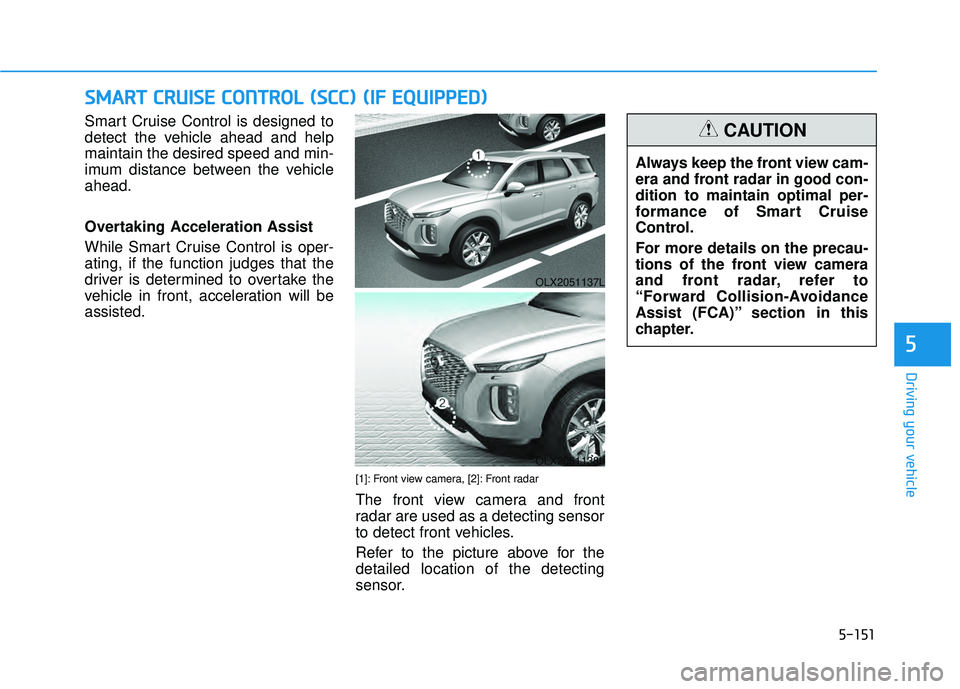
Smart Cruise Control is designed to
detect the vehicle ahead and help
maintain the desired speed and min-
imum distance between the vehicle
ahead.
Overtaking Acceleration Assist
While Smart Cruise Control is oper-
ating, if the function judges that the
driver is determined to overtake the
vehicle in front, acceleration will be
assisted.
[1]: Front view camera, [2]: Front radar
The front view camera and front
radar are used as a detecting sensor
to detect front vehicles.
Refer to the picture above for the
detailed location of the detecting
sensor.
OLX2051137L
OLX2051138L
Always keep the front view cam-
era and front radar in good con-
dition to maintain optimal per-
formance of Smart Cruise
Control.
For more details on the precau-
tions of the front view camera
and front radar, refer to
“Forward Collision-Avoidance
Assist (FCA)” section in this
chapter.
CAUTION
Page 497 of 663
5-163
Driving your vehicle
5
Information
• Smart Cruise Control may not oper-ate for a certain time after the vehi-
cle is started or the front view cam-
era or front radar is initialized.
• You may hear a sound when the brake is controlled by Smart Cruise
Control.
Smart Cruise Control malfunc-
tion and limitations
Smart Cruise Control malfunc-tion
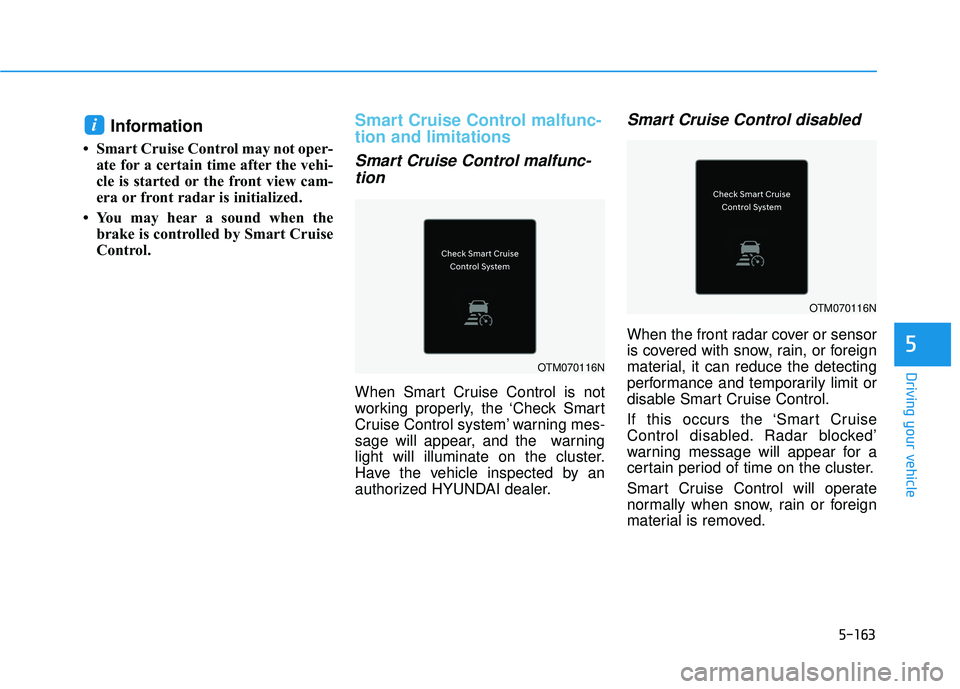
When Smart Cruise Control is not
working properly, the ‘Check Smart
Cruise Control system’ warning mes-
sage will appear, and the warning
light will illuminate on the cluster.
Have the vehicle inspected by an
authorized HYUNDAI dealer.
Smart Cruise Control disabled
When the front radar cover or sensor
is covered with snow, rain, or foreign
material, it can reduce the detecting
performance and temporarily limit or
disable Smart Cruise Control.
If this occurs the ‘Smart Cruise
Control disabled. Radar blocked’
warning message will appear for a
certain period of time on the cluster.
Smart Cruise Control will operate
normally when snow, rain or foreign
material is removed.
i
OTM070116N
OTM070116N
Page 499 of 663
5-165
Driving your vehicle
5
A vehicle suddenly cuts in front
Your vehicle is being towed
Driving through a tunnel or ironbridge
Driving near areas containing metal substances, such as a con-
struction zone, railroad, etc.
A material is near that reflects very well on the front radar, such as a
guardrail, nearby vehicle, etc.
The bumper around the front radar is impacted, damaged or the front
radar is out of position
The temperature around the front radar is high or low
Driving in large areas where there are few vehicles or structures (for
example, desert, meadow, suburb,
etc.)
The vehicle in front is made of material that does not reflect on
the front radar
Driving near a highway (or motor- way) interchange or tollgate
Driving on a slippery surface due to snow, water puddle, ice, etc.
Driving on a curved road The vehicle in front is detected late
The vehicle in front is suddenly
blocked by a obstacle
The vehicle in front suddenly changes lane or suddenly reduces
speed
The vehicle in front is bent out of shape
The front vehicle’s speed is fast or slow
With a vehicle in front, your vehicle changes lane at low speed
The vehicle in front is covered with snow
Unstable driving
You are on a roundabout and the vehicle in front is not detected
You are continuously driving in a circle
Driving in a parking lot
Driving through a construction area, unpaved road, partial paved
road, uneven road, speed bumps,
etc. Driving on an incline road, curved
road, etc.
Driving through a roadside with trees or streetlights
The adverse road conditions cause excessive vehicle vibrations while
driving
Your vehicle height is low or high due to heavy loads, abnormal tire
pressure, etc.
Driving through a narrow road where trees or grass are over-
grown
There is interference by electro- magnetic waves, such as driving in
an area with strong radio waves or
electrical noise
Page 534 of 663
5-200
Front radar Rear corner radar
D DE EC CL LA A R RA A T TI IO O N N O O F F C C O O N NF FI IR R M M I IT T Y Y ( ( I IF F E E Q Q U UI IP P P PE ED D ) )
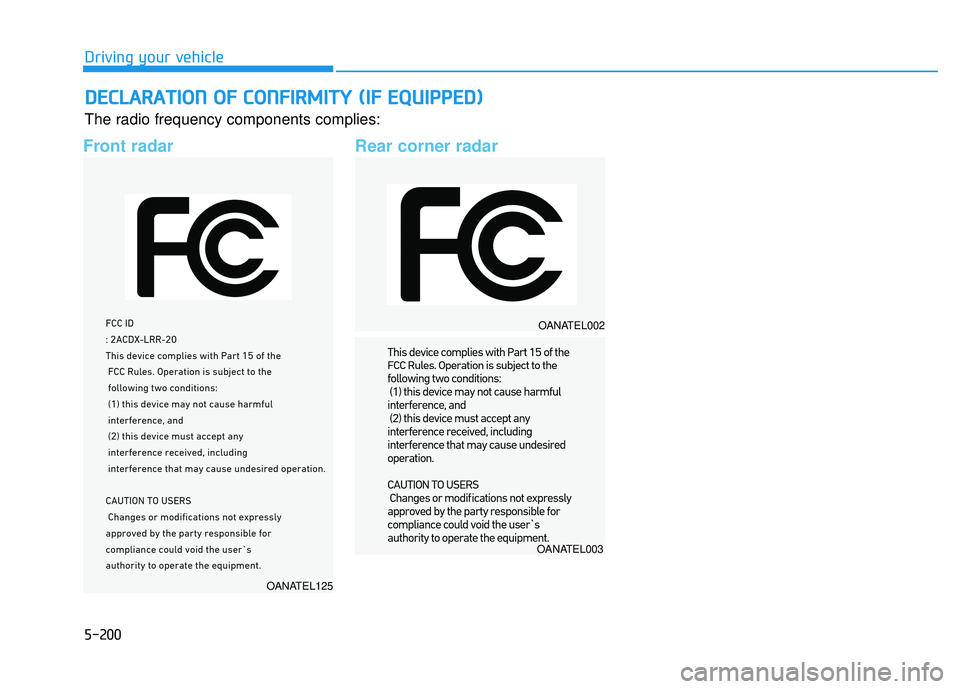
The radio frequency components complies:
Driving your vehicle
OANATEL125
OANATEL002
OANATEL003
Page 612 of 663
7-53
7
Maintenance
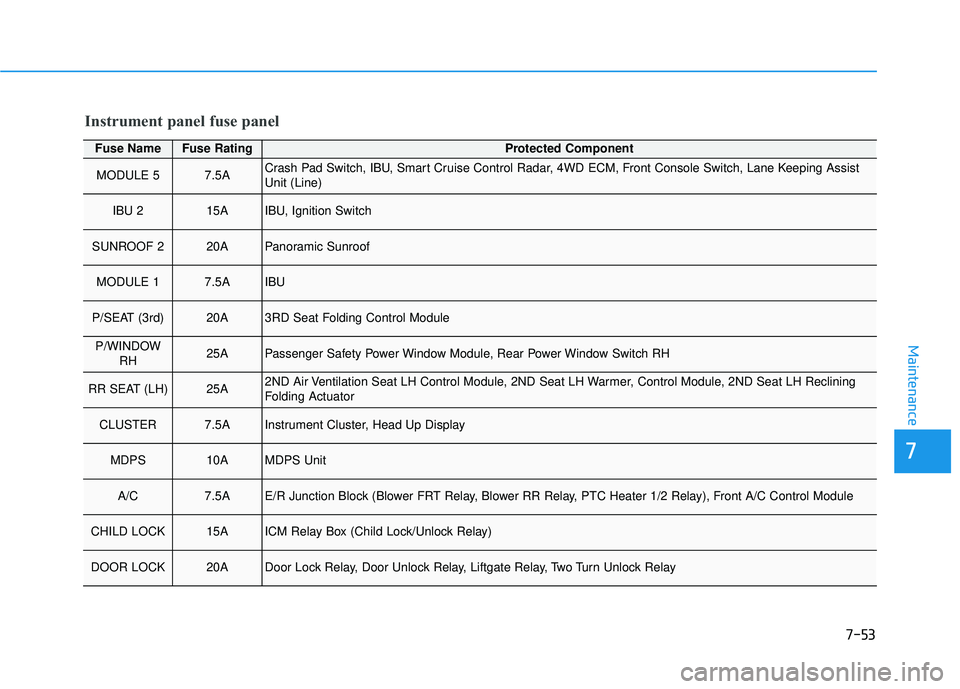
Fuse NameFuse RatingProtected Component
MODULE 57.5ACrash Pad Switch, IBU, Smart Cruise Control Radar, 4WD ECM, Front Console Switch, Lane Keeping Assist
Unit (Line)
IBU 215AIBU, Ignition Switch
SUNROOF 220APanoramic Sunroof
MODULE 17.5AIBU
P/SEAT (3rd)20A3RD Seat Folding Control Module
P/WINDOWRH25APassenger Safety Power Window Module, Rear Power Window Switch RH
RR SEAT (LH)25A2ND Air Ventilation Seat LH Control Module, 2ND Seat LH Warmer, Control Module, 2ND Seat LH Reclining
Folding Actuator
CLUSTER7.5AInstrument Cluster, Head Up Display
MDPS10AMDPS Unit
A/C7.5AE/R Junction Block (Blower FRT Relay, Blower RR Relay, PTC Heater 1/2 Relay), Front A/C Control Module
CHILD LOCK15AICM Relay Box (Child Lock/Unlock Relay)
DOOR LOCK20ADoor Lock Relay, Door Unlock Relay, Liftgate Relay, Two Turn Unlock Relay
Instrument panel fuse panel
Page 656 of 663
I-3
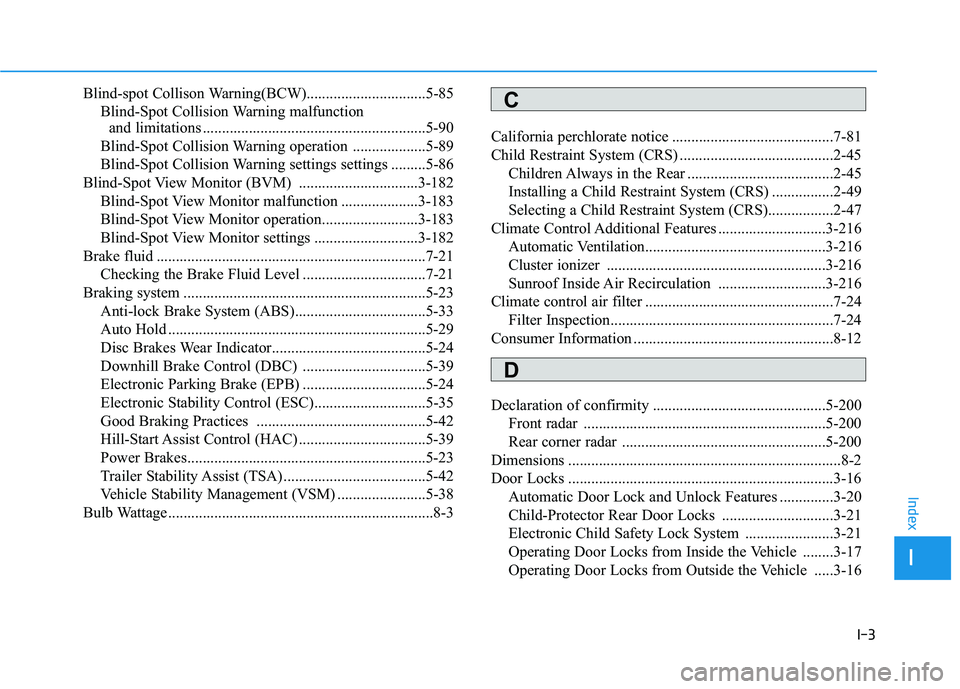
Blind-spot Collison Warning(BCW)...............................5-85Blind-Spot Collision Warning malfunction and limitations ..........................................................5-90
Blind-Spot Collision Warning operation ...................5-89
Blind-Spot Collision Warning settings settings .........5-86
Blind-Spot View Monitor (BVM) ...............................3-182 Blind-Spot View Monitor malfunction ....................3-183
Blind-Spot View Monitor operation.........................3-183
Blind-Spot View Monitor settings ...........................3-182
Brake fluid ......................................................................7-\
21 Checking the Brake Fluid Level ................................7-21
Braking system ...............................................................5-23 Anti-lock Brake System (ABS)..................................5-33
Auto Hold ...................................................................5-29
Disc Brakes Wear Indicator........................................5-24
Downhill Brake Control (DBC) ................................5-39
Electronic Parking Brake (EPB) ................................5-24
Electronic Stability Control (ESC).............................5-35
Good Braking Practices ............................................5-42
Hill-Start Assist Control (HAC) .................................5-39
Power Brakes..............................................................5-23
Trailer Stability Assist (TSA) .....................................5-42
Vehicle Stability Management (VSM) .......................5-38
Bulb Wattage .....................................................................8-3\
California perchlorate notice ..........................................7-81
Child Restraint System (CRS) ........................................2-45
Children Always in the Rear ......................................2-45
Installing a Child Restraint System (CRS) ................2-49
Selecting a Child Restraint System (CRS).................2-47
Climate Control Additional Features ............................3-216 Automatic Ventilation...............................................3-216
Cluster ionizer .........................................................3-216
Sunroof Inside Air Recirculation ............................3-216
Climate control air filter .................................................7-24 Filter Inspection..........................................................7-24
Consumer Information ....................................................8-12
Declaration of confirmity .............................................5-200 Front radar ...............................................................5-200
Rear corner radar .....................................................5-200
Dimensions .......................................................................8\
-2
Door Locks .....................................................................3-1\
6 Automatic Door Lock and Unlock Features ..............3-20
Child-Protector Rear Door Locks .............................3-21
Electronic Child Safety Lock System .......................3-21
Operating Door Locks from Inside the Vehicle ........3-17
Operating Door Locks from Outside the Vehicle .....3-16
I
Index
C
D